CSharp ChatUI Winforms
1.0.0

Je cherchais une belle bulle de chat pour C # winform, mais le seul que je pouvais trouver était celui de Telerik qui n'était pas gratuit. J'ai donc décidé d'en écrire un.
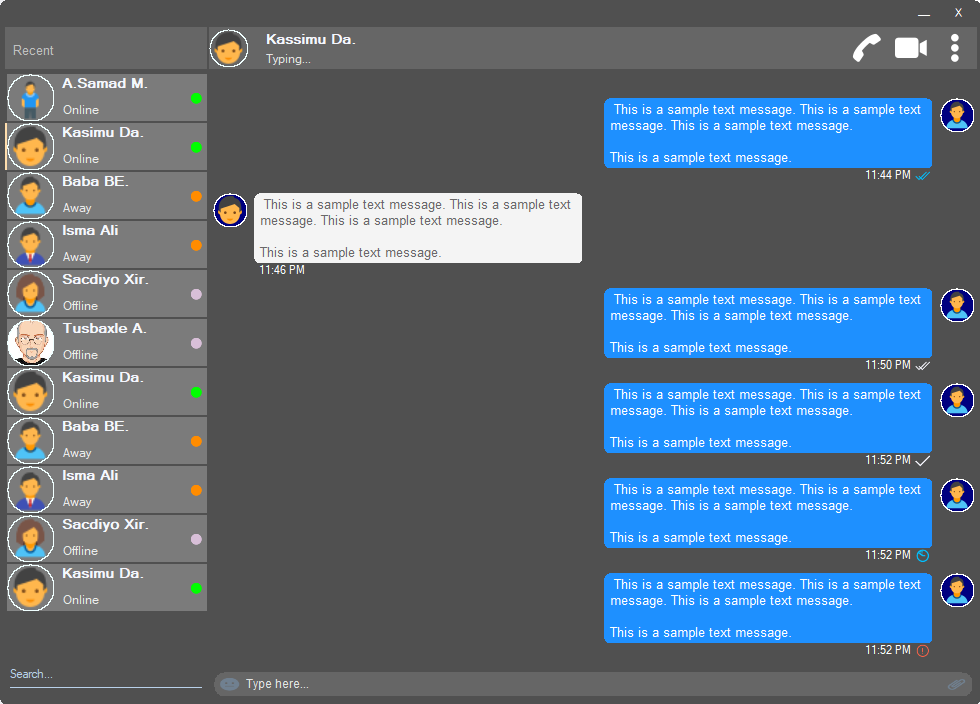
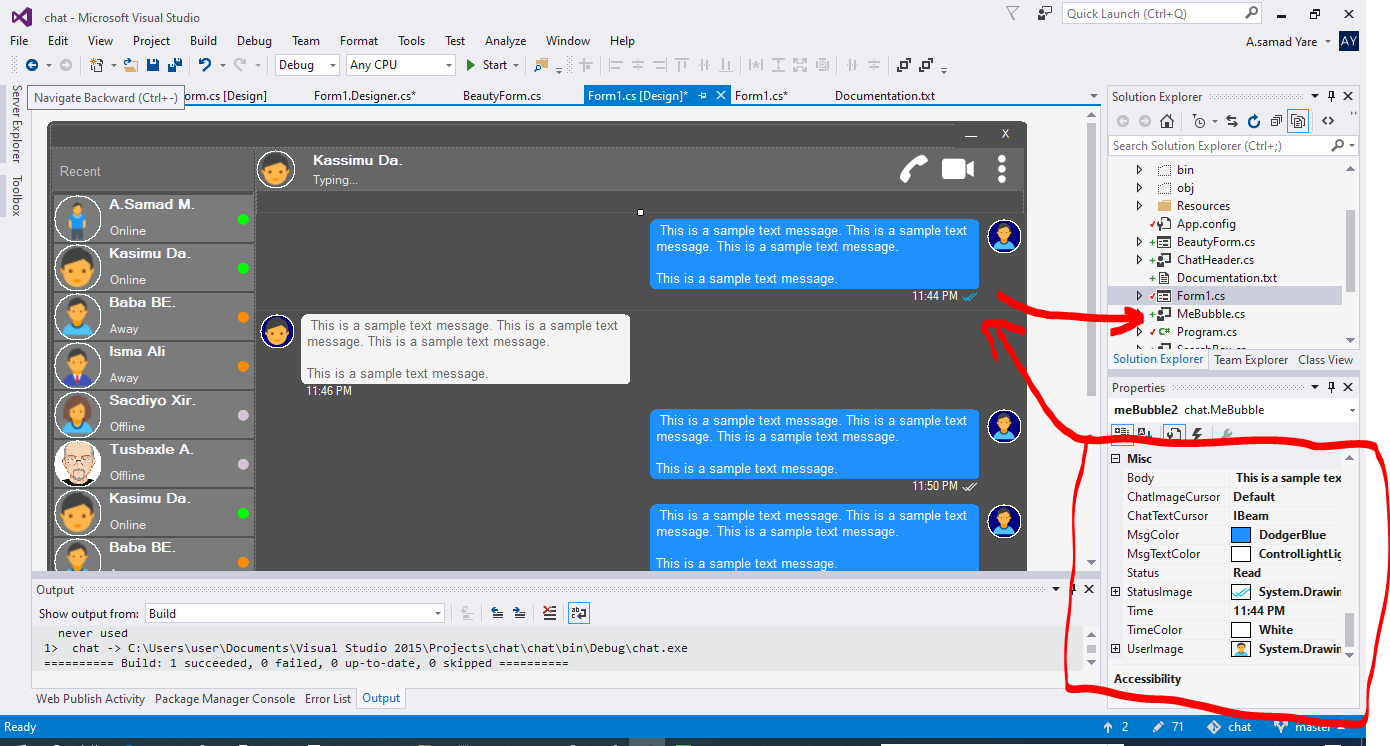
Tous les composants de ce projet sont réactifs et vous n'avez pas à vous soucier du moment où la fenêtre ou le conteneur redimensionne. Ils les redimensionneront également avec le même pourcentage d'espace, et leur look sera le même.
Une belle forme avec des coins ronds. Voir les captures d'écran ci-dessus.
 public partial class Form1 : chat . BeautyForm
   {
       public Form1 ( )
       {
           InitializeComponent ( ) ;
} Voir les captures d'écran ci-dessus, la partie la plus élevée où les détails de l'utilisateur s'affichent. Il a une image de profil utilisateur, un titre, un statut, un appel, un appel vidéo, un menu DOT.
 chat . ChatHeader chatHeader1 = new chat . ChatHeader ( ) ;

chatHeader1 . UserTitle = "Abdisamad Moh." ; // Gets/Sets user title
chatHeader1 . UserStatusText = "Typing..." ; // Gets/Sets User status text.
chatHeader1 . UserImage = Some_Image ; // Gets/Sets User profile image

chatHeader1 . OnCallClick += Double tab to complete . // Fires when user clicks  Call icon
chatHeader1 . OnVideoCallClick += Double tab to complete . // Fires when user clicks Video Call icon
chatHeader1 . OnUserImageClick += Double tab to complete . // Fires when user clicks  Profile Image
chatHeader1 . OnUserStatusTextClick += Double tab to complete . // Fires when user clicks User status Text
chatHeader1 . OnUserTitleClick += Double tab to complete . // Fires when user clicks User Title Text
chatHeader1 . OnMenuDotClick += Double tab to complete . // Fires when user clicks Dot menu Belle boîte de typage utilisateur avec icône emoji intégrée, icône de pièce jointe de fichiers.
 chat . TypingBox typingBox1 = new chat . TypingBox ( ) ;

typingBox1 . Value = "Hi" ; //Gets/Sets text of the typingBox.

typingBox1 . OnTypingTextChanged += Double tab to complete . // Fires when user writes something into the typingBox. This fires per character.
typingBox1 . OnHitEnter += Double tab to complete . // Fires when user hits ENTER key while the typingBox is focused. This fires before newline is created in the typingBox. SHIFT+ENTER will also create newline without firing this event.
typingBox1 . OnEmojiClicked += Double tab to complete . // Fires when user clicks Emoji icon in the typingBox.
typingBox1 . OnAttachmentClicked += Double tab to complete . // Fires when user clicks File attachment icon in the typingBox. Voir les captures d'écran ci-dessus, cette zone de texte avec «Recherche de filigrane» et la ligne de soulignement, c'est-à-dire Recherche Box.
 chat . SearchBox searchBox1 = new chat . SearchBox ( ) ;

searchBox1 . Value = "Something" ; //Gets/Sets value in the searchBox.
searchBox1 . TextColor = Color . GradientActiveCaption ; //Gets/Sets text color and the bottom line color of the searchBox.
searchBox1 . FocusedColor =  Color . WhiteSmoke ; //Gets/Sets text color and the bottom line color of the searchBox when it is focused.
searchBox1 . UnFocusedColor = Color . GradientActiveCaption ; //Gets/Sets text color and the bottom line color of the searchBox when it is not focused.

searchBox1 . OnSearchTextChanged += Double tab to complete . // Fires when user writes something into the typingBox. This fires per character.
searchBox1 . OnHitEnter += Double tab to complete . // Fires when user hits ENTER key while the searchBox is focused. Contrôle utilisateur magnifique et personnalisable avec image de profil, nom d'utilisateur (nom de titre), texte d'état de l'utilisateur, mode d'état de l'utilisateur. Voir les utilisateurs sur le côté gauche dans les captures d'écran ci-dessus.
 chat . Users user1 = new chat . Users ( ) ;

user1 . Username = "Abdisamad Moh." ; // Gets/Sets username or user title.
user1 . UserStatus = Status . Online ; //Option/Enum, Gets/Sets user status mode. Online, Away, Offline. U can add more if u want.
user1 . StatusMessage = "Online" ; //Gets/Sets status message
user1 . UserImage = Some_Image ; //Gets/Sets User profile image.
user1 . ProfileImageCursor = Cursors . Hand ; //Gets/Sets mouse cursor when user hovers mouse pointer over userImage.

user1 . OnClick +=  Double tab to complete . // Fires when anywhere on the user is clicked Including Username, statusText and StatusMode. However they will be excluded if u give them their own event.
user1 . OnUserTitleClick +=  Double tab to complete . // will fire when user clicks Username/Title. In this case, user1.OnClick will not be fired when user clicks on Username/Title.
user1 . OnUserStatusClick +=  Double tab to complete . // will fire when user clicks user status text. In this case, user1.OnClick will not be fired when user clicks on user status text..
user1 . OnUserStatusClick +=  Double tab to complete . // will fire when user clicks user status mode icon. In this case, user1.OnClick will not be fired when user clicks on user status mode icon.
user1 . OnProfileImageClick +=  Double tab to complete . // will fire when user clicks user profile image. In this case, user1.OnClick will not be fired when user clicks on user profile image.

//NOTE: Always use 'OnClick' event for this control instead of 'Click' event. 'OnClick' will take care of all other sub events. Double clicking this control on design time will generate 'Click' event instead of 'OnClick' event which is not recommended. In your Properties explorer find 'OnClick' event and double click to generate 'OnClick' event.Voir Captures d'écran, ces messages de chating sont la bulle de la parole. Dans ce projet, il y a deux bulles, «Mebubble» et «Yoububble». Les deux ont les mêmes propriétés et événements, mais leur utilisation est différente. «Mebubble» est destiné aux chats sortants et «Yoububble» est destiné aux chats entrants.
Dans cet exemple, j'utiliserai «Mebubble». Les deux fonctionnent de la même manière, ont les mêmes propriétés et événements. Seul le nom et l'utilisation sont différents.
 chat . MeBubble meBubble1 = new chat . MeBubble ( ) ;

meBubble1 . Body = "This is a sample message text" ; //Gets/Sets message body.
meBubble1 . MsgColor = Color . DodgerBlue ; //Gets/Sets Message background color.
//NOTE: 'BackColor' will change the whole control's background color while 'MsgColor' will only change the message Body part.
meBubble1 . MsgTextColor = Color . White ; //Gets/Sets message text color.
meBubble1 . ChatImageCursor = Cursors . Default ; //Gets/Sets mouse cursor when it hovers over Bubble profile image.
meBubble1 . ChatTextCursor = Cursors . IBeam ; //Gets/Sets mouse cursor when it hovers over chat body.
meBubble1 . Status = MessageStatus . Delivered ; //Option/Enum, Gets/Sets Message status. This is the tick option. Options:  Sending, Sent, Delivered, Read,  Error,  None, Custom. where None will hide the tick option and Custom will give u option to put what u want.
meBubble1 . StatusImage = Some_Image ; //Gets/Sets custom image for the message status option, that is the tick option.
meBubble1 . Time = "11:44 PM" ; //Gets/Sets time of the chat bubble.
meBubble1 . TimeColor = Color . White ; //Gets/Sets Text Color of the time.
meBubble1 . UserImage = Some_Image ; //Gets/Sets Image of the bubble profile image.

meBubble1 . OnChatTextClick += Double tab to complete . //Fires when user clicks message body part.
meBubble1 . OnChatImageClick += Double tab to complete . //Fires when user clicks the Profile picture of the bubble..
Copyright (c) Abdisamad Moh
L'autorisation est accordée gratuitement à toute personne qui obtient une copie de ce logiciel et des fichiers de documentation associés (le "logiciel"), pour traiter le logiciel sans restriction, y compris sans limiter les droits d'utilisation, de copie, de modification, de fusion, de publication, de distribution, de sublince et / ou de vendre des copies des conditions suivantes.
L'avis de droit d'auteur ci-dessus et le présent avis d'autorisation peuvent (ou non) être inclus dans toutes les copies ou parties substantielles du logiciel.
Le logiciel est fourni "tel quel", sans garantie d'aucune sorte, express ou implicite, y compris, mais sans s'y limiter, les garanties de qualité marchande, d'adéquation à un usage particulier et de non-contrefaçon. En aucun cas, les auteurs ou les détenteurs de droits d'auteur ne seront pas responsables de toute réclamation, dommage ou autre responsabilité, que ce soit dans une action de contrat, de délit ou autre, découlant de, hors du logiciel ou de l'utilisation ou d'autres relations dans le logiciel.







