CSharp ChatUI Winforms
1.0.0

Estaba buscando una hermosa burbuja de chat para C# WinForm, pero la única que pude encontrar fue la de Telerik que no era gratuita. Entonces decidí escribir uno.
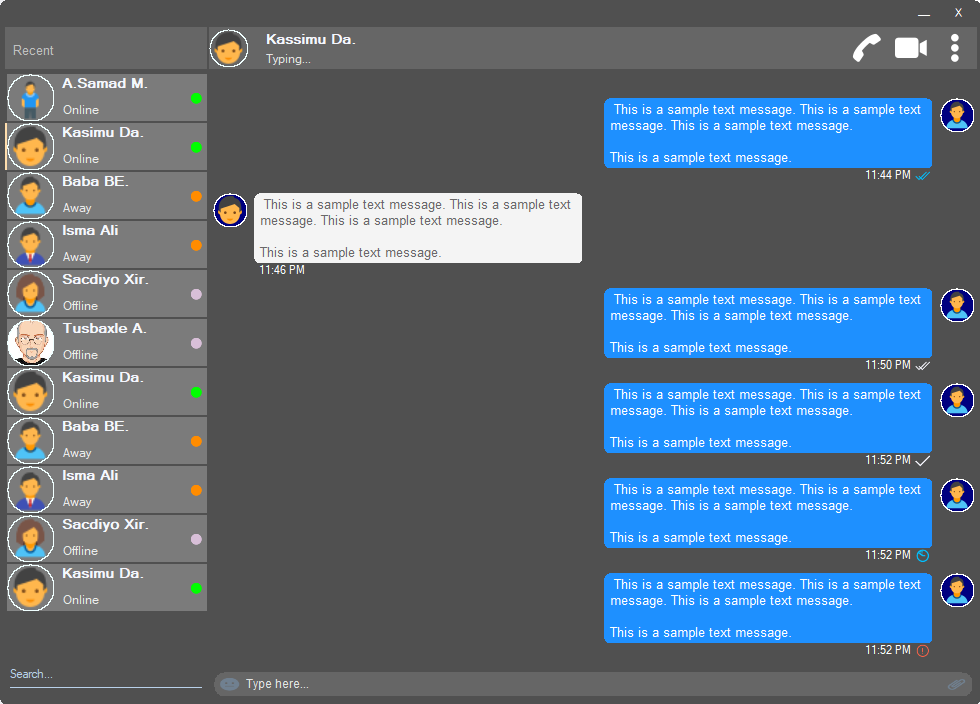
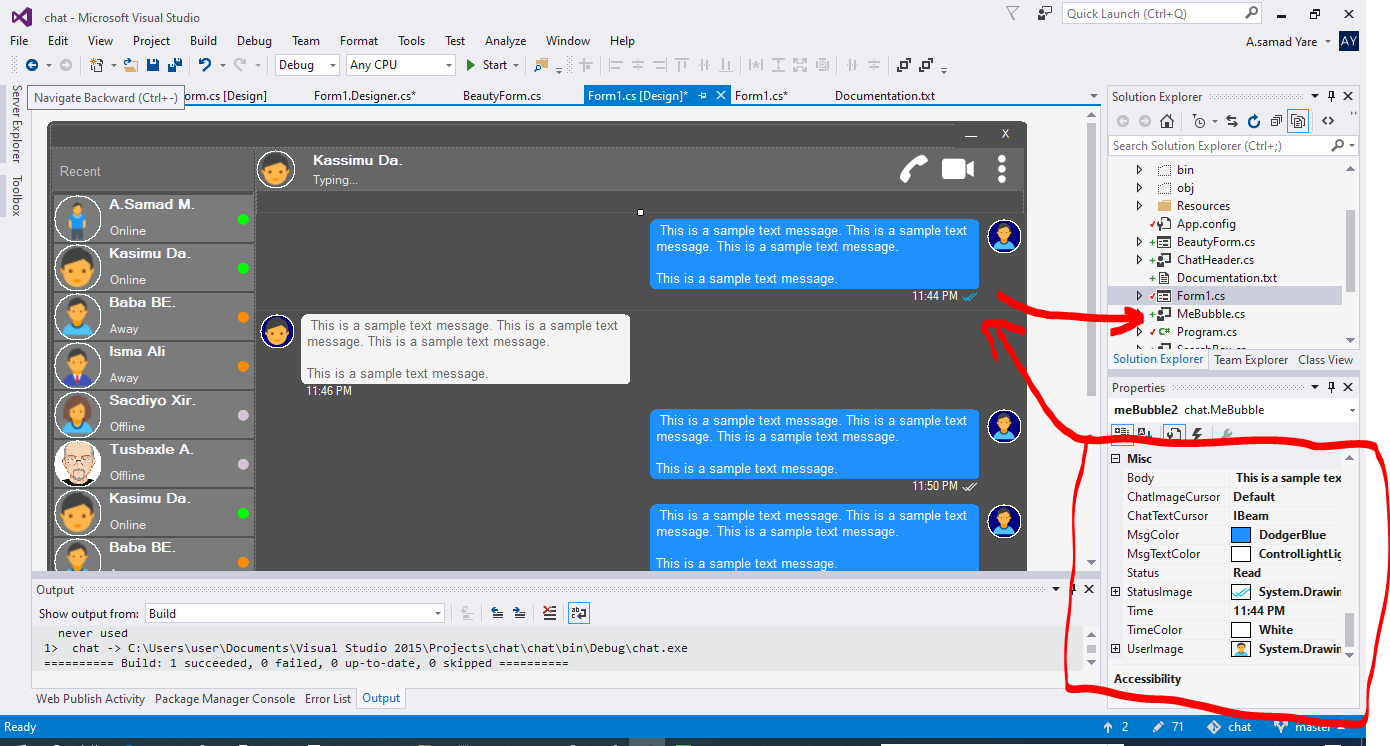
Todos los componentes de este proyecto responden y no necesita preocuparse cuando su ventana o contenedor cambia de tamaño. También los cambiarán con el mismo porcentaje de espacio, y su aspecto será el mismo.
Una hermosa forma con esquinas redondas. Ver capturas de pantalla arriba.
 public partial class Form1 : chat . BeautyForm
   {
       public Form1 ( )
       {
           InitializeComponent ( ) ;
} Consulte las capturas de pantalla anteriores, la parte superior donde se muestran los detalles del usuario. Tiene imagen de perfil de usuario, título, estado, llamada, videollamada, menú Dot.
 chat . ChatHeader chatHeader1 = new chat . ChatHeader ( ) ;

chatHeader1 . UserTitle = "Abdisamad Moh." ; // Gets/Sets user title
chatHeader1 . UserStatusText = "Typing..." ; // Gets/Sets User status text.
chatHeader1 . UserImage = Some_Image ; // Gets/Sets User profile image

chatHeader1 . OnCallClick += Double tab to complete . // Fires when user clicks  Call icon
chatHeader1 . OnVideoCallClick += Double tab to complete . // Fires when user clicks Video Call icon
chatHeader1 . OnUserImageClick += Double tab to complete . // Fires when user clicks  Profile Image
chatHeader1 . OnUserStatusTextClick += Double tab to complete . // Fires when user clicks User status Text
chatHeader1 . OnUserTitleClick += Double tab to complete . // Fires when user clicks User Title Text
chatHeader1 . OnMenuDotClick += Double tab to complete . // Fires when user clicks Dot menu Hermoso cuadro de escritura de usuario con icono de emoji incrustado, icono de archivo adjunto de archivo.
 chat . TypingBox typingBox1 = new chat . TypingBox ( ) ;

typingBox1 . Value = "Hi" ; //Gets/Sets text of the typingBox.

typingBox1 . OnTypingTextChanged += Double tab to complete . // Fires when user writes something into the typingBox. This fires per character.
typingBox1 . OnHitEnter += Double tab to complete . // Fires when user hits ENTER key while the typingBox is focused. This fires before newline is created in the typingBox. SHIFT+ENTER will also create newline without firing this event.
typingBox1 . OnEmojiClicked += Double tab to complete . // Fires when user clicks Emoji icon in the typingBox.
typingBox1 . OnAttachmentClicked += Double tab to complete . // Fires when user clicks File attachment icon in the typingBox. Vea las capturas de pantalla de arriba, ese cuadro de texto con 'Search Water Marker' y subrayando la línea, es decir, Searchbox.
 chat . SearchBox searchBox1 = new chat . SearchBox ( ) ;

searchBox1 . Value = "Something" ; //Gets/Sets value in the searchBox.
searchBox1 . TextColor = Color . GradientActiveCaption ; //Gets/Sets text color and the bottom line color of the searchBox.
searchBox1 . FocusedColor =  Color . WhiteSmoke ; //Gets/Sets text color and the bottom line color of the searchBox when it is focused.
searchBox1 . UnFocusedColor = Color . GradientActiveCaption ; //Gets/Sets text color and the bottom line color of the searchBox when it is not focused.

searchBox1 . OnSearchTextChanged += Double tab to complete . // Fires when user writes something into the typingBox. This fires per character.
searchBox1 . OnHitEnter += Double tab to complete . // Fires when user hits ENTER key while the searchBox is focused. Control de usuario hermoso y personalizable con imagen de perfil, nombre de usuario (nombre de título), texto de estado del usuario, modo de estado del usuario. Vea los usuarios en el lado izquierdo en las capturas de pantalla anteriores.
 chat . Users user1 = new chat . Users ( ) ;

user1 . Username = "Abdisamad Moh." ; // Gets/Sets username or user title.
user1 . UserStatus = Status . Online ; //Option/Enum, Gets/Sets user status mode. Online, Away, Offline. U can add more if u want.
user1 . StatusMessage = "Online" ; //Gets/Sets status message
user1 . UserImage = Some_Image ; //Gets/Sets User profile image.
user1 . ProfileImageCursor = Cursors . Hand ; //Gets/Sets mouse cursor when user hovers mouse pointer over userImage.

user1 . OnClick +=  Double tab to complete . // Fires when anywhere on the user is clicked Including Username, statusText and StatusMode. However they will be excluded if u give them their own event.
user1 . OnUserTitleClick +=  Double tab to complete . // will fire when user clicks Username/Title. In this case, user1.OnClick will not be fired when user clicks on Username/Title.
user1 . OnUserStatusClick +=  Double tab to complete . // will fire when user clicks user status text. In this case, user1.OnClick will not be fired when user clicks on user status text..
user1 . OnUserStatusClick +=  Double tab to complete . // will fire when user clicks user status mode icon. In this case, user1.OnClick will not be fired when user clicks on user status mode icon.
user1 . OnProfileImageClick +=  Double tab to complete . // will fire when user clicks user profile image. In this case, user1.OnClick will not be fired when user clicks on user profile image.

//NOTE: Always use 'OnClick' event for this control instead of 'Click' event. 'OnClick' will take care of all other sub events. Double clicking this control on design time will generate 'Click' event instead of 'OnClick' event which is not recommended. In your Properties explorer find 'OnClick' event and double click to generate 'OnClick' event.Ver capturas de pantalla, esos mensajes de chating son la burbuja del habla. En este proyecto hay dos burbujas, 'Mebubble' y 'Yobubble'. Ambos tienen las mismas propiedades y eventos, pero su uso es diferente. 'Mebubble' es para chats salientes y 'YouBubble' es para chats entrantes.
En este ejemplo usaré 'Mebubble'. Ambos funcionan de la misma manera, tienen las mismas propiedades y eventos. Solo el nombre y el uso son diferentes.
 chat . MeBubble meBubble1 = new chat . MeBubble ( ) ;

meBubble1 . Body = "This is a sample message text" ; //Gets/Sets message body.
meBubble1 . MsgColor = Color . DodgerBlue ; //Gets/Sets Message background color.
//NOTE: 'BackColor' will change the whole control's background color while 'MsgColor' will only change the message Body part.
meBubble1 . MsgTextColor = Color . White ; //Gets/Sets message text color.
meBubble1 . ChatImageCursor = Cursors . Default ; //Gets/Sets mouse cursor when it hovers over Bubble profile image.
meBubble1 . ChatTextCursor = Cursors . IBeam ; //Gets/Sets mouse cursor when it hovers over chat body.
meBubble1 . Status = MessageStatus . Delivered ; //Option/Enum, Gets/Sets Message status. This is the tick option. Options:  Sending, Sent, Delivered, Read,  Error,  None, Custom. where None will hide the tick option and Custom will give u option to put what u want.
meBubble1 . StatusImage = Some_Image ; //Gets/Sets custom image for the message status option, that is the tick option.
meBubble1 . Time = "11:44 PM" ; //Gets/Sets time of the chat bubble.
meBubble1 . TimeColor = Color . White ; //Gets/Sets Text Color of the time.
meBubble1 . UserImage = Some_Image ; //Gets/Sets Image of the bubble profile image.

meBubble1 . OnChatTextClick += Double tab to complete . //Fires when user clicks message body part.
meBubble1 . OnChatImageClick += Double tab to complete . //Fires when user clicks the Profile picture of the bubble..
Copyright (c) Abdisamad Moh
El permiso se otorga, de forma gratuita, a cualquier persona que obtenga una copia de este software y archivos de documentación asociados (el "software"), para tratar en el software sin restricción, incluidos los derechos de los derechos de usar, copiar, modificar, fusionar, publicar, distribuir, sublicense y/o vender copias del software, y para permitir que las personas a quienes se les proporciona el software para hacer, sujeto a las siguientes condiciones: las siguientes condiciones: las siguientes condiciones: las siguientes condiciones:
El aviso de derechos de autor anterior y este aviso de permiso pueden (o no) ser incluidos en todas las copias o porciones sustanciales del software.
El software se proporciona "tal cual", sin garantía de ningún tipo, expresa o implícita, incluidas, entre otros, las garantías de comerciabilidad, idoneidad para un propósito particular y no infracción. En ningún caso los autores o titulares de derechos de autor serán responsables de cualquier reclamo, daños u otra responsabilidad, ya sea en una acción de contrato, agravio o de otra manera, que surge, de o en relación con el software o el uso u otros tratos en el software.







