ELF
1.0.0

ELF是用於遊戲研究的興奮性,輕量級和F Lexsible平台,特別是用於實時策略(RTS)遊戲。在C ++方面,Elf與C ++線程並聯多個遊戲。在Python方面,Elf一次返回一批遊戲狀態,使其對現代RL非常友好。相比之下,其他平台(例如,OpenAi Gym)將一個單個遊戲實例與一個Python接口包裝。這使得遊戲執行有些複雜,這是許多現代強化學習算法的要求。
此外,Elf現在還提供了用於運行並發遊戲環境的Python版本,通過與Zeromq Inter-Process Inter-Process通信進行Python多處理。有關一個簡單的示例,請參見./ex_elfpy.py 。
對於RTS遊戲的研究,Elf配備了快速的RTS引擎和三個混凝土環境:Minirts,捕獲國旗和塔式防禦。 Minirts具有實時戰略遊戲的所有關鍵動力,包括收集資源,建築設施和部隊,在可感知地區以外的未知領土搜尋,並捍衛/攻擊敵人。用戶可以訪問其內部表示形式,並可以自由更改遊戲設置。
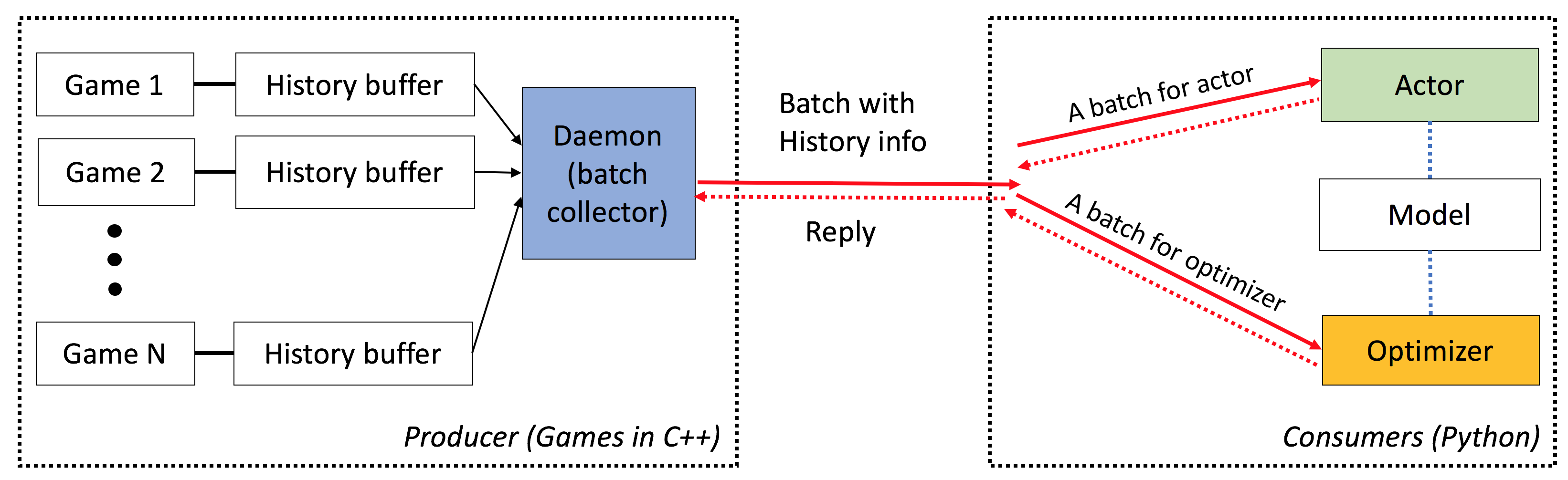
小精靈具有以下特徵:
端到端:ELF為遊戲研究提供了端到端的解決方案。它提供了微型實時策略遊戲環境,並發模擬,直觀的API,基於Web的VisualZation,並帶有強化學習後端,並由Pytorch賦予了最小的資源要求。
廣泛:任何具有C/C ++接口的遊戲都可以通過編寫簡單的包裝器插入此框架中。例如,我們已經將Atari Games納入我們的框架中,並表明每個Core的仿真速度與單核版本相當,因此比使用多處理或Python多線程的實現要快得多。將來,我們計劃結合更多的環境,例如,Darkforest GO引擎。
輕量級:小精靈的開銷很快。用簡單的遊戲(Minirts)建立在RTS發動機上的小精靈在MacBook Pro上每秒運行40K幀。從頭開始訓練模型播放Minirts需要一天的時間為6 CPU + 1 GPU 。
靈活:環境和參與者之間的配對非常靈活,例如一種環境,一種環境(例如,香草A3C),一個具有多種代理的環境(例如,自我播放/MCT)或一個與一個參與者(例如,batcha3c,ga3c)。同樣,在RTS引擎頂部建造的任何遊戲都可以完全訪問其內部表示形式和動態。除了有效的模擬器外,我們還提供了一個輕巧而強大的增強學習框架。該框架可以託管大多數現有的RL算法。在此開源版本中,我們提供了用Pytorch編寫的最先進的演員批評算法。
請參閱此處。
您需要讓cmake > = 3.8, gcc > = 4.9和tbb (Linux libtbb-dev )才能成功安裝此腳本。
 # Download miniconda and install.
wget https://repo.continuum.io/miniconda/Miniconda3-latest-Linux-x86_64.sh -O $HOME/miniconda.sh
/bin/bash $HOME/miniconda.sh -b
$HOME/miniconda3/bin/conda update -y --all python=3

# Add the following to ~/.bash_profile (if you haven't already) and source it:
export PATH=$HOME/miniconda3/bin:$PATH

# Create a new conda environment and install the necessary packages:
conda create -n elf python=3
source activate elf
# If you use cuda 8.0
# conda install pytorch cuda80 -c soumith
conda install pytorch -c soumith

pip install --upgrade pip
pip install msgpack_numpy
conda install tqdm
conda install libgcc

# Install cmake >= 3.8, gcc >= 4.9 and libtbb-dev
# This is platform-dependent.

# Clone and build the repository:
cd ~
git clone https://github.com/facebookresearch/ELF
cd ELF/rts/
mkdir build && cd build
cmake .. -DPYTHON_EXECUTABLE=$HOME/miniconda3/bin/python
make

# Train the model
cd ../..
sh ./train_minirts.sh --gpu 0
任何具有C/C ++接口的遊戲都可以通過編寫簡單的包裝器插入此框架中。目前,我們有以下環境:
Minirts及其擴展( ./rts )
一個微型的實時戰略遊戲,捕捉了其類型的關鍵動力,包括建築工人,收集資源,探索看不見的領土,捍衛敵人並攻擊他們。該遊戲的運行速度非常快(在筆記本電腦上每核40k fps),以促進許多現有的政策增強學習方法的使用。
Atari Games ( ./atari atari)
我們將街機學習環境(ALE)納入精靈,以便您可以加載任何ROM並輕鬆運行1000個並發遊戲實例。
去引擎( ./go )
我們在Elf Platform中重新實現了Darkforest Go Engine。現在,您可以輕鬆地加載一堆.sgf文件,並以最小的資源要求訓練自己的AI(即單個GPU加一個星期)。
使用精靈時,請參考以下Bibtex條目的論文:
 ELF: An Extensive, Lightweight and Flexible Research Platform for Real-time Strategy Games
Yuandong Tian, Qucheng Gong, Wenling Shang, Yuxin Wu, C. Lawrence Zitnick
NIPS 2017

@article{tian2017elf,
  title={ELF: An Extensive, Lightweight and Flexible Research Platform for Real-time Strategy Games},
  author={Yuandong Tian and Qucheng Gong and Wenling Shang and Yuxin Wu and C. Lawrence Zitnick},
  journal={Advances in Neural Information Processing Systems (NIPS)},
  year={2017}
}
ICML視頻遊戲和機器學習(VGML)研討會的幻燈片。
演示。左上是受過訓練的機器人,而底部是基於規則的機器人。
在此處查看詳細文檔。您也可以使用sphinx在./doc中編譯版本。
小精靈很容易使用。初始化看起來如下:
 # We run 1024 games concurrently.
num_games = 1024

# Wait for a batch of 256 games.
batchsize = 256

# The return states contain key 's', 'r' and 'terminal'
# The reply contains key 'a' to be filled from the Python side.
# The definitions of the keys are in the wrapper of the game.
input_spec = dict ( s = '' , r = '' , terminal = '' )
reply_spec = dict ( a = '' )

context = Init ( num_games , batchsize , input_spec , reply_spec )
主循環也非常簡單:
 # Start all game threads and enter main loop.
context . Start ()
while True :
    # Wait for a batch of game states to be ready
    # These games will be blocked, waiting for replies.
    batch = context . Wait ()

    # Apply a model to the game state. The output has key 'pi'
    # You can do whatever you want here. E.g., applying your favorite RL algorithms.
    output = model ( batch )

    # Sample from the output to get the actions of this batch.
    reply [ 'a' ][:] = SampleFromDistribution ( output )

    # Resume games.
    context . Steps ()

# Stop all game threads.
context . Stop () 請檢查train.py和eval.py的實際可運行代碼。
需要具有C ++ 11支持的C ++編譯器(例如,GCC> = 4.9)。需要以下tbb 。 CMAKE> = 3.8也需要。
需要Python 3.x。此外,您需要安裝以下軟件包:Pytorch版本0.2.0+, tqdm , zmq , msgpack , msgpack_numpy
要訓練Minirts的型號,請首先編譯./rts/game_MC (請參閱使用cmake中的./rts/中的說明)。請注意,除非您想查看可視./rts/backend ,否則不需要培訓。
然後,請在當前目錄中運行以下命令(您也可以參考train_minirts.sh ):
game=./rts/game_MC/game model=actor_critic model_file=./rts/game_MC/model
python3 train.py
    --num_games 1024 --batchsize 128                                                                  # Set number of games to be 1024 and batchsize to be 128.
    --freq_update 50                                                                                  # Update behavior policy after 50 updates of the model.
    --players " fs=50,type=AI_NN,args=backup/AI_SIMPLE|delay/0.99|start/500;fs=20,type=AI_SIMPLE "      # Specify AI and its opponent, separated by semicolon. `fs` is frameskip that specifies How often your opponent makes a decision (e.g., fs=20 means it acts every 20 ticks)
                                                                                                      # If `backup` is specified in `args`, then we use rule-based AI for the first `start` ticks, then trained AI takes over. `start` decays with rate `decay`.
    --tqdm                                                                  # Show progress bar.
    --gpu 0                                                                 # Use first gpu. If you don't specify gpu, it will run on CPUs.
    --T 20                                                                  # 20 step actor-critic
    --additional_labels id,last_terminal
    --trainer_stats winrate                                                 # If you want to see the winrate over iterations.
                                                                            # Note that the winrate is computed when the action is sampled from the multinomial distribution (not greedy policy).
                                                                            # To evaluate your model more accurately, please use eval.py.
請注意,較長的地平線(例如, --T 20 )可以使訓練更快,並且(同時)穩定。借助Long Horizon,您應該能夠在12小時內使用16CPU和1GPU在12小時內將其訓練為70%。您可以使用taskset -c控制培訓中使用的CPU數量。
這是一個受過訓練的模型,具有80%的獲勝AI_SIMPLE ,而frameskip = 50。這是一個遊戲重播。
以下是培訓過程中的樣本輸出:
 Version:  bf1304010f9609b2114a1adff4aa2eb338695b9d_staged
Num Actions:  9
Num unittype:  6
100%|█████████████████████████████████████████████████████████████████████████████████████████████████████████████████████████████████████████████| 5000/5000 [01:35<00:00, 52.37it/s]
[2017-07-12 09:04:13.212017][128] Iter[0]:
Train count: 820/5000, actor count: 4180/5000
Save to ./
Filename = ./save-820.bin
Command arguments run.py --batchsize 128 --freq_update 50 --fs_opponent 20 --latest_start 500 --latest_start_decay 0.99 --num_games 1024 --opponent_type AI_SIMPLE --tqdm
0:acc_reward[4100]: avg: -0.34079, min: -0.58232[1580], max: 0.25949[185]
0:cost[4100]: avg: 2.15912, min: 1.97886[2140], max: 2.31487[1173]
0:entropy_err[4100]: avg: -2.13493, min: -2.17945[438], max: -2.04809[1467]
0:init_reward[820]: avg: -0.34093, min: -0.56980[315], max: 0.26211[37]
0:policy_err[4100]: avg: 2.16714, min: 1.98384[1520], max: 2.31068[1176]
0:predict_reward[4100]: avg: -0.33676, min: -1.36083[1588], max: 0.39551[195]
0:reward[4100]: avg: -0.01153, min: -0.13281[1109], max: 0.04688[124]
0:rms_advantage[4100]: avg: 0.15646, min: 0.02189[800], max: 0.79827[564]
0:value_err[4100]: avg: 0.01333, min: 0.00024[800], max: 0.06569[1549]

 86%|████████████████████████████████████████████████████████████████████████████████████████████████████████████████████████▉                    | 4287/5000 [01:23<00:15, 46.97it/s]
要評估Minirts的模型,請嘗試以下命令(您還可以參考eval_minirts.sh ):
game=./rts/game_MC/game model=actor_critic model_file=./rts/game_MC/model
python3 eval.py
    --load [your model]
    --batchsize 128
    --players " fs=50,type=AI_NN;fs=20,type=AI_SIMPLE "
    --num_games 1024
    --num_eval 10000
    --tqdm                          # Nice progress bar
    --gpu 0                         # Use GPU 0 as the evaluation gpu.
    --additional_labels id          # Tell the game environment to output additional dict entries.
    --greedy                        # Use greedy policy to evaluate your model. If not specified, then it will sample from the action distributions.
這是一個示例輸出(用12個CPU評估10K遊戲需要1分鐘40秒):
 Version:  dc895b8ea7df8ef7f98a1a031c3224ce878d52f0_
Num Actions:  9
Num unittype:  6
Load from ./save-212808.bin
Version:  dc895b8ea7df8ef7f98a1a031c3224ce878d52f0_
Num Actions:  9
Num unittype:  6
100%|████████████████████████████████████████████████████████████████████████████████████████████| 10000/10000 [01:40<00:00, 99.94it/s]
str_acc_win_rate: Accumulated win rate: 0.735 [7295/2628/9923]
best_win_rate: 0.7351607376801297
new_record: True
count: 0
str_win_rate: [0] Win rate: 0.735 [7295/2628/9923], Best win rate: 0.735 [0]
Stop all game threads ...
如果您想在Minirts中進行自我播放,請嘗試以下腳本。它將從兩個機器人開始,均以預訓練的模型開始。一個機器人將隨著時間的推移進行訓練,而另一個機器人將固定。如果您只想在沒有培訓的情況下檢查他們的獲勝率,請嘗試--actor_only 。
sh ./selfplay_minirts.sh [your pre-trained model]
要可視化訓練有素的機器人,您可以指定--save_replay_prefix [replay_file_prefix]運行eval.py以保存(大量)重播。請注意,同一標誌也可以應用於訓練/自我播放。
所有重播文件都包含動作序列,在.rep中,並且在加載時應重現完全相同的遊戲。要加載重播在命令行中,請使用以下內容:
./minirts-backend replay --load_replay [your replay] --vis_after 0並打開網頁./rts/frontend/minirts.html檢查遊戲。要在命令行中加載並運行重播(例如,如果您只想快速看到誰贏得比賽),請嘗試:
./minirts-backend replay_cmd --load_replay [your replay]






