ELF
1.0.0

ELF는 게임 연구를위한 xtensive , l yightweight 및 f lexible 플랫폼, 특히 실시간 전략 (RTS) 게임을위한 플랫폼입니다. C ++ 측에서 ELF는 C ++ 스레딩과 병렬로 여러 게임을 호스팅합니다. 파이썬 측면에서 Elf는 한 번에 한 번의 게임 상태를 반환하여 Modern RL에 매우 친숙합니다. 이에 비해 다른 플랫폼 (예 : OpenAi 체육관)은 하나의 단일 게임 인스턴스를 하나의 파이썬 인터페이스로 래과합니다. 이로 인해 동시 게임 실행이 약간 복잡해지며, 이는 많은 현대 강화 학습 알고리즘의 요구 사항입니다.
게다가 ELF는 이제 ZEROMQ 간 프로세스 통신으로 Python Multiprocessing을 통해 동시 게임 환경을 실행하기위한 Python 버전을 제공합니다. 간단한 예는 ./ex_elfpy.py 참조하십시오.
RTS 게임에 대한 연구를 위해 ELF는 빠른 RTS 엔진과 미니어트, 깃발 및 타워 방어의 세 가지 콘크리트 환경과 함께 제공됩니다. 미니어트는 자원 수집, 건축 시설 및 부대, 지각 할 수없는 지역 외부의 알려지지 않은 영토를 정찰하고 적을 방어/공격하는 등 실시간 전략 게임의 모든 주요 역학을 보유하고 있습니다. 사용자는 내부 표현에 액세스 할 수 있으며 게임 설정을 자유롭게 변경할 수 있습니다.
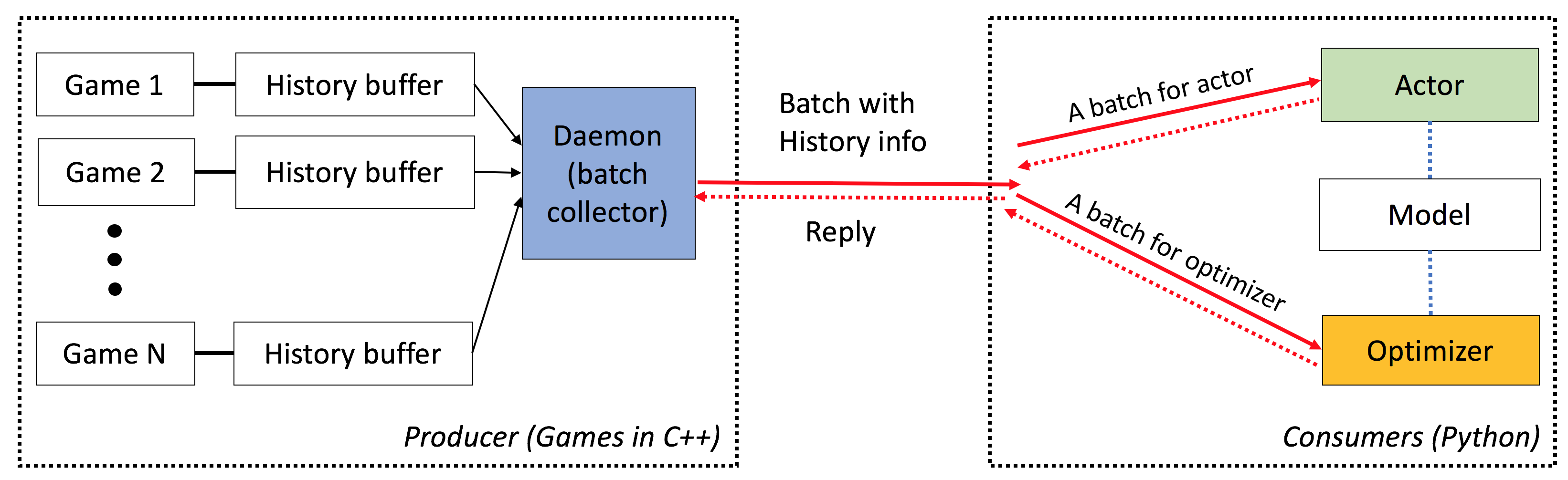
엘프는 다음과 같은 특성을 가지고 있습니다.
엔드 투 엔드 : ELF는 게임 연구에 대한 엔드 투 엔드 솔루션을 제공합니다. 소형 실시간 전략 게임 환경, 동시 시뮬레이션, 직관적 인 API, 웹 기반 Visualzation을 제공하며 Pytorch가 최소한의 리소스 요구 사항을 제공하는 강화 학습 백엔드와 함께 제공됩니다.
광범위한 : C/C ++ 인터페이스가있는 모든 게임은 간단한 래퍼를 작성 하여이 프레임 워크에 연결할 수 있습니다. 예를 들어, 우리는 이미 Atari 게임을 프레임 워크에 통합하고 코어 당 시뮬레이션 속도가 단일 코어 버전과 비교할 수 있으므로 멀티 프로세싱 또는 파이썬 멀티 스레딩을 사용하여 구현보다 훨씬 빠릅니다. 앞으로, 우리는 Darkforest Go 엔진과 같은 더 많은 환경을 통합 할 계획입니다.
경량 : 엘프는 최소한의 오버 헤드로 매우 빠르게 실행됩니다. RTS 엔진에 구축 된 간단한 게임 (미니어트)이있는 ELF는 MacBook Pro에서 코어 당 초당 40K 프레임을 실행합니다. 미니어트를 연주하기 위해 처음부터 모델을 훈련하려면 6 CPU + 1 GPU에서 하루가 걸립니다 .
유연성 : 환경과 액터 사이의 페어링 (예 : 하나의 에이전트)이있는 하나의 환경 (예 : 바닐라 A3C), 여러 에이전트가있는 하나의 환경 (예 : 자체 플레이/MCT) 또는 한 액터 (예 : BatchA3C, GA3C)가있는 여러 환경이 있습니다. 또한 RTS 엔진 위에 구축 된 모든 게임은 내부 표현 및 역학에 완전히 액세스 할 수 있습니다. 효율적인 시뮬레이터 외에도 가벼우면서도 강력한 강화 학습 프레임 워크를 제공합니다. 이 프레임 워크는 대부분의 기존 RL 알고리즘을 호스팅 할 수 있습니다. 이 오픈 소스 릴리스에서 우리는 Pytorch로 작성된 최첨단 액터 크리치 알고리즘을 제공했습니다.
여기를 참조하십시오.
이 스크립트를 성공적으로 설치하려면 cmake > = 3.8, gcc > = 4.9 및 tbb (linux libtbb-dev )가 있어야합니다.
 # Download miniconda and install.
wget https://repo.continuum.io/miniconda/Miniconda3-latest-Linux-x86_64.sh -O $HOME/miniconda.sh
/bin/bash $HOME/miniconda.sh -b
$HOME/miniconda3/bin/conda update -y --all python=3

# Add the following to ~/.bash_profile (if you haven't already) and source it:
export PATH=$HOME/miniconda3/bin:$PATH

# Create a new conda environment and install the necessary packages:
conda create -n elf python=3
source activate elf
# If you use cuda 8.0
# conda install pytorch cuda80 -c soumith
conda install pytorch -c soumith

pip install --upgrade pip
pip install msgpack_numpy
conda install tqdm
conda install libgcc

# Install cmake >= 3.8, gcc >= 4.9 and libtbb-dev
# This is platform-dependent.

# Clone and build the repository:
cd ~
git clone https://github.com/facebookresearch/ELF
cd ELF/rts/
mkdir build && cd build
cmake .. -DPYTHON_EXECUTABLE=$HOME/miniconda3/bin/python
make

# Train the model
cd ../..
sh ./train_minirts.sh --gpu 0
C/C ++ 인터페이스가있는 모든 게임은 간단한 래퍼를 작성 하여이 프레임 워크에 연결할 수 있습니다. 현재 우리는 다음과 같은 환경을 가지고 있습니다.
미니어트 및 확장 ( ./rts )
건축 노동자, 자원 수집, 보이지 않는 영토 탐험, 적을 방어하고 다시 공격하는 등 장르의 주요 역학을 포착하는 소형 실시간 전략 게임. 이 게임은 기존의 많은 정책 강화 학습 접근법의 사용을 용이하게하기 위해 매우 빠르게 실행됩니다 (랩톱의 코어 당 40k FPS).
Atari Games ( ./atari )
ALE (Arcade Learning Environment)를 ELF에 통합하여 ROM을로드하고 1000 동시 게임 인스턴스를 쉽게 실행할 수 있습니다.
GO 엔진 ( ./go )
우리는 ELF 플랫폼에서 Darkforest Go 엔진을 상환합니다. 이제 많은 .SGF 파일을 쉽게로드하고 최소한의 리소스 요구 사항 (예 : 단일 GPU + 주 1 주)으로 자신의 GO AI를 훈련시킬 수 있습니다.
ELF를 사용하는 경우 다음 Bibtex 항목으로 종이를 참조하십시오.
 ELF: An Extensive, Lightweight and Flexible Research Platform for Real-time Strategy Games
Yuandong Tian, Qucheng Gong, Wenling Shang, Yuxin Wu, C. Lawrence Zitnick
NIPS 2017

@article{tian2017elf,
  title={ELF: An Extensive, Lightweight and Flexible Research Platform for Real-time Strategy Games},
  author={Yuandong Tian and Qucheng Gong and Wenling Shang and Yuxin Wu and C. Lawrence Zitnick},
  journal={Advances in Neural Information Processing Systems (NIPS)},
  year={2017}
}
ICML 비디오 게임 및 기계 학습 (VGML) 워크숍의 슬라이드.
데모. 왼쪽 상단은 훈련 된 봇이며 바닥 오른쪽은 규칙 기반 봇입니다.
자세한 문서는 여기를 확인하십시오. sphinx 사용하여 ./doc 에서 버전을 컴파일 할 수도 있습니다.
엘프는 사용하기가 매우 쉽습니다. 초기화는 다음과 같습니다.
 # We run 1024 games concurrently.
num_games = 1024

# Wait for a batch of 256 games.
batchsize = 256

# The return states contain key 's', 'r' and 'terminal'
# The reply contains key 'a' to be filled from the Python side.
# The definitions of the keys are in the wrapper of the game.
input_spec = dict ( s = '' , r = '' , terminal = '' )
reply_spec = dict ( a = '' )

context = Init ( num_games , batchsize , input_spec , reply_spec )
기본 루프도 매우 간단합니다.
 # Start all game threads and enter main loop.
context . Start ()
while True :
    # Wait for a batch of game states to be ready
    # These games will be blocked, waiting for replies.
    batch = context . Wait ()

    # Apply a model to the game state. The output has key 'pi'
    # You can do whatever you want here. E.g., applying your favorite RL algorithms.
    output = model ( batch )

    # Sample from the output to get the actions of this batch.
    reply [ 'a' ][:] = SampleFromDistribution ( output )

    # Resume games.
    context . Steps ()

# Stop all game threads.
context . Stop ()
실제 실행 가능한 코드는 train.py 및 eval.py 확인하십시오.
C ++ 11 지원 (예 : GCC> = 4.9)이있는 C ++ 컴파일러가 필요합니다. 다음 라이브러리는 tbb 필요합니다. cmake> = 3.8도 필요합니다.
Python 3.x가 필요합니다. 또한 Pytorch 버전 0.2.0+, tqdm , zmq , msgpack , msgpack_numpy 설치해야합니다.
미니어트 모델을 훈련하려면 먼저 ./rts/game_MC 컴파일하십시오 ( cmake 사용하여 ./rts/ 의 지침 참조). 시각화를보고 싶지 않다면 ./rts/backend 의 편집은 훈련에 필요하지 않습니다.
그런 다음 현재 디렉토리에서 다음 명령을 실행하십시오 ( train_minirts.sh 도 참조 할 수도 있음) :
game=./rts/game_MC/game model=actor_critic model_file=./rts/game_MC/model
python3 train.py
    --num_games 1024 --batchsize 128                                                                  # Set number of games to be 1024 and batchsize to be 128.
    --freq_update 50                                                                                  # Update behavior policy after 50 updates of the model.
    --players " fs=50,type=AI_NN,args=backup/AI_SIMPLE|delay/0.99|start/500;fs=20,type=AI_SIMPLE "      # Specify AI and its opponent, separated by semicolon. `fs` is frameskip that specifies How often your opponent makes a decision (e.g., fs=20 means it acts every 20 ticks)
                                                                                                      # If `backup` is specified in `args`, then we use rule-based AI for the first `start` ticks, then trained AI takes over. `start` decays with rate `decay`.
    --tqdm                                                                  # Show progress bar.
    --gpu 0                                                                 # Use first gpu. If you don't specify gpu, it will run on CPUs.
    --T 20                                                                  # 20 step actor-critic
    --additional_labels id,last_terminal
    --trainer_stats winrate                                                 # If you want to see the winrate over iterations.
                                                                            # Note that the winrate is computed when the action is sampled from the multinomial distribution (not greedy policy).
                                                                            # To evaluate your model more accurately, please use eval.py.
Long Horizon (예 : --T 20 )은 훈련을 훨씬 빠르게 (동시에) 안정적으로 만들 수 있습니다. Long Horizon을 사용하면 16CPU 및 1GPU로 12 시간 내에 70% Winrate로 훈련 할 수 있어야합니다. taskset -c 사용하여 교육에 사용되는 CPU 수를 제어 할 수 있습니다.
다음은 Frameskip = 50의 AI_SIMPLE 에 대해 80% Winrate를 가진 훈련 된 모델입니다. 여기에 하나의 게임 재생이 있습니다.
다음은 훈련 중 샘플 출력입니다.
 Version:  bf1304010f9609b2114a1adff4aa2eb338695b9d_staged
Num Actions:  9
Num unittype:  6
100%|█████████████████████████████████████████████████████████████████████████████████████████████████████████████████████████████████████████████| 5000/5000 [01:35<00:00, 52.37it/s]
[2017-07-12 09:04:13.212017][128] Iter[0]:
Train count: 820/5000, actor count: 4180/5000
Save to ./
Filename = ./save-820.bin
Command arguments run.py --batchsize 128 --freq_update 50 --fs_opponent 20 --latest_start 500 --latest_start_decay 0.99 --num_games 1024 --opponent_type AI_SIMPLE --tqdm
0:acc_reward[4100]: avg: -0.34079, min: -0.58232[1580], max: 0.25949[185]
0:cost[4100]: avg: 2.15912, min: 1.97886[2140], max: 2.31487[1173]
0:entropy_err[4100]: avg: -2.13493, min: -2.17945[438], max: -2.04809[1467]
0:init_reward[820]: avg: -0.34093, min: -0.56980[315], max: 0.26211[37]
0:policy_err[4100]: avg: 2.16714, min: 1.98384[1520], max: 2.31068[1176]
0:predict_reward[4100]: avg: -0.33676, min: -1.36083[1588], max: 0.39551[195]
0:reward[4100]: avg: -0.01153, min: -0.13281[1109], max: 0.04688[124]
0:rms_advantage[4100]: avg: 0.15646, min: 0.02189[800], max: 0.79827[564]
0:value_err[4100]: avg: 0.01333, min: 0.00024[800], max: 0.06569[1549]

 86%|████████████████████████████████████████████████████████████████████████████████████████████████████████████████████████▉                    | 4287/5000 [01:23<00:15, 46.97it/s]
미니어링 모델을 평가하려면 다음 명령을 시도해보십시오 ( eval_minirts.sh 도 참조 할 수도 있습니다).
game=./rts/game_MC/game model=actor_critic model_file=./rts/game_MC/model
python3 eval.py
    --load [your model]
    --batchsize 128
    --players " fs=50,type=AI_NN;fs=20,type=AI_SIMPLE "
    --num_games 1024
    --num_eval 10000
    --tqdm                          # Nice progress bar
    --gpu 0                         # Use GPU 0 as the evaluation gpu.
    --additional_labels id          # Tell the game environment to output additional dict entries.
    --greedy                        # Use greedy policy to evaluate your model. If not specified, then it will sample from the action distributions.
다음은 예제 출력입니다 (12 CPU로 10K 게임을 평가하는 데 1 분 40 초가 소요됩니다).
 Version:  dc895b8ea7df8ef7f98a1a031c3224ce878d52f0_
Num Actions:  9
Num unittype:  6
Load from ./save-212808.bin
Version:  dc895b8ea7df8ef7f98a1a031c3224ce878d52f0_
Num Actions:  9
Num unittype:  6
100%|████████████████████████████████████████████████████████████████████████████████████████████| 10000/10000 [01:40<00:00, 99.94it/s]
str_acc_win_rate: Accumulated win rate: 0.735 [7295/2628/9923]
best_win_rate: 0.7351607376801297
new_record: True
count: 0
str_win_rate: [0] Win rate: 0.735 [7295/2628/9923], Best win rate: 0.735 [0]
Stop all game threads ...
미니어트에서 자체 놀이를하려면 다음 스크립트를 사용해보십시오. 미리 훈련 된 모델로 시작하는 두 봇으로 시작합니다. 한 봇은 시간이 지남에 따라 훈련되고 다른 봇은 고정되어 있습니다. 훈련없이 Winrate를 확인하려면 --actor_only 시도하십시오.
sh ./selfplay_minirts.sh [your pre-trained model]
훈련 된 봇을 시각화하려면 eval.py (많은) 리플레이를 저장하기 위해 eval.py를 실행할 때 --save_replay_prefix [replay_file_prefix] 지정할 수 있습니다. 동일한 플래그를 훈련/자기 재생에도 적용 할 수도 있습니다.
모든 재생 파일에는 액션 시퀀스가 포함되어 있으며 .rep 에 있으며로드 할 때 동일한 게임을 재현해야합니다. 다음을 사용하여 명령 줄에 재생을로드하려면 다음을 사용합니다.
./minirts-backend replay --load_replay [your replay] --vis_after 0 그리고 게임을 확인하려면 웹 페이지를 열어 ./rts/frontend/minirts.html . 명령 줄에서만 재생을로드하고 실행하려면 (예 : 게임에서 누가 이길 지 빨리보고 싶다면) 시도해보십시오.
./minirts-backend replay_cmd --load_replay [your replay]






