ELF
1.0.0

เอลฟ์เป็น แพลตฟอร์ม ที่มีน้ำหนัก มาก และ เป็น แพลตฟอร์มที่มีความสามารถในการวิจัยเกมโดยเฉพาะอย่างยิ่งสำหรับเกมกลยุทธ์แบบเรียลไทม์ (RTS) ในด้าน C ++-ELF โฮสต์หลายเกมควบคู่ไปกับการทำเกลียว C ++ ทางด้าน Python เอลฟ์ส่งคืนสถานะเกมหนึ่งชุดในแต่ละครั้งทำให้เป็นมิตรมากสำหรับ RL ที่ทันสมัย ในการเปรียบเทียบแพลตฟอร์มอื่น ๆ (เช่น Openai Gym) จะห่ออินสแตนซ์เกมเดียวด้วยหนึ่งอินเตอร์เฟส Python สิ่งนี้ทำให้การดำเนินการเกมพร้อมกันมีความซับซ้อนเล็กน้อยซึ่งเป็นข้อกำหนดของอัลกอริทึมการเรียนรู้การเสริมแรงที่ทันสมัยจำนวนมาก
นอกจากนี้เอลฟ์ยังมีรุ่น Python สำหรับการใช้งานสภาพแวดล้อมของเกมพร้อมกันโดย Python Python Multiprocessing ด้วยการสื่อสารระหว่างกระบวนการของ Zeromq ดู ./ex_elfpy.py สำหรับตัวอย่างง่ายๆ
สำหรับการวิจัยเกี่ยวกับเกม RTS ELF มาพร้อมกับเครื่องยนต์ RTS ที่รวดเร็วและสภาพแวดล้อมที่เป็นรูปธรรมสามอย่าง: Minirts, จับธงและการป้องกันหอคอย Minirts มีพลวัตที่สำคัญทั้งหมดของเกมกลยุทธ์แบบเรียลไทม์รวมถึงการรวบรวมทรัพยากรสิ่งอำนวยความสะดวกการสร้างและกองทหารสอดแนมดินแดนที่ไม่รู้จักนอกภูมิภาคที่รับรู้ได้และปกป้อง/โจมตีศัตรู ผู้ใช้สามารถเข้าถึงการเป็นตัวแทนภายในและสามารถเปลี่ยนการตั้งค่าเกมได้อย่างอิสระ
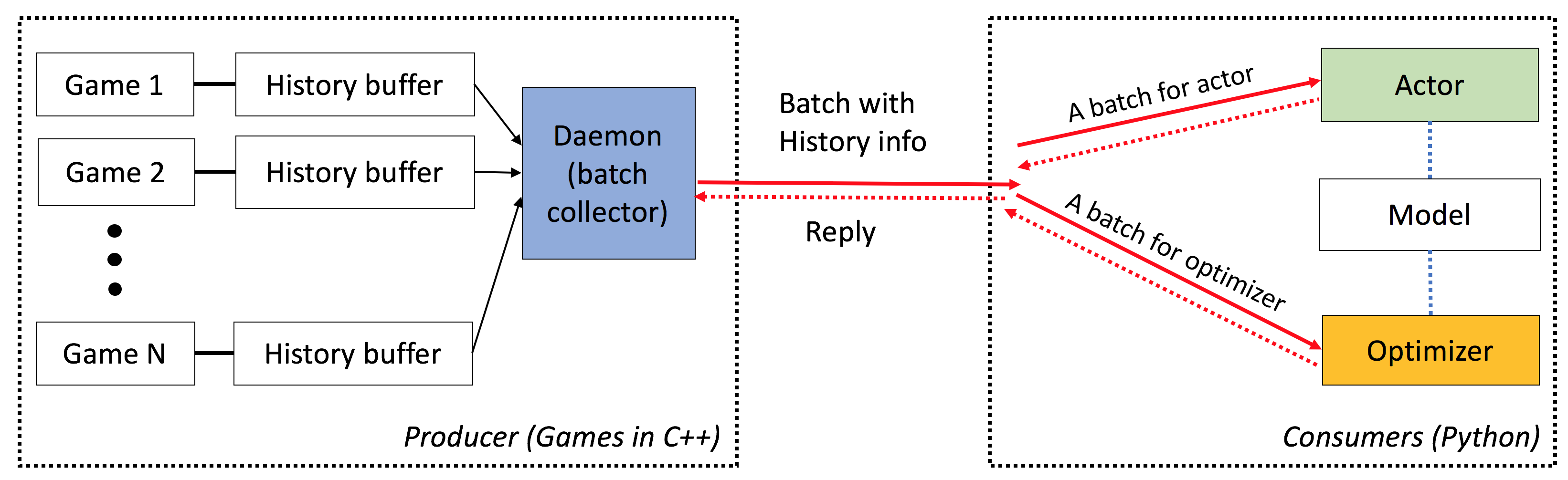
เอลฟ์มีลักษณะดังต่อไปนี้:
end-to-end : ELF นำเสนอโซลูชันแบบครบวงจรสำหรับการวิจัยเกม มันให้สภาพแวดล้อมของเกมกลยุทธ์แบบเรียลไทม์ขนาดเล็กการจำลองพร้อมกัน API ที่ใช้งานง่ายการมองเห็นบนเว็บและยังมาพร้อมกับแบ็กเอนด์การเรียนรู้เสริมแรงที่ได้รับการเสริมพลังโดย Pytorch ด้วยความต้องการทรัพยากรน้อยที่สุด
ครอบคลุม : เกมใด ๆ ที่มีอินเทอร์เฟซ C/C ++ สามารถเสียบเข้ากับเฟรมเวิร์กนี้ได้โดยการเขียนเสื้อคลุมง่าย ๆ ตัวอย่างเช่นเรารวมเกม Atari ไว้ในกรอบของเราแล้วและแสดงให้เห็นว่าความเร็วในการจำลองต่อคอร์นั้นเปรียบได้กับเวอร์ชันเดียวของคอร์และเร็วกว่าการใช้งานโดยใช้การประมวลผลมัลติโพรพิจต์หรือ Python multithreading ในอนาคตเราวางแผนที่จะรวมสภาพแวดล้อมมากขึ้นเช่นเครื่องยนต์ Darkforest GO
น้ำหนักเบา : เอลฟ์ทำงานได้อย่างรวดเร็วโดยมีค่าใช้จ่ายน้อยที่สุด เอลฟ์ที่มีเกมง่าย ๆ (minirts) ที่สร้างขึ้นบนเครื่องยนต์ RTS ทำงาน เฟรม 40K ต่อวินาทีต่อคอร์ บน MacBook Pro การฝึกอบรมแบบจำลองตั้งแต่เริ่มต้นเพื่อเล่น minirts ใช้เวลาหนึ่งวันใน 6 CPU + 1 GPU
ยืดหยุ่น : การจับคู่ระหว่างสภาพแวดล้อมและนักแสดงมีความยืดหยุ่นมากเช่นหนึ่งสภาพแวดล้อมที่มีตัวแทนหนึ่ง (เช่นวานิลลา A3C) สภาพแวดล้อมหนึ่งที่มีตัวแทนหลายตัว (เช่นเล่นเอง/MCTs) หรือสภาพแวดล้อมหลายอย่างที่มีนักแสดงหนึ่งคน (เช่น Batcha3c, Ga3c) นอกจากนี้เกมใด ๆ ที่สร้างขึ้นบนเครื่องยนต์ RTS ให้การเข้าถึงการเป็นตัวแทนและพลวัตภายในอย่างเต็มที่ นอกจากเครื่องจำลองที่มีประสิทธิภาพแล้วเรายังมีกรอบการเรียนรู้การเสริมแรงที่มีน้ำหนักเบา แต่ทรงพลัง เฟรมเวิร์กนี้สามารถโฮสต์อัลกอริทึม RL ที่มีอยู่มากที่สุด ในการเปิดตัวโอเพ่นซอร์สนี้เราได้จัดเตรียมอัลกอริธึมนักแสดงที่ทันสมัยซึ่งเขียนด้วย Pytorch
ดูที่นี่
คุณต้องมี cmake > = 3.8, gcc > = 4.9 และ tbb (linux libtbb-dev ) เพื่อติดตั้งสคริปต์นี้สำเร็จ
 # Download miniconda and install.
wget https://repo.continuum.io/miniconda/Miniconda3-latest-Linux-x86_64.sh -O $HOME/miniconda.sh
/bin/bash $HOME/miniconda.sh -b
$HOME/miniconda3/bin/conda update -y --all python=3

# Add the following to ~/.bash_profile (if you haven't already) and source it:
export PATH=$HOME/miniconda3/bin:$PATH

# Create a new conda environment and install the necessary packages:
conda create -n elf python=3
source activate elf
# If you use cuda 8.0
# conda install pytorch cuda80 -c soumith
conda install pytorch -c soumith

pip install --upgrade pip
pip install msgpack_numpy
conda install tqdm
conda install libgcc

# Install cmake >= 3.8, gcc >= 4.9 and libtbb-dev
# This is platform-dependent.

# Clone and build the repository:
cd ~
git clone https://github.com/facebookresearch/ELF
cd ELF/rts/
mkdir build && cd build
cmake .. -DPYTHON_EXECUTABLE=$HOME/miniconda3/bin/python
make

# Train the model
cd ../..
sh ./train_minirts.sh --gpu 0
เกมใด ๆ ที่มีอินเทอร์เฟซ C/C ++ สามารถเสียบเข้ากับเฟรมเวิร์กนี้ได้โดยการเขียนเสื้อคลุมง่าย ๆ ขณะนี้เรามีสภาพแวดล้อมดังต่อไปนี้:
Minirts และส่วนขยาย ( ./rts )
เกมกลยุทธ์แบบเรียลไทม์ขนาดเล็กที่รวบรวมพลวัตที่สำคัญของประเภทของมันรวมถึงการสร้างแรงงานการรวบรวมทรัพยากรสำรวจดินแดนที่มองไม่เห็นปกป้องศัตรูและโจมตีพวกเขากลับมา เกมดังกล่าวทำงานได้อย่างรวดเร็ว (40k FPS ต่อแกนบนแล็ปท็อป) เพื่ออำนวยความสะดวกในการใช้วิธีการเรียนรู้การเสริมแรงตามนโยบายที่มีอยู่จำนวนมาก
เกมอาตาริ ( ./atari )
เรารวมสภาพแวดล้อมการเรียนรู้อาร์เคด (ALE) เข้ากับเอลฟ์เพื่อให้คุณสามารถโหลด ROM และเรียกใช้อินสแตนซ์เกมพร้อมกันได้ 1,000 รายการได้อย่างง่ายดาย
ไปเครื่องยนต์ ( ./go )
เราปรับปรุงเครื่องยนต์ Darkforest Go ของเราในแพลตฟอร์ม ELF ตอนนี้คุณสามารถโหลดไฟล์. SGF จำนวนมากและฝึกอบรม GO AI ของคุณเองด้วยข้อกำหนดด้านทรัพยากรน้อยที่สุด (เช่น GPU เดียวบวกต่อสัปดาห์)
เมื่อคุณใช้ ELF โปรดอ้างอิงกระดาษด้วยรายการ BIBTEX ต่อไปนี้:
 ELF: An Extensive, Lightweight and Flexible Research Platform for Real-time Strategy Games
Yuandong Tian, Qucheng Gong, Wenling Shang, Yuxin Wu, C. Lawrence Zitnick
NIPS 2017

@article{tian2017elf,
  title={ELF: An Extensive, Lightweight and Flexible Research Platform for Real-time Strategy Games},
  author={Yuandong Tian and Qucheng Gong and Wenling Shang and Yuxin Wu and C. Lawrence Zitnick},
  journal={Advances in Neural Information Processing Systems (NIPS)},
  year={2017}
}
สไลด์ในเวิร์กช็อปวิดีโอเกม ICML และการเรียนรู้ของเครื่อง (VGML)
การสาธิต ซ้ายสุดได้รับการฝึกฝนบอทในขณะที่ด้านล่างขวาคือบอทตามกฎ
ตรวจสอบเอกสารโดยละเอียดที่นี่ นอกจากนี้คุณยังสามารถรวบรวมเวอร์ชันของคุณได้ใน ./doc โดยใช้ sphinx
เอลฟ์ใช้งานง่ายมาก การเริ่มต้นมีลักษณะดังต่อไปนี้:
 # We run 1024 games concurrently.
num_games = 1024

# Wait for a batch of 256 games.
batchsize = 256

# The return states contain key 's', 'r' and 'terminal'
# The reply contains key 'a' to be filled from the Python side.
# The definitions of the keys are in the wrapper of the game.
input_spec = dict ( s = '' , r = '' , terminal = '' )
reply_spec = dict ( a = '' )

context = Init ( num_games , batchsize , input_spec , reply_spec )
ห่วงหลักก็ง่ายมาก:
 # Start all game threads and enter main loop.
context . Start ()
while True :
    # Wait for a batch of game states to be ready
    # These games will be blocked, waiting for replies.
    batch = context . Wait ()

    # Apply a model to the game state. The output has key 'pi'
    # You can do whatever you want here. E.g., applying your favorite RL algorithms.
    output = model ( batch )

    # Sample from the output to get the actions of this batch.
    reply [ 'a' ][:] = SampleFromDistribution ( output )

    # Resume games.
    context . Steps ()

# Stop all game threads.
context . Stop ()
โปรดตรวจสอบ train.py และ eval.py สำหรับรหัสที่เรียกใช้จริง
คอมไพเลอร์ C ++ พร้อมการสนับสนุน C ++ 11 (เช่น, GCC> = 4.9) เป็นสิ่งจำเป็น จำเป็นต้อง tbb ไลบรารีต่อไปนี้ ต้องใช้ cmake> = 3.8
ต้องใช้ Python 3.x นอกจากนี้คุณต้องติดตั้งแพ็คเกจต่อไปนี้: Pytorch เวอร์ชัน 0.2.0+, tqdm , zmq , msgpack , msgpack_numpy
หากต้องการฝึกอบรมแบบจำลองสำหรับ minirts โปรดรวบรวมก่อน ./rts/game_MC game_mc (ดูคำแนะนำใน ./rts/ / โดยใช้ cmake ) โปรดทราบว่าการรวบรวม ./rts/backend backend ไม่จำเป็นสำหรับการฝึกอบรมเว้นแต่คุณต้องการดูการสร้างภาพข้อมูล
จากนั้นโปรดเรียกใช้คำสั่งต่อไปนี้ในไดเรกทอรีปัจจุบัน (คุณสามารถอ้างอิง train_minirts.sh ):
game=./rts/game_MC/game model=actor_critic model_file=./rts/game_MC/model
python3 train.py
    --num_games 1024 --batchsize 128                                                                  # Set number of games to be 1024 and batchsize to be 128.
    --freq_update 50                                                                                  # Update behavior policy after 50 updates of the model.
    --players " fs=50,type=AI_NN,args=backup/AI_SIMPLE|delay/0.99|start/500;fs=20,type=AI_SIMPLE "      # Specify AI and its opponent, separated by semicolon. `fs` is frameskip that specifies How often your opponent makes a decision (e.g., fs=20 means it acts every 20 ticks)
                                                                                                      # If `backup` is specified in `args`, then we use rule-based AI for the first `start` ticks, then trained AI takes over. `start` decays with rate `decay`.
    --tqdm                                                                  # Show progress bar.
    --gpu 0                                                                 # Use first gpu. If you don't specify gpu, it will run on CPUs.
    --T 20                                                                  # 20 step actor-critic
    --additional_labels id,last_terminal
    --trainer_stats winrate                                                 # If you want to see the winrate over iterations.
                                                                            # Note that the winrate is computed when the action is sampled from the multinomial distribution (not greedy policy).
                                                                            # To evaluate your model more accurately, please use eval.py.
โปรดทราบว่า Long Horizon (เช่น --T 20 ) สามารถทำให้การฝึกอบรมเร็วขึ้นมากและ (ในเวลาเดียวกัน) มีเสถียรภาพ ด้วย Long Horizon คุณควรจะสามารถฝึกอบรมได้ถึง 70% Winrate ภายใน 12 ชั่วโมงด้วย 16CPU และ 1GPU คุณสามารถควบคุมจำนวน CPU ที่ใช้ในการฝึกอบรมโดยใช้ taskset -c
นี่คือรูปแบบหนึ่งที่ผ่านการฝึกอบรมด้วย winrate 80% เทียบกับ AI_SIMPLE สำหรับ frameskip = 50 นี่คือเกมเล่นซ้ำหนึ่งเกม
ต่อไปนี้เป็นตัวอย่างตัวอย่างระหว่างการฝึกอบรม:
 Version:  bf1304010f9609b2114a1adff4aa2eb338695b9d_staged
Num Actions:  9
Num unittype:  6
100%|█████████████████████████████████████████████████████████████████████████████████████████████████████████████████████████████████████████████| 5000/5000 [01:35<00:00, 52.37it/s]
[2017-07-12 09:04:13.212017][128] Iter[0]:
Train count: 820/5000, actor count: 4180/5000
Save to ./
Filename = ./save-820.bin
Command arguments run.py --batchsize 128 --freq_update 50 --fs_opponent 20 --latest_start 500 --latest_start_decay 0.99 --num_games 1024 --opponent_type AI_SIMPLE --tqdm
0:acc_reward[4100]: avg: -0.34079, min: -0.58232[1580], max: 0.25949[185]
0:cost[4100]: avg: 2.15912, min: 1.97886[2140], max: 2.31487[1173]
0:entropy_err[4100]: avg: -2.13493, min: -2.17945[438], max: -2.04809[1467]
0:init_reward[820]: avg: -0.34093, min: -0.56980[315], max: 0.26211[37]
0:policy_err[4100]: avg: 2.16714, min: 1.98384[1520], max: 2.31068[1176]
0:predict_reward[4100]: avg: -0.33676, min: -1.36083[1588], max: 0.39551[195]
0:reward[4100]: avg: -0.01153, min: -0.13281[1109], max: 0.04688[124]
0:rms_advantage[4100]: avg: 0.15646, min: 0.02189[800], max: 0.79827[564]
0:value_err[4100]: avg: 0.01333, min: 0.00024[800], max: 0.06569[1549]

 86%|████████████████████████████████████████████████████████████████████████████████████████████████████████████████████████▉                    | 4287/5000 [01:23<00:15, 46.97it/s]
ในการประเมินแบบจำลองสำหรับ minirts ลองใช้คำสั่งต่อไปนี้ (คุณสามารถอ้างอิง eval_minirts.sh ):
game=./rts/game_MC/game model=actor_critic model_file=./rts/game_MC/model
python3 eval.py
    --load [your model]
    --batchsize 128
    --players " fs=50,type=AI_NN;fs=20,type=AI_SIMPLE "
    --num_games 1024
    --num_eval 10000
    --tqdm                          # Nice progress bar
    --gpu 0                         # Use GPU 0 as the evaluation gpu.
    --additional_labels id          # Tell the game environment to output additional dict entries.
    --greedy                        # Use greedy policy to evaluate your model. If not specified, then it will sample from the action distributions.
นี่คือตัวอย่างเอาท์พุท (ใช้เวลา 1 นาที 40 วินาทีในการประเมินเกม 10k ด้วย 12 ซีพียู):
 Version:  dc895b8ea7df8ef7f98a1a031c3224ce878d52f0_
Num Actions:  9
Num unittype:  6
Load from ./save-212808.bin
Version:  dc895b8ea7df8ef7f98a1a031c3224ce878d52f0_
Num Actions:  9
Num unittype:  6
100%|████████████████████████████████████████████████████████████████████████████████████████████| 10000/10000 [01:40<00:00, 99.94it/s]
str_acc_win_rate: Accumulated win rate: 0.735 [7295/2628/9923]
best_win_rate: 0.7351607376801297
new_record: True
count: 0
str_win_rate: [0] Win rate: 0.735 [7295/2628/9923], Best win rate: 0.735 [0]
Stop all game threads ...
ลองใช้สคริปต์ต่อไปนี้หากคุณต้องการเล่นด้วยตนเองใน minirts มันจะเริ่มต้นด้วยสองบอททั้งสองเริ่มต้นด้วยรุ่นที่ผ่านการฝึกอบรมมาก่อน บอทหนึ่งจะได้รับการฝึกฝนเมื่อเวลาผ่านไปในขณะที่อีกอันได้รับการแก้ไข หากคุณเพียงต้องการตรวจสอบ winrate ของพวกเขาโดยไม่ต้องฝึกอบรมลอง --actor_only
sh ./selfplay_minirts.sh [your pre-trained model]
ในการแสดงภาพบอทที่ผ่านการฝึกอบรมคุณสามารถระบุ --save_replay_prefix [replay_file_prefix] เมื่อเรียกใช้ eval.py เพื่อบันทึก (จำนวนมาก) โปรดทราบว่าสามารถนำธงเดียวกันนี้ไปใช้กับการฝึกอบรม/การเล่นด้วยตนเอง
ไฟล์เล่นซ้ำทั้งหมดมีลำดับการกระทำอยู่ใน .rep และควรทำซ้ำเกมเดียวกันที่แน่นอนเมื่อโหลด ในการโหลดการเล่นซ้ำในบรรทัดคำสั่งโดยใช้สิ่งต่อไปนี้:
./minirts-backend replay --load_replay [your replay] --vis_after 0 และเปิดหน้าเว็บ ./rts/frontend/minirts.html เพื่อตรวจสอบเกม ในการโหลดและเรียกใช้การเล่นซ้ำในบรรทัดคำสั่งเท่านั้น (เช่นถ้าคุณต้องการดูว่าใครชนะเกมได้อย่างรวดเร็ว) ลอง:
./minirts-backend replay_cmd --load_replay [your replay]






