L2M
1.0.0

Thomas Schmied 1 ,Markus Hofmarcher 2 ,Fabian Paischer 1 ,Razvan PacScanu 3,4 ,Sepp Hochreiter 1,5
1 Ellis Unit Linz和Lit AI实验室,机器学习研究所,约翰内斯开普勒大学林兹,奥地利
2 JKU LIT SAL ESPML实验室,机器学习研究所,约翰内斯开普勒大学林兹,奥地利
3 Google DeepMind
4 UCL
5奥地利维也纳人工智能高级研究所(IARAI)
该存储库包含“在Neurips 2023接受的RL中调节预训练模型”的源代码。该论文可在此处找到。
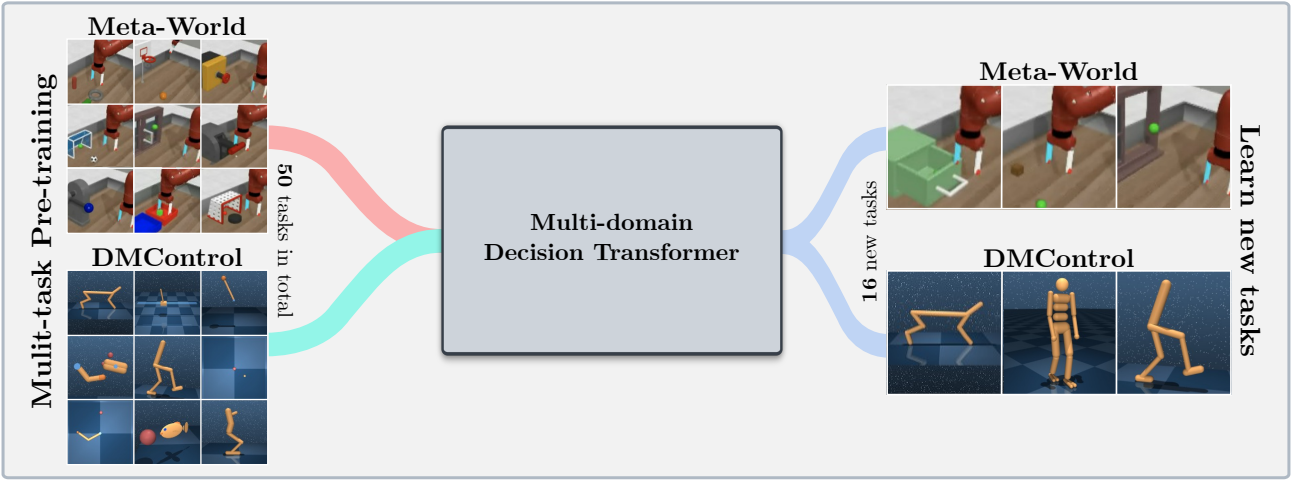
该代码库支持培训决策变压器(DT)模型在线或在以下域上的离线数据集:
该代码库依赖开源框架,包括:
这个存储库是什么?
 .
├── configs                    # Contains all .yaml config files for Hydra to configure agents, envs, etc.
│   ├── agent_params
│   ├── wandb_callback_params
│   ├── env_params
│   ├── eval_params
│   ├── run_params
│   └── config.yaml            # Main config file for Hydra - specifies log/data/model directories.
├── continual_world            # Submodule for Continual-World.
├── dmc2gym_custom             # Custom wrapper for DMControl.
├── figures
├── scripts                    # Scrips for running experiments on Slurm/PBS in multi-gpu/node setups.
├── src                        # Main source directory.
│   ├── algos                  # Contains agent/model/prompt classes.
│   ├── augmentations          # Image augmentations.
│   ├── buffers                # Contains replay trajectory buffers.
│   ├── callbacks              # Contains callbacks for training (e.g., WandB, evaluation, etc.).
│   ├── data                   # Contains data utilities (e.g., for downloading Atari)
│   ├── envs                   # Contains functionality for creating environments.
│   ├── exploration            # Contains exploration strategies.
│   ├── optimizers             # Contains (custom) optimizers.
│   ├── schedulers             # Contains learning rate schedulers.
│   ├── tokenizers_custom      # Contains custom tokenizers for discretizing states/actions.
│   ├── utils
│   └── __init__.py
├── LICENSE
├── README.md
├── environment.yaml
├── requirements.txt
└── main.py                     # Main entry point for training/evaluating agents.
环境配置和requirements.txt项可在environment.yaml中可用。
首先,创建Conda环境。
 conda env create -f environment.yaml
conda activate mddt
然后安装剩余的要求(如果没有在此处查看,则已经下载了Mujoco):
pip install -r requirements.txt
init the continualworld subsodule并安装:
 git submodule init
git submodule update
cd continualworld
pip install .
安装meta-world :
pip install git+https://github.com/rlworkgroup/metaworld.git@18118a28c06893da0f363786696cc792457b062b
安装DMC2GYM的自定义版本。我们的版本使flatten_obs可选,因此使我们能够构建所有DMCONTROL ENV的完整观察空间。
 cd dmc2gym_custom
pip install -e .
下载Mujoco:
 mkdir ~/.mujoco
cd ~/.mujoco
wget https://www.roboti.us/download/mujoco200_linux.zip
unzip mujoco200_linux.zip
mv mujoco200_linux mujoco200
wget https://www.roboti.us/file/mjkey.txt
然后将以下行添加到.bashrc :
export LD_LIBRARY_PATH=$LD_LIBRARY_PATH:~/.mujoco/mujoco200/bin
以下问题很有帮助:
首先,安装以下软件包:
 conda install -c conda-forge glew mesalib
conda install -c menpo glfw3 osmesa
pip install patchelf
手动创建符号链接:
 cp /usr/lib64/libGL.so.1 $CONDA_PREFIX/lib
ln -s $CONDA_PREFIX/lib/libGL.so.1 $CONDA_PREFIX/lib/libGL.so
然后做:
 mkdir ~/rpm
cd ~/rpm
curl -o libgcrypt11.rpm ftp://ftp.pbone.net/mirror/ftp5.gwdg.de/pub/opensuse/repositories/home:/bosconovic:/branches:/home:/elimat:/lsi/openSUSE_Leap_15.1/x86_64/libgcrypt11-1.5.4-lp151.23.29.x86_64.rpm
rpm2cpio libgcrypt11.rpm | cpio -id
最后,导出通往rpm dir的路径(添加到~/.bashrc ):
 export LD_LIBRARY_PATH=$LD_LIBRARY_PATH:~/rpm/usr/lib64
export LDFLAGS="-L/~/rpm/usr/lib64"
该代码库依赖于HYDRA,该密码通过.yaml文件配置实验。 Hydra会自动为给定运行创建日志文件夹结构,如相应的config.yaml文件中指定。
config.yaml是主要配置入口点,包含默认参数。文件引用块defaults下的相应默认参数文件。此外, config.yaml包含4个配置目录路径的重要常数:
 LOG_DIR: ../logs
DATA_DIR: ../data
SSD_DATA_DIR: ../data
MODELS_DIR: ../models
当前通过我们的Web服务器托管了已有的数据集。将元世界和DMCONTROL数据集下载到指定的DATA_DIR :
 # Meta-World
wget --recursive --no-parent --no-host-directories --cut-dirs=2 -R "index.html*" https://ml.jku.at/research/l2m/metaworld
# DMControl
wget --recursive --no-parent --no-host-directories --cut-dirs=2 -R "index.html*" https://ml.jku.at/research/l2m/dm_control_1M
该数据集也可以在HuggingFace Hub上找到。使用huggingface-cli下载:
 # Meta-World
huggingface-cli download ml-jku/meta-world --local-dir=./meta-world --repo-type dataset
# DMControl
huggingface-cli download ml-jku/dm_control --local-dir=./dm_control --repo-type dataset
该框架还支持Atari,D4RL和Visual DMControl数据集。对于Atari和Visual DMControl,我们指的是各自的READMES。
在下文中,我们提供了一些说明性的例子,说明了如何在论文中运行实验。
在MT40 + DMC10上训练40m多域决策变压器(MDDT)模型,在一个GPU上使用3个种子,运行:
python main.py -m experiment_name=pretrain seed=42,43,44 env_params=multi_domain_mtdmc run_params=pretrain eval_params=pretrain_disc agent_params=cdt_pretrain_disc agent_params.kind=MDDT agent_params/model_kwargs=multi_domain_mtdmc agent_params/data_paths=mt40v2_dmc10 +agent_params/replay_buffer_kwargs=multi_domain_mtdmc +agent_params.accumulation_steps=2
要使用LORA在带有3个种子的单个CW10任务上微调预训练的模型,请运行:
python main.py -m experiment_name=cw10_lora seed=42,43,44 env_params=mt50_pretrain run_params=finetune eval_params=finetune agent_params=cdt_mpdt_disc agent_params/model_kwargs=mdmpdt_mtdmc agent_params/data_paths=cw10_v2_cwnet_2M +agent_params/replay_buffer_kwargs=mtdmc_ft agent_params/model_kwargs/prompt_kwargs=lora env_params.envid=hammer-v2 agent_params.data_paths.names='${env_params.envid}.pkl' env_params.eval_env_names=
要以3种种子的顺序方式使用L2M在所有CW10任务上微调预训练的模型,请运行:
python main.py -m experiment_name=cw10_cl_l2m seed=42,43,44 env_params=multi_domain_ft env_params.eval_env_names=cw10_v2 run_params=finetune_coff eval_params=finetune_md_cl agent_params=cdt_mpdt_disc +agent_params.steps_per_task=100000 agent_params/model_kwargs=mdmpdt_mtdmc agent_params/data_paths=cw10_v2_cwnet_2M +agent_params/replay_buffer_kwargs=mtdmc_ft +agent_params.replay_buffer_kwargs.kind=continual agent_params/model_kwargs/prompt_kwargs=l2m_lora
对于多GPU培训,我们使用torchrun 。该工具与hydra发生冲突。因此,创建了启动器插件hydra_torchrun_launcher。
要启用插件,请克隆hydra repo,CD contrib/hydra_torchrun_launcher ,然后安装插件:
 git clone https://github.com/facebookresearch/hydra.git
cd hydra/contrib/hydra_torchrun_launcher
pip install -e .
该插件可以从命令行中使用:
python main.py -m hydra/launcher=torchrun hydra.launcher.nproc_per_node=4 [...]
可以通过CUDA_VISIBLE_DEVICES在单个节点上的本地群集上运行实验,以指定要使用的GPU:
CUDA_VISIBLE_DEVICES=0,1,2,3 python main.py -m hydra/launcher=torchrun hydra.launcher.nproc_per_node=4 [...]
在Slurm上,在单个节点上执行torchrun都一样。例如,在一个节点上以2个GPU运行:
 #!/bin/bash
#SBATCH --account=X
#SBATCH --qos=X
#SBATCH --partition=X
#SBATCH --nodes=1
#SBATCH --gpus=2
#SBATCH --cpus-per-task=32

source activate mddt
python main.py -m hydra/launcher=torchrun hydra.launcher.nproc_per_node=2 [...]
scripts中提供了用于Slurm或PBS的多GPU培训的示例脚本。
在多节点设置中在slurm/pbs上运行需要更多的护理。 scripts中提供示例脚本。
如果您觉得这有用,请考虑引用我们的工作:
 @article{schmied2024learning,
  title={Learning to Modulate pre-trained Models in RL},
  author={Schmied, Thomas and Hofmarcher, Markus and Paischer, Fabian and Pascanu, Razvan and Hochreiter, Sepp},
  journal={Advances in Neural Information Processing Systems},
  volume={36},
  year={2024}
}







