compromise
14.14.3



npm install compromise
文字制作多么简单, ↬ᔐᖜ实际解析和使用有多困难?
妥协尽力将文本转变为数据。它做出有限而明智的决定。它并不像您想象的那么聪明。
 import nlp from 'compromise'

let doc = nlp ( 'she sells seashells by the seashore.' )
doc . verbs ( ) . toPastTense ( )
doc . text ( )
// 'she sold seashells by the seashore.'
 if ( doc . has ( 'simon says #Verb' ) ) {
  return true
}
 let doc = nlp ( entireNovel )
doc . match ( 'the #Adjective of times' ) . text ( )
// "the blurst of times?"
并获取数据:
 import plg from 'compromise-speech'
nlp . extend ( plg )

let doc = nlp ( 'Milwaukee has certainly had its share of visitors..' )
doc . compute ( 'syllables' )
doc . places ( ) . json ( )
/*
[{
  "text": "Milwaukee",
  "terms": [{
    "normal": "milwaukee",
    "syllables": ["mil", "wau", "kee"]
  }]
}]
*/
避免脆性解析器的问题:
 let doc = nlp ( "we're not gonna take it.." )

doc . has ( 'gonna' ) // true
doc . has ( 'going to' ) // true (implicit)

// transform
doc . contractions ( ) . expand ( )
doc . text ( )
// 'we are not going to take it..'
像数据一样鞭打东西:
 let doc = nlp ( 'ninety five thousand and fifty two' )
doc . numbers ( ) . add ( 20 )
doc . text ( )
// 'ninety five thousand and seventy two'
- 因为它实际上是 -
 let doc = nlp ( 'the purple dinosaur' )
doc . nouns ( ) . toPlural ( )
doc . text ( )
// 'the purple dinosaurs'
在客户端使用它:
 < script src =" https://unpkg.com/compromise " > </ script >
< script >
  var doc = nlp ( 'two bottles of beer' )
  doc . numbers ( ) . minus ( 1 )
  document . body . innerHTML = doc . text ( )
  // 'one bottle of beer'
</ script >
或同样:
 import nlp from 'compromise'

var doc = nlp ( 'London is calling' )
doc . verbs ( ) . toNegative ( )
// 'London is not calling'
妥协是〜250KB (缩小):
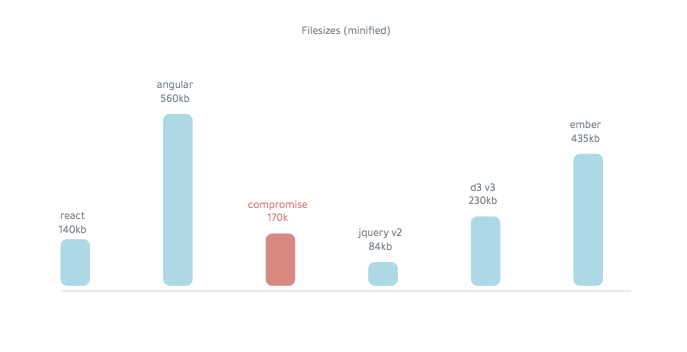
很快。它可以在键盘上运行:
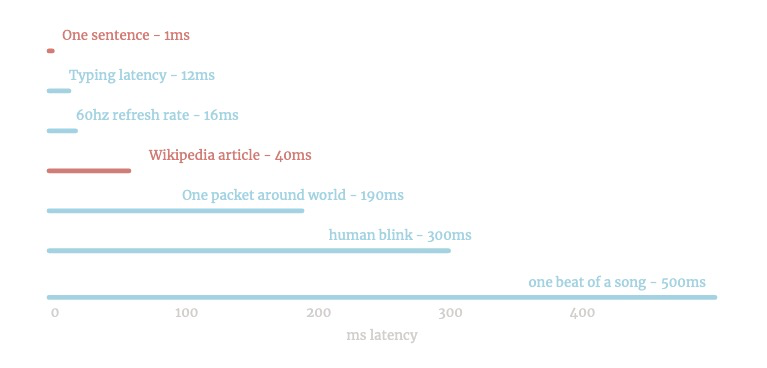
它主要通过结合基本单词列表的所有形式来工作。
最后的词典约为14,000个字:
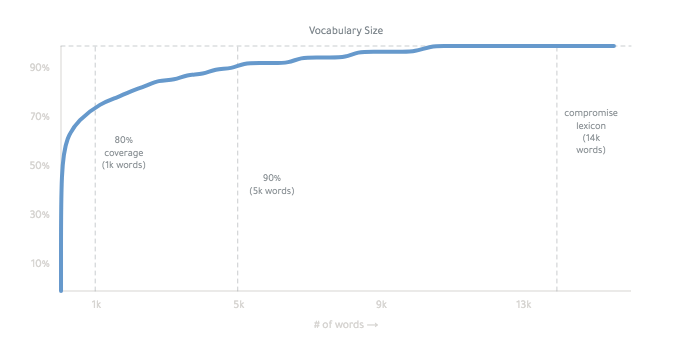
您可以在此处阅读更多有关其工作原理的信息。很奇怪。
好的 -
compromise/one单词,句子和标点符号的tokenizer 。
 import nlp from 'compromise/one'

let doc = nlp ( "Wayne's World, party time" )
let data = doc . json ( )
/* [{
  normal:"wayne's world party time",
    terms:[{ text: "Wayne's", normal: "wayne" },
      ...
      ]
  }]
*/妥协/一个人将您的文本拆分,将其包裹在方便的API中,
/一个是快速的 - 大多数句子要占毫秒的第十千分之一。
它可以执行〜1MB的文本一秒钟 - 或10个Wikipedia页面。
无限的玩笑需要3秒。
compromise/two part-of-speech 。
 import nlp from 'compromise/two'

let doc = nlp ( "Wayne's World, party time" )
let str = doc . match ( '#Possessive #Noun' ) . text ( )
// "Wayne's World"
这比人们有时意识到的更有用。
轻语法可帮助您编写清洁模板,并更接近信息。
妥协有83个标签,以英俊的图表排列。
#firstname → #person → #propernoun → #noun
您可以通过运行doc.debug()看到每个单词的语法
您可以使用nlp.verbose('tagger')看到每个标签的推理。
如果您喜欢Penn标签,则可以通过以下方式得出以下方式。
 let doc = nlp ( 'welcome thrillho' )
doc . compute ( 'penn' )
doc . json ( )
compromise/three Phrase和句子工具。
 import nlp from 'compromise/three'

let doc = nlp ( "Wayne's World, party time" )
let str = doc . people ( ) . normalize ( ) . text ( )
// "wayne"妥协/三是一组工具,可以放大文本的各个部分。
.numbers() .subtract()
当您有一个短语或一组单词时,您可以使用.json()看到其他元数据
 let doc = nlp ( 'four out of five dentists' )
console . log ( doc . fractions ( ) . json ( ) )
/*[{
    text: 'four out of five',
    terms: [ [Object], [Object], [Object], [Object] ],
    fraction: { numerator: 4, denominator: 5, decimal: 0.8 }
  }
]*/
let doc = nlp ( '$4.09CAD' )
doc . money ( ) . json ( )
/*[{
text: '$4.09CAD',
terms: [ [Object] ],
number: { prefix: '$', num: 4.09, suffix: 'cad'}
}
]*/
(匹配方法使用Match-Syntax。)
(这些方法在主要的nlp对象上)
nlp.tokenize(str) - 解析文本而无需运行pos -tagging
nlp.lazy(str,匹配) - 通过最少分析的文本扫描
nlp.plugin({}) - 混合在妥协-plugin中
nlp.parsematch(str) - 将任何匹配语句预先放在JSON中
nlp.world() - 抓取或更改内部库
NLP.Model() - 获取所有当前的语言数据
NLP.Methods() - 抓取或更改内部方法
nlp.hooks() - 请参阅哪些计算方法自动运行
nlp.verbose(模式) - 记录我们用于调试的决策
nlp.version-库的当前SEMVER版本
nlp.addwords(obj,isfrozen?) - 在词典中添加新单词
NLP.ADDAGS(OBJ) - 在标签集中添加新标签
nlp.typeahead(arr) - 在自动填充词典中添加单词
nlp.buildtrie(arr) - 将单词列表编译成快速查找表单
nlp.buildnet(arr) - 将匹配列表汇编为快速匹配表格
'football captain' → 'football captains''turnovers' → 'turnover''will go' → 'went''walked' → 'walks''walked' → 'will walk''walks' → 'walk''walks' → 'walking''drive' → 'had driven''went' → 'did not go'"didn't study" → 'studied' 5fivefifth或5thfive或5'$2.50'之类的东西he walks he walkedhe walked he walkshe walks he will walkhe walks he walkhe walks he didn't walk?!?或者! 'quick''wash-out''(939) 555-0113'之类的东西'#nlp'之类的东西'[email protected]'之类的东西:)?'@nlp_compromise'之类的东西'compromise.cool'之类的东西'he'之类的东西'but'类的东西'of''Mrs.'之类的东西people() places() organizations()'quickly'之类的东西'FBI'之类的东西"Spencer's"之类的东西
该库带有英语语法的体贴,常识性的基线。
您可以自由地更改或浪费任何设置 - 这实际上是有趣的部分。
最简单的部分只是建议任何给定单词的标签:
 let myWords = {
  kermit : 'FirstName' ,
  fozzie : 'FirstName' ,
}
let doc = nlp ( muppetText , myWords )
或通过妥协 - 泛滥进行更重的更改。
 import nlp from 'compromise'
nlp . extend ( {
  // add new tags
  tags : {
    Character : {
      isA : 'Person' ,
      notA : 'Adjective' ,
    } ,
  } ,
  // add or change words in the lexicon
  words : {
    kermit : 'Character' ,
    gonzo : 'Character' ,
  } ,
  // change inflections
  irregulars : {
    get : {
      pastTense : 'gotten' ,
      gerund : 'gettin' ,
    } ,
  } ,
  // add new methods to compromise
  api : View => {
    View . prototype . kermitVoice = function ( ) {
      this . sentences ( ) . prepend ( 'well,' )
      this . match ( 'i [(am|was)]' ) . prepend ( 'um,' )
      return this
    }
  } ,
} )
| 概念 | API | 插件 |
|---|---|---|
| 准确性 | 登录 | 形容词 |
| 缓存 | 构造方法方法 | 日期 |
| 案件 | 收缩 | 出口 |
| 文件大小 | 插入 | 哈希 |
| 内部 | JSON | html |
| 理由 | 角色偏移 | 按键 |
| 词典 | 循环 | ngrams |
| 匹配syntax | 匹配 | 数字 |
| 表现 | 名词 | 段落 |
| 插件 | 输出 | 扫描 |
| 项目 | 选择 | 句子 |
| 标记器 | 排序 | 音节 |
| 标签 | 分裂 | 发音 |
| 令牌化 | 文本 | 严格的 |
| 指定性 | UTILS | 宾夕法尼亚州 |
| 空格 | 动词 | 打字 |
| 世界数据 | 正常化 | 扫 |
| 模糊匹配 | 打字稿 | 突变 |
| 根形 |
这些是一些有用的扩展:
npm install compromise-dates
June 8th或03/03/182 weeks或5mins4:30pm或half past fivenpm install compromise-stats
.tfidf({}) - 按频率和唯一性排名单词
.ngrams({}) - 列出所有重复子名字,
.omigrams() - 一个单词
.bigrams() - 两个单词的n -grams
.trigrams() - 带有三个单词的n -grams
.startgrams() - n -grams,包括短语的第一项
.endgrams() - n -grams,包括短语的最后一项
。
npm install compromise-syllables
npm install compromise-wikipedia
我们致力于在Main和官方Plugins中获得打字稿/DENO的支持:
 import nlp from 'compromise'
import stats from 'compromise-stats'

const nlpEx = nlp . extend ( stats )

nlpEx ( 'This is type safe!' ) . ngrams ( { min : 1 } ) Slash-Support:我们目前将Slash slash作为不同的单词,就像我们为连字符所做的那样。因此,像这样的事情不起作用: nlp('the koala eats/shoots/leaves').has('koala leaves') //false
句子间匹配:默认情况下,句子是顶级抽象。没有插件的句子间句子或多句子匹配不支持: nlp("that's it. Back to Winnipeg!").has('it back')//false
嵌套匹配语法: Regex的危险之处在于您可以无限期地反复出现。我们的比赛语法要弱得多。 (尚不可能)这样的事情: doc.match('(modern (major|minor))? general')必须通过连续的.match()语句来实现复杂匹配。
依赖性解析:正确的句子转换需要理解句子的语法树,我们目前不这样做。我们应该!需要帮助。
en-pos-亚历克斯·科维(Alex Corvi)
NaturalNode- javaScript中的thaternode-统计NLP
winkjs- pos-tagger,dokenizer,JavaScript中的机器学习
dariusk/pos -js- javaScript中的fasttag fork
Compendium -js- JavaScript中的POS和情感分析
节点语言学- 结合,JavaScript中的变形
retext- JavaScript中的非常令人印象深刻的文本实用程序
上标- JS中的对话引擎
JSPO- javaScript构建经过时间测试的Brill-Tagger
Spacy- c/python中的快速,多语言标记器
散文- Joseph Kato的快速标记
TextBlob -Python Tagger
麻省理工学院





