TTSAudioNormalizer
中文文档
TTSAudioNormalizer is a professional TTS audio preprocessing tool that provides comprehensive audio analysis and standardization processing capabilities. This tool aims to improve TTS training data quality and ensure consistency in audio features.
Necessity of TTS Audio Standardization
I. Improve Model Training Effects
1. Optimize Learning Process
- Unified volume levels help models focus on learning speech features rather than being distracted by volume differences
- Standardized data helps models converge faster, reducing training time
- Reduces the risk of models learning incorrect features
2. Prevent Training Anomalies
- Avoid gradient explosion or vanishing due to large volume differences
- Reduce the possibility of model overfitting to volume features
- Improve training process stability
3. Enhance Generalization Ability
- Help models focus on learning essential speech features
- Improve model adaptability in different scenarios
- Reduce dependency on non-critical features
II. Ensure Audio Quality
1. Speech Clarity
- Optimize frequency response, emphasize key speech frequency bands
- Enhance consonant clarity, improve speech intelligibility
- Maintain vowel naturalness, preserve voice characteristics
2. Noise Control
- Remove background noise, improve speech purity
- Compress dynamic range, balance volume levels
- Filter useless frequency bands, reduce interference factors
III. Ensure Data Consistency
1. Technical Specification Uniformity
- Unify sampling rate, ensure data quality
- Standardize channel settings, simplify processing flow
- Standardize audio format, improve compatibility
2. Feature Extraction Optimization
- Improve feature extraction accuracy and reliability
- Enhance comparability between different samples
- Ensure training data quality consistency
Recommended Standardization Process:
1. Basic Preprocessing
- Format Unification
- Convert different audio formats (e.g., to WAV)
- Ensure format compatibility
- Sample Rate Unification
- Standardize sampling rate (e.g., 22050Hz)
- Maintain data consistency
- Mono Channel Conversion
- Convert multi-channel audio to mono
- Simplify subsequent processing
2. Audio Quality Optimization ?
- DC Offset Removal
- Eliminate fixed offset in audio signals
- Improve audio quality
- Volume Normalization
- Unify audio volume levels
- Ensure loudness consistency
- Frequency Response Optimization
- Adjust frequency characteristics
- Optimize audio performance
3. Noise Processing ?
- Silence Removal
- Clean up invalid audio segments
- Enhance data quality
- Noise Reduction
- Eliminate background noise
- Improve audio clarity
- Dynamic Range Compression
- Balance audio dynamic range
- Enhance overall performance
4. Quality Check ✅
- Quality Validation
- Check processed audio quality
- Ensure training requirements are met
- Feature Validation
- Verify audio feature parameters
- Guarantee effective feature extraction
Processing Flow Diagram:
Input Audio ➡️ Basic Preprocessing ➡️ Quality Optimization ➡️ Noise Processing ➡️ Quality Check ➡️ Output Audio
Important Notes:
- Maintain processing logs for each step
- Perform quality checks at key points
- Keep original audio backups
- Adjust parameters based on specific application scenarios
Main Functions
1. Audio Analysis
- Generate detailed loudness statistics report
- Provide volume distribution visualization
- Output parameter optimization suggestions
from audio_analyzer import AudioAnalyzer

analyzer = AudioAnalyzer()
results = analyzer.analyze_speaker_directory(
    base_dir="raw_voices",  # Nested folders, i.e., a main folder containing several subfolders (with audio files)
    output_dir="analysis_report",
    max_workers=16
)
Results:
发现 49 个说话人目录
处理说话人:   0%|          | 0/49 [00:00<?, ?it/s]

分析说话人: 廉颇

分析音频:   0%|          | 0/118 [00:00<?, ?it/s]
分析音频:  25%|██▌       | 30/118 [00:00<00:00, 289.97it/s]
分析音频:  53%|█████▎    | 62/118 [00:00<00:00, 299.46it/s]
分析音频:  78%|███████▊  | 92/118 [00:00<00:00, 298.95it/s]


音频分析报告 说话人: 廉颇:
--------------------------------------------------
分析的音频文件总数: 118

音量统计:

Mean Norm:
  mean: 0.053
  std: 0.010
  min: 0.032
  max: 0.082

RMS Amplitude:
  mean: 0.089
  std: 0.015
  min: 0.057
  max: 0.131

Max Amplitude:
  mean: 0.546
  std: 0.123
  min: 0.293
  max: 0.882
处理说话人:   2%|▏         | 1/49 [00:01<01:03,  1.31s/it]

推荐的target_db值:
1. 保守设置 (保持动态范围): target_db = 0.053
2. 平衡设置 (确保清晰度): target_db = 0.063
3. 安全设置: target_db = -3.000

分析结果已保存到: raw_voices/音频分析报告/廉颇

分析说话人: 小乔

分析音频:   0%|          | 0/201 [00:00<?, ?it/s]
分析音频:  14%|█▍        | 28/201 [00:00<00:00, 268.48it/s]
分析音频:  29%|██▉       | 58/201 [00:00<00:00, 283.83it/s]
分析音频:  43%|████▎     | 87/201 [00:00<00:00, 281.59it/s]
分析音频:  60%|█████▉    | 120/201 [00:00<00:00, 297.76it/s]
分析音频:  75%|███████▍  | 150/201 [00:00<00:00, 294.95it/s]
分析音频:  90%|████████▉ | 180/201 [00:00<00:00, 289.50it/s]


音频分析报告 说话人: 小乔:
--------------------------------------------------
分析的音频文件总数: 201

音量统计:

Mean Norm:
  mean: 0.052
  std: 0.019
  min: 0.012
  max: 0.135

RMS Amplitude:
  mean: 0.086
  std: 0.030
  min: 0.024
  max: 0.209

Max Amplitude:
  mean: 0.495
  std: 0.143
  min: 0.163
  max: 0.943
处理说话人:   4%|▍         | 2/49 [00:02<01:09,  1.49s/it]

推荐的target_db值:
1. 保守设置 (保持动态范围): target_db = 0.052
2. 平衡设置 (确保清晰度): target_db = 0.071
3. 安全设置: target_db = -3.000

分析结果已保存到: raw_voices/音频分析报告/小乔

分析说话人: 赵云

分析音频:   0%|          | 0/142 [00:00<?, ?it/s]
分析音频:  20%|█▉        | 28/142 [00:00<00:00, 270.67it/s]
分析音频:  42%|████▏     | 60/142 [00:00<00:00, 294.19it/s]
分析音频:  63%|██████▎   | 90/142 [00:00<00:00, 291.33it/s]
分析音频:  85%|████████▍ | 120/142 [00:00<00:00, 283.42it/s]


音频分析报告 说话人: 赵云:
--------------------------------------------------
分析的音频文件总数: 142

音量统计:

Mean Norm:
  mean: 0.050
  std: 0.019
  min: 0.018
  max: 0.124

RMS Amplitude:
  mean: 0.089
  std: 0.031
  min: 0.039
  max: 0.193

Max Amplitude:
  mean: 0.603
  std: 0.182
  min: 0.339
  max: 1.000
处理说话人:   6%|▌         | 3/49 [00:04<01:06,  1.45s/it]

推荐的target_db值:
1. 保守设置 (保持动态范围): target_db = 0.050
2. 平衡设置 (确保清晰度): target_db = 0.070
3. 安全设置: target_db = -3.000

分析结果已保存到: raw_voices/音频分析报告/赵云
...
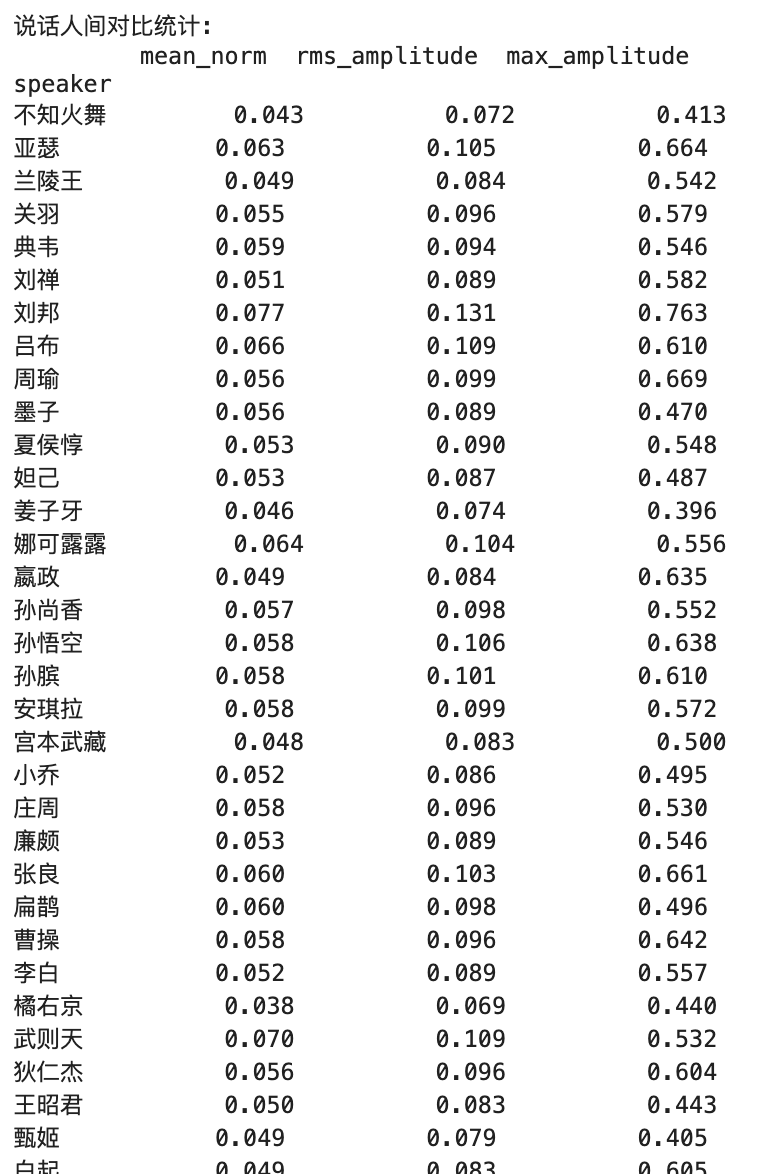
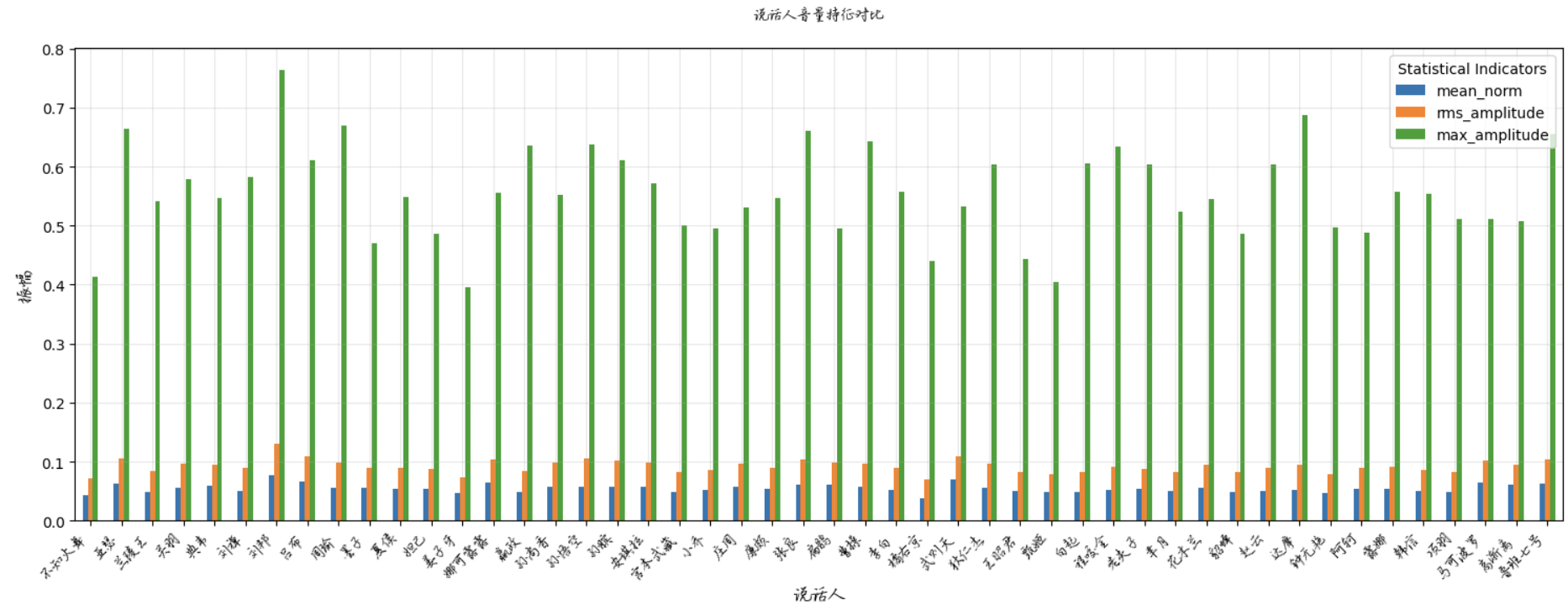
Key Metrics Explanation:
1. Mean Norm
- Practical Significance:
- Reflects overall loudness level of audio
- Represents average absolute amplitude of audio signal
- Value range typically between 0-1
- Value Meaning:
- Higher value = Louder overall perception
- Lower value = Softer overall perception
- Ideal range typically between 0.1-0.3
- Application Scenarios:
- Used to evaluate if overall loudness is appropriate
- Helps determine if volume gain is needed
2. RMS Amplitude
- Practical Significance:
- Reflects effective energy level of audio
- Closer to human ear's perception of loudness
- Considers energy distribution over time
- Value Meaning:
- Higher value = Stronger audio energy
- Lower value = Weaker audio energy
- Professional audio typically recommended between 0.1-0.4
- Application Scenarios:
- Evaluate audio dynamic range
- Determine if audio needs compression or expansion
- Commonly used in audio normalization
3. Max Amplitude
- Practical Significance:
- Reflects peak levels in audio
- Represents maximum instantaneous value of signal
- Used to determine if clipping exists
- Value Meaning:
- 1.0 = Maximum possible value for digital audio (potential clipping)
- Recommended peak control below 0.9
- Too low (e.g., <0.5) indicates audio might be too soft
- Application Scenarios:
- Detect audio distortion
- Evaluate audio headroom
- Guide limiter settings
Relationship Between the Three
-
Hierarchical Relationship:
- Max Amplitude > RMS Amplitude > Mean Norm
- This is due to their different calculation methods
-
Practical Application:
- Mean Norm: Used for overall volume assessment
- RMS: Used for energy level control
- Max Amplitude: Used for peak control
Reference Ideal Values
- Professional Audio Production Reference Values:
- Mean Norm: 0.1-0.3
- RMS: 0.1-0.4
- Max Amplitude: 0.8-0.9
Usage Recommendations
- First check Max Amplitude to avoid clipping
- Use RMS to ensure overall energy is appropriate
- Reference Mean Norm to adjust overall volume
- Consider all three indicators in context of specific application
These indicators work together to help us:
- Ensure audio quality
- Maintain volume consistency
- Avoid distortion and noise
- Optimize listening experience
2. Audio Normalization
Key features of this solution:
- Uses sox's norm effect for audio normalization
- Can process single files or batch process entire directories
- Defaults to normalizing volume to -3dB, adjustable as needed
- Maintains original audio quality, only adjusts volume
Usage is simple:
- For single file: directly call normalize_audio() function
- For entire directory: use batch_normalize_directory() function
The processed audio files should have more uniform volume levels, solving the issue of inconsistent loudness. If overall volume still feels too low or high, adjust the target_db parameter.
from tts_audio_normalizer import AudioProcessingParams, TTSAudioNormalizer

# Create parameter object and customize parameters
params = AudioProcessingParams()
params.noise_reduction_strength = 0.8  # Increase noise reduction intensity
params.target_db = -3  # Set target volume

# Process single file
#normalizer.normalize_audio("input.wav", "output.wav", params)

# Batch process directory
normalizer.batch_normalize_directory(
    input_dir = "./audio_segments",
    output_dir = "./audio_segments_normalized",
    params=params,
    max_workers=4
)
Parameter Configuration Guide
1. Basic Parameters
# Basic format settings
rate: int = 44100            # Sample rate
channels: int = 1            # Number of channels
output_format: str = 'wav'   # Output format
target_db: float = -3.0      # Target volume
2. Sound Quality Optimization Parameters
# Equalizer settings
equalizer_enabled: bool = True    # Enable equalizer
treble_frequency: float = 3000.0  # Treble center (2-8kHz)
mid_frequency: float = 1000.0     # Mid center (250Hz-2kHz)
bass_frequency: float = 100.0     # Bass center (80-250Hz)
3. Noise Reduction Parameters
# Noise processing
subsonic_filter_enabled: bool = True  # Subsonic filtering
compression_ratio: float = 2.5        # Compression ratio
threshold_db: float = -15.0          # Noise threshold
Scene Optimization Recommendations
1. Voice Type Adaptation
| Voice Type |
Recommended Parameters |
| Male |
bass_gain=2.0, mid_frequency=1200Hz |
| Female |
treble_gain=1.5, bass_gain=1.5 |
| Child |
mid_gain=1.5, bass_gain=1.0 |
2. Limiter Configuration
| Compression Level |
Parameter Combination |
| Mild Compression |
threshold_db=-20, ratio=2, attack=0.3s |
| Medium Compression |
threshold_db=-25, ratio=3, attack=0.2s |
| Heavy Compression |
threshold_db=-30, ratio=4, attack=0.1s |
3. Equalizer Configuration
| Sound Quality Goal |
Parameter Combination |
| Voice Enhancement |
treble=2.0, bass=1.0 |
| Clarity Boost |
treble=3.0, bass=-1.0 |
| Warm Tone |
treble=-1.0, bass=2.0 |
Usage Precautions
- Audio Feature Protection
- Avoid over-processing leading to distortion
- Maintain phoneme boundary clarity
- Preserve natural speech prosody
- Dataset Adaptation
- Adjust parameters based on speaker characteristics
- Consider recording environment factors
- Maintain processing consistency
- Quality Control
- Regularly check processing effects
- Monitor abnormal samples
- Adjust parameters timely
Best Practice Workflow
- Perform audio analysis first
- Select parameters based on analysis report
- Test process effects on small batch
- Adjust and optimize parameter configuration
- Execute batch normalization processing
- Verify processing result quality
Through proper configuration and use of this tool, you can significantly improve TTS training data quality, providing better foundation data support for model training.
Contact Information
Wechat








