ai_trailer
1.0.0

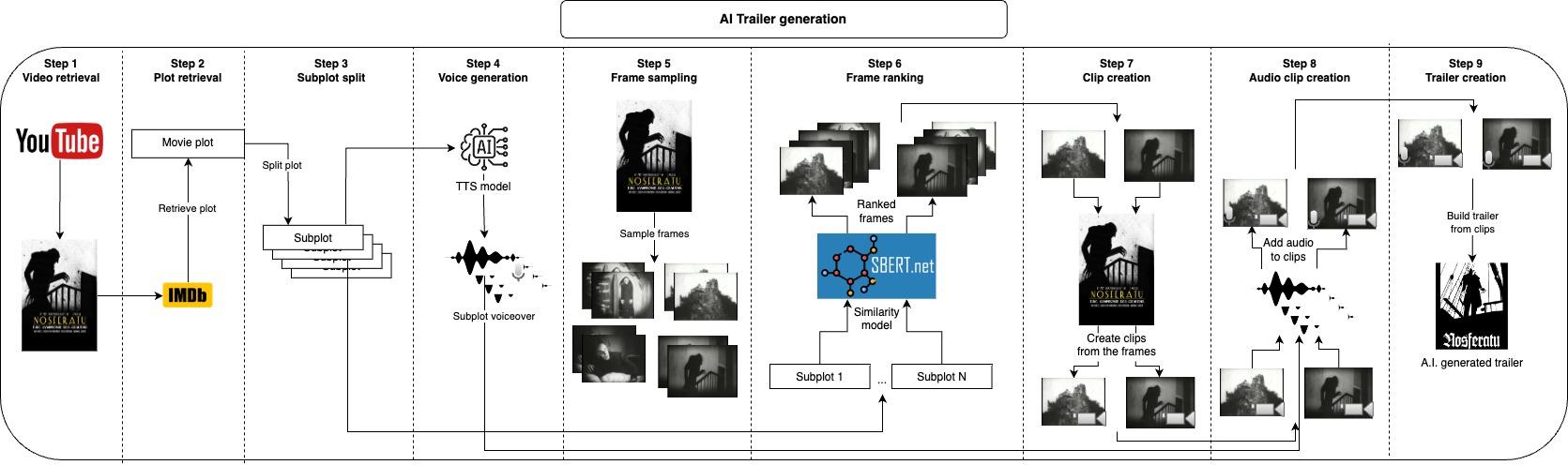
The idea of this repository is to automatically generate a number of trailer candidates for a given video, the user only needs to provide the video file and a couple of text parameters, and everything else is taken care.
First, we optionally take the video's plot at IMDB and split it into subplots, instead of taking at from IMDB you could also provide your own plot or modify it, those subplots will roughly describe the main parts of the video, and next, we generate a voice for each subplot. Now that we have the spoken part of the trailer we just need to take short clips corresponding to each subplot and apply the voice over them, we do this by sampling many frames from the video and taking some of the most similar frames to each subplot, with this we have the images that best represent each subplot, the next step would be to take a clip of a few seconds starting from each frame. After generating the audio and visual part of the trailer we just need to combine each audio with the corresponding clip and finally join all clips together into the final trailer.
All of those steps will generate intermediate files that you can inspect and manually remove what you don't like to improve the results.
Note: with the default parameters, for each subplot only one audio and one clip will be generated thus creating only one trailer candidate. If you wish to create more trailer candidates or have more options of audios and clips to choose from, you can increase
n_audiosandn_retrieved_images, just keep in mind that the trailer candidates increase geometrically with this, forn_audios = 3andn_retrieved_images = 3you will have 9 (3**3) trailer candidates at the end.
The recommended approach to use this repository is with Docker, but you can also use a custom venv, just make sure to install all dependencies.
The user only needs to provide two inputs, the video file and the IMDB ID from that video.
After that you can go to the configs.yaml file and adjust the values accordingly, video_id will be the IMDB ID, and video_path should point to the video's file, you might also want to update project_name to your video's name and provide a reference voice with reference_voice_path.
Any movie's URL at IMDB will look like this "https://www.imdb.com/title/tt0063350", the ID will be the integer part after title/, in this case for "Night of the Living Dead" it would be 0063350, IMDB mainly has movie's informations but you can also find series' episodes and other videos.
project_dir: 'projects'
project_name: Natural_History_Museum
video_path: 'movies/Natural_History_Museum.mp4'
plot_filename: 'plot.txt'
video_retrieval:
  video_url: 'https://www.youtube.com/watch?v=fdcEKPS6tOQ'
plot_retrieval:
  video_id:
subplot:
  split_char:
voice:
  model_id: 'tts_models/multilingual/multi-dataset/xtts_v2'
  device: cpu
  reference_voice_path: 'voices/sample_voice.wav'
  tts_language: en
  n_audios: 1
frame_sampling:
  n_frames: 500
frame_ranking:
  model_id: 'clip-ViT-B-32'
  device: cpu
  n_retrieved_images: 1
  similarity_batch_size: 128
clip:
  min_clip_len: 3
audio_clip:
  clip_volume: 0.1
  voice_volume: 1.0
Build the Docker image
make buildRun the whole pipeline to create the trailer starting from a video and a plot
make trailerRun the whole pipeline to create the trailer starting from a video and retrieving the plot from IMDB
make trailer_imdbRun the whole pipeline to create the trailer starting from a plot and downloading the video from YouTube
make trailer_youtubeRun the whole pipeline to create the trailer downloading the video from YouTube and retrieving the plot from IMDB
make trailer_imdb_youtubeRun the video retrieval step
make video_retrievalRun the plot retrieval step
make plot_retrievalRun the subplot step
make subplotRun the voice step
make voiceRun the frame step (Frame sampling)
make frameRun the image_retrieval step (Frame ranking)
make image_retrievalRun the clip step
make clipRun the audio_clip step
make audio_clipRun the join_clip step
make join_clipApply lint and formatting to the code (only needed for development)
make lintFor development make sure to install requirements-dev.txt and run make lint to maintain the the coding style.
By default I am using XTTS from Coqui AI the model is under the Coqui Public Model License make sure to take a look there if you plan to use the outputs here.





