winesapOS
4.2.0 - The Ventoy Update

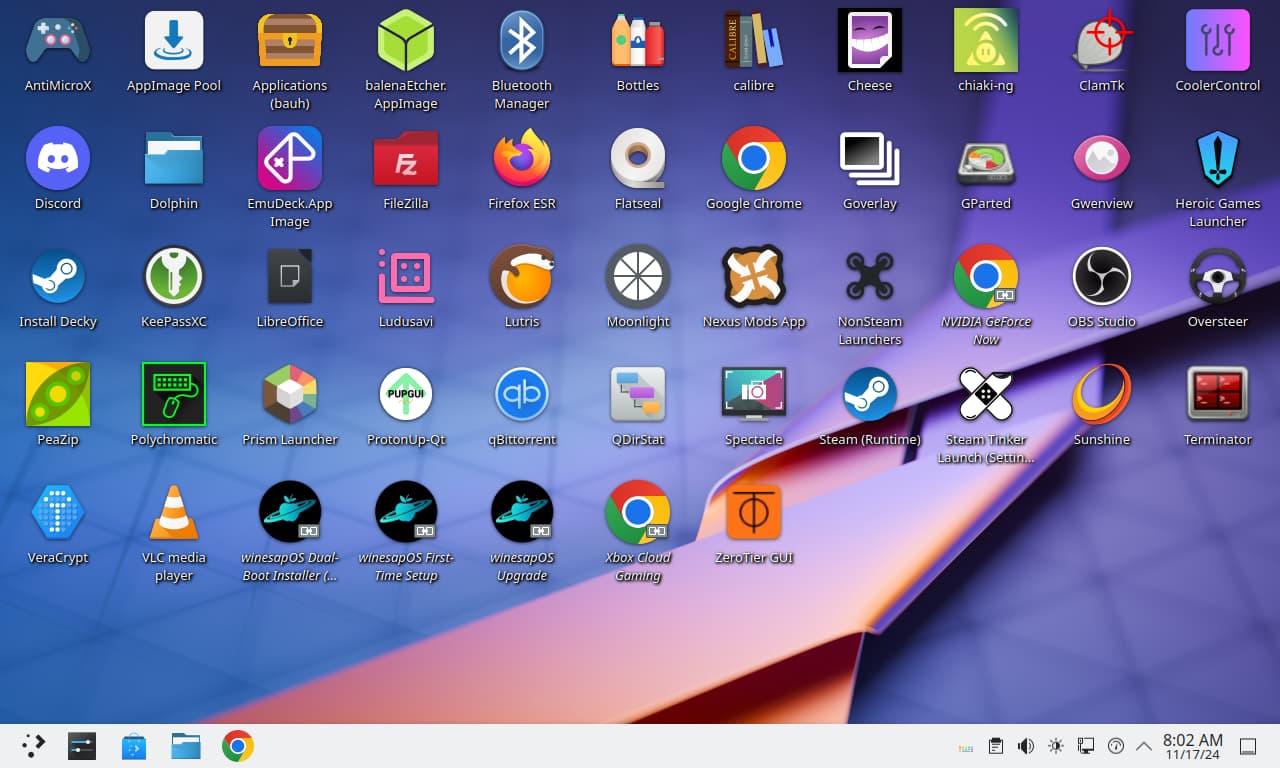
يجعل Winesapos من السهل إعداد Linux وتشغيل الألعاب من محرك أقراص داخلي أو محمول.
لماذا تستخدم winesapos؟
يمكن تنزيل صور الإصدار هنا.
أهداف المشروع:
تريد المساعدة في دعم عملنا؟ فكر في المساعدة في مشكلات المفتوحة والخلل في GitHub. يوفر دليلنا المساهمين.
جدول المحتويات
هذه هي الأسباب التي تجعل MacOS أقل شأناً مقارنة بـ Linux عندما يتعلق الأمر بالألعاب.
noatime و nodiratime لعدم كتابة أوقات الوصول للملفات والأدلة./tmp/ ، /var/log/ ، و /var/tmp/ ) كنظم ملفات RAM فقط./home/ Directory.pacman .يتم دعم جميع أجهزة Mac Intel. يعمل Linux على معظم أجهزة Mac خارج الصندوق هذه الأيام. يتم تثبيت السائقين مسبقًا للأجهزة الأحدث حيث يكون دعم Linux الأصلي مفقودًا.
للتثبيت على محرك أقراص داخلي ، يجب تثبيت WinesApos كطعام مزدوج إلى جانب MacOS. لن يعمل كنظام التشغيل المثبت الوحيد على Intel Mac.
| الأجهزة | مدعوم | سائق (سائق) الطرف الثالث |
|---|---|---|
| لوحة المفاتيح | نعم | بقع Linux-T2 |
| لوحة اللمس | نعم | بقع Linux-T2 |
| NVME | نعم | بقع Linux-T2 |
| صوت | نعم | بقع Linux-T2 و Apple-T2-Audio-Config |
| المشجعين | نعم | MBPFAN |
| بلوتوث | نعم | تصحيحات Linux-T2 و Apple-BCM-Firmware |
| Wi-Fi | نعم | Broadcom-WL و Apple-BCM-Firmware |
| الماسح الضوئي لبصمات الأصابع | لا | |
| شريط اللمس | نعم | بقع Linux-T2 |
ملاحظات حول دعم Bluetooth و Wi-Fi إذا لم يكن يعمل خارج الصندوق:
| الأجهزة | مدعوم | سائق (سائق) الطرف الثالث |
|---|---|---|
| لوحة المفاتيح | نعم | ASUSCTL |
| لوحة اللمس | نعم | |
| NVME | نعم | |
| صوت | نعم | Linux-Firmware-Asus |
| المشجعين | نعم | ASUSCTL |
| بلوتوث | نعم | |
| Wi-Fi | نعم | |
| الماسح الضوئي لبصمات الأصابع | لا |
نحن نقدم الدعم لكل من Asus Rog Ally الأصلي وأحدث Asus Rog Ally X.
| الأجهزة | مدعوم | سائق (سائق) الطرف الثالث |
|---|---|---|
| وحدة تحكم | نعم | بقع Linux-Nobara |
| NVME | نعم | |
| صوت | نعم | بقع Linux-Nobara |
| المشجعين | نعم | |
| بلوتوث | نعم | |
| Wi-Fi | نعم | |
| الماسح الضوئي لبصمات الأصابع | لا |
| الأجهزة | مدعوم | سائق (سائق) الطرف الثالث |
|---|---|---|
| وحدة تحكم | نعم | Ayaneo-platform-dkms-git و heyaled |
| NVME | نعم | |
| صوت | نعم | AW87559-Firmware |
| المشجعين | نعم | |
| بلوتوث | نعم | |
| Wi-Fi | نعم | |
| الماسح الضوئي لبصمات الأصابع | لا |
جميع أجهزة الكمبيوتر الإطارية مدعومة بالكامل.
| الأجهزة | مدعوم | ملحوظات |
|---|---|---|
| لوحة المفاتيح | نعم | |
| لوحة اللمس | نعم | تمت إضافة Quirk إلى تعطيل عندما تكون لوحة المفاتيح قيد الاستخدام |
| NVME | نعم | تم تمكين وضع توفير الطاقة لدعم النوم العميق |
| صوت | نعم | إطار عمل -DSP المستخدم لتحسين جودة الصوت |
| المشجعين | نعم | |
| بلوتوث | نعم | |
| Wi-Fi | نعم | تم تعيين المنطقة تلقائيًا لتمكين Wi-Fi> = 5 |
| الماسح الضوئي لبصمات الأصابع | نعم | |
| مصفوفة LED | نعم | التحكم في المدخلات المستخدمة لإدارة مصفوفة LED |
بالنسبة لجهاز الإطار المحمول 16 ، يجب تمكين دعم الصوت لـ Linux في BIOS.
| الأجهزة | مدعوم | سائق (سائق) الطرف الثالث |
|---|---|---|
| وحدة تحكم | نعم | |
| NVME | نعم | |
| صوت | نعم | |
| المشجعين | نعم | |
| بلوتوث | نعم | بقع Linux-Nobara |
| Wi-Fi | نعم | |
| الماسح الضوئي لبصمات الأصابع | لا |
| الأجهزة | مدعوم | سائق (سائق) الطرف الثالث |
|---|---|---|
| لوحة المفاتيح | نعم | Linux-Surface Pathces |
| لوحة اللمس | نعم | |
| NVME | نعم | |
| صوت | نعم | بقع Linux-Surface |
| المشجعين | نعم | بقع Linux-Surface |
| بلوتوث | نعم | بقع Linux-Surface |
| Wi-Fi | نعم | بقع Linux-Surface |
| الماسح الضوئي لبصمات الأصابع | لا | |
| الشاشة التي تعمل باللمس | نعم | IPTSD و Libwacom-Surface و Linux-Surface Patches |
| الأجهزة | مدعوم | سائق (سائق) الطرف الثالث |
|---|---|---|
| وحدة تحكم | نعم | |
| NVME | نعم | |
| صوت | نعم | |
| المشجعين | نعم | |
| بلوتوث | نعم | |
| Wi-Fi | نعم | |
| الماسح الضوئي لبصمات الأصابع | لا |
يتم دعم كل من نماذج Steam Deck LCD و OLED بالكامل.
| الأجهزة | مدعوم | سائق (سائق) الطرف الثالث |
|---|---|---|
| وحدة تحكم | نعم | |
| لوحة اللمس | نعم | |
| NVME | نعم | |
| صوت | نعم | بقع Linux-Nobara وصمام Linux-Firmware |
| المشجعين | نعم | |
| بلوتوث | نعم | بقع Linux-Nobara وصمام Linux-Firmware |
| Wi-Fi | نعم | بقع Linux-Nobara وصمام Linux-Firmware |
| الشاشة التي تعمل باللمس | نعم |
نحن نعمل بنشاط إلى جانب مشاريع نظام التشغيل هذه للمساعدة في توفير دعم ألعاب Linux الأوسع للجماهير:
اعتبارًا من Winesapos 3.1.0 ، نوفر الآن مستودعنا الخاص مع بعض حزم AUR تم إنشاؤها مسبقًا. يعمل هذا المستودع على Arch Linux و Manjaro. يتم تمكينه على Winesapos افتراضيًا. اعتمادًا على التوزيع الذي تقوم به ، إليك كيفية تمكينه:
 sudo sed -i s'/[core]/[winesapos]nServer = https://winesapos.lukeshort.cloud/repo/$repo/$archnn[core]/'g /etc/pacman.conf
sudo pacman -S -y -y
قم بتمكين مفتاح GPG لاستخدامه عن طريق استيراده ثم التوقيع محليًا على مفتاح الثقة به.
 sudo pacman-key --recv-keys 1805E886BECCCEA99EDF55F081CA29E4A4B01239
sudo pacman-key --init
sudo pacman-key --lsign-key 1805E886BECCCEA99EDF55F081CA29E4A4B01239
| سمات | Steamos 3 | Winesapos 4 |
|---|---|---|
| مستودعات Steamos | نعم | لا |
| حزم قوس لينكس | قديم | جديد |
| توافق الحذاء | UEFI | UEFI و Legacy BIOS |
| برامج تشغيل الرسومات | AMD | AMD و Intel و Nvidia و Parallels و VirtualBox و VMware |
| خادم الصوت | pipewire | pipewire |
| نظام الملفات للقراءة فقط | نعم | لا |
| نظام الملفات المشفر | لا | نعم (صورة آمنة) |
| نوع النسخ الاحتياطي لنظام الملفات | أقسام A/B. | لقطات BTRFS |
| عدد النسخ الاحتياطية لنظام الملفات المحتملة | 1 | غير محدود |
| مديرو الحزم (CLI) | flatpak و nix | Pacman و Paru/Yay/Aur و Flatpak و Homebrew و Nix و Snap |
| مدير الحزمة المفضل (CLI) | Flatpak | Flatpak |
| مديرو الحزم (واجهة المستخدم الرسومية) | اكتشف (flatpak) | Discover (Flatpak) ، Bauh (Pacman ، Paru/Yay/Aur ، Flatpak ، and Snap) ، و AppimagePool (appimage) |
| نوع التحديث | قائم على الصور | مدير الحزمة |
| عدد الحزم المثبتة | صغير | صغيرة (صورة مقلدة) أو كبيرة (الأداء والصور الآمنة) |
| قاذفات اللعبة | بخار | Steam و Heroic Games Launcher و Lutris و Nvidia Geforce Now و Open Gamepad UI و Prism Launcher و Xbox Cloud Gaming |
| نواة لينكس | نبتون (6.5) | Linux LTS (6.6) و Linux Nobara (الأحدث) |
| سائقي Apple Intel Mac إضافي | لا | نعم |
| سائقي الكمبيوتر المحمول ASUS إضافيين | لا | نعم |
| سائقي Asus Rog Ally المحمول الإضافية | لا | نعم |
| سائقي Ayaneo إضافية محمولة | لا | نعم |
| سائقي كمبيوتر إطار إضافي | لا | نعم |
| Lenovo Legion إضافية سائقي محمولة | لا | نعم |
| سائقي كمبيوتر محمول إضافي من Microsoft Surface | لا | نعم |
| OneXplayer إضافية برامج تشغيل محمولة | لا | نعم |
| بيئة سطح المكتب | KDE Plasma 5 | KDE Plasma 6 |
| موضوع سطح المكتب | بخار | نسيم |
| AMD FSR | عالمي | عالمي |
| GamesCope | عالمي | عالمي |
| خمر | بروتون | البروتون و GE-Proton |
| دعم وحدة التحكم في اللعبة | كبير | كبير |
| exfat تخزين منصة منصة | لا | نعم (16 gib على الأداء والصور الآمنة) |
كان Winesapos 3 أول توزيع Linux يعتمد على Steamos 3. تاريخياً ، إليك أول شوكات من Steamos 3:
| توزيعة | المعاينة الأولى | أول إصدار عام |
|---|---|---|
| النبيذ | 2022-03-06 | 2022-03-10 |
| Steamos ل PS4 | 2022-03-09 | 2022-03-25 |
| هولويسو | 2022-04-21 | 2022-05-01 |
الحد الأدنى:
مُستَحسَن:
ملاحظة مهمة حول التخزين الخارجي!
كان أحد الأهداف التأسيسية لـ Winesapos هو أن يكون محمولًا. ومع ذلك ، فإن معظم محركات الأقراص الفلاش وبطاقات SD/TF بطيئة للغاية في تشغيل نظام تشغيل وتوفير تجربة جيدة. للحصول على أفضل تجربة ، استخدم واحدة من محركات الأقراص الفلاش الموصى بها ، أو USB-C> = 3.1 SSD ، أو محطة إرساء USB-C> = 3.2 أو مركز يتضمن فتحة محرك M.2 NVME.
يوفر Winesapos 3 أنواع صور مختلفة لتلبية الاحتياجات المتنوعة لمستخدمينا:
| ميزة | الحد الأدنى | أداء | يؤمن |
|---|---|---|---|
| تخفيف وحدة المعالجة المركزية | لا | لا | نعم |
| التشفير | لا | لا | نعم (لوك) |
| جدار الحماية | لا | لا | نعم (جدار الحماية) |
كلمة مرور root تتطلب إعادة التعيين | لا | لا | نعم |
| 16 GIB exfat تخزين المنصات | لا | نعم | نعم |
| صورة الإصدار مسبقًا | نعم | نعم | لا |
أرشيف نظام ملفات الجذر الحد الأدنى ( winesapos-${WINESAPOS_VERSION}-minimal-rootfs.tar.zst ) هو الملفات المستخرجة من الحد الأدنى من الصورة. يمكن استخدامه للحاويات أو تثبيت Winesapos في سيناريو Docker أو Podman أو Synal-Boot أو WSL 2.
إذا كنت تستخدم الصورة الآمنة ، فإن مفتاح تشفير Luks الافتراضي هو password يجب تغييرها بعد التمهيد الأول. لا تفعل ذلك قبل التمهيد الأول حيث يتم استخدام كلمة المرور الافتراضية لإلغاء قفل القسم لتوحيده لملء جهاز التخزين بأكمله. تغيير مفتاح تشفير Luks للقسم الخامس.
$ sudo cryptsetup luksChangeKey /dev/<DEVICE>5
كلمة مرور حساب المستخدم لـ winesap و root هي نفس اسم المستخدم. يتم تعيين المستخدم root على الانتهاء على الفور. عند تسجيل الدخول الأول ، سيُطلب منك إدخال كلمة مرور جديدة. إليك كيفية تغييره:
winesap .winesap مرة أخرى. يتم قفل حساب المستخدم root حتى يتم تغيير كلمة المرور. يوصى بتغيير هذا على الفور للسماح بالشفاء للعمل.
$ sudo passwd root
winesapos-<VERSION>-<TYPE>.img.zip أرشيف.على جهاز كمبيوتر أو ماك.
dd CLI لفلاش الصورة.مع صناديق جنوم على Linux.
$ qemu-img resize winesapos*.img +24G
مع موازية سطح المكتب على MacOS (Intel فقط).
 qemu-img convert -f raw -O vdi winesapos-<VERSION>-<TYPE>.img winesapos-<VERSION>-<TYPE>.vdi
prl_convert winesapos-<VERSION>-<TYPE>.vdi --allow-no-os --stand-alone-disk --dst=winesapos-<VERSION>-<TYPE>.hdd
مع Virtual Machine Manager على Linux.
$ qemu-img resize winesapos*.img +24G
/var/lib/libvirt/images/ .مع VirtualBox.
VBoxManage convertfromraw --format VDI winesapos-<VERSION>-<TYPE>.img winesapos-<VERSION>-<TYPE>.vdi
qemu-img convert -f raw -O vdi winesapos-<VERSION>-<TYPE>.img winesapos-<VERSION>-<TYPE>.vdi
مع VMware Fusion على MacOS (Intel فقط).
VBoxManage convertfromraw --format VMDK winesapos-<VERSION>-<TYPE>.img winesapos-<VERSION>-<TYPE>.vmdk
qemu-img convert -f raw -O vmdk winesapos-<VERSION>-<TYPE>.img winesapos-<VERSION>-<TYPE>.vmdk
مع محطة عمل VMware على Linux أو Windows.
الحسابات الافتراضية تحتوي على كلمة مرور تعكس اسم المستخدم:
| اسم المستخدم | كلمة المرور |
|---|---|
| النبيذ | النبيذ |
| جذر | جذر |
عند تسجيل الدخول الأول ، سيتم إطلاق معالج "Winesapos Lilre-Setup". سيساعد ذلك في إعداد برامج تشغيل الرسومات ، والمنطقة ، والمنطقة الزمنية ، وأكثر من ذلك. يوصى بشدة بإكمال هذا في الحذاء الأول. ثم أعد التشغيل قبل استخدام Winesapos لتوفير أفضل تجربة.
إذا كنت تستخدم الإعدادات الافتراضية الموصى بها للإعداد لأول مرة وبعد إعادة التشغيل ، اضغط على مفتاح Enter/Return (مفتاح اليمين السفلي على لوحة المفاتيح الظاهرية) على شاشة تسجيل الدخول لتسجيل الدخول بدون كلمة مرور.
بدلاً من استخدام إنشاء إصدار تم إصداره بالفعل ، قد يرغب المستخدمون المتقدمون في إنشاء بناء مخصص. هذا يتطلب فقط 1 gib من المساحة الحرة لتنزيل بيئة Live Arch Linux. كما يسمح باستخدام متغيرات البيئة لتكوين البناء بشكل مختلف عن بناء الإصدار الافتراضي.
قم بتنزيل وإعداد أحدث Arch Linux ISO على محرك أقراص فلاش يحتوي على 1 جيجابايت على الأقل من التخزين.
1A. نحن ندعم أيضًا بناء Winesapos مع Manjaro على الرغم من أننا لا نقدم صور إصدار لذلك. قم بتنزيل إما البلازما أو القرفة أو طبعة سطح المكتب جنوم من Manjaro.
قم بالتمهيد في محرك الأقراص.
تحديث ذاكرة التخزين المؤقت الحزم المعروفة وتثبيت git.
 pacman -S -y
pacman -S git
استنساخ الفرع المستقر وانتقل إلى دليل "النصوص".
 git clone --branch stable https://github.com/winesapos/winesapos.git
cd ./winesapos/scripts/
تكوين متغيرات البيئة لتخصيص البناء. على الأقل ، اسمح للبناء بالعمل على الجهاز العاري المعدني وتحديد ما /dev/<DEVICE> block Device للتثبيت. كن حذرًا لأن هذا سيحذف جميع البيانات الموجودة على هذا الجهاز!
 export WINESAPOS_BUILD_IN_VM_ONLY=false
lsblk
export WINESAPOS_DEVICE=<DEVICE>
بشكل افتراضي ، سيتم بناء صورة الأداء. بدلاً من ذلك ، مصدر متغيرات البيئة لتكوين البناء لجعل الصورة الدنيا أو الآمنة بدلاً من ذلك.
. ./env/winesapos-env-minimal.sh
. ./env/winesapos-env-secure.sh
تشغيل البناء.
sudo -E bash ./winesapos-install.sh
تحقق من أي فشل اختبار (يجب ألا يكون هناك إخراج من هذا الأمر).
grep -P 'FAIL$' /winesapos/etc/winesapos/winesapos-install.log
لمزيد من المعلومات التفصيلية حول عملية الإنشاء ، نوصي بقراءة دليل المساهمة بالكامل.
قم بتكوين إصدار Winesapos للتنزيل ومحرك الحاوية للاستخدام.
 export WINESAPOS_VERSION="4.1.0"
#export WINESAPOS_CONTAINER_ENGINE="docker"
export WINESAPOS_CONTAINER_ENGINE="podman"
قم بتنزيل نظام ملفات الجذر وإلغاء الضغط عليه ثم استيراده. تدعم معظم محركات الحاويات ضغط GZIP فقط (وليس Zstandard).
 curl -LO https://winesapos.lukeshort.cloud/repo/iso/winesapos-${WINESAPOS_VERSION}/winesapos-${WINESAPOS_VERSION}-minimal-rootfs.tar.zst
zstd --decompress winesapos-${WINESAPOS_VERSION}-minimal-rootfs.tar.zst
${WINESAPOS_CONTAINER_ENGINE} import winesapos-${WINESAPOS_VERSION}-minimal-rootfs.tar winesapos:${WINESAPOS_VERSION}
تحقق من استيراد صورة الحاوية.
 ${WINESAPOS_CONTAINER_ENGINE} images | grep winesapos
# Example output: winesapos                        4.1.0     23b9bb5f1c26   26 seconds ago   8.79GB
اعتبارًا من Winesapos 4.1.0 ، يتم دعمه لتشغيله كآلة افتراضية على Windows> = 10 باستخدام WSL 2.
تثبيت WSL 2.
قم بتنزيل نص Winesapos-WSL.PS1.
Open PowerShell وانتقل إلى الموقع الذي تم تنزيله.
السماح وتشغيل السيناريو PowerShell.
PS C:UsersuserDownloads> powershell -ExecutionPolicy Bypass -File .winesapos-wsl.ps1
تحقق من ظهور جهاز افتراضي جديد "winesapos".
PS C:UsersuserDownloads> wsl --list
أدخل الجهاز الظاهري.
PS C:UsersuserDownloads> wsl --distribution winesapOS
تحقق من أنه winesapos.
cat /usr/lib/os-release-winesapos
| اسم المستخدم | كلمة المرور |
|---|---|
| جذر | جذر |
| النبيذ | النبيذ |
على الصورة الآمنة ، يكون مفتاح تشفير Luks هو password . يجب تغيير كلمة المرور لـ Luks وحساب root على الفور.
 $ sudo cryptsetup luksChangeKey /dev/<DEVICE>5
$ sudo passwd root
قم بتشغيل MAC في محرك أقراص خارجي عن طريق الضغط على زر الطاقة وإطلاقه. ثم اضغط على مفتاح OPTION (أو مفتاح ALT على لوحة مفاتيح Windows) للوصول إلى Mac Bootloader. حدد جهاز "EFI Boot".
من المهم أي جهاز Mac مع شريحة أمان Apple T2 ، والتي تحتوي على جميع أجهزة Macs في عام 2018 وبعدها ، إلى السماح بالتمهيد من التخزين الخارجي:
COMMAND على الفور و r Keys للدخول إلى وضع الاسترداد.shutdown /s /f /t 0 .اعتبارًا من Winesapos 4.2.0 ، يتم دعم Ventoy. إنه يعمل فقط مع UEFI Boot (وليس BIOS BOOS Legacy). لا يعمل البرنامج النصي لنظام ملفات ROTION WINESAPOS حاليًا مع Ventoy ، لذا يعد هذا مفيدًا للغاية لأغراض الاسترداد واستكشاف الأخطاء وإصلاحها.
winesapos.vtoy .يوصى باتباع دليل البدء لتثبيت Winesapos على محرك الأقراص الداخلي الخاص به إذا استخدمت أيضًا Linux أو Windows. ثم استخدم Bios اللوحة الأم لتغيير جهاز التمهيد. بالنسبة إلى MacOS ، فإن الطريقة الوحيدة لتثبيته على محرك الأقراص الداخلي هي عن طريق الضعف المزدوج.
ومع ذلك ، من الممكن تثبيت Winesapos على نفس محرك الأقراص مثل Linux أو Windows. هذا ما سيغطيه هذا الدليل بمزيد من التفصيل.
يتم دعم UEFI فقط للتركيبات المزدوجة من Winesapos. بالنسبة إلى BIOS Boos Legacy ، قم بإنشاء صورة تحرير محمولة عادية مثل الحد الأدنى أو الأداء. كل هؤلاء يدعمون كل من BIOS Boot Legacy و UEFI.
تثبيت (إذا لزم الأمر) MacOS أو Windows أولاً. ثم تابع تثبيت Winesapos على نفس محرك الأقراص.
يتم دعم فقط Intel Macs.
command ومفاتيح r حتى يظهر شعار Apple. ثم ترك هذين المفتاحين.csrutil disable لتعطيل SIP.refind-bin-<VERSION>.zip ../refind-install .خطوات شبه آلية:
اتبع دليل البدء في Winesapos للحصول على الحد الأدنى من الصورة على محرك أقراص خارجي.
التمهيد في النبيذ على محرك الأقراص الخارجي.
استخدم gparted لتقسيم مساحة التخزين المجانية. يتم احتساب الملصقات بالرقم صفر "0" (وليس الحرف "O").
قم بتشغيل "Winesapos Dual-Boot Installer (Beta)" اختصار سطح المكتب.
قم بإيقاف تشغيل الكمبيوتر ، وقم بفصل محرك النبيذ الخارجي ، ثم قم بتشغيل الكمبيوتر.
السماح بتمهيد نظام التشغيل الأصلي مرة أخرى.
command أثناء التشغيل. بمجرد التمهيد في MacOS ، قم بتشغيل ./refind-mkdefault (يتطلب تثبيت XCODE). # Enable os-prober. It is disabled by default.
sudo crudini --ini-options=nospace --set /etc/default/grub "" GRUB_DISABLE_OS_PROBER false
sudo grub-mkconfig -o /boot/grub/grub.cfg
الخطوات اليدوية:
اتبع دليل البدء في Winesapos للحصول على الحد الأدنى من الصورة على محرك أقراص خارجي.
قم بتنزيل أحدث winesapos-${WINESAPOS_VERSION}-minimal-rootfs.tar.zst .
wos-drive .التمهيد في النبيذ على محرك الأقراص الخارجي.
استخدم gparted لتقسيم مساحة التخزين المجانية. يتم احتساب الملصقات بالرقم صفر "0" (وليس الحرف "O").
Mount the new partitions with winesapOS optimizaitons and features.
 # View hints about each partition.
$ lsblk
$ sudo mount -t btrfs -o subvol=/,compress-force=zstd:1,discard,noatime,nodiratime -L winesapos-root0 /mnt
$ sudo btrfs subvolume create /mnt/.snapshots
$ sudo btrfs subvolume create /mnt/home
$ sudo mount -t btrfs -o subvol=/home,compress-force=zstd:1,discard,noatime,nodiratime -L winesapos-root0 /mnt/home
$ sudo btrfs subvolume create /mnt/home/.snapshots
$ sudo btrfs subvolume create /mnt/swap
$ sudo mount -t btrfs -o subvol=/swap,compress-force=zstd:1,discard,noatime,nodiratime -L winesapos-root0 /mnt/swap
$ sudo mkdir /mnt/boot
$ sudo mount --label winesapos-boot0 /mnt/boot
$ sudo mkdir /mnt/boot/efi
# Mount the FAT32 EFI partition.
# On macOS, use the newly created EFI partition.
# On Windows, use the existing EFI partition. This is usually the first partition and 100 MiB in size.
$ sudo mount /dev/<DEVICE>1 /mnt/boot/efi
Extract the winesapOS root file system archive.
$ sudo tar --extract --keep-old-files --verbose --file /run/media/winesap/wos-drive/winesapos-${WINESAPOS_VERSION}-minimal-rootfs.tar.zst --directory /mnt/
Configure the bootloader.
 $ grep -v -P "winesapos|WOS" /mnt/etc/fstab | sudo tee /mnt/etc/fstab
$ genfstab -L /mnt | sudo tee -a /mnt/etc/fstab
$ sudo mount --rbind /dev /mnt/dev
$ sudo mount --rbind /sys /mnt/sys
$ sudo mount -t proc /proc /mnt/proc
$ sudo chroot /mnt grub-install --target=x86_64-efi --efi-directory=/boot/efi --bootloader-id=winesapOS
$ sudo chroot /mnt grub-mkconfig -o /boot/grub/grub.cfg
$ sudo chroot /mnt mkinitcpio -P
$ sudo sync
Turn off the computer, unplug the winesapOS external drive, and then turn on the computer.
Allow booting the original operating system again.
command while booting up. Once booted into macOS, run ./refind-mkdefault (requires Xcode to be installed). # Enable os-prober. It is disabled by default.
$ sudo crudini --ini-options=nospace --set /etc/default/grub "" GRUB_DISABLE_OS_PROBER false
$ sudo grub-mkconfig -o /boot/grub/grub.cfg
After logging in for the first time as the winesap user, the first-time setup for winesapOS will appear. Users have the option to manually select their choices or go with the recommended defaults below.
| يثبت | Recomended Default |
|---|---|
| Broadcom proprietary Wi-Fi driver | تلقائي |
| Rotate screen | لا |
| Older version of winesapOS | Stop and prompt user |
| Pacman mirror region | Automatic (GeoIP) |
| Graphics driver | Mesa |
| Swap method | zram |
| Time zone | Automatic (GeoIP) |
| Recommended producitvity apps | نعم |
| Recommended gaming apps | نعم |
| Passwordless login* | Yes (minimal and performance) and No (secure) |
| Hide GRUB boot menu | نعم |
| Upgrade firmware | نعم |
| Change user password | نعم |
| Change root password | نعم |
| لغة | بسأل |
*Press the enter/return key (the bottom-right key on the virtual keyboard) on the login screen for passwordless login.
Upgrades are supported and recommended between all minor releases of winesapOS. For example, it is supported to go from 3.0.0 to 3.2.1.
Where it makes sense, features are backported from newer versions of winesapOS. Bug and security fixes are also included to fix problems either with winesapOS itself or with upstream changes in Arch Linux. Even if a user never upgrades winesapOS, users will continue to get regular system upgrades from Arch Linux.
Before upgrading, please read the full UPGRADE.md notes. This showcases what updates will happen automatically and what updates may need to be manually applied.
Development builds do not support upgrades. Here are the releases that we do support upgrades on:
| يطلق | Upgrades Supported |
|---|---|
| مستقر | نعم |
| Release Candidate (RC) | نعم |
| بيتا | لا |
| ألفا | لا |
Here is how to upgrade winesapOS. Do NOT use "Applications (bauh)" for upgrades, only for package installations.
GUI = Launch the "winesapOS Upgrade" desktop shortcut.
CLI = Launch the winesapOS upgrade script from the stable branch.
curl https://raw.githubusercontent.com/winesapOS/winesapOS/stable/scripts/winesapos-upgrade.sh | sudo -E bash
Terminator . echo stick > /tmp/winesapos_user_name.txt
export WINESAPOS_UPGRADE_FILES=false
export WINESAPOS_UPGRADE_VERSION_CHECK=false
curl https://raw.githubusercontent.com/winesapOS/winesapOS/stable/scripts/winesapos-upgrade.sh | sudo -E bash
curl https://raw.githubusercontent.com/winesapOS/winesapOS/stable/scripts/winesapos-upgrade.sh | sudo -E bash
If desired, it is possible to remove winesapOS specific files and configuration and switch back to upstream Arch Linux using an uninstall script. It will not remove anything that is related to improved hardware compatibility.
curl https://raw.githubusercontent.com/winesapOS/winesapOS/stable/scripts/winesapos-uninstall.sh | sudo -E bash
It is possible to get an experience similar to winesapOS but on a different Linux distribution by installing applications that winesapOS provides.
What this conversion script does:
What it does NOT do:
Run this script to convert to winesapOS:
curl https://raw.githubusercontent.com/winesapOS/winesapOS/stable/scripts/winesapos-convert.sh | bash
Plug additional hardware into a USB hub. Connect the USB hub to the computer before booting.
Do NOT move the USB hub after plugging it in and booting up Linux. It can easily disconnect leading to a corrupt file system.
Consider buying an SSD instead of a flash drive for a longer life-span, more storage, and faster speeds.
Delete old Btrfs backups when the drive is running low on storage space.
 $ sudo snapper list
$ sudo snapper delete <SNAPSHOT_NUMBER>
Enable Proton for all Windows games. This will allow them to run in Linux. For more information about Proton, read this starter guide. Check the compatibility rating for games on Steam by using ProtonDB.
Settings > Steam Play > Enable Steam Play for Support Titles > Use this tool instead of game-specific selections from Steam > Compatibility tool: > (select the latest "Proton" version available) > OK
On the SDDM login screen for the "winesap" user, the "Session" drop-down menu in the top-left can be used to change the session from "Plasma (Wayland)" to "Steam Big Picture (Wayland)". This provides the same experience as having a Steam Deck in "Game Mode" by launching Steam with Gamescope Session.
Switch from Game Mode to Desktop Mode:
القضايا المعروفة:
Alternatively, Steam can be launched from KDE Plasma using the "Steam (Runtime)" desktop shortcut. Then it can be changed to be in the new Big Picture Mode.
There is also a session for Open Gamepad UI as an open source alternative front-end. Select the "OpenGamepadUI (Wayland)" session on the SDDM login screen. It has plugins for Steam, Lutris, and more.
When Mac hardware is detected, all sound is muted on boot because, on newer Macs, the experimental sound driver is extremely loud. This means that any volume changes will be reset on the next boot. Disable and stop the user (not system) mute service to allow the sound volume to be saved:
systemctl --user disable --now winesapos-mute.service
Snapper creates 6 monthly snapshots of the /home directory. snap-pac creates a snapshot of the root / directory before and after using pacman . Both the root and home configurations are set to only use a maximum of 50 GiB each.
During boot, GRUB will have a "winesapOS snapshots" section that will allow booting from a root directory snapshot. This will not appear on first boot because no backups have been taken yet. After a backup has been taken, the GRUB configuration file needs to be regenerated to scan for the new backups.
Manually rebuild the GRUB configuration file to load the latest snapshots:
$ sudo grub-mkconfig -o /boot/grub/grub.cfg
View the available backups:
 $ sudo snapper -c root list
$ sudo snapper -c home list
Manually create a new backup:
$ sudo snapper -c <CONFIG> create
Manually delete a backup:
$ sudo snapper -c <CONFIG> delete <BACKUP_NUMBER>
A VPN is required for LAN gaming online. Use the free and open source ZeroTier VPN service for this.
يستضيف
العملاء
Start the ZeroTier VPN service.
$ sudo systemctl enable --now zerotier-one
Connect to the ZeroTier network.
$ sudo zerotier-cli join <NETWORK_ID>
Challenge: the release image fails to be extracted from the zip file.
Solutions:
Verify the integrity of the downloaded zip files.
Linux:
sha512sum --check winesapos-<VERSION>-<TYPE>.sha512sum.txt
Windows (open Command Prompt as Administrator):
C:Windowssystem32>CertUtil.exe -hashfile C:Users<USER>Downloadswinesapos-<VERSION>-<TYPE>.sha512sum.txt SHA512
Not enough free space. Ensure you have 13 GiB (minimal image) or 31 GiB (performance image) of free space before downloading the zip files.
If using PeaZip, it sometimes fails to extract to the current directory. Try extracting to a different directory.
There are many different reasons why winesapOS may not be booting.
Challenge: the root file system does not resize itself to use all available space on the storage device.
حل:
Re-enable the resize service, reboot, and then view the service log. Open up a GitHub Issue with the full log output.
 sudo systemctl enable winesapos-resize-root-file-system
sudo reboot
sudo journalctl --unit winesapos-resize-root-file-system
If using an external USB drive, it is possible to get errors about a Read-only file system . This is a hardware issue and indicates that the USB drive has been disconnected even if only for a fraction of a second. Short-term, reboot winesapOS to fix these errors. Long-term, try using a different USB port and/or drive and make sure that the drive does not move while in use. For the best experience, we recommend using an internal drive.
Challenge: If Wi-Fi or Bluetooth is not working and Windows is installed, it could be from fast startup being enabled and/or Windows hibernating.
Solutions:
Challenge: the amount of reported free space seems too small or large.
Solutions:
Btrfs is used as the root file system on winesapOS. The most reliable way to view the amount of storage in-use on Btrfs is with this command.
sudo btrfs filesystem df /
Snapper is used to take Btrfs snapshots (1) every time Pacman installs, upgrades, or removes a package and (2) every month. Refer to the Btrfs Backups section for more information on how to manage those snapshots.
If the first-time setup fails or needs debugging, the last log file can be found and copied to the desktop by running these two commands:
 $ sudo cp "/etc/winesapos/$(sudo ls -1 /etc/winesapos/ | grep setup | tail -n 1)" /home/winesap/Desktop/
$ sudo chown winesap:winesap "/home/winesap/Desktop/$(ls -1 ~/Desktop/ | grep setup_)"
Challenge: winesapOS uses labels for file system mounts which confuses the system if more than one label is found.
حل:
Change the file system label of at least the root file system on one of the winesapOS drives. It is recommended to change all of the labels on that same drive. This can cause an unbootable system. Manually review the contents of /etc/fstab to ensure it is correct.
 # Labels can be changed on mounted file systems.
lsblk -o name,label
export DEVICE=vda
sudo -E exfatlabel /dev/${DEVICE}2 wos-drive0
sudo -E fatlabel /dev/${DEVICE}3 WOS-EFI0
sudo sed -i s'/LABEL=WOS-EFI/LABEL=WOS-EFI0/'g /etc/fstab
sudo -E e2label /dev/${DEVICE}4 winesapos-boot0
sudo sed -i s'/LABEL=winesapos-boot/LABEL=winesapos-boot0/'g /etc/fstab
sudo btrfs filesystem label / winesapos-root0
sudo btrfs filesystem show /
sudo sed -i s'/LABEL=winesapos-root/LABEL=winesapos-root0/'g /etc/fstab
lsblk -o name,label
 # GRUB needs to be updated with the new /etc/fstab information.
sudo chroot <MOUNTED_ROOT_AND_BOOT_DIRECTORY> grub-mkconfig -o /boot/grub/grub.cfg
التحديات:
حل:
At the GRUB boot menu select "winesapOS snapshots" and then the desired backup to load. The filesystem will be read-only by default. It can be set to enable writes with this command:
$ sudo btrfs property set -ts /.snapshots/<BTRFS_SNAPSHOT_ID> ro false
For more advanced recovery using overlayfs on-top of a read-only filesystem, refer to this grub-btrfs GitHub issue.
Reinstalling winesapOS on-top of an existing winesapOS installation of the same exact version and image type can cause issues. This is because the partitions are perfectly aligned which leads to overlapping data. Even wiping the partition table is not enough. For the best results, it is recommended to completely wipe at least the first 25 GiB of the storage device. WARNING: This will delete any existing data on that storage device.
dd if=/dev/zero of=/dev/<DEVICE> bs=1M count=25000
When using a portable device such as a laptop or gaming handheld, the operating system goes into a battery saver mode by default. This can be disabled to get maximum performance.
sudo systemctl disable --now auto-cpufreq
wine - sap - o - s .Here are community contributors who have helped the winesapOS project.
مؤسس:
شفرة:
مالي:
These are anonymous surveys done with Linux gaming community members. Most, but not all, are winesapOS users.
Favorite (non-Valve) handheld PC brand:
6 votes.
There were no comments about what the "Other" brand is so that is unknown.
https://twitter.com/LukeShortCloud/status/1649078025634598912
Favorite desktop environments:
25 votes.
"Other" included specific mentions from the community about Cinnamon (for its similarity to Windows) and Sway (for its tiling features).
https://twitter.com/LukeShortCloud/status/1659279345926516737
| Release Version/Tag | Project Name | نظام التشغيل | Desktop Environment | Release Images |
|---|---|---|---|---|
| 4.2.0 | winesapOS | Arch Linux | KDE Plasma | Performance, Minimal, and Minimal Root File System |
| 4.1.0 | winesapOS | Arch Linux | KDE Plasma | Performance, Secure, Minimal, and Minimal Root File System |
| 4.0.0 | winesapOS | Arch Linux | KDE Plasma | Performance, Secure, and Minimal |
| 3.2.0 | winesapOS | SteamOS 3 | KDE Plasma | Performance, Secure, and Minimal |
| 3.0.0 | winesapOS | SteamOS 3 | KDE Plasma | Performance and Secure |
| 2.2.0 | Mac Linux Gaming Stick | Manjaro | قرفة | Performance and Secure |
| 2.0.0 | Mac Linux Gaming Stick | Manjaro | قرفة | أداء |
| 1.0.0 | Mac Linux Gaming Stick | أوبونتو 20.04 | قرفة | لا أحد |
GPLV3





