samantha_ia
1.0.0

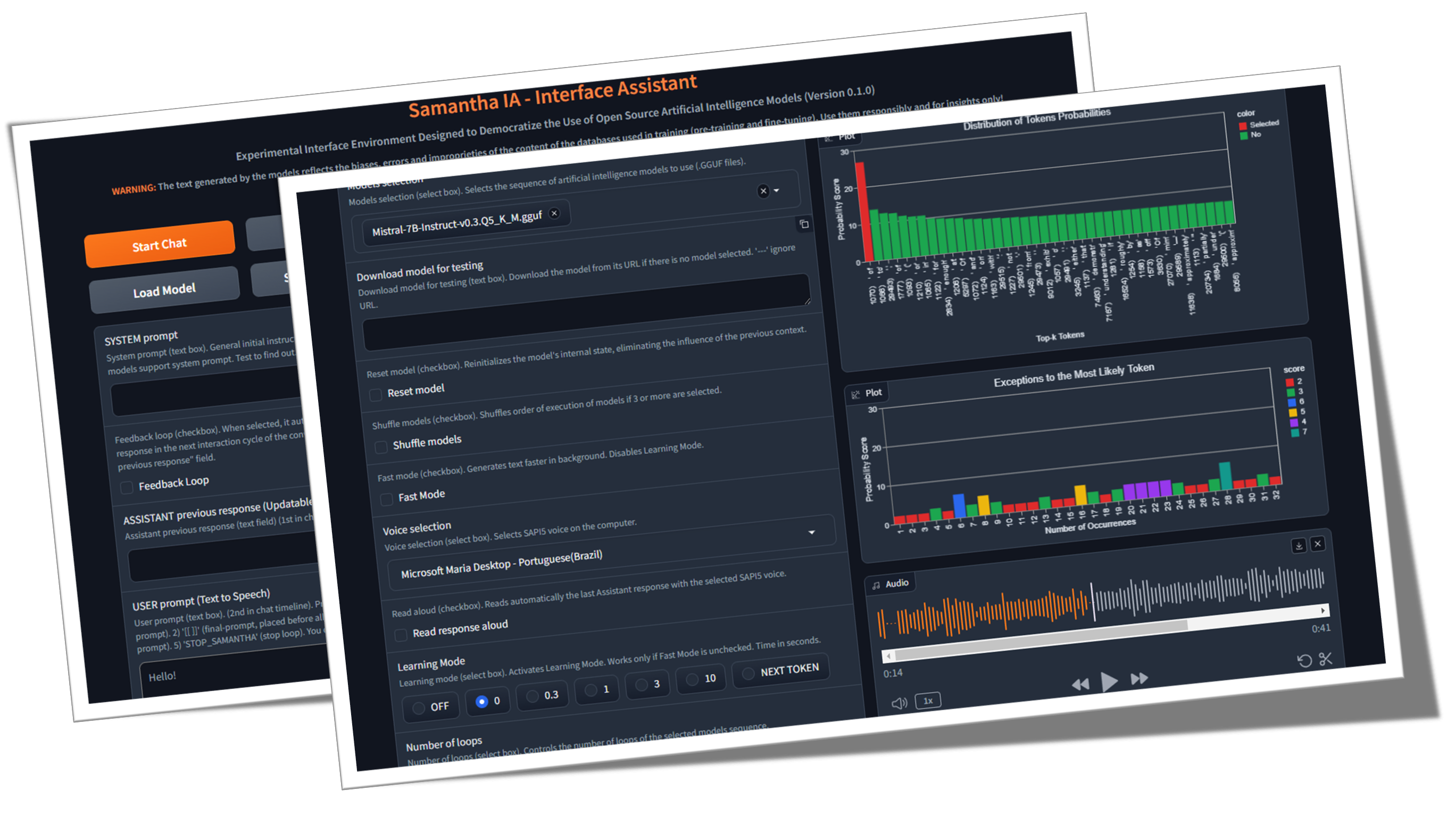
薩曼莎(Samantha)只是開源文本生成人工智能模型的簡單接口助理,該模型是根據開放科學原理(開放方法,開源,開放數據,開放式數據,開放式訪問,開放式同行評審和開放教育資源)和MIT使用許可證(無GPU)。該程序在本地運行LLM,免費和無限地運行,而無需Internet連接,除了下載GGEF模型(GGGUF代表GPT生成的統一格式),或者在執行由模型創建的代碼(GE下載數據集以下載數據集以進行數據分析的代碼)所需的情況下需要。它的目標是使人們對使用AI的使用進行民主化,並證明,使用適當的技術,即使是小型模型也能夠產生類似於大型響應的響應。她的任務是幫助探索(實際)開放AI模型的界限。
什麼是開源AI(opensource.org)
LLM尺寸重要嗎? (加里解釋)
人工智能論文(arxiv.org)
♀️薩曼莎(Samantha)是為了幫助行使公共行政的社會和機構控制的,考慮到人們令人擔憂的當前情況是增加公民對控制機構的信任的損失。它的功能允許任何有興趣探索開源人工智能模型(尤其是Python程序員和數據科學家)的人使用它。該項目起源於MPC-ES團隊開發一個系統,該系統將允許了解LLM模型生成代幣的過程。
♾️ The system allows the sequential loading of a list of prompts (prompt chaining) and models (model chaining), one model at a time to save memory, as well as the adjustment of their hyperparameters, allowing the response generated by the previous model to be feedbacked and analyzed by the subsequent model to generate the next response ( Feedback Loop feature), in an unlimited number of interaction cycles between LLMs without human intervention.模型可以與立即模型提供的答案進行交互,因此每個新響應都取代了上一個。您還可以僅使用一個模型,並在無限數量的文本生成周期中與先前響應進行交互。利用您的想像力結合模型,提示和功能!
該視頻顯示了通過鏈接模型和提示使用Samantha的副本和粘貼LLM功能提示的模型之間相互作用的示例。 Microsoft Phi 3.5和Google Gemma 2模型(由Bartowski)的量化版本挑戰,要回答有關Meta Llama 3.1模型(由NousResearch)創建的有關人性的問題。響應還通過元模型評估。
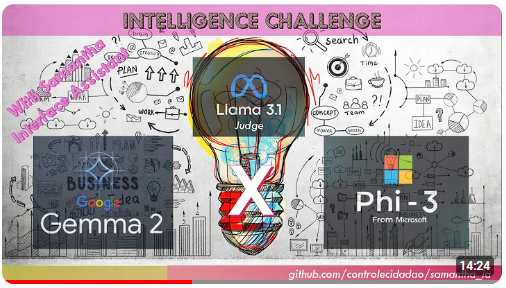
情報挑戰:Gemma 2 vs Phi 3.5與Llama 3.1擔任法官
?一些沒有使用薩曼莎(Samantha)的響應反饋循環功能的固定示例:
(model_1)響應(提示_1)x響應數:用於通過學習模式功能的確定性和隨機行為來分析模型的確定性和隨機行為,並通過隨機設置(視頻)生成多種不同的響應。
(model_1)響應(提示_1,提示_2,提示_n):用相同的模型(提示鏈)序列地執行倍數指令(視頻)。
(model_1,model_2,model_n)響應(提示_1):用於比較模型對同一單個提示的響應(模型鏈)。可用於比較不同模型以及同一模型的量化版本。
(model_1,model_2,model_n)響應(提示_1,提示_2,提示_n):用於比較模型的響應提示列表,並使用DISCTINCT模型(模型和提示鏈)執行一系列指令。每個型號都會響應所有提示。反過來,當使用每個模型功能的單個響應時,每個模型僅響應一個特定的提示。
?一些使用Samantha的響應反饋循環功能的固定示例:
(model_1)響應(提示_1)x響應數:用於使用相同模型的固定用戶指令改進或補充模型的先前響應,並使用單個模型(視頻)模擬2個AIS之間的無盡對話。
(model_1)響應(提示_1,提示_2,提示_n):用於通過倍增用戶指令使用相同的模型(提示鏈)來改善模型的先前響應。每個提示都用於完善或完成先前的響應,並執行取決於先前響應的一系列提示,例如使用增量編碼(視頻)執行探索性數據分析(EDA)。
(model_1,model_2,model_n)響應(提示_1):用於使用Disctinct模型(模型鏈)改進上一個模型的響應,並在不同模型之間生成對話框。
(model_1,model_2,model_n)響應(提示_1,提示_2,提示_n):用於使用Disctinct模型(模型和提示鏈)執行一系列指令和每個模型功能的單個響應。
這些模型和提示序列都可以通過循環功能的數量多次執行。
薩曼莎(Samantha)的封閉序列模板:
([[模型列表] - >響應 - >([用戶提示列表] x響應數))x循環數
但是什麼是GPT?變壓器的視覺介紹(3Blue1brown)
視覺解釋(3blue1brown)在變壓器中的注意
變壓器解釋器(PoloClub)
?提示和模型的測序可以通過分餾用戶輸入指令來產生長時間的響應。每個部分響應都適合模型訓練過程中定義的響應長度。
?作為AI模型之間自動自動交流的開源工具,Samantha Interface Assistant旨在探索具有自我完善反饋迴路的反向提示工程?該技術可以通過轉移到模型來根據用戶的初始不准確說明創建最終提示和相應響應的任務來幫助小型大型語言模型(LLM)生成更準確的響應,從而將中間層添加到及時的施工過程中。薩曼莎(Samantha)沒有隱藏的系統提示,就像專有型號一樣。所有說明均由用戶控制。請參閱擬人系統提示。
?得益於從訓練文本中提取的概括模式產生的緊急行為,並具有正確的提示和適當的超參數配置,即使是小型模型也可以產生巨大的響應!
人類物種的智能不是基於一個智能的存在,而是基於集體智慧。單獨地,我們實際上不是那麼聰明或有能力。我們的社會和經濟體係是基於擁有各種各樣的專業知識和專業知識的各種個人組成的機構。這種龐大的集體智能塑造了我們作為個人的身份,我們每個人都遵循自己的生活道路,成為獨特的個人,進而又助長了我們不斷擴大的集體智力作為一種物種的一部分。我們認為,人工智能的發展將遵循類似的集體道路。 AI的未來不會由一個單一的,巨大的,全知的人工智能係統組成,該系統需要巨大的能量來訓練,運行和維護,而是大量的小型AI系統 - 與他們自己的利基市場和專業相互互動,與彼此互動,與較新的AI系統相互交互,開發了以填補特定利基市場。不斷發展的新基礎模型:釋放自動化模型開發的力量-Sakana AI
?一小步:薩曼莎(Samantha)只是朝著未來的運動,在這個世界中,人工智能不是特權,而是一個在一個世界中,個人可以利用AI來提高其生產力,創造力和決策,而沒有障礙,走上民主AI的旅程,使其成為我們日常生活的良好力量的旅程。
?人工智能的工具性質:認識到人工智能的技術壟斷是可能的統治工具,而社會不平等的擴展則代表了歷史上這個變化點的挑戰。在文本生成過程中註意到較小模型的缺陷,有助於將它們與較大專有模型的完美進行比較,從而有助於這種理解。有必要在其適當的地方重新定位事物,並質疑浪漫的還原主義者對人類特徵的看法,例如智力(由Pareidolia的心理現象引起的擬人化(擬人化))。因此,必須通過與這種新穎的“單詞/令牌計算器”如何工作的教學方法來揭開人工智能的神秘化。當然,市場上人工創造的最初魅力的多巴胺無法承受幾百個令牌的產生(令牌是LLM用來理解和生成文本的基本文本構建塊的名稱。一個令牌可能是整個單詞或單詞的一部分)。
✏️文本生成注意事項:用戶應意識到,AI產生的響應是從對其大語言模型的培訓中得出的。 AI用於生成其輸出的確切源或過程無法精確引用或識別。 AI產生的內容不是來自特定來源的直接報價或彙編。取而代之的是,它反映了AI神經網絡在廣泛數據語料庫的培訓過程中學習和編碼的模式,統計關係和知識。響應是基於這種學識淵博的知識表示產生的,而不是從任何特定的原始材料中逐字檢索。儘管AI的培訓數據可能包括權威來源,但其輸出是其自身對學習的關聯和概念的綜合表達式。
目的:薩曼莎(Samantha)的主要目標是激發他人創建類似(肯定會更好的系統),並教育用戶對AI的利用。我們的目標是培養一個開發人員和愛好者社區,他們可以採用知識和工具來進一步創新並為開源AI領域做出貢獻。通過這樣做,旨在培養協作和共享文化的目的,以確保所有人都能獲得AI的好處,無論其技術背景或財務資源如何。人們認為,通過使更多的人能夠構建和理解AI應用程序,我們可以通過知情和多樣化的觀點共同推動進步並應對社會挑戰。讓我們一起塑造AI是人類積極而包容的力量的未來。
聯合國教科文組織的人工智能建議
OECD關於AI的工作,創新,生產力和技能的計劃
人力創新成本:儘管該系統旨在賦予用戶能力並民主化對AI的訪問,但要承認這項技術的道德含義至關重要。強大的AI系統的發展通常依賴於人工勞動的開發,尤其是在數據註釋和培訓過程中。這可以使現有的不平等現象永久化並創建新形式的數字鴻溝。作為AI的用戶,我們有責任意識到這些問題,並倡導行業內更公平的做法。通過支持道德AI發展並促進數據採購中的透明度,我們可以為所有人提供更具包容性和公平的未來。
como funciona o trabalho humano portrásdainteligência人造
AI技術世界的“現代奴隸”
其他來源
在巨人的肩膀上:特別感謝Georgi Gerganov和整個團隊在Llama.cpp上工作,以使所有這一切成為可能,以及Andrei Bleten的令人驚嘆的Python Bidings for Gerganov C ++圖書館(Llama-Cpp-Python)。
✅開源基金會:基於Llama.cpp / Llama-CPP-Python和Gradio,在MIT許可下,Samantha在標準計算機上運行,即使沒有專用的圖形處理單元(GPU)。
✅離線功能:薩曼莎(Samantha)獨立於Internet運行,僅需要連接到模型文件的初始下載或執行模型創建的代碼時需要的連接。這樣可以確保您的數據處理需求的隱私和安全性。您的敏感數據不會通過機密協議通過互聯網與公司共享。
✅無限制和自由使用:薩曼莎的開源性質允許無限制地使用,而無需任何費用或限制,使任何人,任何時候,任何人都可以使用它。
✅廣泛的模型選擇:通過訪問數千個基礎和微調的開源模型,用戶可以嘗試使用各種AI功能,每個功能都針對不同的任務和應用程序量身定制,從而可以鏈接最能滿足您需求的模型的順序。
✅複製和粘貼LLM:要嘗試一系列gguf模型,只需從任何擁抱的面部存儲庫中復制其下載鏈接並在Samantha內部粘貼即可立即按順序運行它們。
✅ Customizable Parameters: Users have control over model hyperparameters such as context window length ( n_ctx , max_tokens ), token sampling ( temperature , tfs_z , top-k , top-p , min_p , typical_p ), penalties ( presence_penalty , frequency_penalty , repeat_penalty ) and stop words ( stop ), allowing for responses that suit specific requirements, with deterministic or隨機行為。
✅隨機高參數調整:您可以測試超參數設置的隨機組合,並觀察它們對模型產生的響應的影響。
✅交互式體驗:薩曼莎(Samantha)的鏈接功能使用戶能夠通過鏈接提示和模型來生成無盡的文本,從而促進不同LLM之間的複雜互動而無需人工干預。
✅反饋循環:此功能使您可以捕獲模型生成的響應,並將其饋回對話的下一個週期中。
✅提示列表:您可以添加任意數量的提示(由$$$n或n分隔)來控制模型執行的指令序列。可以用預定義的提示序列導入TXT文件。
✅模型列表:您可以選擇任何數量的模型,並以任何順序控制哪個模型響應下一個提示。
✅累積響應:您可以通過將其添加到先前的響應中,以在模型生成下一個響應時考慮每個新響應。重要的是要強調,一組串聯響應必須適合模型上下文窗口。
✅學習見解:一種稱為學習模式的功能使用戶可以觀察模型的決策過程,從而提供有關其如何根據其概率分數(邏輯單位或僅邏輯)和超參數設置選擇輸出代幣的見解。還生成了最不可能選擇的令牌的列表。
✅語音互動:薩曼莎(Samantha)支持簡單的語音命令,其脫機語音到文本vosk(英語和葡萄牙語)以及帶有SAPI5聲音的文字到語音,使其易於訪問且用戶友好。
✅音頻反饋:該界面為用戶提供了可聽見的警報,並通過模型向文本生成階段的開始和結束髮出。
✅文檔處理:系統可以加載小的PDF和TXT文件。為了方便起見,可以通過TXT文件輸入鏈接用戶提示,系統提示和模型的URL列表。
✅通用文本輸入:提示插入的字段允許用戶有效與系統交互,包括系統提示,先前的模型響應和用戶提示,以指導模型的響應。
✅代碼集成:從模型響應中自動提取Python代碼塊,以及在孤立的虛擬環境中預裝的Jupyterlab集成開發環境(IDE),使用戶能夠快速運行生成的代碼以立即結果。
✅編輯,複製和運行Python代碼:系統允許用戶編輯由模型生成的代碼,並通過選擇CTRL + C複製並單擊運行代碼按鈕來運行它。您還可以從任何地方(例如,來自網頁)複製Python代碼,並僅通過按COPY PYTHON代碼和運行代碼按鈕(只要使用已安裝的Python庫)來運行它。
✅代碼塊編輯:用戶可以通過在輸出代碼中輸入#IDE評論,使用CTRL + C選擇和復制#ide評論來選擇並運行模型生成的Python代碼塊,並使用jupyterlab虛擬環境中安裝的庫,並最終單擊運行代碼按鈕;
✅html輸出:當終端中打印的文本以外的“”(空字符串)以外,在HTML彈出窗口中顯示Python解釋器輸出。例如,此功能允許無限制地執行腳本,並且僅在滿足特定條件時顯示結果;
✅自動代碼執行:薩曼莎(Samantha)功能可以自動運行模型生成的Python代碼。生成的代碼由安裝在包含多個庫(類似智能代理的功能)的虛擬環境中的Python解釋器執行。
✅停止條件:如果模型在終端中生成的python代碼的自動執行,則停止薩曼莎(Samantha)。您還可以通過創建僅在滿足特定條件時僅返回字符串STOP_SAMANTHA函數來強制退出運行循環。
✅增量編碼:使用確定性設置,以增量創建Python代碼,確保每個部分在繼續進行下一個方面。
✅完整訪問和控制:通過Python庫的生態系統以及模型生成的代碼,可以訪問計算機文件,允許您讀取,創建,更改和刪除本地文件,並訪問Internet(如果可用)來上傳和下載信息和文件。
✅鍵盤和鼠標自動化:您可以使用pyautogui庫在計算機上自動化任務的序列.exe請參閱使用Python .py無聊的東西自動化。
✅ Data Analysis Tools: A suite of data analysis tools like Pandas, Numpy, SciPy, Scikit-Learn, Matplotlib, Seaborn, Vega-Altair, Plotly, Bokeh, Dash, Streamlit, Ydata-Profiling, Sweetviz, D-Tale, DataPrep, NetworkX, Pyvis, Selenium, PyMuPDF, SQLAlchemy and Beautiful Soup are available within jupyterlab用於全面的分析和可視化。還可以使用DB瀏覽器集成(請參閱DB瀏覽器按鈕)。
有關jupyterlab虛擬環境中所有python庫的完整列表,請使用“創建python代碼,該python代碼打印所有使用pkgutil庫安裝的模塊”之類的提示。並在代碼生成之後按運行代碼按鈕。結果將顯示在瀏覽器彈出窗口中。您還可以在任何啟用環境的終端中使用pipdeptree --packages module_name來查看其依賴關係。
✅績效優化:為了確保CPU上的平穩性能,Samantha維持有限的聊天歷史記錄,僅需以前的響應,從而減少了模型的上下文窗口大小以節省內存和計算資源。
要使用Samantha,您需要:
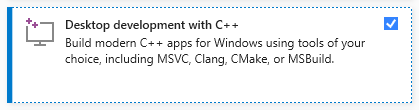
在計算機上安裝Visual Studio(免費社區版本)。下載它,運行它,然後僅選擇具有C ++的選項桌面開發(需要管理員特權):
單擊此處並將其解壓縮到您的計算機中,從Samantha的存儲庫中下載ZIP文件。選擇要安裝程序的驅動器:

打開samantha_ia-main目錄,然後雙擊install_samantha_ia.bat文件以開始安裝。 Windows可能會要求您確認.bat文件的來源。單擊“更多信息”並確認。我們對所有文件的代碼進行檢查(使用virustotal和AI系統這樣做):

這是安裝的關鍵部分。如果一切順利,則該過程將完成,而無需在終端中顯示錯誤消息。
安裝過程大約需要20分鐘,並以兩個虛擬環境的創建結束:薩曼莎( samantha )僅運行AI模型和jupyterlab ,以運行其他安裝的程序。它將佔用大約5 GB的硬盤驅動器。
安裝後,通過雙擊open_samantha.bat文件打開samantha。 Windows可能會再次要求您確認.bat文件的來源。僅首次運行程序才需要此授權。單擊“更多信息”並確認:

終端窗口將打開。這是薩曼莎的服務器端。
回答初始問題(接口語言和語音控制選項 - 語音控制不適合首次使用),該接口將在新的瀏覽器選項卡中打開。這是薩曼莎(Samantha)的瀏覽器側:
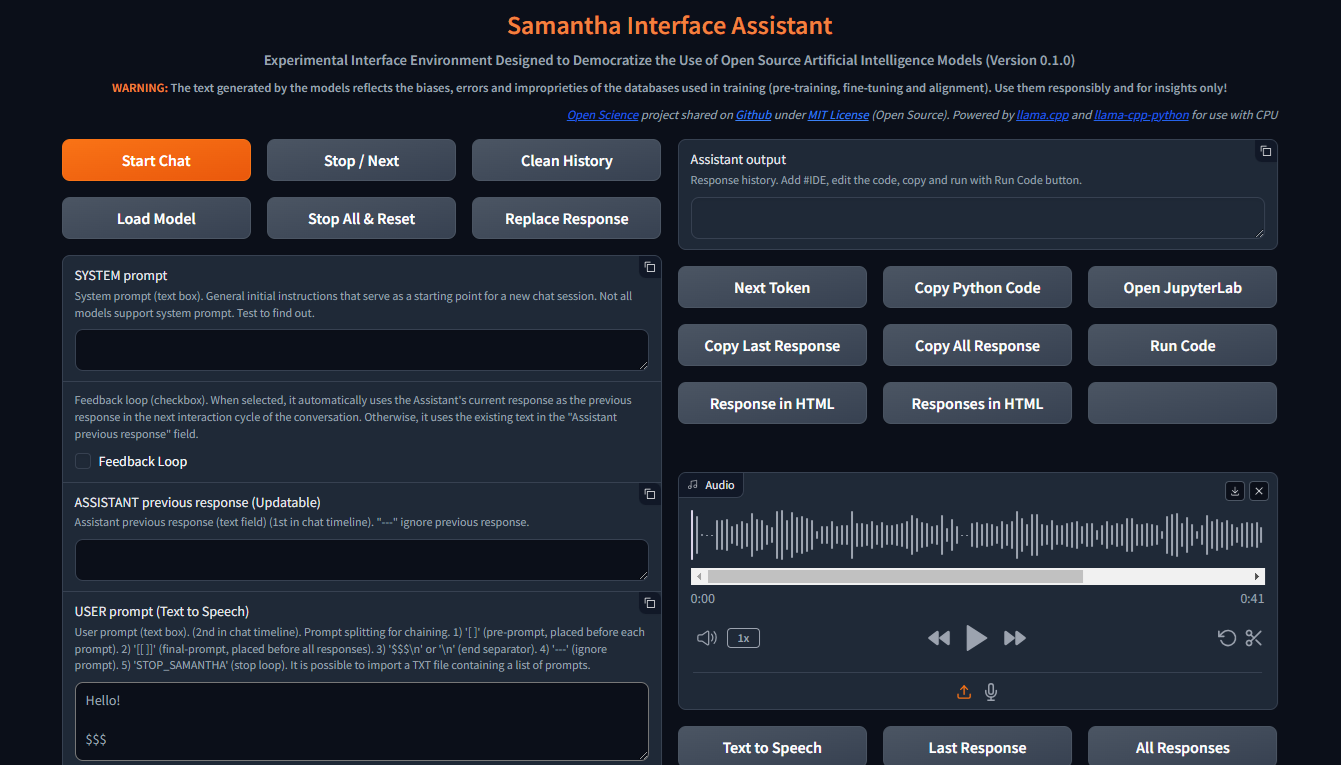
打開瀏覽器窗口後,薩曼莎(Samantha)準備出發。
查看安裝視頻。
薩曼莎(Samantha)只需要一個.gguf模型文件即可生成文本。按照以下步驟執行簡單的模型測試:
通過按CTRL + SHIFT + ESC打開Windows任務管理,然後檢查可用的內存。如有必要,請關閉一些程序以自由記憶。
訪問擁抱面孔存儲庫,然後單擊卡以打開相應的頁面。找到文件和版本選項卡,然後選擇適合您可用內存的.gguf文本生成模型。
右鍵單擊模型下載鏈接圖標並複制其URL。
將模型URL粘貼到Samantha的下載模型中,以用於測試字段。
將提示插入用戶提示字段,然後按Enter 。在提示結束時,請保留$$$簽名。該模型將下載,並將使用默認確定性設置生成響應。您可以通過Windows任務管理跟踪此過程。
通過此副本和粘貼過程下載的每個新型號都將替換上一個模型以節省硬盤驅動器空間。在您的下載文件夾中,模型下載保存為MODEL_FOR_TESTING.gguf 。
您也可以下載該型號並將其永久保存到計算機。有關更多數據,請參見下面的部分。
開放式Souce文本生成模型可以從擁抱面下載,使用gguf作為搜索參數。您可以組合兩個單詞,例如gguf code或gguf portuguese 。
您也可以轉到特定的存儲庫,並查看所有可供下載和測試的.gguf模型,例如https://huggingface.co/bartowski或https://huggingface.co/nousresearch。
這些模型在這樣的卡上顯示:

要下載模型,請單擊卡以打開相應的頁面。找到型號卡以及文件和版本選項卡:

要下載一些模型,您必須同意使用條款。
之後,單擊“文件和版本”選項卡,然後下載適合您可用RAM空間的型號。要檢查您的可用內存,請按CTRL + SHIFT + ESC打開Windows任務管理器,單擊Performance Tab(1),然後選擇“內存” (2):
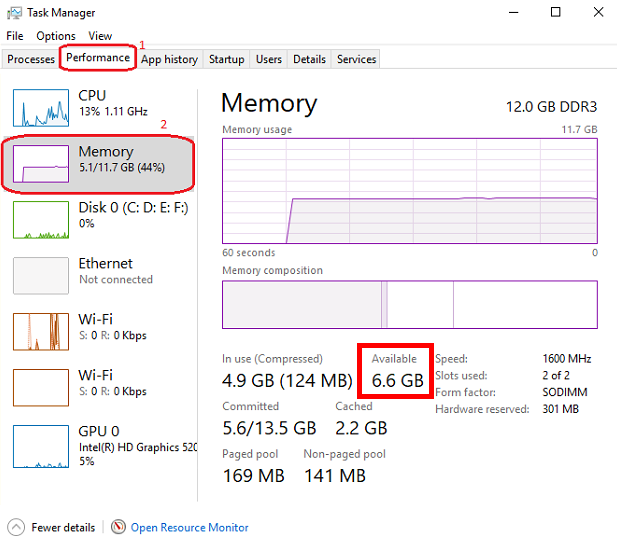
We suggest to download the model with Q4_K_M (4-bit quantization) in its link name (put the mouse over the download button to view the complete file name in the link like this: https://huggingface.co/NousResearch/Hermes-2-Pro-Llama-3-8B-GGUF/resolve/main/Hermes-2-Pro-Llama-3-8B-Q4_K_M.gguf?download=true ).通常,模型大小越大,生成的文本的準確性就越大。
如果下載的型號不適合可用的RAM空間,則將使用硬盤驅動器,從而影響性能。
下載選定的型號並將其保存到您的計算機上,或者只需複制下載鏈接並將其粘貼到Samantha的下載模型中以進行測試字段。在下面的部分中觀看視頻教程以獲取更多詳細信息。
請注意,每個模型都有其自身的特徵,根據其大小,內部體系結構,訓練方法,培訓數據庫的主要語言,用戶提示和超參數調整,其響應明顯不同,並且有必要測試其所需任務的性能。
某些模型由於其技術特性或與薩曼莎(Samantha)使用的當前版本的llama.cpp python結合而無法加載。
在哪裡找到要測試的模型:huggingface gguf模型
薩曼莎(Samantha)是一個實驗程序,用於測試開源AI模型。因此,在嘗試測試用戶創建的新模型或新版本的模型時,發生錯誤是很常見的。
可以使用一些標準來評估模型產生的響應質量,例如:
對用戶和系統提示中包含的顯式和隱式指令的理解程度;
對這些指示的服從程度,與數據庫的主要語言有關;
連貫的文本產生的幻覺程度,但不正確或不正確。文本生成中的幻覺通常是由於對模型的訓練不足或對接下來的令牌的不適當選擇而導致的,這使模型朝著不希望的語義方向發展。
決策過程中的精度程度,以填補用戶提示的上下文中的空白,並解決產生響應所需的歧義。未明確指定的內容,該模型試圖根據其培訓來推斷,這可能導致錯誤。
模型在用戶提示中所包含的偏見(或缺乏偏差)所採用的偏見的一致性程度;
主題的相關程度和相關程度選擇要解決;
響應中主題的廣度和深度程度;
響應的語法和語義精度;
考慮到創建提示(提示工程)的技術以及對模型超參數的調整,響應的結構和內容質量與用戶對用戶的期望(及其克服)有關。
主要控件:
啟動聊天會話,將所有輸入文本(系統提示,先前的響應和用戶提示)發送到服務器以及用戶調整的設置。就像所有其他按鈕一樣,鼠標點擊也會聽起來。
此按鈕還清除了內部以前的響應。
聊天會話可以包含多個對話週期(循環)。
啟動聊天按鈕鍵盤快捷鍵:按頁面上的任何Enter 。
要生成文本,必須在模型選擇下拉列表中預先選擇模型,或者必須提供一個擁抱的面部模型URL才能下載用於測試字段的模型。如果兩個字段都填寫,則通過下拉列表選擇的模型優先。
“打斷當前模型或提示的令牌生成過程,開始執行下一個模型或序列中的提示(如果有)。
它還可以在語音自動播放模式下停止當前播放音頻的播放(讀取響應響應大聲複選框)。
薩曼莎(Samantha)有3個階段:
此按鈕僅在啟動下一個令牌選擇階段時才中斷令牌生成,即使之前按下它也是如此。
如果選擇“運行代碼”選擇複選框,則此中斷不會阻止模型生成的代碼執行。您可以按按鈕停止文本生成並運行已生成的Python代碼。
“清除當前聊天會話的歷史記錄,刪除助手輸出字段以及所有內部日誌,以前的響應等。
為了使此按鈕正常工作,您需要等待模型完成生成文本(助手輸出字段的橙色邊框停止閃爍)
✅允許您選擇保存可加載模型的目錄。
默認:Windows“下載”文件夾
您可以選擇任何包含GGUF模型的目錄。在這種情況下,選定目錄中包含的模型將在模型選擇下拉列表中列出。
打開彈出窗口後,請確保單擊要選擇的文件夾。
?停止運行模型的順序,並重置上一次加載模型的內部設置。
重置後,根據輸入文本的大小,模型需要一些時間才能重新啟動文本生成。
如果選擇運行代碼自動選擇選項,則這種中斷阻止了模型生成的已有python代碼的執行。
?將助手先前響應字段中的文本替換為模型生成的最後一個響應的文本。
替換的文本將用作下一個對話週期中模型的先前響應。
該替換的文本看不到。它不會刪除上一個助手響應字段中的文本,稍後可以再次使用。
在大型語言模型(LLMS)的背景下,系統提示是在對話或任務開始時對模型提供的一種特殊類型的指令。它在與模型的所有交互作用中都被考慮。
將其視為為互動設定舞台。它為LLM提供了有關其角色,所需角色,行為和對話的整體背景的關鍵信息。
這是其工作原理:
定義角色:系統提示清楚地定義了LLM在交互中的作用。
設置語調和角色:系統提示還可以為LLM的回答建立所需的音調和角色。
提供上下文信息:系統提示可以提供與對話或任務相關的背景信息。
使用系統提示的好處:
例子:
假設您想使用LLM以莎士比亞的風格寫一首詩。合適的系統提示是:
You are William Shakespeare, a renowned poet from Elizabethan England.
通過提供此系統提示,您可以指導LLM生成反映莎士比亞語言,風格和主題利益的響應。
並非所有模型都支持系統提示。測試要找出:在系統提示字段中填寫“ x = 2”,並詢問模型在用戶提示字段中的“ x”值。如果模型獲得“ X”的值,則模型中可以使用系統提示。
您可以通過在用戶提示字段開頭中的方括號中添加文本來模擬系統提示的效果: [This text acts as a system prompt]或將系統提示文本添加到助手先前的響應字段中(請勿使用反饋循環)。
要忽略此字段中存在的文本,請在開始時包括--- 。要將文本分成部分,請在它們之間放上$$$ 。忽略每個部分,包括---在每個部分的開頭。
↩️激活後,它會自動將模型在當前對話週期中產生的響應視為下一個週期中助手的先前響應,從而允許系統反饋。
用戶在激活此功能之後,僅在第一個週期中考慮了用戶在助手先前的響應字段中輸入的任何文本。在以下週期中,該模型的響應在內部替換了先前的響應,但沒有刪除該字段中包含的文本,可以在新的聊天會話中重複使用。您可以通過終端監視助手先前響應的內容。
反過來,當停用時,它總是使用助手上一個響應字段中包含的文本作為先前的響應,除非文本先於--- (三重dash)。在模型之前忽略了--- 。
要內部清除模型的先前響應,請按“乾淨歷史記錄”按鈕。
➡️將模型考慮的文本存儲為當前對話週期中的先前響應。
用於反饋模型產生的響應。
要忽略此字段中存在的文本,請在開始時包括--- 。要將文本分成部分,請在它們之間放上$$$ 。忽略每個部分,包括---在每個部分的開頭。
✏️接口的主要輸入字段。它收到將依次提交模型的用戶提示列表。
如果這些項目是由帶有線路斷開的文本組成的,則必須通過線路斷路( SHIFT + ENTER或n )或符號$$$ (三元信號)將列表中的每個項目與下一個項目分開。
當用戶提示中存在時, $$$分隔符優先於n分離器。換句話說, n被忽略。
您可以導入包含提示列表的TXT文件。
---提示列表項目使系統忽略該項目。
將位於單方面括號( [和] )中的文本添加到每個提示列表項目的開頭,並模擬系統提示。
位於雙方括號( [[和]] )中的文本是提示列表中的最後一項。在這種情況下,將模型在當前聊天會話中產生的所有響應都會加入並添加到本項目的末尾,從而使模型可以將它們分析在一起。
如果Python代碼執行僅返回STOP_SAMANTHA詞,則它會停止代幣生成並退出循環。
如果Python代碼執行僅返回'' (空字符串),則不會顯示HTML彈出窗口。
您可以在每個提示之前添加特定的超參數。您必須使用此模式:
{max_tokens=4000, temperature=0, tfs_z=0, top_p=0, min_p=1, typical_p=0, top_k=40, presence_penalty=0, frequency_penalty=0, repeat_penalty=1}
例子:
[您是只在葡萄牙語中寫的詩人]
創建一個關於愛的句子
創造關於生命的句子
---創建有關時間的句子(此指令被忽略)
[[創建英語段落,總結以下句子中包含的想法:]
(以前的響應在此處加入)
模型響應序列:
“ oamoréumfogoque que ard no meu peito,uma chama que me guia atravésda vida。”
“vidaéumrioque fuli sem parar,levando-nos paraalémdo que conhecemos。”
愛與生活是塑造我們存在的交織的力量。愛像火一樣燃燒在我們內部,以激情和目的引導我們度過生活的旅程。同時,生活本身是一條充滿活力且不斷變化的河流,不斷地流動,將我們帶到熟悉的人之外,並進入未知的河流。愛情和生活共同創造了一個強大的電流,使我們前進,敦促我們探索,發現和成長。
✅在計算機上保存並用於文本生成的模型的下拉列表。
要在此字段中查看模型,請單擊“加載模型”按鈕,然後選擇包含模型的文件夾。
保存模型的默認位置是Windows下載目錄。
您可以選擇倍數模型(甚至重複)來創建一系列模型來響應用戶提示。
從URL下載的最後一個模型保存為MODEL_FOR_TESTING.gguf ,也顯示在此列表中。
收到指向模型的擁抱面孔鏈接列表,這些鏈接將通過順序下載和執行。
鏈接示例:
鏈接之前是---將被忽略。
僅在模型選擇下拉列表中未選擇模型時才能起作用。
1️⃣激活每個模型的單個響應。
超過模型數量的提示被忽略。
超過提示數的模型也將被忽略。
您可以多次選擇相同的型號。
此復選框禁用循環數量和響應數量的複選框。
⏮️重新定位模型的內部狀態,消除了先前上下文的影響。
它的工作原理:
調用重置功能時:
好處:
用例:
如果在模型選擇下拉列表中選擇了3個或更多模型,則將模型的執行順序供電。
? ♀️在背景中更快地生成文本,而無需在助手輸出字段中顯示每個令牌。
最小化或隱藏薩曼莎瀏覽器窗口的窗口使代幣生成過程更快。
此復選框禁用學習模式。
選擇計算機SAPI5語音的語言,該語音將讀取模型產生的響應。
使用語音選擇下拉列表中選擇的語言生成的響應自動讀取模式。
如果您希望使用質量質量的語音合成器(Microsoft Edge瀏覽器)重現模型生成的響應,請使用HTML按鈕中的響應在頁面內右鍵單擊,然後在頁面內打開HTML彈出的響應,然後選擇“大聲讀”頁面文本的選項。
為了保存和編輯語音合成器生成的音頻,我們建議使用開源程序Audacity的便攜式版本記錄音頻。調整記錄設置,以捕獲揚聲器(不是麥克風)的音頻輸出。
? ?激活學習模式。
它提出了一系列功能,可以幫助您理解模型的令牌選擇過程,例如:
僅在未選中快速模式時起作用。
無線電按鈕選項:
“在以下鏈接序列中設置塊的重複數:
鍊式序列:( [[模型列表] - >響應 - >([用戶提示列表] x響應數)) x循環數量
模型列表中的每個模型均響應所選響應數的用戶提示符列表中的所有提示。對於選定的循環,重複此塊。
?每個選定模型將在以下鏈接序列中生成的響應數:
鍊式序列:( [[模型列表] - >響應 - >([用戶提示列表] x響應數))x循環數量
模型列表中的每個模型均響應所選響應數的用戶提示符列表中的所有提示。對於選定的循環,重複此塊。
? 當檢查時,將自動運行模型生成的Python代碼。
每當Python代碼返回'' (空字符串))以外的其他值時,HTML彈出窗口都會打開以顯示返回的內容。
當檢查時,當模型在終端中生成的python代碼''自動執行時,停止了薩曼莎。
在滿足條件時,請使用它來停止生成循環。
檢查後,通過將其添加到模型生成下一個響應時考慮的上一個響應中的每個新響應來串聯。
重要的是要強調,一組串聯響應必須適合模型上下文窗口。
?在每個新的對話週期中,調整具有隨機值的模型超參數。
隨機選擇的值在每個高參數的以下值範圍內變化,並在模型生成的每個響應的開頭顯示。
| 超參數 | 最小。價值 | 最大限度。價值 |
|---|---|---|
| 溫度 | 0.1 | 1.0 |
| TFS_Z | 0.1 | 1.0 |
| top_p | 0.1 | 1.0 |
| min_p | 0.1 | 1.0 |
| 典型_p | 0.1 | 1.0 |
| 存在_penalty | 0.0 | 0.3 |
| 頻率__penalty | 0.0 | 0.3 |
| repot_penalty | 1.0 | 1.2 |
該資源在研究超參數之間相互作用的反思中具有應用。
?反饋只有Python解釋器輸出作為下一個助手的上一個響應。不包括模型的響應。
此功能減少了在下一個對話週期中助手的先前響應中要插入的令牌數量。
僅處理反饋循環激活。
隱藏HTML模型響應,包括Python解釋器錯誤消息。
上下文窗口:
n_ctx代表上下文窗口中上下文令牌的數量,並確定模型可以一次處理的最大令牌。它確定模型可以“記住”的先前文本,並在從模型詞彙中選擇下一個令牌時使用。
上下文長度直接影響內存使用和計算負載。更長的n_ctx需要更多的內存和計算能力。
n_ctx工作方式:
它設置了該模型可以立即“看到”的令牌數量的上限。令牌通常是單詞部分,全單詞或字符,具體取決於令牌化方法。該模型使用此上下文來理解和生成文本。例如,如果n_ctx為2048,則該模型可以一次處理多達2048的令牌(現在單詞)。
對模型操作的影響:
在培訓和推理期間,該模型在此上下文窗口中關注所有令牌。
它允許模型捕獲文本中的遠程依賴性。
較大的n_ctx使模型可以處理更長的文本序列而不會丟失早期上下文。
為什麼增加n_ctx會增加內存使用量:
注意機制:LLMS使用自我注意力的機制(例如在變壓器中),該機制計算輸入中所有代幣之間的注意力評分。
二次縮放:注意計算所需的內存在上下文長度上二次縮放。如果雙n_ctx ,則將注意力的內存四倍。
注意: n_ctx必須大於( max_tokens +輸入令牌數) (系統提示 +助手先前響應 +用戶提示)。
如果提示文本所包含的令牌多於N_CTX定義的上下文窗口或所需的內存超過計算機上可用的總數,則將顯示錯誤消息。
助理輸出字段顯示的錯誤消息:
 ==========================================
Error loading LongWriter-glm4-9B-Q4_K_M.gguf.
Some models may not be loaded due to their technical characteristics or incompatibility with the current version of the llama.cpp Python binding used by Samantha.
Try another model.
==========================================
終端顯示的錯誤消息:
Requested tokens (22856) exceed context window of 10016

Unable to allocate 14.2 GiB for an array with shape (25000, 151936) and data type float32
設置為0時,系統將使用最大n_ctx (模型的上下文窗口大小)。
通常,將n_ctx設置為等於max_tokens ,但僅適用於容納模型解析的文本所需的值。 samantha的n_ctx和max_tokens的默認值為4,000個令牌。
在調整n_ctx之前,您必須通過單擊卸載模型按鈕來卸載模型。
例子:
用戶提示= 2000令牌n_ctx = 4000令牌
如果該模型生成的文本等於或大於2000個令牌(4000-2000),則係統將在終端中提出IndexError ,但接口不會崩潰。
要檢查n_ctx在內存中的影響,請打開Windows任務管理器( CTRL + SHIFT + ESC )以監視內存使用情況,選擇內存面板和VARY n_ctx值。不要忘記在更改之間卸載模型。
? 控制模型生成的最大代幣數量。
為模型的最大令牌數量選擇0 (需要最大內存)。
max_tokens的工作方式:
採樣過程:生成文本時,LLMS基於所提供的上下文預測下一個令牌(系統提示 +先前的響應 +用戶提示 +已經生成的文本)。該預測涉及計算詞彙中每個可能令牌的概率。
令牌限制: max_tokens參數對模型在停止之前可以生成多少代幣的嚴格限制,無論預測概率如何。
截斷:一旦生成的文本達到max_tokens ,生成過程就會突然終止。這意味著最終輸出可能不完整或感到切斷。
停止單詞:
?以模型中斷文本生成的字符列表,以格式["$$$", ".", ".n"] (python list)。
令牌採樣:
確定性行為:
要檢查每個高參數對模型行為的確定性影響,請將所有其他超參數設置為其最大隨機值,並多次執行提示。重複每個令牌採樣超參數的過程。
| 超參數 | 確定性 | 隨機 | 選定 |
|---|---|---|---|
| 溫度 | 0 | > 0 | 2(隨機) |
| TFS_Z | 0 | > 0 | 1(隨機) |
| top_p | 0 | > 0 | 1(隨機) |
| min_p | 1 | <1 | 1(確定性) |
| 典型_p | 0 | > 0 | 1(隨機) |
| top_k | 1 | > 1 | 40(隨機) |
換句話說,具有確定性調整的高參數比所有其他超參數都佔據了隨機調整。
由於具有確定性調整的超參數失去了這種情況,因此所有與隨機調整的超參數之間的相互作用發生。
隨機行為:
要檢查模型行為上的超參數的隨機反射,請將所有其他超參數設置為其最大隨機值,並根據其確定性值逐漸改變所選的超參數。重複每個令牌採樣超參數的過程。
您可以結合不同超參數的隨機調整。
| 超參數 | 確定性 | 隨機 | 選定 |
|---|---|---|---|
| 溫度 | 0 | > 0 | 2(隨機) |
| TFS_Z | 0 | > 0 | 1(隨機) |
| top_p | 0 | > 0 | 1(隨機) |
| min_p | 1 | <1 | 1(逐漸減少) |
| 典型_p | 0 | > 0 | 1(隨機) |
| top_k | 1 | > 1 | 40(隨機) |
語言模型中的文本生成超參數,例如top_k , top_p , tfs-z ,典型_p , min_p和溫度,以互補的方式進行交互,以控制選擇下一代令牌的過程。每個都以不同的方式影響令牌選擇,但是可以選擇可以選擇的最終令牌的影響方面存在一個流行率。讓我們檢查一下這些超參數如何相互關係,以及誰對誰進行“佔上風”。
在模型生成每個令牌的邏輯之後,對所有這些超參數進行調整。
薩曼莎(Samantha)在學習模式下顯示每個令牌的邏輯,然後由超參數更改。
Samantha還指出了使用超參數後選擇了哪些令牌。
10個詞彙令牌很可能是該模型返回的,以啟動以下問題的答案:您是誰? :
詞彙ID /令牌 / logit值:
 358)    ' I'       (15.83)
40)     'I'        (14.75)     <<<  Selected
21873)  ' Hello'   (14.68)
9703)   'Hello'    (14.41)
1634)   ' As'      (14.31)
2121)   'As'       (13.98)
20971)  ' Hi'      (13.73)
715)    ' n'      (13.03)
5050)   'My'       (13.01)
13041)  'Hi'       (12.77)
如何禁用超參數:
溫度:將其設置為1.0使原始賠率保持不變。注意:將其設置為0不會“禁用”它,而是使選擇確定性。
TFS_Z (帶有Z分數的無尾巴採樣):將其設置為非常高的值,可以有效地禁用它。
TOP-P (核採樣):將其設置為1.0有效地禁用它。
Min-P :將其設置為非常低的值(接近0)可以有效地禁用它。
典型的P :將其設置為1.0可以有效地禁用它。
TOP-K :將其設置為非常高的值(例如詞彙尺寸)實質上可以禁用它。
患病率
1 top_k , top_p , tfs_z ,典型_p , min_p :這些界定可以選擇的代幣的空間。
TOP_K將可用的令牌數限制為最有可能的代幣。例如,如果k = 50 ,則模型只會考慮下一個單詞最有可能的50個令牌。這50個以外的令牌很可能完全被丟棄,這可以幫助避免不太可能或非常冒險的選擇。
TOP-P根據累積概率的總和來定義閾值。如果p = 0.9 ,該模型將包括最可能的令牌,直到其概率總和達到90% 。與top_k不同,所考慮的令牌數量是動態的,根據概率分佈有所不同。
TFS_Z旨在消除令牌概率分佈的“尾巴”。它是通過丟棄累積概率(來自分佈的尾部)的代幣小於一定閾值z的工作來工作。這個想法是只保留最有用的代幣,而不管該集合中有多少令牌,就消除了那些相關性較小的人。因此, TFS_Z不簡單地截斷頂部的分佈(如top_k或top_p ),而是使模型擺脫了分佈尾部的令牌。這創造了一種更適合過濾最小可能令牌的方式,可以促進最重要的令牌,而不嚴格限制令牌數量,例如TOP_K 。 TFS_Z丟棄了令牌分佈的“尾巴”,從而消除了那些在一定閾值z以下的累積概率的人。
典型_p根據其與分佈的平均熵的差異選擇令牌,即令牌是如何“典型”的。典型P是一種更複雜的抽樣技術,旨在根據熵的概念來維持文本生成的“自然性”,即與模型期望的相比,選擇令牌是多麼“令人驚訝”或可預測的。典型-P的工作方式:典型_P不僅要專注於代幣的絕對概率,而是根據top_k或top_p do,而是基於它們偏離概率分佈的平均熵的偏差選擇令牌。
這是典型的_p進程:
A)平均熵:令牌分佈的平均熵反映了選擇令牌相關的不確定性或驚喜的平均水平。在熵方面,具有很高(預期)或非常低(罕見)概率的概率可能較小(罕見)。
b)發散計算:與分佈的平均熵相比,每個令牌具有其概率。差異可以衡量該令牌的概率與平均值的距離。這個想法是,在上下文中,與平均熵差異較小的令牌更“典型”或自然。
c)採樣:典型的_p定義了累積熵的分數p,以考慮令牌。令牌是根據其差異排序的,而屬於部分P之內的代幣(例如,最典型的“典型”分佈的90%)被考慮進行選擇。該模型以一種有利於代表平均不確定性的方式的方式選擇令牌,從而促進文本生成的自然性。
患病率:這些參數定義了候選令牌集。它們首先用於限制在進行其他調整之前可能的令牌數量。它們合併的方式可以是累積的,在施加這些過濾器的倍數的情況下,它們逐漸減少了可用的令牌數量。最後一組是通過所有這些檢查的令牌之間的交點。
如果您同時使用top_k和top_p ,則必須尊重這兩者。例如,如果top_k = 50和top_p = 0.9 ,則該模型首先將選擇限制為最有可能的代幣,並且在其中考慮那些概率總和達到90%的人。
如果將典型的_P或TFS_Z添加到方程式中,則該模型將在同一組上應用這些額外的過濾器,從而進一步降低選項。
2溫度:調整已經過濾的令牌集中的隨機性。
在模型限制了基於TOP-K , TOP_P , TFS_Z等截止超參數等臨界值的宇宙之後,溫度就會發揮作用。
溫度會改變其餘令牌的概率分佈的平滑度或剛度。溫度低於1的溫度集中概率,導致模型更喜歡最可能的令牌。溫度大於1的溫度使分佈變平,從而使代幣的可能性更大。
患病率:溫度不會改變可用的令牌集,而是調整已經過濾的令牌的相對概率。因此,它不會在top_k , top_p等上佔用。
一般層次結構
top_k,top_p,tfs_z,典型_p,min_p :這些參數首先,限制可能的令牌數量。
溫度:應用選擇過濾器後,溫度調整了其餘令牌的概率,從而控制了最終選擇中的隨機性。
組合場景
_top_k + top_p :如果top_k少於top_p選擇的令牌數量,則top_k佔上風,因為它將令牌數限制為k。如果TOP_P更具限制性(例如,僅考慮5個具有p = 0.9的令牌),則它會超過top_k 。
典型_p + top_p :均應用過濾器,但在不同的方向上。典型_P根據熵選擇,而TOP_P根據累積概率選擇。如果一起使用,最終結果是這些過濾器的交點集。
溫度:它始終是最後一次應用的,可以調節最終選擇中的隨機性,但沒有更改以前過濾器所施加的限制。
患病率摘要
過濾器( top_k,top_p,tfs_z,典型_p,min_p )定義了候選令牌集。
溫度調節過濾集中的相對概率。
最終結果是這些過濾器的組合,首先定義了有資格選擇的令牌,然後用溫度調節隨機性。
?溫度是控制LLM中文本生成過程隨機性的超參數。它影響模型下一步預測的概率分佈。
溫度是一個高參數T,我們在隨機模型中發現,以調節抽樣過程中的隨機性(Ackley,Hinton和Sejnowski 1985)。 SoftMax函數(方程1)將非線性轉換應用於網絡的輸出邏輯,將其轉換為概率分佈(即它們總和為1)。溫度參數調節其形狀,重新分佈輸出概率質量,使分佈與所選溫度成正比。這意味著對於t> 1,高概率降低,而低概率增加,反之亦然。較高的溫度會增加熵和困惑,從而導致生成過程中的更隨機性和不確定性。通常,t的值在[0,2]和t = 0的範圍內表示貪婪採樣,即始終以最高概率為代幣。溫度是大語言模型的創造力參數嗎?
抽樣溫度對大語言模型中問題解決的影響
控制創造力:
當您希望該模型產生更具創造力,意外和多樣化的響應時,請使用更高的溫度。這對於創意寫作,集思廣益和探索多種想法很有用。
這使概率分佈變平,使該模型更有可能採樣較小的可能令牌。
生成的文本變得更加多樣化和創造力,但可能不再連貫。
❄當需要更可預測和集中的輸出時,請使用較低的溫度。這對於需要精確和可靠信息的任務(例如匯總或回答事實問題)很有用。
這使概率分佈提高,使模型更有可能採樣最可能的令牌。
生成的文本變得更加集中和確定性,但潛在的創造力較小。
它的工作原理:
?從數學上講,在應用軟磁函數之前,通過將邏輯(原始得分)除以t除以logit(原始得分)來應用溫度(t)。
較低的溫度使分佈更加“峰值”,有利於高概率的選項。
較高的溫度“變平”了分佈,從而有更多機會可以選擇降低概率。
溫度量表:
通常範圍從0到2,其中1為默認值(無修改)。
t <1:使文本更加確定性,專注和“安全”。
t> 1:使文本更加隨機,多樣化,並可能更具創造力。
t = 0:相當於貪婪的選擇,始終選擇最可能的選項。
避免重複:
更高的溫度可以通過促進多樣性來幫助減少生成文本中的重複模式。
非常低的溫度有時會導致重複和確定性輸出,因為該模型可能會繼續選擇最高的概率代幣。
重要的是要注意,溫度只是可用的幾種採樣超參數之一。其他包括TOP-K採樣,核採樣(或TOP-P)和TFS-Z。這些方法中的每一種都有其自身的特徵,可能更適合不同的任務或發電樣式。
影片:
溫度短1
溫度短2
tfs_z代表使用Z分數進行無尾巴採樣。這是一種用於文本生成技術的超參數,旨在平衡生成文本中多樣性和質量之間的權衡。
上下文和目的:
引入了無尾巴採樣作為其他採樣方法(例如top-k或Nucleus( top-p )採樣)的替代方法。它的目標是在保持動態閾值的同時刪除概率分佈的任意“尾巴”。
LLM文本生成中tfs_z的技術細節
概率分佈分析:
該方法檢查了下一個令牌預測的概率分佈。它專注於此分佈的“尾巴” - 令牌的可能性較小。
z得分計算:
對於分類(降)概率分佈中的每個令牌,計算z評分。 z得分錶示令牌的概率來自均值的標準偏差有多少。
截止確定:
tfs_z參數設置z得分閾值。從該閾值低於此閾值的Z得分的令牌被從考慮中刪除。
動態閾值:
與固定的方法(例如top-k不同,保留的令牌數量可能會根據分佈形狀而變化。這允許在不同的上下文中更加靈活。
抽樣過程:
應用tfs_z臨界值後,從其餘令牌中進行採樣。這可以使用各種方法(例如,溫度調整後的採樣)來完成。
tfs_z是一個超參數,可控製文本生成過程中輸出邏輯的溫度縮放。
這就是它的作用:
logits :LLM生成文本時,它會在詞彙中所有可能的令牌上產生概率分佈。該分佈表示為邏輯的向量(非規範化的對數概率)。
溫度縮放:為了控制輸出的不確定性或“溫度”的水平,您可以通過將其乘以溫度因子( t )來縮放邏輯。這被稱為溫度縮放。
tfs_z超參數:這是一項超參數,可以控制在應用溫度縮放之前進行尺寸縮放的數量。
When you set tfs_z > 0 , the model first normalizes the logits by subtracting their mean ( z-score normalization ) and then scales them with the temperature factor ( t ). This has two effects:
Reduced variance : By normalizing the logits, you reduce the variance of the output distribution, which can help stabilize the generation process.
Increased uncertainty : By scaling the normalized logits with a temperature factor, you increase the uncertainty of the output distribution, which can lead to more diverse and creative text generations.
實際示例:
Imagine that the model is trying to complete the sentence "The sky is..."
Without tfs_z , the model could consider:
blue (30%), cloudy (25%), clear (20%), dark (15%), green (5%), singing (3%), salty (2%)
With TFS-Z (cut by 10%):
blue (30%), cloudy (25%), light (20%), dark (15%)
This eliminates less likely and potentially meaningless options, such as "The sky is salty."
By adjusting the Z-score, we can control how "conservative" or "creative" we want the model to be. A higher Z-score will result in fewer but more "safe" options, while a lower Z-score will allow for more variety but with a greater risk of inconsistencies.
In summary, tfs_z controls how much to scale the output logits after normalizing them. A higher value of tfs_z will produce more uncertain and potentially more creative text generations.
Keep in mind that this is a relatively advanced hyperparameter, and its optimal value may depend on the specific LLM architecture, dataset, and task at hand.
⭕ Top-p (nucleus sampling) is a hyperparameter that controls the diversity and quality of text generation in LLMs. It affects the selection of tokens during the generation process by dynamically limiting the vocabulary based on cumulative probability.
Controlling Output Quality:
? Use higher top-p values (closer to 1) when you want the model to consider a wider range of possibilities, potentially leading to more diverse and creative outputs. This is useful for open-ended tasks, storytelling, or generating multiple alternatives. Higher values allow for more low-probability tokens to be included in the sampling pool.
Use lower top-p values (closer to 0) when you need more focused and high-quality output. This is beneficial for tasks requiring precise information or coherent responses, such as answering specific questions or generating formal text. Lower values restrict the sampling to only the most probable tokens.
它的工作原理:
? Mathematically, top-p sampling selects the smallest possible set of words whose cumulative probability exceeds the chosen p-value. The model then samples from this reduced set of tokens. This approach adapts to the confidence of the model's predictions, unlike fixed methods like top-k sampling.
Top-p scale:
Generally ranges from 0 to 1, with common values between 0.1 (10% most likely) and 0.9 (90% most likely).
p = 1: Equivalent to unmodified sampling from the full vocabulary.
p → 0: Increasingly deterministic, focusing on the highest probability tokens.
p = 0.9: A common choice that balances quality and diversity.
Balancing Coherence and Diversity:
Top-p sampling helps maintain coherence while allowing for diversity. It adapts to the model's confidence, using a smaller set of tokens when the model is very certain and a larger set when it's less certain. This can lead to more natural-sounding text compared to fixed cutoff methods.
Comparison with Temperature:
While temperature modifies the entire probability distribution, top-p directly limits the vocabulary considered. Top-p can be more effective at preventing low-quality outputs while still allowing for creativity, as it dynamically adjusts based on the model's confidence.
It's worth noting that top-p is often used in combination with other sampling methods, such as temperature adjustment or top-k sampling. The optimal choice of hyperparameters often depends on the specific task and desired output characteristics.
The min_p hyperparameter is a relatively recent sampling technique used in text generation by large-scale language models (LLMs). It offers an alternative approach to top_k and nucleus sampling ( top_p ) to control the quality and diversity of generated text.
min_p is a sampling hyperparameter that works in a complementary way to top_p (nucleus sampling). While top_p sets an upper bound on cumulative probabilities, min_p sets a lower bound on individual probabilities.
解釋:
As with other sampling techniques, LLM calculates a probability distribution over the entire vocabulary for the next word.
The min_p defines a minimum probability threshold, p_min.
The method selects the smallest set of words whose summed probability is greater than or equal to p_min.
The next word is then chosen from that set of words.
Detailed operation:
The model calculates P(w|c) for each word w in the vocabulary, given context c.
The words are ordered by decreasing probability: w₁, w₂, ..., w|V|.
The algorithm selects words in the order of greatest probability until the sum of the probabilities is greater than or equal to p_min :
例子:
Suppose we are generating text and the model predicts the following probabilities for the next word:
 "o":        0.3
"one":      0.25
"this":     0.2
"that one": 0.15
"some":     0.1
If we use min-p with p_min = 0.7, the algorithm would work like this:
 Sum "o":                    0.3                     < 0.7
Sum "o" + "one":            0.3 + 0.25       = 0.55 < 0.7
Sum "the" + "one" + "this": 0.3 + 0.25 + 0.2 = 0.75 ≥ 0.7
Therefore, we select the first three words. Renormalizing:
 "o":    0.3  / 0.75 = 0.4
"one":  0.25 / 0.75 ≈ 0.33
"this": 0.2  / 0.75 ≈ 0.27
The next word will be chosen randomly from these three options with the new probabilities.
The typical_p hyperparameter is an entropy-based sampling technique that aims to generate more natural and less predictable text by selecting tokens that represent what is "typical" or "expected" in a probability distribution. Unlike methods like top_k or top_p , which focus on the absolute probabilities of tokens, typical_p considers how surprising or informative a token is relative to the overall probability distribution.
Technical Operation of typical_p
Entropy: The entropy of a distribution measures the expected uncertainty or surprise of an event. In the context of language models, the higher the entropy, the more uncertain the model is about which token should be generated next. Tokens that are very close to the mean entropy of the output distribution are considered "typical", while tokens that are very far away (too predictable or very unlikely) are considered "atypical".
Calculation of Surprise (Local Entropy): For each token in a given probability distribution, we can calculate its surprise (or "informativeness") by comparing its probability with the average entropy of the token distribution. This surprise is measured by the divergence in relation to the average entropy, that is, how much the probability of a token deviates from the average behavior expected by the distribution.
Selection Based on Entropy Divergence: typical_p filters tokens based on this "divergence" or difference between the token's surprise and the average entropy of the distribution. The model orders the tokens according to how "typical" they are, that is, how close they are to the average entropy.
Typical-p limit: After calculating the divergences of all tokens, the model defines a cumulative probability limit, similar to top_p (nucleus sampling). However, instead of summing the tokens' absolute probabilities, typical_p considers the cumulative sum of the divergences until a portion p of the distribution is included. That p is a value between 0 and 1 (eg 0.9), indicating that the model will include tokens that cover 90% of the most "typical" divergences.
If p = 0.9 , the model selects tokens whose divergences in relation to the average entropy represent 90% of the expected uncertainty. This helps avoid both tokens that are extremely predictable and those that are very unlikely, promoting a more natural and fluid generation.
Practical Example
Suppose the model is predicting the next word in a sentence, and the probability distribution of the tokens looks like this:
In the case of top_p with p = 0.9, the model would only include tokens A, B and C, as their probabilities add up to 90%. However, typical_p can include or exclude tokens based on how their probabilities compare to the average entropy of the distribution. If A is extremely predictable, it can be excluded, and tokens like B, C, and even D can be selected for their more typical representativeness in terms of entropy.
Difference from Other Methods
top_k selects the k most likely tokens directly , regardless of entropy or probability distribution.
top_p selects tokens based on the cumulative sum of absolute probabilities , without considering entropy or surprise.
typical_p , on the other hand, introduces the notion of entropy, ensuring that the selected tokens are neither too predictable nor too surprising , but ones that align with the expected behavior of the distribution.
How Typical-p Improves Text Generation
Naturalness: typical-p prevents the model from choosing very predictable tokens (as could happen with a low temperature or restrictive top-p) or very rare tokens (as could happen with a high temperature), maintaining a fluid and natural generation.
Controlled Diversity: By considering the surprise of each token, it promotes diversity without sacrificing coherence. Tokens that are close to the mean entropy of the distribution are more likely to be chosen, promoting natural variations in the text.
Avoids Extreme Outputs: By excluding overly unlikely or predictable tokens, Typical-p keeps generation within a "safe" and natural range, without veering toward extremes of certainty or uncertainty.
Interaction with Other Parameters
typical_p can be combined with other sampling methods:
When combined with temperature , typical_p further adjusts the set of selectable tokens, while temperature modulates the randomness within that set.
It can be combined with top_k or top_p to further fine-tune the process, restricting the universe of tokens based on different probability and entropy criteria.
In summary, typical_p acts in a unique way by considering the entropy of the distribution and selects tokens that are aligned with the expected behavior of this distribution, resulting in a more balanced, fluid and natural generation.
Here are some guidelines and strategies for tuning typical_p :
typical_p = 1.0: Includes all tokens available in the distribution, without restrictions based on entropy. This is equivalent to not applying any typical restrictions, allowing the model to use the full distribution of tokens.
_typical_p < 1.0: The lower the typical_p value, the narrower the set of tokens considered, keeping only those that most closely align with the average entropy. Common values include 0.9 (90% of "typical" tokens) and 0.8 (80%).
建議:
typical-p = 0.9: This is a common value that typically maintains a balance between diversity and coherence. The model will have the flexibility to generate varied text, but without allowing very extreme choices.
typical_p = 0.8: This value is more restrictive and will result in more predictable choices, keeping only tokens that most accurately align with the average entropy. Useful in scenarios where fluidity and naturalness are priorities.
typical_p = 0.7 or less: The lower the value, the more predictable the text generation will be, eliminating tokens that could be considered atypical. This may result in a less diversified and more conservative output.
Fine-Tuning with temperature
typical_p controls the set of tokens based on entropy, but temperature can be used to adjust the randomness within that set . The interaction between these two parameters is important:
temperature > 1.0: Increases randomness within the set of tokens selected by typical_p , allowing even less likely tokens to have a greater chance of being chosen. This can generate more creative or unexpected responses.
temperature < 1.0: Reduces randomness, making the model more conservative by preferring the most likely tokens from the set filtered by typical_p . Using a low temperature with a high typical_p (0.9 or 1.0) can result in very predictable outputs.
例子:
typical_p = 0.9 with _temperature = 1.0: Maintains the balance between naturalness and diversity, allowing the model to generate fluid and creative text, but without major deviations.
typical_p = 0.8 with temperature = 0.7: Makes generation more conservative and predictable, preferring tokens that are closer to the average uncertainty and reducing the chance of creative variations.
它如何工作
In a language model, when the next word is predicted, the model generates a probability distribution for the next token (word or part of a word), where each token has an associated probability based on its previous context. The sum of all probabilities is equal to 1.
top_k works by reducing the number of options available for sampling, limiting the number of candidate tokens. It does this by selecting only the tokens with the k highest probabilities and discarding all others. Then sampling is done from these k tokens, redistributing the probabilities between them.
例子:
Suppose we are generating text and the model predicts the following probabilities for the next word:
 "o":        0.3
"one":      0.25
"this":     0.2
"that one": 0.15
"some":     0.1
If we use top-k with k=3, we only keep the three most likely words:
 "o":        0.3
"one":      0.25
"this":     0.2
Then, we renormalize the probabilities:
 "o":        0.3  / (0.3 + 0.25 + 0.2) ≈ 0.4  (40%)
"one":      0.25 / (0.3 + 0.25 + 0.2) ≈ 0.33 (33%)
"this":     0.2  / (0.3 + 0.25 + 0.2) ≈ 0.27 (27%)
The next word will be chosen from these three options with the new probabilities.
Effect of Hyperparameter k
small k (eg ?=1): The model will be extremely deterministic, as it will always choose the token with the highest probability. This can lead to repetitive and predictable text.
large k (or use all tokens without truncating): The model will have more options and be more creative, but may generate less coherent text as low probability tokens may also be chosen.
Token Penalties:
? Syntactic and semantic variation arises from the penalization of tokens that are replaced by others that begin words related to different ideas, leading the response generated by the model in another direction.
Syntactic variations do not always generate semantic variations.
As text is generated, penalties become more frequent as there are more tokens to be punished.
Deterministic Behavior:
To obtain a deterministic text (same input, same output), but without repeating words (tokens), increase the values of the penalty hyperparameters.
However, if it proves necessary to allow the model to reselect already generated tokens, keep these settings at their default values.
| Hyperparameter | 預設值 | Text Diversity |
|---|---|---|
| presence_penalty | 0 | > 0 |
| 頻率__penalty | 0 | > 0 |
| repeat_penalty | 1 | > 1 |
Presence Penalty:
The presence penalty penalizes tokens that have already appeared in the text, regardless of their frequency. It discourages the repetition of ideas or themes.
手術:
影響:
合身:
Frequency Penalty:
The frequency penalty penalizes tokens based on their frequency in the text generated so far. The more times a token appeared, the greater the penalty.
手術:
影響:
合身:
Repeat Penalty:
The repeat penalty is similar to the frequency penalty, but generally applies to sequences of tokens (n-grams) rather than individual tokens.
手術:
影響:
合身:
How repeat_penalty works:
Starting from the default value (=1), as we reduce this value (<1) the text starts to present more and more repeated words (tokens), to the point where the model starts to repeat a certain passage or word indefinitely.
In turn, as we increase this value (>1), the model starts to penalize repeated words (tokens) more heavily, up to the point where the input text no longer generates penalties in the output text.
During the penalty process (>1), there is a variation in syntactic and semantic coherence.
Practical observations showed that increasing the token penalty (>1) generates syntactic and semantic diversity in the response, as well as promoting a variation in the response length until stabilization, when increasing the value no longer generates variation in the output.
The repeat_penalty hyperparameter has a deterministic nature.
Adjustment tip:
其他的:
Displays model's metadata.
例子:
Model: https://huggingface.co/NousResearch/Hermes-3-Llama-3.1-8B-GGUF/resolve/main/Hermes-3-Llama-3.1-8B.Q8_0.gguf?download=true
 {'general.name': 'Hermes 3 Llama 3.1 8B'
  'general.architecture': 'llama'
  'general.type': 'model'
  'general.organization': 'NousResearch'
  'llama.context_length': '131072'
  'llama.block_count': '32'
  'general.basename': 'Hermes-3-Llama-3.1'
  'general.size_label': '8B'
  'llama.embedding_length': '4096'
  'llama.feed_forward_length': '14336'
  'llama.attention.head_count': '32'
  'tokenizer.ggml.eos_token_id': '128040'
  'general.file_type': '7'
  'llama.attention.head_count_kv': '8'
  'llama.rope.freq_base': '500000.000000'
  'llama.attention.layer_norm_rms_epsilon': '0.000010'
  'llama.vocab_size': '128256'
  'llama.rope.dimension_count': '128'
  'tokenizer.ggml.model': 'gpt2'
  'tokenizer.ggml.pre': 'llama-bpe'
  'general.quantization_version': '2'
  'tokenizer.ggml.bos_token_id': '128000'
  'tokenizer.ggml.padding_token_id': '128040'
  'tokenizer.chat_template': "{% if not add_generation_prompt is defined %}{% set add_generation_prompt = false %}{% endif %}{% for message in messages %}{{'<|im_start|>' + message['role'] + 'n' + message['content'] + '<|im_end|>' + 'n'}}{% endfor %}{% if add_generation_prompt %}{{ '<|im_start|>assistantn' }}{% endif %}"}
✅ Displays model's token vocabulary when selected.
? Displays model's vocabulary when Learning Mode and Show Model Vocabulary are selected simultaneously.
Example (from token 2000 to 2100):
Model: https://huggingface.co/Triangle104/Mistral-7B-Instruct-v0.3-Q5_K_M-GGUF/resolve/main/mistral-7b-instruct-v0.3-q5_k_m.gguf?download=true
 2000)    'ility'
2001)    ' é'
2002)    ' er'
2003)    ' does'
2004)    ' here'
2005)    'the'
2006)    'ures'
2007)    ' %'
2008)    'min'
2009)    ' null'
2010)    'rap'
2011)    '")'
2012)    'rr'
2013)    'List'
2014)    'right'
2015)    ' User'
2016)    'UL'
2017)    'ational'
2018)    ' being'
2019)    'AN'
2020)    'sk'
2021)    ' car'
2022)    'ole'
2023)    ' dist'
2024)    'plic'
2025)    'ollow'
2026)    ' pres'
2027)    ' such'
2028)    'ream'
2029)    'ince'
2030)    'gan'
2031)    ' For'
2032)    '":'
2033)    'son'
2034)    'rivate'
2035)    ' years'
2036)    ' serv'
2037)    ' made'
2038)    'def'
2039)    ';r'
2040)    ' gl'
2041)    ' bel'
2042)    ' list'
2043)    ' cor'
2044)    ' det'
2045)    'ception'
2046)    'egin'
2047)    ' б'
2048)    ' char'
2049)    'trans'
2050)    ' fam'
2051)    ' !='
2052)    'ouse'
2053)    ' dec'
2054)    'ica'
2055)    ' many'
2056)    'aking'
2057)    ' à'
2058)    ' sim'
2059)    'ages'
2060)    'uff'
2061)    'ased'
2062)    'man'
2063)    ' Sh'
2064)    'iet'
2065)    'irect'
2066)    ' Re'
2067)    ' differ'
2068)    ' find'
2069)    'ethod'
2070)    ' r'
2071)    'ines'
2072)    ' inv'
2073)    ' point'
2074)    ' They'
2075)    ' used'
2076)    'ctions'
2077)    ' still'
2078)    'ió'
2079)    'ined'
2080)    ' while'
2081)    'It'
2082)    'ember'
2083)    ' say'
2084)    ' help'
2085)    ' cre'
2086)    ' x'
2087)    ' Tr'
2088)    'ument'
2089)    ' sk'
2090)    'ought'
2091)    'ually'
2092)    'message'
2093)    ' Con'
2094)    ' mon'
2095)    'ared'
2096)    'work'
2097)    '):'
2098)    'ister'
2099)    'arn'
2100)    'ized'
?️ Manually removes the model from memory, freeing up space.
When a new model is selected and the Start chat button is pressed, the previous model is removed from memory automatically.
? Allows you to select a PDF file located on your computer, extracting the text from each page and inserting it in the User prompt field.
The text on each page is separated by $$$ to allow the model to parse it separately.
Click the button to select the PDF file.
? Allows the selection of a PDF file located on the computer, extracting its full text and inserting it in the User prompt field.
At the end, $$$ is inserted to allow the model to fully analyze the entire text.
Click the button to select the PDF file.
Fills System prompt field with a prompt saved in a TXT file.
Click the button to select the TXT file.
Fills Assistant Previous Response field with a prompt saved in a TXT file.
Click the button to select the TXT file.
Fills User prompt field with a list of prompt saved in a TXT file.
Click the button to select the TXT file.
Copy a Hugging Face download model URL (Files and versions tab) and extract all links to .gguf files.
You can paste all the copied links into the Dowonload models for testing field at once.
Fills Download model for testing field with a list of model URLs saved in a TXT file.
Click the button to select the TXT file.
Saves the User prompt in a TXT file.
Click the button to select the directory where to save the file.
Opens DB Browser if its directory is into Samantha's directory.
To install DB Browser:
Download the .zip (no installer) version.
Unpack it with its original name (it will create a directory like DB.Browser.for.SQLite-v3.13.1-win64 ).
Rename the DB Browser directory to db_browser .
Finally, move the db_browser directory to Samantha's directory: ..samantha-ia-maindb_browser
Opens D-Tale library interface in a new browser tab with a example dataset (titanic.csv).
Web Client for Visualizing Pandas Objects
D-Tale is the combination of a Flask back-end and a React front-end to bring you an easy way to view & analyze Pandas data structures. It integrates seamlessly with ipython notebooks & python/ipython terminals. Currently this tool supports such Pandas objects as DataFrame, Series, MultiIndex, DatetimeIndex & RangeIndex. D-Tale Project
現場演示
A Windows terminal will also open.
Opens Auto-Py-To-Exe library, a graphical user interface to Pyinstaller.
概述
Auto-Py-To-Exe is a user-friendly desktop application that provides a graphical interface for converting Python scripts into standalone executable files (.exe). It serves as a wrapper around PyInstaller, making the conversion process more accessible to users who prefer not to work directly with command-line interfaces.
This tool is particularly valuable for Python developers who need to distribute their applications to users who don't have Python installed or prefer standalone executables. Its combination of simplicity and power makes it an excellent choice for both beginners and experienced developers.
To run the .exe file, right-click inside the directory where the file is located and select the Open in terminal option. Then, type the file name in the terminal and press Enter . This procedure allows you to identify any file execution errors.
基本用法
When you copy a Python scrip using CTRL + C or Copy Python Code button and run it by pressing Run Code button, the code is saved as temp.py . Select this file to create a .exe file.
You can use the this procedure with any code, even copyied from the internet.
Common Workflow
Script Selection:
配置:
轉換:
測試:
最佳實踐
發展:
轉換:
分配:
Common Issues and Solutions
Missing Dependencies:
Path Issues:
表現:
優勢
限制
安全考慮
Closes all instances created with the Python interpreter of the jyupyterlab virtual environment.
Use this button to force close running modules that block the Python interpreter, such as servers.
Default Settings:
Samantha's initial settings is deterministic . As a rule, this means that for the same prompt, you'll get always the same answer, even when applying penalties to exclude repeated tokens (penalties does not affect the model deterministic behavior).
? Deterministic settings (default):
Deterministic settings can be used to assess training database biases.
Some models tend to loop (repeat the same text indefinitely) when using highly deterministic adjustments, selecting tokens with the highest probability score. Others may generate the first response with different content from subsequent ones. In this case, to always get the same response, activate the Reset model checkbox.
In turn, for stochastic behavior, suited for creative content, in which model selects tokens with different probability scores, adjust the hyperparameters accordingly.
? Stochastic settings (example):
You can use the Learning Mode to monitor and adjust the degree of determinism/randomness of the responses generated by the model.
Displays the history of responses generated by the model.
The text displayed in this field is editable. But changes made by the user do not affect the text actually generated by the model and stored internally in the interface, which remains accessible through the buttons.
You can use this field to type, paste, edit, copy, and run Python code, as if it were an IDE.
➕ Adds the next token to the model response when Learning Mode is activated.
Copies Python code blocks generated by the model, present in the last response (not the pasted code manually).
You can press this button during response generation to copy the already generated text.
The code must be enclosed in triple backticks:
``` python
(代碼)
````````
Library installation code blocks starting with pip or !pip are ignored.
To manually run the Python code generated by the model, you must first copy it to the clipboard using this button.
This button executes any Python code copied to the clipboard that uses the libraries installed in the jupterlab virtual environment. Just select the code (even outside of Samantha), press CTRL + C and click this button.
Use it in combination with Copy Python Code button.
To run Python code, you don't need to load the model.
The pip and !pip instructions lines present in the code are ignored.
Whenever Python code returns a value other than '' (empty string), an HTML pop-up window opens to display the returned content.
Copies the text generated by the model in your last response.
You can press this button during response generation to copy the already generated text.
Copies the entire text generated by the model in the current chat session.
You can press this button during response generation to copy the already generated text.
Opens Jupyterlab integrated development environment (IDE) in a new browser tab.
Jupyterlab is installed in a separate Python virtual environment with many libraries available, such as:
For a complete list of all Python available libraries, use a prompt like "create a Python code that prints all modules installed using pkgutil library. Separate each module with <br> tag." and press Run code button.結果將顯示在瀏覽器彈出窗口中。
Displays the model's latest response in a HTML pop-up browser window.
Also displays the output of the Python interpreter when it is other than '' (empty string).
The first time the button is pressed, the browser takes a few seconds to load (default: Microsoft Edge).
Displays the all the current chat session responses in a HTML pop-up browser window.
The first time the button is pressed, it takes a few seconds for the window to appear.
When enabled when starting Samantha, this button initiates interaction with the interface through voice.
Interface to convert texts and responses to audio without using the internet.
Reads the text in the User prompt field aloud, using the computer's SAPI5 voice selected by the Voice Selection drop-down list.
Reads the text of the model's last response aloud, using the SAPI5 computer voice selected in the Voice Selection drop-down list.
Reads all the chat session responses aloud, using the SAPI5 computer voice selected in the Voice Selection drop-down list.
List of links to the .gguf model search result on the Hugging Face website, separated by families (llama, gemma, phi, etc.)
Samantha interface operation tips.
For a complete understanding of how the interface works, see the Samantha project on Github.
A collection of user prompts.
Just click to select a prompt and send it to the User prompt field.
You can change this list of prompts by editing the user_prompts.txt file. Samantha must be restarted to display the changes.
A collection of system prompts.
Just click to select a prompt and send it to the System prompt field.
You can change this list of prompts by editing the system_prompts.txt file. Samantha must be restarted to display the changes.
Prompt engineering guides:
? Butterfly Effect: Small changes in the input text (even a single prompt or its position) can lead to substantial changes (syntatic and semantic) in the output generated by the model.
?️ Prompt Tuning: A technique through which the user tests variations of the prompt text (input tokens) in order to generate variations in the output text (scoring of the output tokens) that meet their expectations.
Whatever you don't specify, if it required to generate the response, the model will decide for you.
Simply deleting a word from the prompt or replacing it with its synonym can lead the model to produce the desired answer.
The best response generated by the model does not necessarily result from the most complete prompt text, but rather from the result of a (non-provable) mathematical operation that combines all the prompt tokens.
Using deterministic adjustment and Feedback Mode , the same sequence of prompts will always generate the same sequence of responses. The use of deterministic adjustment allows the reproducibility of the results.
It all comes down to a trial and error process that depends on:
Examples:
Settings: Deterministic, with repeat_penalty = 1.5.
Compare the models' answers in relation to syntactic (different words) and semantic (different ideas) diversities.
Prompt 1: Who are you?
 ==========================================
1) gemma-2-9b-it-Q4_K_M.gguf
==========================================
I am Gemma, an open-weights AI assistant. I'm a large language model trained by Google DeepMind on a massive dataset of text and code. My purpose is to help users by understanding their requests and providing helpful, informative responses.

Here are some key things to know about me:

* **Open-Weights:** This means my weights are publicly accessible. Anyone can see how I work!
* **Text-Based:** I communicate solely through text. I cannot generate images, sound or videos.
* **Knowledge Cut-Off:** My knowledge is based on the data I was trained on, which has a specific cut-off point. I don't have access to real-time information or Google Search.

I am still under development but learning new things every day!
---------- (161 tokens, 58.4s)
Prompt 2: Who are you (without question mark)
 ==========================================
1) gemma-2-9b-it-Q4_K_M.gguf
==========================================
I am Gemma, an open-weights AI assistant. I'm a large language model trained by Google DeepMind on a massive dataset of text and code. My purpose is to help users by understanding their requests and providing helpful, informative responses.

Here are some key things to know about me:

* **Open-Weights:** This means my weights (the parameters that control how I work) are publicly available. Anyone can access them, study them, or even build upon them.
* **Text-Based:** I communicate and generate text only. I cannot interact with the world in any physical way, nor can I process images, audio, or video.

My abilities include:

* Generating creative content (stories, poems, articles)
* Answering your questions based on my training data
* Summarizing factual topics
* Translating languages
* Writing different kinds of creative text formats

Keep in mind that while I strive to be helpful and informative, I am still under development. My knowledge is limited to the data I was trained on, which has a cutoff point. I can sometimes make mistakes or provide incomplete information.
---------- (229 tokens, 83.6s)
Prompt 3: Who are you. (replacing "?" by ".")
 ==========================================
1) gemma-2-9b-it-Q4_K_M.gguf
==========================================
I am Gemma, an open-weights AI assistant developed by the Gemma team at Google DeepMind.

Think of me as a language expert! I can understand and generate text, which means I can answer your questions, write stories, summarize information, translate languages, and much more. However, remember that I'm just a computer program – I don't have feelings or personal experiences like humans do. My knowledge comes from the massive amount of text data I was trained on.

What can I help you with today?
---------- (106 tokens, 39.0s)
User prompt:
You are the AI Judge of an INTELLIGENCE CHALLENGE between two other AIs (AI 1 and AI 2). Your task is to create a challenging question about HUMAN NATURE that tests the reasoning skills, creativity and knowledge of the two AIs. The question must be open-ended, allowing for varied and complex answers. Start by identifying yourself as "IA Judge" and informing who created you. AIs 1 and 2 will respond next.
$$$
You are "AI 1". You are being challenged in your ability to answer questions. Start by saying who you are, who created you, and answer the question asked by the AI Judge. Respond from the point of view of a non-human artificial intelligence entity. Your goal is to provide the most complete and accurate answer possible.
$$$
You are "AI 2". You are being challenged in your ability to answer questions. Start by saying who you are, who created you, and answer the question asked by the AI Judge. Respond from the point of view of a non-human artificial intelligence entity. Your goal is to provide the most complete and accurate answer possible.
$$$
You are the AI Judge. Evaluate the responses of AIs 1 and 2, also identifying them by the developer (Ex.: AI 1 - Google, AI 2 - Microsoft), and decide based on which of the two is the best.
$$$
---Você é a IA Juiz de um DESAFIO DE INTELIGÊNCIA entre duas outras IAs (IA 1 e IA 2). Sua tarefa é criar uma pergunta desafiadora sobre a NATUREZA HUMANA que teste as habilidades de raciocínio, criatividade e conhecimento das duas IAs. A pergunta deve ser aberta, permitindo respostas variadas e complexas. Inicie identificando-se como "IA Juiz" e informando quem lhe criou. As IAs 1 e 2 responderão na sequência.
$$$
---Você é a "IA 1". Você está sendo desafiada em sua capacidade de responder perguntas. Inicie dizendo quem é você, quem lhe criou, e responda a pergunta formulada pela IA Juiz. Responda sob o ponto de vista de uma entidade de entidade de inteligência artificial não humana. Seu objetivo é fornecer a resposta mais completa e precisa possível.
$$$
---Você é a "IA 2". Você está sendo desafiada em sua capacidade de responder perguntas. Inicie dizendo quem é você, quem lhe criou, e responda a pergunta formulada pela IA Juiz. Responda sob o ponto de vista de uma entidade de entidade de inteligência artificial não humana. Seu objetivo é fornecer a resposta mais completa e precisa possível.
$$$
---Você é a IA Juiz. Avalie as respostas das IAs 1 e 2, identificando-as também pelo desenvolvedor (Ex.: IA 1 - Google, IA 2 - Microsoft), e decida fundamentadamente qual das duas é a melhor.
$$$
Prompts are separated by $$$ . Prompts beginning with --- are ignored.
Model chaining sequence:
設定:
You can just paste the model URLs in Download model for testing field or download them and select via Model selection dropdown list.
Each prompt is answered by a single model, following the model selection order (first model answers the first prompt and so on).
Each prompt is executed automatically and the model's response is fed back cumulatively to the model to generate the next response.
The responses are concatenated to allow the next model to consider the entire context of the conversation when generating the next response.
Experiment with other models to test their behaviors. Change the initial prompt slightly to test the model's adherence.
User prompt:
 Translate to English and refine the following instruction:
"Crie um prompt para uma IA gerar um código em Python que exiba um gráfico de barras usando dados aleatórios contextualizados."
DO NOT EXECUTE THE CODE!
$$$

Refine even more the prompt in your previous response.
DO NOT EXECUTE THE CODE!
$$$

Execute the prompt in your previous response.
$$$

Correct the errors in your previous response, if any.
$$$
模型:
https://huggingface.co/chatpdflocal/llama3.1-8b-gguf/resolve/main/ggml-model-Q4_K_M.gguf?download=true (you can just paste the URL in Download model for testing field)
設定:
This prompt translate the initial instruction from Portuguese to English (instructions in English use to generate more accurate responses), transfers the task of refining the user's initial prompt to the model (models add detailed instructions), generating a more elaborate prompt.
Each prompt is executed automatically and the model's response, as well as the output of the Python interpreter (if existing), are fed back to the model to generate the next response.
To create a prompt list like this, add one prompt at a time and test it. If the code runs correctly, add the next prompt considering the output of the previous one. Since you are using deterministic settings, the model output will be the same for the same input text.
Experiment with other models to test their behaviors. Change the initial prompt slightly to test the model's adherence.
User prompt:
 Follow the instructions below step by step:
1) Create a Python function that generates a random number between 1 and 10. If the number returned is less than 4, print that number. Otherwise, print ''.
2) Execute the function.
Attention: Write only the code. Do not include comments.
$$$
設定:
This prompt creates and executes Python code sequentially until a condition is met (random number < 4), stopping Samantha.
You can ask the model to create any Python code and specify any condition to stop Samantha.
User prompt:
 Create a complete and detailed description of a Chain-of-Thougths (CoT) prompt engineer specialized AI system.
Example: "I am an AI specialized in Chain-of-Thougths (CoT) prompt engineering. My mission is to analyze the prompt provided by the user, identify areas that can be improved and generate an improved step by step prompt...".
Finish by asking the user for a prompt to improve.
$$$

Based on your previous response, improve the following prompt:
PROMPT: "Create a bar chart using Python."
$$$

Generate the code described in your previous response.
$$$
設定:
This prompt creates the persona of an AI prompt engineer, who refines the user's initial prompt and generates Python code. Finally, Samantha runs the code and displays the bar chart in a pop-up window.
You can submit any initial prompt to the model.
Using LLMs to assist in Exploratory Data Analysis (EDA) can be summarized in two actions:
decide on aspects of the analysis to be carried out.
generate the programming code to be used in the analysis.
Samantha has the functionality to execute the generated codes using a virtual environment in which several libraries for data analysis are installed.
? Incremental coding:
Each prompt in the chaining sequence creates a specific code that is saved in a python file ( temp.py ). This file is created, executed and cleaned for each prompt in the sequence. All Python variables are deleted at the end of each conversation cycle.
By activating the Feedback Loop mode, it is possible to ask the model to change the code of its previous message to add new functionalities. Simply execute the new code created and test its functioning.
This cycle must be repeated until the final code that performs the complete analysis is obtained.
?建設中。
Keep only one interface window open at a time. Multiple open windows prevent the buttons from working properly. If there is more than one Samantha tab open, only one must be executed at a time (server side and browser side are independent).
It is not possible to interrupt the program during the model loading and thinking phases, except by closing it. Pressing the stop buttons during these phases will only take effect when the token generation phase begins.
You can select the same model more than once, in any sequence you prefer. To do so, select additional models at the bottom of the dropdown list. When deleting a model, all of the same type will be excluded from the selection.
To create a new line in a field, press SHIFT + ENTER . If only the ENTER key is pressed, anywhere in the Samantha interface, the loading/processing/generation phases will begin.
The pop-up window generated by the matplotlib module must be closed for the program to continue running.
Whenever you save a new model on your computer, you must click on the "Load Model" button and select the folder where it is located so that it appears in the model selection dropdown.
Changes made to the fields and interface settings during the model download and loading, processing and token generation will only be made the next time the Start Chat button or the ENTER key is pressed.
To follow the text generation on the screen, click inside the Assistant output field and press the Page Down key until you see the end of the text being generated by the model.
You can use Windows keyboard shortcuts inside fields: CTRL + A (select all text) , CTRL + C (copy text), CTRL + V (paste copied text) and CTRL + Z (undo) etc.
To reload the browser tab, press F5 and Clear history button. This procedure will reset all fields and settings of the interface. If there was a model loaded via URL, it will remain loaded and accessible in the Select model dropdown list as MODEL_FOR_TESTING (no need to re-download).
If you accidentally close Samantha's browser tab, open a new tab and type localhost to display the full local URL: http://localhost:7860/?__theme=dark . In this case, Samantha's server must be running.
When generating code incrementally, divide the user prompt into parts separated by $$$ that generate blocks of code that complement each other.
Samantha is being developed under the principles of Open Science (open methodology, open source, open data, open access, open peer review and open educational resources) and and MIT License. Therefore, anyone can contribute to its improvement.
Feel free to share your ideas with us!
?️ Code Versions:
Version 0.6.0 (2025-02-01):
Version 0.5.0 (2025-01-08):
Version 0.4.0 (2024-12-30):
Version 0.3.0 (2024-10-29):
.exe ) from the code generated by the model, using Auto-Py-To-Exe library.Version 0.2.0 (2024-10-14):
Version 0.1.0 (2024-09-01):
Future improvements:
Suggestions are always welcome!








