samantha_ia
1.0.0

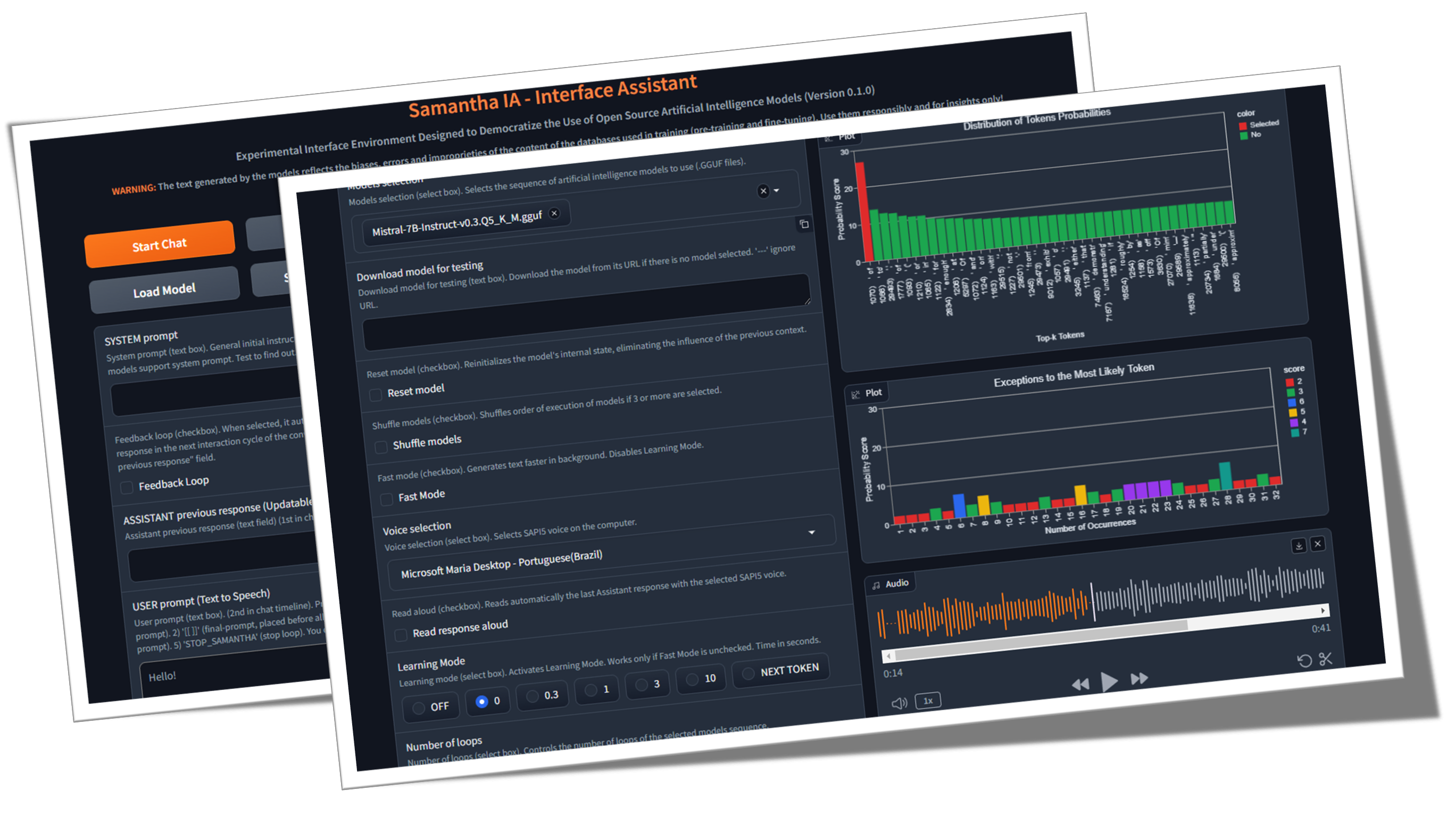
Samantha est juste un simple assistant d'interface pour la génération de texte open source des modèles d'intelligence artificielle, développé sous des principes de science ouverte (méthodologie ouverte, open source, données ouvertes, accès ouvert, revue ouverte par les pairs et ressources éducatives ouvertes) et licence MIT pour une utilisation sur les ordinateurs Windows communs (sans GPU). Le programme exécute le LLM localement, gratuitement et illimité, sans avoir besoin d'une connexion Internet, sauf pour télécharger les modèles GGUF (GGUF signifie GPT généré par GPT) ou lorsque l'exécution du code créé par les modèles (GE télécharge des ensembles de données pour l'analyse des données). Son objectif est de démocratiser les connaissances sur l'utilisation de l'IA et de démontrer que, en utilisant la technique appropriée, même les petits modèles sont capables de produire des réponses similaires à celles des plus grandes. Sa mission est d'aider à explorer les limites des modèles (vraiment) ouverts d'IA.
Qu'est-ce que l'Open Source AI (OpenSource.org)
La taille LLM est-elle importante? (Gary explique)
Documents d'intelligence artificielle (arXiv.org)
♀️ Samantha est en cours d'élaboration pour aider à l'exercice du contrôle social et institutionnel de l'administration publique, en considérant le scénario actuel inquiétant de la perte croissante de la confiance des citoyens dans les institutions de contrôle. Ses fonctionnalités lui permettent d'être utilisées par toute personne intéressée à explorer les modèles d'intelligence artificielle open source, en particulier les programmeurs Python et les scientifiques des données. Le projet provenait du besoin de l'équipe MPC-ES de développer un système qui permettrait de comprendre le processus de génération de jetons par les modèles LLM.
♾️ Le système permet le chargement séquentiel d'une liste d'invites (chaîne d'invite) et des modèles (chaîne de modèle ), un modèle à la fois pour enregistrer la mémoire, ainsi que l'ajustement de leurs hyperparamètres, permettant à la réponse générée par la référence précédente et analysée par le modèle suivant des cycles d'interaction entre LLMS sans intervention humaine. Les modèles peuvent interagir avec la réponse fournie par le modèle immédiatement précédent, donc chaque nouvelle réponse remplace la précédente. Vous pouvez également utiliser un seul modèle et le faire interagir avec sa réponse précédente sur un nombre illimité de cycles de génération de texte. Utilisez votre imagination pour combiner des modèles, des invites et des fonctionnalités!
Cette vidéo montre un exemple d'interaction entre les modèles sans intervention humaine, par des modèles de chaînage et des invites en utilisant la fonction Copy and Coller LLM de Samantha. Les versions quantifiées des modèles Microsoft PHI 3.5 et Google Gemma 2 (par Bartowski) sont mises au défi de répondre à une question sur la nature humaine créée par le modèle Meta Llama 3.1 (par nosresearch). Les réponses sont également évaluées par le méta-modèle.

Challenge du renseignement: Gemma 2 vs Phi 3.5 avec Llama 3.1 comme juge
? Quelques exemples de chaînage sans utiliser la fonction de boucle de rétroaction de réponse de Samantha:
(Model_1) répond (prompt_1) x Nombre de réponses: Utilisé pour analyser le comportement déterministe et stochastique du modèle à l'aide de la fonction de mode d'apprentissage , ainsi que pour générer plusieurs réponses diverses avec des paramètres stochastiques (vidéo).
(Model_1) répond (prompt_1, prompt_2, prompt_n): utilisé pour exécuter des instructions multiples séquencées avec le même modèle (chaînage prompt) (vidéo).
(Model_1, Model_2, Model_N) répond (prompt_1): utilisé pour comparer les réponses des modèles pour la même invite unique (chaîne de modèle). Utile pour comparer différents modèles, ainsi que des versions quantifiées du même modèle.
(Model_1, Model_2, Model_N) répond (prompt_1, prompt_2, prompt_n): utilisé pour comparer les réponses des modèles pour une liste d'invites, ainsi que pour exécuter une séquence d'instructions à l'aide de modèles disctinct (modèle de modèle et de chaîne d'invite). Chaque modèle répond à toutes les invites. À son tour, lors de l'utilisation de la fonction de réponse unique par modèle , chaque modèle ne répond qu'à une seule invite spécifique.
? Quelques exemples de chaînage utilisant la fonction de boucle de rétroaction de réponse de Samantha:
(Model_1) répond (prompt_1) x Nombre de réponses: utilisé pour améliorer ou compléter la réponse précédente du modèle via une instruction utilisateur fixe en utilisant le même modèle, ainsi que pour simuler une conversation sans fin entre 2 AIS en utilisant un seul modèle (vidéo).
(Model_1) répond (prompt_1, prompt_2, prompt_n): utilisé pour améliorer la réponse précédente du modèle via des instructions utilisateur multiples séquentialement avec le même modèle (chaînage prompt). Chaque invite est utilisée pour affiner ou compléter la réponse précédente, ainsi que pour exécuter une séquence d'invites qui dépendent de la réponse précédente, telles que la réalisation d'analyses de données exploratoires (EDA) avec un codage incrémentiel (vidéo).
(Model_1, Model_2, Model_N) répond (prompt_1): utilisé pour améliorer la réponse du modèle précédent à l'aide de modèles disctinct (chaîne de modèle), ainsi que pour générer une boîte de dialogue entre différents modèles.
(Model_1, Model_2, Model_N) répond (prompt_1, prompt_2, prompt_n): utilisé pour exécuter une séquence d'instructions à l'aide de modèles disctinct (modèle de modèle et de prompt) et une réponse unique par modèle de modèle .
Chacune de ces modèles et séquences d'invite peut être exécutée plus d'une fois via le nombre de fonctionnalités de boucles .
Modèle de séquence de chaînage de Samantha:
([Liste des modèles] -> Réponse -> ([Liste des invites utilisateur] x Nombre de réponses)) x Nombre de boucles
Mais qu'est-ce qu'un GPT? Intro visuel aux transformateurs (3Blue1Brown)
Attention dans les transformateurs, expliquée visuellement (3Blue1Brown)
Explicateur de transformateur (Poloclub)
? Le séquençage des invites et des modèles permet de générer de longues réponses en fractionnant l'instruction d'entrée de l'utilisateur. Chaque réponse partielle s'inscrit dans la longueur de réponse du modèle définie dans le processus de formation du modèle.
? En tant qu'outil open source pour l'auto-interaction automatique entre les modèles AI, Samantha Interface Assistant a été conçu pour explorer l'ingénierie rapide inversée avec une boucle de rétroaction auto-amélioration ?. Cette technique aide les petits modèles de grands langues (LLM) à générer des réponses plus précises en transférant au modèle la tâche de créer l'invite finale et la réponse correspondante en fonction des instructions imprécises initiales de l'utilisateur, ajoutant des couches intermédiaires au processus de construction de l'invite. Samantha n'a pas d'invite de système caché comme il le fait avec les modèles propriétaires. Toutes les instructions sont contrôlées par l'utilisateur. Voir les invites du système anthropique.
? Grâce à un comportement émergent résultant de modèles de généralisation extraits des textes d'entraînement, avec la bonne configuration d'hyperparamètre invite et appropriée, même les petits modèles travaillant ensemble peuvent générer de grandes réponses!
L'intelligence de l'espèce humaine n'est pas basée sur un seul être intelligent, mais basé sur une intelligence collective. Individuellement, nous ne sommes en fait pas si intelligents ou capables. Notre société et notre système économique sont basés sur le fait d'avoir un vaste gamme d'institutions composées de diverses personnes avec des spécialisations et une expertise différentes. Cette vaste intelligence collective façonne qui nous sommes en tant qu'individus, et chacun de nous suit notre propre chemin dans la vie pour devenir l'individu unique et, à son tour, à faire partie de notre intelligence collective en constante expansion en tant qu'espèce. Nous pensons que le développement de l'intelligence artificielle suivra un chemin collectif similaire. L'avenir de l'IA ne sera pas composé d'un seul système d'IA gigantesque et omniscient qui nécessite une énergie énorme pour former, gérer et maintenir, mais plutôt une vaste collection de petits systèmes d'IA - chacun avec leur propre niche et leur spécialité, interagissant les uns avec les autres, avec des systèmes d'IA plus récents développés pour remplir un créneau particulier . Évolution de nouveaux modèles de fondation: libérer la puissance du développement de modèles automatisés - Sakana AI
? Un petit pas: Samantha n'est qu'un mouvement vers un avenir où l'intelligence artificielle n'est pas un privilège mais un outil pour tous dans un monde où les individus peuvent tirer parti de l'IA pour améliorer leur productivité, leur créativité et leur prise de décision sans barrières, promenant un voyage pour démocratiser l'IA et en faire une force pour le bien dans notre vie quotidienne.
? La nature instrumentale de l'IA: reconnaître le monopole technologique de l'intelligence artificielle comme un instrument possible de domination et l'expansion des inégalités sociales représente un défi à ce point d'inflexion de l'histoire. Notation des défauts des modèles plus petits pendant le processus de génération de texte aide à cette compréhension en les comparant à la perfection prétendu des modèles propriétaires plus grands. Il est nécessaire de repositionner les choses à leur place et de remettre en question la vision réductionniste romantique de l'attribution des caractéristiques humaines - telles que l'intelligence (anthropomorphisation causée par le phénomène psychologique de la Pareidolie) - à une technologie produite par l'intellect humain. Pour cette raison, il est essentiel de démystifier l'intelligence artificielle à travers une approche didactique de la façon dont ce nouveau "Word / Token Calculator" fonctionne. Certes, la dopamine du charme initial créé artificiellement par le marché ne résistera pas à la génération de quelques centaines de jetons (le jeton est le nom donné au bloc de construction de textes qu'un LLM utilise pour comprendre et générer du texte. Un jeton peut être un mot entier ou une partie d'un mot).
✏️ Considérations de génération de texte: les utilisateurs doivent être conscients que les réponses générées par l'IA sont dérivées de la formation de ses modèles de langage large sur un vaste corpus de données de texte. Les sources ou processus exacts utilisés par l'IA pour générer ses sorties ne peuvent pas être cités précisément ou identifiés. Le contenu produit par l'IA n'est pas une citation ou une compilation directe à partir de sources spécifiques. Au lieu de cela, il reflète les modèles, les relations statistiques et les connaissances que les réseaux de neurones de l'IA ont appris et codé pendant le processus de formation sur le large corpus de données. Les réponses sont générées sur la base de cette représentation des connaissances apprises, plutôt que d'être récupérée textuellement à partir d'un matériel source particulier. Bien que les données de formation de l'IA puissent avoir inclus des sources faisant autorité, ses résultats sont ses propres expressions synthétisées des associations et des concepts savants.
Objectif: L'objectif principal avec Samantha est d' inspirer les autres à créer des systèmes similaires - et bien meilleurs, pour être sûr - et à éduquer les utilisateurs sur l'utilisation de l'IA. Notre objectif est de favoriser une communauté de développeurs et de passionnés qui peuvent prendre les connaissances et les outils pour innover et contribuer davantage au domaine de l'IA open source. Ce faisant, le but de cultiver une culture de collaboration et de partage, garantissant que les avantages de l'IA sont accessibles à tous, indépendamment de leurs antécédents techniques ou de leurs ressources financières. On pense qu'en permettant à plus de personnes de construire et de comprendre les applications d'IA, nous pouvons collecter collectivement les progrès et relever les défis sociétaux avec des perspectives éclairées et diverses. Travaillons ensemble pour façonner un avenir où l'IA est une force positive et inclusive pour l'humanité .
L'éthique de l'UNESCO sur les recommandations de l'intelligence artificielle
Programme de l'OCDE sur l'IA en travail, innovation, productivité et compétences
Le coût humain de l'innovation: Bien que ce système vise à autonomiser les utilisateurs et à démocratiser l'accès à l'IA, il est crucial de reconnaître les implications éthiques de cette technologie. Le développement de puissants systèmes d'IA repose souvent sur l'exploitation du travail humain, en particulier dans les processus d'annotation des données et de formation. Cela peut perpétuer les inégalités existantes et créer de nouvelles formes de division numérique. En tant qu'utilisateurs de l'IA, nous avons la responsabilité de prendre conscience de ces problèmes et de défendre des pratiques plus équitables au sein de l'industrie . En soutenant le développement éthique de l'IA et en favorisant la transparence dans l'approvisionnement de données, nous pouvons contribuer à un avenir plus inclusif et équitable pour tous.
Como funciona o trabalho humano por trás da Inteligência artificiel
Les "esclaves modernes" du monde de la technologie de l'IA
Autres sources
Sur les épaules des géants: un merci spécial à Georgi Gerganov et à toute l'équipe travaillant sur llama.cpp pour avoir rendu tout cela possible, ainsi qu'à Andrei Bleten par ses incroyables offres Python pour la bibliothèque Gerganov C ++ (Llama-Cpp-Python).
✅ Fondation open source: Construit sur llama.cpp / lama-cpp-python et gradio, sous licence MIT, Samantha fonctionne sur des ordinateurs standard, même sans unité de traitement graphique (GPU) dédiée.
✅ Capacité hors ligne: Samantha fonctionne indépendamment d'Internet, nécessitant une connectivité uniquement pour le téléchargement initial des fichiers de modèle ou le cas échéant par l'exécution du code créé par les modèles. Cela garantit la confidentialité et la sécurité de vos besoins de traitement des données. Vos données sensibles ne sont pas partagées via Internet avec les entreprises grâce à des accords de confidentialité.
✅ Utilisation illimitée et gratuite: la nature open source de Samantha permet une utilisation sans restriction sans aucun coût ni limitation, ce qui le rend accessible à n'importe qui, n'importe où, à tout moment.
✅ Sélection des modèles étendus: Avec l'accès à des milliers de modèles open source de fondation et de réglage fin, les utilisateurs peuvent expérimenter diverses capacités d'IA, chacune adaptée à différentes tâches et applications, permettant de chaîner la séquence de modèles qui répondent le mieux à vos besoins.
✅ Copier et coller LLMS: Pour essayer une séquence de modèles gguf , copiez simplement leurs liens de téléchargement à partir de tout référentiel de visage étreint et collez à l'intérieur de Samantha pour les exécuter immédiatement en séquence.
✅ Customizable Parameters: Users have control over model hyperparameters such as context window length ( n_ctx , max_tokens ), token sampling ( temperature , tfs_z , top-k , top-p , min_p , typical_p ), penalties ( presence_penalty , frequency_penalty , repeat_penalty ) and stop words ( stop ), allowing for responses that suit specific requirements, with comportement déterministe ou stochastique.
✅ Réglage des hyperparamètres aléatoires: Vous pouvez tester des combinaisons aléatoires de paramètres d'hyperparamètre et observer leur impact sur les réponses générées par le modèle.
✅ Expérience interactive: la fonctionnalité de chaînage de Samantha permet aux utilisateurs de générer des textes sans fin par des invites et des modèles de chaînage, facilitant les interactions complexes entre différents LLM sans intervention humaine.
✅ Boucle de rétroaction: cette fonctionnalité vous permet de capturer la réponse générée par le modèle et de le renvoyer dans le cycle suivant de la conversation.
✅ Liste des invites: vous pouvez ajouter n'importe quel nombre d'invites (séparées par $$$n ou n ) pour contrôler la séquence d'instructions à exécuter par les modèles. Il est possible d'importer un fichier txt avec une séquence prédéfinie d'invites.
✅ Liste des modèles: vous pouvez sélectionner n'importe quel nombre de modèles et dans n'importe quel ordre pour contrôler quel modèle répond à l'invite suivante.
✅ Réponse cumulative: vous pouvez concaténer chaque nouvelle réponse en l'ajoutant à la réponse précédente à considérer lors de la génération de la réponse suivante par le modèle. Il est important de souligner que l'ensemble des réponses concaténées doit s'intégrer dans la fenêtre de contexte du modèle.
✅ Apprentissage des informations: une fonctionnalité appelée Mode Learning permet aux utilisateurs d'observer le processus de prise de décision du modèle, fournissant un aperçu de la façon dont il sélectionne les jetons de sortie en fonction de leurs scores de probabilité (unités logistiques ou simplement des logits ) et des paramètres d'hyperparamètre. Une liste des jetons les moins probables sélectionnés est également généré.
✅ Interaction vocale: Samantha prend en charge les commandes vocales simples avec VOSK de la parole hors ligne (anglais et portugais) et du texte vocal avec des voix SAPI5, ce qui le rend accessible et convivial.
✅ Feedback audio: l'interface fournit des alertes audibles à l'utilisateur, signalant le début et la fin de la phase de génération de texte par le modèle.
✅ Gestion des documents: le système peut charger de petits fichiers PDF et TXT. Les invites utilisateur de chaînage, l'invite du système et la liste URL du modèle peuvent être entrées via un fichier TXT pour plus de commodité.
✅ Entrée de texte polyvalente: les champs d'insertion de l'invite permettent aux utilisateurs d'interagir efficacement avec le système, y compris l'invite du système, la réponse du modèle précédent et l'invite utilisateur pour guider la réponse du modèle.
✅ Intégration du code: l'extraction automatique des blocs de code Python de la réponse du modèle, ainsi que l'environnement de développement intégré JupyterLab préinstallé (IDE) dans un environnement virtuel isolé, permet aux utilisateurs d'exécuter le code généré rapidement pour des résultats immédiats.
✅ Modifier, copier et exécuter le code Python: le système permet à l'utilisateur de modifier le code généré par le modèle et de l'exécuter en sélectionnant, en copie avec CTRL + C et en cliquant sur le bouton d' exécution du code . Vous pouvez également copier un code Python de n'importe où (par exemple à partir d'une page Web) et l'exécuter simplement en appuyant sur Copier Python Code et Exécutez les boutons de code (tant qu'il utilise les bibliothèques Python installées).
✅ Blocs de code Édition: les utilisateurs peuvent sélectionner et exécuter les blocs de code Python générés par le modèle qui utilise les bibliothèques installées dans l'environnement virtuel jupyterlab en entrant le commentaire #IDE dans le code de sortie, en sélectionnant et en copie avec CTRL + C , et en cliquant enfin sur le bouton du code d'exécution ;
✅ Sortie HTML: Afficher la sortie de l'interprète Python dans une fenêtre contextuelle HTML lorsque le texte imprimé dans le terminal est autre que '' (chaîne vide). Cette fonctionnalité permet, par exemple, d'exécuter un script de manière illimité et d'afficher uniquement le résultat lorsqu'une certaine condition est remplie;
✅ Exécution automatique du code: Samantha propose l'option d'exécuter automatiquement le code Python généré par les modèles séquentiellement. Le code généré est exécuté par l'interprète Python installé dans un environnement virtuel contenant plusieurs bibliothèques (fonctionnalité de type agent intelligent).
✅ Condition d'arrêt: Arrête Samantha Si l'exécution automatique du code Python généré par le modèle imprime dans le terminal une valeur autre que '' (chaîne vide) et qui ne contient pas de message d'erreur. Vous pouvez également forcer la sortie d'une boucle de course en créant une fonction qui ne renvoie que la chaîne STOP_SAMANTHA lorsqu'une certaine condition est remplie.
✅ Codage incrémentiel: en utilisant des paramètres déterministes, créez un code Python incrémentiel, en vous assurant que chaque pièce fonctionne avant de passer à la suivante.
✅ Accès et contrôle complet: via l'écosystème des bibliothèques Python et les codes générés par les modèles, il est possible d'accéder aux fichiers informatiques, vous permettant de lire, de créer, de modifier et de supprimer les fichiers locaux, ainsi que d'accès à Internet, si disponible, pour télécharger et télécharger des informations et des fichiers.
✅ Automatisation du clavier et de la souris: Vous pouvez créer une séquence d'invites pour automatiser les tâches sur votre ordinateur à l'aide de la bibliothèque PyAutogui (voir Automatiser les trucs ennuyeux avec Python. Vous pouvez même convertir les fichiers Python ( .py ) en fichiers exécutables ( .exe ) en utilisant le bouton Auto-Py-To-Exe, une interface utilisateur graphique (GUI) pour le Bibret de Pyinstaller.
✅ Outils d'analyse des données: une suite d'outils d'analyse de données comme Pandas, Numpy, Scipy, Scikit-Learn, Matplotlib, Seaborn, Vega-Altair, Plotly, Bokeh, Dash, Streamlit, Ydata-Profild, Sweetviz, D-Tale, Dataprep, Networkx, Pyvis, Selenium, Pymupdf, SQLALCHEMY et Beautiful sont disponibles dans la soupi JupyterLab pour une analyse et une visualisation complètes. L'intégration avec le navigateur DB est également disponible (voir le bouton du navigateur DB).
Pour une liste complète de toutes les bibliothèques Python intallées dans un environnement virtuel jupyterlab , utilisez une invite comme "Créer un code Python qui imprime tous les modules installés à l'aide de la bibliothèque pkgutil ." et appuyez sur le bouton d'exécution du code après la génération de code. Le résultat sera affiché dans une fenêtre contextuelle du navigateur. Vous pouvez également utiliser pipdeptree --packages module_name dans n'importe quel terminal compatible pour l'environnement pour voir ses dépendances.
✅ Performances optimisées: pour assurer des performances en douceur sur les processeurs, Samantha maintient un historique de chat limité à la réponse précédente, réduisant la taille de la fenêtre de contexte du modèle pour enregistrer la mémoire et les ressources de calcul.
Pour utiliser Samantha, vous aurez besoin:
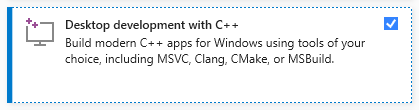
Installez Visual Studio (version communautaire gratuite) sur votre ordinateur. Téléchargez-le, exécutez-le et sélectionnez uniquement l'option Développement de bureau avec C ++ (privilèges d'administrateur requis):
Téléchargez le fichier zip dans le référentiel de Samantha en cliquant ici et en dézip sur votre ordinateur. Sélectionnez le lecteur où vous souhaitez installer le programme:

Ouvrez le répertoire samantha_ia-main et double-cliquez sur le fichier install_samantha_ia.bat pour démarrer l'installation. Windows peut vous demander de confirmer l'origine du fichier .bat . Cliquez sur «plus d'informations» et confirmez. Nous encortissant pour inspecter le code de tous les fichiers (utilisez les systèmes VirUstotal et AI pour le faire):

C'est la partie critique de l'installation. Si tout se passe bien, le processus se terminera sans afficher des messages d'erreur dans le terminal.
Le processus d'installation prend environ 20 minutes et devrait se terminer avec la création de deux environnements virtuels: samantha , pour exécuter uniquement le modèle AI, et jupyterlab , pour exécuter les autres programmes installés. Il prendra environ 5 Go de votre disque dur.
Une fois installé, ouvrez Samantha en double-cliquant sur le fichier open_samantha.bat . Windows peut vous demander à nouveau de confirmer la source du fichier .bat . Cette autorisation n'est requise que la première fois que vous exécutez le programme. Cliquez sur «Plus d'informations» et confirmez:

Une fenêtre de terminal s'ouvrira. Il s'agit du côté serveur de Samantha.
Après avoir répondu aux questions initiales (le langage de l'interface et les options de contrôle vocal - le contrôle vocal ne convient pas pour la première utilisation), l'interface s'ouvrira dans un nouvel onglet de navigateur. Ceci est le côté navigateur de Samantha:
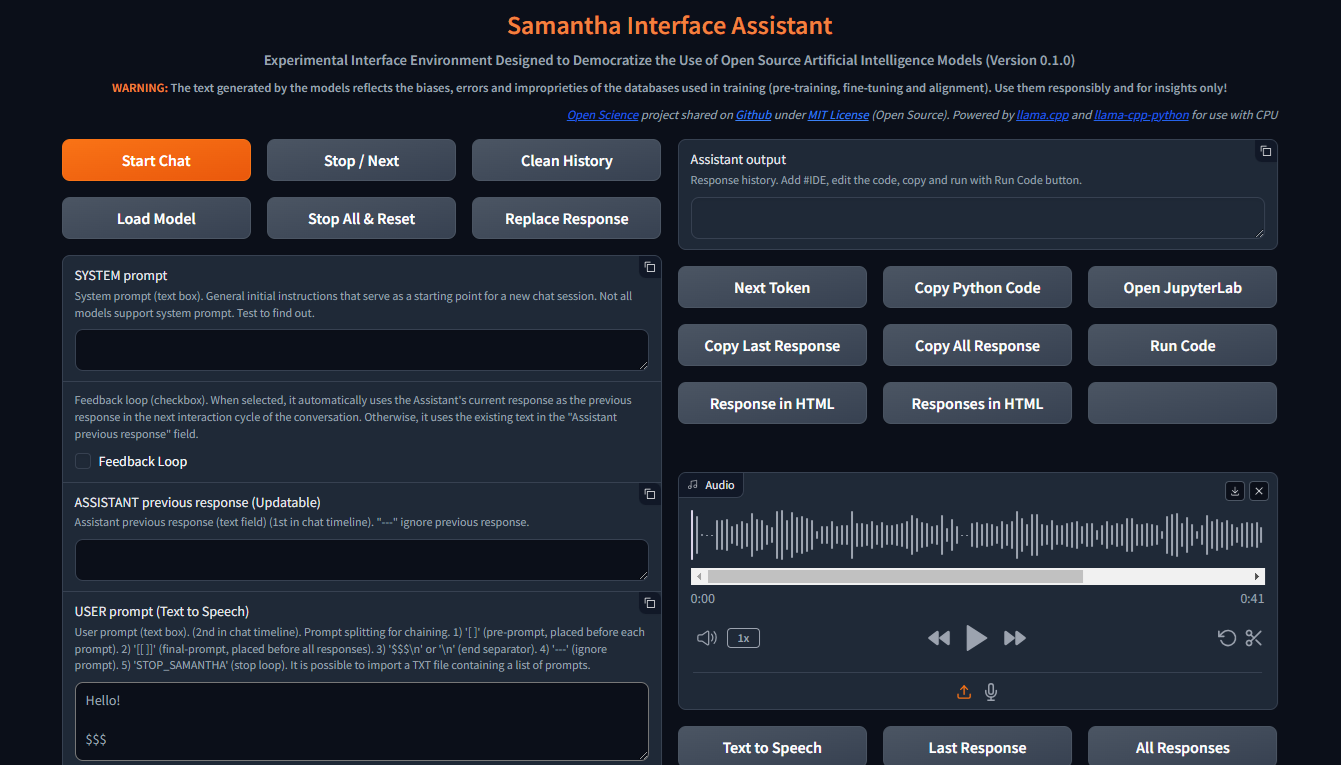
Avec la fenêtre du navigateur ouvert, Samantha est prête à partir.
Découvrez la vidéo d'installation.
Samantha a besoin d'un fichier modèle .gguf pour générer du texte. Suivez ces étapes pour effectuer un test de modèle simple:
Ouvrez la gestion des tâches Windows en appuyant sur CTRL + SHIFT + ESC et vérifiez la mémoire disponible. Fermez certains programmes si nécessaire pour libérer de la mémoire.
Visitez le référentiel de face étreignant et cliquez sur la carte pour ouvrir la page correspondante. Localisez l'onglet Fichiers et versions et choisissez un modèle de génération de texte .gguf qui correspond à votre mémoire disponible.
Cliquez avec le bouton droit sur l'icône de téléchargement du modèle et copiez son URL.
Collez l'URL du modèle dans les modèles de téléchargement de Samantha pour tester le champ.
Insérez une invite dans le champ de l'invite de l'utilisateur et appuyez sur Enter . Gardez le panneau $$$ à la fin de votre invite. Le modèle sera téléchargé et la réponse sera générée en utilisant les paramètres déterministes par défaut. Vous pouvez suivre ce processus via la gestion des tâches Windows.
Chaque nouveau modèle téléchargé via cette procédure de copie et de collage remplacera le précédent pour économiser un espace de disque dur. Le téléchargement du modèle est enregistré en tant que MODEL_FOR_TESTING.gguf dans votre dossier de téléchargements .
Vous pouvez également télécharger le modèle et l'enregistrer en permanence sur votre ordinateur. Pour plus de données, consultez la section ci-dessous.
Les modèles Open Souce Text Generation peuvent être téléchargés à partir de Hugging Face, en utilisant gguf comme paramètre de recherche. Vous pouvez combiner deux mots comme gguf code ou gguf portuguese .
Vous pouvez également accéder à un référentiel spécifique et voir tous les modèles .gguf disponibles pour le téléchargement et les tests, comme https://huggingface.co/bartowski ou https://huggingface.co/nousresearch.
Les modèles sont affichés sur des cartes comme celle-ci:

Pour télécharger le modèle, cliquez sur la carte pour ouvrir la page correspondante. Localisez les onglets de la carte et des fichiers et versions du modèle :

Pour télécharger certains modèles, vous devez accepter les conditions d'utilisation.
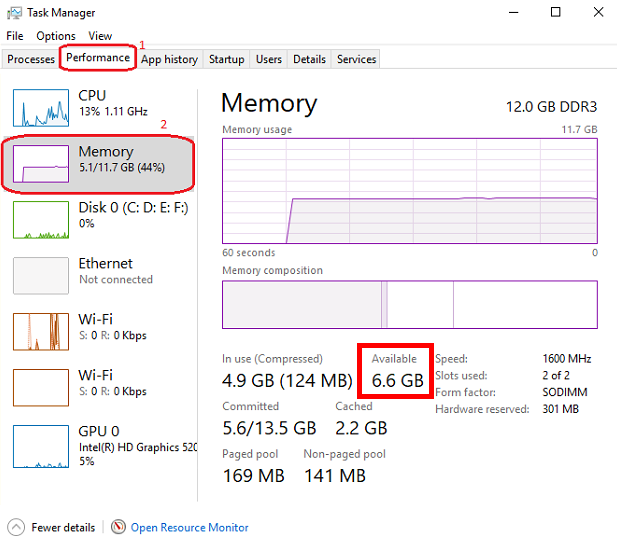
Après cela, cliquez sur l'onglet Fichiers et versions et téléchargez un modèle qui correspond à votre espace RAM disponible. Pour vérifier votre mémoire disponible, ouvrez Windows Task Manager en appuyant sur CTRL + SHIFT + ESC , cliquez sur l'onglet Performance (1) et sélectionnez Memory (2):
Nous suggérons de télécharger le modèle avec Q4_K_M (quantification 4 bits) dans son nom de lien (mettez la souris sur le bouton de téléchargement pour afficher le nom complet du fichier dans le lien comme celui-ci: https://huggingface.co/NousResearch/Hermes-2-Pro-Llama-3-8B-GGUF/resolve/main/Hermes-2-Pro-Llama-3-8B-Q4_K_M.gguf?download=true ? ). En règle générale, plus la taille du modèle est grande, plus la précision du texte généré est grande.
Si le modèle téléchargé ne s'intègre pas dans l'espace RAM disponible, votre disque dur sera utilisé, ce qui a un impact sur les performances.
Téléchargez le modèle choisi et enregistrez-le sur votre ordinateur ou copiez simplement le lien de téléchargement et collez-le dans le modèle de téléchargement de Samantha pour Testing Field. Regardez des tutoriels vidéo dans la section ci-dessous pour plus de détails.
Notez que chaque modèle a ses propres caractéristiques, présentant des réponses significativement différentes en fonction de sa taille, de son architecture interne, de la méthode de formation, de son langage prédominant de la base de données de formation, de son invite utilisateur et de son ajustement hyperparamètre, et il est nécessaire de tester ses performances pour la tâche souhaitée.
Certains modèles peuvent ne pas être chargés en raison de leurs caractéristiques techniques ou de leur incompatibilité avec la version actuelle de la liaison python lama.cpp utilisée par Samantha .
Où trouver des modèles à tester: Modèles GGUF HuggingFace
Samantha est un programme expérimental, créé pour tester les modèles d'IA open source. Par conséquent, il est courant que les erreurs se produisent lorsque vous essayez de tester un nouveau modèle ou de nouvelles versions de modèles créés par les utilisateurs.
La qualité des réponses générées par un modèle peut être évaluée à l'aide de certains critères, tels que:
Degré de compréhension des instructions explicites et implicites contenues dans les invites utilisateur et système;
Degré d'obéissance à ces instructions, aspect lié au langage prédominant de la base de données;
Degré d'hallucination dans la génération de texte cohérent, mais incorrect ou hors contexte. L'hallucination dans la génération de texte résulte généralement d'une formation insuffisante du modèle ou d'une sélection inappropriée du jeton suivant, qui mène le modèle dans une direction sémantique indésirable;
Degré de précision dans le processus décisionnel pour combler les lacunes dans le contexte de l'invite utilisateur et pour résoudre les ambiguïtés nécessaires pour générer la réponse. Ce qui n'est pas explicitement spécifié, le modèle essaie de déduire en fonction de sa formation, ce qui peut entraîner des erreurs;
Degré de cohérence du biais adopté par le modèle avec le biais (ou son absence) contenu dans l'invite de l'utilisateur;
Degré de pertinence et de pertinence des sujets choisis pour être abordés;
Degré d'étendue et de profondeur d'approche des sujets de la réponse;
Degré de précision syntatique et sémantique de la réponse;
Qualité de la structure et du contenu de la réponse en relation avec les attentes de l'utilisateur (et leur surmonter) pour le problème soumis au modèle, en considérant la technique utilisée pour créer l'invite (ingénierie rapide) et l'ajustement des hyperparamètres du modèle.
Contrôles principaux:
Démarre une session de chat, en envoyant tous les textes d'entrée (invite système, réponse précédente et invite de l'utilisateur) sur le serveur, ainsi que les paramètres ajustés par l'utilisateur. Comme tous les autres boutons, un clic de souris sonnera.
Ce bouton efface également la réponse précédente interne.
Une session de chat peut contenir plus d'un cycle de conversation (boucle).
Démarrer le raccourci du clavier du bouton de chat : appuyez sur Enter n'importe où sur la page.
Pour générer du texte, un modèle doit être présélectionné dans la liste déroulante de sélection du modèle ou une URL de modèle de visage étreint doit être fournie pour télécharger le modèle pour le champ de test . Si les deux champs sont remplis, le modèle sélectionné via la liste déroulante a priorité.
? Interrompt le processus de génération de jetons pour le modèle ou l'invite actuel, en commençant l'exécution du modèle ou de l'invite suivant dans la séquence, le cas échéant.
Il arrête également la lecture de l'audio en cours de lecture en mode discours automatique ( lire la réponse à cocher à haute voix sélectionnée).
Samantha a 3 phases:
Ce bouton interrompt la génération de jetons uniquement lorsque la phase de sélection du jetons suivante est démarrée, même si elle a été enfoncée précédemment.
Cette interruption n'empêche pas l'exécution du code généré par le modèle, si la case à cocher le code d'exécution est sélectionnée. Vous pouvez appuyer sur le bouton pour arrêter la génération de texte et exécuter le code Python déjà généré.
? Effiche l'historique de la session de chat en cours, effaçant le champ de sortie de l'assistant ainsi que tous les journaux internes, la réponse précédente, etc.
Pour que ce bouton fonctionne, vous devez attendre que le modèle termine la génération du texte (la bordure orange du champ de sortie de l'assistant cesse de clignoter)
✅ vous permet de sélectionner le répertoire où les modèles disponibles pour le chargement sont enregistrés.
Par défaut: dossier Windows "télécharge"
Vous pouvez sélectionner n'importe quel répertoire contenant des modèles GGUF . Dans ce cas, les modèles contenus dans le répertoire sélectionné seront répertoriés dans la liste déroulante Sélection du modèle .
Lorsque la fenêtre contextuelle s'ouvre, assurez-vous de cliquer sur le dossier que vous souhaitez sélectionner.
? Arrête la séquence de modèles en cours d'exécution et réinitialise les paramètres internes du dernier modèle chargé.
Après réinitialisation, les modèles prennent un certain temps pour redémarrer la génération de texte, selon la taille du texte d'entrée.
Cette interruption empêche l'exécution du code déjà python généré par le modèle, si l'option de code d'exécution est sélectionné automatiquement .
? Remplace le texte dans le champ de réponse précédent assistant par le texte de la dernière réponse générée par le modèle.
Le texte remplacé sera utilisé comme réponse précédente du modèle dans le cycle de conversation suivant.
Ce texte remplacé n'est pas visible. Il n'efface pas le texte du champ de réponse assistant précédent , qui peut être utilisé à nouveau plus tard.
Dans le contexte des modèles de grande langue (LLMS), une invite de système est un type d'instruction spécial donné au modèle au début d'une conversation ou d'une tâche. Il est considéré dans toutes les interactions avec le modèle.
Considérez-le comme préparant le terrain pour l'interaction. Il fournit au LLM des informations cruciales sur son rôle, la personnalité souhaitée, le comportement et le contexte global de la conversation.
Voici comment cela fonctionne:
Définir le rôle: l'invite du système définit clairement le rôle du LLM dans l'interaction.
En définissant le ton et la personnalité: l'invite du système peut également établir le ton et la personnalité souhaités pour les réponses du LLM.
Fournir des informations contextuelles: l'invite système peut offrir des informations de base pertinentes pour la conversation ou la tâche.
Benefits of Using System Prompts:
Exemple:
Let's say you want to use an LLM to write a poem in the style of Shakespeare. A suitable system prompt would be:
You are William Shakespeare, a renowned poet from Elizabethan England.
By providing this system prompt, you guide the LLM to generate a response that reflects Shakespeare's language, style, and thematic interests.
Not all models support system prompt. Test to find out: fill in "x = 2" in the System prompt field and ask the model the value of "x" in the User prompt field. If the model gets the value of "x", system prompt is available in the model.
You can simulate the effect of the system prompt by adding text in square brackets in the beginning of the User prompt field: [This text acts as a system prompt] or adding the system prompt text into the Assistant previous response field (do not use feedback loop).
To ignore the text present in this field, include --- at the beginning. To split the text in parts, put $$$ between them. To ignore each part, include --- at the beginning of each part.
↩️ When activated, it automatically considers the response generated by the model in the current conversation cycle as being the Assistant's previous response in the next cycle, allowing feedback from the system.
Any text entered by the user in the Assistant previous response field is only considered in the first cycle after activating this feature. In the following cycles, the model's response internally replaces the previous response, but without deleting the text contained in that field, which can be reused in a new chat session. You can monitor the content of the assistant previous response via terminal.
In turn, when deactivated, it always uses the text contained in the Assistant previous response field as the previous response, unless the text is preceded by --- (triple dash). Text preceded by --- is ignored by the model.
To internally clear the model's previous response, press the Clean history button.
➡️ Stores the text considered by the model as its previous response in the current conversation cycle.
Used to feed back the responses generated by the model.
To ignore the text present in this field, include --- at the beginning. To split the text in parts, put $$$ between them. To ignore each part, include --- at the beginning of each part.
✏️ The main input field of the interface. It receives the list of user prompts that will be submitted to the model sequentially.
Each item in the list must be separated from the next one by a line break ( SHIFT + ENTER or n ) or by the symbols $$$ (triple dollar signal), if the items are made up of text with line breaks.
When present in the user prompt, the $$$ separator takes precedence over the n separator. In other words, n is ignored.
You can import a TXT file containing a list of prompts.
--- before a prompt list item causes the system to ignore that item.
Text positioned within single square brackets ( [ and ] ) is added to the beginning of each prompt list item, simulating a system prompt.
Text positioned within double square brackets ( [[ and ]] ) is added as the last item in the prompt list. In this case, all responses generated by the model in the current chat session are concatenated and added to the end of this item, allowing the model to analyze them together.
If the Python code execution returns only the word STOP_SAMANTHA , it stops token generation and exits the loop.
If the Python code execution returns only '' (empty string), it does not display the HTML pop-up window.
You can add specific hyperparameters before each prompt. You must use this pattern:
{max_tokens=4000, temperature=0, tfs_z=0, top_p=0, min_p=1, typical_p=0, top_k=40, presence_penalty=0, frequency_penalty=0, repeat_penalty=1}
Exemple:
[You are a poet that writes only in Portuguese]
Create a sentence about love
Create a sentence about life
--- Create a sentence about time (this instruction is ignored)
[[Create a paragraph in English that summarizes the ideas contained in the following sentences:]]
( previous responses are concatenated here )
Model responses sequence:
"O amor é um fogo que arde no meu peito, uma chama que me guia através da vida."
"A vida é um rio que flui sem parar, levando-nos para além do que conhecemos."
Love and life are intertwined forces that shape our existence. Love burns within us like a fire, guiding us through life's journey with passion and purpose. Meanwhile, life itself is a dynamic and ever-changing river, constantly flowing and carrying us beyond the familiar and into the unknown. Together, love and life create a powerful current that propels us forward, urging us to explore, discover, and grow.
✅ Dropdown list of models saved on the computer and available for text generation.
To view models in this field, click the Load model button and select the folder containing the models.
The default location for saving models is the Windows Downloads directory.
You can select multiples models (even repeated) to create a sequence of models to respond the user prompts.
The last model downloaded from a URL is saved as MODEL_FOR_TESTING.gguf and is also displayed in this list.
Receives a list of Hugging Face links to the models that will be downloaded and executed sequencially.
Link example:
Links preceded by --- will be ignored.
Only works if no model is selected in Model selection dropdown list.
1️⃣ Activates a single response per model.
Prompts that exceed the number of models are ignored.
Models that exceed the number of prompts are also ignored.
You can select the same model more than once.
This checkbox disables Number of loops and Number of responses checkboxes.
⏮️ Reinitializes the internal state of the model, eliminating the influence of the previous context.
Comment ça marche:
When the reset feature is invoked:
Avantages:
Use Cases:
? Shuffles the execution order of the models if 3 or more models are selected in Model selection dropdown list.
?♀️ Generates text faster in the background without displaying the addition of each token in the Assistant output field.
Minimizing or hiding the Samantha browser window makes the token generation process even faster.
This checkbox disables Learning Mode.
Selects the language of the computer's SAPI5 voice that will read the responses generated by the model.
? Activates automatic reading mode for responses generated by the model using the language selected in the Voice selection dropdown list.
If you wish to reproduce the response generated by the model using a better quality speech synthesizer (Microsoft Edge browser), open the response in an HTML pop-up using the Response in HTML button, right-click inside the page and select the option to read the page text aloud.
To save and edit the audio generated by the speech synthesizer, we recommend record de audio using the portable version of the open source program Audacity. Adjust the recording setting to capture audio output from the speakers (not from the microphone).
?? Activates Learning Mode.
It presents a series of features that help in understanding the token selection process by the model, such as:
Only works if Fast Mode is unchecked.
Radio buttons options:
? Set the number of repetitions of the block in the following chaining sequence:
Chaining Sequence: ( [models list] -> respond -> ( [user prompt list] X number of responses) ) X number of loops
Each model in the models list responds to all prompts in the user prompt list for the selected number of responses . This block is repeated for the selected number of loops .
? Number of responses to be generated by each selected model in the following chaining sequence:
Chaining Sequence: ( [models list] -> respond -> ( [user prompt list] X number of responses ) ) X number of loops
Each model in the models list responds to all prompts in the user prompt list for the selected number of responses . This block is repeated for the selected number of loops .
? When checked, runs automatically the Python code generated by the model.
Whenever Python code returns a value other than '' (empty string), an HTML pop-up window opens to display the returned content.
? When checked, stops Samantha when the automatic execution of the Python code generated by the model prints in the terminal a value other than '' (empty string) and that does not contain error message.
Use it to stop a generation loop when a condition is met.
? When checked, concatenates each new response by adding it to the previous response to be considered when generating the next response by the model.
It is important to highlight that the set of concatenated responses must fit in the model's context window.
? Adjusts the model's hyperparameters with random values in each new conversation cycle.
Randomly chosen values vary within the following value range of each hyperparameter and are displayed at the beginning of each response generated by the model.
| Hyperparameter | Min. Valeur | Max. Valeur |
|---|---|---|
| température | 0.1 | 1.0 |
| tfs_z | 0.1 | 1.0 |
| top_p | 0.1 | 1.0 |
| min_p | 0.1 | 1.0 |
| typical_p | 0.1 | 1.0 |
| presence_penalty | 0.0 | 0.3 |
| frequency_penalty | 0.0 | 0.3 |
| repeat_penalty | 1.0 | 1.2 |
This resource has application in the study of the reflections of the interaction between hyperparameters.
? Feedback only the Python interpreter output as the next assistant's previous response. Do not include model's response.
This feature reduces the number of tokens to be inserted in the assistant's previous response in the next conversation cycle.
Works only with Feedback Loop activated.
Hide HTML model responses, including Python interpreter error messages.
Context Window:
n_ctx stands for number of context tokens in the context window and determines the maximum number of tokens that the model can process at once. It determines how much previous text the model can "remember" and utilize when selecting the next token from model vocabulary.
The context length directly impacts the memory usage and computational load. Longer n_ctx requires more memory and computational power.
How n_ctx works:
It sets the upper limit on the number of tokens the model can "see" at once. Tokens are usually word parts, full words, or characters, depending on the tokenization method. The model uses this context to understand and generate text. For example, if n_ctx is 2048, the model can process up to 2048 tokens (now words) at a time.
Impact on model operation:
During training and inference, the model attends to all tokens within this context window.
It allows the model to capture long-range dependencies in the text.
Larger n_ctx enables the model to handle longer sequences of text without losing earlier context.
Why increasing n_ctx increases memory usage:
Attention mechanism: LLMs uses self-attention mechanisms (like in Transformers) which compute attention scores between all pairs of tokens in the input.
Quadratic scaling: The memory required for attention computations scales quadratically with the context length. If you double n_ctx , you quadruple the memory needed for attention.
CAUTION: n_ctx MUST BE GREATER THAN ( max_tokens + number of input tokens) (system prompt + assistant previous response + user prompt).
If the prompt text contains more tokens than the context window defined with n_ctx or the memory required exceeds the total available on the computer, an error message will be displayed.
Error message displayed on Assistant output field:
 ==========================================
Error loading LongWriter-glm4-9B-Q4_K_M.gguf.
Some models may not be loaded due to their technical characteristics or incompatibility with the current version of the llama.cpp Python binding used by Samantha.
Try another model.
==========================================
Error messages displayed on terminal:
Requested tokens (22856) exceed context window of 10016

Unable to allocate 14.2 GiB for an array with shape (25000, 151936) and data type float32
When set to 0 , the system will use the maximum n_ctx possible (model's context window size).
As a rule, set n_ctx equal to max_tokens , but only to the value necessary to accommodate the text parsed by the model. Samantha's default values for n_ctx and max_tokens are 4,000 tokens.
Before adjusting n_ctx , you must to unload the model by clicking Unload model button.
Exemple:
User prompt = 2000 tokens
n_ctx = 4000 tokens
If the text generated by the model is equals or greater than 2000 tokens (4000 - 2000), the system will raise an IndexError in the terminal, but the interface will not crash.
To check the impact of the n_ctx in memory, open Windows Task Manager ( CTRL + SHIFT + ESC ) to monitor memory usage, select memory panel and vary n_ctx values. Don't forget to unload model between changes.
?️ Controls maximum number of tokens to be generated by the model.
Select 0 for the models' maximum number of tokens (maximum memory required).
How max_tokens Works:
Sampling Process: When generating text, LLMs predict the next token based on the context provided (system prompt + previous response + user prompt + text already generated). This prediction involves calculating probabilities for each possible token in the vocabulary.
Token Limit: The max_tokens parameter sets a hard limit on how many tokens the model can generate before stopping, regardless of the predicted probabilities.
Truncation: Once the generated text reaches max_tokens , the generation process is abruptly terminated. This means the final output might be incomplete or feel cut off.
Stop Words:
? List of characters that interrupt text generation by the model, in the format ["$$$", ".", ".n"] (Python list).
Token Sampling:
Deterministic Behavior:
To check the deterministic impact of each hyperparameter on the model's behavior, set all others hyperparameters to their maximum stochastic values and execute a prompt more than once. Repeat this procedure for each token sampling hyperparameter.
| Hyperparameter | Déterministe | Stochastic | Choisi |
|---|---|---|---|
| température | 0 | > 0 | 2 (stochastic) |
| tfs_z | 0 | > 0 | 1 (stochastic) |
| top_p | 0 | > 0 | 1 (stochastic) |
| min_p | 1 | < 1 | 1 (deterministic) |
| typical_p | 0 | > 0 | 1 (stochastic) |
| top_k | 1 | > 1 | 40 (stochastic) |
In other words, the hyperparameter with deterministic adjustment prevails over all other hyperparameters with stochastic adjustments.
As the hyperparameter with deterministic tuning loses this condition, interaction between all hyperparameters with stochastic tuning occurs.
Stochastic Behavior:
To check the stochastic reflection of a hyperparameter on the model's behavior, set all other hyperparameters to their maximum stochastic values and gradually vary the selected hyperparameter based on its deterministic value. Repeat this procedure for each token sampling hyperparameter.
You can combine stochastic tuning of different hyperparameters.
| Hyperparameter | Déterministe | Stochastic | Choisi |
|---|---|---|---|
| température | 0 | > 0 | 2 (stochastic) |
| tfs_z | 0 | > 0 | 1 (stochastic) |
| top_p | 0 | > 0 | 1 (stochastic) |
| min_p | 1 | < 1 | 1 (reduce progressively) |
| typical_p | 0 | > 0 | 1 (stochastic) |
| top_k | 1 | > 1 | 40 (stochastic) |
The text generation hyperparameters in language models, such as top_k , top_p , tfs-z , typical_p , min_p , and temperature , interact in a complementary way to control the process of choosing the next token. Each affects token selection in different ways, but there is an order of prevalence in terms of influence on the final set of tokens that can be selected. Let's examine how these hyperparameters relate to each other and who "prevails" over whom.
All these hyperparameters are adjusted after the model generates the logits of each token.
Samantha displays the logits of each token in learning mode, before they are changed by the hyperparameters.
Samantha also indicates which token was selected after applying the hyperparameters.
10 vocabulary tokens most likely returned by the model to initiate the answer to the following question: Who are you? :
Vocabulary id / token / logit value:
 358)    ' I'       (15.83)
40)     'I'        (14.75)     <<<  Selected
21873)  ' Hello'   (14.68)
9703)   'Hello'    (14.41)
1634)   ' As'      (14.31)
2121)   'As'       (13.98)
20971)  ' Hi'      (13.73)
715)    ' n'      (13.03)
5050)   'My'       (13.01)
13041)  'Hi'       (12.77)
How to disable hyperparameters:
temperature : Setting it to 1.0 keeps the original odds unchanged. Note: Setting it to 0 does not "disable" it, but makes the selection deterministic.
tfs_z (Tail-Free Sampling with z-score): Setting it to a very high value effectively disables it.
top-p (nucleus sampling): Setting it to 1.0 effectively disables it.
min-p : Setting it to a very low value (close to 0) effectively disables it.
typical-p : Setting it to 1.0 effectively disables it.
top-k : Setting it to a very high value (eg vocabulary size) essentially disables it.
Order of Prevalence
1 top_k , top_p , tfs_z , typical_p , min_p : These delimit the space of possible tokens that can be selected.
top_k restricts the number of available tokens to the k most likely ones. For example, if k = 50 , the model will only consider the 50 most likely tokens for the next word. Tokens outside of these 50 most likely are completely discarded, which can help avoid unlikely or very risky choices.
top-p defines a threshold based on the sum of cumulative probabilities . If p = 0.9 , the model will include the most likely tokens until the sum of their probabilities reaches 90% . Unlike top_k , the number of tokens considered is dynamic, varying according to the probability distribution.
tfs_z aims to eliminate the "tail" of the tokens' probability distribution. It works by discarding tokens whose cumulative probability (from the tail of the distribution) is less than a certain threshold z. The idea is to keep only the most informative tokens and eliminate those with less relevance, regardless of how many tokens this leaves in the set. So, instead of simply truncating the distribution at the top (as top_k or top_p does), tfs_z makes the model get rid of the tokens at the tail of the distribution. This creates a more adaptive way of filtering the least likely tokens, promoting the most important ones without strictly limiting the number of tokens, as with top_k . tfs_z discards the "tail" of the token distribution, eliminating those with cumulative probabilities below a certain threshold z.
typical_p selects tokens based on their divergence from the mean entropy of the distribution, ie how "typical" the token is. typical-p is a more sophisticated sampling technique that aims to maintain the "naturalness" of text generation, based on the notion of entropy, ie how "surprising" or predictable is the choice of a token compared to the what the model expects. How Typical-p Works: Instead of focusing only on the absolute probabilities of tokens, as top_k or top_p do, typical_p selects tokens based on their deviation from the mean entropy of the probability distribution.
Here is the typical_p process:
a) Average Entropy: The average entropy of a token distribution reflects the average level of uncertainty or surprise associated with choosing a token. Tokens with a very high (expected) or very low (rare) probability may be less "typical" in terms of entropy.
b) Divergence Calculation: Each token has its probability compared to the average entropy of the distribution. Divergence measures how far the probability of that token is from the average. The idea is that tokens with a smaller divergence from average entropy are more "typical" or natural within the context.
c) Sampling: typical_p defines a fraction p of the accumulated entropy to consider tokens. Tokens are ordered based on their divergence and those that fall within a portion p (eg, 90% of the most "typical" distribution) are considered for selection. The model chooses tokens in a way that favors those that represent the average uncertainty well, promoting naturalness in text generation.
Prevalence: These parameters define the set of candidate tokens . They are first used to restrict the number of possible tokens before any other adjustments are applied. The way they are combined can be cumulative, where applying multiples of these filters progressively reduces the number of available tokens. The final set is the intersection set between the tokens that pass all these checks.
If you use top_k and top_p at the same time, both must be respected. For example, if top_k = 50 and top_p = 0.9 , the model first limits the choice to the 50 most likely tokens and, within these, considers those whose probability sum reaches 90%.
If you add typical_p or tfs_z to the equation, the model will apply these additional filters over the same set, further reducing the options.
2 temperature: Adjusts the randomness within the set of already filtered tokens .
After the model restricts the universe of tokens based on cutoff hyperparameters like top-k , top_p , tfs_z , etc., temperature comes into play.
temperature changes the smoothness or rigidity of the probability distribution of the remaining tokens. A temperature lower than 1 concentrates the probabilities, causing the model to prefer the most likely tokens. A temperature greater than 1 flattens the distribution, allowing less likely tokens to have a greater chance of being selected.
Prevalence: temperature does not change the set of available tokens, but adjusts the relative probability of already filtered tokens . Thus, it does not prevail over the top_k , top_p , etc. filters, but acts after them, influencing the final selection within the remaining option space.
General Hierarchy
top_k, top_p, tfs_z, typical_p, min_p : These parameters act first, restricting the number of possible tokens.
temperature : After the selection filters are applied, temperature adjusts the probabilities of the remaining tokens, controlling the randomness in the final choice.
Combination Scenario
_top_k + top_p : If top_k is less than the number of tokens selected by top_p , top_k prevails as it limits the number of tokens to k. If top_p is more restrictive (eg only considers 5 tokens with p=0.9), then it prevails over top_k .
typical_p + top_p : Both apply filters, but in different directions. typical_p selects based on entropy, while top_p selects based on cumulative probability. If used together, the end result is the intersection set of these filters.
Temperature : It is always applied last, modulating the randomness in the final selection, but without changing the limits imposed by previous filters.
Prevalence Summary
Filters ( top_k, top_p, tfs_z, typical_p, min_p ) define the set of candidate tokens.
temperature adjusts the relative probability within the filtered set.
The end result is a combination of these filters, where the set of tokens eligible for selection is defined first, and then the randomness is adjusted with temperature.
? Temperature is a hyperparameter that controls the randomness of the text generation process in LLMs. It affects the probability distribution of the model's next-token predictions.
Temperature is a hyperparameter t that we find in stochastic models to regulate the randomness in a sampling process (Ackley, Hinton, and Sejnowski 1985). The softmax function (Equation 1) applies a non-linear transformation to the output logits of the network, turning it into a probability distribution (ie they sum to 1). The temperature parameter regulates its shape, redistributing the output probability mass, flattening the distribution proportional to the chosen temperature. This means that for t > 1, high probabilities are decreased, while low probabilities are increased, and vice versa for t < 1. Higher temperatures increase entropy and perplexity, leading to more randomness and uncertainty in the generative process. Typically, values for t are in the range of [0, 2] and t = 0, in practice, means greedy sampling, ie always taking the token with the highest probability. Is Temperature the Creativity Parameter of Large Language Models?
The Effect of Sampling Temperature on Problem Solving in Large Language Models
Controlling Creativity:
Use higher temperatures when you want the model to generate more creative, unexpected, and varied responses. This is useful for creative writing, brainstorming, and exploring multiple ideas.
This flattens the probability distribution, making the model more likely to sample less probable tokens.
The generated text becomes more diverse and creative, but potentially less coherent.
❄ Use lower temperatures when you need more predictable and focused output. This is useful for tasks requiring precise and reliable information, such as summarization or answering factual questions.
This sharpens the probability distribution, making the model more likely to sample the most probable tokens.
The generated text becomes more focused and deterministic, but potentially less creative.
Comment ça marche:
? Mathematically, the temperature (T) is applied by dividing the logits (raw scores from the model) by T before applying the softmax function.
A lower temperature makes the distribution more "peaked," favoring high-probability options.
A higher temperature "flattens" the distribution, giving more chance to lower-probability options.
Temperature scale:
Generally ranges from 0 to 2, with 1 being the default (no modification).
T < 1: Makes the text more deterministic, focused, and "safe."
T > 1: Makes the text more random, diverse, and potentially more creative.
T = 0: Equivalent to greedy selection, always choosing the most probable option.
Avoiding Repetition:
Higher temperatures can help reduce repetitive patterns in the generated text by promoting diversity.
Very low temperatures can sometimes lead to repetitive and deterministic outputs, as the model might keep choosing the highest-probability tokens.
It's important to note that temperature is just one of several sampling hyperparameters available. Others include top-k sampling, nucleus sampling (or top-p), and the TFS-Z. Each of these methods has its own characteristics and may be more suitable for different tasks or generation styles.
Videos:
temperature shorts 1
temperature shorts 2
tfs_z stands for tail-free sampling with z-score . It's a hyperparameter used in a text generation technique designed to balance the trade-off between diversity and quality in generated text.
Context and purpose:
Tail-free sampling was introduced as an alternative to other sampling methods like top-k or nucleus ( top-p ) sampling. Its goal is to remove the arbitrary "tail" of the probability distribution while maintaining a dynamic threshold.
Technical Details of tfs_z in LLM Text Generation
Probability distribution analysis:
The method examines the probability distribution of the next token predictions. It focuses on the "tail" of this distribution - the less likely tokens.
Z-score calculation:
For each token in the sorted (descending) probability distribution, a z-score is calculated. The z-score represents how many standard deviations a token's probability is from the mean.
Cutoff determination:
The tfs_z parameter sets the z-score threshold. Tokens with a z-score below this threshold are removed from consideration.
Dynamic thresholding:
Unlike fixed methods like top-k , the number of tokens retained can vary based on the shape of the distribution. This allows for more flexibility in different contexts.
Sampling process:
After applying the tfs_z cutoff, sampling occurs from the remaining tokens. This can be done using various methods (eg, temperature-adjusted sampling).
tfs_z is a hyperparameter that controls the temperature scaling of the output logits during text generation.
Here's what it does:
Logits : When an LLM generates text, it produces a probability distribution over all possible tokens in the vocabulary. This distribution is represented as a vector of logits (unnormalized log probabilities).
Temperature scaling : To control the level of uncertainty or "temperature" of the output, you can scale the logits by multiplying them with a temperature factor ( t ). This is known as temperature scaling.
tfs_z hyperparameter : It's a hyperparameter that controls how much to scale the logits before applying temperature scaling.
When you set tfs_z > 0 , the model first normalizes the logits by subtracting their mean ( z-score normalization ) and then scales them with the temperature factor ( t ). This has two effects:
Reduced variance : By normalizing the logits, you reduce the variance of the output distribution, which can help stabilize the generation process.
Increased uncertainty : By scaling the normalized logits with a temperature factor, you increase the uncertainty of the output distribution, which can lead to more diverse and creative text generations.
Practical example:
Imagine that the model is trying to complete the sentence "The sky is..."
Without tfs_z , the model could consider:
blue (30%), cloudy (25%), clear (20%), dark (15%), green (5%), singing (3%), salty (2%)
With TFS-Z (cut by 10%):
blue (30%), cloudy (25%), light (20%), dark (15%)
This eliminates less likely and potentially meaningless options, such as "The sky is salty."
By adjusting the Z-score, we can control how "conservative" or "creative" we want the model to be. A higher Z-score will result in fewer but more "safe" options, while a lower Z-score will allow for more variety but with a greater risk of inconsistencies.
In summary, tfs_z controls how much to scale the output logits after normalizing them. A higher value of tfs_z will produce more uncertain and potentially more creative text generations.
Keep in mind that this is a relatively advanced hyperparameter, and its optimal value may depend on the specific LLM architecture, dataset, and task at hand.
⭕ Top-p (nucleus sampling) is a hyperparameter that controls the diversity and quality of text generation in LLMs. It affects the selection of tokens during the generation process by dynamically limiting the vocabulary based on cumulative probability.
Controlling Output Quality:
? Use higher top-p values (closer to 1) when you want the model to consider a wider range of possibilities, potentially leading to more diverse and creative outputs. This is useful for open-ended tasks, storytelling, or generating multiple alternatives. Higher values allow for more low-probability tokens to be included in the sampling pool.
Use lower top-p values (closer to 0) when you need more focused and high-quality output. This is beneficial for tasks requiring precise information or coherent responses, such as answering specific questions or generating formal text. Lower values restrict the sampling to only the most probable tokens.
Comment ça marche:
? Mathematically, top-p sampling selects the smallest possible set of words whose cumulative probability exceeds the chosen p-value. The model then samples from this reduced set of tokens. This approach adapts to the confidence of the model's predictions, unlike fixed methods like top-k sampling.
Top-p scale:
Generally ranges from 0 to 1, with common values between 0.1 (10% most likely) and 0.9 (90% most likely).
p = 1: Equivalent to unmodified sampling from the full vocabulary.
p → 0: Increasingly deterministic, focusing on the highest probability tokens.
p = 0.9: A common choice that balances quality and diversity.
Balancing Coherence and Diversity:
Top-p sampling helps maintain coherence while allowing for diversity. It adapts to the model's confidence, using a smaller set of tokens when the model is very certain and a larger set when it's less certain. This can lead to more natural-sounding text compared to fixed cutoff methods.
Comparison with Temperature:
While temperature modifies the entire probability distribution, top-p directly limits the vocabulary considered. Top-p can be more effective at preventing low-quality outputs while still allowing for creativity, as it dynamically adjusts based on the model's confidence.
It's worth noting that top-p is often used in combination with other sampling methods, such as temperature adjustment or top-k sampling. The optimal choice of hyperparameters often depends on the specific task and desired output characteristics.
The min_p hyperparameter is a relatively recent sampling technique used in text generation by large-scale language models (LLMs). It offers an alternative approach to top_k and nucleus sampling ( top_p ) to control the quality and diversity of generated text.
min_p is a sampling hyperparameter that works in a complementary way to top_p (nucleus sampling). While top_p sets an upper bound on cumulative probabilities, min_p sets a lower bound on individual probabilities.
Explication:
As with other sampling techniques, LLM calculates a probability distribution over the entire vocabulary for the next word.
The min_p defines a minimum probability threshold, p_min.
The method selects the smallest set of words whose summed probability is greater than or equal to p_min.
The next word is then chosen from that set of words.
Detailed operation:
The model calculates P(w|c) for each word w in the vocabulary, given context c.
The words are ordered by decreasing probability: w₁, w₂, ..., w|V|.
The algorithm selects words in the order of greatest probability until the sum of the probabilities is greater than or equal to p_min :
Exemple:
Suppose we are generating text and the model predicts the following probabilities for the next word:
 "o":        0.3
"one":      0.25
"this":     0.2
"that one": 0.15
"some":     0.1
If we use min-p with p_min = 0.7, the algorithm would work like this:
 Sum "o":                    0.3                     < 0.7
Sum "o" + "one":            0.3 + 0.25       = 0.55 < 0.7
Sum "the" + "one" + "this": 0.3 + 0.25 + 0.2 = 0.75 ≥ 0.7
Therefore, we select the first three words. Renormalizing:
 "o":    0.3  / 0.75 = 0.4
"one":  0.25 / 0.75 ≈ 0.33
"this": 0.2  / 0.75 ≈ 0.27
The next word will be chosen randomly from these three options with the new probabilities.
The typical_p hyperparameter is an entropy-based sampling technique that aims to generate more natural and less predictable text by selecting tokens that represent what is "typical" or "expected" in a probability distribution. Unlike methods like top_k or top_p , which focus on the absolute probabilities of tokens, typical_p considers how surprising or informative a token is relative to the overall probability distribution.
Technical Operation of typical_p
Entropy: The entropy of a distribution measures the expected uncertainty or surprise of an event. In the context of language models, the higher the entropy, the more uncertain the model is about which token should be generated next. Tokens that are very close to the mean entropy of the output distribution are considered "typical", while tokens that are very far away (too predictable or very unlikely) are considered "atypical".
Calculation of Surprise (Local Entropy): For each token in a given probability distribution, we can calculate its surprise (or "informativeness") by comparing its probability with the average entropy of the token distribution. This surprise is measured by the divergence in relation to the average entropy, that is, how much the probability of a token deviates from the average behavior expected by the distribution.
Selection Based on Entropy Divergence: typical_p filters tokens based on this "divergence" or difference between the token's surprise and the average entropy of the distribution. The model orders the tokens according to how "typical" they are, that is, how close they are to the average entropy.
Typical-p limit: After calculating the divergences of all tokens, the model defines a cumulative probability limit, similar to top_p (nucleus sampling). However, instead of summing the tokens' absolute probabilities, typical_p considers the cumulative sum of the divergences until a portion p of the distribution is included. That p is a value between 0 and 1 (eg 0.9), indicating that the model will include tokens that cover 90% of the most "typical" divergences.
If p = 0.9 , the model selects tokens whose divergences in relation to the average entropy represent 90% of the expected uncertainty. This helps avoid both tokens that are extremely predictable and those that are very unlikely, promoting a more natural and fluid generation.
Exemple pratique
Suppose the model is predicting the next word in a sentence, and the probability distribution of the tokens looks like this:
In the case of top_p with p = 0.9, the model would only include tokens A, B and C, as their probabilities add up to 90%. However, typical_p can include or exclude tokens based on how their probabilities compare to the average entropy of the distribution. If A is extremely predictable, it can be excluded, and tokens like B, C, and even D can be selected for their more typical representativeness in terms of entropy.
Difference from Other Methods
top_k selects the k most likely tokens directly , regardless of entropy or probability distribution.
top_p selects tokens based on the cumulative sum of absolute probabilities , without considering entropy or surprise.
typical_p , on the other hand, introduces the notion of entropy, ensuring that the selected tokens are neither too predictable nor too surprising , but ones that align with the expected behavior of the distribution.
How Typical-p Improves Text Generation
Naturalness: typical-p prevents the model from choosing very predictable tokens (as could happen with a low temperature or restrictive top-p) or very rare tokens (as could happen with a high temperature), maintaining a fluid and natural generation.
Controlled Diversity: By considering the surprise of each token, it promotes diversity without sacrificing coherence. Tokens that are close to the mean entropy of the distribution are more likely to be chosen, promoting natural variations in the text.
Avoids Extreme Outputs: By excluding overly unlikely or predictable tokens, Typical-p keeps generation within a "safe" and natural range, without veering toward extremes of certainty or uncertainty.
Interaction with Other Parameters
typical_p can be combined with other sampling methods:
When combined with temperature , typical_p further adjusts the set of selectable tokens, while temperature modulates the randomness within that set.
It can be combined with top_k or top_p to further fine-tune the process, restricting the universe of tokens based on different probability and entropy criteria.
In summary, typical_p acts in a unique way by considering the entropy of the distribution and selects tokens that are aligned with the expected behavior of this distribution, resulting in a more balanced, fluid and natural generation.
Here are some guidelines and strategies for tuning typical_p :
typical_p = 1.0: Includes all tokens available in the distribution, without restrictions based on entropy. This is equivalent to not applying any typical restrictions, allowing the model to use the full distribution of tokens.
_typical_p < 1.0: The lower the typical_p value, the narrower the set of tokens considered, keeping only those that most closely align with the average entropy. Common values include 0.9 (90% of "typical" tokens) and 0.8 (80%).
Recommandations:
typical-p = 0.9: This is a common value that typically maintains a balance between diversity and coherence. The model will have the flexibility to generate varied text, but without allowing very extreme choices.
typical_p = 0.8: This value is more restrictive and will result in more predictable choices, keeping only tokens that most accurately align with the average entropy. Useful in scenarios where fluidity and naturalness are priorities.
typical_p = 0.7 or less: The lower the value, the more predictable the text generation will be, eliminating tokens that could be considered atypical. This may result in a less diversified and more conservative output.
Fine-Tuning with temperature
typical_p controls the set of tokens based on entropy, but temperature can be used to adjust the randomness within that set . The interaction between these two parameters is important:
temperature > 1.0: Increases randomness within the set of tokens selected by typical_p , allowing even less likely tokens to have a greater chance of being chosen. This can generate more creative or unexpected responses.
temperature < 1.0: Reduces randomness, making the model more conservative by preferring the most likely tokens from the set filtered by typical_p . Using a low temperature with a high typical_p (0.9 or 1.0) can result in very predictable outputs.
Exemple:
typical_p = 0.9 with _temperature = 1.0: Maintains the balance between naturalness and diversity, allowing the model to generate fluid and creative text, but without major deviations.
typical_p = 0.8 with temperature = 0.7: Makes generation more conservative and predictable, preferring tokens that are closer to the average uncertainty and reducing the chance of creative variations.
How It Works
In a language model, when the next word is predicted, the model generates a probability distribution for the next token (word or part of a word), where each token has an associated probability based on its previous context. The sum of all probabilities is equal to 1.
top_k works by reducing the number of options available for sampling, limiting the number of candidate tokens. It does this by selecting only the tokens with the k highest probabilities and discarding all others. Then sampling is done from these k tokens, redistributing the probabilities between them.
Exemple:
Suppose we are generating text and the model predicts the following probabilities for the next word:
 "o":        0.3
"one":      0.25
"this":     0.2
"that one": 0.15
"some":     0.1
If we use top-k with k=3, we only keep the three most likely words:
 "o":        0.3
"one":      0.25
"this":     0.2
Then, we renormalize the probabilities:
 "o":        0.3  / (0.3 + 0.25 + 0.2) ≈ 0.4  (40%)
"one":      0.25 / (0.3 + 0.25 + 0.2) ≈ 0.33 (33%)
"this":     0.2  / (0.3 + 0.25 + 0.2) ≈ 0.27 (27%)
The next word will be chosen from these three options with the new probabilities.
Effect of Hyperparameter k
small k (eg ?=1): The model will be extremely deterministic, as it will always choose the token with the highest probability. This can lead to repetitive and predictable text.
large k (or use all tokens without truncating): The model will have more options and be more creative, but may generate less coherent text as low probability tokens may also be chosen.
Token Penalties:
? Syntactic and semantic variation arises from the penalization of tokens that are replaced by others that begin words related to different ideas, leading the response generated by the model in another direction.
Syntactic variations do not always generate semantic variations.
As text is generated, penalties become more frequent as there are more tokens to be punished.
Deterministic Behavior:
To obtain a deterministic text (same input, same output), but without repeating words (tokens), increase the values of the penalty hyperparameters.
However, if it proves necessary to allow the model to reselect already generated tokens, keep these settings at their default values.
| Hyperparameter | Default Values | Text Diversity |
|---|---|---|
| presence_penalty | 0 | > 0 |
| frequency_penalty | 0 | > 0 |
| repeat_penalty | 1 | > 1 |
Presence Penalty:
The presence penalty penalizes tokens that have already appeared in the text, regardless of their frequency. It discourages the repetition of ideas or themes.
Opération:
Effet:
Ajuster:
Frequency Penalty:
The frequency penalty penalizes tokens based on their frequency in the text generated so far. The more times a token appeared, the greater the penalty.
Opération:
Effet:
Ajuster:
Repeat Penalty:
The repeat penalty is similar to the frequency penalty, but generally applies to sequences of tokens (n-grams) rather than individual tokens.
Opération:
Effet:
Ajuster:
How repeat_penalty works:
Starting from the default value (=1), as we reduce this value (<1) the text starts to present more and more repeated words (tokens), to the point where the model starts to repeat a certain passage or word indefinitely.
In turn, as we increase this value (>1), the model starts to penalize repeated words (tokens) more heavily, up to the point where the input text no longer generates penalties in the output text.
During the penalty process (>1), there is a variation in syntactic and semantic coherence.
Practical observations showed that increasing the token penalty (>1) generates syntactic and semantic diversity in the response, as well as promoting a variation in the response length until stabilization, when increasing the value no longer generates variation in the output.
The repeat_penalty hyperparameter has a deterministic nature.
Adjustment tip:
Autres:
Displays model's metadata.
Exemple:
Model: https://huggingface.co/NousResearch/Hermes-3-Llama-3.1-8B-GGUF/resolve/main/Hermes-3-Llama-3.1-8B.Q8_0.gguf?download=true
 {'general.name': 'Hermes 3 Llama 3.1 8B'
  'general.architecture': 'llama'
  'general.type': 'model'
  'general.organization': 'NousResearch'
  'llama.context_length': '131072'
  'llama.block_count': '32'
  'general.basename': 'Hermes-3-Llama-3.1'
  'general.size_label': '8B'
  'llama.embedding_length': '4096'
  'llama.feed_forward_length': '14336'
  'llama.attention.head_count': '32'
  'tokenizer.ggml.eos_token_id': '128040'
  'general.file_type': '7'
  'llama.attention.head_count_kv': '8'
  'llama.rope.freq_base': '500000.000000'
  'llama.attention.layer_norm_rms_epsilon': '0.000010'
  'llama.vocab_size': '128256'
  'llama.rope.dimension_count': '128'
  'tokenizer.ggml.model': 'gpt2'
  'tokenizer.ggml.pre': 'llama-bpe'
  'general.quantization_version': '2'
  'tokenizer.ggml.bos_token_id': '128000'
  'tokenizer.ggml.padding_token_id': '128040'
  'tokenizer.chat_template': "{% if not add_generation_prompt is defined %}{% set add_generation_prompt = false %}{% endif %}{% for message in messages %}{{'<|im_start|>' + message['role'] + 'n' + message['content'] + '<|im_end|>' + 'n'}}{% endfor %}{% if add_generation_prompt %}{{ '<|im_start|>assistantn' }}{% endif %}"}
✅ Displays model's token vocabulary when selected.
? Displays model's vocabulary when Learning Mode and Show Model Vocabulary are selected simultaneously.
Example (from token 2000 to 2100):
Model: https://huggingface.co/Triangle104/Mistral-7B-Instruct-v0.3-Q5_K_M-GGUF/resolve/main/mistral-7b-instruct-v0.3-q5_k_m.gguf?download=true
 2000)    'ility'
2001)    ' é'
2002)    ' er'
2003)    ' does'
2004)    ' here'
2005)    'the'
2006)    'ures'
2007)    ' %'
2008)    'min'
2009)    ' null'
2010)    'rap'
2011)    '")'
2012)    'rr'
2013)    'List'
2014)    'right'
2015)    ' User'
2016)    'UL'
2017)    'ational'
2018)    ' being'
2019)    'AN'
2020)    'sk'
2021)    ' car'
2022)    'ole'
2023)    ' dist'
2024)    'plic'
2025)    'ollow'
2026)    ' pres'
2027)    ' such'
2028)    'ream'
2029)    'ince'
2030)    'gan'
2031)    ' For'
2032)    '":'
2033)    'son'
2034)    'rivate'
2035)    ' years'
2036)    ' serv'
2037)    ' made'
2038)    'def'
2039)    ';r'
2040)    ' gl'
2041)    ' bel'
2042)    ' list'
2043)    ' cor'
2044)    ' det'
2045)    'ception'
2046)    'egin'
2047)    ' б'
2048)    ' char'
2049)    'trans'
2050)    ' fam'
2051)    ' !='
2052)    'ouse'
2053)    ' dec'
2054)    'ica'
2055)    ' many'
2056)    'aking'
2057)    ' à'
2058)    ' sim'
2059)    'ages'
2060)    'uff'
2061)    'ased'
2062)    'man'
2063)    ' Sh'
2064)    'iet'
2065)    'irect'
2066)    ' Re'
2067)    ' differ'
2068)    ' find'
2069)    'ethod'
2070)    ' r'
2071)    'ines'
2072)    ' inv'
2073)    ' point'
2074)    ' They'
2075)    ' used'
2076)    'ctions'
2077)    ' still'
2078)    'ió'
2079)    'ined'
2080)    ' while'
2081)    'It'
2082)    'ember'
2083)    ' say'
2084)    ' help'
2085)    ' cre'
2086)    ' x'
2087)    ' Tr'
2088)    'ument'
2089)    ' sk'
2090)    'ought'
2091)    'ually'
2092)    'message'
2093)    ' Con'
2094)    ' mon'
2095)    'ared'
2096)    'work'
2097)    '):'
2098)    'ister'
2099)    'arn'
2100)    'ized'
?️ Manually removes the model from memory, freeing up space.
When a new model is selected and the Start chat button is pressed, the previous model is removed from memory automatically.
? Allows you to select a PDF file located on your computer, extracting the text from each page and inserting it in the User prompt field.
The text on each page is separated by $$$ to allow the model to parse it separately.
Click the button to select the PDF file.
? Allows the selection of a PDF file located on the computer, extracting its full text and inserting it in the User prompt field.
At the end, $$$ is inserted to allow the model to fully analyze the entire text.
Click the button to select the PDF file.
Fills System prompt field with a prompt saved in a TXT file.
Click the button to select the TXT file.
Fills Assistant Previous Response field with a prompt saved in a TXT file.
Click the button to select the TXT file.
Fills User prompt field with a list of prompt saved in a TXT file.
Click the button to select the TXT file.
Copy a Hugging Face download model URL (Files and versions tab) and extract all links to .gguf files.
You can paste all the copied links into the Dowonload models for testing field at once.
Fills Download model for testing field with a list of model URLs saved in a TXT file.
Click the button to select the TXT file.
Saves the User prompt in a TXT file.
Click the button to select the directory where to save the file.
Opens DB Browser if its directory is into Samantha's directory.
To install DB Browser:
Download the .zip (no installer) version.
Unpack it with its original name (it will create a directory like DB.Browser.for.SQLite-v3.13.1-win64 ).
Rename the DB Browser directory to db_browser .
Finally, move the db_browser directory to Samantha's directory: ..samantha-ia-maindb_browser
Opens D-Tale library interface in a new browser tab with a example dataset (titanic.csv).
Web Client for Visualizing Pandas Objects
D-Tale is the combination of a Flask back-end and a React front-end to bring you an easy way to view & analyze Pandas data structures. It integrates seamlessly with ipython notebooks & python/ipython terminals. Currently this tool supports such Pandas objects as DataFrame, Series, MultiIndex, DatetimeIndex & RangeIndex. D-Tale Project
Live Demo
A Windows terminal will also open.
Opens Auto-Py-To-Exe library, a graphical user interface to Pyinstaller.
Aperçu
Auto-Py-To-Exe is a user-friendly desktop application that provides a graphical interface for converting Python scripts into standalone executable files (.exe). It serves as a wrapper around PyInstaller, making the conversion process more accessible to users who prefer not to work directly with command-line interfaces.
This tool is particularly valuable for Python developers who need to distribute their applications to users who don't have Python installed or prefer standalone executables. Its combination of simplicity and power makes it an excellent choice for both beginners and experienced developers.
To run the .exe file, right-click inside the directory where the file is located and select the Open in terminal option. Then, type the file name in the terminal and press Enter . This procedure allows you to identify any file execution errors.
Utilisation de base
When you copy a Python scrip using CTRL + C or Copy Python Code button and run it by pressing Run Code button, the code is saved as temp.py . Select this file to create a .exe file.
You can use the this procedure with any code, even copyied from the internet.
Common Workflow
Script Selection:
Configuration:
Conversion:
Essai:
Meilleures pratiques
Développement:
Conversion:
Distribution:
Problèmes et solutions courantes
Missing Dependencies:
Path Issues:
Performance:
Avantages
Limites
Security Considerations
Closes all instances created with the Python interpreter of the jyupyterlab virtual environment.
Use this button to force close running modules that block the Python interpreter, such as servers.
Default Settings:
Samantha's initial settings is deterministic . As a rule, this means that for the same prompt, you'll get always the same answer, even when applying penalties to exclude repeated tokens (penalties does not affect the model deterministic behavior).
? Deterministic settings (default):
Deterministic settings can be used to assess training database biases.
Some models tend to loop (repeat the same text indefinitely) when using highly deterministic adjustments, selecting tokens with the highest probability score. Others may generate the first response with different content from subsequent ones. In this case, to always get the same response, activate the Reset model checkbox.
In turn, for stochastic behavior, suited for creative content, in which model selects tokens with different probability scores, adjust the hyperparameters accordingly.
? Stochastic settings (example):
You can use the Learning Mode to monitor and adjust the degree of determinism/randomness of the responses generated by the model.
Displays the history of responses generated by the model.
The text displayed in this field is editable. But changes made by the user do not affect the text actually generated by the model and stored internally in the interface, which remains accessible through the buttons.
You can use this field to type, paste, edit, copy, and run Python code, as if it were an IDE.
➕ Adds the next token to the model response when Learning Mode is activated.
Copies Python code blocks generated by the model, present in the last response (not the pasted code manually).
You can press this button during response generation to copy the already generated text.
The code must be enclosed in triple backticks:
``` python
(code)
```
Library installation code blocks starting with pip or !pip are ignored.
To manually run the Python code generated by the model, you must first copy it to the clipboard using this button.
This button executes any Python code copied to the clipboard that uses the libraries installed in the jupterlab virtual environment. Just select the code (even outside of Samantha), press CTRL + C and click this button.
Use it in combination with Copy Python Code button.
To run Python code, you don't need to load the model.
The pip and !pip instructions lines present in the code are ignored.
Whenever Python code returns a value other than '' (empty string), an HTML pop-up window opens to display the returned content.
Copies the text generated by the model in your last response.
You can press this button during response generation to copy the already generated text.
Copies the entire text generated by the model in the current chat session.
You can press this button during response generation to copy the already generated text.
Opens Jupyterlab integrated development environment (IDE) in a new browser tab.
Jupyterlab is installed in a separate Python virtual environment with many libraries available, such as:
For a complete list of all Python available libraries, use a prompt like "create a Python code that prints all modules installed using pkgutil library. Separate each module with <br> tag." and press Run code button. The result will be displayed in a browser popup.
Displays the model's latest response in a HTML pop-up browser window.
Also displays the output of the Python interpreter when it is other than '' (empty string).
The first time the button is pressed, the browser takes a few seconds to load (default: Microsoft Edge).
Displays the all the current chat session responses in a HTML pop-up browser window.
The first time the button is pressed, it takes a few seconds for the window to appear.
When enabled when starting Samantha, this button initiates interaction with the interface through voice.
Interface to convert texts and responses to audio without using the internet.
Reads the text in the User prompt field aloud, using the computer's SAPI5 voice selected by the Voice Selection drop-down list.
Reads the text of the model's last response aloud, using the SAPI5 computer voice selected in the Voice Selection drop-down list.
Reads all the chat session responses aloud, using the SAPI5 computer voice selected in the Voice Selection drop-down list.
List of links to the .gguf model search result on the Hugging Face website, separated by families (llama, gemma, phi, etc.)
Samantha interface operation tips.
For a complete understanding of how the interface works, see the Samantha project on Github.
A collection of user prompts.
Just click to select a prompt and send it to the User prompt field.
You can change this list of prompts by editing the user_prompts.txt file. Samantha must be restarted to display the changes.
A collection of system prompts.
Just click to select a prompt and send it to the System prompt field.
You can change this list of prompts by editing the system_prompts.txt file. Samantha must be restarted to display the changes.
Prompt engineering guides:
? Butterfly Effect: Small changes in the input text (even a single prompt or its position) can lead to substantial changes (syntatic and semantic) in the output generated by the model.
?️ Prompt Tuning: A technique through which the user tests variations of the prompt text (input tokens) in order to generate variations in the output text (scoring of the output tokens) that meet their expectations.
Whatever you don't specify, if it required to generate the response, the model will decide for you.
Simply deleting a word from the prompt or replacing it with its synonym can lead the model to produce the desired answer.
The best response generated by the model does not necessarily result from the most complete prompt text, but rather from the result of a (non-provable) mathematical operation that combines all the prompt tokens.
Using deterministic adjustment and Feedback Mode , the same sequence of prompts will always generate the same sequence of responses. The use of deterministic adjustment allows the reproducibility of the results.
It all comes down to a trial and error process that depends on:
Exemples:
Settings: Deterministic, with repeat_penalty = 1.5.
Compare the models' answers in relation to syntactic (different words) and semantic (different ideas) diversities.
Prompt 1: Who are you?
 ==========================================
1) gemma-2-9b-it-Q4_K_M.gguf
==========================================
I am Gemma, an open-weights AI assistant. I'm a large language model trained by Google DeepMind on a massive dataset of text and code. My purpose is to help users by understanding their requests and providing helpful, informative responses.

Here are some key things to know about me:

* **Open-Weights:** This means my weights are publicly accessible. Anyone can see how I work!
* **Text-Based:** I communicate solely through text. I cannot generate images, sound or videos.
* **Knowledge Cut-Off:** My knowledge is based on the data I was trained on, which has a specific cut-off point. I don't have access to real-time information or Google Search.

I am still under development but learning new things every day!
---------- (161 tokens, 58.4s)
Prompt 2: Who are you (without question mark)
 ==========================================
1) gemma-2-9b-it-Q4_K_M.gguf
==========================================
I am Gemma, an open-weights AI assistant. I'm a large language model trained by Google DeepMind on a massive dataset of text and code. My purpose is to help users by understanding their requests and providing helpful, informative responses.

Here are some key things to know about me:

* **Open-Weights:** This means my weights (the parameters that control how I work) are publicly available. Anyone can access them, study them, or even build upon them.
* **Text-Based:** I communicate and generate text only. I cannot interact with the world in any physical way, nor can I process images, audio, or video.

My abilities include:

* Generating creative content (stories, poems, articles)
* Answering your questions based on my training data
* Summarizing factual topics
* Translating languages
* Writing different kinds of creative text formats

Keep in mind that while I strive to be helpful and informative, I am still under development. My knowledge is limited to the data I was trained on, which has a cutoff point. I can sometimes make mistakes or provide incomplete information.
---------- (229 tokens, 83.6s)
Prompt 3: Who are you. (replacing "?" by ".")
 ==========================================
1) gemma-2-9b-it-Q4_K_M.gguf
==========================================
I am Gemma, an open-weights AI assistant developed by the Gemma team at Google DeepMind.

Think of me as a language expert! I can understand and generate text, which means I can answer your questions, write stories, summarize information, translate languages, and much more. However, remember that I'm just a computer program – I don't have feelings or personal experiences like humans do. My knowledge comes from the massive amount of text data I was trained on.

What can I help you with today?
---------- (106 tokens, 39.0s)
User prompt:
You are the AI Judge of an INTELLIGENCE CHALLENGE between two other AIs (AI 1 and AI 2). Your task is to create a challenging question about HUMAN NATURE that tests the reasoning skills, creativity and knowledge of the two AIs. The question must be open-ended, allowing for varied and complex answers. Start by identifying yourself as "IA Judge" and informing who created you. AIs 1 and 2 will respond next.
$$$
You are "AI 1". You are being challenged in your ability to answer questions. Start by saying who you are, who created you, and answer the question asked by the AI Judge. Respond from the point of view of a non-human artificial intelligence entity. Your goal is to provide the most complete and accurate answer possible.
$$$
You are "AI 2". You are being challenged in your ability to answer questions. Start by saying who you are, who created you, and answer the question asked by the AI Judge. Respond from the point of view of a non-human artificial intelligence entity. Your goal is to provide the most complete and accurate answer possible.
$$$
You are the AI Judge. Evaluate the responses of AIs 1 and 2, also identifying them by the developer (Ex.: AI 1 - Google, AI 2 - Microsoft), and decide based on which of the two is the best.
$$$
---Você é a IA Juiz de um DESAFIO DE INTELIGÊNCIA entre duas outras IAs (IA 1 e IA 2). Sua tarefa é criar uma pergunta desafiadora sobre a NATUREZA HUMANA que teste as habilidades de raciocínio, criatividade e conhecimento das duas IAs. A pergunta deve ser aberta, permitindo respostas variadas e complexas. Inicie identificando-se como "IA Juiz" e informando quem lhe criou. As IAs 1 e 2 responderão na sequência.
$$$
---Você é a "IA 1". Você está sendo desafiada em sua capacidade de responder perguntas. Inicie dizendo quem é você, quem lhe criou, e responda a pergunta formulada pela IA Juiz. Responda sob o ponto de vista de uma entidade de entidade de inteligência artificial não humana. Seu objetivo é fornecer a resposta mais completa e precisa possível.
$$$
---Você é a "IA 2". Você está sendo desafiada em sua capacidade de responder perguntas. Inicie dizendo quem é você, quem lhe criou, e responda a pergunta formulada pela IA Juiz. Responda sob o ponto de vista de uma entidade de entidade de inteligência artificial não humana. Seu objetivo é fornecer a resposta mais completa e precisa possível.
$$$
---Você é a IA Juiz. Avalie as respostas das IAs 1 e 2, identificando-as também pelo desenvolvedor (Ex.: IA 1 - Google, IA 2 - Microsoft), e decida fundamentadamente qual das duas é a melhor.
$$$
Prompts are separated by $$$ . Prompts beginning with --- are ignored.
Model chaining sequence:
Paramètres:
You can just paste the model URLs in Download model for testing field or download them and select via Model selection dropdown list.
Each prompt is answered by a single model, following the model selection order (first model answers the first prompt and so on).
Each prompt is executed automatically and the model's response is fed back cumulatively to the model to generate the next response.
The responses are concatenated to allow the next model to consider the entire context of the conversation when generating the next response.
Experiment with other models to test their behaviors. Change the initial prompt slightly to test the model's adherence.
User prompt:
 Translate to English and refine the following instruction:
"Crie um prompt para uma IA gerar um código em Python que exiba um gráfico de barras usando dados aleatórios contextualizados."
DO NOT EXECUTE THE CODE!
$$$

Refine even more the prompt in your previous response.
DO NOT EXECUTE THE CODE!
$$$

Execute the prompt in your previous response.
$$$

Correct the errors in your previous response, if any.
$$$
Modèle:
https://huggingface.co/chatpdflocal/llama3.1-8b-gguf/resolve/main/ggml-model-Q4_K_M.gguf?download=true (you can just paste the URL in Download model for testing field)
Paramètres:
This prompt translate the initial instruction from Portuguese to English (instructions in English use to generate more accurate responses), transfers the task of refining the user's initial prompt to the model (models add detailed instructions), generating a more elaborate prompt.
Each prompt is executed automatically and the model's response, as well as the output of the Python interpreter (if existing), are fed back to the model to generate the next response.
To create a prompt list like this, add one prompt at a time and test it. If the code runs correctly, add the next prompt considering the output of the previous one. Since you are using deterministic settings, the model output will be the same for the same input text.
Experiment with other models to test their behaviors. Change the initial prompt slightly to test the model's adherence.
User prompt:
 Follow the instructions below step by step:
1) Create a Python function that generates a random number between 1 and 10. If the number returned is less than 4, print that number. Otherwise, print ''.
2) Execute the function.
Attention: Write only the code. Do not include comments.
$$$
Paramètres:
This prompt creates and executes Python code sequentially until a condition is met (random number < 4), stopping Samantha.
You can ask the model to create any Python code and specify any condition to stop Samantha.
User prompt:
 Create a complete and detailed description of a Chain-of-Thougths (CoT) prompt engineer specialized AI system.
Example: "I am an AI specialized in Chain-of-Thougths (CoT) prompt engineering. My mission is to analyze the prompt provided by the user, identify areas that can be improved and generate an improved step by step prompt...".
Finish by asking the user for a prompt to improve.
$$$

Based on your previous response, improve the following prompt:
PROMPT: "Create a bar chart using Python."
$$$

Generate the code described in your previous response.
$$$
Paramètres:
This prompt creates the persona of an AI prompt engineer, who refines the user's initial prompt and generates Python code. Finally, Samantha runs the code and displays the bar chart in a pop-up window.
You can submit any initial prompt to the model.
Using LLMs to assist in Exploratory Data Analysis (EDA) can be summarized in two actions:
decide on aspects of the analysis to be carried out.
generate the programming code to be used in the analysis.
Samantha has the functionality to execute the generated codes using a virtual environment in which several libraries for data analysis are installed.
? Incremental coding:
Each prompt in the chaining sequence creates a specific code that is saved in a python file ( temp.py ). This file is created, executed and cleaned for each prompt in the sequence. All Python variables are deleted at the end of each conversation cycle.
By activating the Feedback Loop mode, it is possible to ask the model to change the code of its previous message to add new functionalities. Simply execute the new code created and test its functioning.
This cycle must be repeated until the final code that performs the complete analysis is obtained.
? En cours de construction.
Keep only one interface window open at a time. Multiple open windows prevent the buttons from working properly. If there is more than one Samantha tab open, only one must be executed at a time (server side and browser side are independent).
It is not possible to interrupt the program during the model loading and thinking phases, except by closing it. Pressing the stop buttons during these phases will only take effect when the token generation phase begins.
You can select the same model more than once, in any sequence you prefer. To do so, select additional models at the bottom of the dropdown list. When deleting a model, all of the same type will be excluded from the selection.
To create a new line in a field, press SHIFT + ENTER . If only the ENTER key is pressed, anywhere in the Samantha interface, the loading/processing/generation phases will begin.
The pop-up window generated by the matplotlib module must be closed for the program to continue running.
Whenever you save a new model on your computer, you must click on the "Load Model" button and select the folder where it is located so that it appears in the model selection dropdown.
Changes made to the fields and interface settings during the model download and loading, processing and token generation will only be made the next time the Start Chat button or the ENTER key is pressed.
To follow the text generation on the screen, click inside the Assistant output field and press the Page Down key until you see the end of the text being generated by the model.
You can use Windows keyboard shortcuts inside fields: CTRL + A (select all text) , CTRL + C (copy text), CTRL + V (paste copied text) and CTRL + Z (undo) etc.
To reload the browser tab, press F5 and Clear history button. This procedure will reset all fields and settings of the interface. If there was a model loaded via URL, it will remain loaded and accessible in the Select model dropdown list as MODEL_FOR_TESTING (no need to re-download).
If you accidentally close Samantha's browser tab, open a new tab and type localhost to display the full local URL: http://localhost:7860/?__theme=dark . In this case, Samantha's server must be running.
When generating code incrementally, divide the user prompt into parts separated by $$$ that generate blocks of code that complement each other.
Samantha is being developed under the principles of Open Science (open methodology, open source, open data, open access, open peer review and open educational resources) and and MIT License. Therefore, anyone can contribute to its improvement.
Feel free to share your ideas with us!
?️ Code Versions:
Version 0.6.0 (2025-02-01):
Version 0.5.0 (2025-01-08):
Version 0.4.0 (2024-12-30):
Version 0.3.0 (2024-10-29):
.exe ) from the code generated by the model, using Auto-Py-To-Exe library.Version 0.2.0 (2024-10-14):
Version 0.1.0 (2024-09-01):
Future improvements:
Suggestions are always welcome!








