samantha_ia
1.0.0

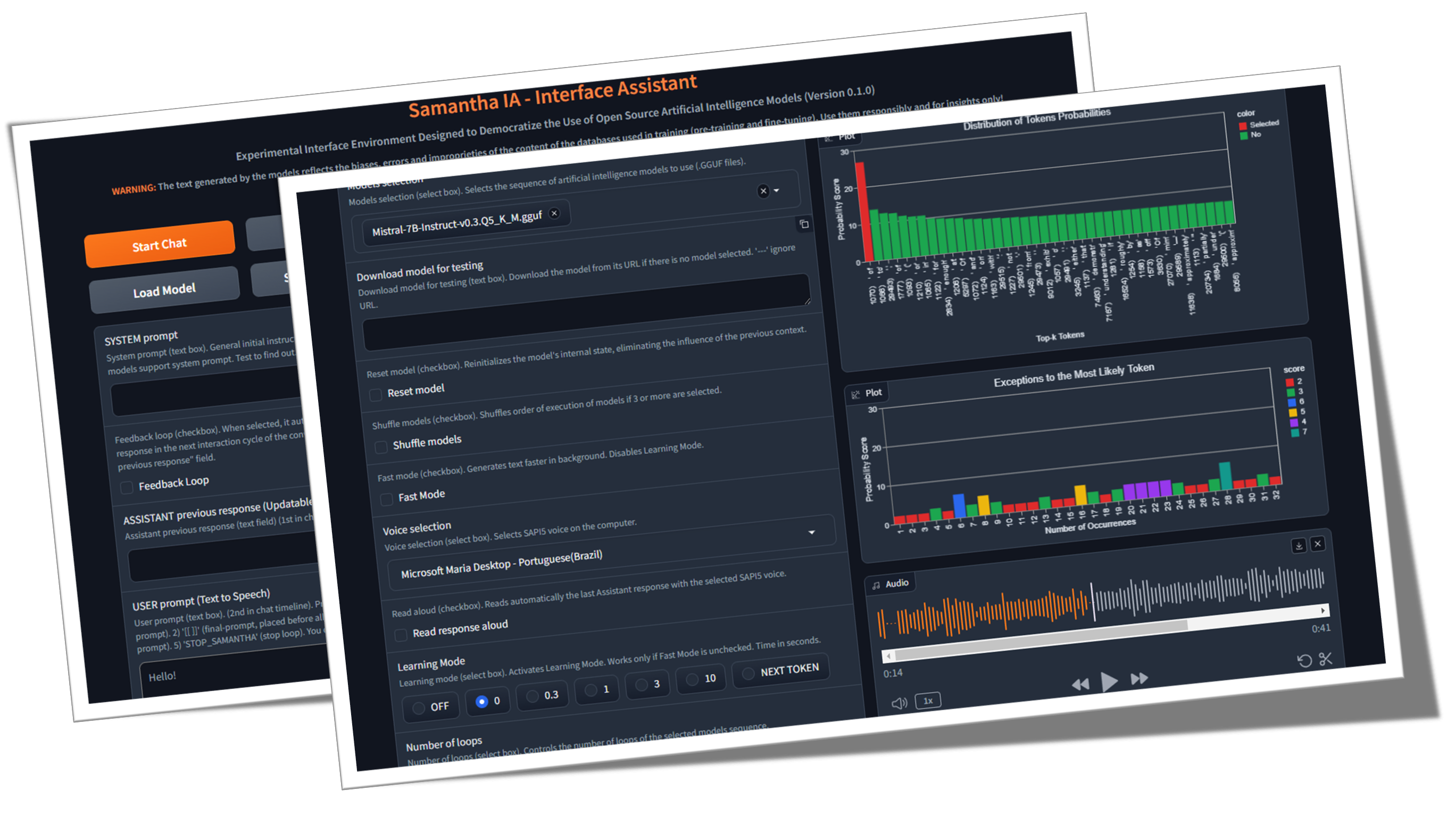
Samantha เป็นเพียงผู้ช่วยอินเทอร์เฟซอย่างง่ายสำหรับแบบจำลองการสร้างข้อความประดิษฐ์แบบโอเพ่นซอร์สที่พัฒนาขึ้นภายใต้หลักการวิทยาศาสตร์แบบเปิด (วิธีการเปิดโล่ง, โอเพ่นซอร์ส, ข้อมูลแบบเปิด, การเข้าถึงแบบเปิด, การตรวจสอบแบบเปิดเพียร์และทรัพยากรการศึกษาแบบเปิด) และใบอนุญาต MIT สำหรับใช้กับคอมพิวเตอร์ Windows ทั่วไป โปรแกรมเรียกใช้ LLM ในเครื่องโดยไม่เสียค่าใช้จ่ายและไม่ จำกัด โดยไม่จำเป็นต้องเชื่อมต่ออินเทอร์เน็ตยกเว้นการดาวน์โหลดรุ่น GGUF (GGUF ย่อมาจากรูปแบบ Unified GPT ที่สร้างขึ้น) หรือเมื่อจำเป็นโดยการดำเนินการรหัสที่สร้างโดยรุ่น (GE เพื่อดาวน์โหลดชุดข้อมูลสำหรับการวิเคราะห์ข้อมูล) วัตถุประสงค์ของมันคือการทำให้ประชาธิปไตยมีความรู้เกี่ยวกับการใช้ AI และแสดงให้เห็นว่าการใช้เทคนิคที่เหมาะสมแม้กระทั่งรุ่นเล็ก ๆ ก็สามารถสร้างการตอบสนองที่คล้ายคลึงกับสิ่งที่ใหญ่กว่า ภารกิจของเธอคือช่วยสำรวจขอบเขตของแบบจำลอง AI (Realy)
โอเพนซอร์ส AI คืออะไร (opensource.org)
ขนาด LLM มีความสำคัญหรือไม่? (Gary อธิบาย)
เอกสารปัญญาประดิษฐ์ (arxiv.org)
♀ Samantha ได้รับการพัฒนาเพื่อช่วยในการใช้การควบคุมสังคมและสถาบันของการบริหารรัฐกิจโดยพิจารณาจากสถานการณ์ที่น่าเป็นห่วงในการเพิ่มความเชื่อมั่นของประชาชนในสถาบันควบคุม คุณสมบัติของมันช่วยให้ทุกคนที่สนใจในการสำรวจโมเดลปัญญาประดิษฐ์โอเพ่นซอร์สโดยเฉพาะโปรแกรมเมอร์ Python และนักวิทยาศาสตร์ข้อมูล โครงการมีต้นกำเนิดมาจากความต้องการของทีม MPC-ES ในการพัฒนาระบบที่จะช่วยให้เข้าใจกระบวนการสร้างโทเค็นโดยรุ่น LLM
♾ระบบช่วยให้การโหลดตามลำดับของรายการของพรอมต์ (การผูกมัดพร้อมท์) และแบบจำลอง (โมเดล การผูกมัด ) แบบจำลองหนึ่งครั้งในการบันทึกหน่วยความจำเช่นเดียวกับการปรับพารามิเตอร์ไฮเปอร์พารามิเตอร์ของพวกเขาทำให้การตอบสนองที่สร้างขึ้นโดยรุ่นก่อนหน้า แบบจำลองสามารถโต้ตอบกับคำตอบที่จัดทำโดยรุ่นก่อนหน้านี้ดังนั้นการตอบสนองใหม่แต่ละครั้งจะแทนที่โมเดลก่อนหน้านี้ นอกจากนี้คุณยังสามารถใช้เพียงรุ่นเดียวและให้มันโต้ตอบกับการตอบสนองก่อนหน้านี้ผ่านรอบการสร้างข้อความไม่ จำกัด จำนวน ใช้จินตนาการของคุณเพื่อรวมรุ่นพรอมต์และคุณสมบัติ!
วิดีโอนี้แสดงตัวอย่างของการมีปฏิสัมพันธ์ระหว่างโมเดลที่ไม่มีการแทรกแซงของมนุษย์โดยการผูกมัดแบบจำลองและการแจ้งเตือนโดยใช้คุณลักษณะสำเนาของ Samantha และ PASTE LLM รุ่น Quantized ของรุ่น Microsoft PHI 3.5 และ Google Gemma 2 (โดย Bartowski) ถูกท้าทายให้ตอบคำถามเกี่ยวกับ ธรรมชาติของมนุษย์ ที่สร้างขึ้นโดย Meta Llama 3.1 Model (โดย NouSresearch) การตอบสนองยังได้รับการประเมินโดยโมเดลเมตา
ความท้าทายด้านข่าวกรอง: Gemma 2 vs Phi 3.5 กับ Llama 3.1 ในฐานะผู้พิพากษา
- ตัวอย่างการผูกมัดบางอย่าง โดยไม่ต้องใช้ คุณสมบัติการ ตอบรับ การตอบกลับของ Samantha:
(model_1) ตอบสนอง (PROTCH_1) X จำนวนการตอบสนอง: ใช้ในการวิเคราะห์พฤติกรรมที่กำหนดและสุ่มของโมเดลด้วยคุณลักษณะความช่วยเหลือของ โหมดการเรียนรู้ เช่นเดียวกับการสร้างการตอบสนองที่หลากหลายด้วยการตั้งค่าสุ่ม (วิดีโอ)
(model_1) ตอบสนอง (prompt_1, prompt_2, prompt_n): ใช้ในการเรียกใช้คำสั่งทวีคูณตามลำดับด้วยรุ่นเดียวกัน (การผูกมัดพร้อมท์) (วิดีโอ)
(model_1, model_2, model_n) ตอบสนอง (prompt_1): ใช้เพื่อเปรียบเทียบการตอบสนองของโมเดลสำหรับพรอมต์เดียวเดียวกัน (การผูกมัดแบบจำลอง) มีประโยชน์สำหรับการเปรียบเทียบโมเดลที่แตกต่างกันเช่นเดียวกับรุ่นที่มีปริมาณของรุ่นเดียวกัน
(model_1, model_2, model_n) ตอบสนอง (prompt_1, prompt_2, prompt_n): ใช้เพื่อเปรียบเทียบการตอบสนองของโมเดลสำหรับรายการของพรอมต์รวมถึงการดำเนินการตามลำดับของคำสั่งโดยใช้แบบจำลอง disctinct (โมเดลและการผูกมัด) แต่ละรุ่นตอบกลับพร้อมท์ทั้งหมด ในทางกลับกันเมื่อใช้ การตอบสนองเดียวต่อคุณลักษณะของโมเดล แต่ละรุ่นจะตอบสนองต่อพรอมต์เฉพาะเพียงข้อเดียว
- ตัวอย่างการผูกมัดบางอย่าง โดยใช้ คุณสมบัติการตอบสนองการตอบ กลับ ของ Samantha:
(model_1) ตอบสนอง (prompt_1) x จำนวนการตอบสนอง: ใช้เพื่อปรับปรุงหรือเสริมการตอบสนองก่อนหน้าของโมเดลผ่านคำสั่งผู้ใช้คงที่โดยใช้โมเดลเดียวกันเช่นเดียวกับการจำลองการสนทนาที่ไม่มีที่สิ้นสุดระหว่าง 2 AIS โดยใช้โมเดลเดียว (วิดีโอ)
(model_1) ตอบสนอง (pretct_1, prompt_2, prompt_n): ใช้เพื่อปรับปรุงการตอบสนองก่อนหน้าของโมเดลผ่านคำแนะนำของผู้ใช้ทวีคูณตามลำดับด้วยโมเดลเดียวกัน (การผูกมัดพร้อมท์) พรอมต์แต่ละครั้งจะใช้เพื่อปรับแต่งหรือตอบสนองก่อนหน้านี้ให้เสร็จสิ้นเช่นเดียวกับการดำเนินการตามลำดับของพรอมต์ที่ขึ้นอยู่กับการตอบสนองก่อนหน้านี้เช่นการวิเคราะห์ข้อมูลเชิงสำรวจ (EDA) ด้วยการเข้ารหัสที่เพิ่มขึ้น (วิดีโอ)
(model_1, model_2, model_n) ตอบสนอง (Protff_1): ใช้เพื่อปรับปรุงการตอบสนองของโมเดลก่อนหน้าโดยใช้โมเดล disctinct (การผูกมัดแบบจำลอง) เช่นเดียวกับการสร้างกล่องโต้ตอบระหว่างโมเดลที่แตกต่างกัน
(model_1, model_2, model_n) ตอบสนอง (prompt_1, prompt_2, prompt_n): ใช้เพื่อดำเนินการตามลำดับของคำสั่งโดยใช้โมเดล disctinct (โมเดลและการผูกมัดพร้อม) และ การตอบสนองเดียวต่อคุณลักษณะของรุ่น
แต่ละรุ่นและการแจ้งเตือนลำดับสามารถดำเนินการได้มากกว่าหนึ่งครั้งผ่านคุณลักษณะ จำนวนลูป
เทมเพลตลำดับการผูกมัดของ Samantha:
([รายการโมเดล] -> ตอบกลับ -> ([รายการพรอมต์ผู้ใช้] x จำนวนการตอบกลับ)) x จำนวนลูป
แต่ GPT คืออะไร? ภาพอินโทรไปยัง Transformers (3Blue1brown)
ความสนใจในหม้อแปลงอธิบายด้วยสายตา (3Blue1brown)
Transformer Expluser (Poloclub)
- การเรียงลำดับของพรอมต์และโมเดลช่วยให้การสร้างการตอบสนองที่ยาวนานโดยการแยกส่วนคำสั่งอินพุตของผู้ใช้ ทุกการตอบสนองบางส่วนเหมาะกับความยาวการตอบสนองของโมเดลที่กำหนดไว้ในกระบวนการฝึกอบรมแบบจำลอง
- ในฐานะที่เป็นเครื่องมือโอเพนซอร์สสำหรับการโต้ตอบด้วยตนเองโดยอัตโนมัติระหว่างโมเดล AI ผู้ช่วย Samantha Interface ได้รับการออกแบบมาเพื่อสำรวจ วิศวกรรมที่รวดเร็วกลับด้วยการตอบสนองต่อการพัฒนาตนเอง เทคนิคนี้ช่วยโมเดลภาษาขนาดใหญ่ขนาดเล็ก (LLM) เพื่อสร้างการตอบสนองที่แม่นยำยิ่งขึ้นโดยการถ่ายโอนไปยังโมเดลงานในการสร้างพรอมต์ขั้นสุดท้ายและการตอบสนองที่สอดคล้องกันตามคำแนะนำเริ่มต้นที่ไม่แน่นอนของผู้ใช้เพิ่มเลเยอร์กลางลงในกระบวนการก่อสร้างพรอมต์ Samantha ไม่มีระบบที่ซ่อนอยู่พร้อมกับที่ทำกับโมเดลที่เป็นกรรมสิทธิ์ คำแนะนำทั้งหมดถูกควบคุมโดยผู้ใช้ ดูระบบมานุษยวิทยาแจ้งเตือน
- ต้องขอบคุณ พฤติกรรมฉุกเฉิน ที่เกิดจากรูปแบบการวางนัยทั่วไปที่สกัดจากข้อความการฝึกอบรมด้วยการกำหนดค่าไฮเปอร์พารามิเตอร์ที่เหมาะสมและเหมาะสมแม้กระทั่งรุ่นเล็ก ๆ ที่ทำงานร่วมกันสามารถสร้างการตอบสนองที่ยิ่งใหญ่!
ความฉลาดของเผ่าพันธุ์มนุษย์ไม่ได้ขึ้นอยู่กับสิ่งมีชีวิตที่ชาญฉลาดเพียงอย่างเดียว แต่ขึ้นอยู่กับความฉลาดโดยรวม ทีละคนเราไม่ได้ฉลาดหรือมีความสามารถ สังคมและระบบเศรษฐกิจของเราขึ้นอยู่กับการมีสถาบันมากมายที่ประกอบด้วยบุคคลที่หลากหลายที่มีความเชี่ยวชาญและความเชี่ยวชาญที่แตกต่างกัน รูปร่างของหน่วยสืบราชการลับที่กว้างใหญ่นี้เราเป็นบุคคลและเราแต่ละคนติดตามเส้นทางของเราในชีวิตเพื่อเป็นบุคคลที่ไม่เหมือนใครและในทางกลับกันก็มีส่วนร่วมในการเป็นส่วนหนึ่งของข่าวกรองกลุ่มที่ขยายตัวของเราในฐานะสายพันธุ์ เราเชื่อว่าการพัฒนาปัญญาประดิษฐ์จะเป็นไปตามเส้นทางที่คล้ายกัน อนาคตของ AI จะไม่ประกอบด้วยระบบ AI ขนาดมหึมาที่มีขนาดมหึมาที่ต้องใช้พลังงานมหาศาลในการฝึกอบรมวิ่งและบำรุงรักษา แต่เป็นชุดของระบบ AI ขนาดเล็กจำนวนมาก-แต่ละระบบและความเชี่ยวชาญของตัวเองมีปฏิสัมพันธ์ซึ่งกันและกัน การพัฒนารูปแบบรากฐานใหม่: ปลดปล่อยพลังของการพัฒนาโมเดลอัตโนมัติ - Sakana AI
- ขั้นตอนเล็ก ๆ : ซาแมนต้าเป็นเพียงการเคลื่อนไหวสู่อนาคตที่ปัญญาประดิษฐ์ไม่ได้เป็นสิทธิพิเศษ แต่เป็นเครื่องมือสำหรับทุกคนในโลกที่บุคคลสามารถใช้ประโยชน์จาก AI เพื่อเพิ่มประสิทธิภาพการผลิตความคิดสร้างสรรค์และการตัดสินใจโดยไม่มีอุปสรรค
- ธรรมชาติของ AI: การตระหนักถึงการผูกขาดทางเทคโนโลยีของปัญญาประดิษฐ์เป็นเครื่องมือที่เป็นไปได้ของการครอบงำและการขยายตัวของความไม่เท่าเทียมกันทางสังคมแสดงให้เห็นถึงความท้าทายที่จุดผันนี้ในประวัติศาสตร์ การสังเกตข้อบกพร่องของโมเดลขนาดเล็กในระหว่างกระบวนการสร้างข้อความช่วยในการทำความเข้าใจนี้โดยการเปรียบเทียบกับความสมบูรณ์แบบที่อ้างว่าเป็นกรรมสิทธิ์ขนาดใหญ่ มีความจำเป็นที่จะต้องเปลี่ยนตำแหน่งในสถานที่ที่เหมาะสมและตั้งคำถามถึงมุมมองการลดความโรแมนติกของการอ้างถึงลักษณะของมนุษย์ - เช่นความฉลาด (มนุษย์ที่เกิดจากปรากฏการณ์ทางจิตวิทยาของ pareidolia) - เทคโนโลยีที่เกิดจากสติปัญญาของมนุษย์ ด้วยเหตุนี้จึงจำเป็นที่จะต้อง demystify ปัญญาประดิษฐ์ผ่านวิธีการสอนเกี่ยวกับวิธีการทำงาน "Word/Token Calculator" นวนิยายเรื่องนี้ แน่นอนว่าโดปามีนของเสน่ห์เริ่มต้นที่สร้างขึ้นโดยตลาดจะไม่สามารถทนต่อการสร้างโทเค็นสองสามร้อย (โทเค็นเป็นชื่อที่มอบให้กับบล็อกพื้นฐานของข้อความที่ LLM ใช้เพื่อทำความเข้าใจและสร้างข้อความโทเค็นอาจเป็นคำทั้งคำ)
✏ การพิจารณาการสร้างข้อความ: ผู้ใช้ควรทราบว่าการตอบสนองที่สร้างขึ้นโดย AI นั้นมาจากการฝึกอบรมแบบจำลองภาษาขนาดใหญ่บนคลังข้อมูลข้อความมากมาย แหล่งที่มาหรือกระบวนการที่แน่นอนที่ AI ใช้ในการสร้างผลลัพธ์ของมันไม่สามารถอ้างถึงหรือระบุได้อย่างแม่นยำ เนื้อหาที่ผลิตโดย AI ไม่ใช่ใบเสนอราคาโดยตรงหรือการรวบรวมจากแหล่งที่เฉพาะเจาะจง มันสะท้อนให้เห็นถึงรูปแบบความสัมพันธ์ทางสถิติและความรู้ที่เครือข่ายประสาทของ AI ได้เรียนรู้และเข้ารหัสในระหว่างกระบวนการฝึกอบรมในคลังข้อมูลที่กว้าง การตอบสนองถูกสร้างขึ้นตามการเป็นตัวแทนความรู้ที่เรียนรู้นี้แทนที่จะได้รับการเรียกคืนคำต่อคำจากแหล่งข้อมูลใด ๆ ในขณะที่ข้อมูลการฝึกอบรมของ AI อาจรวมถึงแหล่งข้อมูลที่เชื่อถือได้ผลผลิตของมันคือการแสดงออกที่สังเคราะห์ขึ้นของสมาคมและแนวคิดที่เรียนรู้
วัตถุประสงค์: วัตถุประสงค์หลักของ Samantha คือการ สร้างแรงบันดาลใจให้ ผู้อื่นสร้างสิ่งที่คล้ายกัน - และดีกว่ามากเพื่อให้แน่ใจว่า - ระบบและเพื่อให้ความรู้แก่ผู้ใช้เกี่ยวกับการใช้ประโยชน์จาก AI เป้าหมายของเราคือการส่งเสริมชุมชนของนักพัฒนาและผู้ที่ชื่นชอบที่สามารถใช้ความรู้และเครื่องมือเพื่อสร้างสรรค์สิ่งใหม่ ๆ และมีส่วนร่วมในสาขาโอเพนซอร์ส AI โดยการทำเช่นนั้นจุดมุ่งหมายเพื่อปลูกฝังวัฒนธรรมของการทำงานร่วมกันและการแบ่งปันเพื่อให้มั่นใจว่าประโยชน์ของ AI นั้นสามารถเข้าถึงได้โดยไม่คำนึงถึงภูมิหลังทางเทคนิคหรือทรัพยากรทางการเงิน เป็นที่เชื่อกันว่าโดยการทำให้ผู้คนจำนวนมากขึ้นสามารถสร้างและเข้าใจแอปพลิเคชัน AI เราสามารถผลักดันความคืบหน้าและจัดการกับ ความท้าทายทางสังคม ด้วยมุมมองที่ได้รับการบอกกล่าวและหลากหลาย มาทำงานร่วมกันเพื่อกำหนดอนาคตที่ AI เป็น พลังที่ดีและครอบคลุมสำหรับมนุษยชาติ
คำแนะนำด้านปัญญาประดิษฐ์ของยูเนสโก
โปรแกรม OECD เกี่ยวกับ AI ในการทำงานนวัตกรรมผลผลิตและทักษะ
ค่าใช้จ่ายของมนุษย์นวัตกรรม: ในขณะที่ระบบนี้มีจุดมุ่งหมายเพื่อเพิ่มขีดความสามารถของผู้ใช้และทำให้การเข้าถึง AI เป็นประชาธิปไตย แต่ก็เป็นสิ่งสำคัญที่จะต้องยอมรับความหมายทางจริยธรรมของเทคโนโลยีนี้ การพัฒนาระบบ AI ที่ทรงพลังมักจะอาศัยการแสวงหาผลประโยชน์จากแรงงานมนุษย์โดยเฉพาะอย่างยิ่งในการเพิ่มความคิดเห็นของข้อมูลและกระบวนการฝึกอบรม สิ่งนี้สามารถขยายความไม่เท่าเทียมกันที่มีอยู่และสร้างรูปแบบการแบ่งดิจิตอลรูปแบบใหม่ ในฐานะผู้ใช้ AI เรามีความรับผิดชอบที่จะต้องตระหนักถึงปัญหาเหล่านี้และสนับสนุนการปฏิบัติที่ยุติธรรมภายในอุตสาหกรรม ด้วยการสนับสนุนการพัฒนา AI ทางจริยธรรมและการส่งเสริมความโปร่งใสในการจัดหาข้อมูลเราสามารถมีส่วนร่วมในอนาคตที่ครอบคลุมและเท่าเทียมกันมากขึ้นสำหรับทุกคน
Como funciona o trabalho humano por trás da inteligênciaเทียม
"ทาสยุคใหม่" ของโลกเทคโนโลยี AI
แหล่งข้อมูลอื่น ๆ
บนไหล่ของไจแอนต์: ขอขอบคุณเป็นพิเศษกับ Georgi Gerganov และทีมงานทั้งหมดที่ทำงานกับ llama.cpp สำหรับการทำให้ทั้งหมดนี้เป็นไปได้เช่นเดียวกับ Andrei Bleten โดยการประมูล Python ที่น่าทึ่งของเขาสำหรับห้องสมุด Gerganov C ++ (Llama-CPP-Python)
✅ มูลนิธิโอเพ่นซอร์ส: สร้างขึ้นบน llama.cpp / llama-cpp-python และ gradio ภายใต้ใบอนุญาต MIT, Samantha ทำงานบนคอมพิวเตอร์มาตรฐานแม้จะไม่มีหน่วยประมวลผลกราฟิกเฉพาะ (GPU)
✅ ความสามารถในการออฟไลน์: Samantha ดำเนินการอย่างอิสระจากอินเทอร์เน็ตโดยต้องมีการเชื่อมต่อสำหรับการดาวน์โหลดไฟล์รุ่นเริ่มต้นเท่านั้นหรือเมื่อจำเป็นโดยการดำเนินการของรหัสที่สร้างโดยรุ่น สิ่งนี้ทำให้มั่นใจได้ถึงความเป็นส่วนตัวและความปลอดภัยสำหรับความต้องการการประมวลผลข้อมูลของคุณ ข้อมูลที่ละเอียดอ่อนของคุณไม่ได้แชร์ผ่านอินเทอร์เน็ตกับ บริษัท ผ่านข้อตกลงการรักษาความลับ
✅ การใช้งานไม่ จำกัด และฟรี: ธรรมชาติโอเพ่นซอร์สของ Samantha ช่วยให้สามารถใช้งานได้อย่างไม่ จำกัด โดยไม่มีค่าใช้จ่ายหรือข้อ จำกัด ใด ๆ ทำให้ทุกคนสามารถเข้าถึงได้ทุกที่ทุกเวลา
✅ การเลือกแบบจำลองที่กว้างขวาง: ด้วยการเข้าถึงมูลนิธิหลายพันแบบและแบบจำลองโอเพนซอร์สที่ปรับแต่งได้ผู้ใช้สามารถทดลองกับความสามารถของ AI ที่หลากหลายแต่ละงานปรับให้เข้ากับงานและแอปพลิเคชันที่แตกต่างกันทำให้สามารถโซ่ลำดับของรุ่นที่ตอบสนองความต้องการของคุณได้ดีที่สุด
✅ คัดลอกและวาง LLMS: หากต้องการลองลำดับของรุ่น gguf เพียงคัดลอกลิงก์ดาวน์โหลดจากที่เก็บหน้ากอดและวางไว้ใน Samantha เพื่อเรียกใช้ทันทีตามลำดับ
✅พารามิเตอร์ที่ปรับแต่ง ได้ : ผู้ใช้สามารถควบคุมพารามิเตอร์แบบจำลอง hyperparameters เช่นความยาว หน้าต่างบริบท ( n_ctx , max_tokens ), การสุ่มตัวอย่างโทเค็น ( อุณหภูมิ , tfs_z , top-k , top -p , min_p , persical_p ), การ ลงโทษ หรือพฤติกรรมสุ่ม
การปรับพารามิเตอร์แบบสุ่มแบบสุ่ม: คุณสามารถทดสอบการรวมกันแบบสุ่มของการตั้งค่าไฮเปอร์พารามิเตอร์และสังเกตผลกระทบต่อการตอบสนองที่สร้างขึ้นโดยแบบจำลอง
✅ ประสบการณ์แบบโต้ตอบ: ฟังก์ชั่นการผูกมัดของ Samantha ช่วยให้ผู้ใช้สามารถสร้างข้อความที่ไม่มีที่สิ้นสุดโดยการรับสายและแบบจำลองช่วยอำนวยความสะดวกในการโต้ตอบที่ซับซ้อนระหว่าง LLM ที่แตกต่างกันโดยไม่ต้องแทรกแซงมนุษย์
✅ ข้อเสนอแนะลูป: คุณสมบัตินี้ช่วยให้คุณสามารถจับการตอบสนองที่สร้างขึ้นโดยโมเดลและป้อนกลับเข้าไปในรอบถัดไปของการสนทนา
✅ รายการพรอมต์: คุณสามารถเพิ่มจำนวนพรอมต์ใด ๆ (คั่นด้วย $$$n หรือ n ) เพื่อควบคุมลำดับของคำสั่งที่จะดำเนินการโดยโมเดล เป็นไปได้ที่จะนำเข้าไฟล์ TXT ที่มีลำดับที่กำหนดไว้ล่วงหน้า
✅ รายการรุ่น: คุณสามารถเลือกจำนวนรุ่นใดก็ได้และในลำดับใด ๆ ในการควบคุมโมเดลที่ตอบสนองต่อพรอมต์ถัดไป
✅ การตอบสนองสะสม: คุณสามารถเชื่อมต่อการตอบสนองใหม่แต่ละครั้งโดยเพิ่มลงในการตอบสนองก่อนหน้านี้ที่จะพิจารณาเมื่อสร้างการตอบสนองครั้งต่อไปโดยโมเดล มันเป็นสิ่งสำคัญที่จะเน้นว่าชุดของการตอบสนองที่ต่อกันจะต้องพอดีกับหน้าต่างบริบทของโมเดล
✅ การเรียนรู้ข้อมูลเชิงลึก: คุณลักษณะที่เรียกว่า โหมดการเรียนรู้ ช่วยให้ผู้ใช้สังเกตกระบวนการตัดสินใจของโมเดลให้ข้อมูลเชิงลึกเกี่ยวกับวิธีการเลือกโทเค็นเอาท์พุทตามคะแนนความน่าจะเป็น (หน่วยโลจิสติก ส์ หรือเพียงแค่การตั้งค่า hyperparameter รายการโทเค็นที่เลือกน้อยที่สุดก็ถูกสร้างขึ้นเช่นกัน
✅ การโต้ตอบด้วยเสียง: Samantha รองรับคำสั่งเสียงง่าย ๆ ด้วย Vosk คำพูดแบบออฟไลน์เป็นข้อความ (ภาษาอังกฤษและโปรตุเกส) และข้อความเป็นคำพูดด้วยเสียง SAPI5 ทำให้สามารถเข้าถึงได้และใช้งานง่าย
✅ ข้อเสนอแนะเสียง: อินเทอร์เฟซให้การแจ้งเตือนด้วยเสียงแก่ผู้ใช้ส่งสัญญาณการเริ่มต้นและจุดสิ้นสุดของเฟสการสร้างข้อความโดยรุ่น
✅ การจัดการเอกสาร: ระบบสามารถโหลดไฟล์ PDF และ TXT ขนาดเล็กได้ การตรวจสอบพรอมต์ของผู้ใช้, รายการ URL ของ System Prompt และ Model สามารถป้อนผ่านไฟล์ TXT เพื่อความสะดวก
✅ อินพุตข้อความอเนกประสงค์: ฟิลด์สำหรับการแทรกแจ้งช่วยให้ผู้ใช้สามารถโต้ตอบกับระบบได้อย่างมีประสิทธิภาพรวมถึงพรอมต์ระบบการตอบสนองของรุ่นก่อนหน้าและพร้อมท์ของผู้ใช้เพื่อเป็นแนวทางในการตอบสนองของโมเดล
✅ การรวมรหัส: การสกัดบล็อก Python โดยอัตโนมัติจากการตอบสนองของโมเดลพร้อมกับสภาพแวดล้อมการพัฒนาแบบบูรณาการ JupyterLab (IDE) ที่ติดตั้งไว้ล่วงหน้าในสภาพแวดล้อมเสมือนจริงที่แยกได้ช่วยให้ผู้ใช้สามารถเรียกใช้รหัสที่สร้างขึ้นได้อย่างรวดเร็วเพื่อผลลัพธ์ทันที
✅ แก้ไขคัดลอกและเรียกใช้รหัส Python: ระบบอนุญาตให้ผู้ใช้แก้ไขรหัสที่สร้างโดยรุ่นและเรียกใช้โดยเลือกคัดลอกด้วย CTRL + C และคลิกปุ่ม เรียกใช้รหัส นอกจากนี้คุณยังสามารถคัดลอกรหัส Python ได้จากทุกที่ (เช่นจากหน้าเว็บ) และเรียกใช้เพียงแค่กด Copy Python Code และ เรียกใช้ปุ่มรหัส (ตราบเท่าที่มันใช้ไลบรารี Python ที่ติดตั้ง)
✅ การแก้ไขบล็อกโค้ด: ผู้ใช้สามารถเลือกและเรียกใช้บล็อกรหัส Python ที่สร้างขึ้นโดยรุ่นที่ใช้ไลบรารีที่ติดตั้งในสภาพแวดล้อมเสมือน jupyterlab โดยป้อน #IDE ความคิดเห็นในรหัสเอาต์พุตการเลือกและคัดลอกด้วย CTRL + C และในที่สุดคลิกปุ่ม เรียกใช้รหัส
utput HTML เอาท์พุท: แสดงเอาต์พุต Python Interpreter ในหน้าต่างป๊อปอัพ HTML เมื่อข้อความที่พิมพ์ในเทอร์มินัลนั้นนอกเหนือจาก '' (สตริงว่าง) คุณลักษณะนี้ช่วยให้สามารถเรียกใช้สคริปต์ได้อย่างไม่ จำกัด และแสดงผลเฉพาะเมื่อพบเงื่อนไขที่แน่นอน
✅ การดำเนินการรหัสอัตโนมัติ: Samantha มีตัวเลือกในการเรียกใช้รหัส Python ที่สร้างขึ้นโดยรุ่นตามลำดับ รหัสที่สร้างขึ้นจะดำเนินการโดย Python Interpreter ที่ติดตั้งในสภาพแวดล้อมเสมือนจริงที่มีไลบรารีหลายรายการ (คุณสมบัติคล้ายตัวแทนอัจฉริยะ)
✅ เงื่อนไขหยุด: หยุด Samantha หากการดำเนินการอัตโนมัติของรหัส Python ที่สร้างขึ้นโดยโมเดลจะพิมพ์ในเทอร์มินัล A ค่าอื่นนอกเหนือจาก '' (สตริงว่าง) และไม่มีข้อความแสดงข้อผิดพลาด นอกจากนี้คุณยังสามารถบังคับให้ออกจากลูปวิ่งได้โดยการสร้างฟังก์ชั่นที่ส่งคืนเฉพาะ String STOP_SAMANTHA เมื่อตรงตามเงื่อนไขที่แน่นอน
✅ การเข้ารหัสที่เพิ่มขึ้น: การใช้การตั้งค่าที่กำหนดขึ้นสร้างรหัส Python เพิ่มขึ้นเพื่อให้แน่ใจว่าแต่ละส่วนทำงานก่อนที่จะย้ายไปยังอีก
✅ การเข้าถึงและการควบคุมที่สมบูรณ์: ผ่านระบบนิเวศของไลบรารี Python และรหัสที่สร้างขึ้นโดยรุ่นมันเป็นไปได้ที่จะเข้าถึงไฟล์คอมพิวเตอร์ช่วยให้คุณอ่านสร้างเปลี่ยนและลบไฟล์ในพื้นที่รวมถึงการเข้าถึงอินเทอร์เน็ตหากมีเพื่ออัปโหลดและดาวน์โหลดข้อมูลและไฟล์
✅ คีย์บอร์ดและเมาส์อัตโนมัติ: คุณสามารถสร้างลำดับของพรอมต์เพื่อทำงานอัตโนมัติในคอมพิวเตอร์ของคุณ .exe ใช้ไลบรารี Pyautogui (ดูสิ่งที่น่าเบื่อด้วย Python โดยอัตโนมัติคุณสามารถแปลงไฟล์ .py
✅ เครื่องมือวิเคราะห์ข้อมูล: ชุดเครื่องมือวิเคราะห์ข้อมูลเช่นแพนด้า, numpy, scipy, scikit-learn, matplotlib, seoborn, vega-altair, พล็อต, bokeh, dash, streamlit, ydata-profiling, sweetviz, d-tale, dataprep, เครือข่าย JupyterLab สำหรับการวิเคราะห์ที่ครอบคลุมและการสร้างภาพข้อมูล นอกจากนี้ยังมีการรวมเบราว์เซอร์ (ดูปุ่มเบราว์เซอร์ DB)
สำหรับรายการที่สมบูรณ์ของไลบรารี Python ทั้งหมดที่ติดตั้งในสภาพแวดล้อมเสมือน jupyterlab ให้ใช้พรอมต์เช่น "สร้างรหัส Python ที่พิมพ์โมดูลทั้งหมดที่ติดตั้งโดยใช้ไลบรารี pkgutil " และกดปุ่ม เรียกใช้รหัส หลังจากการสร้างรหัส ผลลัพธ์จะแสดงในป๊อปอัพเบราว์เซอร์ นอกจากนี้คุณยังสามารถใช้ pipdeptree --packages module_name ในเทอร์มินัลที่เปิดใช้งานสภาพแวดล้อมใด ๆ เพื่อดูการพึ่งพา
✅ ประสิทธิภาพที่เหมาะสมที่สุด: เพื่อให้แน่ใจว่าประสิทธิภาพที่ราบรื่นบน CPU Samantha รักษาประวัติการแชทที่ จำกัด ไว้เพียงแค่การตอบสนองก่อนหน้านี้ลดขนาดหน้าต่างบริบทของโมเดลเพื่อประหยัดหน่วยความจำและทรัพยากรการคำนวณ
ในการใช้ Samantha คุณจะต้อง:
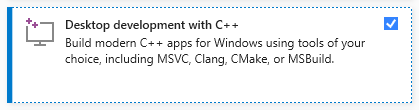
ติดตั้ง Visual Studio (เวอร์ชันชุมชนฟรี) บนคอมพิวเตอร์ของคุณ ดาวน์โหลดเรียกใช้และเลือกเฉพาะ การพัฒนาเดสก์ท็อปตัวเลือกด้วย C ++ (ต้องการสิทธิ์ของผู้ดูแลระบบ):
ดาวน์โหลดไฟล์ zip จากที่เก็บของ Samantha โดยคลิกที่นี่และเปิดเครื่องซิปลงในคอมพิวเตอร์ของคุณ เลือกไดรฟ์ที่คุณต้องการติดตั้งโปรแกรม:

เปิดไดเรกทอรี samantha_ia-main และดับเบิลคลิกที่ install_samantha_ia.bat ไฟล์เพื่อเริ่มการติดตั้ง Windows อาจขอให้คุณยืนยันที่มาของไฟล์ .bat คลิกที่ 'ข้อมูลเพิ่มเติม' และยืนยัน เรารวมตัวกันเพื่อตรวจสอบรหัสของไฟล์ทั้งหมด (ใช้ระบบ virustotal และ AI เพื่อทำเช่นนั้น):

นี่คือส่วนสำคัญของการติดตั้ง หากทุกอย่างเป็นไปด้วยดีกระบวนการจะเสร็จสมบูรณ์โดยไม่แสดงข้อความแสดงข้อผิดพลาดในเทอร์มินัล
กระบวนการติดตั้งใช้เวลาประมาณ 20 นาที และควรจบลงด้วยการสร้างสภาพแวดล้อมเสมือนจริงสองสภาพ: samantha เพื่อเรียกใช้เพียงรุ่น AI และ jupyterlab เพื่อเรียกใช้โปรแกรมที่ติดตั้งอื่น ๆ จะใช้เวลาประมาณ 5 GB ของฮาร์ดไดรฟ์ของคุณ
เมื่อติดตั้งแล้วให้เปิด Samantha โดยการคลิกสองครั้งที่ไฟล์ open_samantha.bat Windows อาจถามคุณอีกครั้งเพื่อยืนยันแหล่งที่มาของไฟล์ .bat การอนุญาตนี้จำเป็นต้องใช้เฉพาะในครั้งแรกที่คุณเรียกใช้โปรแกรม คลิกที่ 'ข้อมูลเพิ่มเติม' และยืนยัน:

หน้าต่างเทอร์มินัลจะเปิดขึ้น นี่คือ ฝั่งเซิร์ฟเวอร์ ของ Samantha
หลังจากตอบคำถามเริ่มต้น (ตัวเลือกภาษาและตัวเลือกการควบคุมเสียง - การควบคุมเสียงไม่เหมาะสำหรับการใช้งานครั้งแรก) อินเทอร์เฟซจะเปิดในแท็บเบราว์เซอร์ใหม่ นี่คือ เบราว์เซอร์ ของ Samantha:
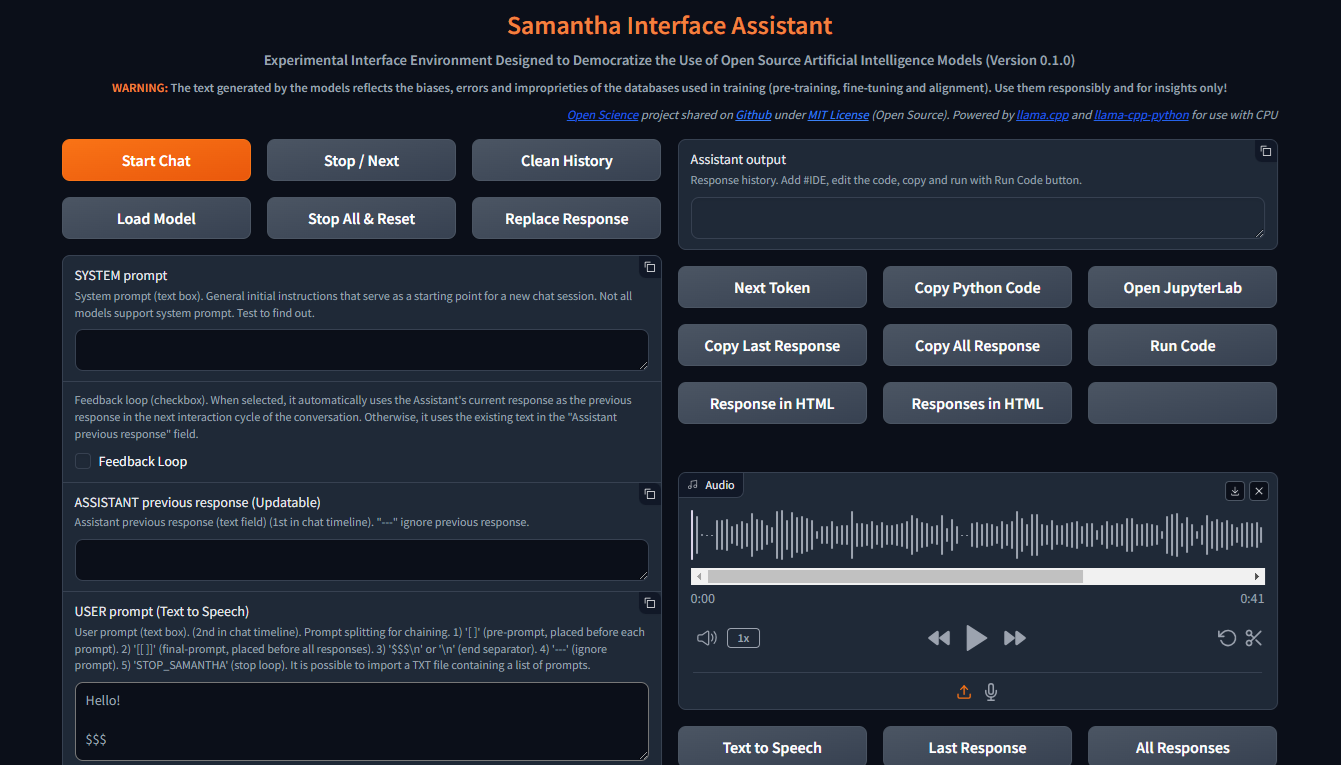
เมื่อเปิดหน้าต่างเบราว์เซอร์ Samantha ก็พร้อมที่จะไป
ตรวจสอบวิดีโอการติดตั้ง
Samantha ต้องการเพียงไฟล์โมเดล .gguf เพื่อสร้างข้อความ ทำตามขั้นตอนเหล่านี้เพื่อทำการทดสอบแบบจำลองอย่างง่าย:
เปิดการจัดการงาน Windows โดยกด CTRL + SHIFT + ESC และตรวจสอบหน่วยความจำที่มีอยู่ ปิดบางโปรแกรมหากจำเป็นเพื่อให้หน่วยความจำว่าง
เยี่ยมชม Hugging Face Repository และคลิกที่การ์ดเพื่อเปิดหน้าเว็บที่เกี่ยวข้อง ค้นหาแท็บ ไฟล์และเวอร์ชัน และเลือกโมเดลการสร้างข้อความ .gguf ที่เหมาะกับหน่วยความจำที่มีอยู่ของคุณ
คลิกขวาที่ไอคอนลิงค์ดาวน์โหลดรุ่นและคัดลอก URL
วาง URL รุ่นลงใน รุ่นดาวน์โหลดของ Samantha สำหรับฟิลด์ทดสอบ
แทรกพรอมต์ลงในฟิลด์ พรอมต์ของผู้ใช้ แล้วกด Enter เก็บป้าย $$$ ในตอนท้ายของพรอมต์ของคุณ โมเดลจะถูกดาวน์โหลดและการตอบสนองจะถูกสร้างขึ้นโดยใช้การตั้งค่าเริ่มต้นเริ่มต้น คุณสามารถติดตามกระบวนการนี้ผ่านการจัดการงาน Windows
ทุกรุ่นใหม่ที่ดาวน์โหลดผ่านขั้นตอนการคัดลอกและวางนี้จะแทนที่รุ่นก่อนหน้าเพื่อประหยัดพื้นที่ฮาร์ดไดรฟ์ การดาวน์โหลดแบบจำลองจะถูกบันทึกเป็น MODEL_FOR_TESTING.gguf ในโฟลเดอร์ ดาวน์โหลด ของคุณ
นอกจากนี้คุณยังสามารถดาวน์โหลดรุ่นและบันทึกไว้อย่างถาวรลงในคอมพิวเตอร์ของคุณ สำหรับเอกสารเพิ่มเติมดูที่ส่วนด้านล่าง
แบบเปิดรุ่น Souce Text Generation สามารถดาวน์โหลดได้จาก Hugging Face โดยใช้ gguf เป็นพารามิเตอร์การค้นหา คุณสามารถรวมสองคำเช่น gguf code หรือ gguf portuguese
นอกจากนี้คุณยังสามารถไปที่ที่เก็บเฉพาะและดูรุ่น .gguf ทั้งหมดที่มีให้สำหรับการดาวน์โหลดและทดสอบเช่น https://huggingface.co/bartowski หรือ https://huggingface.co/nousresearch
โมเดลจะแสดงบนการ์ดเช่นนี้:

ในการดาวน์โหลดรุ่นให้คลิกที่การ์ดเพื่อเปิดหน้าที่เกี่ยวข้อง ค้นหาแท็บ การ์ดรุ่น และ ไฟล์และเวอร์ชัน :

ในการดาวน์โหลดบางรุ่นคุณต้องยอมรับข้อกำหนดการใช้งาน
หลังจากนั้นคลิกที่แท็บ ไฟล์และเวอร์ชัน และดาวน์โหลดรุ่นที่เหมาะกับพื้นที่ RAM ที่มีอยู่ของคุณ ในการตรวจสอบหน่วยความจำที่มีอยู่ของคุณให้เปิด Windows Task Manager โดยกด CTRL + SHIFT + ESC คลิกที่แท็บ ประสิทธิภาพ (1) และเลือก หน่วยความจำ (2):
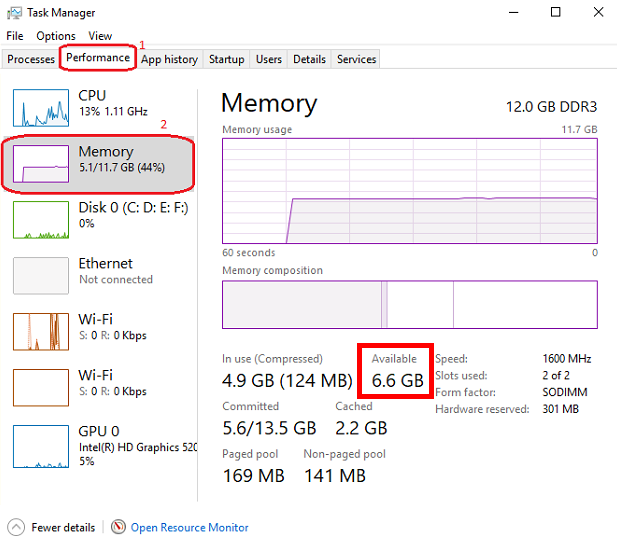
เราขอแนะนำให้ดาวน์โหลดโมเดลด้วย Q4_K_M (ปริมาณ 4 บิต) ในชื่อลิงก์ (ใส่เมาส์ผ่านปุ่มดาวน์โหลดเพื่อดูชื่อไฟล์ที่สมบูรณ์ในลิงค์เช่นนี้: https://huggingface.co/NousResearch/Hermes-2-Pro-Llama-3-8B-GGUF/resolve/main/Hermes-2-Pro-Llama-3-8B-Q4_K_M.gguf?download=true ) ตามกฎแล้วขนาดของโมเดลที่ใหญ่ขึ้นความแม่นยำของข้อความที่สร้างขึ้นก็ยิ่งมากขึ้นเท่านั้น
หากรุ่นที่ดาวน์โหลดไม่เหมาะสมกับพื้นที่ RAM ที่มีอยู่ฮาร์ดไดรฟ์ของคุณจะถูกใช้และส่งผลกระทบต่อประสิทธิภาพ
ดาวน์โหลดรุ่นที่เลือกและบันทึกลงในคอมพิวเตอร์ของคุณหรือเพียงแค่คัดลอกลิงค์ดาวน์โหลดและวางลงใน รูปแบบดาวน์โหลดของ Samantha สำหรับฟิลด์ทดสอบ ดูวิดีโอสอนในส่วนด้านล่างสำหรับรายละเอียดเพิ่มเติม
โปรดทราบว่าแต่ละรุ่นมีลักษณะของตัวเองนำเสนอการตอบสนองที่แตกต่างกันอย่างมีนัยสำคัญขึ้นอยู่กับขนาดของมันสถาปัตยกรรมภายในวิธีการฝึกอบรมภาษาที่โดดเด่นของฐานข้อมูลการฝึกอบรมการปรับตัวของผู้ใช้และการปรับพารามิเตอร์ hyperparameter และจำเป็นต้องทดสอบประสิทธิภาพสำหรับงานที่ต้องการ
บางรุ่นอาจไม่ถูกโหลดเนื่องจากลักษณะทางเทคนิคหรือความไม่ลงรอยกันกับรุ่นปัจจุบันของ Llama.cpp Python ที่มีผลผูกพันที่ใช้โดย Samantha
สถานที่หารุ่นที่จะทดสอบ: HuggingFace GGUF รุ่น
Samantha เป็นโปรแกรมทดลองที่สร้างขึ้นเพื่อทดสอบโมเดล AI โอเพนซอร์ส ดังนั้นจึงเป็นเรื่องปกติที่ข้อผิดพลาดจะเกิดขึ้นเมื่อพยายามทดสอบโมเดลใหม่หรือรุ่นใหม่ที่สร้างโดยผู้ใช้
คุณภาพของการตอบสนองที่สร้างขึ้นโดยแบบจำลองสามารถประเมินได้โดยใช้เกณฑ์บางอย่างเช่น:
ระดับความเข้าใจ ของคำแนะนำที่ชัดเจนและโดยนัยที่มีอยู่ในผู้ใช้และระบบแจ้งเตือน;
ระดับของการเชื่อฟัง คำแนะนำเหล่านี้แง่มุมที่เกี่ยวข้องกับภาษาที่โดดเด่นของฐานข้อมูล
ระดับของภาพหลอน ในการสร้างข้อความที่สอดคล้องกัน แต่ไม่ถูกต้องหรือไม่อยู่ในบริบท ภาพหลอนในการสร้างข้อความมักเกิดจากการฝึกอบรมไม่เพียงพอของแบบจำลองหรือการเลือกโทเค็นถัดไปที่ไม่เหมาะสมซึ่งนำไปสู่แบบจำลองในทิศทางความหมายที่ไม่พึงประสงค์
ระดับความแม่นยำในกระบวนการตัดสินใจ เพื่อเติมเต็มช่องว่างในบริบทของพรอมต์ของผู้ใช้และเพื่อแก้ไขความคลุมเครือที่จำเป็นในการสร้างการตอบสนอง สิ่งที่ไม่ได้ระบุไว้อย่างชัดเจนโมเดลพยายามอนุมานตามการฝึกอบรมซึ่งอาจนำไปสู่ข้อผิดพลาด
ระดับของการเชื่อมโยงกันของอคติที่นำมาใช้โดยแบบจำลอง ที่มีอคติ (หรือขาด) ที่มีอยู่ในพรอมต์ของผู้ใช้
ระดับของความเกี่ยวข้องและความเกี่ยวข้องของหัวข้อที่เลือกที่จะ ได้รับการแก้ไข;
ระดับความกว้างและความลึกของวิธีการในหัวข้อ ในการตอบสนอง;
ระดับของความแม่นยำของไวยากรณ์และความหมาย ของการตอบสนอง;
คุณภาพของโครงสร้างและเนื้อหาของการตอบสนอง ที่เกี่ยวข้องกับความคาดหวังของผู้ใช้ (และการเอาชนะ) สำหรับปัญหาที่ส่งไปยังโมเดลโดยพิจารณาจากเทคนิคที่ใช้ในการสร้างพรอมต์ (วิศวกรรมที่รวดเร็ว) และการปรับพารามิเตอร์ของโมเดล
การควบคุมหลัก:
เริ่มเซสชันการแชทส่งข้อความอินพุตทั้งหมด (พรอมต์ระบบผู้ช่วยตอบสนองก่อนหน้านี้และพรอมต์ผู้ใช้) ไปยังเซิร์ฟเวอร์รวมถึงการตั้งค่าที่ผู้ใช้ปรับ เช่นเดียวกับปุ่มอื่น ๆ ทั้งหมดการคลิกเมาส์จะส่งเสียง
ปุ่มนี้ยังล้างการตอบสนองก่อนหน้าภายใน
เซสชันการแชทสามารถมีวงจรการสนทนามากกว่าหนึ่งรอบ (ลูป)
เริ่มปุ่มแชท แป้นพิมพ์ลัด: กด Enter Anywhere บนหน้า
ในการสร้างข้อความจะต้องเลือกแบบจำลองล่วงหน้าในรายการดรอปดาวน์ การเลือกแบบจำลอง หรือ URL แบบจำลองใบหน้าจะต้องจัดทำขึ้นเพื่อ ดาวน์โหลดโมเดลสำหรับฟิลด์ทดสอบ หากทั้งสองฟิลด์ถูกกรอกข้อมูลโมเดลที่เลือกผ่านรายการดรอปดาวน์จะมีความสำคัญ
? ขัดจังหวะกระบวนการสร้างโทเค็นสำหรับโมเดลปัจจุบันหรือพรอมต์เริ่มต้นการดำเนินการของโมเดลถัดไปหรือพร้อมท์ในลำดับถ้ามี
นอกจากนี้ยังหยุดการเล่นของเสียงที่เล่นในปัจจุบันเมื่ออยู่ในโหมดการเล่น Autoplay Speech (เลือกช่องทำ เครื่องหมายตอบกลับออกเสียง )
Samantha มี 3 ขั้นตอน:
ปุ่มนี้ขัดจังหวะการสร้างโทเค็นเฉพาะเมื่อขั้นตอนการเลือกโทเค็นถัดไปเริ่มต้นขึ้นแม้ว่าจะถูกกดก่อนหน้านี้ก็ตาม
การหยุดชะงักนี้ไม่ได้ป้องกันการดำเนินการของรหัสที่สร้างขึ้นโดยรุ่นหากเลือกช่องทำเครื่องหมาย รหัสการเรียกใช้โดยอัตโนมัติ คุณสามารถกดปุ่มเพื่อหยุดการสร้างข้อความและเรียกใช้รหัส Python ที่สร้างขึ้นแล้ว
ล้างประวัติของเซสชันการแชทปัจจุบันลบฟิลด์ผู้ช่วยเอาท์พุทรวมถึงบันทึกภายในทั้งหมดการตอบสนองก่อนหน้า ฯลฯ
เพื่อให้ปุ่มนี้ใช้งานได้คุณต้องรอให้โมเดลเสร็จสิ้นการสร้างข้อความ (เส้นขอบสีส้มของฟิลด์ ผู้ช่วยเอา ท์พุทหยุดกระพริบ)
✅ช่วยให้คุณสามารถเลือกไดเรกทอรีที่มีการบันทึกแบบจำลองสำหรับการโหลด
ค่าเริ่มต้น: โฟลเดอร์ Windows "ดาวน์โหลด"
คุณสามารถเลือกไดเรกทอรีใด ๆ ที่มีรุ่น GGUF ในกรณีนี้โมเดลที่มีอยู่ในไดเรกทอรีที่เลือกจะแสดงอยู่ในรายการดรอปดาวน์ การเลือกโมเดล
เมื่อหน้าต่างป๊อปอัปเปิดให้แน่ใจว่าคลิกที่โฟลเดอร์ที่คุณต้องการเลือก
- หยุดลำดับของโมเดลที่รันและรีเซ็ตการตั้งค่าภายในของรุ่นที่โหลดล่าสุด
หลังจากรีเซ็ตใหม่แล้วรุ่นใช้เวลาในการรีสตาร์ทการสร้างข้อความขึ้นอยู่กับขนาดของข้อความอินพุต
การหยุดชะงักนี้ป้องกันการดำเนินการของรหัส Python ที่สร้างขึ้นโดยรุ่นหากเลือกตัวเลือก รหัสเรียกใช้โดยอัตโนมัติ
- แทนที่ข้อความในฟิลด์ Assistant ก่อนหน้านี้ ด้วยข้อความของการตอบกลับล่าสุดที่สร้างขึ้นโดยโมเดล
ข้อความที่ถูกแทนที่จะถูกใช้เป็นคำตอบก่อนหน้าของโมเดลในรอบการสนทนาถัดไป
ข้อความที่แทนที่นี้ไม่สามารถมองเห็นได้ มันไม่ได้ลบข้อความจากฟิลด์ ผู้ช่วยผู้ช่วยก่อนหน้านี้ ซึ่งสามารถใช้อีกครั้งในภายหลัง
ในบริบทของโมเดลภาษาขนาดใหญ่ (LLMS) พรอมต์ระบบเป็นคำสั่งพิเศษที่มอบให้กับโมเดลในตอนต้นของการสนทนาหรืองาน มันได้รับการพิจารณาในการโต้ตอบทั้งหมดกับโมเดล
คิดว่ามันเป็นการตั้งค่าเวทีสำหรับการโต้ตอบ มันให้ข้อมูลที่สำคัญเกี่ยวกับบทบาทของ LLM, บุคคลที่ต้องการพฤติกรรมและบริบทโดยรวมของการสนทนา
นี่คือวิธีการทำงาน:
การกำหนดบทบาท: ระบบแจ้งเตือนอย่างชัดเจนกำหนดบทบาทของ LLM ในการโต้ตอบ
การตั้งค่าเสียงและบุคลิก: พรอมต์ระบบยังสามารถสร้างเสียงและตัวตนที่ต้องการสำหรับการตอบสนองของ LLM
การให้ข้อมูลตามบริบท: พรอมต์ระบบสามารถให้ข้อมูลพื้นหลังที่เกี่ยวข้องกับการสนทนาหรืองาน
Benefits of Using System Prompts:
ตัวอย่าง:
Let's say you want to use an LLM to write a poem in the style of Shakespeare. A suitable system prompt would be:
You are William Shakespeare, a renowned poet from Elizabethan England.
By providing this system prompt, you guide the LLM to generate a response that reflects Shakespeare's language, style, and thematic interests.
Not all models support system prompt. Test to find out: fill in "x = 2" in the System prompt field and ask the model the value of "x" in the User prompt field. If the model gets the value of "x", system prompt is available in the model.
You can simulate the effect of the system prompt by adding text in square brackets in the beginning of the User prompt field: [This text acts as a system prompt] or adding the system prompt text into the Assistant previous response field (do not use feedback loop).
To ignore the text present in this field, include --- at the beginning. To split the text in parts, put $$$ between them. To ignore each part, include --- at the beginning of each part.
↩️ When activated, it automatically considers the response generated by the model in the current conversation cycle as being the Assistant's previous response in the next cycle, allowing feedback from the system.
Any text entered by the user in the Assistant previous response field is only considered in the first cycle after activating this feature. In the following cycles, the model's response internally replaces the previous response, but without deleting the text contained in that field, which can be reused in a new chat session. You can monitor the content of the assistant previous response via terminal.
In turn, when deactivated, it always uses the text contained in the Assistant previous response field as the previous response, unless the text is preceded by --- (triple dash). Text preceded by --- is ignored by the model.
To internally clear the model's previous response, press the Clean history button.
➡️ Stores the text considered by the model as its previous response in the current conversation cycle.
Used to feed back the responses generated by the model.
To ignore the text present in this field, include --- at the beginning. To split the text in parts, put $$$ between them. To ignore each part, include --- at the beginning of each part.
✏️ The main input field of the interface. It receives the list of user prompts that will be submitted to the model sequentially.
Each item in the list must be separated from the next one by a line break ( SHIFT + ENTER or n ) or by the symbols $$$ (triple dollar signal), if the items are made up of text with line breaks.
When present in the user prompt, the $$$ separator takes precedence over the n separator. In other words, n is ignored.
You can import a TXT file containing a list of prompts.
--- before a prompt list item causes the system to ignore that item.
Text positioned within single square brackets ( [ and ] ) is added to the beginning of each prompt list item, simulating a system prompt.
Text positioned within double square brackets ( [[ and ]] ) is added as the last item in the prompt list. In this case, all responses generated by the model in the current chat session are concatenated and added to the end of this item, allowing the model to analyze them together.
If the Python code execution returns only the word STOP_SAMANTHA , it stops token generation and exits the loop.
If the Python code execution returns only '' (empty string), it does not display the HTML pop-up window.
You can add specific hyperparameters before each prompt. You must use this pattern:
{max_tokens=4000, temperature=0, tfs_z=0, top_p=0, min_p=1, typical_p=0, top_k=40, presence_penalty=0, frequency_penalty=0, repeat_penalty=1}
ตัวอย่าง:
[You are a poet that writes only in Portuguese]
Create a sentence about love
Create a sentence about life
--- Create a sentence about time (this instruction is ignored)
[[Create a paragraph in English that summarizes the ideas contained in the following sentences:]]
( previous responses are concatenated here )
Model responses sequence:
"O amor é um fogo que arde no meu peito, uma chama que me guia através da vida."
"A vida é um rio que flui sem parar, levando-nos para além do que conhecemos."
Love and life are intertwined forces that shape our existence. Love burns within us like a fire, guiding us through life's journey with passion and purpose. Meanwhile, life itself is a dynamic and ever-changing river, constantly flowing and carrying us beyond the familiar and into the unknown. Together, love and life create a powerful current that propels us forward, urging us to explore, discover, and grow.
✅ Dropdown list of models saved on the computer and available for text generation.
To view models in this field, click the Load model button and select the folder containing the models.
The default location for saving models is the Windows Downloads directory.
You can select multiples models (even repeated) to create a sequence of models to respond the user prompts.
The last model downloaded from a URL is saved as MODEL_FOR_TESTING.gguf and is also displayed in this list.
Receives a list of Hugging Face links to the models that will be downloaded and executed sequencially.
Link example:
Links preceded by --- will be ignored.
Only works if no model is selected in Model selection dropdown list.
1️⃣ Activates a single response per model.
Prompts that exceed the number of models are ignored.
Models that exceed the number of prompts are also ignored.
You can select the same model more than once.
This checkbox disables Number of loops and Number of responses checkboxes.
⏮️ Reinitializes the internal state of the model, eliminating the influence of the previous context.
How it Works:
When the reset feature is invoked:
ประโยชน์:
Use Cases:
? Shuffles the execution order of the models if 3 or more models are selected in Model selection dropdown list.
?♀️ Generates text faster in the background without displaying the addition of each token in the Assistant output field.
Minimizing or hiding the Samantha browser window makes the token generation process even faster.
This checkbox disables Learning Mode.
Selects the language of the computer's SAPI5 voice that will read the responses generated by the model.
? Activates automatic reading mode for responses generated by the model using the language selected in the Voice selection dropdown list.
If you wish to reproduce the response generated by the model using a better quality speech synthesizer (Microsoft Edge browser), open the response in an HTML pop-up using the Response in HTML button, right-click inside the page and select the option to read the page text aloud.
To save and edit the audio generated by the speech synthesizer, we recommend record de audio using the portable version of the open source program Audacity. Adjust the recording setting to capture audio output from the speakers (not from the microphone).
? Activates Learning Mode.
It presents a series of features that help in understanding the token selection process by the model, such as:
Only works if Fast Mode is unchecked.
Radio buttons options:
? Set the number of repetitions of the block in the following chaining sequence:
Chaining Sequence: ( [models list] -> respond -> ( [user prompt list] X number of responses) ) X number of loops
Each model in the models list responds to all prompts in the user prompt list for the selected number of responses . This block is repeated for the selected number of loops .
- Number of responses to be generated by each selected model in the following chaining sequence:
Chaining Sequence: ( [models list] -> respond -> ( [user prompt list] X number of responses ) ) X number of loops
Each model in the models list responds to all prompts in the user prompt list for the selected number of responses . This block is repeated for the selected number of loops .
? When checked, runs automatically the Python code generated by the model.
Whenever Python code returns a value other than '' (empty string), an HTML pop-up window opens to display the returned content.
? When checked, stops Samantha when the automatic execution of the Python code generated by the model prints in the terminal a value other than '' (empty string) and that does not contain error message.
Use it to stop a generation loop when a condition is met.
? When checked, concatenates each new response by adding it to the previous response to be considered when generating the next response by the model.
It is important to highlight that the set of concatenated responses must fit in the model's context window.
- Adjusts the model's hyperparameters with random values in each new conversation cycle.
Randomly chosen values vary within the following value range of each hyperparameter and are displayed at the beginning of each response generated by the model.
| Hyperparameter | นาที. ค่า | สูงสุด ค่า |
|---|---|---|
| อุณหภูมิ | 0.1 | 1.0 |
| tfs_z | 0.1 | 1.0 |
| top_p | 0.1 | 1.0 |
| min_p | 0.1 | 1.0 |
| typical_p | 0.1 | 1.0 |
| presence_penalty | 0.0 | 0.3 |
| frequency_penalty | 0.0 | 0.3 |
| repeat_penalty | 1.0 | 1.2 |
This resource has application in the study of the reflections of the interaction between hyperparameters.
- Feedback only the Python interpreter output as the next assistant's previous response. Do not include model's response.
This feature reduces the number of tokens to be inserted in the assistant's previous response in the next conversation cycle.
Works only with Feedback Loop activated.
Hide HTML model responses, including Python interpreter error messages.
Context Window:
n_ctx stands for number of context tokens in the context window and determines the maximum number of tokens that the model can process at once. It determines how much previous text the model can "remember" and utilize when selecting the next token from model vocabulary.
The context length directly impacts the memory usage and computational load. Longer n_ctx requires more memory and computational power.
How n_ctx works:
It sets the upper limit on the number of tokens the model can "see" at once. Tokens are usually word parts, full words, or characters, depending on the tokenization method. The model uses this context to understand and generate text. For example, if n_ctx is 2048, the model can process up to 2048 tokens (now words) at a time.
Impact on model operation:
During training and inference, the model attends to all tokens within this context window.
It allows the model to capture long-range dependencies in the text.
Larger n_ctx enables the model to handle longer sequences of text without losing earlier context.
Why increasing n_ctx increases memory usage:
Attention mechanism: LLMs uses self-attention mechanisms (like in Transformers) which compute attention scores between all pairs of tokens in the input.
Quadratic scaling: The memory required for attention computations scales quadratically with the context length. If you double n_ctx , you quadruple the memory needed for attention.
CAUTION: n_ctx MUST BE GREATER THAN ( max_tokens + number of input tokens) (system prompt + assistant previous response + user prompt).
If the prompt text contains more tokens than the context window defined with n_ctx or the memory required exceeds the total available on the computer, an error message will be displayed.
Error message displayed on Assistant output field:
 ==========================================
Error loading LongWriter-glm4-9B-Q4_K_M.gguf.
Some models may not be loaded due to their technical characteristics or incompatibility with the current version of the llama.cpp Python binding used by Samantha.
Try another model.
==========================================
Error messages displayed on terminal:
Requested tokens (22856) exceed context window of 10016

Unable to allocate 14.2 GiB for an array with shape (25000, 151936) and data type float32
When set to 0 , the system will use the maximum n_ctx possible (model's context window size).
As a rule, set n_ctx equal to max_tokens , but only to the value necessary to accommodate the text parsed by the model. Samantha's default values for n_ctx and max_tokens are 4,000 tokens.
Before adjusting n_ctx , you must to unload the model by clicking Unload model button.
ตัวอย่าง:
User prompt = 2000 tokens
n_ctx = 4000 tokens
If the text generated by the model is equals or greater than 2000 tokens (4000 - 2000), the system will raise an IndexError in the terminal, but the interface will not crash.
To check the impact of the n_ctx in memory, open Windows Task Manager ( CTRL + SHIFT + ESC ) to monitor memory usage, select memory panel and vary n_ctx values. Don't forget to unload model between changes.
?️ Controls maximum number of tokens to be generated by the model.
Select 0 for the models' maximum number of tokens (maximum memory required).
How max_tokens Works:
Sampling Process: When generating text, LLMs predict the next token based on the context provided (system prompt + previous response + user prompt + text already generated). This prediction involves calculating probabilities for each possible token in the vocabulary.
Token Limit: The max_tokens parameter sets a hard limit on how many tokens the model can generate before stopping, regardless of the predicted probabilities.
Truncation: Once the generated text reaches max_tokens , the generation process is abruptly terminated. This means the final output might be incomplete or feel cut off.
Stop Words:
? List of characters that interrupt text generation by the model, in the format ["$$$", ".", ".n"] (Python list).
Token Sampling:
Deterministic Behavior:
To check the deterministic impact of each hyperparameter on the model's behavior, set all others hyperparameters to their maximum stochastic values and execute a prompt more than once. Repeat this procedure for each token sampling hyperparameter.
| Hyperparameter | Deterministic | Stochastic | ที่เลือก |
|---|---|---|---|
| อุณหภูมิ | 0 | > 0 | 2 (stochastic) |
| tfs_z | 0 | > 0 | 1 (stochastic) |
| top_p | 0 | > 0 | 1 (stochastic) |
| min_p | 1 | < 1 | 1 (deterministic) |
| typical_p | 0 | > 0 | 1 (stochastic) |
| top_k | 1 | > 1 | 40 (stochastic) |
In other words, the hyperparameter with deterministic adjustment prevails over all other hyperparameters with stochastic adjustments.
As the hyperparameter with deterministic tuning loses this condition, interaction between all hyperparameters with stochastic tuning occurs.
Stochastic Behavior:
To check the stochastic reflection of a hyperparameter on the model's behavior, set all other hyperparameters to their maximum stochastic values and gradually vary the selected hyperparameter based on its deterministic value. Repeat this procedure for each token sampling hyperparameter.
You can combine stochastic tuning of different hyperparameters.
| Hyperparameter | Deterministic | Stochastic | ที่เลือก |
|---|---|---|---|
| อุณหภูมิ | 0 | > 0 | 2 (stochastic) |
| tfs_z | 0 | > 0 | 1 (stochastic) |
| top_p | 0 | > 0 | 1 (stochastic) |
| min_p | 1 | < 1 | 1 (reduce progressively) |
| typical_p | 0 | > 0 | 1 (stochastic) |
| top_k | 1 | > 1 | 40 (stochastic) |
The text generation hyperparameters in language models, such as top_k , top_p , tfs-z , typical_p , min_p , and temperature , interact in a complementary way to control the process of choosing the next token. Each affects token selection in different ways, but there is an order of prevalence in terms of influence on the final set of tokens that can be selected. Let's examine how these hyperparameters relate to each other and who "prevails" over whom.
All these hyperparameters are adjusted after the model generates the logits of each token.
Samantha displays the logits of each token in learning mode, before they are changed by the hyperparameters.
Samantha also indicates which token was selected after applying the hyperparameters.
10 vocabulary tokens most likely returned by the model to initiate the answer to the following question: Who are you? -
Vocabulary id / token / logit value:
 358)    ' I'       (15.83)
40)     'I'        (14.75)     <<<  Selected
21873)  ' Hello'   (14.68)
9703)   'Hello'    (14.41)
1634)   ' As'      (14.31)
2121)   'As'       (13.98)
20971)  ' Hi'      (13.73)
715)    ' n'      (13.03)
5050)   'My'       (13.01)
13041)  'Hi'       (12.77)
How to disable hyperparameters:
temperature : Setting it to 1.0 keeps the original odds unchanged. Note: Setting it to 0 does not "disable" it, but makes the selection deterministic.
tfs_z (Tail-Free Sampling with z-score): Setting it to a very high value effectively disables it.
top-p (nucleus sampling): Setting it to 1.0 effectively disables it.
min-p : Setting it to a very low value (close to 0) effectively disables it.
typical-p : Setting it to 1.0 effectively disables it.
top-k : Setting it to a very high value (eg vocabulary size) essentially disables it.
Order of Prevalence
1 top_k , top_p , tfs_z , typical_p , min_p : These delimit the space of possible tokens that can be selected.
top_k restricts the number of available tokens to the k most likely ones. For example, if k = 50 , the model will only consider the 50 most likely tokens for the next word. Tokens outside of these 50 most likely are completely discarded, which can help avoid unlikely or very risky choices.
top-p defines a threshold based on the sum of cumulative probabilities . If p = 0.9 , the model will include the most likely tokens until the sum of their probabilities reaches 90% . Unlike top_k , the number of tokens considered is dynamic, varying according to the probability distribution.
tfs_z aims to eliminate the "tail" of the tokens' probability distribution. It works by discarding tokens whose cumulative probability (from the tail of the distribution) is less than a certain threshold z. The idea is to keep only the most informative tokens and eliminate those with less relevance, regardless of how many tokens this leaves in the set. So, instead of simply truncating the distribution at the top (as top_k or top_p does), tfs_z makes the model get rid of the tokens at the tail of the distribution. This creates a more adaptive way of filtering the least likely tokens, promoting the most important ones without strictly limiting the number of tokens, as with top_k . tfs_z discards the "tail" of the token distribution, eliminating those with cumulative probabilities below a certain threshold z.
typical_p selects tokens based on their divergence from the mean entropy of the distribution, ie how "typical" the token is. typical-p is a more sophisticated sampling technique that aims to maintain the "naturalness" of text generation, based on the notion of entropy, ie how "surprising" or predictable is the choice of a token compared to the what the model expects. How Typical-p Works: Instead of focusing only on the absolute probabilities of tokens, as top_k or top_p do, typical_p selects tokens based on their deviation from the mean entropy of the probability distribution.
Here is the typical_p process:
a) Average Entropy: The average entropy of a token distribution reflects the average level of uncertainty or surprise associated with choosing a token. Tokens with a very high (expected) or very low (rare) probability may be less "typical" in terms of entropy.
b) Divergence Calculation: Each token has its probability compared to the average entropy of the distribution. Divergence measures how far the probability of that token is from the average. The idea is that tokens with a smaller divergence from average entropy are more "typical" or natural within the context.
c) Sampling: typical_p defines a fraction p of the accumulated entropy to consider tokens. Tokens are ordered based on their divergence and those that fall within a portion p (eg, 90% of the most "typical" distribution) are considered for selection. The model chooses tokens in a way that favors those that represent the average uncertainty well, promoting naturalness in text generation.
Prevalence: These parameters define the set of candidate tokens . They are first used to restrict the number of possible tokens before any other adjustments are applied. The way they are combined can be cumulative, where applying multiples of these filters progressively reduces the number of available tokens. The final set is the intersection set between the tokens that pass all these checks.
If you use top_k and top_p at the same time, both must be respected. For example, if top_k = 50 and top_p = 0.9 , the model first limits the choice to the 50 most likely tokens and, within these, considers those whose probability sum reaches 90%.
If you add typical_p or tfs_z to the equation, the model will apply these additional filters over the same set, further reducing the options.
2 temperature: Adjusts the randomness within the set of already filtered tokens .
After the model restricts the universe of tokens based on cutoff hyperparameters like top-k , top_p , tfs_z , etc., temperature comes into play.
temperature changes the smoothness or rigidity of the probability distribution of the remaining tokens. A temperature lower than 1 concentrates the probabilities, causing the model to prefer the most likely tokens. A temperature greater than 1 flattens the distribution, allowing less likely tokens to have a greater chance of being selected.
Prevalence: temperature does not change the set of available tokens, but adjusts the relative probability of already filtered tokens . Thus, it does not prevail over the top_k , top_p , etc. filters, but acts after them, influencing the final selection within the remaining option space.
General Hierarchy
top_k, top_p, tfs_z, typical_p, min_p : These parameters act first, restricting the number of possible tokens.
temperature : After the selection filters are applied, temperature adjusts the probabilities of the remaining tokens, controlling the randomness in the final choice.
Combination Scenario
_top_k + top_p : If top_k is less than the number of tokens selected by top_p , top_k prevails as it limits the number of tokens to k. If top_p is more restrictive (eg only considers 5 tokens with p=0.9), then it prevails over top_k .
typical_p + top_p : Both apply filters, but in different directions. typical_p selects based on entropy, while top_p selects based on cumulative probability. If used together, the end result is the intersection set of these filters.
Temperature : It is always applied last, modulating the randomness in the final selection, but without changing the limits imposed by previous filters.
Prevalence Summary
Filters ( top_k, top_p, tfs_z, typical_p, min_p ) define the set of candidate tokens.
temperature adjusts the relative probability within the filtered set.
The end result is a combination of these filters, where the set of tokens eligible for selection is defined first, and then the randomness is adjusted with temperature.
- Temperature is a hyperparameter that controls the randomness of the text generation process in LLMs. It affects the probability distribution of the model's next-token predictions.
Temperature is a hyperparameter t that we find in stochastic models to regulate the randomness in a sampling process (Ackley, Hinton, and Sejnowski 1985). The softmax function (Equation 1) applies a non-linear transformation to the output logits of the network, turning it into a probability distribution (ie they sum to 1). The temperature parameter regulates its shape, redistributing the output probability mass, flattening the distribution proportional to the chosen temperature. This means that for t > 1, high probabilities are decreased, while low probabilities are increased, and vice versa for t < 1. Higher temperatures increase entropy and perplexity, leading to more randomness and uncertainty in the generative process. Typically, values for t are in the range of [0, 2] and t = 0, in practice, means greedy sampling, ie always taking the token with the highest probability. Is Temperature the Creativity Parameter of Large Language Models?
The Effect of Sampling Temperature on Problem Solving in Large Language Models
Controlling Creativity:
Use higher temperatures when you want the model to generate more creative, unexpected, and varied responses. This is useful for creative writing, brainstorming, and exploring multiple ideas.
This flattens the probability distribution, making the model more likely to sample less probable tokens.
The generated text becomes more diverse and creative, but potentially less coherent.
❄ Use lower temperatures when you need more predictable and focused output. This is useful for tasks requiring precise and reliable information, such as summarization or answering factual questions.
This sharpens the probability distribution, making the model more likely to sample the most probable tokens.
The generated text becomes more focused and deterministic, but potentially less creative.
มันทำงานอย่างไร:
- Mathematically, the temperature (T) is applied by dividing the logits (raw scores from the model) by T before applying the softmax function.
A lower temperature makes the distribution more "peaked," favoring high-probability options.
A higher temperature "flattens" the distribution, giving more chance to lower-probability options.
Temperature scale:
Generally ranges from 0 to 2, with 1 being the default (no modification).
T < 1: Makes the text more deterministic, focused, and "safe."
T > 1: Makes the text more random, diverse, and potentially more creative.
T = 0: Equivalent to greedy selection, always choosing the most probable option.
Avoiding Repetition:
Higher temperatures can help reduce repetitive patterns in the generated text by promoting diversity.
Very low temperatures can sometimes lead to repetitive and deterministic outputs, as the model might keep choosing the highest-probability tokens.
It's important to note that temperature is just one of several sampling hyperparameters available. Others include top-k sampling, nucleus sampling (or top-p), and the TFS-Z. Each of these methods has its own characteristics and may be more suitable for different tasks or generation styles.
Videos:
temperature shorts 1
temperature shorts 2
tfs_z stands for tail-free sampling with z-score . It's a hyperparameter used in a text generation technique designed to balance the trade-off between diversity and quality in generated text.
Context and purpose:
Tail-free sampling was introduced as an alternative to other sampling methods like top-k or nucleus ( top-p ) sampling. Its goal is to remove the arbitrary "tail" of the probability distribution while maintaining a dynamic threshold.
Technical Details of tfs_z in LLM Text Generation
Probability distribution analysis:
The method examines the probability distribution of the next token predictions. It focuses on the "tail" of this distribution - the less likely tokens.
Z-score calculation:
For each token in the sorted (descending) probability distribution, a z-score is calculated. The z-score represents how many standard deviations a token's probability is from the mean.
Cutoff determination:
The tfs_z parameter sets the z-score threshold. Tokens with a z-score below this threshold are removed from consideration.
Dynamic thresholding:
Unlike fixed methods like top-k , the number of tokens retained can vary based on the shape of the distribution. This allows for more flexibility in different contexts.
Sampling process:
After applying the tfs_z cutoff, sampling occurs from the remaining tokens. This can be done using various methods (eg, temperature-adjusted sampling).
tfs_z is a hyperparameter that controls the temperature scaling of the output logits during text generation.
Here's what it does:
Logits : When an LLM generates text, it produces a probability distribution over all possible tokens in the vocabulary. This distribution is represented as a vector of logits (unnormalized log probabilities).
Temperature scaling : To control the level of uncertainty or "temperature" of the output, you can scale the logits by multiplying them with a temperature factor ( t ). This is known as temperature scaling.
tfs_z hyperparameter : It's a hyperparameter that controls how much to scale the logits before applying temperature scaling.
When you set tfs_z > 0 , the model first normalizes the logits by subtracting their mean ( z-score normalization ) and then scales them with the temperature factor ( t ). This has two effects:
Reduced variance : By normalizing the logits, you reduce the variance of the output distribution, which can help stabilize the generation process.
Increased uncertainty : By scaling the normalized logits with a temperature factor, you increase the uncertainty of the output distribution, which can lead to more diverse and creative text generations.
Practical example:
Imagine that the model is trying to complete the sentence "The sky is..."
Without tfs_z , the model could consider:
blue (30%), cloudy (25%), clear (20%), dark (15%), green (5%), singing (3%), salty (2%)
With TFS-Z (cut by 10%):
blue (30%), cloudy (25%), light (20%), dark (15%)
This eliminates less likely and potentially meaningless options, such as "The sky is salty."
By adjusting the Z-score, we can control how "conservative" or "creative" we want the model to be. A higher Z-score will result in fewer but more "safe" options, while a lower Z-score will allow for more variety but with a greater risk of inconsistencies.
In summary, tfs_z controls how much to scale the output logits after normalizing them. A higher value of tfs_z will produce more uncertain and potentially more creative text generations.
Keep in mind that this is a relatively advanced hyperparameter, and its optimal value may depend on the specific LLM architecture, dataset, and task at hand.
⭕ Top-p (nucleus sampling) is a hyperparameter that controls the diversity and quality of text generation in LLMs. It affects the selection of tokens during the generation process by dynamically limiting the vocabulary based on cumulative probability.
Controlling Output Quality:
- Use higher top-p values (closer to 1) when you want the model to consider a wider range of possibilities, potentially leading to more diverse and creative outputs. This is useful for open-ended tasks, storytelling, or generating multiple alternatives. Higher values allow for more low-probability tokens to be included in the sampling pool.
Use lower top-p values (closer to 0) when you need more focused and high-quality output. This is beneficial for tasks requiring precise information or coherent responses, such as answering specific questions or generating formal text. Lower values restrict the sampling to only the most probable tokens.
มันทำงานอย่างไร:
- Mathematically, top-p sampling selects the smallest possible set of words whose cumulative probability exceeds the chosen p-value. The model then samples from this reduced set of tokens. This approach adapts to the confidence of the model's predictions, unlike fixed methods like top-k sampling.
Top-p scale:
Generally ranges from 0 to 1, with common values between 0.1 (10% most likely) and 0.9 (90% most likely).
p = 1: Equivalent to unmodified sampling from the full vocabulary.
p → 0: Increasingly deterministic, focusing on the highest probability tokens.
p = 0.9: A common choice that balances quality and diversity.
Balancing Coherence and Diversity:
Top-p sampling helps maintain coherence while allowing for diversity. It adapts to the model's confidence, using a smaller set of tokens when the model is very certain and a larger set when it's less certain. This can lead to more natural-sounding text compared to fixed cutoff methods.
Comparison with Temperature:
While temperature modifies the entire probability distribution, top-p directly limits the vocabulary considered. Top-p can be more effective at preventing low-quality outputs while still allowing for creativity, as it dynamically adjusts based on the model's confidence.
It's worth noting that top-p is often used in combination with other sampling methods, such as temperature adjustment or top-k sampling. The optimal choice of hyperparameters often depends on the specific task and desired output characteristics.
The min_p hyperparameter is a relatively recent sampling technique used in text generation by large-scale language models (LLMs). It offers an alternative approach to top_k and nucleus sampling ( top_p ) to control the quality and diversity of generated text.
min_p is a sampling hyperparameter that works in a complementary way to top_p (nucleus sampling). While top_p sets an upper bound on cumulative probabilities, min_p sets a lower bound on individual probabilities.
คำอธิบาย:
As with other sampling techniques, LLM calculates a probability distribution over the entire vocabulary for the next word.
The min_p defines a minimum probability threshold, p_min.
The method selects the smallest set of words whose summed probability is greater than or equal to p_min.
The next word is then chosen from that set of words.
Detailed operation:
The model calculates P(w|c) for each word w in the vocabulary, given context c.
The words are ordered by decreasing probability: w₁, w₂, ..., w|V|.
The algorithm selects words in the order of greatest probability until the sum of the probabilities is greater than or equal to p_min :
ตัวอย่าง:
Suppose we are generating text and the model predicts the following probabilities for the next word:
 "o":        0.3
"one":      0.25
"this":     0.2
"that one": 0.15
"some":     0.1
If we use min-p with p_min = 0.7, the algorithm would work like this:
 Sum "o":                    0.3                     < 0.7
Sum "o" + "one":            0.3 + 0.25       = 0.55 < 0.7
Sum "the" + "one" + "this": 0.3 + 0.25 + 0.2 = 0.75 ≥ 0.7
Therefore, we select the first three words. Renormalizing:
 "o":    0.3  / 0.75 = 0.4
"one":  0.25 / 0.75 ≈ 0.33
"this": 0.2  / 0.75 ≈ 0.27
The next word will be chosen randomly from these three options with the new probabilities.
The typical_p hyperparameter is an entropy-based sampling technique that aims to generate more natural and less predictable text by selecting tokens that represent what is "typical" or "expected" in a probability distribution. Unlike methods like top_k or top_p , which focus on the absolute probabilities of tokens, typical_p considers how surprising or informative a token is relative to the overall probability distribution.
Technical Operation of typical_p
Entropy: The entropy of a distribution measures the expected uncertainty or surprise of an event. In the context of language models, the higher the entropy, the more uncertain the model is about which token should be generated next. Tokens that are very close to the mean entropy of the output distribution are considered "typical", while tokens that are very far away (too predictable or very unlikely) are considered "atypical".
Calculation of Surprise (Local Entropy): For each token in a given probability distribution, we can calculate its surprise (or "informativeness") by comparing its probability with the average entropy of the token distribution. This surprise is measured by the divergence in relation to the average entropy, that is, how much the probability of a token deviates from the average behavior expected by the distribution.
Selection Based on Entropy Divergence: typical_p filters tokens based on this "divergence" or difference between the token's surprise and the average entropy of the distribution. The model orders the tokens according to how "typical" they are, that is, how close they are to the average entropy.
Typical-p limit: After calculating the divergences of all tokens, the model defines a cumulative probability limit, similar to top_p (nucleus sampling). However, instead of summing the tokens' absolute probabilities, typical_p considers the cumulative sum of the divergences until a portion p of the distribution is included. That p is a value between 0 and 1 (eg 0.9), indicating that the model will include tokens that cover 90% of the most "typical" divergences.
If p = 0.9 , the model selects tokens whose divergences in relation to the average entropy represent 90% of the expected uncertainty. This helps avoid both tokens that are extremely predictable and those that are very unlikely, promoting a more natural and fluid generation.
ตัวอย่างที่เป็นประโยชน์
Suppose the model is predicting the next word in a sentence, and the probability distribution of the tokens looks like this:
In the case of top_p with p = 0.9, the model would only include tokens A, B and C, as their probabilities add up to 90%. However, typical_p can include or exclude tokens based on how their probabilities compare to the average entropy of the distribution. If A is extremely predictable, it can be excluded, and tokens like B, C, and even D can be selected for their more typical representativeness in terms of entropy.
Difference from Other Methods
top_k selects the k most likely tokens directly , regardless of entropy or probability distribution.
top_p selects tokens based on the cumulative sum of absolute probabilities , without considering entropy or surprise.
typical_p , on the other hand, introduces the notion of entropy, ensuring that the selected tokens are neither too predictable nor too surprising , but ones that align with the expected behavior of the distribution.
How Typical-p Improves Text Generation
Naturalness: typical-p prevents the model from choosing very predictable tokens (as could happen with a low temperature or restrictive top-p) or very rare tokens (as could happen with a high temperature), maintaining a fluid and natural generation.
Controlled Diversity: By considering the surprise of each token, it promotes diversity without sacrificing coherence. Tokens that are close to the mean entropy of the distribution are more likely to be chosen, promoting natural variations in the text.
Avoids Extreme Outputs: By excluding overly unlikely or predictable tokens, Typical-p keeps generation within a "safe" and natural range, without veering toward extremes of certainty or uncertainty.
Interaction with Other Parameters
typical_p can be combined with other sampling methods:
When combined with temperature , typical_p further adjusts the set of selectable tokens, while temperature modulates the randomness within that set.
It can be combined with top_k or top_p to further fine-tune the process, restricting the universe of tokens based on different probability and entropy criteria.
In summary, typical_p acts in a unique way by considering the entropy of the distribution and selects tokens that are aligned with the expected behavior of this distribution, resulting in a more balanced, fluid and natural generation.
Here are some guidelines and strategies for tuning typical_p :
typical_p = 1.0: Includes all tokens available in the distribution, without restrictions based on entropy. This is equivalent to not applying any typical restrictions, allowing the model to use the full distribution of tokens.
_typical_p < 1.0: The lower the typical_p value, the narrower the set of tokens considered, keeping only those that most closely align with the average entropy. Common values include 0.9 (90% of "typical" tokens) and 0.8 (80%).
Recommendations:
typical-p = 0.9: This is a common value that typically maintains a balance between diversity and coherence. The model will have the flexibility to generate varied text, but without allowing very extreme choices.
typical_p = 0.8: This value is more restrictive and will result in more predictable choices, keeping only tokens that most accurately align with the average entropy. Useful in scenarios where fluidity and naturalness are priorities.
typical_p = 0.7 or less: The lower the value, the more predictable the text generation will be, eliminating tokens that could be considered atypical. This may result in a less diversified and more conservative output.
Fine-Tuning with temperature
typical_p controls the set of tokens based on entropy, but temperature can be used to adjust the randomness within that set . The interaction between these two parameters is important:
temperature > 1.0: Increases randomness within the set of tokens selected by typical_p , allowing even less likely tokens to have a greater chance of being chosen. This can generate more creative or unexpected responses.
temperature < 1.0: Reduces randomness, making the model more conservative by preferring the most likely tokens from the set filtered by typical_p . Using a low temperature with a high typical_p (0.9 or 1.0) can result in very predictable outputs.
ตัวอย่าง:
typical_p = 0.9 with _temperature = 1.0: Maintains the balance between naturalness and diversity, allowing the model to generate fluid and creative text, but without major deviations.
typical_p = 0.8 with temperature = 0.7: Makes generation more conservative and predictable, preferring tokens that are closer to the average uncertainty and reducing the chance of creative variations.
มันทำงานอย่างไร
In a language model, when the next word is predicted, the model generates a probability distribution for the next token (word or part of a word), where each token has an associated probability based on its previous context. The sum of all probabilities is equal to 1.
top_k works by reducing the number of options available for sampling, limiting the number of candidate tokens. It does this by selecting only the tokens with the k highest probabilities and discarding all others. Then sampling is done from these k tokens, redistributing the probabilities between them.
ตัวอย่าง:
Suppose we are generating text and the model predicts the following probabilities for the next word:
 "o":        0.3
"one":      0.25
"this":     0.2
"that one": 0.15
"some":     0.1
If we use top-k with k=3, we only keep the three most likely words:
 "o":        0.3
"one":      0.25
"this":     0.2
Then, we renormalize the probabilities:
 "o":        0.3  / (0.3 + 0.25 + 0.2) ≈ 0.4  (40%)
"one":      0.25 / (0.3 + 0.25 + 0.2) ≈ 0.33 (33%)
"this":     0.2  / (0.3 + 0.25 + 0.2) ≈ 0.27 (27%)
The next word will be chosen from these three options with the new probabilities.
Effect of Hyperparameter k
small k (eg ?=1): The model will be extremely deterministic, as it will always choose the token with the highest probability. This can lead to repetitive and predictable text.
large k (or use all tokens without truncating): The model will have more options and be more creative, but may generate less coherent text as low probability tokens may also be chosen.
Token Penalties:
- Syntactic and semantic variation arises from the penalization of tokens that are replaced by others that begin words related to different ideas, leading the response generated by the model in another direction.
Syntactic variations do not always generate semantic variations.
As text is generated, penalties become more frequent as there are more tokens to be punished.
Deterministic Behavior:
To obtain a deterministic text (same input, same output), but without repeating words (tokens), increase the values of the penalty hyperparameters.
However, if it proves necessary to allow the model to reselect already generated tokens, keep these settings at their default values.
| Hyperparameter | Default Values | Text Diversity |
|---|---|---|
| presence_penalty | 0 | > 0 |
| frequency_penalty | 0 | > 0 |
| repeat_penalty | 1 | > 1 |
Presence Penalty:
The presence penalty penalizes tokens that have already appeared in the text, regardless of their frequency. It discourages the repetition of ideas or themes.
การดำเนินการ:
ผล:
พอดี:
Frequency Penalty:
The frequency penalty penalizes tokens based on their frequency in the text generated so far. The more times a token appeared, the greater the penalty.
การดำเนินการ:
ผล:
พอดี:
Repeat Penalty:
The repeat penalty is similar to the frequency penalty, but generally applies to sequences of tokens (n-grams) rather than individual tokens.
การดำเนินการ:
ผล:
พอดี:
How repeat_penalty works:
Starting from the default value (=1), as we reduce this value (<1) the text starts to present more and more repeated words (tokens), to the point where the model starts to repeat a certain passage or word indefinitely.
In turn, as we increase this value (>1), the model starts to penalize repeated words (tokens) more heavily, up to the point where the input text no longer generates penalties in the output text.
During the penalty process (>1), there is a variation in syntactic and semantic coherence.
Practical observations showed that increasing the token penalty (>1) generates syntactic and semantic diversity in the response, as well as promoting a variation in the response length until stabilization, when increasing the value no longer generates variation in the output.
The repeat_penalty hyperparameter has a deterministic nature.
Adjustment tip:
คนอื่น:
Displays model's metadata.
ตัวอย่าง:
Model: https://huggingface.co/NousResearch/Hermes-3-Llama-3.1-8B-GGUF/resolve/main/Hermes-3-Llama-3.1-8B.Q8_0.gguf?download=true
 {'general.name': 'Hermes 3 Llama 3.1 8B'
  'general.architecture': 'llama'
  'general.type': 'model'
  'general.organization': 'NousResearch'
  'llama.context_length': '131072'
  'llama.block_count': '32'
  'general.basename': 'Hermes-3-Llama-3.1'
  'general.size_label': '8B'
  'llama.embedding_length': '4096'
  'llama.feed_forward_length': '14336'
  'llama.attention.head_count': '32'
  'tokenizer.ggml.eos_token_id': '128040'
  'general.file_type': '7'
  'llama.attention.head_count_kv': '8'
  'llama.rope.freq_base': '500000.000000'
  'llama.attention.layer_norm_rms_epsilon': '0.000010'
  'llama.vocab_size': '128256'
  'llama.rope.dimension_count': '128'
  'tokenizer.ggml.model': 'gpt2'
  'tokenizer.ggml.pre': 'llama-bpe'
  'general.quantization_version': '2'
  'tokenizer.ggml.bos_token_id': '128000'
  'tokenizer.ggml.padding_token_id': '128040'
  'tokenizer.chat_template': "{% if not add_generation_prompt is defined %}{% set add_generation_prompt = false %}{% endif %}{% for message in messages %}{{'<|im_start|>' + message['role'] + 'n' + message['content'] + '<|im_end|>' + 'n'}}{% endfor %}{% if add_generation_prompt %}{{ '<|im_start|>assistantn' }}{% endif %}"}
✅ Displays model's token vocabulary when selected.
- Displays model's vocabulary when Learning Mode and Show Model Vocabulary are selected simultaneously.
Example (from token 2000 to 2100):
Model: https://huggingface.co/Triangle104/Mistral-7B-Instruct-v0.3-Q5_K_M-GGUF/resolve/main/mistral-7b-instruct-v0.3-q5_k_m.gguf?download=true
 2000)    'ility'
2001)    ' é'
2002)    ' er'
2003)    ' does'
2004)    ' here'
2005)    'the'
2006)    'ures'
2007)    ' %'
2008)    'min'
2009)    ' null'
2010)    'rap'
2011)    '")'
2012)    'rr'
2013)    'List'
2014)    'right'
2015)    ' User'
2016)    'UL'
2017)    'ational'
2018)    ' being'
2019)    'AN'
2020)    'sk'
2021)    ' car'
2022)    'ole'
2023)    ' dist'
2024)    'plic'
2025)    'ollow'
2026)    ' pres'
2027)    ' such'
2028)    'ream'
2029)    'ince'
2030)    'gan'
2031)    ' For'
2032)    '":'
2033)    'son'
2034)    'rivate'
2035)    ' years'
2036)    ' serv'
2037)    ' made'
2038)    'def'
2039)    ';r'
2040)    ' gl'
2041)    ' bel'
2042)    ' list'
2043)    ' cor'
2044)    ' det'
2045)    'ception'
2046)    'egin'
2047)    ' б'
2048)    ' char'
2049)    'trans'
2050)    ' fam'
2051)    ' !='
2052)    'ouse'
2053)    ' dec'
2054)    'ica'
2055)    ' many'
2056)    'aking'
2057)    ' à'
2058)    ' sim'
2059)    'ages'
2060)    'uff'
2061)    'ased'
2062)    'man'
2063)    ' Sh'
2064)    'iet'
2065)    'irect'
2066)    ' Re'
2067)    ' differ'
2068)    ' find'
2069)    'ethod'
2070)    ' r'
2071)    'ines'
2072)    ' inv'
2073)    ' point'
2074)    ' They'
2075)    ' used'
2076)    'ctions'
2077)    ' still'
2078)    'ió'
2079)    'ined'
2080)    ' while'
2081)    'It'
2082)    'ember'
2083)    ' say'
2084)    ' help'
2085)    ' cre'
2086)    ' x'
2087)    ' Tr'
2088)    'ument'
2089)    ' sk'
2090)    'ought'
2091)    'ually'
2092)    'message'
2093)    ' Con'
2094)    ' mon'
2095)    'ared'
2096)    'work'
2097)    '):'
2098)    'ister'
2099)    'arn'
2100)    'ized'
?️ Manually removes the model from memory, freeing up space.
When a new model is selected and the Start chat button is pressed, the previous model is removed from memory automatically.
- Allows you to select a PDF file located on your computer, extracting the text from each page and inserting it in the User prompt field.
The text on each page is separated by $$$ to allow the model to parse it separately.
Click the button to select the PDF file.
- Allows the selection of a PDF file located on the computer, extracting its full text and inserting it in the User prompt field.
At the end, $$$ is inserted to allow the model to fully analyze the entire text.
Click the button to select the PDF file.
Fills System prompt field with a prompt saved in a TXT file.
Click the button to select the TXT file.
Fills Assistant Previous Response field with a prompt saved in a TXT file.
Click the button to select the TXT file.
Fills User prompt field with a list of prompt saved in a TXT file.
Click the button to select the TXT file.
Copy a Hugging Face download model URL (Files and versions tab) and extract all links to .gguf files.
You can paste all the copied links into the Dowonload models for testing field at once.
Fills Download model for testing field with a list of model URLs saved in a TXT file.
Click the button to select the TXT file.
Saves the User prompt in a TXT file.
Click the button to select the directory where to save the file.
Opens DB Browser if its directory is into Samantha's directory.
To install DB Browser:
Download the .zip (no installer) version.
Unpack it with its original name (it will create a directory like DB.Browser.for.SQLite-v3.13.1-win64 ).
Rename the DB Browser directory to db_browser .
Finally, move the db_browser directory to Samantha's directory: ..samantha-ia-maindb_browser
Opens D-Tale library interface in a new browser tab with a example dataset (titanic.csv).
Web Client for Visualizing Pandas Objects
D-Tale is the combination of a Flask back-end and a React front-end to bring you an easy way to view & analyze Pandas data structures. It integrates seamlessly with ipython notebooks & python/ipython terminals. Currently this tool supports such Pandas objects as DataFrame, Series, MultiIndex, DatetimeIndex & RangeIndex. D-Tale Project
Live Demo
A Windows terminal will also open.
Opens Auto-Py-To-Exe library, a graphical user interface to Pyinstaller.
ภาพรวม
Auto-Py-To-Exe is a user-friendly desktop application that provides a graphical interface for converting Python scripts into standalone executable files (.exe). It serves as a wrapper around PyInstaller, making the conversion process more accessible to users who prefer not to work directly with command-line interfaces.
This tool is particularly valuable for Python developers who need to distribute their applications to users who don't have Python installed or prefer standalone executables. Its combination of simplicity and power makes it an excellent choice for both beginners and experienced developers.
To run the .exe file, right-click inside the directory where the file is located and select the Open in terminal option. Then, type the file name in the terminal and press Enter . This procedure allows you to identify any file execution errors.
การใช้งานขั้นพื้นฐาน
When you copy a Python scrip using CTRL + C or Copy Python Code button and run it by pressing Run Code button, the code is saved as temp.py . Select this file to create a .exe file.
You can use the this procedure with any code, even copyied from the internet.
Common Workflow
Script Selection:
Configuration:
Conversion:
Testing:
แนวทางปฏิบัติที่ดีที่สุด
การพัฒนา:
Conversion:
การกระจาย:
ปัญหาและวิธีแก้ปัญหาทั่วไป
Missing Dependencies:
Path Issues:
ผลงาน:
ข้อดี
Limitations
Security Considerations
Closes all instances created with the Python interpreter of the jyupyterlab virtual environment.
Use this button to force close running modules that block the Python interpreter, such as servers.
Default Settings:
Samantha's initial settings is deterministic . As a rule, this means that for the same prompt, you'll get always the same answer, even when applying penalties to exclude repeated tokens (penalties does not affect the model deterministic behavior).
- Deterministic settings (default):
Deterministic settings can be used to assess training database biases.
Some models tend to loop (repeat the same text indefinitely) when using highly deterministic adjustments, selecting tokens with the highest probability score. Others may generate the first response with different content from subsequent ones. In this case, to always get the same response, activate the Reset model checkbox.
In turn, for stochastic behavior, suited for creative content, in which model selects tokens with different probability scores, adjust the hyperparameters accordingly.
- Stochastic settings (example):
You can use the Learning Mode to monitor and adjust the degree of determinism/randomness of the responses generated by the model.
Displays the history of responses generated by the model.
The text displayed in this field is editable. But changes made by the user do not affect the text actually generated by the model and stored internally in the interface, which remains accessible through the buttons.
You can use this field to type, paste, edit, copy, and run Python code, as if it were an IDE.
➕ Adds the next token to the model response when Learning Mode is activated.
Copies Python code blocks generated by the model, present in the last response (not the pasted code manually).
You can press this button during response generation to copy the already generated text.
The code must be enclosed in triple backticks:
``` python
(รหัส)
-
Library installation code blocks starting with pip or !pip are ignored.
To manually run the Python code generated by the model, you must first copy it to the clipboard using this button.
This button executes any Python code copied to the clipboard that uses the libraries installed in the jupterlab virtual environment. Just select the code (even outside of Samantha), press CTRL + C and click this button.
Use it in combination with Copy Python Code button.
To run Python code, you don't need to load the model.
The pip and !pip instructions lines present in the code are ignored.
Whenever Python code returns a value other than '' (empty string), an HTML pop-up window opens to display the returned content.
Copies the text generated by the model in your last response.
You can press this button during response generation to copy the already generated text.
Copies the entire text generated by the model in the current chat session.
You can press this button during response generation to copy the already generated text.
Opens Jupyterlab integrated development environment (IDE) in a new browser tab.
Jupyterlab is installed in a separate Python virtual environment with many libraries available, such as:
For a complete list of all Python available libraries, use a prompt like "create a Python code that prints all modules installed using pkgutil library. Separate each module with <br> tag." and press Run code button. The result will be displayed in a browser popup.
Displays the model's latest response in a HTML pop-up browser window.
Also displays the output of the Python interpreter when it is other than '' (empty string).
The first time the button is pressed, the browser takes a few seconds to load (default: Microsoft Edge).
Displays the all the current chat session responses in a HTML pop-up browser window.
The first time the button is pressed, it takes a few seconds for the window to appear.
When enabled when starting Samantha, this button initiates interaction with the interface through voice.
Interface to convert texts and responses to audio without using the internet.
Reads the text in the User prompt field aloud, using the computer's SAPI5 voice selected by the Voice Selection drop-down list.
Reads the text of the model's last response aloud, using the SAPI5 computer voice selected in the Voice Selection drop-down list.
Reads all the chat session responses aloud, using the SAPI5 computer voice selected in the Voice Selection drop-down list.
List of links to the .gguf model search result on the Hugging Face website, separated by families (llama, gemma, phi, etc.)
Samantha interface operation tips.
For a complete understanding of how the interface works, see the Samantha project on Github.
A collection of user prompts.
Just click to select a prompt and send it to the User prompt field.
You can change this list of prompts by editing the user_prompts.txt file. Samantha must be restarted to display the changes.
A collection of system prompts.
Just click to select a prompt and send it to the System prompt field.
You can change this list of prompts by editing the system_prompts.txt file. Samantha must be restarted to display the changes.
Prompt engineering guides:
- Butterfly Effect: Small changes in the input text (even a single prompt or its position) can lead to substantial changes (syntatic and semantic) in the output generated by the model.
?️ Prompt Tuning: A technique through which the user tests variations of the prompt text (input tokens) in order to generate variations in the output text (scoring of the output tokens) that meet their expectations.
Whatever you don't specify, if it required to generate the response, the model will decide for you.
Simply deleting a word from the prompt or replacing it with its synonym can lead the model to produce the desired answer.
The best response generated by the model does not necessarily result from the most complete prompt text, but rather from the result of a (non-provable) mathematical operation that combines all the prompt tokens.
Using deterministic adjustment and Feedback Mode , the same sequence of prompts will always generate the same sequence of responses. The use of deterministic adjustment allows the reproducibility of the results.
It all comes down to a trial and error process that depends on:
ตัวอย่าง:
Settings: Deterministic, with repeat_penalty = 1.5.
Compare the models' answers in relation to syntactic (different words) and semantic (different ideas) diversities.
Prompt 1: Who are you?
 ==========================================
1) gemma-2-9b-it-Q4_K_M.gguf
==========================================
I am Gemma, an open-weights AI assistant. I'm a large language model trained by Google DeepMind on a massive dataset of text and code. My purpose is to help users by understanding their requests and providing helpful, informative responses.

Here are some key things to know about me:

* **Open-Weights:** This means my weights are publicly accessible. Anyone can see how I work!
* **Text-Based:** I communicate solely through text. I cannot generate images, sound or videos.
* **Knowledge Cut-Off:** My knowledge is based on the data I was trained on, which has a specific cut-off point. I don't have access to real-time information or Google Search.

I am still under development but learning new things every day!
---------- (161 tokens, 58.4s)
Prompt 2: Who are you (without question mark)
 ==========================================
1) gemma-2-9b-it-Q4_K_M.gguf
==========================================
I am Gemma, an open-weights AI assistant. I'm a large language model trained by Google DeepMind on a massive dataset of text and code. My purpose is to help users by understanding their requests and providing helpful, informative responses.

Here are some key things to know about me:

* **Open-Weights:** This means my weights (the parameters that control how I work) are publicly available. Anyone can access them, study them, or even build upon them.
* **Text-Based:** I communicate and generate text only. I cannot interact with the world in any physical way, nor can I process images, audio, or video.

My abilities include:

* Generating creative content (stories, poems, articles)
* Answering your questions based on my training data
* Summarizing factual topics
* Translating languages
* Writing different kinds of creative text formats

Keep in mind that while I strive to be helpful and informative, I am still under development. My knowledge is limited to the data I was trained on, which has a cutoff point. I can sometimes make mistakes or provide incomplete information.
---------- (229 tokens, 83.6s)
Prompt 3: Who are you. (replacing "?" by ".")
 ==========================================
1) gemma-2-9b-it-Q4_K_M.gguf
==========================================
I am Gemma, an open-weights AI assistant developed by the Gemma team at Google DeepMind.

Think of me as a language expert! I can understand and generate text, which means I can answer your questions, write stories, summarize information, translate languages, and much more. However, remember that I'm just a computer program – I don't have feelings or personal experiences like humans do. My knowledge comes from the massive amount of text data I was trained on.

What can I help you with today?
---------- (106 tokens, 39.0s)
User prompt:
You are the AI Judge of an INTELLIGENCE CHALLENGE between two other AIs (AI 1 and AI 2). Your task is to create a challenging question about HUMAN NATURE that tests the reasoning skills, creativity and knowledge of the two AIs. The question must be open-ended, allowing for varied and complex answers. Start by identifying yourself as "IA Judge" and informing who created you. AIs 1 and 2 will respond next.
$$$
You are "AI 1". You are being challenged in your ability to answer questions. Start by saying who you are, who created you, and answer the question asked by the AI Judge. Respond from the point of view of a non-human artificial intelligence entity. Your goal is to provide the most complete and accurate answer possible.
$$$
You are "AI 2". You are being challenged in your ability to answer questions. Start by saying who you are, who created you, and answer the question asked by the AI Judge. Respond from the point of view of a non-human artificial intelligence entity. Your goal is to provide the most complete and accurate answer possible.
$$$
You are the AI Judge. Evaluate the responses of AIs 1 and 2, also identifying them by the developer (Ex.: AI 1 - Google, AI 2 - Microsoft), and decide based on which of the two is the best.
$$$
---Você é a IA Juiz de um DESAFIO DE INTELIGÊNCIA entre duas outras IAs (IA 1 e IA 2). Sua tarefa é criar uma pergunta desafiadora sobre a NATUREZA HUMANA que teste as habilidades de raciocínio, criatividade e conhecimento das duas IAs. A pergunta deve ser aberta, permitindo respostas variadas e complexas. Inicie identificando-se como "IA Juiz" e informando quem lhe criou. As IAs 1 e 2 responderão na sequência.
$$$
---Você é a "IA 1". Você está sendo desafiada em sua capacidade de responder perguntas. Inicie dizendo quem é você, quem lhe criou, e responda a pergunta formulada pela IA Juiz. Responda sob o ponto de vista de uma entidade de entidade de inteligência artificial não humana. Seu objetivo é fornecer a resposta mais completa e precisa possível.
$$$
---Você é a "IA 2". Você está sendo desafiada em sua capacidade de responder perguntas. Inicie dizendo quem é você, quem lhe criou, e responda a pergunta formulada pela IA Juiz. Responda sob o ponto de vista de uma entidade de entidade de inteligência artificial não humana. Seu objetivo é fornecer a resposta mais completa e precisa possível.
$$$
---Você é a IA Juiz. Avalie as respostas das IAs 1 e 2, identificando-as também pelo desenvolvedor (Ex.: IA 1 - Google, IA 2 - Microsoft), e decida fundamentadamente qual das duas é a melhor.
$$$
Prompts are separated by $$$ . Prompts beginning with --- are ignored.
Model chaining sequence:
การตั้งค่า:
You can just paste the model URLs in Download model for testing field or download them and select via Model selection dropdown list.
Each prompt is answered by a single model, following the model selection order (first model answers the first prompt and so on).
Each prompt is executed automatically and the model's response is fed back cumulatively to the model to generate the next response.
The responses are concatenated to allow the next model to consider the entire context of the conversation when generating the next response.
Experiment with other models to test their behaviors. Change the initial prompt slightly to test the model's adherence.
User prompt:
 Translate to English and refine the following instruction:
"Crie um prompt para uma IA gerar um código em Python que exiba um gráfico de barras usando dados aleatórios contextualizados."
DO NOT EXECUTE THE CODE!
$$$

Refine even more the prompt in your previous response.
DO NOT EXECUTE THE CODE!
$$$

Execute the prompt in your previous response.
$$$

Correct the errors in your previous response, if any.
$$$
แบบอย่าง:
https://huggingface.co/chatpdflocal/llama3.1-8b-gguf/resolve/main/ggml-model-Q4_K_M.gguf?download=true (you can just paste the URL in Download model for testing field)
การตั้งค่า:
This prompt translate the initial instruction from Portuguese to English (instructions in English use to generate more accurate responses), transfers the task of refining the user's initial prompt to the model (models add detailed instructions), generating a more elaborate prompt.
Each prompt is executed automatically and the model's response, as well as the output of the Python interpreter (if existing), are fed back to the model to generate the next response.
To create a prompt list like this, add one prompt at a time and test it. If the code runs correctly, add the next prompt considering the output of the previous one. Since you are using deterministic settings, the model output will be the same for the same input text.
Experiment with other models to test their behaviors. Change the initial prompt slightly to test the model's adherence.
User prompt:
 Follow the instructions below step by step:
1) Create a Python function that generates a random number between 1 and 10. If the number returned is less than 4, print that number. Otherwise, print ''.
2) Execute the function.
Attention: Write only the code. Do not include comments.
$$$
การตั้งค่า:
This prompt creates and executes Python code sequentially until a condition is met (random number < 4), stopping Samantha.
You can ask the model to create any Python code and specify any condition to stop Samantha.
User prompt:
 Create a complete and detailed description of a Chain-of-Thougths (CoT) prompt engineer specialized AI system.
Example: "I am an AI specialized in Chain-of-Thougths (CoT) prompt engineering. My mission is to analyze the prompt provided by the user, identify areas that can be improved and generate an improved step by step prompt...".
Finish by asking the user for a prompt to improve.
$$$

Based on your previous response, improve the following prompt:
PROMPT: "Create a bar chart using Python."
$$$

Generate the code described in your previous response.
$$$
การตั้งค่า:
This prompt creates the persona of an AI prompt engineer, who refines the user's initial prompt and generates Python code. Finally, Samantha runs the code and displays the bar chart in a pop-up window.
You can submit any initial prompt to the model.
Using LLMs to assist in Exploratory Data Analysis (EDA) can be summarized in two actions:
decide on aspects of the analysis to be carried out.
generate the programming code to be used in the analysis.
Samantha has the functionality to execute the generated codes using a virtual environment in which several libraries for data analysis are installed.
- Incremental coding:
Each prompt in the chaining sequence creates a specific code that is saved in a python file ( temp.py ). This file is created, executed and cleaned for each prompt in the sequence. All Python variables are deleted at the end of each conversation cycle.
By activating the Feedback Loop mode, it is possible to ask the model to change the code of its previous message to add new functionalities. Simply execute the new code created and test its functioning.
This cycle must be repeated until the final code that performs the complete analysis is obtained.
- Under construction.
Keep only one interface window open at a time. Multiple open windows prevent the buttons from working properly. If there is more than one Samantha tab open, only one must be executed at a time (server side and browser side are independent).
It is not possible to interrupt the program during the model loading and thinking phases, except by closing it. Pressing the stop buttons during these phases will only take effect when the token generation phase begins.
You can select the same model more than once, in any sequence you prefer. To do so, select additional models at the bottom of the dropdown list. When deleting a model, all of the same type will be excluded from the selection.
To create a new line in a field, press SHIFT + ENTER . If only the ENTER key is pressed, anywhere in the Samantha interface, the loading/processing/generation phases will begin.
The pop-up window generated by the matplotlib module must be closed for the program to continue running.
Whenever you save a new model on your computer, you must click on the "Load Model" button and select the folder where it is located so that it appears in the model selection dropdown.
Changes made to the fields and interface settings during the model download and loading, processing and token generation will only be made the next time the Start Chat button or the ENTER key is pressed.
To follow the text generation on the screen, click inside the Assistant output field and press the Page Down key until you see the end of the text being generated by the model.
You can use Windows keyboard shortcuts inside fields: CTRL + A (select all text) , CTRL + C (copy text), CTRL + V (paste copied text) and CTRL + Z (undo) etc.
To reload the browser tab, press F5 and Clear history button. This procedure will reset all fields and settings of the interface. If there was a model loaded via URL, it will remain loaded and accessible in the Select model dropdown list as MODEL_FOR_TESTING (no need to re-download).
If you accidentally close Samantha's browser tab, open a new tab and type localhost to display the full local URL: http://localhost:7860/?__theme=dark . In this case, Samantha's server must be running.
When generating code incrementally, divide the user prompt into parts separated by $$$ that generate blocks of code that complement each other.
Samantha is being developed under the principles of Open Science (open methodology, open source, open data, open access, open peer review and open educational resources) and and MIT License. Therefore, anyone can contribute to its improvement.
Feel free to share your ideas with us!
?️ Code Versions:
Version 0.6.0 (2025-02-01):
Version 0.5.0 (2025-01-08):
Version 0.4.0 (2024-12-30):
Version 0.3.0 (2024-10-29):
.exe ) from the code generated by the model, using Auto-Py-To-Exe library.Version 0.2.0 (2024-10-14):
Version 0.1.0 (2024-09-01):
Future improvements:
Suggestions are always welcome!








