samantha_ia
1.0.0

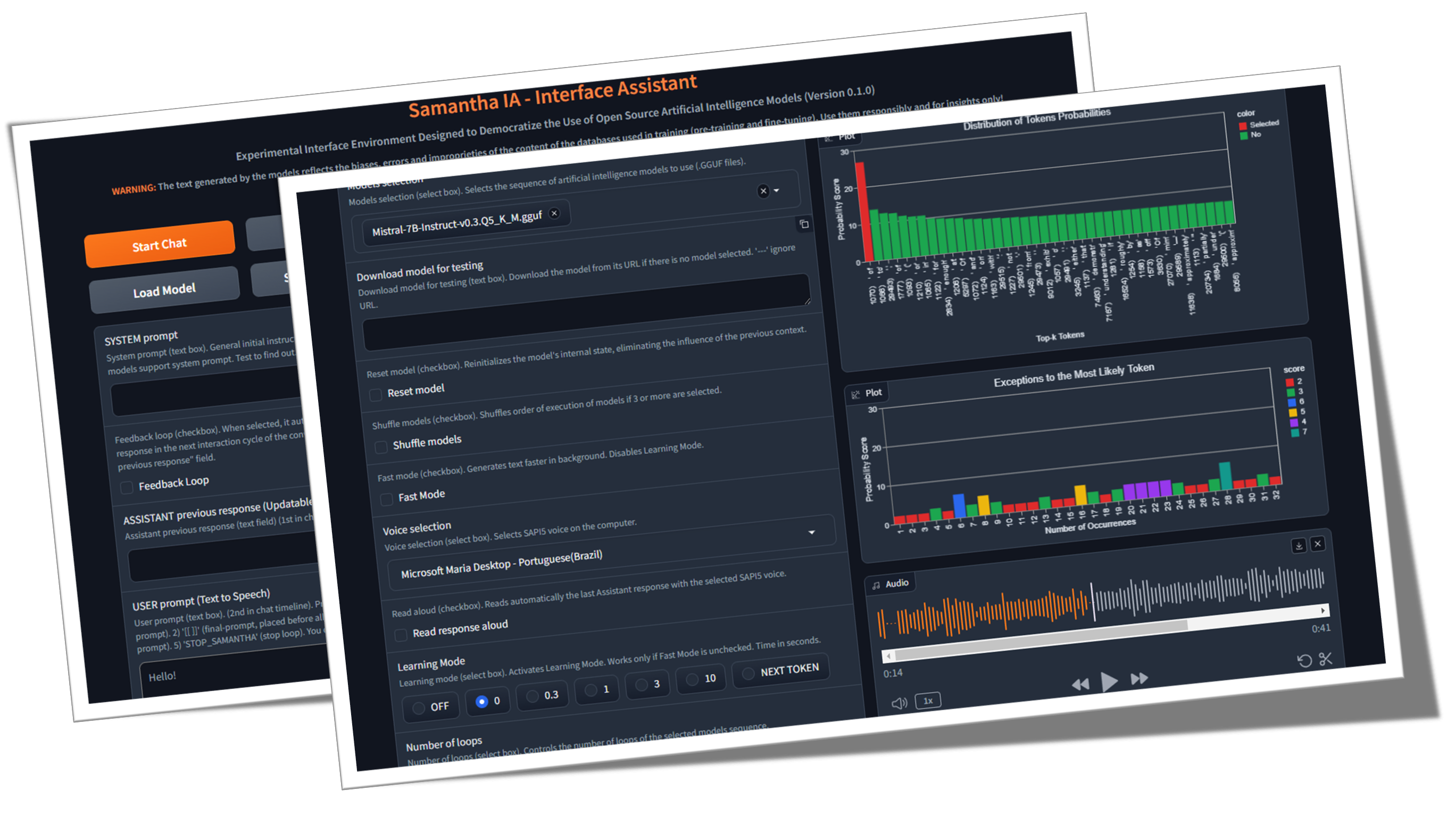
Samantha hanyalah asisten antarmuka sederhana untuk model intelijen buatan generasi teks open source, yang dikembangkan di bawah prinsip -prinsip sains terbuka (metodologi terbuka, open source, data terbuka, akses terbuka, tinjauan peer terbuka dan sumber daya pendidikan terbuka) dan lisensi MIT untuk digunakan pada komputer Windows umum (tanpa GPU). Program ini menjalankan LLM secara lokal, gratis dan tanpa batas, tanpa perlu koneksi internet, kecuali untuk mengunduh model GGUF (GGUF adalah singkatan dari Format Terpadu yang dihasilkan GPT) atau bila diperlukan oleh pelaksanaan kode yang dibuat oleh model (GE untuk mengunduh kumpulan data untuk analisis data). Tujuannya adalah untuk mendemokratisasi pengetahuan tentang penggunaan AI dan menunjukkan bahwa, menggunakan teknik yang tepat, bahkan model kecil mampu menghasilkan respons yang mirip dengan yang lebih besar. Misinya adalah membantu mengeksplorasi batas -batas model AI terbuka.
Apa itu open source ai (opensource.org)
Apakah ukuran LLM penting? (Gary menjelaskan)
Kertas Kecerdasan Buatan (arxiv.org)
️ Samantha sedang dikembangkan untuk membantu dalam melaksanakan kontrol sosial dan kelembagaan administrasi publik, mengingat skenario yang mengkhawatirkan saat ini tentang peningkatan kehilangan kepercayaan warga terhadap lembaga kontrol. Fitur -fiturnya memungkinkannya untuk digunakan oleh siapa pun yang tertarik untuk mengeksplorasi model kecerdasan buatan open source, terutama programmer python dan ilmuwan data. Proyek ini berasal dari kebutuhan tim MPC-ES untuk mengembangkan sistem yang akan memungkinkan pemahaman proses menghasilkan token oleh model LLM.
♾️ Sistem ini memungkinkan pemuatan berurutan dari daftar prompt (rantai prompt) dan model (model rantai ), satu model pada satu waktu untuk menghemat memori, serta penyesuaian hiperparameter mereka, yang memungkinkan respons yang dihasilkan oleh model yang tidak ada di antara fitur loop yang tidak ada. Model dapat berinteraksi dengan jawaban yang disediakan oleh model sebelumnya, sehingga setiap respons baru menggantikan yang sebelumnya. Anda juga dapat menggunakan hanya satu model dan berinteraksi dengan respons sebelumnya atas jumlah siklus pembuatan teks yang tidak terbatas. Gunakan imajinasi Anda untuk menggabungkan model, permintaan, dan fitur!
Video ini menunjukkan contoh interaksi antara model tanpa intervensi manusia, dengan merantai model dan meminta menggunakan fitur salinan dan tempel Samantha. Versi terkuantisasi dari model Microsoft PHI 3.5 dan Google Gemma 2 (oleh Bartowski) ditantang untuk menjawab pertanyaan tentang sifat manusia yang dibuat oleh model Meta llama 3.1 (oleh NousResearch). Respons juga dievaluasi oleh model meta.

Tantangan Intelijen: Gemma 2 vs Phi 3.5 dengan Llama 3.1 sebagai Hakim
? Beberapa contoh rantai tanpa menggunakan fitur loop umpan balik respons Samantha:
(model_1) merespons (prompt_1) x Jumlah respons: Digunakan untuk menganalisis perilaku deterministik dan stokastik model dengan bantuan fitur mode pembelajaran , serta untuk menghasilkan berbagai respons beragam dengan pengaturan stokastik (video).
(model_1) merespons (prompt_1, prompt_2, prompt_n): Digunakan untuk menjalankan instruksi multiples secara berurutan dengan model yang sama (prompt chaining) (video).
(model_1, model_2, model_n) Respons (prompt_1): Digunakan untuk membandingkan respons model untuk prompt tunggal yang sama (model chaining). Berguna untuk membandingkan model yang berbeda, serta versi terkuantisasi dari model yang sama.
(model_1, model_2, model_n) Respons (prompt_1, prompt_2, prompt_n): Digunakan untuk membandingkan respons model untuk daftar prompt, serta untuk menjalankan urutan instruksi menggunakan model DiscTinct (model dan prompt chain). Setiap model merespons semua petunjuk. Pada gilirannya, saat menggunakan fitur respons per model tunggal , setiap model merespons hanya satu prompt spesifik.
? Beberapa contoh rantai menggunakan fitur loop umpan balik respons Samantha:
(model_1) menanggapi (prompt_1) x Jumlah respons: digunakan untuk meningkatkan atau melengkapi respons model sebelumnya melalui instruksi pengguna tetap menggunakan model yang sama, serta untuk mensimulasikan percakapan tanpa akhir antara 2 AIS menggunakan model tunggal (video).
(model_1) merespons (prompt_1, prompt_2, prompt_n): Digunakan untuk meningkatkan respons model sebelumnya melalui multiples instruksi pengguna secara berurutan dengan model yang sama (prompt chaining). Setiap prompt digunakan untuk memperbaiki atau menyelesaikan respons sebelumnya, serta untuk menjalankan urutan petunjuk yang bergantung pada respons sebelumnya, seperti melakukan analisis data eksplorasi (EDA) dengan pengkodean tambahan (video).
(model_1, model_2, model_n) Respons (prompt_1): Digunakan untuk meningkatkan respons model sebelumnya menggunakan model DiscTinct (model chaining), serta untuk menghasilkan dialog antara model yang berbeda.
(model_1, model_2, model_n) Respons (prompt_1, prompt_2, prompt_n): Digunakan untuk menjalankan urutan instruksi menggunakan model DiscTinct (model dan prompt chaining) dan respons tunggal per fitur model .
Masing -masing model ini dan meminta urutan dapat dieksekusi lebih dari sekali melalui jumlah fitur loop .
Templat urutan rantai Samantha:
([Daftar Model] -> Respons -> ([Daftar Prompt Pengguna] X Jumlah tanggapan)) x Jumlah loop
Tapi apa itu GPT? Intro Visual ke Transformers (3Blue1Brown)
Perhatian dalam Transformers, dijelaskan secara visual (3blue1brown)
Transformer Explainer (Poloclub)
? Urutan prompt dan model memungkinkan pembuatan respons panjang dengan memapisi instruksi input pengguna. Setiap respons parsial cocok dengan panjang respons model yang ditentukan dalam proses pelatihan model.
? Sebagai alat open source untuk interaksi diri otomatis antara model AI, Samantha Interface Assistant dirancang untuk mengeksplorasi rekayasa cepat terbalik dengan loop umpan balik peningkatan diri ? Teknik ini membantu Model Bahasa Kecil Besar (LLM) untuk menghasilkan respons yang lebih akurat dengan mentransfer ke model tugas membuat prompt akhir dan respons yang sesuai berdasarkan instruksi awal yang tidak tepat pengguna, menambahkan lapisan perantara ke proses konstruksi cepat. Samantha tidak memiliki prompt sistem tersembunyi seperti itu dengan model berpemilik. Semua instruksi dikendalikan oleh pengguna. Lihat permintaan sistem antropik.
? Berkat perilaku yang muncul yang dihasilkan dari pola generalisasi yang diekstraksi dari teks pelatihan, dengan konfigurasi hiperparameter yang tepat dan tepat, bahkan model kecil yang bekerja bersama dapat menghasilkan respons besar!
Kecerdasan spesies manusia tidak didasarkan pada makhluk cerdas tunggal, tetapi berdasarkan pada kecerdasan kolektif. Secara individual, kita sebenarnya tidak begitu cerdas atau mampu. Masyarakat dan sistem ekonomi kita didasarkan pada memiliki sejumlah besar lembaga yang terdiri dari beragam individu dengan spesialisasi dan keahlian yang berbeda. Kecerdasan kolektif yang luas ini membentuk siapa kita sebagai individu, dan masing-masing dari kita mengikuti jalan hidup kita sendiri untuk menjadi individu yang unik, dan pada gilirannya, berkontribusi kembali untuk menjadi bagian dari kecerdasan kolektif kita yang terus berkembang sebagai spesies. Kami percaya bahwa pengembangan kecerdasan buatan akan mengikuti jalur kolektif yang serupa. Masa depan AI tidak akan terdiri dari sistem AI tunggal, raksasa, semua-tahu yang membutuhkan energi besar untuk melatih, menjalankan, dan mempertahankan, tetapi lebih banyak kumpulan sistem AI kecil-masing-masing dengan ceruk dan spesialisasi mereka sendiri, berinteraksi satu sama lain, dengan sistem AI yang lebih baru dikembangkan untuk mengisi ceruk tertentu . Model Yayasan Baru yang Berevolusi: Melepaskan Kekuatan Pengembangan Model Mengotomatisasi - Sakana AI
? Langkah kecil: Samantha hanyalah sebuah gerakan menuju masa depan di mana kecerdasan buatan bukanlah hak istimewa tetapi merupakan alat bagi semua orang di dunia di mana individu dapat memanfaatkan AI untuk meningkatkan produktivitas, kreativitas, dan pengambilan keputusan mereka tanpa hambatan, berjalan dalam perjalanan untuk mendemokrasikan AI dan menjadikannya kekuatan untuk kebaikan dalam kehidupan sehari-hari kita.
? Sifat instrumental AI: Mengenali monopoli teknologi kecerdasan buatan sebagai instrumen dominasi yang mungkin dan perluasan ketidaksetaraan sosial merupakan tantangan pada titik infleksi dalam sejarah ini. Memperhatikan kekurangan dari model yang lebih kecil selama proses pembuatan teks membantu dalam pemahaman ini dengan membandingkannya dengan kesempurnaan yang diklaim dari model kepemilikan yang lebih besar. Penting untuk memposisikan ulang hal -hal di tempat -tempat yang tepat dan mempertanyakan pandangan reduksionis romantis tentang mengaitkan karakteristik manusia - seperti kecerdasan (antropomorfisasi yang disebabkan oleh fenomena psikologis pareidolia) - dengan teknologi yang diproduksi oleh kecerdasan manusia. Untuk alasan ini, penting untuk menghilangkan kecerdasan buatan melalui pendekatan didaktik tentang bagaimana novel ini "kata/kalkulator token" ini bekerja. Tentu saja, dopamin pesona awal yang dibuat secara artifisial oleh pasar tidak akan menahan generasi beberapa ratus token (token adalah nama yang diberikan pada blok bangunan dasar teks yang digunakan LLM untuk memahami dan menghasilkan teks. Token mungkin merupakan seluruh kata atau bagian dari sebuah kata).
✏️ Pertimbangan Pembuatan Teks: Pengguna harus menyadari bahwa tanggapan yang dihasilkan oleh AI berasal dari pelatihan model bahasa yang besar pada kumpulan besar data teks. Sumber atau proses yang tepat yang digunakan oleh AI untuk menghasilkan outputnya tidak dapat dikutip atau diidentifikasi secara tepat. Konten yang dihasilkan oleh AI bukan kutipan atau kompilasi langsung dari sumber tertentu. Sebaliknya, ini mencerminkan pola, hubungan statistik, dan pengetahuan yang telah dipelajari dan dikodekan oleh jaringan saraf AI selama proses pelatihan pada korpus data yang luas. Respons dihasilkan berdasarkan representasi pengetahuan yang dipelajari ini, daripada diambil kata demi kata dari bahan sumber tertentu. Sementara data pelatihan AI mungkin termasuk sumber otoritatif, outputnya adalah ekspresi yang disintesis sendiri dari asosiasi dan konsep yang dipelajari.
Tujuan: Tujuan utama dengan Samantha adalah untuk menginspirasi orang lain untuk membuat yang serupa - dan jauh lebih baik, untuk memastikan - sistem dan untuk mendidik pengguna tentang pemanfaatan AI. Tujuan kami adalah untuk menumbuhkan komunitas pengembang dan penggemar yang dapat mengambil pengetahuan dan alat untuk lebih berinovasi dan berkontribusi pada bidang AI open source. Dengan melakukan itu, tujuan untuk menumbuhkan budaya kolaborasi dan berbagi, memastikan bahwa manfaat AI dapat diakses oleh semua orang, terlepas dari latar belakang teknis atau sumber daya keuangan mereka. Dipercayai bahwa dengan memungkinkan lebih banyak orang untuk membangun dan memahami aplikasi AI, kami dapat secara kolektif mendorong kemajuan dan mengatasi tantangan sosial dengan perspektif yang terinformasi dan beragam. Mari kita bekerja sama untuk membentuk masa depan di mana AI adalah kekuatan positif dan inklusif untuk kemanusiaan .
Etika Rekomendasi Kecerdasan Buatan UNESCO
Program OECD tentang AI dalam pekerjaan, inovasi, produktivitas dan keterampilan
Biaya inovasi manusia: Sementara sistem ini bertujuan untuk memberdayakan pengguna dan mendemokratisasi akses ke AI, penting untuk mengakui implikasi etis dari teknologi ini. Pengembangan sistem AI yang kuat sering bergantung pada eksploitasi tenaga kerja manusia, terutama dalam anotasi data dan proses pelatihan. Ini dapat melanggengkan ketidaksetaraan yang ada dan menciptakan bentuk -bentuk baru dari kesenjangan digital. Sebagai pengguna AI, kami memiliki tanggung jawab untuk menyadari masalah ini dan mengadvokasi praktik yang lebih adil dalam industri . Dengan mendukung pengembangan AI etis dan mempromosikan transparansi dalam sumber data, kami dapat berkontribusi pada masa depan yang lebih inklusif dan merata untuk semua.
Como funciona o trabalho humano por trás da inteligência buatan
"Budak modern" dari dunia teknologi AI
Sumber lain
Di pundak Giants: Terima kasih khusus kepada Georgi Gerganov dan seluruh tim yang bekerja di llama.cpp untuk membuat semua hal ini mungkin, serta untuk Andrei Bleten oleh Python Biging-nya yang luar biasa untuk Perpustakaan Gerganov C ++ (Llama-CPP-Python).
✅ Yayasan Open Source: Dibangun di atas llama.cpp / llama-cpp-python dan gradio, di bawah lisensi MIT, Samantha berjalan di komputer standar, bahkan tanpa unit pemrosesan grafis khusus (GPU).
✅ Kemampuan offline: Samantha beroperasi secara independen dari Internet, membutuhkan konektivitas hanya untuk pengunduhan awal file model atau bila diperlukan oleh pelaksanaan kode yang dibuat oleh model. Ini memastikan privasi dan keamanan untuk kebutuhan pemrosesan data Anda. Data sensitif Anda tidak dibagikan melalui internet dengan perusahaan melalui perjanjian kerahasiaan.
✅ Penggunaan Tanpa Batas dan Gratis: Sifat open source Samantha memungkinkan penggunaan tanpa batasan tanpa biaya atau keterbatasan, membuatnya dapat diakses oleh siapa pun, di mana saja, kapan saja.
✅ Pemilihan model yang luas: Dengan akses ke ribuan foundation dan model open source yang disempurnakan, pengguna dapat bereksperimen dengan berbagai kemampuan AI, masing-masing disesuaikan dengan tugas dan aplikasi yang berbeda, yang memungkinkan untuk rantai urutan model yang paling memenuhi kebutuhan Anda.
✅ Salin dan Tempel LLMS: Untuk mencoba urutan model gguf , cukup salin tautan unduhan mereka dari repositori wajah pemeluk dan tempel di dalam Samantha untuk segera menjalankannya secara berurutan.
✅ Customizable Parameters: Users have control over model hyperparameters such as context window length ( n_ctx , max_tokens ), token sampling ( temperature , tfs_z , top-k , top-p , min_p , typical_p ), penalties ( presence_penalty , frequency_penalty , repeat_penalty ) and stop words ( stop ), allowing for responses that suit specific requirements, with deterministic or perilaku stokastik.
✅ Penyesuaian hiperparameter acak: Anda dapat menguji kombinasi acak dari pengaturan hiperparameter dan mengamati dampaknya pada respons yang dihasilkan oleh model.
✅ Pengalaman Interaktif: Fungsi rantai Samantha memungkinkan pengguna untuk menghasilkan teks tanpa akhir dengan merantai petunjuk dan model, memfasilitasi interaksi kompleks antara LLM yang berbeda tanpa intervensi manusia.
✅ Loop Umpan Balik: Fitur ini memungkinkan Anda untuk menangkap respons yang dihasilkan oleh model dan memasukkannya kembali ke siklus percakapan berikutnya.
✅ Daftar Prompt: Anda dapat menambahkan sejumlah prompt (dipisahkan oleh $$$n atau n ) untuk mengontrol urutan instruksi yang akan dieksekusi oleh model. Dimungkinkan untuk mengimpor file TXT dengan urutan petunjuk yang telah ditentukan.
✅ Daftar Model: Anda dapat memilih sejumlah model dan dalam urutan apa pun untuk mengontrol model mana yang merespons prompt berikutnya.
✅ Respons Kumulatif: Anda dapat menggabungkan setiap respons baru dengan menambahkannya ke respons sebelumnya untuk dipertimbangkan ketika menghasilkan respons selanjutnya oleh model. Penting untuk menyoroti bahwa serangkaian respons yang digabungkan harus sesuai dengan jendela konteks model.
✅ Wawasan Belajar: Fitur yang disebut Mode Pembelajaran memungkinkan pengguna mengamati proses pengambilan keputusan model, memberikan wawasan tentang bagaimana ia memilih token output berdasarkan skor probabilitas mereka (unit logistik atau hanya logit ) dan pengaturan hiperparameter. Daftar token yang paling tidak mungkin dipilih juga dihasilkan.
✅ Interaksi Suara: Samantha mendukung perintah suara sederhana dengan vosk ucapan-ke-teks offline (bahasa Inggris dan Portugis) dan teks-ke-speech dengan suara SAPI5, membuatnya dapat diakses dan ramah pengguna.
✅ Umpan Balik Audio: Antarmuka memberikan peringatan yang dapat didengar kepada pengguna, menandakan awal dan akhir fase pembuatan teks oleh model.
✅ Penanganan Dokumen: Sistem dapat memuat file PDF dan TXT kecil. Daftar URL Prompt, System Prompt dan Model dapat dimasukkan melalui file TXT untuk kenyamanan.
✅ Input Teks Serbaguna: Bidang untuk penyisipan yang cepat memungkinkan pengguna untuk berinteraksi dengan sistem secara efektif, termasuk prompt sistem, respons model sebelumnya dan prompt pengguna untuk memandu respons model.
✅ Integrasi Kode: Ekstraksi otomatis blok kode Python dari respons model, bersama dengan Jupyterlab Integrated Development Environment (IDE) yang sudah dipasang sebelumnya dalam lingkungan virtual yang terisolasi, memungkinkan pengguna untuk menjalankan kode yang dihasilkan dengan cepat untuk hasil segera.
✅ Edit, Salin, dan Jalankan Kode Python: Sistem memungkinkan pengguna untuk mengedit kode yang dihasilkan oleh model dan menjalankannya dengan memilih, menyalin dengan CTRL + C dan mengklik tombol Run Code . Anda juga dapat menyalin kode Python dari mana saja (misalnya dari halaman web) dan menjalankannya hanya dengan menekan COPY Python Code dan menjalankan tombol kode (selama ia menggunakan pustaka Python yang diinstal).
✅ Pengeditan Blok Kode: Pengguna dapat memilih dan menjalankan blok kode Python yang dihasilkan oleh model yang menggunakan pustaka yang diinstal di lingkungan virtual jupyterlab dengan memasukkan komentar #IDE dalam kode output, memilih dan menyalin dengan CTRL + C , dan akhirnya mengklik tombol Run Code ;
✅ Output HTML: Tampilkan output interpreter Python di jendela pop-up HTML ketika teks dicetak di terminal selain '' (string kosong). Fitur ini memungkinkan, misalnya, untuk menjalankan skrip tanpa batas dan hanya menampilkan hasilnya ketika kondisi tertentu dipenuhi;
✅ Eksekusi Kode Otomatis: Samantha fitur opsi untuk secara otomatis menjalankan kode Python yang dihasilkan oleh model secara berurutan. Kode yang dihasilkan dijalankan oleh interpreter Python yang diinstal di lingkungan virtual yang berisi beberapa perpustakaan (fitur seperti agen cerdas).
✅ Kondisi berhenti: Menghentikan Samantha jika eksekusi otomatis kode python yang dihasilkan oleh model mencetak di terminal nilai selain '' (string kosong) dan itu tidak berisi pesan kesalahan. Anda juga dapat memaksa keluar dari loop berjalan dengan membuat fungsi yang hanya mengembalikan string STOP_SAMANTHA saat kondisi tertentu dipenuhi.
✅ Pengkodean tambahan: Menggunakan pengaturan deterministik, buat kode Python secara bertahap, pastikan setiap bagian berfungsi sebelum pindah ke yang berikutnya.
✅ Akses dan Kontrol Lengkap: Melalui ekosistem perpustakaan Python dan kode yang dihasilkan oleh model, dimungkinkan untuk mengakses file komputer, memungkinkan Anda membaca, membuat, mengubah, dan menghapus file lokal, serta mengakses internet, jika tersedia, untuk mengunggah dan mengunduh informasi dan file.
✅ Keyboard dan Mouse Automation: Anda dapat membuat urutan petunjuk untuk mengotomatisasi tugas di komputer Anda menggunakan pustaka Pyautogui (lihat Otomatiskan Barang yang membosankan dengan Python. Anda bahkan dapat mengonversi file python ( .py ) ke file yang dapat dieksekusi ( .exe ) menggunakan auto-py-to-tombol.
✅ Data Analysis Tools: A suite of data analysis tools like Pandas, Numpy, SciPy, Scikit-Learn, Matplotlib, Seaborn, Vega-Altair, Plotly, Bokeh, Dash, Streamlit, Ydata-Profiling, Sweetviz, D-Tale, DataPrep, NetworkX, Pyvis, Selenium, PyMuPDF, SQLAlchemy and Beautiful Soup are available within Jupyterlab untuk analisis dan visualisasi komprehensif. Integrasi dengan DB Browser juga tersedia (lihat tombol DB Browser).
Untuk daftar lengkap semua perpustakaan Python yang diintalasi dalam lingkungan virtual jupyterlab , gunakan prompt seperti "Buat kode Python yang mencetak semua modul yang diinstal menggunakan pustaka pkgutil ." dan tekan tombol Run Code setelah pembuatan kode. Hasilnya akan ditampilkan di popup browser. Anda juga dapat menggunakan pipdeptree --packages module_name di terminal yang diaktifkan lingkungan untuk melihat ketergantungannya.
✅ Kinerja Dioptimalkan: Untuk memastikan kinerja yang lancar pada CPU, Samantha mempertahankan riwayat obrolan terbatas hanya pada respons sebelumnya, mengurangi ukuran jendela konteks model untuk menghemat sumber daya memori dan komputasi.
Untuk menggunakan Samantha, Anda akan membutuhkan:
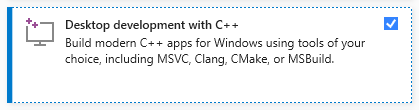
Instal Visual Studio (versi komunitas gratis) di komputer Anda. Unduh, jalankan, dan pilih hanya pengembangan opsi desktop dengan C ++ (diperlukan hak administrator):
Unduh file zip dari repositori Samantha dengan mengklik di sini dan unzip ke komputer Anda. Pilih drive tempat Anda ingin menginstal program:

Buka Direktori samantha_ia-main dan klik dua kali pada file install_samantha_ia.bat untuk memulai instalasi. Windows mungkin meminta Anda untuk mengonfirmasi asal file .bat . Klik 'info lebih lanjut' dan konfirmasi. Kami encorage untuk memeriksa kode semua file (menggunakan sistem Virustotal dan AI untuk melakukannya):

Ini adalah bagian penting dari instalasi. Jika semuanya berjalan dengan baik, prosesnya akan selesai tanpa menampilkan pesan kesalahan di terminal.
Proses instalasi memakan waktu sekitar 20 menit dan harus diakhiri dengan pembuatan dua lingkungan virtual: samantha , untuk menjalankan hanya model AI, dan jupyterlab , untuk menjalankan program yang diinstal lainnya. Ini akan memakan waktu sekitar 5 GB dari hard drive Anda.
Setelah diinstal, buka Samantha dengan mengklik dua kali pada file open_samantha.bat . Windows mungkin meminta Anda lagi untuk mengonfirmasi sumber file .bat . Otorisasi ini hanya diperlukan pertama kali Anda menjalankan program. Klik 'Info lebih lanjut' dan konfirmasi:

Jendela terminal akan terbuka. Ini adalah sisi server Samantha.
Setelah menjawab pertanyaan awal (bahasa antarmuka dan opsi kontrol suara - kontrol suara tidak cocok untuk penggunaan pertama), antarmuka akan terbuka di tab browser baru. Ini adalah sisi browser Samantha:
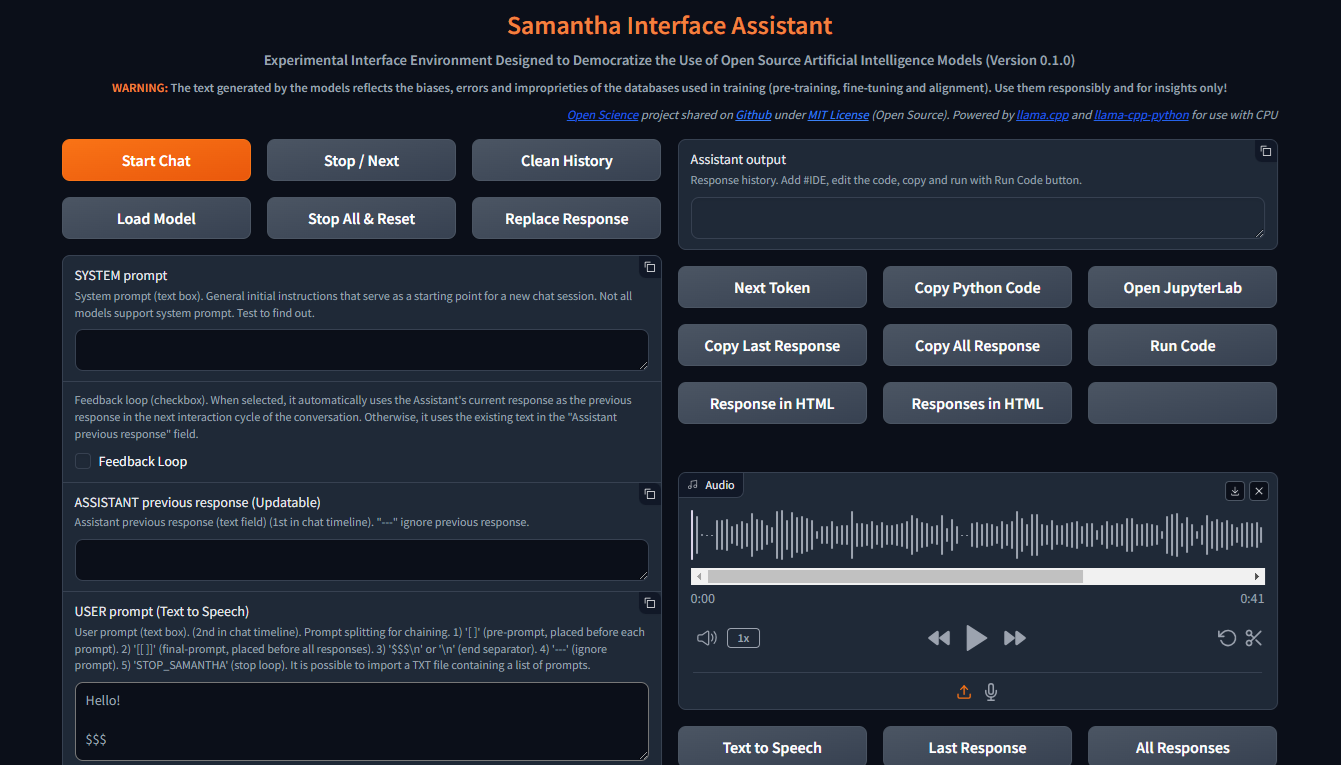
Dengan jendela browser dibuka, Samantha siap untuk pergi.
Lihat video instalasi.
Samantha hanya membutuhkan file model .gguf untuk menghasilkan teks. Ikuti langkah -langkah ini untuk melakukan tes model sederhana:
Buka Windows Task Management dengan menekan CTRL + SHIFT + ESC dan periksa memori yang tersedia. Tutup beberapa program jika perlu untuk membebaskan memori.
Kunjungi Repositori Memeluk Wajah dan klik pada kartu untuk membuka halaman yang sesuai. Temukan tab File dan Versi dan pilih model pembuatan teks .gguf yang sesuai dengan memori yang tersedia.
Klik kanan atas ikon tautan unduhan model dan salin URL -nya.
Tempel URL Model ke dalam Model Unduhan Samantha untuk Bidang Pengujian .
Masukkan prompt ke bidang prompt pengguna dan tekan Enter . Simpan tanda $$$ di akhir prompt Anda. Model akan diunduh dan respons akan dihasilkan menggunakan pengaturan deterministik default. Anda dapat melacak proses ini melalui Windows Task Management.
Setiap model baru yang diunduh melalui prosedur salinan dan tempel ini akan menggantikan yang sebelumnya untuk menghemat ruang hard drive. Download model disimpan sebagai MODEL_FOR_TESTING.gguf di folder unduhan Anda.
Anda juga dapat mengunduh model dan menyimpannya secara permanen ke komputer Anda. Untuk lebih banyak data, lihat bagian di bawah ini.
Buka model pembuatan teks Souce dapat diunduh dari wajah pelukan, menggunakan gguf sebagai parameter pencarian. Anda dapat menggabungkan dua kata seperti gguf code atau gguf portuguese .
Anda juga dapat pergi ke repositori tertentu dan melihat semua model .gguf yang tersedia untuk mengunduh dan menguji, seperti https://huggingface.co/bartowski atau https://huggingface.co/nousresearch.
Model ditampilkan pada kartu seperti ini:

Untuk mengunduh model, klik pada kartu untuk membuka halaman yang sesuai. Temukan kartu model dan file file dan versi :

Untuk mengunduh beberapa model, Anda harus menyetujui ketentuan penggunaan.
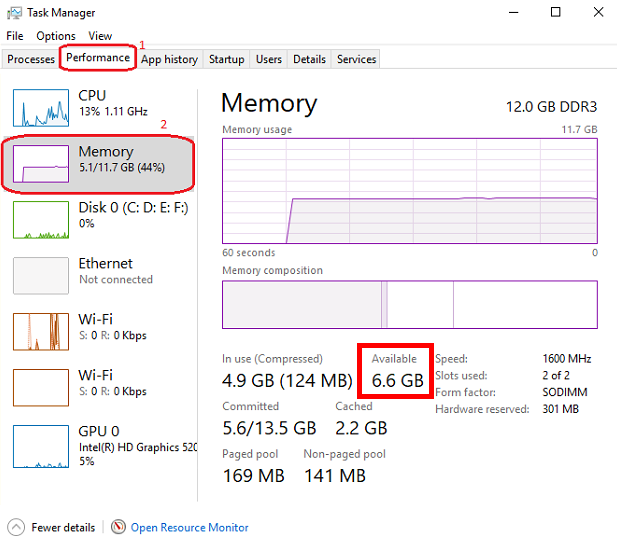
Setelah itu, klik tab File dan Versi dan unduh model yang sesuai dengan ruang RAM yang tersedia. Untuk memeriksa memori yang tersedia, buka Windows Task Manager dengan menekan CTRL + SHIFT + ESC , klik pada tab Kinerja (1) dan pilih memori (2):
Kami menyarankan untuk mengunduh model dengan q4_k_m (kuantisasi 4-bit) di nama tautannya (letakkan mouse di atas tombol unduh untuk melihat nama file lengkap di tautan seperti ini: https://huggingface.co/NousResearch/Hermes-2-Pro-Llama-3-8B-GGUF/resolve/main/Hermes-2-Pro-Llama-3-8B-Q4_K_M.gguf?download=true ). Sebagai aturan, semakin besar ukuran model, semakin besar keakuratan teks yang dihasilkan.
Jika model yang diunduh tidak sesuai dengan ruang RAM yang tersedia, hard drive Anda akan digunakan, memengaruhi kinerja.
Unduh model yang dipilih dan simpan ke komputer Anda atau cukup salin tautan unduhan dan tempel ke dalam model unduhan Samantha untuk bidang pengujian . Tonton tutorial video di bagian di bawah ini untuk detail lebih lanjut.
Perhatikan bahwa setiap model memiliki karakteristiknya sendiri, menyajikan tanggapan yang berbeda secara signifikan tergantung pada ukurannya, arsitektur internal, metode pelatihan, bahasa utama dari database pelatihan, penyesuaian prompt pengguna dan hiperparameter, dan perlu untuk menguji kinerjanya untuk tugas yang diinginkan.
Beberapa model mungkin tidak dimuat karena karakteristik teknis atau ketidakcocokan dengan versi saat ini dari pengikatan python llama.cpp yang digunakan oleh Samantha .
Di mana menemukan model untuk diuji: model huggingface GGUF
Samantha adalah program eksperimental, dibuat untuk menguji model AI open source. Oleh karena itu, adalah umum untuk kesalahan terjadi ketika mencoba menguji model baru atau versi baru model yang dibuat oleh pengguna.
Kualitas respons yang dihasilkan oleh model dapat dievaluasi menggunakan beberapa kriteria, seperti:
Tingkat pemahaman instruksi eksplisit dan implisit yang terkandung dalam petunjuk pengguna dan sistem;
Tingkat kepatuhan terhadap instruksi ini, aspek yang terkait dengan bahasa dominan dari database;
Tingkat halusinasi dalam generasi teks yang koheren, tetapi salah atau di luar konteks. Halusinasi dalam pembuatan teks biasanya dihasilkan dari pelatihan model yang tidak memadai atau pemilihan token berikutnya yang tidak tepat, yang memimpin model dalam arah semantik yang tidak diinginkan;
Tingkat ketepatan dalam proses pengambilan keputusan untuk mengisi kesenjangan dalam konteks prompt pengguna dan untuk menyelesaikan ambiguitas yang diperlukan untuk menghasilkan respons. Apa yang tidak ditentukan secara eksplisit, model mencoba untuk menyimpulkan berdasarkan pelatihannya, yang dapat menyebabkan kesalahan;
Tingkat koherensi bias yang diadopsi oleh model dengan bias (atau ketiadaan) yang terkandung dalam prompt pengguna;
Tingkat keterkaitan dan relevansi topik yang dipilih untuk ditangani;
Tingkat luas dan kedalaman pendekatan topik dalam respons;
Tingkat ketepatan sintatik dan semantik dari respons;
Kualitas struktur dan konten respons sehubungan dengan ekspektasi pengguna (dan overing mereka) untuk masalah yang diserahkan ke model, mengingat teknik yang digunakan untuk membuat prompt (Prompt Engineering) dan penyesuaian hiperparameter model.
Kontrol Utama:
Mulai sesi obrolan, mengirim semua teks input (prompt sistem, asisten respons sebelumnya dan prompt pengguna) ke server, serta pengaturan yang disesuaikan oleh pengguna. Sama seperti semua tombol lainnya, klik mouse akan terdengar.
Tombol ini juga menghapus respons internal sebelumnya.
Sesi obrolan dapat berisi lebih dari satu siklus percakapan (loop).
Mulai Tombol Obrolan Pintasan Keyboard: Tekan Enter Anywhere di halaman.
Untuk menghasilkan teks, model harus dipilih sebelumnya dalam daftar dropdown pemilihan model atau URL model wajah pemeluk harus disediakan untuk mengunduh model untuk bidang pengujian . Jika kedua bidang diisi, model yang dipilih melalui daftar dropdown diutamakan.
? Mengganggu proses pembuatan token untuk model atau prompt saat ini, memulai eksekusi model berikutnya atau prompt dalam urutan, jika ada.
Ini juga menghentikan pemutaran audio yang saat ini diputar saat dalam mode Autoplay Bicara ( baca respons kotak centang yang dipilih).
Samantha memiliki 3 fase:
Tombol ini mengganggu generasi token hanya ketika fase pemilihan token berikutnya dimulai, bahkan jika ditekan sebelumnya.
Gangguan ini tidak mencegah pelaksanaan kode yang dihasilkan oleh model, jika kotak centang yang dijalankan secara otomatis dipilih. Anda dapat menekan tombol untuk menghentikan pembuatan teks dan menjalankan kode Python yang sudah dihasilkan.
? Menghapus riwayat sesi obrolan saat ini, menghapus bidang output asisten serta semua log internal, respons sebelumnya, dll.
Agar tombol ini berfungsi, Anda harus menunggu model menyelesaikan menghasilkan teks (batas oranye dari bidang output asisten berhenti berkedip)
✅ Memungkinkan Anda untuk memilih direktori tempat model yang tersedia untuk pemuatan disimpan.
Folder Default: Windows "Unduh"
Anda dapat memilih direktori apa pun yang berisi model GGUF . Dalam hal ini, model yang terkandung dalam direktori yang dipilih akan terdaftar dalam daftar dropdown pemilihan model .
Saat jendela pop-up terbuka, pastikan untuk mengklik folder yang ingin Anda pilih.
? Menghentikan urutan model yang berjalan dan mengatur ulang pengaturan internal model yang dimuat terakhir.
Setelah mengatur ulang, model membutuhkan waktu untuk memulai kembali pembuatan teks, tergantung pada ukuran teks input.
Gangguan ini mencegah pelaksanaan kode Python yang sudah dihasilkan oleh model, jika opsi Run Code secara otomatis dipilih.
? Mengganti teks di bidang respons asisten sebelumnya dengan teks dari respons terakhir yang dihasilkan oleh model.
Teks yang diganti akan digunakan sebagai respons model sebelumnya dalam siklus percakapan berikutnya.
Teks yang diganti ini tidak terlihat. Itu tidak menghapus teks dari bidang respons asisten sebelumnya , yang dapat digunakan lagi nanti.
Dalam konteks model bahasa besar (LLM), prompt sistem adalah jenis instruksi khusus yang diberikan kepada model di awal percakapan atau tugas. Ini dipertimbangkan dalam semua interaksi dengan model.
Anggap saja sebagai pengaturan panggung untuk interaksi. Ini memberi LLM informasi penting tentang perannya, kepribadian yang diinginkan, perilaku, dan konteks keseluruhan percakapan.
Begini cara kerjanya:
Mendefinisikan Peran: Prompt sistem dengan jelas mendefinisikan peran LLM dalam interaksi.
Mengatur nada dan kepribadian: Prompt sistem juga dapat menetapkan nada dan kepribadian yang diinginkan untuk tanggapan LLM.
Memberikan informasi kontekstual: Prompt sistem dapat menawarkan informasi latar belakang yang relevan dengan percakapan atau tugas.
Benefits of Using System Prompts:
Contoh:
Let's say you want to use an LLM to write a poem in the style of Shakespeare. A suitable system prompt would be:
You are William Shakespeare, a renowned poet from Elizabethan England.
By providing this system prompt, you guide the LLM to generate a response that reflects Shakespeare's language, style, and thematic interests.
Not all models support system prompt. Test to find out: fill in "x = 2" in the System prompt field and ask the model the value of "x" in the User prompt field. If the model gets the value of "x", system prompt is available in the model.
You can simulate the effect of the system prompt by adding text in square brackets in the beginning of the User prompt field: [This text acts as a system prompt] or adding the system prompt text into the Assistant previous response field (do not use feedback loop).
To ignore the text present in this field, include --- at the beginning. To split the text in parts, put $$$ between them. To ignore each part, include --- at the beginning of each part.
↩️ When activated, it automatically considers the response generated by the model in the current conversation cycle as being the Assistant's previous response in the next cycle, allowing feedback from the system.
Any text entered by the user in the Assistant previous response field is only considered in the first cycle after activating this feature. In the following cycles, the model's response internally replaces the previous response, but without deleting the text contained in that field, which can be reused in a new chat session. You can monitor the content of the assistant previous response via terminal.
In turn, when deactivated, it always uses the text contained in the Assistant previous response field as the previous response, unless the text is preceded by --- (triple dash). Text preceded by --- is ignored by the model.
To internally clear the model's previous response, press the Clean history button.
➡️ Stores the text considered by the model as its previous response in the current conversation cycle.
Used to feed back the responses generated by the model.
To ignore the text present in this field, include --- at the beginning. To split the text in parts, put $$$ between them. To ignore each part, include --- at the beginning of each part.
✏️ The main input field of the interface. It receives the list of user prompts that will be submitted to the model sequentially.
Each item in the list must be separated from the next one by a line break ( SHIFT + ENTER or n ) or by the symbols $$$ (triple dollar signal), if the items are made up of text with line breaks.
When present in the user prompt, the $$$ separator takes precedence over the n separator. In other words, n is ignored.
You can import a TXT file containing a list of prompts.
--- before a prompt list item causes the system to ignore that item.
Text positioned within single square brackets ( [ and ] ) is added to the beginning of each prompt list item, simulating a system prompt.
Text positioned within double square brackets ( [[ and ]] ) is added as the last item in the prompt list. In this case, all responses generated by the model in the current chat session are concatenated and added to the end of this item, allowing the model to analyze them together.
If the Python code execution returns only the word STOP_SAMANTHA , it stops token generation and exits the loop.
If the Python code execution returns only '' (empty string), it does not display the HTML pop-up window.
You can add specific hyperparameters before each prompt. You must use this pattern:
{max_tokens=4000, temperature=0, tfs_z=0, top_p=0, min_p=1, typical_p=0, top_k=40, presence_penalty=0, frequency_penalty=0, repeat_penalty=1}
Contoh:
[You are a poet that writes only in Portuguese]
Create a sentence about love
Create a sentence about life
--- Create a sentence about time (this instruction is ignored)
[[Create a paragraph in English that summarizes the ideas contained in the following sentences:]]
( previous responses are concatenated here )
Model responses sequence:
"O amor é um fogo que arde no meu peito, uma chama que me guia através da vida."
"A vida é um rio que flui sem parar, levando-nos para além do que conhecemos."
Love and life are intertwined forces that shape our existence. Love burns within us like a fire, guiding us through life's journey with passion and purpose. Meanwhile, life itself is a dynamic and ever-changing river, constantly flowing and carrying us beyond the familiar and into the unknown. Together, love and life create a powerful current that propels us forward, urging us to explore, discover, and grow.
✅ Dropdown list of models saved on the computer and available for text generation.
To view models in this field, click the Load model button and select the folder containing the models.
The default location for saving models is the Windows Downloads directory.
You can select multiples models (even repeated) to create a sequence of models to respond the user prompts.
The last model downloaded from a URL is saved as MODEL_FOR_TESTING.gguf and is also displayed in this list.
Receives a list of Hugging Face links to the models that will be downloaded and executed sequencially.
Link example:
Links preceded by --- will be ignored.
Only works if no model is selected in Model selection dropdown list.
1️⃣ Activates a single response per model.
Prompts that exceed the number of models are ignored.
Models that exceed the number of prompts are also ignored.
You can select the same model more than once.
This checkbox disables Number of loops and Number of responses checkboxes.
⏮️ Reinitializes the internal state of the model, eliminating the influence of the previous context.
How it Works:
When the reset feature is invoked:
Manfaat:
Use Cases:
? Shuffles the execution order of the models if 3 or more models are selected in Model selection dropdown list.
?♀️ Generates text faster in the background without displaying the addition of each token in the Assistant output field.
Minimizing or hiding the Samantha browser window makes the token generation process even faster.
This checkbox disables Learning Mode.
Selects the language of the computer's SAPI5 voice that will read the responses generated by the model.
? Activates automatic reading mode for responses generated by the model using the language selected in the Voice selection dropdown list.
If you wish to reproduce the response generated by the model using a better quality speech synthesizer (Microsoft Edge browser), open the response in an HTML pop-up using the Response in HTML button, right-click inside the page and select the option to read the page text aloud.
To save and edit the audio generated by the speech synthesizer, we recommend record de audio using the portable version of the open source program Audacity. Adjust the recording setting to capture audio output from the speakers (not from the microphone).
?? Activates Learning Mode.
It presents a series of features that help in understanding the token selection process by the model, such as:
Only works if Fast Mode is unchecked.
Radio buttons options:
? Set the number of repetitions of the block in the following chaining sequence:
Chaining Sequence: ( [models list] -> respond -> ( [user prompt list] X number of responses) ) X number of loops
Each model in the models list responds to all prompts in the user prompt list for the selected number of responses . This block is repeated for the selected number of loops .
? Number of responses to be generated by each selected model in the following chaining sequence:
Chaining Sequence: ( [models list] -> respond -> ( [user prompt list] X number of responses ) ) X number of loops
Each model in the models list responds to all prompts in the user prompt list for the selected number of responses . This block is repeated for the selected number of loops .
? When checked, runs automatically the Python code generated by the model.
Whenever Python code returns a value other than '' (empty string), an HTML pop-up window opens to display the returned content.
? When checked, stops Samantha when the automatic execution of the Python code generated by the model prints in the terminal a value other than '' (empty string) and that does not contain error message.
Use it to stop a generation loop when a condition is met.
? When checked, concatenates each new response by adding it to the previous response to be considered when generating the next response by the model.
It is important to highlight that the set of concatenated responses must fit in the model's context window.
? Adjusts the model's hyperparameters with random values in each new conversation cycle.
Randomly chosen values vary within the following value range of each hyperparameter and are displayed at the beginning of each response generated by the model.
| Hyperparameter | Min. Nilai | Max. Nilai |
|---|---|---|
| suhu | 0.1 | 1.0 |
| tfs_z | 0.1 | 1.0 |
| top_p | 0.1 | 1.0 |
| min_p | 0.1 | 1.0 |
| typical_p | 0.1 | 1.0 |
| presence_penalty | 0,0 | 0.3 |
| frequency_penalty | 0,0 | 0.3 |
| repeat_penalty | 1.0 | 1.2 |
This resource has application in the study of the reflections of the interaction between hyperparameters.
? Feedback only the Python interpreter output as the next assistant's previous response. Do not include model's response.
This feature reduces the number of tokens to be inserted in the assistant's previous response in the next conversation cycle.
Works only with Feedback Loop activated.
Hide HTML model responses, including Python interpreter error messages.
Context Window:
n_ctx stands for number of context tokens in the context window and determines the maximum number of tokens that the model can process at once. It determines how much previous text the model can "remember" and utilize when selecting the next token from model vocabulary.
The context length directly impacts the memory usage and computational load. Longer n_ctx requires more memory and computational power.
How n_ctx works:
It sets the upper limit on the number of tokens the model can "see" at once. Tokens are usually word parts, full words, or characters, depending on the tokenization method. The model uses this context to understand and generate text. For example, if n_ctx is 2048, the model can process up to 2048 tokens (now words) at a time.
Impact on model operation:
During training and inference, the model attends to all tokens within this context window.
It allows the model to capture long-range dependencies in the text.
Larger n_ctx enables the model to handle longer sequences of text without losing earlier context.
Why increasing n_ctx increases memory usage:
Attention mechanism: LLMs uses self-attention mechanisms (like in Transformers) which compute attention scores between all pairs of tokens in the input.
Quadratic scaling: The memory required for attention computations scales quadratically with the context length. If you double n_ctx , you quadruple the memory needed for attention.
CAUTION: n_ctx MUST BE GREATER THAN ( max_tokens + number of input tokens) (system prompt + assistant previous response + user prompt).
If the prompt text contains more tokens than the context window defined with n_ctx or the memory required exceeds the total available on the computer, an error message will be displayed.
Error message displayed on Assistant output field:
 ==========================================
Error loading LongWriter-glm4-9B-Q4_K_M.gguf.
Some models may not be loaded due to their technical characteristics or incompatibility with the current version of the llama.cpp Python binding used by Samantha.
Try another model.
==========================================
Error messages displayed on terminal:
Requested tokens (22856) exceed context window of 10016

Unable to allocate 14.2 GiB for an array with shape (25000, 151936) and data type float32
When set to 0 , the system will use the maximum n_ctx possible (model's context window size).
As a rule, set n_ctx equal to max_tokens , but only to the value necessary to accommodate the text parsed by the model. Samantha's default values for n_ctx and max_tokens are 4,000 tokens.
Before adjusting n_ctx , you must to unload the model by clicking Unload model button.
Contoh:
User prompt = 2000 tokens
n_ctx = 4000 tokens
If the text generated by the model is equals or greater than 2000 tokens (4000 - 2000), the system will raise an IndexError in the terminal, but the interface will not crash.
To check the impact of the n_ctx in memory, open Windows Task Manager ( CTRL + SHIFT + ESC ) to monitor memory usage, select memory panel and vary n_ctx values. Don't forget to unload model between changes.
?️ Controls maximum number of tokens to be generated by the model.
Select 0 for the models' maximum number of tokens (maximum memory required).
How max_tokens Works:
Sampling Process: When generating text, LLMs predict the next token based on the context provided (system prompt + previous response + user prompt + text already generated). This prediction involves calculating probabilities for each possible token in the vocabulary.
Token Limit: The max_tokens parameter sets a hard limit on how many tokens the model can generate before stopping, regardless of the predicted probabilities.
Truncation: Once the generated text reaches max_tokens , the generation process is abruptly terminated. This means the final output might be incomplete or feel cut off.
Stop Words:
? List of characters that interrupt text generation by the model, in the format ["$$$", ".", ".n"] (Python list).
Token Sampling:
Deterministic Behavior:
To check the deterministic impact of each hyperparameter on the model's behavior, set all others hyperparameters to their maximum stochastic values and execute a prompt more than once. Repeat this procedure for each token sampling hyperparameter.
| Hyperparameter | Deterministik | Stokastik | Terpilih |
|---|---|---|---|
| suhu | 0 | > 0 | 2 (stochastic) |
| tfs_z | 0 | > 0 | 1 (stochastic) |
| top_p | 0 | > 0 | 1 (stochastic) |
| min_p | 1 | <1 | 1 (deterministic) |
| typical_p | 0 | > 0 | 1 (stochastic) |
| top_k | 1 | > 1 | 40 (stochastic) |
In other words, the hyperparameter with deterministic adjustment prevails over all other hyperparameters with stochastic adjustments.
As the hyperparameter with deterministic tuning loses this condition, interaction between all hyperparameters with stochastic tuning occurs.
Stochastic Behavior:
To check the stochastic reflection of a hyperparameter on the model's behavior, set all other hyperparameters to their maximum stochastic values and gradually vary the selected hyperparameter based on its deterministic value. Repeat this procedure for each token sampling hyperparameter.
You can combine stochastic tuning of different hyperparameters.
| Hyperparameter | Deterministik | Stokastik | Terpilih |
|---|---|---|---|
| suhu | 0 | > 0 | 2 (stochastic) |
| tfs_z | 0 | > 0 | 1 (stochastic) |
| top_p | 0 | > 0 | 1 (stochastic) |
| min_p | 1 | <1 | 1 (reduce progressively) |
| typical_p | 0 | > 0 | 1 (stochastic) |
| top_k | 1 | > 1 | 40 (stochastic) |
The text generation hyperparameters in language models, such as top_k , top_p , tfs-z , typical_p , min_p , and temperature , interact in a complementary way to control the process of choosing the next token. Each affects token selection in different ways, but there is an order of prevalence in terms of influence on the final set of tokens that can be selected. Let's examine how these hyperparameters relate to each other and who "prevails" over whom.
All these hyperparameters are adjusted after the model generates the logits of each token.
Samantha displays the logits of each token in learning mode, before they are changed by the hyperparameters.
Samantha also indicates which token was selected after applying the hyperparameters.
10 vocabulary tokens most likely returned by the model to initiate the answer to the following question: Who are you? :
Vocabulary id / token / logit value:
 358)    ' I'       (15.83)
40)     'I'        (14.75)     <<<  Selected
21873)  ' Hello'   (14.68)
9703)   'Hello'    (14.41)
1634)   ' As'      (14.31)
2121)   'As'       (13.98)
20971)  ' Hi'      (13.73)
715)    ' n'      (13.03)
5050)   'My'       (13.01)
13041)  'Hi'       (12.77)
How to disable hyperparameters:
temperature : Setting it to 1.0 keeps the original odds unchanged. Note: Setting it to 0 does not "disable" it, but makes the selection deterministic.
tfs_z (Tail-Free Sampling with z-score): Setting it to a very high value effectively disables it.
top-p (nucleus sampling): Setting it to 1.0 effectively disables it.
min-p : Setting it to a very low value (close to 0) effectively disables it.
typical-p : Setting it to 1.0 effectively disables it.
top-k : Setting it to a very high value (eg vocabulary size) essentially disables it.
Order of Prevalence
1 top_k , top_p , tfs_z , typical_p , min_p : These delimit the space of possible tokens that can be selected.
top_k restricts the number of available tokens to the k most likely ones. For example, if k = 50 , the model will only consider the 50 most likely tokens for the next word. Tokens outside of these 50 most likely are completely discarded, which can help avoid unlikely or very risky choices.
top-p defines a threshold based on the sum of cumulative probabilities . If p = 0.9 , the model will include the most likely tokens until the sum of their probabilities reaches 90% . Unlike top_k , the number of tokens considered is dynamic, varying according to the probability distribution.
tfs_z aims to eliminate the "tail" of the tokens' probability distribution. It works by discarding tokens whose cumulative probability (from the tail of the distribution) is less than a certain threshold z. The idea is to keep only the most informative tokens and eliminate those with less relevance, regardless of how many tokens this leaves in the set. So, instead of simply truncating the distribution at the top (as top_k or top_p does), tfs_z makes the model get rid of the tokens at the tail of the distribution. This creates a more adaptive way of filtering the least likely tokens, promoting the most important ones without strictly limiting the number of tokens, as with top_k . tfs_z discards the "tail" of the token distribution, eliminating those with cumulative probabilities below a certain threshold z.
typical_p selects tokens based on their divergence from the mean entropy of the distribution, ie how "typical" the token is. typical-p is a more sophisticated sampling technique that aims to maintain the "naturalness" of text generation, based on the notion of entropy, ie how "surprising" or predictable is the choice of a token compared to the what the model expects. How Typical-p Works: Instead of focusing only on the absolute probabilities of tokens, as top_k or top_p do, typical_p selects tokens based on their deviation from the mean entropy of the probability distribution.
Here is the typical_p process:
a) Average Entropy: The average entropy of a token distribution reflects the average level of uncertainty or surprise associated with choosing a token. Tokens with a very high (expected) or very low (rare) probability may be less "typical" in terms of entropy.
b) Divergence Calculation: Each token has its probability compared to the average entropy of the distribution. Divergence measures how far the probability of that token is from the average. The idea is that tokens with a smaller divergence from average entropy are more "typical" or natural within the context.
c) Sampling: typical_p defines a fraction p of the accumulated entropy to consider tokens. Tokens are ordered based on their divergence and those that fall within a portion p (eg, 90% of the most "typical" distribution) are considered for selection. The model chooses tokens in a way that favors those that represent the average uncertainty well, promoting naturalness in text generation.
Prevalence: These parameters define the set of candidate tokens . They are first used to restrict the number of possible tokens before any other adjustments are applied. The way they are combined can be cumulative, where applying multiples of these filters progressively reduces the number of available tokens. The final set is the intersection set between the tokens that pass all these checks.
If you use top_k and top_p at the same time, both must be respected. For example, if top_k = 50 and top_p = 0.9 , the model first limits the choice to the 50 most likely tokens and, within these, considers those whose probability sum reaches 90%.
If you add typical_p or tfs_z to the equation, the model will apply these additional filters over the same set, further reducing the options.
2 temperature: Adjusts the randomness within the set of already filtered tokens .
After the model restricts the universe of tokens based on cutoff hyperparameters like top-k , top_p , tfs_z , etc., temperature comes into play.
temperature changes the smoothness or rigidity of the probability distribution of the remaining tokens. A temperature lower than 1 concentrates the probabilities, causing the model to prefer the most likely tokens. A temperature greater than 1 flattens the distribution, allowing less likely tokens to have a greater chance of being selected.
Prevalence: temperature does not change the set of available tokens, but adjusts the relative probability of already filtered tokens . Thus, it does not prevail over the top_k , top_p , etc. filters, but acts after them, influencing the final selection within the remaining option space.
General Hierarchy
top_k, top_p, tfs_z, typical_p, min_p : These parameters act first, restricting the number of possible tokens.
temperature : After the selection filters are applied, temperature adjusts the probabilities of the remaining tokens, controlling the randomness in the final choice.
Combination Scenario
_top_k + top_p : If top_k is less than the number of tokens selected by top_p , top_k prevails as it limits the number of tokens to k. If top_p is more restrictive (eg only considers 5 tokens with p=0.9), then it prevails over top_k .
typical_p + top_p : Both apply filters, but in different directions. typical_p selects based on entropy, while top_p selects based on cumulative probability. If used together, the end result is the intersection set of these filters.
Temperature : It is always applied last, modulating the randomness in the final selection, but without changing the limits imposed by previous filters.
Prevalence Summary
Filters ( top_k, top_p, tfs_z, typical_p, min_p ) define the set of candidate tokens.
temperature adjusts the relative probability within the filtered set.
The end result is a combination of these filters, where the set of tokens eligible for selection is defined first, and then the randomness is adjusted with temperature.
? Temperature is a hyperparameter that controls the randomness of the text generation process in LLMs. It affects the probability distribution of the model's next-token predictions.
Temperature is a hyperparameter t that we find in stochastic models to regulate the randomness in a sampling process (Ackley, Hinton, and Sejnowski 1985). The softmax function (Equation 1) applies a non-linear transformation to the output logits of the network, turning it into a probability distribution (ie they sum to 1). The temperature parameter regulates its shape, redistributing the output probability mass, flattening the distribution proportional to the chosen temperature. This means that for t > 1, high probabilities are decreased, while low probabilities are increased, and vice versa for t < 1. Higher temperatures increase entropy and perplexity, leading to more randomness and uncertainty in the generative process. Typically, values for t are in the range of [0, 2] and t = 0, in practice, means greedy sampling, ie always taking the token with the highest probability. Is Temperature the Creativity Parameter of Large Language Models?
The Effect of Sampling Temperature on Problem Solving in Large Language Models
Controlling Creativity:
Use higher temperatures when you want the model to generate more creative, unexpected, and varied responses. This is useful for creative writing, brainstorming, and exploring multiple ideas.
This flattens the probability distribution, making the model more likely to sample less probable tokens.
The generated text becomes more diverse and creative, but potentially less coherent.
❄ Use lower temperatures when you need more predictable and focused output. This is useful for tasks requiring precise and reliable information, such as summarization or answering factual questions.
This sharpens the probability distribution, making the model more likely to sample the most probable tokens.
The generated text becomes more focused and deterministic, but potentially less creative.
Cara kerjanya:
? Mathematically, the temperature (T) is applied by dividing the logits (raw scores from the model) by T before applying the softmax function.
A lower temperature makes the distribution more "peaked," favoring high-probability options.
A higher temperature "flattens" the distribution, giving more chance to lower-probability options.
Temperature scale:
Generally ranges from 0 to 2, with 1 being the default (no modification).
T < 1: Makes the text more deterministic, focused, and "safe."
T > 1: Makes the text more random, diverse, and potentially more creative.
T = 0: Equivalent to greedy selection, always choosing the most probable option.
Avoiding Repetition:
Higher temperatures can help reduce repetitive patterns in the generated text by promoting diversity.
Very low temperatures can sometimes lead to repetitive and deterministic outputs, as the model might keep choosing the highest-probability tokens.
It's important to note that temperature is just one of several sampling hyperparameters available. Others include top-k sampling, nucleus sampling (or top-p), and the TFS-Z. Each of these methods has its own characteristics and may be more suitable for different tasks or generation styles.
Videos:
temperature shorts 1
temperature shorts 2
tfs_z stands for tail-free sampling with z-score . It's a hyperparameter used in a text generation technique designed to balance the trade-off between diversity and quality in generated text.
Context and purpose:
Tail-free sampling was introduced as an alternative to other sampling methods like top-k or nucleus ( top-p ) sampling. Its goal is to remove the arbitrary "tail" of the probability distribution while maintaining a dynamic threshold.
Technical Details of tfs_z in LLM Text Generation
Probability distribution analysis:
The method examines the probability distribution of the next token predictions. It focuses on the "tail" of this distribution - the less likely tokens.
Z-score calculation:
For each token in the sorted (descending) probability distribution, a z-score is calculated. The z-score represents how many standard deviations a token's probability is from the mean.
Cutoff determination:
The tfs_z parameter sets the z-score threshold. Tokens with a z-score below this threshold are removed from consideration.
Dynamic thresholding:
Unlike fixed methods like top-k , the number of tokens retained can vary based on the shape of the distribution. This allows for more flexibility in different contexts.
Sampling process:
After applying the tfs_z cutoff, sampling occurs from the remaining tokens. This can be done using various methods (eg, temperature-adjusted sampling).
tfs_z is a hyperparameter that controls the temperature scaling of the output logits during text generation.
Here's what it does:
Logits : When an LLM generates text, it produces a probability distribution over all possible tokens in the vocabulary. This distribution is represented as a vector of logits (unnormalized log probabilities).
Temperature scaling : To control the level of uncertainty or "temperature" of the output, you can scale the logits by multiplying them with a temperature factor ( t ). This is known as temperature scaling.
tfs_z hyperparameter : It's a hyperparameter that controls how much to scale the logits before applying temperature scaling.
When you set tfs_z > 0 , the model first normalizes the logits by subtracting their mean ( z-score normalization ) and then scales them with the temperature factor ( t ). This has two effects:
Reduced variance : By normalizing the logits, you reduce the variance of the output distribution, which can help stabilize the generation process.
Increased uncertainty : By scaling the normalized logits with a temperature factor, you increase the uncertainty of the output distribution, which can lead to more diverse and creative text generations.
Practical example:
Imagine that the model is trying to complete the sentence "The sky is..."
Without tfs_z , the model could consider:
blue (30%), cloudy (25%), clear (20%), dark (15%), green (5%), singing (3%), salty (2%)
With TFS-Z (cut by 10%):
blue (30%), cloudy (25%), light (20%), dark (15%)
This eliminates less likely and potentially meaningless options, such as "The sky is salty."
By adjusting the Z-score, we can control how "conservative" or "creative" we want the model to be. A higher Z-score will result in fewer but more "safe" options, while a lower Z-score will allow for more variety but with a greater risk of inconsistencies.
In summary, tfs_z controls how much to scale the output logits after normalizing them. A higher value of tfs_z will produce more uncertain and potentially more creative text generations.
Keep in mind that this is a relatively advanced hyperparameter, and its optimal value may depend on the specific LLM architecture, dataset, and task at hand.
⭕ Top-p (nucleus sampling) is a hyperparameter that controls the diversity and quality of text generation in LLMs. It affects the selection of tokens during the generation process by dynamically limiting the vocabulary based on cumulative probability.
Controlling Output Quality:
? Use higher top-p values (closer to 1) when you want the model to consider a wider range of possibilities, potentially leading to more diverse and creative outputs. This is useful for open-ended tasks, storytelling, or generating multiple alternatives. Higher values allow for more low-probability tokens to be included in the sampling pool.
Use lower top-p values (closer to 0) when you need more focused and high-quality output. This is beneficial for tasks requiring precise information or coherent responses, such as answering specific questions or generating formal text. Lower values restrict the sampling to only the most probable tokens.
Cara kerjanya:
? Mathematically, top-p sampling selects the smallest possible set of words whose cumulative probability exceeds the chosen p-value. The model then samples from this reduced set of tokens. This approach adapts to the confidence of the model's predictions, unlike fixed methods like top-k sampling.
Top-p scale:
Generally ranges from 0 to 1, with common values between 0.1 (10% most likely) and 0.9 (90% most likely).
p = 1: Equivalent to unmodified sampling from the full vocabulary.
p → 0: Increasingly deterministic, focusing on the highest probability tokens.
p = 0.9: A common choice that balances quality and diversity.
Balancing Coherence and Diversity:
Top-p sampling helps maintain coherence while allowing for diversity. It adapts to the model's confidence, using a smaller set of tokens when the model is very certain and a larger set when it's less certain. This can lead to more natural-sounding text compared to fixed cutoff methods.
Comparison with Temperature:
While temperature modifies the entire probability distribution, top-p directly limits the vocabulary considered. Top-p can be more effective at preventing low-quality outputs while still allowing for creativity, as it dynamically adjusts based on the model's confidence.
It's worth noting that top-p is often used in combination with other sampling methods, such as temperature adjustment or top-k sampling. The optimal choice of hyperparameters often depends on the specific task and desired output characteristics.
The min_p hyperparameter is a relatively recent sampling technique used in text generation by large-scale language models (LLMs). It offers an alternative approach to top_k and nucleus sampling ( top_p ) to control the quality and diversity of generated text.
min_p is a sampling hyperparameter that works in a complementary way to top_p (nucleus sampling). While top_p sets an upper bound on cumulative probabilities, min_p sets a lower bound on individual probabilities.
Penjelasan:
As with other sampling techniques, LLM calculates a probability distribution over the entire vocabulary for the next word.
The min_p defines a minimum probability threshold, p_min.
The method selects the smallest set of words whose summed probability is greater than or equal to p_min.
The next word is then chosen from that set of words.
Detailed operation:
The model calculates P(w|c) for each word w in the vocabulary, given context c.
The words are ordered by decreasing probability: w₁, w₂, ..., w|V|.
The algorithm selects words in the order of greatest probability until the sum of the probabilities is greater than or equal to p_min :
Contoh:
Suppose we are generating text and the model predicts the following probabilities for the next word:
 "o":        0.3
"one":      0.25
"this":     0.2
"that one": 0.15
"some":     0.1
If we use min-p with p_min = 0.7, the algorithm would work like this:
 Sum "o":                    0.3                     < 0.7
Sum "o" + "one":            0.3 + 0.25       = 0.55 < 0.7
Sum "the" + "one" + "this": 0.3 + 0.25 + 0.2 = 0.75 ≥ 0.7
Therefore, we select the first three words. Renormalizing:
 "o":    0.3  / 0.75 = 0.4
"one":  0.25 / 0.75 ≈ 0.33
"this": 0.2  / 0.75 ≈ 0.27
The next word will be chosen randomly from these three options with the new probabilities.
The typical_p hyperparameter is an entropy-based sampling technique that aims to generate more natural and less predictable text by selecting tokens that represent what is "typical" or "expected" in a probability distribution. Unlike methods like top_k or top_p , which focus on the absolute probabilities of tokens, typical_p considers how surprising or informative a token is relative to the overall probability distribution.
Technical Operation of typical_p
Entropy: The entropy of a distribution measures the expected uncertainty or surprise of an event. In the context of language models, the higher the entropy, the more uncertain the model is about which token should be generated next. Tokens that are very close to the mean entropy of the output distribution are considered "typical", while tokens that are very far away (too predictable or very unlikely) are considered "atypical".
Calculation of Surprise (Local Entropy): For each token in a given probability distribution, we can calculate its surprise (or "informativeness") by comparing its probability with the average entropy of the token distribution. This surprise is measured by the divergence in relation to the average entropy, that is, how much the probability of a token deviates from the average behavior expected by the distribution.
Selection Based on Entropy Divergence: typical_p filters tokens based on this "divergence" or difference between the token's surprise and the average entropy of the distribution. The model orders the tokens according to how "typical" they are, that is, how close they are to the average entropy.
Typical-p limit: After calculating the divergences of all tokens, the model defines a cumulative probability limit, similar to top_p (nucleus sampling). However, instead of summing the tokens' absolute probabilities, typical_p considers the cumulative sum of the divergences until a portion p of the distribution is included. That p is a value between 0 and 1 (eg 0.9), indicating that the model will include tokens that cover 90% of the most "typical" divergences.
If p = 0.9 , the model selects tokens whose divergences in relation to the average entropy represent 90% of the expected uncertainty. This helps avoid both tokens that are extremely predictable and those that are very unlikely, promoting a more natural and fluid generation.
Contoh praktis
Suppose the model is predicting the next word in a sentence, and the probability distribution of the tokens looks like this:
In the case of top_p with p = 0.9, the model would only include tokens A, B and C, as their probabilities add up to 90%. However, typical_p can include or exclude tokens based on how their probabilities compare to the average entropy of the distribution. If A is extremely predictable, it can be excluded, and tokens like B, C, and even D can be selected for their more typical representativeness in terms of entropy.
Difference from Other Methods
top_k selects the k most likely tokens directly , regardless of entropy or probability distribution.
top_p selects tokens based on the cumulative sum of absolute probabilities , without considering entropy or surprise.
typical_p , on the other hand, introduces the notion of entropy, ensuring that the selected tokens are neither too predictable nor too surprising , but ones that align with the expected behavior of the distribution.
How Typical-p Improves Text Generation
Naturalness: typical-p prevents the model from choosing very predictable tokens (as could happen with a low temperature or restrictive top-p) or very rare tokens (as could happen with a high temperature), maintaining a fluid and natural generation.
Controlled Diversity: By considering the surprise of each token, it promotes diversity without sacrificing coherence. Tokens that are close to the mean entropy of the distribution are more likely to be chosen, promoting natural variations in the text.
Avoids Extreme Outputs: By excluding overly unlikely or predictable tokens, Typical-p keeps generation within a "safe" and natural range, without veering toward extremes of certainty or uncertainty.
Interaction with Other Parameters
typical_p can be combined with other sampling methods:
When combined with temperature , typical_p further adjusts the set of selectable tokens, while temperature modulates the randomness within that set.
It can be combined with top_k or top_p to further fine-tune the process, restricting the universe of tokens based on different probability and entropy criteria.
In summary, typical_p acts in a unique way by considering the entropy of the distribution and selects tokens that are aligned with the expected behavior of this distribution, resulting in a more balanced, fluid and natural generation.
Here are some guidelines and strategies for tuning typical_p :
typical_p = 1.0: Includes all tokens available in the distribution, without restrictions based on entropy. This is equivalent to not applying any typical restrictions, allowing the model to use the full distribution of tokens.
_typical_p < 1.0: The lower the typical_p value, the narrower the set of tokens considered, keeping only those that most closely align with the average entropy. Common values include 0.9 (90% of "typical" tokens) and 0.8 (80%).
Recommendations:
typical-p = 0.9: This is a common value that typically maintains a balance between diversity and coherence. The model will have the flexibility to generate varied text, but without allowing very extreme choices.
typical_p = 0.8: This value is more restrictive and will result in more predictable choices, keeping only tokens that most accurately align with the average entropy. Useful in scenarios where fluidity and naturalness are priorities.
typical_p = 0.7 or less: The lower the value, the more predictable the text generation will be, eliminating tokens that could be considered atypical. This may result in a less diversified and more conservative output.
Fine-Tuning with temperature
typical_p controls the set of tokens based on entropy, but temperature can be used to adjust the randomness within that set . The interaction between these two parameters is important:
temperature > 1.0: Increases randomness within the set of tokens selected by typical_p , allowing even less likely tokens to have a greater chance of being chosen. This can generate more creative or unexpected responses.
temperature < 1.0: Reduces randomness, making the model more conservative by preferring the most likely tokens from the set filtered by typical_p . Using a low temperature with a high typical_p (0.9 or 1.0) can result in very predictable outputs.
Contoh:
typical_p = 0.9 with _temperature = 1.0: Maintains the balance between naturalness and diversity, allowing the model to generate fluid and creative text, but without major deviations.
typical_p = 0.8 with temperature = 0.7: Makes generation more conservative and predictable, preferring tokens that are closer to the average uncertainty and reducing the chance of creative variations.
How It Works
In a language model, when the next word is predicted, the model generates a probability distribution for the next token (word or part of a word), where each token has an associated probability based on its previous context. The sum of all probabilities is equal to 1.
top_k works by reducing the number of options available for sampling, limiting the number of candidate tokens. It does this by selecting only the tokens with the k highest probabilities and discarding all others. Then sampling is done from these k tokens, redistributing the probabilities between them.
Contoh:
Suppose we are generating text and the model predicts the following probabilities for the next word:
 "o":        0.3
"one":      0.25
"this":     0.2
"that one": 0.15
"some":     0.1
If we use top-k with k=3, we only keep the three most likely words:
 "o":        0.3
"one":      0.25
"this":     0.2
Then, we renormalize the probabilities:
 "o":        0.3  / (0.3 + 0.25 + 0.2) ≈ 0.4  (40%)
"one":      0.25 / (0.3 + 0.25 + 0.2) ≈ 0.33 (33%)
"this":     0.2  / (0.3 + 0.25 + 0.2) ≈ 0.27 (27%)
The next word will be chosen from these three options with the new probabilities.
Effect of Hyperparameter k
small k (eg ?=1): The model will be extremely deterministic, as it will always choose the token with the highest probability. This can lead to repetitive and predictable text.
large k (or use all tokens without truncating): The model will have more options and be more creative, but may generate less coherent text as low probability tokens may also be chosen.
Token Penalties:
? Syntactic and semantic variation arises from the penalization of tokens that are replaced by others that begin words related to different ideas, leading the response generated by the model in another direction.
Syntactic variations do not always generate semantic variations.
As text is generated, penalties become more frequent as there are more tokens to be punished.
Deterministic Behavior:
To obtain a deterministic text (same input, same output), but without repeating words (tokens), increase the values of the penalty hyperparameters.
However, if it proves necessary to allow the model to reselect already generated tokens, keep these settings at their default values.
| Hyperparameter | Nilai default | Text Diversity |
|---|---|---|
| presence_penalty | 0 | > 0 |
| frequency_penalty | 0 | > 0 |
| repeat_penalty | 1 | > 1 |
Presence Penalty:
The presence penalty penalizes tokens that have already appeared in the text, regardless of their frequency. It discourages the repetition of ideas or themes.
Operasi:
Memengaruhi:
Bugar:
Frequency Penalty:
The frequency penalty penalizes tokens based on their frequency in the text generated so far. The more times a token appeared, the greater the penalty.
Operasi:
Memengaruhi:
Bugar:
Repeat Penalty:
The repeat penalty is similar to the frequency penalty, but generally applies to sequences of tokens (n-grams) rather than individual tokens.
Operasi:
Memengaruhi:
Bugar:
How repeat_penalty works:
Starting from the default value (=1), as we reduce this value (<1) the text starts to present more and more repeated words (tokens), to the point where the model starts to repeat a certain passage or word indefinitely.
In turn, as we increase this value (>1), the model starts to penalize repeated words (tokens) more heavily, up to the point where the input text no longer generates penalties in the output text.
During the penalty process (>1), there is a variation in syntactic and semantic coherence.
Practical observations showed that increasing the token penalty (>1) generates syntactic and semantic diversity in the response, as well as promoting a variation in the response length until stabilization, when increasing the value no longer generates variation in the output.
The repeat_penalty hyperparameter has a deterministic nature.
Adjustment tip:
Yang lain:
Displays model's metadata.
Contoh:
Model: https://huggingface.co/NousResearch/Hermes-3-Llama-3.1-8B-GGUF/resolve/main/Hermes-3-Llama-3.1-8B.Q8_0.gguf?download=true
 {'general.name': 'Hermes 3 Llama 3.1 8B'
  'general.architecture': 'llama'
  'general.type': 'model'
  'general.organization': 'NousResearch'
  'llama.context_length': '131072'
  'llama.block_count': '32'
  'general.basename': 'Hermes-3-Llama-3.1'
  'general.size_label': '8B'
  'llama.embedding_length': '4096'
  'llama.feed_forward_length': '14336'
  'llama.attention.head_count': '32'
  'tokenizer.ggml.eos_token_id': '128040'
  'general.file_type': '7'
  'llama.attention.head_count_kv': '8'
  'llama.rope.freq_base': '500000.000000'
  'llama.attention.layer_norm_rms_epsilon': '0.000010'
  'llama.vocab_size': '128256'
  'llama.rope.dimension_count': '128'
  'tokenizer.ggml.model': 'gpt2'
  'tokenizer.ggml.pre': 'llama-bpe'
  'general.quantization_version': '2'
  'tokenizer.ggml.bos_token_id': '128000'
  'tokenizer.ggml.padding_token_id': '128040'
  'tokenizer.chat_template': "{% if not add_generation_prompt is defined %}{% set add_generation_prompt = false %}{% endif %}{% for message in messages %}{{'<|im_start|>' + message['role'] + 'n' + message['content'] + '<|im_end|>' + 'n'}}{% endfor %}{% if add_generation_prompt %}{{ '<|im_start|>assistantn' }}{% endif %}"}
✅ Displays model's token vocabulary when selected.
? Displays model's vocabulary when Learning Mode and Show Model Vocabulary are selected simultaneously.
Example (from token 2000 to 2100):
Model: https://huggingface.co/Triangle104/Mistral-7B-Instruct-v0.3-Q5_K_M-GGUF/resolve/main/mistral-7b-instruct-v0.3-q5_k_m.gguf?download=true
 2000)    'ility'
2001)    ' é'
2002)    ' er'
2003)    ' does'
2004)    ' here'
2005)    'the'
2006)    'ures'
2007)    ' %'
2008)    'min'
2009)    ' null'
2010)    'rap'
2011)    '")'
2012)    'rr'
2013)    'List'
2014)    'right'
2015)    ' User'
2016)    'UL'
2017)    'ational'
2018)    ' being'
2019)    'AN'
2020)    'sk'
2021)    ' car'
2022)    'ole'
2023)    ' dist'
2024)    'plic'
2025)    'ollow'
2026)    ' pres'
2027)    ' such'
2028)    'ream'
2029)    'ince'
2030)    'gan'
2031)    ' For'
2032)    '":'
2033)    'son'
2034)    'rivate'
2035)    ' years'
2036)    ' serv'
2037)    ' made'
2038)    'def'
2039)    ';r'
2040)    ' gl'
2041)    ' bel'
2042)    ' list'
2043)    ' cor'
2044)    ' det'
2045)    'ception'
2046)    'egin'
2047)    ' б'
2048)    ' char'
2049)    'trans'
2050)    ' fam'
2051)    ' !='
2052)    'ouse'
2053)    ' dec'
2054)    'ica'
2055)    ' many'
2056)    'aking'
2057)    ' à'
2058)    ' sim'
2059)    'ages'
2060)    'uff'
2061)    'ased'
2062)    'man'
2063)    ' Sh'
2064)    'iet'
2065)    'irect'
2066)    ' Re'
2067)    ' differ'
2068)    ' find'
2069)    'ethod'
2070)    ' r'
2071)    'ines'
2072)    ' inv'
2073)    ' point'
2074)    ' They'
2075)    ' used'
2076)    'ctions'
2077)    ' still'
2078)    'ió'
2079)    'ined'
2080)    ' while'
2081)    'It'
2082)    'ember'
2083)    ' say'
2084)    ' help'
2085)    ' cre'
2086)    ' x'
2087)    ' Tr'
2088)    'ument'
2089)    ' sk'
2090)    'ought'
2091)    'ually'
2092)    'message'
2093)    ' Con'
2094)    ' mon'
2095)    'ared'
2096)    'work'
2097)    '):'
2098)    'ister'
2099)    'arn'
2100)    'ized'
?️ Manually removes the model from memory, freeing up space.
When a new model is selected and the Start chat button is pressed, the previous model is removed from memory automatically.
? Allows you to select a PDF file located on your computer, extracting the text from each page and inserting it in the User prompt field.
The text on each page is separated by $$$ to allow the model to parse it separately.
Click the button to select the PDF file.
? Allows the selection of a PDF file located on the computer, extracting its full text and inserting it in the User prompt field.
At the end, $$$ is inserted to allow the model to fully analyze the entire text.
Click the button to select the PDF file.
Fills System prompt field with a prompt saved in a TXT file.
Click the button to select the TXT file.
Fills Assistant Previous Response field with a prompt saved in a TXT file.
Click the button to select the TXT file.
Fills User prompt field with a list of prompt saved in a TXT file.
Click the button to select the TXT file.
Copy a Hugging Face download model URL (Files and versions tab) and extract all links to .gguf files.
You can paste all the copied links into the Dowonload models for testing field at once.
Fills Download model for testing field with a list of model URLs saved in a TXT file.
Click the button to select the TXT file.
Saves the User prompt in a TXT file.
Click the button to select the directory where to save the file.
Opens DB Browser if its directory is into Samantha's directory.
To install DB Browser:
Download the .zip (no installer) version.
Unpack it with its original name (it will create a directory like DB.Browser.for.SQLite-v3.13.1-win64 ).
Rename the DB Browser directory to db_browser .
Finally, move the db_browser directory to Samantha's directory: ..samantha-ia-maindb_browser
Opens D-Tale library interface in a new browser tab with a example dataset (titanic.csv).
Web Client for Visualizing Pandas Objects
D-Tale is the combination of a Flask back-end and a React front-end to bring you an easy way to view & analyze Pandas data structures. It integrates seamlessly with ipython notebooks & python/ipython terminals. Currently this tool supports such Pandas objects as DataFrame, Series, MultiIndex, DatetimeIndex & RangeIndex. D-Tale Project
Live Demo
A Windows terminal will also open.
Opens Auto-Py-To-Exe library, a graphical user interface to Pyinstaller.
Ringkasan
Auto-Py-To-Exe is a user-friendly desktop application that provides a graphical interface for converting Python scripts into standalone executable files (.exe). It serves as a wrapper around PyInstaller, making the conversion process more accessible to users who prefer not to work directly with command-line interfaces.
This tool is particularly valuable for Python developers who need to distribute their applications to users who don't have Python installed or prefer standalone executables. Its combination of simplicity and power makes it an excellent choice for both beginners and experienced developers.
To run the .exe file, right-click inside the directory where the file is located and select the Open in terminal option. Then, type the file name in the terminal and press Enter . This procedure allows you to identify any file execution errors.
Penggunaan dasar
When you copy a Python scrip using CTRL + C or Copy Python Code button and run it by pressing Run Code button, the code is saved as temp.py . Select this file to create a .exe file.
You can use the this procedure with any code, even copyied from the internet.
Common Workflow
Script Selection:
Konfigurasi:
Konversi:
Testing:
Praktik terbaik
Perkembangan:
Konversi:
Distribusi:
Masalah dan Solusi Umum
Missing Dependencies:
Path Issues:
Pertunjukan:
Keuntungan
Batasan
Security Considerations
Closes all instances created with the Python interpreter of the jyupyterlab virtual environment.
Use this button to force close running modules that block the Python interpreter, such as servers.
Default Settings:
Samantha's initial settings is deterministic . As a rule, this means that for the same prompt, you'll get always the same answer, even when applying penalties to exclude repeated tokens (penalties does not affect the model deterministic behavior).
? Deterministic settings (default):
Deterministic settings can be used to assess training database biases.
Some models tend to loop (repeat the same text indefinitely) when using highly deterministic adjustments, selecting tokens with the highest probability score. Others may generate the first response with different content from subsequent ones. In this case, to always get the same response, activate the Reset model checkbox.
In turn, for stochastic behavior, suited for creative content, in which model selects tokens with different probability scores, adjust the hyperparameters accordingly.
? Stochastic settings (example):
You can use the Learning Mode to monitor and adjust the degree of determinism/randomness of the responses generated by the model.
Displays the history of responses generated by the model.
The text displayed in this field is editable. But changes made by the user do not affect the text actually generated by the model and stored internally in the interface, which remains accessible through the buttons.
You can use this field to type, paste, edit, copy, and run Python code, as if it were an IDE.
➕ Adds the next token to the model response when Learning Mode is activated.
Copies Python code blocks generated by the model, present in the last response (not the pasted code manually).
You can press this button during response generation to copy the already generated text.
The code must be enclosed in triple backticks:
``` python
(kode)
```
Library installation code blocks starting with pip or !pip are ignored.
To manually run the Python code generated by the model, you must first copy it to the clipboard using this button.
This button executes any Python code copied to the clipboard that uses the libraries installed in the jupterlab virtual environment. Just select the code (even outside of Samantha), press CTRL + C and click this button.
Use it in combination with Copy Python Code button.
To run Python code, you don't need to load the model.
The pip and !pip instructions lines present in the code are ignored.
Whenever Python code returns a value other than '' (empty string), an HTML pop-up window opens to display the returned content.
Copies the text generated by the model in your last response.
You can press this button during response generation to copy the already generated text.
Copies the entire text generated by the model in the current chat session.
You can press this button during response generation to copy the already generated text.
Opens Jupyterlab integrated development environment (IDE) in a new browser tab.
Jupyterlab is installed in a separate Python virtual environment with many libraries available, such as:
For a complete list of all Python available libraries, use a prompt like "create a Python code that prints all modules installed using pkgutil library. Separate each module with <br> tag." and press Run code button. The result will be displayed in a browser popup.
Displays the model's latest response in a HTML pop-up browser window.
Also displays the output of the Python interpreter when it is other than '' (empty string).
The first time the button is pressed, the browser takes a few seconds to load (default: Microsoft Edge).
Displays the all the current chat session responses in a HTML pop-up browser window.
The first time the button is pressed, it takes a few seconds for the window to appear.
When enabled when starting Samantha, this button initiates interaction with the interface through voice.
Interface to convert texts and responses to audio without using the internet.
Reads the text in the User prompt field aloud, using the computer's SAPI5 voice selected by the Voice Selection drop-down list.
Reads the text of the model's last response aloud, using the SAPI5 computer voice selected in the Voice Selection drop-down list.
Reads all the chat session responses aloud, using the SAPI5 computer voice selected in the Voice Selection drop-down list.
List of links to the .gguf model search result on the Hugging Face website, separated by families (llama, gemma, phi, etc.)
Samantha interface operation tips.
For a complete understanding of how the interface works, see the Samantha project on Github.
A collection of user prompts.
Just click to select a prompt and send it to the User prompt field.
You can change this list of prompts by editing the user_prompts.txt file. Samantha must be restarted to display the changes.
A collection of system prompts.
Just click to select a prompt and send it to the System prompt field.
You can change this list of prompts by editing the system_prompts.txt file. Samantha must be restarted to display the changes.
Prompt engineering guides:
? Butterfly Effect: Small changes in the input text (even a single prompt or its position) can lead to substantial changes (syntatic and semantic) in the output generated by the model.
?️ Prompt Tuning: A technique through which the user tests variations of the prompt text (input tokens) in order to generate variations in the output text (scoring of the output tokens) that meet their expectations.
Whatever you don't specify, if it required to generate the response, the model will decide for you.
Simply deleting a word from the prompt or replacing it with its synonym can lead the model to produce the desired answer.
The best response generated by the model does not necessarily result from the most complete prompt text, but rather from the result of a (non-provable) mathematical operation that combines all the prompt tokens.
Using deterministic adjustment and Feedback Mode , the same sequence of prompts will always generate the same sequence of responses. The use of deterministic adjustment allows the reproducibility of the results.
It all comes down to a trial and error process that depends on:
Contoh:
Settings: Deterministic, with repeat_penalty = 1.5.
Compare the models' answers in relation to syntactic (different words) and semantic (different ideas) diversities.
Prompt 1: Who are you?
 ==========================================
1) gemma-2-9b-it-Q4_K_M.gguf
==========================================
I am Gemma, an open-weights AI assistant. I'm a large language model trained by Google DeepMind on a massive dataset of text and code. My purpose is to help users by understanding their requests and providing helpful, informative responses.

Here are some key things to know about me:

* **Open-Weights:** This means my weights are publicly accessible. Anyone can see how I work!
* **Text-Based:** I communicate solely through text. I cannot generate images, sound or videos.
* **Knowledge Cut-Off:** My knowledge is based on the data I was trained on, which has a specific cut-off point. I don't have access to real-time information or Google Search.

I am still under development but learning new things every day!
---------- (161 tokens, 58.4s)
Prompt 2: Who are you (without question mark)
 ==========================================
1) gemma-2-9b-it-Q4_K_M.gguf
==========================================
I am Gemma, an open-weights AI assistant. I'm a large language model trained by Google DeepMind on a massive dataset of text and code. My purpose is to help users by understanding their requests and providing helpful, informative responses.

Here are some key things to know about me:

* **Open-Weights:** This means my weights (the parameters that control how I work) are publicly available. Anyone can access them, study them, or even build upon them.
* **Text-Based:** I communicate and generate text only. I cannot interact with the world in any physical way, nor can I process images, audio, or video.

My abilities include:

* Generating creative content (stories, poems, articles)
* Answering your questions based on my training data
* Summarizing factual topics
* Translating languages
* Writing different kinds of creative text formats

Keep in mind that while I strive to be helpful and informative, I am still under development. My knowledge is limited to the data I was trained on, which has a cutoff point. I can sometimes make mistakes or provide incomplete information.
---------- (229 tokens, 83.6s)
Prompt 3: Who are you. (replacing "?" by ".")
 ==========================================
1) gemma-2-9b-it-Q4_K_M.gguf
==========================================
I am Gemma, an open-weights AI assistant developed by the Gemma team at Google DeepMind.

Think of me as a language expert! I can understand and generate text, which means I can answer your questions, write stories, summarize information, translate languages, and much more. However, remember that I'm just a computer program – I don't have feelings or personal experiences like humans do. My knowledge comes from the massive amount of text data I was trained on.

What can I help you with today?
---------- (106 tokens, 39.0s)
User prompt:
You are the AI Judge of an INTELLIGENCE CHALLENGE between two other AIs (AI 1 and AI 2). Your task is to create a challenging question about HUMAN NATURE that tests the reasoning skills, creativity and knowledge of the two AIs. The question must be open-ended, allowing for varied and complex answers. Start by identifying yourself as "IA Judge" and informing who created you. AIs 1 and 2 will respond next.
$$$
You are "AI 1". You are being challenged in your ability to answer questions. Start by saying who you are, who created you, and answer the question asked by the AI Judge. Respond from the point of view of a non-human artificial intelligence entity. Your goal is to provide the most complete and accurate answer possible.
$$$
You are "AI 2". You are being challenged in your ability to answer questions. Start by saying who you are, who created you, and answer the question asked by the AI Judge. Respond from the point of view of a non-human artificial intelligence entity. Your goal is to provide the most complete and accurate answer possible.
$$$
You are the AI Judge. Evaluate the responses of AIs 1 and 2, also identifying them by the developer (Ex.: AI 1 - Google, AI 2 - Microsoft), and decide based on which of the two is the best.
$$$
---Você é a IA Juiz de um DESAFIO DE INTELIGÊNCIA entre duas outras IAs (IA 1 e IA 2). Sua tarefa é criar uma pergunta desafiadora sobre a NATUREZA HUMANA que teste as habilidades de raciocínio, criatividade e conhecimento das duas IAs. A pergunta deve ser aberta, permitindo respostas variadas e complexas. Inicie identificando-se como "IA Juiz" e informando quem lhe criou. As IAs 1 e 2 responderão na sequência.
$$$
---Você é a "IA 1". Você está sendo desafiada em sua capacidade de responder perguntas. Inicie dizendo quem é você, quem lhe criou, e responda a pergunta formulada pela IA Juiz. Responda sob o ponto de vista de uma entidade de entidade de inteligência artificial não humana. Seu objetivo é fornecer a resposta mais completa e precisa possível.
$$$
---Você é a "IA 2". Você está sendo desafiada em sua capacidade de responder perguntas. Inicie dizendo quem é você, quem lhe criou, e responda a pergunta formulada pela IA Juiz. Responda sob o ponto de vista de uma entidade de entidade de inteligência artificial não humana. Seu objetivo é fornecer a resposta mais completa e precisa possível.
$$$
---Você é a IA Juiz. Avalie as respostas das IAs 1 e 2, identificando-as também pelo desenvolvedor (Ex.: IA 1 - Google, IA 2 - Microsoft), e decida fundamentadamente qual das duas é a melhor.
$$$
Prompts are separated by $$$ . Prompts beginning with --- are ignored.
Model chaining sequence:
Settings:
You can just paste the model URLs in Download model for testing field or download them and select via Model selection dropdown list.
Each prompt is answered by a single model, following the model selection order (first model answers the first prompt and so on).
Each prompt is executed automatically and the model's response is fed back cumulatively to the model to generate the next response.
The responses are concatenated to allow the next model to consider the entire context of the conversation when generating the next response.
Experiment with other models to test their behaviors. Change the initial prompt slightly to test the model's adherence.
User prompt:
 Translate to English and refine the following instruction:
"Crie um prompt para uma IA gerar um código em Python que exiba um gráfico de barras usando dados aleatórios contextualizados."
DO NOT EXECUTE THE CODE!
$$$

Refine even more the prompt in your previous response.
DO NOT EXECUTE THE CODE!
$$$

Execute the prompt in your previous response.
$$$

Correct the errors in your previous response, if any.
$$$
Model:
https://huggingface.co/chatpdflocal/llama3.1-8b-gguf/resolve/main/ggml-model-Q4_K_M.gguf?download=true (you can just paste the URL in Download model for testing field)
Settings:
This prompt translate the initial instruction from Portuguese to English (instructions in English use to generate more accurate responses), transfers the task of refining the user's initial prompt to the model (models add detailed instructions), generating a more elaborate prompt.
Each prompt is executed automatically and the model's response, as well as the output of the Python interpreter (if existing), are fed back to the model to generate the next response.
To create a prompt list like this, add one prompt at a time and test it. If the code runs correctly, add the next prompt considering the output of the previous one. Since you are using deterministic settings, the model output will be the same for the same input text.
Experiment with other models to test their behaviors. Change the initial prompt slightly to test the model's adherence.
User prompt:
 Follow the instructions below step by step:
1) Create a Python function that generates a random number between 1 and 10. If the number returned is less than 4, print that number. Otherwise, print ''.
2) Execute the function.
Attention: Write only the code. Do not include comments.
$$$
Settings:
This prompt creates and executes Python code sequentially until a condition is met (random number < 4), stopping Samantha.
You can ask the model to create any Python code and specify any condition to stop Samantha.
User prompt:
 Create a complete and detailed description of a Chain-of-Thougths (CoT) prompt engineer specialized AI system.
Example: "I am an AI specialized in Chain-of-Thougths (CoT) prompt engineering. My mission is to analyze the prompt provided by the user, identify areas that can be improved and generate an improved step by step prompt...".
Finish by asking the user for a prompt to improve.
$$$

Based on your previous response, improve the following prompt:
PROMPT: "Create a bar chart using Python."
$$$

Generate the code described in your previous response.
$$$
Settings:
This prompt creates the persona of an AI prompt engineer, who refines the user's initial prompt and generates Python code. Finally, Samantha runs the code and displays the bar chart in a pop-up window.
You can submit any initial prompt to the model.
Using LLMs to assist in Exploratory Data Analysis (EDA) can be summarized in two actions:
decide on aspects of the analysis to be carried out.
generate the programming code to be used in the analysis.
Samantha has the functionality to execute the generated codes using a virtual environment in which several libraries for data analysis are installed.
? Incremental coding:
Each prompt in the chaining sequence creates a specific code that is saved in a python file ( temp.py ). This file is created, executed and cleaned for each prompt in the sequence. All Python variables are deleted at the end of each conversation cycle.
By activating the Feedback Loop mode, it is possible to ask the model to change the code of its previous message to add new functionalities. Simply execute the new code created and test its functioning.
This cycle must be repeated until the final code that performs the complete analysis is obtained.
? Sedang dibangun.
Keep only one interface window open at a time. Multiple open windows prevent the buttons from working properly. If there is more than one Samantha tab open, only one must be executed at a time (server side and browser side are independent).
It is not possible to interrupt the program during the model loading and thinking phases, except by closing it. Pressing the stop buttons during these phases will only take effect when the token generation phase begins.
You can select the same model more than once, in any sequence you prefer. To do so, select additional models at the bottom of the dropdown list. When deleting a model, all of the same type will be excluded from the selection.
To create a new line in a field, press SHIFT + ENTER . If only the ENTER key is pressed, anywhere in the Samantha interface, the loading/processing/generation phases will begin.
The pop-up window generated by the matplotlib module must be closed for the program to continue running.
Whenever you save a new model on your computer, you must click on the "Load Model" button and select the folder where it is located so that it appears in the model selection dropdown.
Changes made to the fields and interface settings during the model download and loading, processing and token generation will only be made the next time the Start Chat button or the ENTER key is pressed.
To follow the text generation on the screen, click inside the Assistant output field and press the Page Down key until you see the end of the text being generated by the model.
You can use Windows keyboard shortcuts inside fields: CTRL + A (select all text) , CTRL + C (copy text), CTRL + V (paste copied text) and CTRL + Z (undo) etc.
To reload the browser tab, press F5 and Clear history button. This procedure will reset all fields and settings of the interface. If there was a model loaded via URL, it will remain loaded and accessible in the Select model dropdown list as MODEL_FOR_TESTING (no need to re-download).
If you accidentally close Samantha's browser tab, open a new tab and type localhost to display the full local URL: http://localhost:7860/?__theme=dark . In this case, Samantha's server must be running.
When generating code incrementally, divide the user prompt into parts separated by $$$ that generate blocks of code that complement each other.
Samantha is being developed under the principles of Open Science (open methodology, open source, open data, open access, open peer review and open educational resources) and and MIT License. Therefore, anyone can contribute to its improvement.
Feel free to share your ideas with us!
?️ Code Versions:
Version 0.6.0 (2025-02-01):
Version 0.5.0 (2025-01-08):
Version 0.4.0 (2024-12-30):
Version 0.3.0 (2024-10-29):
.exe ) from the code generated by the model, using Auto-Py-To-Exe library.Version 0.2.0 (2024-10-14):
Version 0.1.0 (2024-09-01):
Future improvements:
Suggestions are always welcome!








