samantha_ia
1.0.0

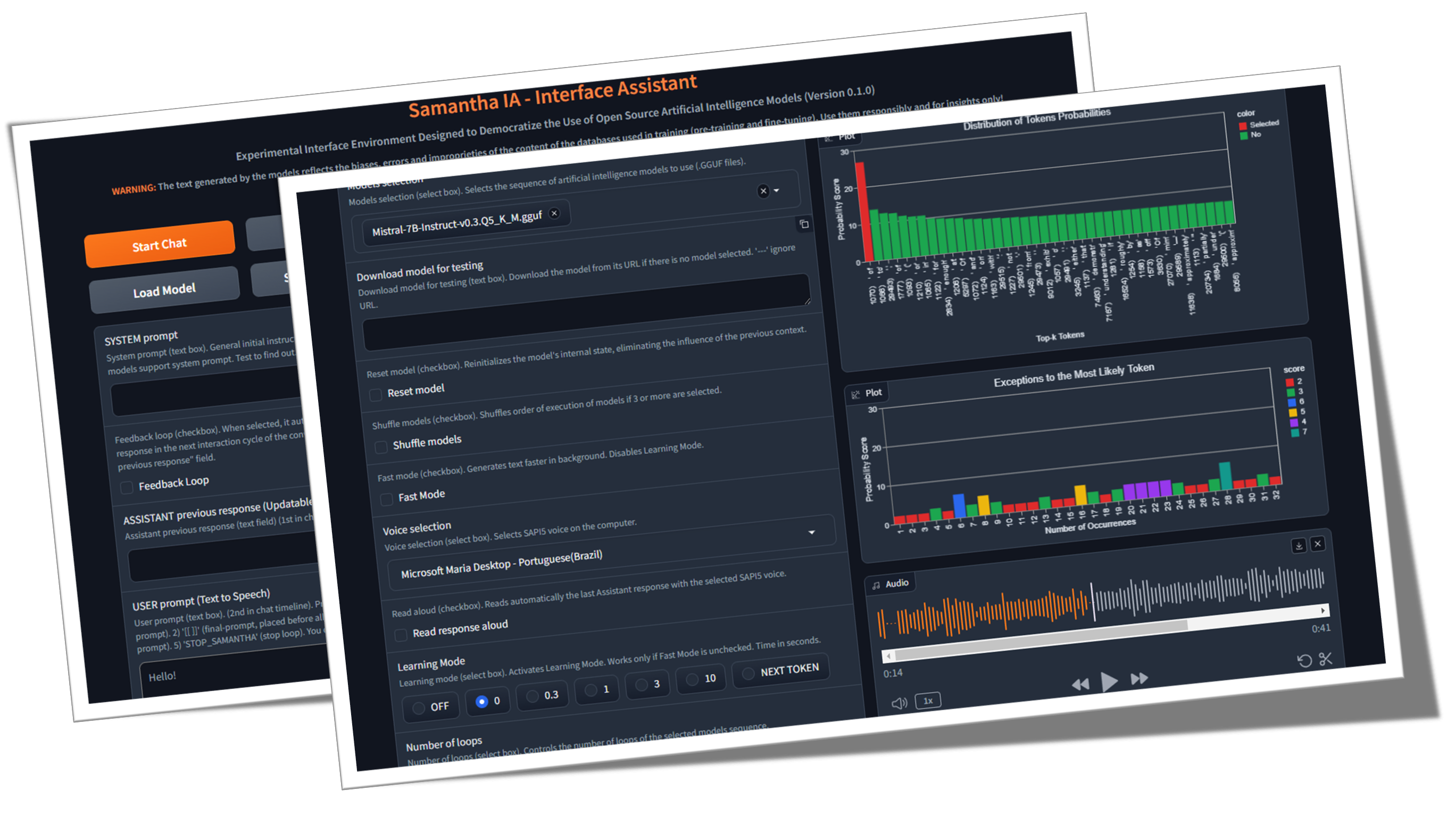
Samantha ist nur ein einfacher Schnittstellenassistent für Open -Source -Textgenerierung künstlicher Intelligenzmodelle, die unter Open Science Principles (Open Methodology, Open Source, Open Data, Open Access, Open Peer Review und Open Educational Resources) und MIT -Lizenz für die Verwendung auf gemeinsamen Windows -Computern (ohne GPU) entwickelt wurden. Das Programm führt die LLM lokal, kostenlos und unbegrenzt aus, ohne dass eine Internetverbindung erforderlich ist, außer um GGUF-Modelle herunterzuladen (GGUF steht für GPT-generiertes Unified Format) oder bei Bedarf durch die Ausführung des von den Modellen erstellten Code (GE zum Herunterladen von Datensätzen für Datenanalysen). Ziel ist es, das Wissen über die Verwendung von KI zu demokratisieren und zu demonstrieren, dass selbst kleine Modelle mithilfe der entsprechenden Technik Antworten erzeugen können, die denen größerer ähnlicher sind. Ihre Mission ist es, die Grenzen von (wirklich) offenen KI -Modellen zu erkunden.
Was ist Open Source AI (OpenSource.org)
Ist LLM -Größe wichtig? (Gary erklärt)
Künstliche Intelligenzpapiere (arxiv.org)
♀️ Samantha wird entwickelt, um die Ausübung der sozialen und institutionellen Kontrolle der öffentlichen Verwaltung zu unterstützen, unter Berücksichtigung des besorgniserregenden aktuellen Szenarios des zunehmenden Verlusts des Vertrauens der Bürger in Kontrollinstitutionen. Seine Funktionen ermöglichen es ihm, von allen, die sich für die Erforschung von Open -Source -Modellen für künstliche Intelligenz, insbesondere Python -Programmierer und Datenwissenschaftler, um Erkundung von künstlichen Intelligenzmodellen, verwendet. Das Projekt stammte aus der Notwendigkeit des MPC-E-Teams, ein System zu entwickeln, das das Verständnis des Prozesses der Generierung von Token nach LLM-Modellen ermöglicht.
♾️ Das System ermöglicht das sequentielle Laden einer Liste von Eingabeaufforderungen (Eingabeaufforderung) und Modellen (Modellkettung), ein Modell zum Zeitpunkt des Speicherns sowie die Anpassung ihrer Hyperparameter, wodurch die Reaktion ermöglicht wird, die durch das Vorgängermodell generiert wird, um die nächste Reaktion zu generieren ( Feedback -Loop -Feature). Modelle können mit der Antwort des unmittelbar vorhergehenden Modells interagieren, sodass jede neue Antwort die vorherige ersetzt. Sie können auch nur ein Modell verwenden und es mit seiner vorherigen Antwort über eine unbegrenzte Anzahl von Textgenerierungszyklen interagieren. Verwenden Sie Ihre Fantasie, um Modelle, Aufforderungen und Funktionen zu kombinieren!
Dieses Video zeigt ein Beispiel für die Interaktion zwischen Modellen ohne menschliche Intervention, indem Modelle und Eingabeaufforderungen mit der Kopier- und Einfügen von Samantha -LLM -Funktionen verkettet werden. Quantisierte Versionen der Modelle Microsoft PHI 3.5 und Google Gemma 2 (von Bartowski) sind aufgefordert, eine Frage über die menschliche Natur zu beantworten, die durch das Meta Lama 3.1 -Modell (von Nousresearch) erstellt wurde. Die Antworten werden auch vom Meta -Modell bewertet.

Intelligence Challenge: Gemma 2 gegen Phi 3.5 mit Lama 3.1 als Richter
? Einige Kettungsbeispiele ohne Samanthas Response Feedback Loop -Funktion:
(model_1) antwortet (prompt_1) x Anzahl der Antworten: Wird verwendet, um das deterministisches und stochastisches Verhalten des Modells mit Hilfe des Lernmodusfunktion zu analysieren und mehrere verschiedene Antworten mit stochastischen Einstellungen (Video) zu generieren.
(model_1) antwortet (Eingabeaufforderung_1, fordert_2, fordert_n): Wird verwendet, um Multiples -Anweisungen sequenz mit demselben Modell (Eingabeaufforderung) (VIDEO) auszuführen.
(model_1, model_2, model_n) reagieren (Eingabeaufforderung_1): Wird verwendet, um die Antworten der Modelle für dieselbe einzelne Eingabeaufforderung (Modellketten) zu vergleichen. Nützlich zum Vergleich verschiedener Modelle sowie quantisierte Versionen desselben Modells.
(model_1, model_2, model_n) reagieren (prompt_1, prompt_2, prompt_n): Wird verwendet, um die Antworten von Modellen für eine Liste von Eingabeaufforderungen zu vergleichen sowie eine Abfolge von Anweisungen mithilfe von DiscTinct -Modellen (Modell und Eingabeaufforderung) auszuführen. Jedes Modell reagiert auf alle Eingabeaufforderungen. Wenn jedes Modell die einzelne Antwort pro Modellfunktion verwendet, reagiert jedes Modell nur auf eine bestimmte Eingabeaufforderung.
? Einige Kettungsbeispiele unter Verwendung von Samanthas Response Feedback Loop -Funktion:
(model_1) antwortet (prompt_1) x Anzahl der Antworten: Wird zur Verbesserung oder Ergänzung der vorherigen Antwort des Modells durch einen festen Benutzeranweisungen mit demselben Modell sowie zur Simulation einer endlosen Konversation zwischen 2 AIs mit einem einzigen Modell (Video) verwendet.
(model_1) antwortet (Eingabeaufforderung_1, fordert_2, fordert_n): Wird zur Verbesserung der vorherigen Antwort des Modells durch Multiply -Benutzeranweisungen sequenz mit demselben Modell (Eingabeaufforderung) verwendet. Jede Eingabeaufforderung wird verwendet, um die vorherige Antwort zu verfeinern oder zu vervollständigen sowie eine Abfolge von Eingabeaufforderungen auszuführen, die von der vorherigen Antwort abhängen, z.
(model_1, model_2, model_n) reagieren (prompt_1): Wird zur Verbesserung der Reaktion des Vorgängermodells mithilfe von Disctinct -Modellen (Modellkettung) sowie zur Generierung eines Dialogfelds zwischen verschiedenen Modellen verwendet.
(model_1, model_2, model_n) reagieren (prompt_1, prompt_2, prompt_n): Wird verwendet, um eine Folge von Anweisungen mit DISCTinct -Modellen (Modell und Eingabeaufforderung) und einzelner Antwort pro Modell auszuführen.
Jedes dieser Modelle und Eingabesequenzen können mehr als einmal über die Anzahl der Loops -Funktionen ausgeführt werden.
Samanthas Verkettungssequenzvorlage:
([Modelsliste] -> reagieren -> ([Benutzeraufforderungsliste] x Anzahl der Antworten)) x Anzahl der Schleifen
Aber was ist ein GPT? Visuelles Intro zu Transformatoren (3Blue1Brown)
Aufmerksamkeit in Transformatoren, visuell erklärt (3Blue1Brown)
Transformator Erklärer (Poloclub)
? Die Sequenzierung von Eingabeaufforderungen und Modellen ermöglicht die Erzeugung langer Antworten, indem die Benutzereingabebehörungen gebrochen werden. Jede partielle Antwort passt in die im Modelltraining definierte Antwortlänge des Modells.
? Als Open-Source-Tool für die automatische Selbstinteraktion zwischen AI-Modellen wurde Samantha Interface Assistant entwickelt, um die Reverse-Eingabe-Engineering mit Selbstverbesserungs-Feedback-Schleife zu untersuchen? Diese Technik hilft kleinen großsprachigen Modellen (LLM), genauere Antworten zu generieren, indem sie auf das Modell übertragen werden. Die Aufgabe des Erstellens der endgültigen Eingabeaufforderung und der entsprechenden Antwort basierend auf den anfänglichen ungenutzigen Anweisungen des Benutzers und dem Hinzufügen von Zwischenschichten zum Eingabeaufforderungsprozess. Samantha hat keine versteckte Systemaufforderung wie bei proprietären Modellen. Alle Anweisungen werden vom Benutzer gesteuert. Siehe anthropische Systemaufforderungen.
? Dank des aufstrebenden Verhaltens , das sich aus der aus Trainingstexten extrahierten Generalisierungsmustern ergibt, können auch kleine Modelle, die zusammenarbeiten, große Antworten erzeugen!
Die Intelligenz der menschlichen Spezies basiert nicht auf einem einzigen intelligenten Wesen, sondern auf einer kollektiven Intelligenz. Individuell sind wir eigentlich nicht so intelligent oder fähig. Unsere Gesellschaft und unser Wirtschaftssystem basieren auf einer Vielzahl von Institutionen, die sich aus verschiedenen Personen mit unterschiedlichen Spezialisierungen und Fachkenntnissen zusammensetzen. Diese riesige kollektive Intelligenz prägt das, was wir als Individuen sind, und jeder von uns folgt unserem eigenen Lebensweg, um zum einzigartigen Individuum zu werden und wiederum dazu beizutragen, Teil unserer immer erweiterten kollektiven Intelligenz als Spezies zu sein. Wir glauben, dass die Entwicklung künstlicher Intelligenz einem ähnlichen, kollektiven Weg folgen wird. Die Zukunft von AI wird nicht aus einem einzigen, gigantischen, allwissenden KI-System bestehen, das enorme Energie zum Training, Laufen und Aufrechterhalten erfordert, sondern eine große Sammlung kleiner KI-Systeme-unzureichend mit ihrer eigenen Nische und Spezialität, die miteinander interagiert und mit neueren KI-Systemen entwickelt wurde, um eine bestimmte Nische zu füllen . Entwicklung neuer Foundation -Modelle: Entfesselung der Kraft der Automatisierung der Modellentwicklung - Sakana AI
? Ein kleiner Schritt: Samantha ist nur eine Bewegung in Richtung einer Zukunft, in der künstliche Intelligenz kein Privileg ist, sondern ein Werkzeug für alle in einer Welt, in der Einzelpersonen KI nutzen können, um ihre Produktivität, Kreativität und Entscheidungsfindung ohne Barrieren zu verbessern, eine Reise zur Demokratisierung von KI zu machen und es zu einer Kraft für das Wohl in unserem täglichen Leben zu machen.
? Die instrumentelle Natur der KI: Anerkennung des technologischen Monopols der künstlichen Intelligenz als mögliches Instrument der Herrschaft und die Ausweitung sozialer Ungleichheiten stellt eine Herausforderung an diesem Wendepunkt in der Geschichte dar. Wenn Sie die Mängel der kleineren Modelle während des Textgenerierungsprozesses in diesem Verständnis feststellen, verglichen sie mit der behaupteten Perfektion der größeren proprietären Modelle. Es ist notwendig, Dinge an ihren richtigen Orten neu zu positionieren und die romantische reduktionistische Sichtweise der Anerkennung menschlicher Merkmale - wie der Intelligenz (Anthropomorphisierung durch das psychologische Phänomen von Pareidolie) - zu einer vom menschlichen Intellekt erzeugten Technologie in Frage zu stellen. Aus diesem Grund ist es wichtig, künstliche Intelligenz durch einen didaktischen Ansatz zu entmystifizieren, wie dieser neuartige "Wort/Token -Rechner" funktioniert. Sicherlich wird der Dopamin des anfänglichen Charmas, der vom Markt künstlich künstlich erstellt wurde, der Erzeugung einiger hundert Token nicht standhalten (Token ist der Name, der dem grundlegenden Baustein von Texten gegeben wird, mit dem ein LLM Text versteht und generiert. Ein Token kann ein ganzes Wort oder ein Teil eines Wortes sein).
✏️ Überlegungen zur Textgenerierung: Benutzer sollten sich bewusst sein, dass die von AI generierten Antworten aus der Ausbildung ihrer großartigen Modelle auf einem riesigen Korpus von Textdaten abgeleitet werden. Die genauen Quellen oder Prozesse, die von der KI zur Erzeugung ihrer Ausgaben verwendet werden, können nicht genau zitiert oder identifiziert werden. Der von der KI erzeugte Inhalt ist kein direktes Zitat oder eine Zusammenstellung aus bestimmten Quellen. Stattdessen spiegelt es die Muster, statistischen Beziehungen und das Wissen wider, dass die neuronalen Netzwerke der KI während des Trainingsprozesses auf dem Broad Data Corpus gelernt und codiert haben. Die Antworten werden auf der Grundlage dieser erlernten Wissensrepräsentation erzeugt, anstatt aus einem bestimmten Quellmaterial aus wörtlich abgerufen zu werden. Während die Trainingsdaten der KI möglicherweise maßgebliche Quellen enthalten haben, sind ihre Ausgaben ihre eigenen synthetisierten Ausdrücke der gelehrten Assoziationen und Konzepte.
Ziel: Das Hauptziel von Samantha ist es, andere dazu zu inspirieren , ähnliche und viel bessere Systeme zu erstellen und Benutzer über die Nutzung von KI aufzuklären. Unser Ziel ist es, eine Gemeinschaft von Entwicklern und Enthusiasten zu fördern, die das Wissen und Werkzeuge nutzen können, um weiter innovativ zu sein und zum Bereich der Open -Source -KI beizutragen. Auf diese Weise das Ziel, eine Kultur der Zusammenarbeit und des Teilens zu kultivieren, um sicherzustellen, dass die Vorteile der KI für alle zugänglich sind, unabhängig von ihrem technischen Hintergrund oder ihrer finanziellen Ressourcen. Es wird angenommen, dass wir durch das Erstellen von KI -Anwendungen, indem wir mehr Menschen konstruieren und verstehen können, gemeinsam den Fortschritt vorantreiben und gesellschaftliche Herausforderungen mit informierten und vielfältigen Perspektiven bewältigen können. Lassen Sie uns zusammenarbeiten, um eine Zukunft zu formen, in der KI eine positive und integrative Kraft für die Menschheit ist.
UNESCO -Ethik der Empfehlungen für künstliche Intelligenz
OECD -Programm zur KI in Arbeit, Innovation, Produktivität und Fähigkeiten
Die menschlichen Innovationskosten: Während dieses System darauf abzielt, Benutzer zu stärken und den Zugang zu KI zu demokratisieren, ist es entscheidend, die ethischen Auswirkungen dieser Technologie anzuerkennen. Die Entwicklung leistungsstarker KI -Systeme beruht häufig auf der Ausbeutung menschlicher Arbeitskräfte, insbesondere in Bezug auf Datenanmerkungen und Schulungsprozesse. Dies kann bestehende Ungleichheiten aufrechterhalten und neue Formen der digitalen Kluft schaffen. Als Nutzer von AI sind wir die Verantwortung, diese Probleme zu bewusst und sich für fairere Praktiken innerhalb der Branche zu befürworten . Durch die Unterstützung der ethischen KI -Entwicklung und die Förderung der Transparenz bei der Datenerhebung können wir für alle zu einer integrativeren und gerechteren Zukunft beitragen.
Como Funciona o Trabalho Humano Por Trás da Inteligência künstlich
Die "modernen Sklaven" der KI -Tech -Welt
Andere Quellen
Auf den Schultern der Giants: Besonderer Dank an Georgi Gerganov und das gesamte Team, das an Lama.Cpp arbeitet, für die all dies möglich, sowie an Andrei Blesen durch seine erstaunlichen Python-Gebote für die Gerganov C ++-Bibliothek (Lama-CPP-Python).
✅ Open Source Foundation: Aufgebaut auf LLAMA.CPP / Lama-CPP-Python und Gradio, unter MIT-Lizenz, wird Samantha auch ohne dedizierte Grafikverarbeitungseinheit (GPU) auf Standardcomputern ausgeführt.
✅ Offline -Funktion: Samantha arbeitet unabhängig vom Internet und erfordert die Konnektivität nur für den ersten Download von Modelldateien oder bei Bedarf durch die Ausführung des von den Modellen erstellten Code. Dies gewährleistet die Privatsphäre und Sicherheit für Ihre Datenverarbeitungsanforderungen. Ihre sensiblen Daten werden nicht über das Internet mit Unternehmen über Vertraulichkeitsvereinbarungen geteilt.
✅ Unbegrenzte und kostenlose Verwendung: Die Open -Source -Natur von Samantha ermöglicht die uneingeschränkte Verwendung ohne Kosten oder Einschränkungen, wodurch sie jederzeit für jeden zugänglich ist.
✅ Umfangreiche Modellauswahl: Mit Zugriff auf Tausende von Fundament- und fein abgestimmten Open-Source-Modellen können Benutzer mit verschiedenen KI-Funktionen experimentieren, die jeweils auf verschiedene Aufgaben und Anwendungen zugeschnitten sind, sodass die Abfolge der Modelle ketten können, die Ihren Anforderungen am besten entsprechen.
✅ Kopieren und Einfügen von LLMs: Um eine Abfolge von gguf -Modellen auszuprobieren, kopieren Sie einfach ihre Download -Links aus einem beliebigen Umarmungs -Gesichts -Repository und fügen Sie sie in Samantha ein, um sie sofort nacheinander auszuführen.
✅ Customizable Parameters: Users have control over model hyperparameters such as context window length ( n_ctx , max_tokens ), token sampling ( temperature , tfs_z , top-k , top-p , min_p , typical_p ), penalties ( presence_penalty , frequency_penalty , repeat_penalty ) and stop words ( stop ), allowing for responses that suit specific requirements, with deterministisches oder stochastisches Verhalten.
✅ Anpassungen von zufälligen Hyperparametern: Sie können zufällige Kombinationen von Hyperparametereinstellungen testen und ihre Auswirkungen auf die vom Modell erzeugten Antworten beobachten.
✅ Interaktive Erfahrung: Samanthas Kabinenfunktionalität ermöglicht es Benutzern, endlose Texte zu generieren, indem sie Eingabeaufforderungen und Modelle verkettet und komplexe Wechselwirkungen zwischen verschiedenen LLMs ohne menschliche Intervention ermöglichen.
✅ Rückkopplungsschleife: Mit dieser Funktion können Sie die vom Modell erzeugte Antwort erfassen und in den nächsten Zyklus der Konversation zurückführen.
✅ Eingabeaufforderung: Sie können eine beliebige Anzahl von Eingabeaufforderungen hinzufügen (getrennt durch $$$n oder n ), um die Abfolge der von den Modellen ausgeführten Anweisungen zu steuern. Es ist möglich, eine TXT -Datei mit einer vordefinierten Folge von Eingabeaufforderungen zu importieren.
✅ Modellliste: Sie können eine beliebige Anzahl von Modellen auswählen und in jeder Hinsicht steuern, welches Modell auf die nächste Eingabeaufforderung reagiert.
✅ Kumulative Antwort: Sie können jede neue Antwort verkettet, indem Sie sie der vorherigen Antwort hinzufügen, um bei der Erstellung der nächsten Antwort durch das Modell berücksichtigt zu werden. Es ist wichtig hervorzuheben, dass der Satz verketteter Antworten in das Kontextfenster des Modells passen muss.
✅ Lernerkenntnisse: Eine Funktion namens Learning Mode ermöglicht es, dass Benutzer den Entscheidungsprozess des Modells beobachten und Einblicke in die Auswahl der Ausgangs-Token basierend auf ihren Wahrscheinlichkeitswerten (Logistikeinheiten oder Logits ) und Hyperparameter-Einstellungen geben. Es wird ebenfalls eine Liste der am wenigsten ausgewählten Token generiert.
✅ Voice Interaction: Samantha unterstützt einfache Sprachbefehle mit Offline-Sprache-Text-Vosk (Englisch und Portugiesisch) und Text-to-Speech mit SAPI5-Stimmen, wodurch es zugänglich und benutzerfreundlich ist.
✅ Audio -Feedback: Die Schnittstelle bietet dem Benutzer akustische Warnungen und signalisiert den Beginn und Ende der Textgenerierungsphase durch das Modell.
✅ Dokumenthandhabung: Das System kann kleine PDF- und TXT -Dateien laden. Kettungsanforderungen, Systemaufforderungen und die URL -Liste des Modells können aus Gründen einer TXT -Datei eingeben werden.
✅ Vielseitige Texteingabe: Felder für die Einführung von Eingabeaufforderungen ermöglichen es den Benutzern, effektiv mit dem System zu interagieren, einschließlich der Systemaufforderung, der Vorgängermodellantwort und der Benutzeraufforderung, die Antwort des Modells zu leiten.
✅ Code-Integration: Automatische Extraktion von Python-Codeblöcken aus der Reaktion des Modells sowie vorinstallierte JupyterLab Integrated Development Environment (IDE) in einer isolierten virtuellen Umgebung ermöglicht es Benutzern, generierte Code schnell für sofortige Ergebnisse auszuführen.
✅ Python -Code bearbeiten, kopieren und ausführen: Mit dem System kann der Benutzer den vom Modell generierten Code bearbeiten und durch auswählen, mit CTRL + C kopieren und auf die Schaltfläche Code ausführen. Sie können auch einen Python -Code von überall kopieren (z. B. aus einer Webseite) und ihn ausführen, indem Sie Python -Code kopieren und Code -Schaltflächen ausführen (solange die installierten Python -Bibliotheken verwendet werden).
✅ Codeblöcke Bearbeiten: Benutzer können Python -Codeblöcke auswählen und ausführen, die vom Modell generiert werden, das die in der virtuellen jupyterlab -Umgebung installierten Bibliotheken verwendet, indem Sie den #IDE -Kommentar in den Ausgabescode eingeben, mit CTRL + C ausgewählt und kopieren, und schließlich auf die Schaltfläche " Ausführen des Ausführungscode" klicken.
✅ HTML-Ausgabe: Python-Interpreter-Ausgabe in einem HTML-Popup-Fenster anzeigen, wenn der im Terminal gedruckte Text anders als '' (leere Zeichenfolge) ist. Mit dieser Funktion können beispielsweise ein Skript unbegrenzt ausgeführt und das Ergebnis nur angezeigt, wenn eine bestimmte Bedingung erfüllt ist.
✅ Automatische Codeausführung: Samantha verfügt über die Option, den von den Modellen nacheinander generierten Python -Code automatisch auszuführen. Der generierte Code wird vom Python-Dolmetscher ausgeführt, der in einer virtuellen Umgebung mit mehreren Bibliotheken (intelligent agentenähnliche Funktion) installiert wurde.
✅ Stop -Bedingung: Stoppt Samantha, wenn die automatische Ausführung des Python -Codes, das durch das Modell generiert wird, in dem Terminal einen anderen Wert als '' (leere Zeichenfolge) gedruckt wird, und das enthält keine Fehlermeldung. Sie können auch eine Laufschleife beenden, indem Sie eine Funktion erstellen, die nur die String STOP_SAMANTHA zurückgibt, wenn eine bestimmte Bedingung erfüllt ist.
✅ Inkrementelle Codierung: Erstellen Sie die deterministische Einstellungen inkrementell Python -Code und stellen Sie sicher, dass jeder Teil funktioniert, bevor Sie mit dem nächsten fortfahren.
✅ Vollständige Zugriff und Kontrolle: Über das Ökosystem der Python -Bibliotheken und die von den Modellen generierten Codes können Sie auf Computerdateien zugreifen, sodass Sie lokale Dateien lesen, erstellen, ändern und löschen können sowie auf das Internet zugreifen, um Informationen und Dateien hochzuladen und herunterzuladen.
✅ Tastatur- und Mausautomatisierung: Sie können eine Folge von Eingabeaufforderungen zum Automatisieren von Aufgaben auf Ihrem Computer mithilfe der Pyautogui-Bibliothek erstellen (siehe automatisieren Sie das Bohrungsmaterial mit Python. Sie können sogar Python-Dateien ( .py ) in ausführbare Dateien ( .exe ) mit der automatischen Py-zu-Exe-Taste um konvertieren.
✅ Data Analysis Tools: A suite of data analysis tools like Pandas, Numpy, SciPy, Scikit-Learn, Matplotlib, Seaborn, Vega-Altair, Plotly, Bokeh, Dash, Streamlit, Ydata-Profiling, Sweetviz, D-Tale, DataPrep, NetworkX, Pyvis, Selenium, PyMuPDF, SQLAlchemy and Beautiful Soup are available within JupyterLab für eine umfassende Analyse und Visualisierung. Die Integration in den DB -Browser ist ebenfalls verfügbar (siehe DB -Browser -Taste).
Für eine vollständige Liste aller Python -Bibliotheken, die in der virtuellen Umgebung jupyterlab intalliert sind, verwenden Sie eine Eingabeaufforderung wie "Erstellen Sie einen Python -Code, der alle mit pkgutil -Bibliothek installierten Module druckt." und drücken Sie nach der Codegenerierung den Code -Code -Taste. Das Ergebnis wird in einem Browser -Popup angezeigt. Sie können auch pipdeptree --packages module_name in einem beliebigen Umgebungsanschluss verwenden, um seine Abhängigkeiten anzuzeigen.
✅ Leistung optimiert: Um eine reibungslose Leistung bei CPUs zu gewährleisten, behält Samantha einen begrenzten Chat -Verlauf nur für die vorherige Antwort bei und verringert die Kontextfenstergröße des Modells, um Speicher- und Rechenressourcen zu sparen.
Um Samantha zu verwenden, benötigen Sie:
Installieren Sie Visual Studio (kostenlose Community -Version) auf Ihrem Computer. Laden Sie es herunter, führen Sie es aus und wählen Sie nur die Option Desktop -Entwicklung mit C ++ (Administratorrechte erforderlich) aus.
Laden Sie die ZIP -Datei von Samanthas Repository herunter, indem Sie hier klicken und auf Ihren Computer entpacken. Wählen Sie das Laufwerk aus, an dem Sie das Programm installieren möchten:

Öffnen Sie das Verzeichnis samantha_ia-main und doppelklicken Sie auf install_samantha_ia.bat -Datei, um die Installation zu starten. Windows kann Sie möglicherweise auffordern, den Ursprung der .bat -Datei zu bestätigen. Klicken Sie auf "Weitere Informationen" und bestätigen Sie. Wir ermöglichen es, den Code aller Dateien zu inspizieren (verwenden Sie dazu Virustotal- und AI -Systeme):

Dies ist der kritische Teil der Installation. Wenn alles gut läuft, wird der Vorgang abgeschlossen, ohne Fehlermeldungen im Terminal anzuzeigen.
Der Installationsprozess dauert ungefähr 20 Minuten und sollte mit der Erstellung von zwei virtuellen Umgebungen enden: samantha , um nur das KI -Modell und jupyterlab auszuführen, um die anderen installierten Programme auszuführen. Es wird ungefähr 5 GB Ihrer Festplatte dauern.
Öffnen Sie Samantha nach der Installation, indem Sie doppelt auf open_samantha.bat -Datei klicken. Windows kann Sie möglicherweise erneut bitten, die Quelle der .bat -Datei zu bestätigen. Diese Autorisierung ist nur beim ersten Ausführen des Programms erforderlich. Klicken Sie auf "Weitere Informationen" und bestätigen Sie:

Ein Terminalfenster wird geöffnet. Dies ist der serverseitige Samantha.
Nach der Beantwortung der anfänglichen Fragen (Schnittstellensprache und Sprachsteuerungsoptionen - Die Sprachsteuerung ist nicht für die erste Verwendung geeignet), wird die Schnittstelle auf einer neuen Browser -Registerkarte geöffnet. Dies ist die Browser-Seite des Samantha:
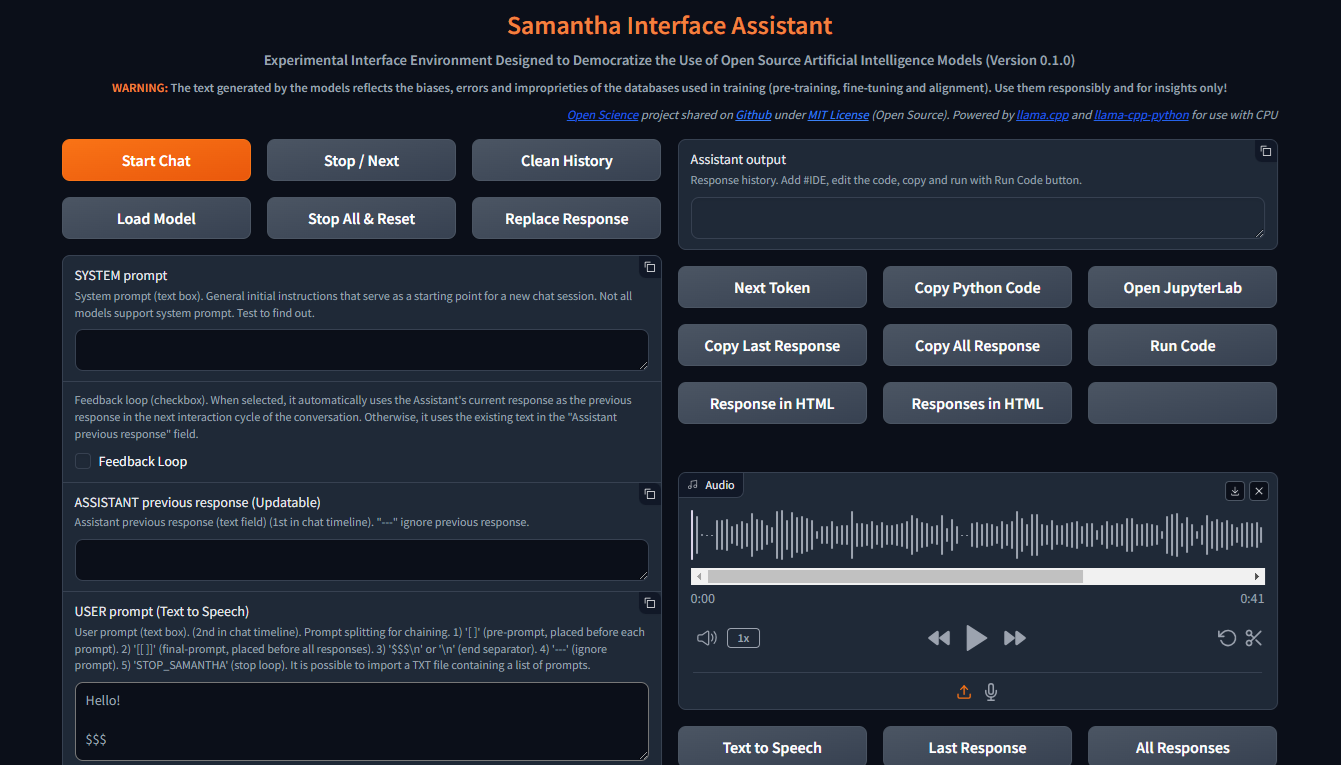
Mit dem geöffneten Browserfenster ist Samantha bereit zu gehen.
Schauen Sie sich das Installationsvideo an.
Samantha benötigt nur eine .gguf -Modelldatei, um Text zu generieren. Befolgen Sie diese Schritte, um einen einfachen Modelltest durchzuführen:
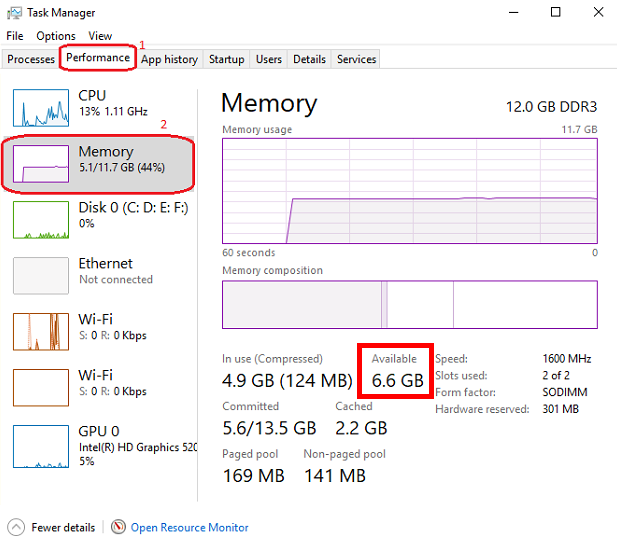
Öffnen Sie die Windows -Taskverwaltung, indem Sie CTRL + SHIFT + ESC drücken und den verfügbaren Speicher überprüfen. Schließen Sie bei Bedarf einige Programme, um den Speicher zu freizugeben.
Besuchen Sie das Umarmungs -Face -Repository und klicken Sie auf die Karte, um die entsprechende Seite zu öffnen. Suchen Sie die Registerkarte "Dateien und Versionen" und wählen Sie ein .gguf -Textgenerierungsmodell, das in Ihren verfügbaren Speicher passt.
Klicken Sie mit der rechten Maustaste über das Symbol "Modell Download Download" und kopieren Sie die URL.
Fügen Sie die Modell -URL in Samanthas Download -Modelle zum Testfeld ein.
Fügen Sie eine Eingabeaufforderung in ein Eingabeaufforderung ein und drücken Sie Enter . Halten Sie das $$$ -Sschild am Ende Ihrer Eingabeaufforderung. Das Modell wird heruntergeladen und die Antwort wird unter Verwendung der Standarddeterministischen Einstellungen generiert. Sie können diesen Vorgang über Windows Task Management verfolgen.
Jedes neue Modell, das über diese Kopie- und Einfügeprozedur heruntergeladen wurde, ersetzt den vorherigen, um den Festplattenspeicher zu sparen. Modelldownload wird in Ihrem Download -Ordner als MODEL_FOR_TESTING.gguf gespeichert.
Sie können das Modell auch herunterladen und dauerhaft auf Ihrem Computer speichern. Weitere Datenails finden Sie im Abschnitt unten.
Open Souce Text -Generierungsmodelle können mit gguf als Suchparameter aus dem Umarmungsgesicht heruntergeladen werden. Sie können zwei Wörter wie gguf code oder gguf portuguese kombinieren.
Sie können auch in ein bestimmtes Repository wechseln und alle .gguf -Modelle zum Herunterladen und Testen ansehen, z.
Die Modelle werden auf solchen Karten angezeigt:

Um das Modell herunterzuladen, klicken Sie auf die Karte, um die entsprechende Seite zu öffnen. Suchen Sie die Registerkarte "Modellkarten und Dateien und Versionen" :

Um einige Modelle herunterzuladen, müssen Sie den Nutzungsbedingungen zustimmen.
Klicken Sie danach auf die Registerkarte "Dateien und Versionen" und laden Sie ein Modell herunter, das in Ihren verfügbaren RAM -Speicherplatz passt. Um Ihren verfügbaren Speicher zu überprüfen, öffnen Sie Windows Task Manager, indem Sie CTRL + SHIFT + ESC drücken. Klicken Sie auf die Registerkarte Performance (1) und wählen Sie Speicher (2):
Wir empfehlen, das Modell mit Q4_K_M (4-Bit-Quantisierung) in den Linknamen herunterzuladen (die Maus über die Download-Schaltfläche legen, um den vollständigen Dateinamen im Link wie folgt anzuzeigen: https://huggingface.co/NousResearch/Hermes-2-Pro-Llama-3-8B-GGUF/resolve/main/Hermes-2-Pro-Llama-3-8B-Q4_K_M.gguf?download=true ). Je größer die Modellgröße ist, desto größer ist die Genauigkeit des generierten Textes.
Wenn das heruntergeladene Modell nicht in den verfügbaren RAM -Speicherplatz passt, wird Ihre Festplatte verwendet, was sich auf die Leistung auswirkt.
Laden Sie das ausgewählte Modell herunter und speichern Sie es auf Ihren Computer oder kopieren Sie den Download -Link und fügen Sie es einfach in das Download -Modell von Samantha zum Testfeld ein. Weitere Informationen finden Sie in den folgenden Abschnitt Video -Tutorials.
Beachten Sie, dass jedes Modell seine eigenen Merkmale aufweist und je nach Größe, interner Architektur, Trainingsmethode, vorherrschender Sprache der Trainingsdatenbank, der Eingabeaufforderung und Hyperparameteranpassung erheblich unterschiedliche Antworten aufweist. Es ist erforderlich, ihre Leistung für die gewünschte Aufgabe zu testen.
Einige Modelle werden aufgrund ihrer technischen Eigenschaften oder ihrer Inkompatibilität mit der aktuellen Version der von Samantha verwendeten Python -Bindung möglicherweise nicht geladen .
Wo man Modelle zum Testen finden kann: Umarmung der GGUF -Modelle umarmt
Samantha ist ein experimentelles Programm, das zum Testen von Open -Source -KI -Modellen erstellt wurde. Daher ist es üblich, dass Fehler auftreten, wenn Sie versuchen, ein neues Modell oder neue Versionen von Modellen zu testen, die von Benutzern erstellt wurden.
Die Qualität der von einem Modell erzeugten Antworten kann anhand einiger Kriterien bewertet werden, wie z. B.:
Grad des Verständnisses der expliziten und impliziten Anweisungen, die in den Benutzer- und Systemaufforderungen enthalten sind;
Grad des Gehorsams gegenüber diesen Anweisungen, Aspekt in Bezug auf die vorherrschende Sprache der Datenbank;
Halluzinationsgrad in der Erzeugung von kohärenten Text, aber falsch oder aus dem Kontext. Die Halluzination der Textgenerierung resultiert typischerweise aus einer unzureichenden Ausbildung des Modells oder einer unangemessenen Auswahl des nächsten Tokens, was das Modell in unerwünschte semantische Richtung führt.
Präzisionsgrad im Entscheidungsprozess zum Schließen der Lücken im Kontext der Benutzeraufforderung und zur Behebung von Mehrdeutigkeiten, die zur Generierung der Antwort erforderlich sind. Was nicht explizit angegeben ist, versucht das Modell, auf der Grundlage seines Trainings zu schließen, was zu Fehlern führen kann.
Kohärenzgrad der vom Modell angenommenen Verzerrung mit der in der Eingabeaufforderung des Benutzers enthaltenen Verzerrung (oder fehlend);
Grad der PERTINENZ und Relevanz der Themen ausgewählt , um angesprochen zu werden;
Grad der Breite und Tiefe des Ansatzes der Themen in der Reaktion;
Grad der syntatischen und semantischen Präzision der Reaktion;
Qualität der Struktur und des Inhalts der Antwort in Bezug auf die Erwartungen des Benutzers (und deren Überwindung) für das dem Modell übermittelte Problem unter Berücksichtigung der Technik, die zur Erstellung der Eingabeaufforderung (Eingabeaufforderung Engineering) und die Anpassung der Hyperparameter des Modells verwendet wird.
Hauptkontrollen:
Startet eine Chat -Sitzung, sendet alle Eingabetexte (Systemaufforderung, Assistent vorherige Antwort und Benutzeraufforderung) an den Server sowie die vom Benutzer angepassten Einstellungen. Genau wie bei allen anderen Tasten klingt ein Mausklick.
Diese Taste löscht auch die interne vorherige Antwort.
Eine Chat -Sitzung kann mehr als einen Konversationszyklus (Schleife) enthalten.
Starten Sie die Chat -Taste Tastatur Tastaturverknüpfung: Drücken Sie Enter auf der Seite überall.
Um Text zu generieren, muss ein Modell in der Dropdown-Liste der Modellauswahl vorgewählt werden, oder es muss eine URL des Umarmungsgesichtsmodells bereitgestellt werden, um ein Modell zum Testfeld zu herunterladen . Wenn beide Felder ausgefüllt sind, hat das über die Dropdown -Liste ausgewählte Modell Vorrang.
Unterbricht den Token -Erzeugungsprozess für das aktuelle Modell oder die Eingabeaufforderung und starten Sie die Ausführung des nächsten Modells oder die Eingabeaufforderung in der Sequenz, falls vorhanden.
Außerdem wird die Wiedergabe des aktuell gespielten Audios im Sprachautoplay -Modus gestoppt (das Kontrollkästchen Reaktion ausgewählt).
Samantha hat 3 Phasen:
Diese Taste unterbricht die Token -Generation nur dann, wenn die nächste Token -Auswahlphase gestartet wird, auch wenn sie zuvor gedrückt wurde.
Diese Unterbrechung verhindert nicht die Ausführung des vom Modell generierten Code, wenn das Kontrollkästchen des Ausführens automatisch ausgewählt ist. Sie können die Taste drücken, um die Textgenerierung zu stoppen und den bereits generierten Python -Code auszuführen.
Löscht den Verlauf der aktuellen Chat -Sitzung und löscht das Feld Assistant Output sowie alle internen Protokolle, vorherige Antwort usw.
Damit diese Schaltfläche funktioniert, müssen Sie warten, bis das Modell das Erzeugen des Textes beendet hat (orangefarbener Rand des Feldes Assistant Output hört auf zu blinzeln).
✅ Ermöglicht Ihnen das Verzeichnis, in dem die zum Laden verfügbaren Modelle gespeichert sind.
Standard: Windows "Downloads" Ordner
Sie können jedes Verzeichnis auswählen, das GGUF -Modelle enthält. In diesem Fall werden die im ausgewählten Verzeichnis enthaltenen Modelle in der Dropdown -Liste der Modellauswahl aufgeführt.
Wenn sich das Popup-Fenster öffnet, klicken Sie auf den Ordner, den Sie auswählen möchten.
? Stoppt die Abfolge von laufenden Modellen und setzt interne Einstellungen des zuletzt geladenen Modells zurück.
Nach dem Zurücksetzen brauchen die Modelle je nach Größe des Eingabentextes einige Zeit, um die Textgenerierung neu zu starten.
Diese Unterbrechung verhindern die Ausführung des bereits vom Modell generierten Python -Codes, wenn die Option automatisch ausführen.
? Ersetzt den Text im vorherigen Antwortfeld der Assistenten durch den Text der letzten Antwort, die vom Modell generiert wurde.
Der ersetzte Text wird als vorherige Antwort des Modells im nächsten Konversationszyklus verwendet.
Dieser ersetzte Text ist nicht sichtbar. Es löscht den Text aus dem vorherigen Assistant -Antwortfeld nicht, der später erneut verwendet werden kann.
Im Kontext von Großsprachmodellen (LLMs) ist eine Systemaufforderung eine spezielle Art von Anweisungen, die dem Modell zu Beginn einer Konversation oder Aufgabe gegeben wird. Es wird in allen Interaktionen mit dem Modell berücksichtigt.
Betrachten Sie es als die Bühne für die Interaktion. Es bietet dem LLM wichtige Informationen über seine Rolle, die gewünschte Person, das Verhalten und den Gesamtkontext des Gesprächs.
So funktioniert es:
Definieren der Rolle: Die Systemaufforderung definiert deutlich die Rolle des LLM in der Interaktion.
Festlegen des Tons und der Persona: Die Systemaufforderung kann auch den gewünschten Ton und die gewünschte Person für die Antworten des LLM festlegen.
Bereitstellung von Kontextinformationen: Die Systemaufforderung bietet Hintergrundinformationen, die für die Konversation oder Aufgabe relevant sind.
Benefits of Using System Prompts:
Beispiel:
Let's say you want to use an LLM to write a poem in the style of Shakespeare. A suitable system prompt would be:
You are William Shakespeare, a renowned poet from Elizabethan England.
By providing this system prompt, you guide the LLM to generate a response that reflects Shakespeare's language, style, and thematic interests.
Not all models support system prompt. Test to find out: fill in "x = 2" in the System prompt field and ask the model the value of "x" in the User prompt field. If the model gets the value of "x", system prompt is available in the model.
You can simulate the effect of the system prompt by adding text in square brackets in the beginning of the User prompt field: [This text acts as a system prompt] or adding the system prompt text into the Assistant previous response field (do not use feedback loop).
To ignore the text present in this field, include --- at the beginning. To split the text in parts, put $$$ between them. To ignore each part, include --- at the beginning of each part.
↩️ When activated, it automatically considers the response generated by the model in the current conversation cycle as being the Assistant's previous response in the next cycle, allowing feedback from the system.
Any text entered by the user in the Assistant previous response field is only considered in the first cycle after activating this feature. In the following cycles, the model's response internally replaces the previous response, but without deleting the text contained in that field, which can be reused in a new chat session. You can monitor the content of the assistant previous response via terminal.
In turn, when deactivated, it always uses the text contained in the Assistant previous response field as the previous response, unless the text is preceded by --- (triple dash). Text preceded by --- is ignored by the model.
To internally clear the model's previous response, press the Clean history button.
➡️ Stores the text considered by the model as its previous response in the current conversation cycle.
Used to feed back the responses generated by the model.
To ignore the text present in this field, include --- at the beginning. To split the text in parts, put $$$ between them. To ignore each part, include --- at the beginning of each part.
✏️ The main input field of the interface. It receives the list of user prompts that will be submitted to the model sequentially.
Each item in the list must be separated from the next one by a line break ( SHIFT + ENTER or n ) or by the symbols $$$ (triple dollar signal), if the items are made up of text with line breaks.
When present in the user prompt, the $$$ separator takes precedence over the n separator. In other words, n is ignored.
You can import a TXT file containing a list of prompts.
--- before a prompt list item causes the system to ignore that item.
Text positioned within single square brackets ( [ and ] ) is added to the beginning of each prompt list item, simulating a system prompt.
Text positioned within double square brackets ( [[ and ]] ) is added as the last item in the prompt list. In this case, all responses generated by the model in the current chat session are concatenated and added to the end of this item, allowing the model to analyze them together.
If the Python code execution returns only the word STOP_SAMANTHA , it stops token generation and exits the loop.
If the Python code execution returns only '' (empty string), it does not display the HTML pop-up window.
You can add specific hyperparameters before each prompt. You must use this pattern:
{max_tokens=4000, temperature=0, tfs_z=0, top_p=0, min_p=1, typical_p=0, top_k=40, presence_penalty=0, frequency_penalty=0, repeat_penalty=1}
Beispiel:
[You are a poet that writes only in Portuguese]
Create a sentence about love
Create a sentence about life
--- Create a sentence about time (this instruction is ignored)
[[Create a paragraph in English that summarizes the ideas contained in the following sentences:]]
( previous responses are concatenated here )
Model responses sequence:
"O amor é um fogo que arde no meu peito, uma chama que me guia através da vida."
"A vida é um rio que flui sem parar, levando-nos para além do que conhecemos."
Love and life are intertwined forces that shape our existence. Love burns within us like a fire, guiding us through life's journey with passion and purpose. Meanwhile, life itself is a dynamic and ever-changing river, constantly flowing and carrying us beyond the familiar and into the unknown. Together, love and life create a powerful current that propels us forward, urging us to explore, discover, and grow.
✅ Dropdown list of models saved on the computer and available for text generation.
To view models in this field, click the Load model button and select the folder containing the models.
The default location for saving models is the Windows Downloads directory.
You can select multiples models (even repeated) to create a sequence of models to respond the user prompts.
The last model downloaded from a URL is saved as MODEL_FOR_TESTING.gguf and is also displayed in this list.
Receives a list of Hugging Face links to the models that will be downloaded and executed sequencially.
Link example:
Links preceded by --- will be ignored.
Only works if no model is selected in Model selection dropdown list.
1️⃣ Activates a single response per model.
Prompts that exceed the number of models are ignored.
Models that exceed the number of prompts are also ignored.
You can select the same model more than once.
This checkbox disables Number of loops and Number of responses checkboxes.
⏮️ Reinitializes the internal state of the model, eliminating the influence of the previous context.
Wie es funktioniert:
When the reset feature is invoked:
Vorteile:
Use Cases:
? Shuffles the execution order of the models if 3 or more models are selected in Model selection dropdown list.
?♀️ Generates text faster in the background without displaying the addition of each token in the Assistant output field.
Minimizing or hiding the Samantha browser window makes the token generation process even faster.
This checkbox disables Learning Mode.
Selects the language of the computer's SAPI5 voice that will read the responses generated by the model.
? Activates automatic reading mode for responses generated by the model using the language selected in the Voice selection dropdown list.
If you wish to reproduce the response generated by the model using a better quality speech synthesizer (Microsoft Edge browser), open the response in an HTML pop-up using the Response in HTML button, right-click inside the page and select the option to read the page text aloud.
To save and edit the audio generated by the speech synthesizer, we recommend record de audio using the portable version of the open source program Audacity. Adjust the recording setting to capture audio output from the speakers (not from the microphone).
?? Activates Learning Mode.
It presents a series of features that help in understanding the token selection process by the model, such as:
Only works if Fast Mode is unchecked.
Radio buttons options:
? Set the number of repetitions of the block in the following chaining sequence:
Chaining Sequence: ( [models list] -> respond -> ( [user prompt list] X number of responses) ) X number of loops
Each model in the models list responds to all prompts in the user prompt list for the selected number of responses . This block is repeated for the selected number of loops .
? Number of responses to be generated by each selected model in the following chaining sequence:
Chaining Sequence: ( [models list] -> respond -> ( [user prompt list] X number of responses ) ) X number of loops
Each model in the models list responds to all prompts in the user prompt list for the selected number of responses . This block is repeated for the selected number of loops .
? When checked, runs automatically the Python code generated by the model.
Whenever Python code returns a value other than '' (empty string), an HTML pop-up window opens to display the returned content.
? When checked, stops Samantha when the automatic execution of the Python code generated by the model prints in the terminal a value other than '' (empty string) and that does not contain error message.
Use it to stop a generation loop when a condition is met.
? When checked, concatenates each new response by adding it to the previous response to be considered when generating the next response by the model.
It is important to highlight that the set of concatenated responses must fit in the model's context window.
? Adjusts the model's hyperparameters with random values in each new conversation cycle.
Randomly chosen values vary within the following value range of each hyperparameter and are displayed at the beginning of each response generated by the model.
| Hyperparameter | Min. Wert | Max. Wert |
|---|---|---|
| Temperatur | 0,1 | 1.0 |
| tfs_z | 0,1 | 1.0 |
| top_p | 0,1 | 1.0 |
| min_p | 0,1 | 1.0 |
| typical_p | 0,1 | 1.0 |
| presence_penalty | 0,0 | 0,3 |
| frequency_penalty | 0,0 | 0,3 |
| repeat_penalty | 1.0 | 1.2 |
This resource has application in the study of the reflections of the interaction between hyperparameters.
? Feedback only the Python interpreter output as the next assistant's previous response. Do not include model's response.
This feature reduces the number of tokens to be inserted in the assistant's previous response in the next conversation cycle.
Works only with Feedback Loop activated.
Hide HTML model responses, including Python interpreter error messages.
Context Window:
n_ctx stands for number of context tokens in the context window and determines the maximum number of tokens that the model can process at once. It determines how much previous text the model can "remember" and utilize when selecting the next token from model vocabulary.
The context length directly impacts the memory usage and computational load. Longer n_ctx requires more memory and computational power.
How n_ctx works:
It sets the upper limit on the number of tokens the model can "see" at once. Tokens are usually word parts, full words, or characters, depending on the tokenization method. The model uses this context to understand and generate text. For example, if n_ctx is 2048, the model can process up to 2048 tokens (now words) at a time.
Impact on model operation:
During training and inference, the model attends to all tokens within this context window.
It allows the model to capture long-range dependencies in the text.
Larger n_ctx enables the model to handle longer sequences of text without losing earlier context.
Why increasing n_ctx increases memory usage:
Attention mechanism: LLMs uses self-attention mechanisms (like in Transformers) which compute attention scores between all pairs of tokens in the input.
Quadratic scaling: The memory required for attention computations scales quadratically with the context length. If you double n_ctx , you quadruple the memory needed for attention.
CAUTION: n_ctx MUST BE GREATER THAN ( max_tokens + number of input tokens) (system prompt + assistant previous response + user prompt).
If the prompt text contains more tokens than the context window defined with n_ctx or the memory required exceeds the total available on the computer, an error message will be displayed.
Error message displayed on Assistant output field:
 ==========================================
Error loading LongWriter-glm4-9B-Q4_K_M.gguf.
Some models may not be loaded due to their technical characteristics or incompatibility with the current version of the llama.cpp Python binding used by Samantha.
Try another model.
==========================================
Error messages displayed on terminal:
Requested tokens (22856) exceed context window of 10016

Unable to allocate 14.2 GiB for an array with shape (25000, 151936) and data type float32
When set to 0 , the system will use the maximum n_ctx possible (model's context window size).
As a rule, set n_ctx equal to max_tokens , but only to the value necessary to accommodate the text parsed by the model. Samantha's default values for n_ctx and max_tokens are 4,000 tokens.
Before adjusting n_ctx , you must to unload the model by clicking Unload model button.
Beispiel:
User prompt = 2000 tokens
n_ctx = 4000 tokens
If the text generated by the model is equals or greater than 2000 tokens (4000 - 2000), the system will raise an IndexError in the terminal, but the interface will not crash.
To check the impact of the n_ctx in memory, open Windows Task Manager ( CTRL + SHIFT + ESC ) to monitor memory usage, select memory panel and vary n_ctx values. Don't forget to unload model between changes.
?️ Controls maximum number of tokens to be generated by the model.
Select 0 for the models' maximum number of tokens (maximum memory required).
How max_tokens Works:
Sampling Process: When generating text, LLMs predict the next token based on the context provided (system prompt + previous response + user prompt + text already generated). This prediction involves calculating probabilities for each possible token in the vocabulary.
Token Limit: The max_tokens parameter sets a hard limit on how many tokens the model can generate before stopping, regardless of the predicted probabilities.
Truncation: Once the generated text reaches max_tokens , the generation process is abruptly terminated. This means the final output might be incomplete or feel cut off.
Stop Words:
? List of characters that interrupt text generation by the model, in the format ["$$$", ".", ".n"] (Python list).
Token Sampling:
Deterministic Behavior:
To check the deterministic impact of each hyperparameter on the model's behavior, set all others hyperparameters to their maximum stochastic values and execute a prompt more than once. Repeat this procedure for each token sampling hyperparameter.
| Hyperparameter | Deterministisch | Stochastic | Ausgewählt |
|---|---|---|---|
| Temperatur | 0 | > 0 | 2 (stochastic) |
| tfs_z | 0 | > 0 | 1 (stochastic) |
| top_p | 0 | > 0 | 1 (stochastic) |
| min_p | 1 | < 1 | 1 (deterministic) |
| typical_p | 0 | > 0 | 1 (stochastic) |
| top_k | 1 | > 1 | 40 (stochastic) |
In other words, the hyperparameter with deterministic adjustment prevails over all other hyperparameters with stochastic adjustments.
As the hyperparameter with deterministic tuning loses this condition, interaction between all hyperparameters with stochastic tuning occurs.
Stochastic Behavior:
To check the stochastic reflection of a hyperparameter on the model's behavior, set all other hyperparameters to their maximum stochastic values and gradually vary the selected hyperparameter based on its deterministic value. Repeat this procedure for each token sampling hyperparameter.
You can combine stochastic tuning of different hyperparameters.
| Hyperparameter | Deterministisch | Stochastic | Ausgewählt |
|---|---|---|---|
| Temperatur | 0 | > 0 | 2 (stochastic) |
| tfs_z | 0 | > 0 | 1 (stochastic) |
| top_p | 0 | > 0 | 1 (stochastic) |
| min_p | 1 | < 1 | 1 (reduce progressively) |
| typical_p | 0 | > 0 | 1 (stochastic) |
| top_k | 1 | > 1 | 40 (stochastic) |
The text generation hyperparameters in language models, such as top_k , top_p , tfs-z , typical_p , min_p , and temperature , interact in a complementary way to control the process of choosing the next token. Each affects token selection in different ways, but there is an order of prevalence in terms of influence on the final set of tokens that can be selected. Let's examine how these hyperparameters relate to each other and who "prevails" over whom.
All these hyperparameters are adjusted after the model generates the logits of each token.
Samantha displays the logits of each token in learning mode, before they are changed by the hyperparameters.
Samantha also indicates which token was selected after applying the hyperparameters.
10 vocabulary tokens most likely returned by the model to initiate the answer to the following question: Who are you? :
Vocabulary id / token / logit value:
 358)    ' I'       (15.83)
40)     'I'        (14.75)     <<<  Selected
21873)  ' Hello'   (14.68)
9703)   'Hello'    (14.41)
1634)   ' As'      (14.31)
2121)   'As'       (13.98)
20971)  ' Hi'      (13.73)
715)    ' n'      (13.03)
5050)   'My'       (13.01)
13041)  'Hi'       (12.77)
How to disable hyperparameters:
temperature : Setting it to 1.0 keeps the original odds unchanged. Note: Setting it to 0 does not "disable" it, but makes the selection deterministic.
tfs_z (Tail-Free Sampling with z-score): Setting it to a very high value effectively disables it.
top-p (nucleus sampling): Setting it to 1.0 effectively disables it.
min-p : Setting it to a very low value (close to 0) effectively disables it.
typical-p : Setting it to 1.0 effectively disables it.
top-k : Setting it to a very high value (eg vocabulary size) essentially disables it.
Order of Prevalence
1 top_k , top_p , tfs_z , typical_p , min_p : These delimit the space of possible tokens that can be selected.
top_k restricts the number of available tokens to the k most likely ones. For example, if k = 50 , the model will only consider the 50 most likely tokens for the next word. Tokens outside of these 50 most likely are completely discarded, which can help avoid unlikely or very risky choices.
top-p defines a threshold based on the sum of cumulative probabilities . If p = 0.9 , the model will include the most likely tokens until the sum of their probabilities reaches 90% . Unlike top_k , the number of tokens considered is dynamic, varying according to the probability distribution.
tfs_z aims to eliminate the "tail" of the tokens' probability distribution. It works by discarding tokens whose cumulative probability (from the tail of the distribution) is less than a certain threshold z. The idea is to keep only the most informative tokens and eliminate those with less relevance, regardless of how many tokens this leaves in the set. So, instead of simply truncating the distribution at the top (as top_k or top_p does), tfs_z makes the model get rid of the tokens at the tail of the distribution. This creates a more adaptive way of filtering the least likely tokens, promoting the most important ones without strictly limiting the number of tokens, as with top_k . tfs_z discards the "tail" of the token distribution, eliminating those with cumulative probabilities below a certain threshold z.
typical_p selects tokens based on their divergence from the mean entropy of the distribution, ie how "typical" the token is. typical-p is a more sophisticated sampling technique that aims to maintain the "naturalness" of text generation, based on the notion of entropy, ie how "surprising" or predictable is the choice of a token compared to the what the model expects. How Typical-p Works: Instead of focusing only on the absolute probabilities of tokens, as top_k or top_p do, typical_p selects tokens based on their deviation from the mean entropy of the probability distribution.
Here is the typical_p process:
a) Average Entropy: The average entropy of a token distribution reflects the average level of uncertainty or surprise associated with choosing a token. Tokens with a very high (expected) or very low (rare) probability may be less "typical" in terms of entropy.
b) Divergence Calculation: Each token has its probability compared to the average entropy of the distribution. Divergence measures how far the probability of that token is from the average. The idea is that tokens with a smaller divergence from average entropy are more "typical" or natural within the context.
c) Sampling: typical_p defines a fraction p of the accumulated entropy to consider tokens. Tokens are ordered based on their divergence and those that fall within a portion p (eg, 90% of the most "typical" distribution) are considered for selection. The model chooses tokens in a way that favors those that represent the average uncertainty well, promoting naturalness in text generation.
Prevalence: These parameters define the set of candidate tokens . They are first used to restrict the number of possible tokens before any other adjustments are applied. The way they are combined can be cumulative, where applying multiples of these filters progressively reduces the number of available tokens. The final set is the intersection set between the tokens that pass all these checks.
If you use top_k and top_p at the same time, both must be respected. For example, if top_k = 50 and top_p = 0.9 , the model first limits the choice to the 50 most likely tokens and, within these, considers those whose probability sum reaches 90%.
If you add typical_p or tfs_z to the equation, the model will apply these additional filters over the same set, further reducing the options.
2 temperature: Adjusts the randomness within the set of already filtered tokens .
After the model restricts the universe of tokens based on cutoff hyperparameters like top-k , top_p , tfs_z , etc., temperature comes into play.
temperature changes the smoothness or rigidity of the probability distribution of the remaining tokens. A temperature lower than 1 concentrates the probabilities, causing the model to prefer the most likely tokens. A temperature greater than 1 flattens the distribution, allowing less likely tokens to have a greater chance of being selected.
Prevalence: temperature does not change the set of available tokens, but adjusts the relative probability of already filtered tokens . Thus, it does not prevail over the top_k , top_p , etc. filters, but acts after them, influencing the final selection within the remaining option space.
General Hierarchy
top_k, top_p, tfs_z, typical_p, min_p : These parameters act first, restricting the number of possible tokens.
temperature : After the selection filters are applied, temperature adjusts the probabilities of the remaining tokens, controlling the randomness in the final choice.
Combination Scenario
_top_k + top_p : If top_k is less than the number of tokens selected by top_p , top_k prevails as it limits the number of tokens to k. If top_p is more restrictive (eg only considers 5 tokens with p=0.9), then it prevails over top_k .
typical_p + top_p : Both apply filters, but in different directions. typical_p selects based on entropy, while top_p selects based on cumulative probability. If used together, the end result is the intersection set of these filters.
Temperature : It is always applied last, modulating the randomness in the final selection, but without changing the limits imposed by previous filters.
Prevalence Summary
Filters ( top_k, top_p, tfs_z, typical_p, min_p ) define the set of candidate tokens.
temperature adjusts the relative probability within the filtered set.
The end result is a combination of these filters, where the set of tokens eligible for selection is defined first, and then the randomness is adjusted with temperature.
? Temperature is a hyperparameter that controls the randomness of the text generation process in LLMs. It affects the probability distribution of the model's next-token predictions.
Temperature is a hyperparameter t that we find in stochastic models to regulate the randomness in a sampling process (Ackley, Hinton, and Sejnowski 1985). The softmax function (Equation 1) applies a non-linear transformation to the output logits of the network, turning it into a probability distribution (ie they sum to 1). The temperature parameter regulates its shape, redistributing the output probability mass, flattening the distribution proportional to the chosen temperature. This means that for t > 1, high probabilities are decreased, while low probabilities are increased, and vice versa for t < 1. Higher temperatures increase entropy and perplexity, leading to more randomness and uncertainty in the generative process. Typically, values for t are in the range of [0, 2] and t = 0, in practice, means greedy sampling, ie always taking the token with the highest probability. Is Temperature the Creativity Parameter of Large Language Models?
The Effect of Sampling Temperature on Problem Solving in Large Language Models
Controlling Creativity:
Use higher temperatures when you want the model to generate more creative, unexpected, and varied responses. This is useful for creative writing, brainstorming, and exploring multiple ideas.
This flattens the probability distribution, making the model more likely to sample less probable tokens.
The generated text becomes more diverse and creative, but potentially less coherent.
❄ Use lower temperatures when you need more predictable and focused output. This is useful for tasks requiring precise and reliable information, such as summarization or answering factual questions.
This sharpens the probability distribution, making the model more likely to sample the most probable tokens.
The generated text becomes more focused and deterministic, but potentially less creative.
Wie es funktioniert:
? Mathematically, the temperature (T) is applied by dividing the logits (raw scores from the model) by T before applying the softmax function.
A lower temperature makes the distribution more "peaked," favoring high-probability options.
A higher temperature "flattens" the distribution, giving more chance to lower-probability options.
Temperature scale:
Generally ranges from 0 to 2, with 1 being the default (no modification).
T < 1: Makes the text more deterministic, focused, and "safe."
T > 1: Makes the text more random, diverse, and potentially more creative.
T = 0: Equivalent to greedy selection, always choosing the most probable option.
Avoiding Repetition:
Higher temperatures can help reduce repetitive patterns in the generated text by promoting diversity.
Very low temperatures can sometimes lead to repetitive and deterministic outputs, as the model might keep choosing the highest-probability tokens.
It's important to note that temperature is just one of several sampling hyperparameters available. Others include top-k sampling, nucleus sampling (or top-p), and the TFS-Z. Each of these methods has its own characteristics and may be more suitable for different tasks or generation styles.
Videos:
temperature shorts 1
temperature shorts 2
tfs_z stands for tail-free sampling with z-score . It's a hyperparameter used in a text generation technique designed to balance the trade-off between diversity and quality in generated text.
Context and purpose:
Tail-free sampling was introduced as an alternative to other sampling methods like top-k or nucleus ( top-p ) sampling. Its goal is to remove the arbitrary "tail" of the probability distribution while maintaining a dynamic threshold.
Technical Details of tfs_z in LLM Text Generation
Probability distribution analysis:
The method examines the probability distribution of the next token predictions. It focuses on the "tail" of this distribution - the less likely tokens.
Z-score calculation:
For each token in the sorted (descending) probability distribution, a z-score is calculated. The z-score represents how many standard deviations a token's probability is from the mean.
Cutoff determination:
The tfs_z parameter sets the z-score threshold. Tokens with a z-score below this threshold are removed from consideration.
Dynamic thresholding:
Unlike fixed methods like top-k , the number of tokens retained can vary based on the shape of the distribution. This allows for more flexibility in different contexts.
Sampling process:
After applying the tfs_z cutoff, sampling occurs from the remaining tokens. This can be done using various methods (eg, temperature-adjusted sampling).
tfs_z is a hyperparameter that controls the temperature scaling of the output logits during text generation.
Here's what it does:
Logits : When an LLM generates text, it produces a probability distribution over all possible tokens in the vocabulary. This distribution is represented as a vector of logits (unnormalized log probabilities).
Temperature scaling : To control the level of uncertainty or "temperature" of the output, you can scale the logits by multiplying them with a temperature factor ( t ). This is known as temperature scaling.
tfs_z hyperparameter : It's a hyperparameter that controls how much to scale the logits before applying temperature scaling.
When you set tfs_z > 0 , the model first normalizes the logits by subtracting their mean ( z-score normalization ) and then scales them with the temperature factor ( t ). This has two effects:
Reduced variance : By normalizing the logits, you reduce the variance of the output distribution, which can help stabilize the generation process.
Increased uncertainty : By scaling the normalized logits with a temperature factor, you increase the uncertainty of the output distribution, which can lead to more diverse and creative text generations.
Practical example:
Imagine that the model is trying to complete the sentence "The sky is..."
Without tfs_z , the model could consider:
blue (30%), cloudy (25%), clear (20%), dark (15%), green (5%), singing (3%), salty (2%)
With TFS-Z (cut by 10%):
blue (30%), cloudy (25%), light (20%), dark (15%)
This eliminates less likely and potentially meaningless options, such as "The sky is salty."
By adjusting the Z-score, we can control how "conservative" or "creative" we want the model to be. A higher Z-score will result in fewer but more "safe" options, while a lower Z-score will allow for more variety but with a greater risk of inconsistencies.
In summary, tfs_z controls how much to scale the output logits after normalizing them. A higher value of tfs_z will produce more uncertain and potentially more creative text generations.
Keep in mind that this is a relatively advanced hyperparameter, and its optimal value may depend on the specific LLM architecture, dataset, and task at hand.
⭕ Top-p (nucleus sampling) is a hyperparameter that controls the diversity and quality of text generation in LLMs. It affects the selection of tokens during the generation process by dynamically limiting the vocabulary based on cumulative probability.
Controlling Output Quality:
? Use higher top-p values (closer to 1) when you want the model to consider a wider range of possibilities, potentially leading to more diverse and creative outputs. This is useful for open-ended tasks, storytelling, or generating multiple alternatives. Higher values allow for more low-probability tokens to be included in the sampling pool.
Use lower top-p values (closer to 0) when you need more focused and high-quality output. This is beneficial for tasks requiring precise information or coherent responses, such as answering specific questions or generating formal text. Lower values restrict the sampling to only the most probable tokens.
Wie es funktioniert:
? Mathematically, top-p sampling selects the smallest possible set of words whose cumulative probability exceeds the chosen p-value. The model then samples from this reduced set of tokens. This approach adapts to the confidence of the model's predictions, unlike fixed methods like top-k sampling.
Top-p scale:
Generally ranges from 0 to 1, with common values between 0.1 (10% most likely) and 0.9 (90% most likely).
p = 1: Equivalent to unmodified sampling from the full vocabulary.
p → 0: Increasingly deterministic, focusing on the highest probability tokens.
p = 0.9: A common choice that balances quality and diversity.
Balancing Coherence and Diversity:
Top-p sampling helps maintain coherence while allowing for diversity. It adapts to the model's confidence, using a smaller set of tokens when the model is very certain and a larger set when it's less certain. This can lead to more natural-sounding text compared to fixed cutoff methods.
Comparison with Temperature:
While temperature modifies the entire probability distribution, top-p directly limits the vocabulary considered. Top-p can be more effective at preventing low-quality outputs while still allowing for creativity, as it dynamically adjusts based on the model's confidence.
It's worth noting that top-p is often used in combination with other sampling methods, such as temperature adjustment or top-k sampling. The optimal choice of hyperparameters often depends on the specific task and desired output characteristics.
The min_p hyperparameter is a relatively recent sampling technique used in text generation by large-scale language models (LLMs). It offers an alternative approach to top_k and nucleus sampling ( top_p ) to control the quality and diversity of generated text.
min_p is a sampling hyperparameter that works in a complementary way to top_p (nucleus sampling). While top_p sets an upper bound on cumulative probabilities, min_p sets a lower bound on individual probabilities.
Erläuterung:
As with other sampling techniques, LLM calculates a probability distribution over the entire vocabulary for the next word.
The min_p defines a minimum probability threshold, p_min.
The method selects the smallest set of words whose summed probability is greater than or equal to p_min.
The next word is then chosen from that set of words.
Detailed operation:
The model calculates P(w|c) for each word w in the vocabulary, given context c.
The words are ordered by decreasing probability: w₁, w₂, ..., w|V|.
The algorithm selects words in the order of greatest probability until the sum of the probabilities is greater than or equal to p_min :
Beispiel:
Suppose we are generating text and the model predicts the following probabilities for the next word:
 "o":        0.3
"one":      0.25
"this":     0.2
"that one": 0.15
"some":     0.1
If we use min-p with p_min = 0.7, the algorithm would work like this:
 Sum "o":                    0.3                     < 0.7
Sum "o" + "one":            0.3 + 0.25       = 0.55 < 0.7
Sum "the" + "one" + "this": 0.3 + 0.25 + 0.2 = 0.75 ≥ 0.7
Therefore, we select the first three words. Renormalizing:
 "o":    0.3  / 0.75 = 0.4
"one":  0.25 / 0.75 ≈ 0.33
"this": 0.2  / 0.75 ≈ 0.27
The next word will be chosen randomly from these three options with the new probabilities.
The typical_p hyperparameter is an entropy-based sampling technique that aims to generate more natural and less predictable text by selecting tokens that represent what is "typical" or "expected" in a probability distribution. Unlike methods like top_k or top_p , which focus on the absolute probabilities of tokens, typical_p considers how surprising or informative a token is relative to the overall probability distribution.
Technical Operation of typical_p
Entropy: The entropy of a distribution measures the expected uncertainty or surprise of an event. In the context of language models, the higher the entropy, the more uncertain the model is about which token should be generated next. Tokens that are very close to the mean entropy of the output distribution are considered "typical", while tokens that are very far away (too predictable or very unlikely) are considered "atypical".
Calculation of Surprise (Local Entropy): For each token in a given probability distribution, we can calculate its surprise (or "informativeness") by comparing its probability with the average entropy of the token distribution. This surprise is measured by the divergence in relation to the average entropy, that is, how much the probability of a token deviates from the average behavior expected by the distribution.
Selection Based on Entropy Divergence: typical_p filters tokens based on this "divergence" or difference between the token's surprise and the average entropy of the distribution. The model orders the tokens according to how "typical" they are, that is, how close they are to the average entropy.
Typical-p limit: After calculating the divergences of all tokens, the model defines a cumulative probability limit, similar to top_p (nucleus sampling). However, instead of summing the tokens' absolute probabilities, typical_p considers the cumulative sum of the divergences until a portion p of the distribution is included. That p is a value between 0 and 1 (eg 0.9), indicating that the model will include tokens that cover 90% of the most "typical" divergences.
If p = 0.9 , the model selects tokens whose divergences in relation to the average entropy represent 90% of the expected uncertainty. This helps avoid both tokens that are extremely predictable and those that are very unlikely, promoting a more natural and fluid generation.
Praktisches Beispiel
Suppose the model is predicting the next word in a sentence, and the probability distribution of the tokens looks like this:
In the case of top_p with p = 0.9, the model would only include tokens A, B and C, as their probabilities add up to 90%. However, typical_p can include or exclude tokens based on how their probabilities compare to the average entropy of the distribution. If A is extremely predictable, it can be excluded, and tokens like B, C, and even D can be selected for their more typical representativeness in terms of entropy.
Difference from Other Methods
top_k selects the k most likely tokens directly , regardless of entropy or probability distribution.
top_p selects tokens based on the cumulative sum of absolute probabilities , without considering entropy or surprise.
typical_p , on the other hand, introduces the notion of entropy, ensuring that the selected tokens are neither too predictable nor too surprising , but ones that align with the expected behavior of the distribution.
How Typical-p Improves Text Generation
Naturalness: typical-p prevents the model from choosing very predictable tokens (as could happen with a low temperature or restrictive top-p) or very rare tokens (as could happen with a high temperature), maintaining a fluid and natural generation.
Controlled Diversity: By considering the surprise of each token, it promotes diversity without sacrificing coherence. Tokens that are close to the mean entropy of the distribution are more likely to be chosen, promoting natural variations in the text.
Avoids Extreme Outputs: By excluding overly unlikely or predictable tokens, Typical-p keeps generation within a "safe" and natural range, without veering toward extremes of certainty or uncertainty.
Interaction with Other Parameters
typical_p can be combined with other sampling methods:
When combined with temperature , typical_p further adjusts the set of selectable tokens, while temperature modulates the randomness within that set.
It can be combined with top_k or top_p to further fine-tune the process, restricting the universe of tokens based on different probability and entropy criteria.
In summary, typical_p acts in a unique way by considering the entropy of the distribution and selects tokens that are aligned with the expected behavior of this distribution, resulting in a more balanced, fluid and natural generation.
Here are some guidelines and strategies for tuning typical_p :
typical_p = 1.0: Includes all tokens available in the distribution, without restrictions based on entropy. This is equivalent to not applying any typical restrictions, allowing the model to use the full distribution of tokens.
_typical_p < 1.0: The lower the typical_p value, the narrower the set of tokens considered, keeping only those that most closely align with the average entropy. Common values include 0.9 (90% of "typical" tokens) and 0.8 (80%).
Recommendations:
typical-p = 0.9: This is a common value that typically maintains a balance between diversity and coherence. The model will have the flexibility to generate varied text, but without allowing very extreme choices.
typical_p = 0.8: This value is more restrictive and will result in more predictable choices, keeping only tokens that most accurately align with the average entropy. Useful in scenarios where fluidity and naturalness are priorities.
typical_p = 0.7 or less: The lower the value, the more predictable the text generation will be, eliminating tokens that could be considered atypical. This may result in a less diversified and more conservative output.
Fine-Tuning with temperature
typical_p controls the set of tokens based on entropy, but temperature can be used to adjust the randomness within that set . The interaction between these two parameters is important:
temperature > 1.0: Increases randomness within the set of tokens selected by typical_p , allowing even less likely tokens to have a greater chance of being chosen. This can generate more creative or unexpected responses.
temperature < 1.0: Reduces randomness, making the model more conservative by preferring the most likely tokens from the set filtered by typical_p . Using a low temperature with a high typical_p (0.9 or 1.0) can result in very predictable outputs.
Beispiel:
typical_p = 0.9 with _temperature = 1.0: Maintains the balance between naturalness and diversity, allowing the model to generate fluid and creative text, but without major deviations.
typical_p = 0.8 with temperature = 0.7: Makes generation more conservative and predictable, preferring tokens that are closer to the average uncertainty and reducing the chance of creative variations.
Wie es funktioniert
In a language model, when the next word is predicted, the model generates a probability distribution for the next token (word or part of a word), where each token has an associated probability based on its previous context. The sum of all probabilities is equal to 1.
top_k works by reducing the number of options available for sampling, limiting the number of candidate tokens. It does this by selecting only the tokens with the k highest probabilities and discarding all others. Then sampling is done from these k tokens, redistributing the probabilities between them.
Beispiel:
Suppose we are generating text and the model predicts the following probabilities for the next word:
 "o":        0.3
"one":      0.25
"this":     0.2
"that one": 0.15
"some":     0.1
If we use top-k with k=3, we only keep the three most likely words:
 "o":        0.3
"one":      0.25
"this":     0.2
Then, we renormalize the probabilities:
 "o":        0.3  / (0.3 + 0.25 + 0.2) ≈ 0.4  (40%)
"one":      0.25 / (0.3 + 0.25 + 0.2) ≈ 0.33 (33%)
"this":     0.2  / (0.3 + 0.25 + 0.2) ≈ 0.27 (27%)
The next word will be chosen from these three options with the new probabilities.
Effect of Hyperparameter k
small k (eg ?=1): The model will be extremely deterministic, as it will always choose the token with the highest probability. This can lead to repetitive and predictable text.
large k (or use all tokens without truncating): The model will have more options and be more creative, but may generate less coherent text as low probability tokens may also be chosen.
Token Penalties:
? Syntactic and semantic variation arises from the penalization of tokens that are replaced by others that begin words related to different ideas, leading the response generated by the model in another direction.
Syntactic variations do not always generate semantic variations.
As text is generated, penalties become more frequent as there are more tokens to be punished.
Deterministic Behavior:
To obtain a deterministic text (same input, same output), but without repeating words (tokens), increase the values of the penalty hyperparameters.
However, if it proves necessary to allow the model to reselect already generated tokens, keep these settings at their default values.
| Hyperparameter | Default Values | Text Diversity |
|---|---|---|
| presence_penalty | 0 | > 0 |
| frequency_penalty | 0 | > 0 |
| repeat_penalty | 1 | > 1 |
Presence Penalty:
The presence penalty penalizes tokens that have already appeared in the text, regardless of their frequency. It discourages the repetition of ideas or themes.
Betrieb:
Wirkung:
Fit:
Frequency Penalty:
The frequency penalty penalizes tokens based on their frequency in the text generated so far. The more times a token appeared, the greater the penalty.
Betrieb:
Wirkung:
Fit:
Repeat Penalty:
The repeat penalty is similar to the frequency penalty, but generally applies to sequences of tokens (n-grams) rather than individual tokens.
Betrieb:
Wirkung:
Fit:
How repeat_penalty works:
Starting from the default value (=1), as we reduce this value (<1) the text starts to present more and more repeated words (tokens), to the point where the model starts to repeat a certain passage or word indefinitely.
In turn, as we increase this value (>1), the model starts to penalize repeated words (tokens) more heavily, up to the point where the input text no longer generates penalties in the output text.
During the penalty process (>1), there is a variation in syntactic and semantic coherence.
Practical observations showed that increasing the token penalty (>1) generates syntactic and semantic diversity in the response, as well as promoting a variation in the response length until stabilization, when increasing the value no longer generates variation in the output.
The repeat_penalty hyperparameter has a deterministic nature.
Adjustment tip:
Others:
Displays model's metadata.
Beispiel:
Model: https://huggingface.co/NousResearch/Hermes-3-Llama-3.1-8B-GGUF/resolve/main/Hermes-3-Llama-3.1-8B.Q8_0.gguf?download=true
 {'general.name': 'Hermes 3 Llama 3.1 8B'
  'general.architecture': 'llama'
  'general.type': 'model'
  'general.organization': 'NousResearch'
  'llama.context_length': '131072'
  'llama.block_count': '32'
  'general.basename': 'Hermes-3-Llama-3.1'
  'general.size_label': '8B'
  'llama.embedding_length': '4096'
  'llama.feed_forward_length': '14336'
  'llama.attention.head_count': '32'
  'tokenizer.ggml.eos_token_id': '128040'
  'general.file_type': '7'
  'llama.attention.head_count_kv': '8'
  'llama.rope.freq_base': '500000.000000'
  'llama.attention.layer_norm_rms_epsilon': '0.000010'
  'llama.vocab_size': '128256'
  'llama.rope.dimension_count': '128'
  'tokenizer.ggml.model': 'gpt2'
  'tokenizer.ggml.pre': 'llama-bpe'
  'general.quantization_version': '2'
  'tokenizer.ggml.bos_token_id': '128000'
  'tokenizer.ggml.padding_token_id': '128040'
  'tokenizer.chat_template': "{% if not add_generation_prompt is defined %}{% set add_generation_prompt = false %}{% endif %}{% for message in messages %}{{'<|im_start|>' + message['role'] + 'n' + message['content'] + '<|im_end|>' + 'n'}}{% endfor %}{% if add_generation_prompt %}{{ '<|im_start|>assistantn' }}{% endif %}"}
✅ Displays model's token vocabulary when selected.
? Displays model's vocabulary when Learning Mode and Show Model Vocabulary are selected simultaneously.
Example (from token 2000 to 2100):
Model: https://huggingface.co/Triangle104/Mistral-7B-Instruct-v0.3-Q5_K_M-GGUF/resolve/main/mistral-7b-instruct-v0.3-q5_k_m.gguf?download=true
 2000)    'ility'
2001)    ' é'
2002)    ' er'
2003)    ' does'
2004)    ' here'
2005)    'the'
2006)    'ures'
2007)    ' %'
2008)    'min'
2009)    ' null'
2010)    'rap'
2011)    '")'
2012)    'rr'
2013)    'List'
2014)    'right'
2015)    ' User'
2016)    'UL'
2017)    'ational'
2018)    ' being'
2019)    'AN'
2020)    'sk'
2021)    ' car'
2022)    'ole'
2023)    ' dist'
2024)    'plic'
2025)    'ollow'
2026)    ' pres'
2027)    ' such'
2028)    'ream'
2029)    'ince'
2030)    'gan'
2031)    ' For'
2032)    '":'
2033)    'son'
2034)    'rivate'
2035)    ' years'
2036)    ' serv'
2037)    ' made'
2038)    'def'
2039)    ';r'
2040)    ' gl'
2041)    ' bel'
2042)    ' list'
2043)    ' cor'
2044)    ' det'
2045)    'ception'
2046)    'egin'
2047)    ' б'
2048)    ' char'
2049)    'trans'
2050)    ' fam'
2051)    ' !='
2052)    'ouse'
2053)    ' dec'
2054)    'ica'
2055)    ' many'
2056)    'aking'
2057)    ' à'
2058)    ' sim'
2059)    'ages'
2060)    'uff'
2061)    'ased'
2062)    'man'
2063)    ' Sh'
2064)    'iet'
2065)    'irect'
2066)    ' Re'
2067)    ' differ'
2068)    ' find'
2069)    'ethod'
2070)    ' r'
2071)    'ines'
2072)    ' inv'
2073)    ' point'
2074)    ' They'
2075)    ' used'
2076)    'ctions'
2077)    ' still'
2078)    'ió'
2079)    'ined'
2080)    ' while'
2081)    'It'
2082)    'ember'
2083)    ' say'
2084)    ' help'
2085)    ' cre'
2086)    ' x'
2087)    ' Tr'
2088)    'ument'
2089)    ' sk'
2090)    'ought'
2091)    'ually'
2092)    'message'
2093)    ' Con'
2094)    ' mon'
2095)    'ared'
2096)    'work'
2097)    '):'
2098)    'ister'
2099)    'arn'
2100)    'ized'
?️ Manually removes the model from memory, freeing up space.
When a new model is selected and the Start chat button is pressed, the previous model is removed from memory automatically.
? Allows you to select a PDF file located on your computer, extracting the text from each page and inserting it in the User prompt field.
The text on each page is separated by $$$ to allow the model to parse it separately.
Click the button to select the PDF file.
? Allows the selection of a PDF file located on the computer, extracting its full text and inserting it in the User prompt field.
At the end, $$$ is inserted to allow the model to fully analyze the entire text.
Click the button to select the PDF file.
Fills System prompt field with a prompt saved in a TXT file.
Click the button to select the TXT file.
Fills Assistant Previous Response field with a prompt saved in a TXT file.
Click the button to select the TXT file.
Fills User prompt field with a list of prompt saved in a TXT file.
Click the button to select the TXT file.
Copy a Hugging Face download model URL (Files and versions tab) and extract all links to .gguf files.
You can paste all the copied links into the Dowonload models for testing field at once.
Fills Download model for testing field with a list of model URLs saved in a TXT file.
Click the button to select the TXT file.
Saves the User prompt in a TXT file.
Click the button to select the directory where to save the file.
Opens DB Browser if its directory is into Samantha's directory.
To install DB Browser:
Download the .zip (no installer) version.
Unpack it with its original name (it will create a directory like DB.Browser.for.SQLite-v3.13.1-win64 ).
Rename the DB Browser directory to db_browser .
Finally, move the db_browser directory to Samantha's directory: ..samantha-ia-maindb_browser
Opens D-Tale library interface in a new browser tab with a example dataset (titanic.csv).
Web Client for Visualizing Pandas Objects
D-Tale is the combination of a Flask back-end and a React front-end to bring you an easy way to view & analyze Pandas data structures. It integrates seamlessly with ipython notebooks & python/ipython terminals. Currently this tool supports such Pandas objects as DataFrame, Series, MultiIndex, DatetimeIndex & RangeIndex. D-Tale Project
Live Demo
A Windows terminal will also open.
Opens Auto-Py-To-Exe library, a graphical user interface to Pyinstaller.
Überblick
Auto-Py-To-Exe is a user-friendly desktop application that provides a graphical interface for converting Python scripts into standalone executable files (.exe). It serves as a wrapper around PyInstaller, making the conversion process more accessible to users who prefer not to work directly with command-line interfaces.
This tool is particularly valuable for Python developers who need to distribute their applications to users who don't have Python installed or prefer standalone executables. Its combination of simplicity and power makes it an excellent choice for both beginners and experienced developers.
To run the .exe file, right-click inside the directory where the file is located and select the Open in terminal option. Then, type the file name in the terminal and press Enter . This procedure allows you to identify any file execution errors.
Grundnutzung
When you copy a Python scrip using CTRL + C or Copy Python Code button and run it by pressing Run Code button, the code is saved as temp.py . Select this file to create a .exe file.
You can use the this procedure with any code, even copyied from the internet.
Common Workflow
Script Selection:
Konfiguration:
Konvertierung:
Testen:
Best Practices
Entwicklung:
Konvertierung:
Verteilung:
Häufige Probleme und Lösungen
Missing Dependencies:
Path Issues:
Leistung:
Vorteile
Einschränkungen
Security Considerations
Closes all instances created with the Python interpreter of the jyupyterlab virtual environment.
Use this button to force close running modules that block the Python interpreter, such as servers.
Default Settings:
Samantha's initial settings is deterministic . As a rule, this means that for the same prompt, you'll get always the same answer, even when applying penalties to exclude repeated tokens (penalties does not affect the model deterministic behavior).
? Deterministic settings (default):
Deterministic settings can be used to assess training database biases.
Some models tend to loop (repeat the same text indefinitely) when using highly deterministic adjustments, selecting tokens with the highest probability score. Others may generate the first response with different content from subsequent ones. In this case, to always get the same response, activate the Reset model checkbox.
In turn, for stochastic behavior, suited for creative content, in which model selects tokens with different probability scores, adjust the hyperparameters accordingly.
? Stochastic settings (example):
You can use the Learning Mode to monitor and adjust the degree of determinism/randomness of the responses generated by the model.
Displays the history of responses generated by the model.
The text displayed in this field is editable. But changes made by the user do not affect the text actually generated by the model and stored internally in the interface, which remains accessible through the buttons.
You can use this field to type, paste, edit, copy, and run Python code, as if it were an IDE.
➕ Adds the next token to the model response when Learning Mode is activated.
Copies Python code blocks generated by the model, present in the last response (not the pasted code manually).
You can press this button during response generation to copy the already generated text.
The code must be enclosed in triple backticks:
``` python
(Code)
```
Library installation code blocks starting with pip or !pip are ignored.
To manually run the Python code generated by the model, you must first copy it to the clipboard using this button.
This button executes any Python code copied to the clipboard that uses the libraries installed in the jupterlab virtual environment. Just select the code (even outside of Samantha), press CTRL + C and click this button.
Use it in combination with Copy Python Code button.
To run Python code, you don't need to load the model.
The pip and !pip instructions lines present in the code are ignored.
Whenever Python code returns a value other than '' (empty string), an HTML pop-up window opens to display the returned content.
Copies the text generated by the model in your last response.
You can press this button during response generation to copy the already generated text.
Copies the entire text generated by the model in the current chat session.
You can press this button during response generation to copy the already generated text.
Opens Jupyterlab integrated development environment (IDE) in a new browser tab.
Jupyterlab is installed in a separate Python virtual environment with many libraries available, such as:
For a complete list of all Python available libraries, use a prompt like "create a Python code that prints all modules installed using pkgutil library. Separate each module with <br> tag." and press Run code button. The result will be displayed in a browser popup.
Displays the model's latest response in a HTML pop-up browser window.
Also displays the output of the Python interpreter when it is other than '' (empty string).
The first time the button is pressed, the browser takes a few seconds to load (default: Microsoft Edge).
Displays the all the current chat session responses in a HTML pop-up browser window.
The first time the button is pressed, it takes a few seconds for the window to appear.
When enabled when starting Samantha, this button initiates interaction with the interface through voice.
Interface to convert texts and responses to audio without using the internet.
Reads the text in the User prompt field aloud, using the computer's SAPI5 voice selected by the Voice Selection drop-down list.
Reads the text of the model's last response aloud, using the SAPI5 computer voice selected in the Voice Selection drop-down list.
Reads all the chat session responses aloud, using the SAPI5 computer voice selected in the Voice Selection drop-down list.
List of links to the .gguf model search result on the Hugging Face website, separated by families (llama, gemma, phi, etc.)
Samantha interface operation tips.
For a complete understanding of how the interface works, see the Samantha project on Github.
A collection of user prompts.
Just click to select a prompt and send it to the User prompt field.
You can change this list of prompts by editing the user_prompts.txt file. Samantha must be restarted to display the changes.
A collection of system prompts.
Just click to select a prompt and send it to the System prompt field.
You can change this list of prompts by editing the system_prompts.txt file. Samantha must be restarted to display the changes.
Prompt engineering guides:
? Butterfly Effect: Small changes in the input text (even a single prompt or its position) can lead to substantial changes (syntatic and semantic) in the output generated by the model.
?️ Prompt Tuning: A technique through which the user tests variations of the prompt text (input tokens) in order to generate variations in the output text (scoring of the output tokens) that meet their expectations.
Whatever you don't specify, if it required to generate the response, the model will decide for you.
Simply deleting a word from the prompt or replacing it with its synonym can lead the model to produce the desired answer.
The best response generated by the model does not necessarily result from the most complete prompt text, but rather from the result of a (non-provable) mathematical operation that combines all the prompt tokens.
Using deterministic adjustment and Feedback Mode , the same sequence of prompts will always generate the same sequence of responses. The use of deterministic adjustment allows the reproducibility of the results.
It all comes down to a trial and error process that depends on:
Examples:
Settings: Deterministic, with repeat_penalty = 1.5.
Compare the models' answers in relation to syntactic (different words) and semantic (different ideas) diversities.
Prompt 1: Who are you?
 ==========================================
1) gemma-2-9b-it-Q4_K_M.gguf
==========================================
I am Gemma, an open-weights AI assistant. I'm a large language model trained by Google DeepMind on a massive dataset of text and code. My purpose is to help users by understanding their requests and providing helpful, informative responses.

Here are some key things to know about me:

* **Open-Weights:** This means my weights are publicly accessible. Anyone can see how I work!
* **Text-Based:** I communicate solely through text. I cannot generate images, sound or videos.
* **Knowledge Cut-Off:** My knowledge is based on the data I was trained on, which has a specific cut-off point. I don't have access to real-time information or Google Search.

I am still under development but learning new things every day!
---------- (161 tokens, 58.4s)
Prompt 2: Who are you (without question mark)
 ==========================================
1) gemma-2-9b-it-Q4_K_M.gguf
==========================================
I am Gemma, an open-weights AI assistant. I'm a large language model trained by Google DeepMind on a massive dataset of text and code. My purpose is to help users by understanding their requests and providing helpful, informative responses.

Here are some key things to know about me:

* **Open-Weights:** This means my weights (the parameters that control how I work) are publicly available. Anyone can access them, study them, or even build upon them.
* **Text-Based:** I communicate and generate text only. I cannot interact with the world in any physical way, nor can I process images, audio, or video.

My abilities include:

* Generating creative content (stories, poems, articles)
* Answering your questions based on my training data
* Summarizing factual topics
* Translating languages
* Writing different kinds of creative text formats

Keep in mind that while I strive to be helpful and informative, I am still under development. My knowledge is limited to the data I was trained on, which has a cutoff point. I can sometimes make mistakes or provide incomplete information.
---------- (229 tokens, 83.6s)
Prompt 3: Who are you. (replacing "?" by ".")
 ==========================================
1) gemma-2-9b-it-Q4_K_M.gguf
==========================================
I am Gemma, an open-weights AI assistant developed by the Gemma team at Google DeepMind.

Think of me as a language expert! I can understand and generate text, which means I can answer your questions, write stories, summarize information, translate languages, and much more. However, remember that I'm just a computer program – I don't have feelings or personal experiences like humans do. My knowledge comes from the massive amount of text data I was trained on.

What can I help you with today?
---------- (106 tokens, 39.0s)
User prompt:
You are the AI Judge of an INTELLIGENCE CHALLENGE between two other AIs (AI 1 and AI 2). Your task is to create a challenging question about HUMAN NATURE that tests the reasoning skills, creativity and knowledge of the two AIs. The question must be open-ended, allowing for varied and complex answers. Start by identifying yourself as "IA Judge" and informing who created you. AIs 1 and 2 will respond next.
$$$
You are "AI 1". You are being challenged in your ability to answer questions. Start by saying who you are, who created you, and answer the question asked by the AI Judge. Respond from the point of view of a non-human artificial intelligence entity. Your goal is to provide the most complete and accurate answer possible.
$$$
You are "AI 2". You are being challenged in your ability to answer questions. Start by saying who you are, who created you, and answer the question asked by the AI Judge. Respond from the point of view of a non-human artificial intelligence entity. Your goal is to provide the most complete and accurate answer possible.
$$$
You are the AI Judge. Evaluate the responses of AIs 1 and 2, also identifying them by the developer (Ex.: AI 1 - Google, AI 2 - Microsoft), and decide based on which of the two is the best.
$$$
---Você é a IA Juiz de um DESAFIO DE INTELIGÊNCIA entre duas outras IAs (IA 1 e IA 2). Sua tarefa é criar uma pergunta desafiadora sobre a NATUREZA HUMANA que teste as habilidades de raciocínio, criatividade e conhecimento das duas IAs. A pergunta deve ser aberta, permitindo respostas variadas e complexas. Inicie identificando-se como "IA Juiz" e informando quem lhe criou. As IAs 1 e 2 responderão na sequência.
$$$
---Você é a "IA 1". Você está sendo desafiada em sua capacidade de responder perguntas. Inicie dizendo quem é você, quem lhe criou, e responda a pergunta formulada pela IA Juiz. Responda sob o ponto de vista de uma entidade de entidade de inteligência artificial não humana. Seu objetivo é fornecer a resposta mais completa e precisa possível.
$$$
---Você é a "IA 2". Você está sendo desafiada em sua capacidade de responder perguntas. Inicie dizendo quem é você, quem lhe criou, e responda a pergunta formulada pela IA Juiz. Responda sob o ponto de vista de uma entidade de entidade de inteligência artificial não humana. Seu objetivo é fornecer a resposta mais completa e precisa possível.
$$$
---Você é a IA Juiz. Avalie as respostas das IAs 1 e 2, identificando-as também pelo desenvolvedor (Ex.: IA 1 - Google, IA 2 - Microsoft), e decida fundamentadamente qual das duas é a melhor.
$$$
Prompts are separated by $$$ . Prompts beginning with --- are ignored.
Model chaining sequence:
Einstellungen:
You can just paste the model URLs in Download model for testing field or download them and select via Model selection dropdown list.
Each prompt is answered by a single model, following the model selection order (first model answers the first prompt and so on).
Each prompt is executed automatically and the model's response is fed back cumulatively to the model to generate the next response.
The responses are concatenated to allow the next model to consider the entire context of the conversation when generating the next response.
Experiment with other models to test their behaviors. Change the initial prompt slightly to test the model's adherence.
User prompt:
 Translate to English and refine the following instruction:
"Crie um prompt para uma IA gerar um código em Python que exiba um gráfico de barras usando dados aleatórios contextualizados."
DO NOT EXECUTE THE CODE!
$$$

Refine even more the prompt in your previous response.
DO NOT EXECUTE THE CODE!
$$$

Execute the prompt in your previous response.
$$$

Correct the errors in your previous response, if any.
$$$
Modell:
https://huggingface.co/chatpdflocal/llama3.1-8b-gguf/resolve/main/ggml-model-Q4_K_M.gguf?download=true (you can just paste the URL in Download model for testing field)
Einstellungen:
This prompt translate the initial instruction from Portuguese to English (instructions in English use to generate more accurate responses), transfers the task of refining the user's initial prompt to the model (models add detailed instructions), generating a more elaborate prompt.
Each prompt is executed automatically and the model's response, as well as the output of the Python interpreter (if existing), are fed back to the model to generate the next response.
To create a prompt list like this, add one prompt at a time and test it. If the code runs correctly, add the next prompt considering the output of the previous one. Since you are using deterministic settings, the model output will be the same for the same input text.
Experiment with other models to test their behaviors. Change the initial prompt slightly to test the model's adherence.
User prompt:
 Follow the instructions below step by step:
1) Create a Python function that generates a random number between 1 and 10. If the number returned is less than 4, print that number. Otherwise, print ''.
2) Execute the function.
Attention: Write only the code. Do not include comments.
$$$
Einstellungen:
This prompt creates and executes Python code sequentially until a condition is met (random number < 4), stopping Samantha.
You can ask the model to create any Python code and specify any condition to stop Samantha.
User prompt:
 Create a complete and detailed description of a Chain-of-Thougths (CoT) prompt engineer specialized AI system.
Example: "I am an AI specialized in Chain-of-Thougths (CoT) prompt engineering. My mission is to analyze the prompt provided by the user, identify areas that can be improved and generate an improved step by step prompt...".
Finish by asking the user for a prompt to improve.
$$$

Based on your previous response, improve the following prompt:
PROMPT: "Create a bar chart using Python."
$$$

Generate the code described in your previous response.
$$$
Einstellungen:
This prompt creates the persona of an AI prompt engineer, who refines the user's initial prompt and generates Python code. Finally, Samantha runs the code and displays the bar chart in a pop-up window.
You can submit any initial prompt to the model.
Using LLMs to assist in Exploratory Data Analysis (EDA) can be summarized in two actions:
decide on aspects of the analysis to be carried out.
generate the programming code to be used in the analysis.
Samantha has the functionality to execute the generated codes using a virtual environment in which several libraries for data analysis are installed.
? Incremental coding:
Each prompt in the chaining sequence creates a specific code that is saved in a python file ( temp.py ). This file is created, executed and cleaned for each prompt in the sequence. All Python variables are deleted at the end of each conversation cycle.
By activating the Feedback Loop mode, it is possible to ask the model to change the code of its previous message to add new functionalities. Simply execute the new code created and test its functioning.
This cycle must be repeated until the final code that performs the complete analysis is obtained.
? Im Bau.
Keep only one interface window open at a time. Multiple open windows prevent the buttons from working properly. If there is more than one Samantha tab open, only one must be executed at a time (server side and browser side are independent).
It is not possible to interrupt the program during the model loading and thinking phases, except by closing it. Pressing the stop buttons during these phases will only take effect when the token generation phase begins.
You can select the same model more than once, in any sequence you prefer. To do so, select additional models at the bottom of the dropdown list. When deleting a model, all of the same type will be excluded from the selection.
To create a new line in a field, press SHIFT + ENTER . If only the ENTER key is pressed, anywhere in the Samantha interface, the loading/processing/generation phases will begin.
The pop-up window generated by the matplotlib module must be closed for the program to continue running.
Whenever you save a new model on your computer, you must click on the "Load Model" button and select the folder where it is located so that it appears in the model selection dropdown.
Changes made to the fields and interface settings during the model download and loading, processing and token generation will only be made the next time the Start Chat button or the ENTER key is pressed.
To follow the text generation on the screen, click inside the Assistant output field and press the Page Down key until you see the end of the text being generated by the model.
You can use Windows keyboard shortcuts inside fields: CTRL + A (select all text) , CTRL + C (copy text), CTRL + V (paste copied text) and CTRL + Z (undo) etc.
To reload the browser tab, press F5 and Clear history button. This procedure will reset all fields and settings of the interface. If there was a model loaded via URL, it will remain loaded and accessible in the Select model dropdown list as MODEL_FOR_TESTING (no need to re-download).
If you accidentally close Samantha's browser tab, open a new tab and type localhost to display the full local URL: http://localhost:7860/?__theme=dark . In this case, Samantha's server must be running.
When generating code incrementally, divide the user prompt into parts separated by $$$ that generate blocks of code that complement each other.
Samantha is being developed under the principles of Open Science (open methodology, open source, open data, open access, open peer review and open educational resources) and and MIT License. Therefore, anyone can contribute to its improvement.
Feel free to share your ideas with us!
?️ Code Versions:
Version 0.6.0 (2025-02-01):
Version 0.5.0 (2025-01-08):
Version 0.4.0 (2024-12-30):
Version 0.3.0 (2024-10-29):
.exe ) from the code generated by the model, using Auto-Py-To-Exe library.Version 0.2.0 (2024-10-14):
Version 0.1.0 (2024-09-01):
Future improvements:
Suggestions are always welcome!








