Flutter AssetsAudioPlayer
1.0.0

直接從Flutter(Android / ios / Web / MacOS)直接播放存儲在資產文件中的音樂 /音頻。
您還可以使用網絡中的播放音頻文件使用其URL,收音機/直播和本地文件
可以在Android&iOS上顯示通知,並處理藍牙操作
 flutter :
  assets :
    - assets/audios/
AssetsAudioPlayer . newPlayer (). open (
Audio ( "assets/audios/song1.mp3" ),
autoStart : true ,
showNotification : true ,
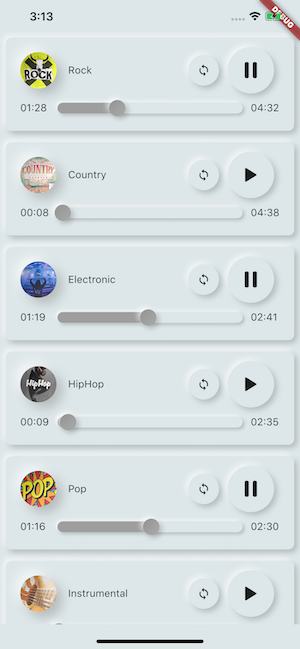
);
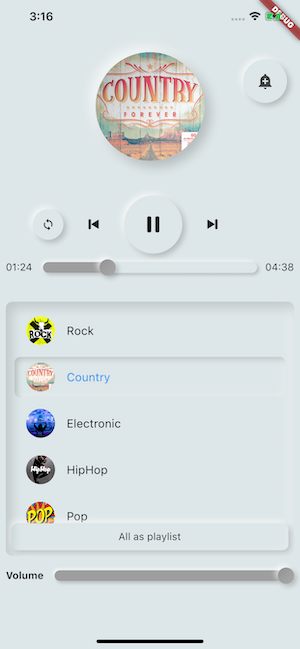
 dependencies :
assets_audio_player : ^3.0.8與flutter: ">=3.3.0" ,請確保升級您的SDK
你喜歡包裝嗎?給我買一個kofi :)
| 音頻源 | 安卓 | ios | 網絡 | macos |
|---|---|---|---|---|
| ?資產文件(資產路徑) | ✅ | ✅ | ✅ | ✅ |
| 網絡文件(URL) | ✅ | ✅ | ✅ | ✅ |
| ?本地文件(路徑) | ✅ | ✅ | ✅ | ✅ |
| ?網絡直播 /無線電(URL) (默認,hls,dash,smoothstream ) | ✅ | ✅ | ✅ | ✅ |
| 特徵 | 安卓 | ios | 網絡 | macos |
|---|---|---|---|---|
| ?多個玩家 | ✅ | ✅ | ✅ | ✅ |
| ?打開播放列表 | ✅ | ✅ | ✅ | ✅ |
| 系統通知 | ✅ | ✅ | ||
| 藍牙動作 | ✅ | ✅ | ||
| ?尊重系統靜音模式 | ✅ | ✅ | ||
| ?暫停電話 | ✅ | ✅ |
| 命令 | 安卓 | ios | 網絡 | macos |
|---|---|---|---|---|
| ▶玩 | ✅ | ✅ | ✅ | ✅ |
| ⏸暫停 | ✅ | ✅ | ✅ | ✅ |
| ⏹停下來 | ✅ | ✅ | ✅ | ✅ |
| ⏩尋求(位置) | ✅ | ✅ | ✅ | ✅ |
| ⏪⏩Seekby(位置) | ✅ | ✅ | ✅ | ✅ |
| ⏩前進(速度) | ✅ | ✅ | ✅ | ✅ |
| ⏪倒帶(速度) | ✅ | ✅ | ✅ | ✅ |
| ⏭下一個 | ✅ | ✅ | ✅ | ✅ |
| ⏮上一個 | ✅ | ✅ | ✅ | ✅ |
| 小部件 | 安卓 | ios | 網絡 | macos |
|---|---|---|---|---|
| ?音頻小部件 | ✅ | ✅ | ✅ | ✅ |
| ?小部件構建者 | ✅ | ✅ | ✅ | ✅ |
| ? AudioPlayer構建器擴展 | ✅ | ✅ | ✅ | ✅ |
| 特性 | 安卓 | ios | 網絡 | macos |
|---|---|---|---|---|
| ?環形 | ✅ | ✅ | ✅ | ✅ |
| ?洗牌 | ✅ | ✅ | ✅ | ✅ |
| ?獲取/設置音量 | ✅ | ✅ | ✅ | ✅ |
| ⏩獲取/設置播放速度 | ✅ | ✅ | ✅ | ✅ |
| ⏩獲取/設置俯仰 | ✅ |
| 聽眾 | 安卓 | ios | 網絡 | macos |
|---|---|---|---|---|
| ?聽眾準備就緒(已完成) | ✅ | ✅ | ✅ | ✅ |
| ?偵聽器電流位置 | ✅ | ✅ | ✅ | ✅ |
| ?聽眾完成了 | ✅ | ✅ | ✅ | ✅ |
| ?聽眾緩衝 | ✅ | ✅ | ✅ | ✅ |
| ?聽眾音量 | ✅ | ✅ | ✅ | ✅ |
| 聽眾玩速度 | ✅ | ✅ | ✅ | ✅ |
| 聽眾音調 | ✅ |
無需使用Assets_audio_player將歌曲複製到媒體緩存,您可以直接從資產中打開它們。
 flutter :
  assets :
- assets/audios/ final assetsAudioPlayer = AssetsAudioPlayer ();
assetsAudioPlayer. open (
Audio ( "assets/audios/song1.mp3" ),
);您也可以從URL播放網絡歌曲
 final assetsAudioPlayer = AssetsAudioPlayer ();

try {
    await assetsAudioPlayer. open (
        Audio . network ( "http://www.mysite.com/myMp3file.mp3" ),
    );
} catch (t) {
    //mp3 unreachable
}URL的直播 /收音機
與網絡的主要區別,如果您暫停/播放,在直播上,它將恢復以介紹持續時間
 final assetsAudioPlayer = AssetsAudioPlayer ();

try {
    await assetsAudioPlayer. open (
        Audio . liveStream ( MY_LIVESTREAM_URL ),
    );
} catch (t) {
    //stream unreachable
}並播放文件中的歌曲
 //create a new player
final assetsAudioPlayer = AssetsAudioPlayer ();

assetsAudioPlayer. open (
    Audio . file ( FILE_URI ),
);
對於文件URI,請查看https://pub.dev/packages/path_provider
assetsAudioPlayer. playOrPause ();
assetsAudioPlayer. play ();
assetsAudioPlayer. pause ();
assetsAudioPlayer. seek ( Duration to);
assetsAudioPlayer. seekBy ( Duration by);assetsAudioPlayer. forwardRewind ( double speed);
//if positive, forward, if negative, rewind assetsAudioPlayer. stop ();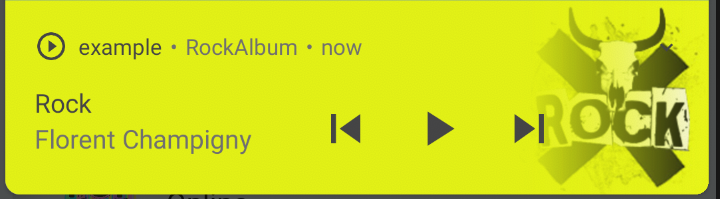
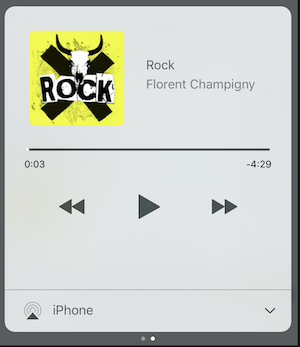
在iOS上,它將使用MPNowPlayingInfoCenter
 final audio = Audio . network ( "/assets/audio/country.mp3" ,
    metas : Metas (
            title :  "Country" ,
            artist : "Florent Champigny" ,
            album : "CountryAlbum" ,
            image : MetasImage . asset ( "assets/images/country.jpg" ), //can be MetasImage.network
          ),
);showNotification: true _player. open (audio, showNotification : true )自定義圖標(僅Android)
確保您在android/res/drawable中添加了這些圖標! ! !不在撲朔迷離的資產上! ! ! !
 await _assetsAudioPlayer. open (
        myAudio,
        showNotification : true ,
        notificationSettings : NotificationSettings (
            customStopIcon : AndroidResDrawable (name : "ic_stop_custom" ),
            customPauseIcon : AndroidResDrawable (name : "ic_pause_custom" ),
            customPlayIcon : AndroidResDrawable (name : "ic_play_custom" ),
            customPrevIcon : AndroidResDrawable (name : "ic_prev_custom" ),
            customNextIcon : AndroidResDrawable (name : "ic_next_custom" ),
        )
而且不要忘記告訴Proguard將這些資源保留為發布模式
(零件保留資源)
https://sites.google.com/a/android.com/tools/tech-docs/new-build-system/resource-shrinking
<? xml version = " 1.0 " encoding = " utf-8 " ?>
< resources xmlns : tools = " http://schemas.android.com/tools "
tools:keep= " @drawable/ic_next_custom, @drawable/ic_prev_custom, @drawable/ic_pause_custom, @drawable/ic_play_custom, @drawable/ic_stop_custom " />將圖標添加到Android的res文件夾中(Android/App/SRC/Main/Res)
將此圖標引用到您的AndroidManifest(Android/app/src/main/androidManifest.xml)中
< meta-data
     android : name = " assets.audio.player.notification.icon "
     android : resource = " @drawable/ic_music_custom " />
您還可以更改動作圖標
 <meta-data
    android:name="assets.audio.player.notification.icon.play"
    android:resource="@drawable/ic_play_custom"/>
<meta-data
    android:name="assets.audio.player.notification.icon.pause"
    android:resource="@drawable/ic_pause_custom"/>
<meta-data
    android:name="assets.audio.player.notification.icon.stop"
    android:resource="@drawable/ic_stop_custom"/>
<meta-data
    android:name="assets.audio.player.notification.icon.next"
    android:resource="@drawable/ic_next_custom"/>
<meta-data
    android:name="assets.audio.player.notification.icon.prev"
    android:resource="@drawable/ic_prev_custom"/>
添加主要
 AssetsAudioPlayer . setupNotificationsOpenAction ((notification) {
    //custom action
    return true ; //true : handled, does not notify others listeners
                 //false : enable others listeners to handle it
});
然後,如果您想在小部件上進行自定義操作
 AssetsAudioPlayer . addNotificationOpenAction ((notification) {
   //custom action
   return false ; //true : handled, does not notify others listeners
                 //false : enable others listeners to handle it
});您可以啟用/禁用通知操作
 open ( AUDIO ,
   showNotification : true ,
   notificationSettings : NotificationSettings (
       prevEnabled : false , //disable the previous button

       //and have a custom next action (will disable the default action)
       customNextAction : (player) {
         print ( "next" );
       }
   )

)創建音頻後,只需致電
audio. updateMetas (
       player : _assetsAudioPlayer, //add the player if the audio is actually played
       title : "My new title" ,
       artist : "My new artist" ,
       //if I not provide a new album, it keep the old one
       image : MetasImage . network (
         //my new image url
       ),
);您必須啟用通知才能使它們工作
可用遠程命令:
(目前僅適用於Android)
在打開歌曲/播放列表時,添加策略
assetsAudioPlayer. open (
   ...
  headPhoneStrategy : HeadPhoneStrategy .pauseOnUnplug,
  //headPhoneStrategy: HeadPhoneStrategy.none, //default
  //headPhoneStrategy: HeadPhoneStrategy.pauseOnUnplugPlayOnPlug,
)
如果您也想在藍牙上使用它,則必須在AndroidManifest.xml中添加藍牙許可
< uses-permission android : name = " android.permission.BLUETOOTH " />您可以使用Assetsaudioplayer.newplayer()創建新的Assetsaudioplayer,它將在其他本機媒體播放器中播放歌曲
這將使可以同時播放兩首歌
您可以擁有任意數量的球員!
 ///play 3 songs in parallel
AssetsAudioPlayer . newPlayer (). open (
    Audio ( "assets/audios/song1.mp3" )
);
AssetsAudioPlayer . newPlayer (). open (
    Audio ( "assets/audios/song2.mp3" )
);

//another way, with create, open, play & dispose the player on finish
AssetsAudioPlayer . playAndForget (
    Audio ( "assets/audios/song3.mp3" )
);每個玩家都有一個唯一生成的id ,您可以使用
final player = AssetsAudioPlayer . withId (id : "MY_UNIQUE_ID" );assetsAudioPlayer. open (
Playlist (
audios : [
Audio ( "assets/audios/song1.mp3" ),
Audio ( "assets/audios/song2.mp3" )
]
),
loopMode : LoopMode .playlist //loop the full playlist
);
assetsAudioPlayer. next ();
assetsAudioPlayer. prev ();
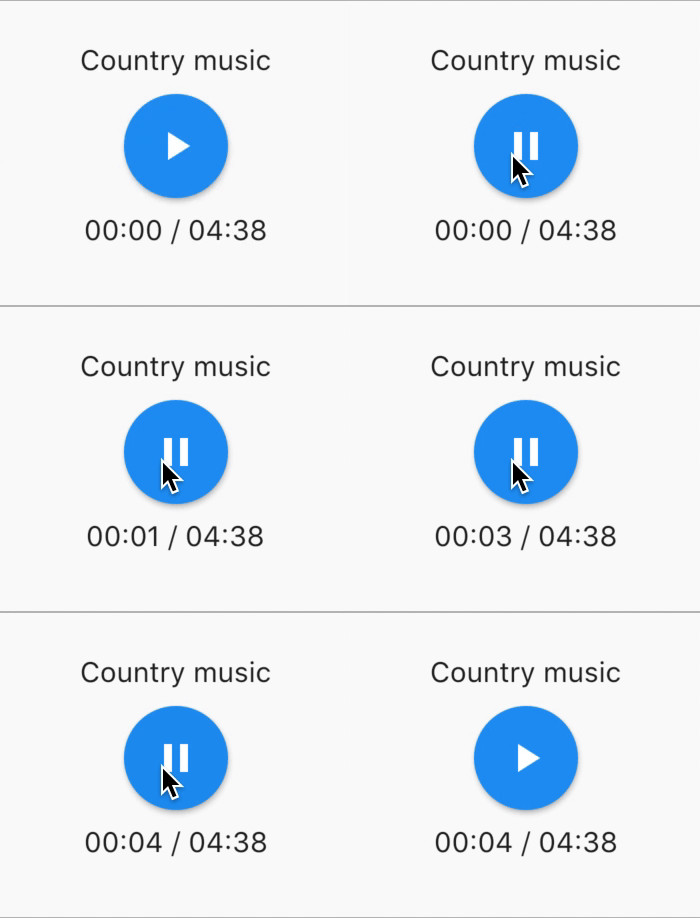
assetsAudioPlayer. playlistPlayAtIndex ( 1 );如果您想要一種更加顫抖的方式播放音頻,請嘗試AudioWidget !
 //inside a stateful widget

bool _play = false ;

@override
Widget build ( BuildContext context) {
  return AudioWidget . assets (
     path : "assets/audios/country.mp3" ,
     play : _play,
     child : RaisedButton (
           child : Text (
               _play ? "pause" : "play" ,
           ),
           onPressed : () {
               setState (() {
                 _play = ! _play;
               });
           }
      ),
      onReadyToPlay : (duration) {
          //onReadyToPlay
      },
      onPositionChanged : (current, duration) {
          //onPositionChanged
      },
  );
}
怎麼辦?停止 ? AudioWidget?
只需從樹上刪除音頻!或只是繼續play: false
所有聽眾都使用RXDART曝光流,Assetsaudioplayer將某些偵聽器視為ValueObserbable(可觀察到可同步訪問最後發射項目的可觀察);
 //The current playing audio, filled with the total song duration
assetsAudioPlayer.current //ValueObservable<PlayingAudio>

//Retrieve directly the current played asset
final PlayingAudio playing = assetsAudioPlayer.current.value;

//Listen to the current playing song
assetsAudioPlayer.current. listen ((playingAudio){
    final asset = playingAudio.assetAudio;
    final songDuration = playingAudio.duration;
}) //Listen to the current playing song
final duration = assetsAudioPlayer.current.value.duration;assetsAudioPlayer.currentPosition //ValueObservable<Duration>
//retrieve directly the current song position
final Duration position = assetsAudioPlayer.currentPosition.value;
return StreamBuilder (
stream : assetsAudioPlayer.currentPosition,
builder : (context, asyncSnapshot) {
final Duration duration = asyncSnapshot.data;
return Text (duration. toString ());
}),或使用玩家構建器!
 PlayerBuilder . currentPosition (
     player : _assetsAudioPlayer,
     builder : (context, duration) {
       return Text (duration. toString ());
     }
)
或玩家建造者擴展
_assetsAudioPlayer. builderCurrentPosition (
     builder : (context, duration) {
       return Text (duration. toString ());
     }
)布爾可觀察的代表當前的媒體演奏者的狀態
assetsAudioPlayer.isPlaying // ValueObservable<bool>

//retrieve directly the current player state
final bool playing = assetsAudioPlayer.isPlaying.value;

//will follow the AssetsAudioPlayer playing state
return StreamBuilder (
    stream : assetsAudioPlayer.isPlaying,
    builder : (context, asyncSnapshot) {
        final bool isPlaying = asyncSnapshot.data;
        return Text (isPlaying ? "Pause" : "Play" );
    }),
或使用玩家構建器!
 PlayerBuilder . isPlaying (
     player : _assetsAudioPlayer,
     builder : (context, isPlaying) {
       return Text (isPlaying ? "Pause" : "Play" );
     }
)
或玩家建造者擴展
_assetsAudioPlayer. builderIsPlaying (
     builder : (context, isPlaying) {
       return Text (isPlaying ? "Pause" : "Play" );
     }
)更改音量(0.0和1.0之間)
assetsAudioPlayer. setVolume ( 0.5 );媒體播放器可以遵循系統的“音量模式”(振動,靜音,正常),只需將respectSilentMode選擇參數設置為true
_player. open ( PLAYABLE , respectSilentMode : true );https://developer.android.com/reference/android/media/audiomanager.html?hl=fr#getringermode()
https://developer.apple.com/documentation/avfoundation/avaudiosessioncategorysoloambient
聽音量
 return StreamBuilder (
    stream : assetsAudioPlayer.volume,
    builder : (context, asyncSnapshot) {
        final double volume = asyncSnapshot.data;
        return Text ( "volume : $ volume " );
    }),
或使用玩家構建器!
 PlayerBuilder . volume (
     player : _assetsAudioPlayer,
     builder : (context, volume) {
       return Text ( "volume : $ volume " );
     }
)噹噹前歌曲結束時打電話給
它給出了剛完成的播放音頻
assetsAudioPlayer.playlistAudioFinished //ValueObservable<Playing>

assetsAudioPlayer.playlistAudioFinished. listen (( Playing playing){

})
當完整的播放列表完成播放時打電話
assetsAudioPlayer.playlistFinished //ValueObservable<bool>

assetsAudioPlayer.playlistFinished. listen ((finished){

}) final LoopMode loopMode = assetsAudioPlayer.loop;
// possible values
// LoopMode.none : not looping
// LoopMode.single : looping a single audio
// LoopMode.playlist : looping the fyll playlist
assetsAudioPlayer. setLoopMode ( LoopMode .single);
assetsAudioPlayer.loopMode. listen ((loopMode){
//listen to loop
})
assetsAudioPlayer. toggleLoop (); //toggle the value of loopingassetsAudioPlayer. setPlaySpeed ( 1.5 );
assetsAudioPlayer.playSpeed. listen ((playSpeed){
//listen to playSpeed
})
//change play speed for a particular Audio
Audio audio = Audio . network (
url,
playSpeed : 1.5
);
assetsAudioPlayer. open (audio);assetsAudioPlayer. setPitch ( 1.2 );
assetsAudioPlayer.pitch. listen ((pitch){
//listen to pitch
})
//change pitch for a particular Audio
Audio audio = Audio . network (
url,
pitch : 1.2
);
assetsAudioPlayer. open (audio);默認情況下,在播放錯誤時,它會停止音頻
但是您可以添加自定義行為
_player.onErrorDo = (handler){
  handler.player. stop ();
};
打開另一個音頻
_player.onErrorDo = (handler){
  handler.player. open ( ANOTHER_AUDIO );
};
嘗試在同一位置再次打開
_player.onErrorDo = (handler){
  handler.player. open (
      handler.playlist. copyWith (
        startIndex : handler.playlistIndex
      ),
      seek : handler.currentPosition
  );
}; Android usesCleartextTraffic="true"允許HTTPS調用,如果您使用HTTP,您將出現錯誤
 <?xml version="1.0" encoding="utf-8"?>
<manifest ...>
    <uses-permission android:name="android.permission.INTERNET" />
    <application
        ...
        android:usesCleartextTraffic="true"
        ...>
        ...
    </application>
</manifest>
iOS僅允許HTTPS調用NSAppTransportSecurity如果您使用HTTP,您NSAllowsArbitraryLoads出現錯誤
 <key>NSAppTransportSecurity</key>
<dict>
    <key>NSAllowsArbitraryLoads</key>
    <true/>
</dict>
要啟用MACOS上的HTTP調用,您必須將輸入/輸出調用功能添加到info.plist中
 <key>NSAppTransportSecurity</key>
<dict>
    <key>NSAllowsArbitraryLoads</key>
    <true/>
</dict>
<key>UIBackgroundModes</key>
<array>
    <string>audio</string>
    <string>fetch</string>
</array>
<key>com.apple.security.network.client</key>
<true/>
在你的
Runner/DebugProfile.entitlements
添加
 <key>com.apple.security.network.client</key>
<true/>
完整的Runner/DebugProfile.entitlements
 <?xml version="1.0" encoding="UTF-8"?>
<!DOCTYPE plist PUBLIC "-//Apple//DTD PLIST 1.0//EN" "http://www.apple.com/DTDs/PropertyList-1.0.dtd">
<plist version="1.0">
<dict>
	<key>com.apple.security.app-sandbox</key>
	<true/>
	<key>com.apple.security.cs.allow-jit</key>
	<true/>
	<key>com.apple.security.network.server</key>
	<true/>
	<key>com.apple.security.network.client</key>
	<true/>
</dict>
</plist>
樣品中使用的所有uses都來自https://www.freemusicarchive.org/





