Flutter AssetsAudioPlayer
1.0.0

Tocar música / áudio armazenado em arquivos de ativos (simultaneamente) diretamente do Flutter (Android / iOS / Web / MacOS).
Você também pode usar os arquivos de áudio de reprodução da rede usando o URL, os rádios/transmissão ao vivo e os arquivos locais
A notificação pode ser exibida no Android e iOS, e as ações Bluetooth são tratadas
 flutter :
  assets :
    - assets/audios/
AssetsAudioPlayer . newPlayer (). open (
Audio ( "assets/audios/song1.mp3" ),
autoStart : true ,
showNotification : true ,
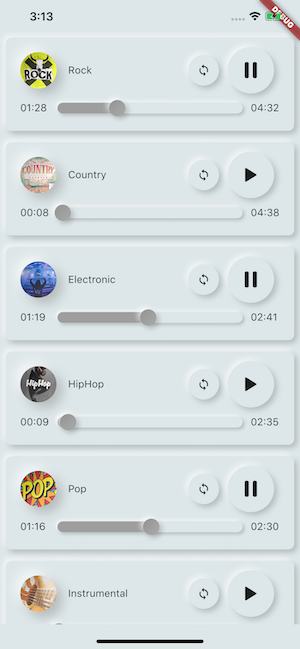
);
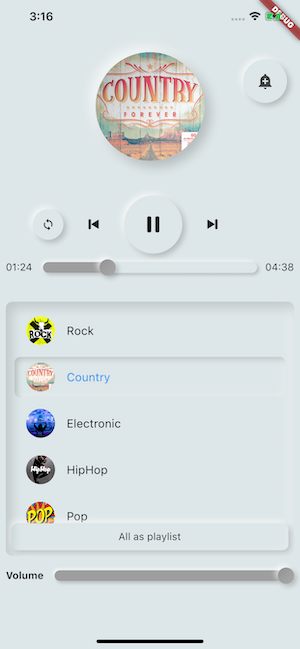
 dependencies :
  assets_audio_player : ^3.0.8
Funciona com flutter: ">=3.3.0" , certifique -se de atualizar seu SDK
Você gosta do pacote? Compre -me um kofi :)
| Fonte de áudio | Android | iOS | Web | Macos |
|---|---|---|---|---|
| ? Sustde de ativo (caminho do ativo) | ✅ | ✅ | ✅ | ✅ |
| Arquivo de rede (URL) | ✅ | ✅ | ✅ | ✅ |
| ? Arquivo local (caminho) | ✅ | ✅ | ✅ | ✅ |
| ? Rede LiveStream / Radio (URL) ( Padrão, HLS, Dash, Smoothstream ) | ✅ | ✅ | ✅ | ✅ |
| Recurso | Android | iOS | Web | Macos |
|---|---|---|---|---|
| ? Vários jogadores | ✅ | ✅ | ✅ | ✅ |
| ? Lista de reprodução aberta | ✅ | ✅ | ✅ | ✅ |
| Notificação do sistema | ✅ | ✅ | ||
| Ações Bluetooth | ✅ | ✅ | ||
| ? Respeito o modo silencioso do sistema | ✅ | ✅ | ||
| ? Pausa em telefonema | ✅ | ✅ |
| Comandos | Android | iOS | Web | Macos |
|---|---|---|---|---|
| ▶ Play | ✅ | ✅ | ✅ | ✅ |
| ⏸ Pausa | ✅ | ✅ | ✅ | ✅ |
| ⏹ Pare | ✅ | ✅ | ✅ | ✅ |
| ⏩ Busca (posição) | ✅ | ✅ | ✅ | ✅ |
| ⏪⏩ Seekby (posição) | ✅ | ✅ | ✅ | ✅ |
| ⏩ Avanço (velocidade) | ✅ | ✅ | ✅ | ✅ |
| ⏪ Rewind (velocidade) | ✅ | ✅ | ✅ | ✅ |
| ⏭ Em seguida | ✅ | ✅ | ✅ | ✅ |
| ⏮ Anterior | ✅ | ✅ | ✅ | ✅ |
| Widgets | Android | iOS | Web | Macos |
|---|---|---|---|---|
| ? Widget de áudio | ✅ | ✅ | ✅ | ✅ |
| ? Construtores de widgets | ✅ | ✅ | ✅ | ✅ |
| ? Extensão dos construtores do Audioplayer | ✅ | ✅ | ✅ | ✅ |
| Propriedades | Android | iOS | Web | Macos |
|---|---|---|---|---|
| ? Laço | ✅ | ✅ | ✅ | ✅ |
| ? Embaralhar | ✅ | ✅ | ✅ | ✅ |
| ? Obtenha/defina o volume | ✅ | ✅ | ✅ | ✅ |
| ⏩ Obtenha/defina a velocidade de jogo | ✅ | ✅ | ✅ | ✅ |
| ⏩ Get/Set Pitch | ✅ |
| Ouvintes | Android | iOS | Web | Macos |
|---|---|---|---|---|
| ? Ouvinte onready (completização) | ✅ | ✅ | ✅ | ✅ |
| ? Lista Currentposition | ✅ | ✅ | ✅ | ✅ |
| ? O ouvinte terminou | ✅ | ✅ | ✅ | ✅ |
| ? Buffer de ouvinte | ✅ | ✅ | ✅ | ✅ |
| ? Volume do ouvinte | ✅ | ✅ | ✅ | ✅ |
| ? Speed tocam do ouvinte | ✅ | ✅ | ✅ | ✅ |
| ? | ✅ |
Não é necessário copiar músicas para um cache de mídia, com assets_audio_player Você pode abri -las diretamente dos ativos.
 flutter :
  assets :
- assets/audios/ final assetsAudioPlayer = AssetsAudioPlayer ();
assetsAudioPlayer. open (
Audio ( "assets/audios/song1.mp3" ),
);Você também pode tocar músicas de rede do URL
 final assetsAudioPlayer = AssetsAudioPlayer ();

try {
    await assetsAudioPlayer. open (
        Audio . network ( "http://www.mysite.com/myMp3file.mp3" ),
    );
} catch (t) {
    //mp3 unreachable
}
Dream ao vivo / rádio da URL
A principal diferença com a rede, se você pausar/reproduzir, na transmissão ao vivo, ele retomará a duração
 final assetsAudioPlayer = AssetsAudioPlayer ();

try {
    await assetsAudioPlayer. open (
        Audio . liveStream ( MY_LIVESTREAM_URL ),
    );
} catch (t) {
    //stream unreachable
}
E tocar músicas do arquivo
 //create a new player
final assetsAudioPlayer = AssetsAudioPlayer ();

assetsAudioPlayer. open (
    Audio . file ( FILE_URI ),
);
Para o arquivo URI, consulte https://pub.dev/packages/path_provider
assetsAudioPlayer. playOrPause ();
assetsAudioPlayer. play ();
assetsAudioPlayer. pause ();
assetsAudioPlayer. seek ( Duration to);
assetsAudioPlayer. seekBy ( Duration by);assetsAudioPlayer. forwardRewind ( double speed);
//if positive, forward, if negative, rewind assetsAudioPlayer. stop ();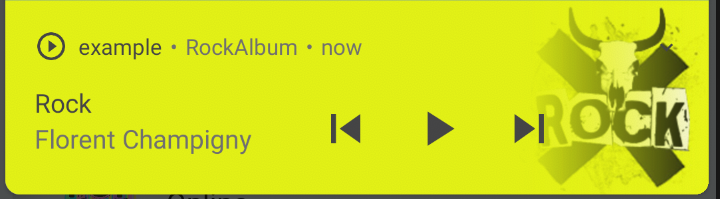
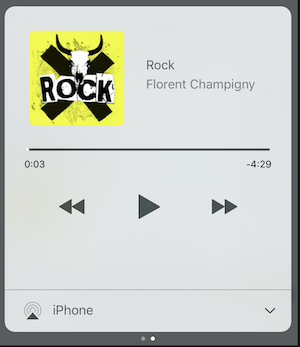
No iOS, ele usará MPNowPlayingInfoCenter
 final audio = Audio . network ( "/assets/audio/country.mp3" ,
    metas : Metas (
            title :  "Country" ,
            artist : "Florent Champigny" ,
            album : "CountryAlbum" ,
            image : MetasImage . asset ( "assets/images/country.jpg" ), //can be MetasImage.network
          ),
);showNotification: true _player. open (audio, showNotification : true )Ícone personalizado (somente Android)
Certifique -se de adicionar esses ícones dentro do seu android/res/drawable !!! Não em ativos de vibração !!!!
 await _assetsAudioPlayer. open (
        myAudio,
        showNotification : true ,
        notificationSettings : NotificationSettings (
            customStopIcon : AndroidResDrawable (name : "ic_stop_custom" ),
            customPauseIcon : AndroidResDrawable (name : "ic_pause_custom" ),
            customPlayIcon : AndroidResDrawable (name : "ic_play_custom" ),
            customPrevIcon : AndroidResDrawable (name : "ic_prev_custom" ),
            customNextIcon : AndroidResDrawable (name : "ic_next_custom" ),
        )
E não se esqueça de dizer a Proguard para manter esses recursos para o modo de liberação
(Parte mantendo os recursos)
https://sites.google.com/a/android.com/tools/tech-docs/new-build-system/resource-hrifrique
<? xml version = " 1.0 " encoding = " utf-8 " ?>
< resources xmlns : tools = " http://schemas.android.com/tools "
tools:keep= " @drawable/ic_next_custom, @drawable/ic_prev_custom, @drawable/ic_pause_custom, @drawable/ic_play_custom, @drawable/ic_stop_custom " /> Adicione seu ícone na pasta res Android (Android/App/Src/Main/Res)
Faça referência a este ícone ao seu AndroidManifest (Android/App/Src/Main/AndroidManifest.xml)
< meta-data
     android : name = " assets.audio.player.notification.icon "
     android : resource = " @drawable/ic_music_custom " />
Você também pode alterar os ícones de ações
 <meta-data
    android:name="assets.audio.player.notification.icon.play"
    android:resource="@drawable/ic_play_custom"/>
<meta-data
    android:name="assets.audio.player.notification.icon.pause"
    android:resource="@drawable/ic_pause_custom"/>
<meta-data
    android:name="assets.audio.player.notification.icon.stop"
    android:resource="@drawable/ic_stop_custom"/>
<meta-data
    android:name="assets.audio.player.notification.icon.next"
    android:resource="@drawable/ic_next_custom"/>
<meta-data
    android:name="assets.audio.player.notification.icon.prev"
    android:resource="@drawable/ic_prev_custom"/>
Adicione Main
 AssetsAudioPlayer . setupNotificationsOpenAction ((notification) {
    //custom action
    return true ; //true : handled, does not notify others listeners
                 //false : enable others listeners to handle it
});
Então, se você quiser uma ação personalizada no widget
 AssetsAudioPlayer . addNotificationOpenAction ((notification) {
   //custom action
   return false ; //true : handled, does not notify others listeners
                 //false : enable others listeners to handle it
});Você pode ativar/desativar uma ação de notificação
 open ( AUDIO ,
   showNotification : true ,
   notificationSettings : NotificationSettings (
       prevEnabled : false , //disable the previous button

       //and have a custom next action (will disable the default action)
       customNextAction : (player) {
         print ( "next" );
       }
   )

)Após sua criação de áudio, basta ligar
audio. updateMetas (
       player : _assetsAudioPlayer, //add the player if the audio is actually played
       title : "My new title" ,
       artist : "My new artist" ,
       //if I not provide a new album, it keep the old one
       image : MetasImage . network (
         //my new image url
       ),
);Você tem que permitir a notificação para fazê -los funcionar
Comandos remotos disponíveis:
(Apenas para Android por enquanto)
Ao abrir uma música/lista de reprodução, adicione uma estratégia
assetsAudioPlayer. open (
   ...
  headPhoneStrategy : HeadPhoneStrategy .pauseOnUnplug,
  //headPhoneStrategy: HeadPhoneStrategy.none, //default
  //headPhoneStrategy: HeadPhoneStrategy.pauseOnUnplugPlayOnPlug,
)
Se você quiser fazê -lo funcionar no Bluetooth também, precisará adicionar a permissão Bluetooth dentro do seu AndroidManifest.xml
< uses-permission android : name = " android.permission.BLUETOOTH " />Você pode criar um novo AssetsAudioPlayer usando assetsaudioplayer.newplayer (), que tocará músicas em um mídia nativo diferente
Isso permitirá tocar duas músicas simultaneamente
Você pode ter quantos jogadores quiser!
 ///play 3 songs in parallel
AssetsAudioPlayer . newPlayer (). open (
    Audio ( "assets/audios/song1.mp3" )
);
AssetsAudioPlayer . newPlayer (). open (
    Audio ( "assets/audios/song2.mp3" )
);

//another way, with create, open, play & dispose the player on finish
AssetsAudioPlayer . playAndForget (
    Audio ( "assets/audios/song3.mp3" )
);
Cada jogador tem um id gerado exclusivo, você pode recuperá -los ou criá -los manualmente
final player = AssetsAudioPlayer . withId (id : "MY_UNIQUE_ID" );assetsAudioPlayer. open (
Playlist (
audios : [
Audio ( "assets/audios/song1.mp3" ),
Audio ( "assets/audios/song2.mp3" )
]
),
loopMode : LoopMode .playlist //loop the full playlist
);
assetsAudioPlayer. next ();
assetsAudioPlayer. prev ();
assetsAudioPlayer. playlistPlayAtIndex ( 1 ); Se você quiser uma maneira mais vibrada de jogar áudio, tente o AudioWidget !
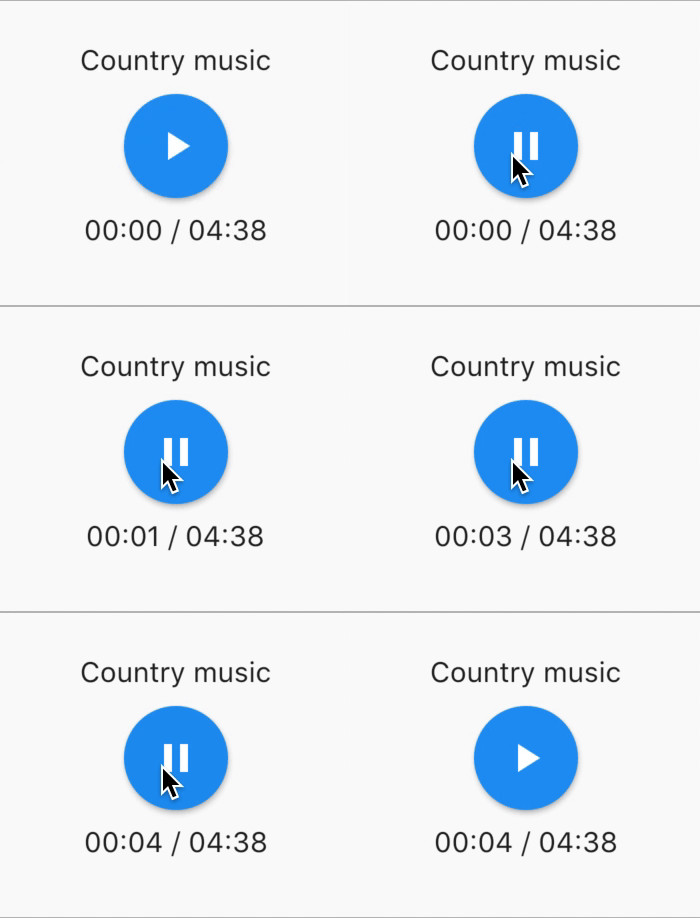
 //inside a stateful widget

bool _play = false ;

@override
Widget build ( BuildContext context) {
  return AudioWidget . assets (
     path : "assets/audios/country.mp3" ,
     play : _play,
     child : RaisedButton (
           child : Text (
               _play ? "pause" : "play" ,
           ),
           onPressed : () {
               setState (() {
                 _play = ! _play;
               });
           }
      ),
      onReadyToPlay : (duration) {
          //onReadyToPlay
      },
      onPositionChanged : (current, duration) {
          //onPositionChanged
      },
  );
}
Como fazer? parar ? O Audiowidget?
Basta remover o áudio da árvore! Ou simplesmente mantenha play: false
Todos os ouvintes expõem fluxos usando o RXDART, o AssetsAudioPlayer expõe alguns ouvintes como ValueObservable (observável que fornece acesso síncrono ao último item emitido);
 //The current playing audio, filled with the total song duration
assetsAudioPlayer.current //ValueObservable<PlayingAudio>

//Retrieve directly the current played asset
final PlayingAudio playing = assetsAudioPlayer.current.value;

//Listen to the current playing song
assetsAudioPlayer.current. listen ((playingAudio){
    final asset = playingAudio.assetAudio;
    final songDuration = playingAudio.duration;
}) //Listen to the current playing song
final duration = assetsAudioPlayer.current.value.duration;assetsAudioPlayer.currentPosition //ValueObservable<Duration>
//retrieve directly the current song position
final Duration position = assetsAudioPlayer.currentPosition.value;
return StreamBuilder (
stream : assetsAudioPlayer.currentPosition,
builder : (context, asyncSnapshot) {
final Duration duration = asyncSnapshot.data;
return Text (duration. toString ());
}),Ou use um jogador de jogador!
 PlayerBuilder . currentPosition (
     player : _assetsAudioPlayer,
     builder : (context, duration) {
       return Text (duration. toString ());
     }
)
ou extensão do construtor de jogadores
_assetsAudioPlayer. builderCurrentPosition (
     builder : (context, duration) {
       return Text (duration. toString ());
     }
)Observável booleano representando o estado de reprodução do MediaPlayer atual
assetsAudioPlayer.isPlaying // ValueObservable<bool>

//retrieve directly the current player state
final bool playing = assetsAudioPlayer.isPlaying.value;

//will follow the AssetsAudioPlayer playing state
return StreamBuilder (
    stream : assetsAudioPlayer.isPlaying,
    builder : (context, asyncSnapshot) {
        final bool isPlaying = asyncSnapshot.data;
        return Text (isPlaying ? "Pause" : "Play" );
    }),
Ou use um jogador de jogador!
 PlayerBuilder . isPlaying (
     player : _assetsAudioPlayer,
     builder : (context, isPlaying) {
       return Text (isPlaying ? "Pause" : "Play" );
     }
)
ou extensão do construtor de jogadores
_assetsAudioPlayer. builderIsPlaying (
     builder : (context, isPlaying) {
       return Text (isPlaying ? "Pause" : "Play" );
     }
)Altere o volume (entre 0,0 e 1,0)
assetsAudioPlayer. setVolume ( 0.5 ); O Media Player pode seguir o sistema "Modo de volume" (vibrar, silenciado, normal) simplesmente definir o parâmetro opcional true respectSilentMode
_player. open ( PLAYABLE , respectSilentMode : true );https://developer.android.com/reference/android/media/audiomanager.html?hl=fr#getringermode ()
https://developer.apple.com/documentation/avfoundation/avaudiosessionCategorysoloambient
Ouça o volume
 return StreamBuilder (
    stream : assetsAudioPlayer.volume,
    builder : (context, asyncSnapshot) {
        final double volume = asyncSnapshot.data;
        return Text ( "volume : $ volume " );
    }),
Ou use um jogador de jogador!
 PlayerBuilder . volume (
     player : _assetsAudioPlayer,
     builder : (context, volume) {
       return Text ( "volume : $ volume " );
     }
)Chamado quando a música atual terminar para tocar,
Dá o áudio que acabou de terminar
assetsAudioPlayer.playlistAudioFinished //ValueObservable<Playing>

assetsAudioPlayer.playlistAudioFinished. listen (( Playing playing){

})
Chamado quando a lista de reprodução completa terminar para jogar
assetsAudioPlayer.playlistFinished //ValueObservable<bool>

assetsAudioPlayer.playlistFinished. listen ((finished){

}) final LoopMode loopMode = assetsAudioPlayer.loop;
// possible values
// LoopMode.none : not looping
// LoopMode.single : looping a single audio
// LoopMode.playlist : looping the fyll playlist
assetsAudioPlayer. setLoopMode ( LoopMode .single);
assetsAudioPlayer.loopMode. listen ((loopMode){
//listen to loop
})
assetsAudioPlayer. toggleLoop (); //toggle the value of loopingassetsAudioPlayer. setPlaySpeed ( 1.5 );
assetsAudioPlayer.playSpeed. listen ((playSpeed){
//listen to playSpeed
})
//change play speed for a particular Audio
Audio audio = Audio . network (
url,
playSpeed : 1.5
);
assetsAudioPlayer. open (audio);assetsAudioPlayer. setPitch ( 1.2 );
assetsAudioPlayer.pitch. listen ((pitch){
//listen to pitch
})
//change pitch for a particular Audio
Audio audio = Audio . network (
url,
pitch : 1.2
);
assetsAudioPlayer. open (audio);Por padrão, ao reproduzir erro, ele pare o áudio
Mas você pode adicionar um comportamento personalizado
_player.onErrorDo = (handler){
  handler.player. stop ();
};
Abra outro áudio
_player.onErrorDo = (handler){
  handler.player. open ( ANOTHER_AUDIO );
};
Tente abrir novamente na mesma posição
_player.onErrorDo = (handler){
  handler.player. open (
      handler.playlist. copyWith (
        startIndex : handler.playlistIndex
      ),
      seek : handler.currentPosition
  );
}; O Android permite apenas chamadas HTTPS, você terá um erro se estiver usando HTTP, não se esqueça de adicionar permissão da Internet e o SEET usesCleartextTraffic="true" no seu AndroidManifest.xml
 <?xml version="1.0" encoding="utf-8"?>
<manifest ...>
    <uses-permission android:name="android.permission.INTERNET" />
    <application
        ...
        android:usesCleartextTraffic="true"
        ...>
        ...
    </application>
</manifest>
O iOS permite apenas chamadas HTTPS, você terá um erro se estiver usando HTTP, não se esqueça de editar sua info.plist e definir NSAppTransportSecurity como NSAllowsArbitraryLoads
 <key>NSAppTransportSecurity</key>
<dict>
    <key>NSAllowsArbitraryLoads</key>
    <true/>
</dict>
Para ativar as chamadas HTTP no macOS, você deve adicionar recursos de chamadas de entrada/saída em info.plist
 <key>NSAppTransportSecurity</key>
<dict>
    <key>NSAllowsArbitraryLoads</key>
    <true/>
</dict>
<key>UIBackgroundModes</key>
<array>
    <string>audio</string>
    <string>fetch</string>
</array>
<key>com.apple.security.network.client</key>
<true/>
e em seu
Runner/DebugProfile.entitlements
adicionar
 <key>com.apple.security.network.client</key>
<true/>
Runner/DebugProfile.entitlements
 <?xml version="1.0" encoding="UTF-8"?>
<!DOCTYPE plist PUBLIC "-//Apple//DTD PLIST 1.0//EN" "http://www.apple.com/DTDs/PropertyList-1.0.dtd">
<plist version="1.0">
<dict>
	<key>com.apple.security.app-sandbox</key>
	<true/>
	<key>com.apple.security.cs.allow-jit</key>
	<true/>
	<key>com.apple.security.network.server</key>
	<true/>
	<key>com.apple.security.network.client</key>
	<true/>
</dict>
</plist>
Todas as músicas usadas nas amostras vieram de https://www.freemusicarchive.org/





