Flutter AssetsAudioPlayer
1.0.0

Spielen Sie Musik / Audio, die in Assets -Dateien (gleichzeitig) direkt von Flutter (Android / iOS / Web / macOS) gespeichert sind.
Sie können auch Audiodateien aus dem Netzwerk mithilfe der URL-, Radios/Livestream- und lokalen Dateien verwenden
Die Benachrichtigung kann auf Android & iOS angezeigt werden, und Bluetooth -Aktionen werden behandelt
 flutter :
  assets :
    - assets/audios/
AssetsAudioPlayer . newPlayer (). open (
Audio ( "assets/audios/song1.mp3" ),
autoStart : true ,
showNotification : true ,
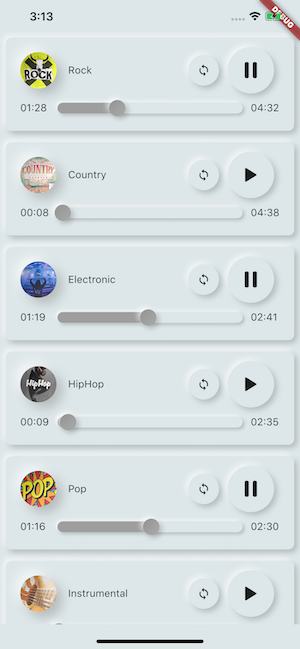
);
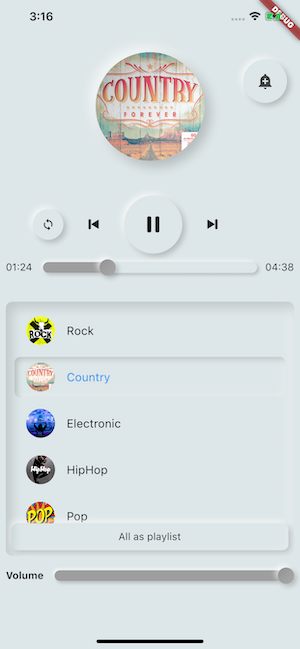
 dependencies :
  assets_audio_player : ^3.0.8
Funktioniert mit flutter: ">=3.3.0" , upgraden Sie Ihre SDK auf
Du magst das Paket? Kaufen Sie mir einen Kofi :)
| Audioquelle | Android | iOS | Netz | Macos |
|---|---|---|---|---|
| ? ️ ASSET -Datei (Asset Pfad) | ✅ | ✅ | ✅ | ✅ |
| Netzwerkdatei (URL) | ✅ | ✅ | ✅ | ✅ |
| ? Lokale Datei (Pfad) | ✅ | ✅ | ✅ | ✅ |
| ? Netzwerk Livestream / Radio (URL) ( Standard, HLS, Dash, SmoothStream ) | ✅ | ✅ | ✅ | ✅ |
| Besonderheit | Android | iOS | Netz | Macos |
|---|---|---|---|---|
| ? Mehrere Spieler | ✅ | ✅ | ✅ | ✅ |
| ? Open Playlist | ✅ | ✅ | ✅ | ✅ |
| Systembenachrichtigung | ✅ | ✅ | ||
| Bluetooth -Aktionen | ✅ | ✅ | ||
| ? Respektsystem Silent Modus | ✅ | ✅ | ||
| ? Pause bei Telefonanrufen | ✅ | ✅ |
| Befehle | Android | iOS | Netz | Macos |
|---|---|---|---|---|
| ▶ Spielen | ✅ | ✅ | ✅ | ✅ |
| ⏸ Pause | ✅ | ✅ | ✅ | ✅ |
| ⏹ Stop | ✅ | ✅ | ✅ | ✅ |
| ⏩ Suchen (Position) | ✅ | ✅ | ✅ | ✅ |
| ⏪⏩ Seekby (Position) | ✅ | ✅ | ✅ | ✅ |
| ⏩ Vorwärts (Geschwindigkeit) | ✅ | ✅ | ✅ | ✅ |
| ⏪ Rückspulen (Geschwindigkeit) | ✅ | ✅ | ✅ | ✅ |
| ⏭ Weiter | ✅ | ✅ | ✅ | ✅ |
| ⏮ pre | ✅ | ✅ | ✅ | ✅ |
| Widgets | Android | iOS | Netz | Macos |
|---|---|---|---|---|
| ? Audio -Widget | ✅ | ✅ | ✅ | ✅ |
| ? Widget Builders | ✅ | ✅ | ✅ | ✅ |
| ? Audioplayer Builders -Erweiterung | ✅ | ✅ | ✅ | ✅ |
| Eigenschaften | Android | iOS | Netz | Macos |
|---|---|---|---|---|
| ? Schleife | ✅ | ✅ | ✅ | ✅ |
| ? Shuffle | ✅ | ✅ | ✅ | ✅ |
| ? Lautstärke erhalten/festlegen | ✅ | ✅ | ✅ | ✅ |
| ⏩ Spielgeschwindigkeit erhalten/festlegen | ✅ | ✅ | ✅ | ✅ |
| ⏩ Get/Set Pitch | ✅ |
| Zuhörer | Android | iOS | Netz | Macos |
|---|---|---|---|---|
| ? Hörer Onready (Fersion) | ✅ | ✅ | ✅ | ✅ |
| ? Hörerstromposition | ✅ | ✅ | ✅ | ✅ |
| ? Hörer beendet | ✅ | ✅ | ✅ | ✅ |
| ? Hörerpufferung | ✅ | ✅ | ✅ | ✅ |
| ? Hörervolumen | ✅ | ✅ | ✅ | ✅ |
| ? Hörer spielen Geschwindigkeit | ✅ | ✅ | ✅ | ✅ |
| ? Hörer | ✅ |
Keine benötigten, um Songs in einen Mediencache zu kopieren, mit assets_audio_player können Sie sie direkt aus den Assets öffnen.
 flutter :
  assets :
- assets/audios/ final assetsAudioPlayer = AssetsAudioPlayer ();
assetsAudioPlayer. open (
Audio ( "assets/audios/song1.mp3" ),
);Sie können auch Netzwerksongs von URL abspielen
 final assetsAudioPlayer = AssetsAudioPlayer ();

try {
    await assetsAudioPlayer. open (
        Audio . network ( "http://www.mysite.com/myMp3file.mp3" ),
    );
} catch (t) {
    //mp3 unreachable
}
Livestream / Radio aus der URL
Der Hauptunterschied zum Netzwerk, wenn Sie innehalten/spielen, wird es auf Livestream wieder aufgenommen, die Dauer zu präsentieren
 final assetsAudioPlayer = AssetsAudioPlayer ();

try {
    await assetsAudioPlayer. open (
        Audio . liveStream ( MY_LIVESTREAM_URL ),
    );
} catch (t) {
    //stream unreachable
}
Und spielen Songs aus der Datei
 //create a new player
final assetsAudioPlayer = AssetsAudioPlayer ();

assetsAudioPlayer. open (
    Audio . file ( FILE_URI ),
);
Für Datei URI finden Sie bitte https://pub.dev/packages/path_provider
assetsAudioPlayer. playOrPause ();
assetsAudioPlayer. play ();
assetsAudioPlayer. pause ();
assetsAudioPlayer. seek ( Duration to);
assetsAudioPlayer. seekBy ( Duration by);assetsAudioPlayer. forwardRewind ( double speed);
//if positive, forward, if negative, rewind assetsAudioPlayer. stop ();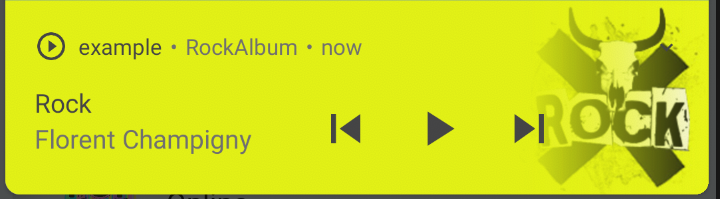
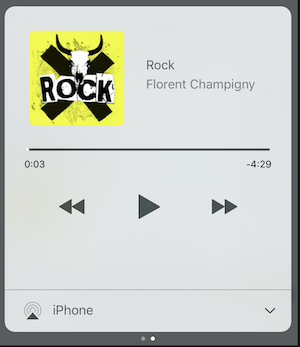
Auf iOS wird es MPNowPlayingInfoCenter verwenden
 final audio = Audio . network ( "/assets/audio/country.mp3" ,
    metas : Metas (
            title :  "Country" ,
            artist : "Florent Champigny" ,
            album : "CountryAlbum" ,
            image : MetasImage . asset ( "assets/images/country.jpg" ), //can be MetasImage.network
          ),
);showNotification: true _player. open (audio, showNotification : true )Benutzerdefiniertes Symbol (nur Android)
Stellen Sie sicher, dass Sie diese Symbole in Ihrem android/res/drawable hinzugefügt haben !!! Nicht auf Flattern Assets !!!!
 await _assetsAudioPlayer. open (
        myAudio,
        showNotification : true ,
        notificationSettings : NotificationSettings (
            customStopIcon : AndroidResDrawable (name : "ic_stop_custom" ),
            customPauseIcon : AndroidResDrawable (name : "ic_pause_custom" ),
            customPlayIcon : AndroidResDrawable (name : "ic_play_custom" ),
            customPrevIcon : AndroidResDrawable (name : "ic_prev_custom" ),
            customNextIcon : AndroidResDrawable (name : "ic_next_custom" ),
        )
Und vergessen Sie nicht, dass Sie Proguard sagen sollen, dass diese Ressourcen für den Release -Modus aufbewahrt werden sollen
(Teil des Teils Ressourcen)
https://sites.google.com/a/android.com/tools/tech-docs/new-build-system/resource-shrinking
<? xml version = " 1.0 " encoding = " utf-8 " ?>
< resources xmlns : tools = " http://schemas.android.com/tools "
tools:keep= " @drawable/ic_next_custom, @drawable/ic_prev_custom, @drawable/ic_pause_custom, @drawable/ic_play_custom, @drawable/ic_stop_custom " /> Fügen Sie Ihr Symbol in den res -Ordner Ihres Android -Ordners (Android/App/SRC/Main/res) hinzu.
Verweisen Sie dieses Symbol in Ihr AndroidManifest (Android/App/SRC/Main/AndroidManifest.xml)
< meta-data
     android : name = " assets.audio.player.notification.icon "
     android : resource = " @drawable/ic_music_custom " />
Sie können auch Aktionssymbole ändern
 <meta-data
    android:name="assets.audio.player.notification.icon.play"
    android:resource="@drawable/ic_play_custom"/>
<meta-data
    android:name="assets.audio.player.notification.icon.pause"
    android:resource="@drawable/ic_pause_custom"/>
<meta-data
    android:name="assets.audio.player.notification.icon.stop"
    android:resource="@drawable/ic_stop_custom"/>
<meta-data
    android:name="assets.audio.player.notification.icon.next"
    android:resource="@drawable/ic_next_custom"/>
<meta-data
    android:name="assets.audio.player.notification.icon.prev"
    android:resource="@drawable/ic_prev_custom"/>
Main hinzufügen
 AssetsAudioPlayer . setupNotificationsOpenAction ((notification) {
    //custom action
    return true ; //true : handled, does not notify others listeners
                 //false : enable others listeners to handle it
});
Wenn Sie dann eine benutzerdefinierte Aktion auf Widget wünschen
 AssetsAudioPlayer . addNotificationOpenAction ((notification) {
   //custom action
   return false ; //true : handled, does not notify others listeners
                 //false : enable others listeners to handle it
});Sie können eine Benachrichtigungsaktion aktivieren/deaktivieren
 open ( AUDIO ,
   showNotification : true ,
   notificationSettings : NotificationSettings (
       prevEnabled : false , //disable the previous button

       //and have a custom next action (will disable the default action)
       customNextAction : (player) {
         print ( "next" );
       }
   )

)Rufen Sie nach Ihrer Audioerstellung einfach an
audio. updateMetas (
       player : _assetsAudioPlayer, //add the player if the audio is actually played
       title : "My new title" ,
       artist : "My new artist" ,
       //if I not provide a new album, it keep the old one
       image : MetasImage . network (
         //my new image url
       ),
);Sie müssen eine Benachrichtigung ermöglichen, damit sie zum Laufen gebracht werden
Verfügbare Remote -Befehle:
(Nur für Android vorerst)
Fügen Sie beim Öffnen eines Songs/einer Wiedergabeliste eine Strategie hinzu
assetsAudioPlayer. open (
   ...
  headPhoneStrategy : HeadPhoneStrategy .pauseOnUnplug,
  //headPhoneStrategy: HeadPhoneStrategy.none, //default
  //headPhoneStrategy: HeadPhoneStrategy.pauseOnUnplugPlayOnPlug,
)
Wenn Sie es auch auf Bluetooth funktionieren möchten, müssen Sie die Bluetooth -Berechtigung in Ihrem AndroidManifest.xml hinzufügen
< uses-permission android : name = " android.permission.BLUETOOTH " />Sie können neue Assetsaudioplayer mit AssetsAudioplayer.NewPlayer () erstellen, das Songs in einem anderen nativen Medienspieler abspielt
Dies ermöglicht es, zwei Songs gleichzeitig zu spielen
Sie können so viele Spieler haben, wie Sie möchten!
 ///play 3 songs in parallel
AssetsAudioPlayer . newPlayer (). open (
    Audio ( "assets/audios/song1.mp3" )
);
AssetsAudioPlayer . newPlayer (). open (
    Audio ( "assets/audios/song2.mp3" )
);

//another way, with create, open, play & dispose the player on finish
AssetsAudioPlayer . playAndForget (
    Audio ( "assets/audios/song3.mp3" )
);
Jeder Spieler id
final player = AssetsAudioPlayer . withId (id : "MY_UNIQUE_ID" );assetsAudioPlayer. open (
Playlist (
audios : [
Audio ( "assets/audios/song1.mp3" ),
Audio ( "assets/audios/song2.mp3" )
]
),
loopMode : LoopMode .playlist //loop the full playlist
);
assetsAudioPlayer. next ();
assetsAudioPlayer. prev ();
assetsAudioPlayer. playlistPlayAtIndex ( 1 ); Wenn Sie eine flattere Möglichkeit haben möchten, Audio zu spielen, probieren Sie das AudioWidget !
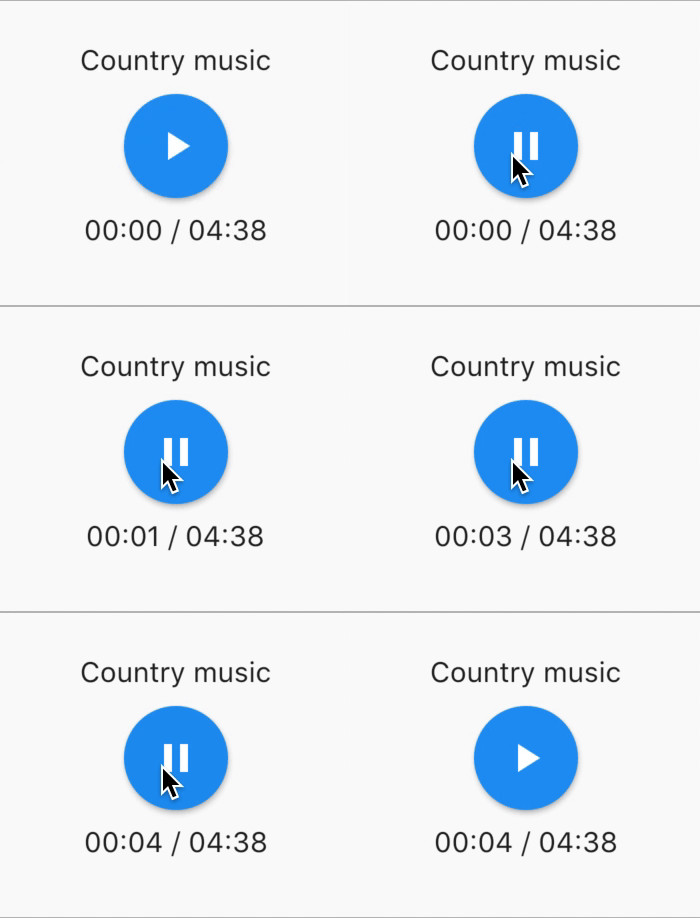
 //inside a stateful widget

bool _play = false ;

@override
Widget build ( BuildContext context) {
  return AudioWidget . assets (
     path : "assets/audios/country.mp3" ,
     play : _play,
     child : RaisedButton (
           child : Text (
               _play ? "pause" : "play" ,
           ),
           onPressed : () {
               setState (() {
                 _play = ! _play;
               });
           }
      ),
      onReadyToPlay : (duration) {
          //onReadyToPlay
      },
      onPositionChanged : (current, duration) {
          //onPositionChanged
      },
  );
}
Wie? stoppen ? das audiowidget?
Entfernen Sie einfach das Audio vom Baum! Oder einfach play: false
Alle Zuhörer enthüllen Streams mit RxDart, Assetsaudioplayer, einige Hörer als ValueObservable (beobachtbar, der einen synchronen Zugriff auf das letzte emittierte Element ermöglicht).
 //The current playing audio, filled with the total song duration
assetsAudioPlayer.current //ValueObservable<PlayingAudio>

//Retrieve directly the current played asset
final PlayingAudio playing = assetsAudioPlayer.current.value;

//Listen to the current playing song
assetsAudioPlayer.current. listen ((playingAudio){
    final asset = playingAudio.assetAudio;
    final songDuration = playingAudio.duration;
}) //Listen to the current playing song
final duration = assetsAudioPlayer.current.value.duration;assetsAudioPlayer.currentPosition //ValueObservable<Duration>
//retrieve directly the current song position
final Duration position = assetsAudioPlayer.currentPosition.value;
return StreamBuilder (
stream : assetsAudioPlayer.currentPosition,
builder : (context, asyncSnapshot) {
final Duration duration = asyncSnapshot.data;
return Text (duration. toString ());
}),Oder benutzen Sie einen Playerbuilder!
 PlayerBuilder . currentPosition (
     player : _assetsAudioPlayer,
     builder : (context, duration) {
       return Text (duration. toString ());
     }
)
oder Player Builder -Erweiterung
_assetsAudioPlayer. builderCurrentPosition (
     builder : (context, duration) {
       return Text (duration. toString ());
     }
)boolescher Beobachtbar, der den aktuellen Mediaplayer spielt, den Staat spielt
assetsAudioPlayer.isPlaying // ValueObservable<bool>

//retrieve directly the current player state
final bool playing = assetsAudioPlayer.isPlaying.value;

//will follow the AssetsAudioPlayer playing state
return StreamBuilder (
    stream : assetsAudioPlayer.isPlaying,
    builder : (context, asyncSnapshot) {
        final bool isPlaying = asyncSnapshot.data;
        return Text (isPlaying ? "Pause" : "Play" );
    }),
Oder benutzen Sie einen Playerbuilder!
 PlayerBuilder . isPlaying (
     player : _assetsAudioPlayer,
     builder : (context, isPlaying) {
       return Text (isPlaying ? "Pause" : "Play" );
     }
)
oder Player Builder -Erweiterung
_assetsAudioPlayer. builderIsPlaying (
     builder : (context, isPlaying) {
       return Text (isPlaying ? "Pause" : "Play" );
     }
)Ändern Sie das Volumen (zwischen 0,0 und 1,0)
assetsAudioPlayer. setVolume ( 0.5 ); Der Media -Player kann dem System "Volumenmodus" folgen (vibrieren, gedämpft, normal) einfach den optionalen Parameter respectSilentMode als true einstellen
_player. open ( PLAYABLE , respectSilentMode : true );https://developer.android.com/reference/android/media/audiomanager.html?hl=fr#getRingMode ()
https://developer.apple.com/documentation/avfoundation/avaudioSessioncategorysoloambient
Hören Sie die Lautstärke an
 return StreamBuilder (
    stream : assetsAudioPlayer.volume,
    builder : (context, asyncSnapshot) {
        final double volume = asyncSnapshot.data;
        return Text ( "volume : $ volume " );
    }),
Oder benutzen Sie einen Playerbuilder!
 PlayerBuilder . volume (
     player : _assetsAudioPlayer,
     builder : (context, volume) {
       return Text ( "volume : $ volume " );
     }
)Angerufen, als das aktuelle Lied gespielt hat,
Es gibt dem spielerischen Audio, das gerade fertig ist
assetsAudioPlayer.playlistAudioFinished //ValueObservable<Playing>

assetsAudioPlayer.playlistAudioFinished. listen (( Playing playing){

})
Angerufen, als die vollständige Wiedergabeliste zum Spielen fertig ist
assetsAudioPlayer.playlistFinished //ValueObservable<bool>

assetsAudioPlayer.playlistFinished. listen ((finished){

}) final LoopMode loopMode = assetsAudioPlayer.loop;
// possible values
// LoopMode.none : not looping
// LoopMode.single : looping a single audio
// LoopMode.playlist : looping the fyll playlist
assetsAudioPlayer. setLoopMode ( LoopMode .single);
assetsAudioPlayer.loopMode. listen ((loopMode){
//listen to loop
})
assetsAudioPlayer. toggleLoop (); //toggle the value of loopingassetsAudioPlayer. setPlaySpeed ( 1.5 );
assetsAudioPlayer.playSpeed. listen ((playSpeed){
//listen to playSpeed
})
//change play speed for a particular Audio
Audio audio = Audio . network (
url,
playSpeed : 1.5
);
assetsAudioPlayer. open (audio);assetsAudioPlayer. setPitch ( 1.2 );
assetsAudioPlayer.pitch. listen ((pitch){
//listen to pitch
})
//change pitch for a particular Audio
Audio audio = Audio . network (
url,
pitch : 1.2
);
assetsAudioPlayer. open (audio);Standardmäßig stoppt es beim Spielenfehler das Audio
Sie können jedoch ein benutzerdefiniertes Verhalten hinzufügen
_player.onErrorDo = (handler){
  handler.player. stop ();
};
Öffnen Sie ein weiteres Audio
_player.onErrorDo = (handler){
  handler.player. open ( ANOTHER_AUDIO );
};
Versuchen Sie, sich in derselben Position erneut zu öffnen
_player.onErrorDo = (handler){
  handler.player. open (
      handler.playlist. copyWith (
        startIndex : handler.playlistIndex
      ),
      seek : handler.currentPosition
  );
}; Android erlauben nur HTTPS -Aufrufe, Sie haben einen Fehler, wenn Sie HTTP verwenden. Vergessen Sie nicht, die Internet -Berechtigung hinzuzufügen, und Seet usesCleartextTraffic="true" in Ihrem AndroidManifest.xml
 <?xml version="1.0" encoding="utf-8"?>
<manifest ...>
    <uses-permission android:name="android.permission.INTERNET" />
    <application
        ...
        android:usesCleartextTraffic="true"
        ...>
        ...
    </application>
</manifest>
iOS erlauben nur HTTPS -Aufrufe NSAppTransportSecurity Sie haben einen Fehler NSAllowsArbitraryLoads wenn Sie HTTP verwenden . Vergessen
 <key>NSAppTransportSecurity</key>
<dict>
    <key>NSAllowsArbitraryLoads</key>
    <true/>
</dict>
Um HTTP -Aufrufe auf macOS zu aktivieren, müssen Sie Eingänge/Ausgaber Anrufe in info.plist hinzufügen
 <key>NSAppTransportSecurity</key>
<dict>
    <key>NSAllowsArbitraryLoads</key>
    <true/>
</dict>
<key>UIBackgroundModes</key>
<array>
    <string>audio</string>
    <string>fetch</string>
</array>
<key>com.apple.security.network.client</key>
<true/>
und in deinem
Runner/DebugProfile.entitlements
hinzufügen
 <key>com.apple.security.network.client</key>
<true/>
Komplette Runner/DebugProfile.entitlements
 <?xml version="1.0" encoding="UTF-8"?>
<!DOCTYPE plist PUBLIC "-//Apple//DTD PLIST 1.0//EN" "http://www.apple.com/DTDs/PropertyList-1.0.dtd">
<plist version="1.0">
<dict>
	<key>com.apple.security.app-sandbox</key>
	<true/>
	<key>com.apple.security.cs.allow-jit</key>
	<true/>
	<key>com.apple.security.network.server</key>
	<true/>
	<key>com.apple.security.network.client</key>
	<true/>
</dict>
</plist>
Alle in den Samples verwendeten Musik stammen von https://www.freemusicarchive.org/





