Flutter AssetsAudioPlayer
1.0.0

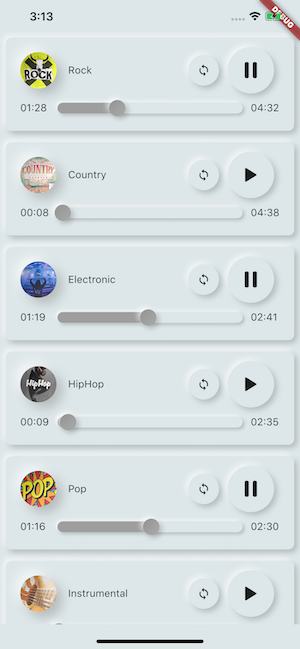
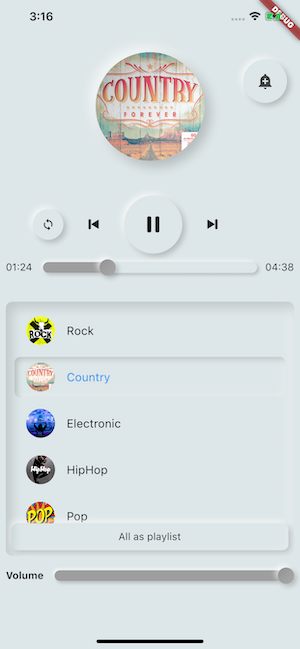
قم بتشغيل الموسيقى / الصوت المخزنة في ملفات الأصول (في وقت واحد) مباشرة من Flutter (Android / iOS / Web / MacOS).
يمكنك أيضًا استخدام ملفات الصوت من الشبكة باستخدام عنوان URL وراديو/البث المباشر والملفات المحلية
يمكن عرض الإخطار على Android & iOS ، ويتم التعامل مع إجراءات Bluetooth
 flutter :
  assets :
    - assets/audios/
AssetsAudioPlayer . newPlayer (). open (
Audio ( "assets/audios/song1.mp3" ),
autoStart : true ,
showNotification : true ,
);
 dependencies :
  assets_audio_player : ^3.0.8
يعمل مع flutter: ">=3.3.0" ، تأكد من ترقية SDK الخاص بك
هل تحب الحزمة؟ اشتر لي كوفي :)
| مصدر الصوت | Android | iOS | الويب | ماكوس |
|---|---|---|---|---|
| ملف الأصول (مسار الأصول) | ✅ | ✅ | ✅ | ✅ |
| ملف الشبكة (URL) | ✅ | ✅ | ✅ | ✅ |
| ؟ الملف المحلي (المسار) | ✅ | ✅ | ✅ | ✅ |
| ؟ شبكة Livestream / Radio (URL) ( افتراضي ، HLS ، DASH ، SmoothStream ) | ✅ | ✅ | ✅ | ✅ |
| ميزة | Android | iOS | الويب | ماكوس |
|---|---|---|---|---|
| ؟ لاعبين متعددين | ✅ | ✅ | ✅ | ✅ |
| ؟ فتح قائمة التشغيل | ✅ | ✅ | ✅ | ✅ |
| إشعار النظام | ✅ | ✅ | ||
| إجراءات البلوتوث | ✅ | ✅ | ||
| ؟ احترم وضع النظام الصامت | ✅ | ✅ | ||
| ؟ توقف مؤقتًا على الاتصال الهاتفي | ✅ | ✅ |
| الأوامر | Android | iOS | الويب | ماكوس |
|---|---|---|---|---|
| ▶ اللعب | ✅ | ✅ | ✅ | ✅ |
| ⏸ توقف | ✅ | ✅ | ✅ | ✅ |
| ⏹ توقف | ✅ | ✅ | ✅ | ✅ |
| ⏩ اطلب (موقف) | ✅ | ✅ | ✅ | ✅ |
| ⏪⏩ Seekby (موقف) | ✅ | ✅ | ✅ | ✅ |
| ⏩ إلى الأمام (السرعة) | ✅ | ✅ | ✅ | ✅ |
| ⏪ الترجيح (السرعة) | ✅ | ✅ | ✅ | ✅ |
| ⏭ التالي | ✅ | ✅ | ✅ | ✅ |
| ⏮ السابق | ✅ | ✅ | ✅ | ✅ |
| الحاجيات | Android | iOS | الويب | ماكوس |
|---|---|---|---|---|
| ؟ أداة الصوت | ✅ | ✅ | ✅ | ✅ |
| ؟ البنائين القطعة | ✅ | ✅ | ✅ | ✅ |
| ؟ امتداد بناة السمع | ✅ | ✅ | ✅ | ✅ |
| ملكيات | Android | iOS | الويب | ماكوس |
|---|---|---|---|---|
| ؟ حلقة | ✅ | ✅ | ✅ | ✅ |
| ؟ خلط | ✅ | ✅ | ✅ | ✅ |
| ؟ الحصول على/ضبط حجم | ✅ | ✅ | ✅ | ✅ |
| ⏩ الحصول على/تعيين سرعة اللعب | ✅ | ✅ | ✅ | ✅ |
| ⏩ الحصول على/تعيين الملعب | ✅ |
| المستمعين | Android | iOS | الويب | ماكوس |
|---|---|---|---|---|
| ؟ المستمع onReady (مكتمل) | ✅ | ✅ | ✅ | ✅ |
| ؟ المستمع CurrentPosition | ✅ | ✅ | ✅ | ✅ |
| ؟ انتهى المستمع | ✅ | ✅ | ✅ | ✅ |
| ؟ مستمع التخزين المؤقت | ✅ | ✅ | ✅ | ✅ |
| ؟ حجم المستمع | ✅ | ✅ | ✅ | ✅ |
| ؟ | ✅ | ✅ | ✅ | ✅ |
| ؟ مستمع الملعب | ✅ |
لا حاجة لنسخ الأغاني إلى ذاكرة التخزين المؤقت الوسائط ، مع Assets_audio_player يمكنك فتحها مباشرة من الأصول.
 flutter :
  assets :
- assets/audios/ final assetsAudioPlayer = AssetsAudioPlayer ();
assetsAudioPlayer. open (
Audio ( "assets/audios/song1.mp3" ),
);يمكنك أيضًا تشغيل أغاني الشبكة من عنوان URL
 final assetsAudioPlayer = AssetsAudioPlayer ();

try {
    await assetsAudioPlayer. open (
        Audio . network ( "http://www.mysite.com/myMp3file.mp3" ),
    );
} catch (t) {
    //mp3 unreachable
}
البث المباشر / الراديو من عنوان URL
الفرق الرئيسي في الشبكة ، إذا توقفت/تلعب ، على البث المباشر ، فسيستأنفها لتقديم المدة
 final assetsAudioPlayer = AssetsAudioPlayer ();

try {
    await assetsAudioPlayer. open (
        Audio . liveStream ( MY_LIVESTREAM_URL ),
    );
} catch (t) {
    //stream unreachable
}
وتشغيل الأغاني من الملف
 //create a new player
final assetsAudioPlayer = AssetsAudioPlayer ();

assetsAudioPlayer. open (
    Audio . file ( FILE_URI ),
);
للملف URI ، يرجى إلقاء نظرة على https://pub.dev/packages/path_provider
assetsAudioPlayer. playOrPause ();
assetsAudioPlayer. play ();
assetsAudioPlayer. pause ();
assetsAudioPlayer. seek ( Duration to);
assetsAudioPlayer. seekBy ( Duration by);assetsAudioPlayer. forwardRewind ( double speed);
//if positive, forward, if negative, rewind assetsAudioPlayer. stop ();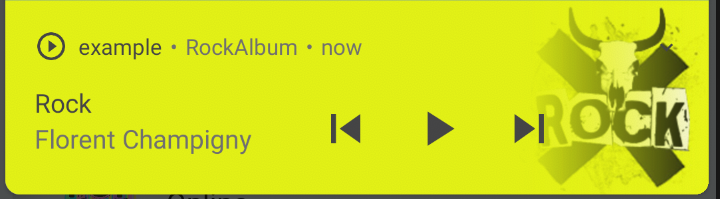
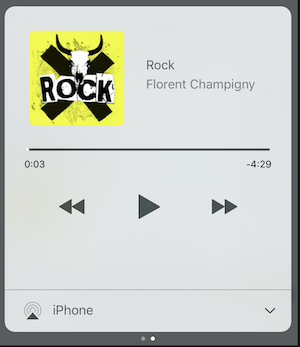
على iOS ، سوف يستخدم MPNowPlayingInfoCenter
 final audio = Audio . network ( "/assets/audio/country.mp3" ,
    metas : Metas (
            title :  "Country" ,
            artist : "Florent Champigny" ,
            album : "CountryAlbum" ,
            image : MetasImage . asset ( "assets/images/country.jpg" ), //can be MetasImage.network
          ),
);showNotification: true _player. open (audio, showNotification : true )أيقونة مخصصة (Android فقط)
تأكد من إضافة تلك الرموز داخل android/res/drawable !!! ليس على أصول رفرفة !!!!
 await _assetsAudioPlayer. open (
        myAudio,
        showNotification : true ,
        notificationSettings : NotificationSettings (
            customStopIcon : AndroidResDrawable (name : "ic_stop_custom" ),
            customPauseIcon : AndroidResDrawable (name : "ic_pause_custom" ),
            customPlayIcon : AndroidResDrawable (name : "ic_play_custom" ),
            customPrevIcon : AndroidResDrawable (name : "ic_prev_custom" ),
            customNextIcon : AndroidResDrawable (name : "ic_next_custom" ),
        )
ولا تنسى إخبار بروغارد للحفاظ على هذه الموارد لوضع الإصدار
(جزء الحفاظ على الموارد)
https://sites.google.com/a/android.com/tools/tech-docs/new-build-system/resource-hrinking
<? xml version = " 1.0 " encoding = " utf-8 " ?>
< resources xmlns : tools = " http://schemas.android.com/tools "
tools:keep= " @drawable/ic_next_custom, @drawable/ic_prev_custom, @drawable/ic_pause_custom, @drawable/ic_play_custom, @drawable/ic_stop_custom " /> أضف الرمز الخاص بك إلى مجلد res Android (Android/App/SRC/Main/Res)
الرجوع إلى هذا الرمز إلى AndroidManifest الخاص بك (Android/APP/SRC/Main/Androidmanifest.xml)
< meta-data
     android : name = " assets.audio.player.notification.icon "
     android : resource = " @drawable/ic_music_custom " />
يمكنك أيضًا تغيير أيقونات الإجراءات
 <meta-data
    android:name="assets.audio.player.notification.icon.play"
    android:resource="@drawable/ic_play_custom"/>
<meta-data
    android:name="assets.audio.player.notification.icon.pause"
    android:resource="@drawable/ic_pause_custom"/>
<meta-data
    android:name="assets.audio.player.notification.icon.stop"
    android:resource="@drawable/ic_stop_custom"/>
<meta-data
    android:name="assets.audio.player.notification.icon.next"
    android:resource="@drawable/ic_next_custom"/>
<meta-data
    android:name="assets.audio.player.notification.icon.prev"
    android:resource="@drawable/ic_prev_custom"/>
إضافة في الرئيسية
 AssetsAudioPlayer . setupNotificationsOpenAction ((notification) {
    //custom action
    return true ; //true : handled, does not notify others listeners
                 //false : enable others listeners to handle it
});
ثم إذا كنت تريد إجراء مخصص على القطعة
 AssetsAudioPlayer . addNotificationOpenAction ((notification) {
   //custom action
   return false ; //true : handled, does not notify others listeners
                 //false : enable others listeners to handle it
});يمكنك تمكين/تعطيل إجراء الإخطار
 open ( AUDIO ,
   showNotification : true ,
   notificationSettings : NotificationSettings (
       prevEnabled : false , //disable the previous button

       //and have a custom next action (will disable the default action)
       customNextAction : (player) {
         print ( "next" );
       }
   )

)بعد إنشاء الصوت الخاص بك ، فقط اتصل
audio. updateMetas (
       player : _assetsAudioPlayer, //add the player if the audio is actually played
       title : "My new title" ,
       artist : "My new artist" ,
       //if I not provide a new album, it keep the old one
       image : MetasImage . network (
         //my new image url
       ),
);عليك تمكين الإخطار لجعلهم يعملون
الأوامر البعيدة المتاحة:
(فقط لنظام Android الآن)
أثناء فتح أغنية/قائمة تشغيل ، أضف استراتيجية
assetsAudioPlayer. open (
   ...
  headPhoneStrategy : HeadPhoneStrategy .pauseOnUnplug,
  //headPhoneStrategy: HeadPhoneStrategy.none, //default
  //headPhoneStrategy: HeadPhoneStrategy.pauseOnUnplugPlayOnPlug,
)
إذا كنت ترغب في جعلها تعمل على Bluetooth أيضًا ، فستضطر إلى إضافة إذن Bluetooth داخل AndroidManifest.xml
< uses-permission android : name = " android.permission.BLUETOOTH " />يمكنك إنشاء AssetSaudiopLayer جديد باستخدام AssetSaudiopLayer.newplayer () ، والذي سيعزف على الأغاني في مشغل وسائط أصلي مختلف
سيمكن هذا من تشغيل أغنيتين في وقت واحد
يمكنك الحصول على أكبر عدد من اللاعبين كما تريد!
 ///play 3 songs in parallel
AssetsAudioPlayer . newPlayer (). open (
    Audio ( "assets/audios/song1.mp3" )
);
AssetsAudioPlayer . newPlayer (). open (
    Audio ( "assets/audios/song2.mp3" )
);

//another way, with create, open, play & dispose the player on finish
AssetsAudioPlayer . playAndForget (
    Audio ( "assets/audios/song3.mp3" )
);
كل لاعب لديه id إنشاؤه فريدًا ، يمكنك استرداده أو إنشاءه يدويًا باستخدامه
final player = AssetsAudioPlayer . withId (id : "MY_UNIQUE_ID" );assetsAudioPlayer. open (
Playlist (
audios : [
Audio ( "assets/audios/song1.mp3" ),
Audio ( "assets/audios/song2.mp3" )
]
),
loopMode : LoopMode .playlist //loop the full playlist
);
assetsAudioPlayer. next ();
assetsAudioPlayer. prev ();
assetsAudioPlayer. playlistPlayAtIndex ( 1 ); إذا كنت تريد طريقة أكثر رفرفة لتشغيل الصوت ، جرب AudioWidget !
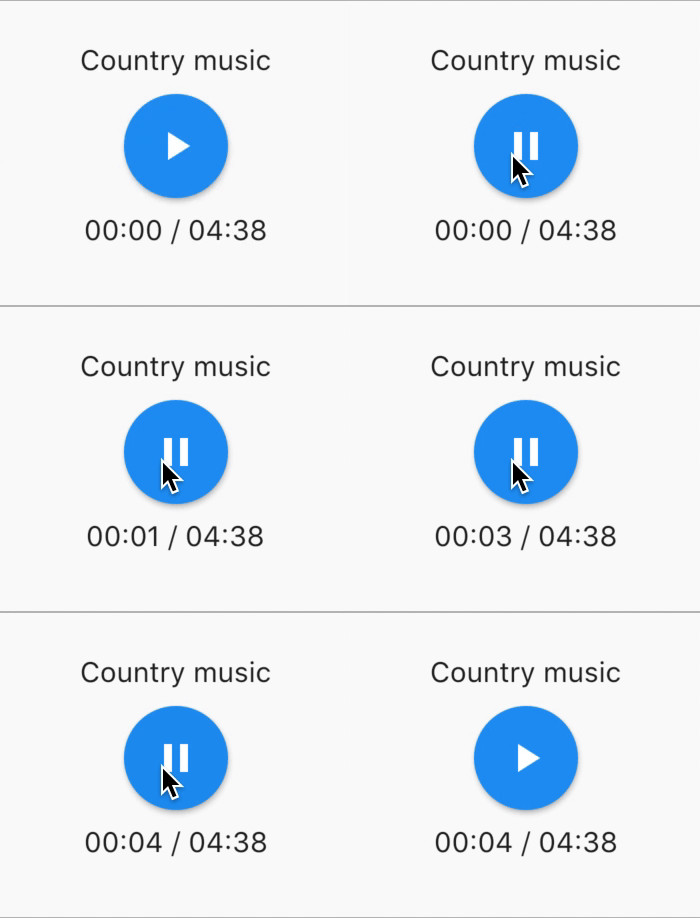
 //inside a stateful widget

bool _play = false ;

@override
Widget build ( BuildContext context) {
  return AudioWidget . assets (
     path : "assets/audios/country.mp3" ,
     play : _play,
     child : RaisedButton (
           child : Text (
               _play ? "pause" : "play" ,
           ),
           onPressed : () {
               setState (() {
                 _play = ! _play;
               });
           }
      ),
      onReadyToPlay : (duration) {
          //onReadyToPlay
      },
      onPositionChanged : (current, duration) {
          //onPositionChanged
      },
  );
}
كيف؟ قف ؟ المسموع؟
فقط قم بإزالة الصوت من الشجرة! أو ببساطة الحفاظ على play: false
جميع المستمعين يعرضون التدفقات باستخدام RXDART ، يعرض AssetSaudiOplayer بعض المستمعين على أنهم قابلين للملاحظة (يمكن ملاحظتها والتي توفر وصولًا متزامنًا إلى آخر عنصر ينبعث منه) ؛
 //The current playing audio, filled with the total song duration
assetsAudioPlayer.current //ValueObservable<PlayingAudio>

//Retrieve directly the current played asset
final PlayingAudio playing = assetsAudioPlayer.current.value;

//Listen to the current playing song
assetsAudioPlayer.current. listen ((playingAudio){
    final asset = playingAudio.assetAudio;
    final songDuration = playingAudio.duration;
}) //Listen to the current playing song
final duration = assetsAudioPlayer.current.value.duration;assetsAudioPlayer.currentPosition //ValueObservable<Duration>
//retrieve directly the current song position
final Duration position = assetsAudioPlayer.currentPosition.value;
return StreamBuilder (
stream : assetsAudioPlayer.currentPosition,
builder : (context, asyncSnapshot) {
final Duration duration = asyncSnapshot.data;
return Text (duration. toString ());
}),أو استخدام لاعب!
 PlayerBuilder . currentPosition (
     player : _assetsAudioPlayer,
     builder : (context, duration) {
       return Text (duration. toString ());
     }
)
أو تمديد منشئ اللاعب
_assetsAudioPlayer. builderCurrentPosition (
     builder : (context, duration) {
       return Text (duration. toString ());
     }
)منطقية يمكن ملاحظتها التي تمثل حالة لعب MediaPlayer الحالية
assetsAudioPlayer.isPlaying // ValueObservable<bool>

//retrieve directly the current player state
final bool playing = assetsAudioPlayer.isPlaying.value;

//will follow the AssetsAudioPlayer playing state
return StreamBuilder (
    stream : assetsAudioPlayer.isPlaying,
    builder : (context, asyncSnapshot) {
        final bool isPlaying = asyncSnapshot.data;
        return Text (isPlaying ? "Pause" : "Play" );
    }),
أو استخدام لاعب!
 PlayerBuilder . isPlaying (
     player : _assetsAudioPlayer,
     builder : (context, isPlaying) {
       return Text (isPlaying ? "Pause" : "Play" );
     }
)
أو تمديد منشئ اللاعب
_assetsAudioPlayer. builderIsPlaying (
     builder : (context, isPlaying) {
       return Text (isPlaying ? "Pause" : "Play" );
     }
)قم بتغيير مستوى الصوت (بين 0.0 و 1.0)
assetsAudioPlayer. setVolume ( 0.5 ); يمكن لمشغل الوسائط متابعة النظام "وضع مستوى الصوت" (الاهتزاز ، الصامت ، العادي) ببساطة تعيين المعلمة الاختيارية respectSilentMode على النحو true
_player. open ( PLAYABLE , respectSilentMode : true );https://developer.android.com/reference/android/media/audiomanager.html؟hl=fr#getringermode ()
https://developer.apple.com/documentation/avfoundation/avaudiosessioncategorysoloambient
استمع إلى مستوى الصوت
 return StreamBuilder (
    stream : assetsAudioPlayer.volume,
    builder : (context, asyncSnapshot) {
        final double volume = asyncSnapshot.data;
        return Text ( "volume : $ volume " );
    }),
أو استخدام لاعب!
 PlayerBuilder . volume (
     player : _assetsAudioPlayer,
     builder : (context, volume) {
       return Text ( "volume : $ volume " );
     }
)استدعاء عندما انتهت الأغنية الحالية للتشغيل ،
إنه يعطي صوت اللعب الذي انتهى للتو
assetsAudioPlayer.playlistAudioFinished //ValueObservable<Playing>

assetsAudioPlayer.playlistAudioFinished. listen (( Playing playing){

})
اتصل عندما تنتهي قائمة التشغيل الكاملة للعب
assetsAudioPlayer.playlistFinished //ValueObservable<bool>

assetsAudioPlayer.playlistFinished. listen ((finished){

}) final LoopMode loopMode = assetsAudioPlayer.loop;
// possible values
// LoopMode.none : not looping
// LoopMode.single : looping a single audio
// LoopMode.playlist : looping the fyll playlist
assetsAudioPlayer. setLoopMode ( LoopMode .single);
assetsAudioPlayer.loopMode. listen ((loopMode){
//listen to loop
})
assetsAudioPlayer. toggleLoop (); //toggle the value of loopingassetsAudioPlayer. setPlaySpeed ( 1.5 );
assetsAudioPlayer.playSpeed. listen ((playSpeed){
//listen to playSpeed
})
//change play speed for a particular Audio
Audio audio = Audio . network (
url,
playSpeed : 1.5
);
assetsAudioPlayer. open (audio);assetsAudioPlayer. setPitch ( 1.2 );
assetsAudioPlayer.pitch. listen ((pitch){
//listen to pitch
})
//change pitch for a particular Audio
Audio audio = Audio . network (
url,
pitch : 1.2
);
assetsAudioPlayer. open (audio);افتراضيًا ، عند تشغيل خطأ ، توقف الصوت
ولكن يمكنك إضافة سلوك مخصص
_player.onErrorDo = (handler){
  handler.player. stop ();
};
افتح صوتًا آخر
_player.onErrorDo = (handler){
  handler.player. open ( ANOTHER_AUDIO );
};
حاول فتح مرة أخرى في نفس الموقف
_player.onErrorDo = (handler){
  handler.player. open (
      handler.playlist. copyWith (
        startIndex : handler.playlistIndex
      ),
      seek : handler.currentPosition
  );
}; يسمح Android فقط بمكالمات HTTPS ، سيكون لديك خطأ إذا كنت تستخدم HTTP ، فلا تنس إضافة إذن الإنترنت و seet usesCleartextTraffic="true" في AndroidManifest.xml الخاص بك
 <?xml version="1.0" encoding="utf-8"?>
<manifest ...>
    <uses-permission android:name="android.permission.INTERNET" />
    <application
        ...
        android:usesCleartextTraffic="true"
        ...>
        ...
    </application>
</manifest>
iOS تسمح فقط لمكالمات HTTPS NSAllowsArbitraryLoads سيكون لديك خطأ إذا كنت تستخدم HTTP ، ولا NSAppTransportSecurity تعديل info
 <key>NSAppTransportSecurity</key>
<dict>
    <key>NSAllowsArbitraryLoads</key>
    <true/>
</dict>
لتمكين مكالمات HTTP على MacOS ، يجب عليك إضافة إمكانيات مكالمات الإدخال/الإخراج إلى info.plist
 <key>NSAppTransportSecurity</key>
<dict>
    <key>NSAllowsArbitraryLoads</key>
    <true/>
</dict>
<key>UIBackgroundModes</key>
<array>
    <string>audio</string>
    <string>fetch</string>
</array>
<key>com.apple.security.network.client</key>
<true/>
وفيك
Runner/DebugProfile.entitlements
يضيف
 <key>com.apple.security.network.client</key>
<true/>
Runner/DebugProfile.entitlements
 <?xml version="1.0" encoding="UTF-8"?>
<!DOCTYPE plist PUBLIC "-//Apple//DTD PLIST 1.0//EN" "http://www.apple.com/DTDs/PropertyList-1.0.dtd">
<plist version="1.0">
<dict>
	<key>com.apple.security.app-sandbox</key>
	<true/>
	<key>com.apple.security.cs.allow-jit</key>
	<true/>
	<key>com.apple.security.network.server</key>
	<true/>
	<key>com.apple.security.network.client</key>
	<true/>
</dict>
</plist>
جاءت جميع الموسيقى المستخدمة في العينات من https://www.freemusicarchive.org/





