Starling Spatial Deactivator
vator v0.3

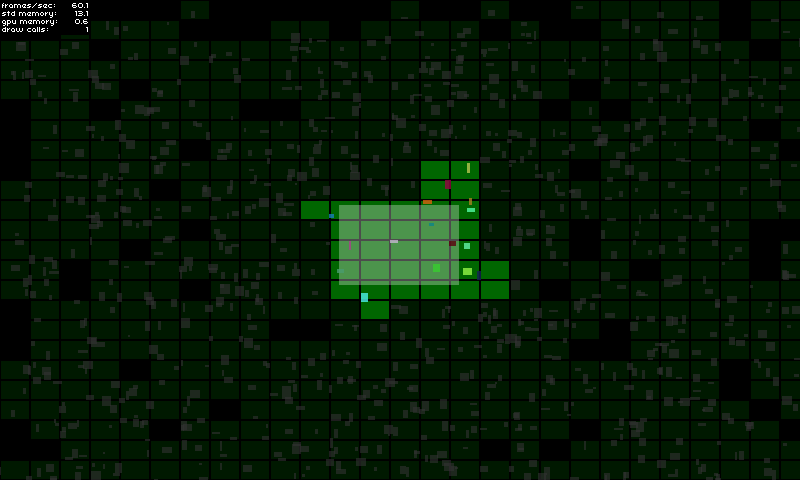
這種Starling擴展是解決遊戲對象的2D空間激活 /停用的一種方法。例如,它是為了照顧 /隱藏屏幕外的遊戲元素,不僅……當遊戲對像被認為是活動或不活動的情況下,您基本上都可以用您想做任何您想做的事情。
如果:
有關實施的更多詳細信息,請查看演示頁面。
在這裡嘗試!
GameManager中: private var _deactivator : SpatialDeactivator ;
private var _activeAreaAABB : Rectangle = new Rectangle ( 0 , 0 , 120 , 80 ) ;
public function MyGameManager()
{
// Create the spatial deactivator
_deactivator = new SpatialDeactivator(_activeAreaAABB.width * 0.25, _activeAreaAABB.height * 0.25);
Starling.current.juggler.add(_deactivator);
}
// Called at each frame...
public function update () : void
{
// Update active area when needed
_activeAreaAABB.x = ...; // Your complex stuff here
_activeAreaAABB.y = ...; // Your complex stuff here
_activeAreaAABB.width = ...; // Your complex stuff here
_activeAreaAABB.height = ...; // Your complex stuff here
// IMPORTANT TIP: Update only if AABB has changed!
_deactivator.updateActiveArea(_activeAreaAABB);
}
public function get deactivator() : SpatialDeactivator
{
return _deactivator;
}GameObject中: private var _spatialElement : SpatialElement ;
public function MyGameObject(gameManager : MyGameManager)
{
// Setup game object core components
_mySprite = ...;
_myPhysicalBody = ...;
// IMPORTANT: Make sure that the object starts inactive!
// The deactivator will take care of activating it right away if needed.
onSpatialElementActivityChanged(false);
// Create spatial element
_spatialElement = new SpatialElement(gameManager.deactivator);
_spatialElement.activityChangedCallback = onSpatialElementActivityChanged;
// Initial position update
updatePosition();
}
// Called during frame update...
public function updatePosition() : void
{
// Update game object position & size
x = ...; // Your complex stuff here
y = ...; // Your complex stuff here
width = ...; // Your complex stuff here
height = ...; // Your complex stuff here
// IMPORTANT TIP: Update only if AABB has changed!
_spatialElement.updateAABB(x, y, width, height);
}
private function onSpatialElementActivityChanged( active : Boolean ) : void
{
// Activate / deactivate your object as you want.
_mySprite.visible = active;
_myPhysicalBody.enable = active;
...
}重要說明:
調試模式將幫助您查看是否選擇了正確的配置(請參見下面的重要方面)。
您可以像這樣啟用它:
 _deactivator = new SpatialDeactivator( 32 , 32 , true ) ;

if ( _deactivator . debugSprite)
addChild ( _deactivator . debugSprite) ; 只需克隆或下載存儲庫,然後將src/ch文件夾複製/粘貼到您的src目錄中,或將src/文件夾添加到您的類路徑。
使此工具有效的重要一點是找到正確的塊尺寸,以最適合您的需求。
您可以通過啟用調試模式來測試並查看最適合您的選擇(請參閱部分)。
與活動面積大小相比,我個人使用的比率為0.25 。
new SpatialDeactivator( _activeAreaAABB . width * 0.25 , _activeAreaAABB . height * 0.25 ) ;如果您的活動區域與相機視圖相對應,則使用餘量對於預測即將到來的遊戲對象的激活可能很有用。
 private var _margin : Number = 20 ;
private var _activeAreaAABB : Rectangle = new Rectangle ( 0 , 0 , 120 + _margin , 80 + _margin ) ;
...
_activeAreaAABB . x = x - _margin * 0.5 ;
_activeAreaAABB . y = y - _margin * 0.5 ;
deactivator . updateActiveArea( _activeAreaAABB ) ;空間元素的大小應涵蓋遊戲對象的整個尺寸,以確保遊戲對像不會過早或過於活躍。如果需要,空間元素的大小也可能比您的遊戲對象的範圍大一點:
_spatialElement . updateAABB( x - margin * 0.5 , y - margin * 0.5 , width + margin, height + margin) ;






