Starling Spatial Deactivator
vator v0.3

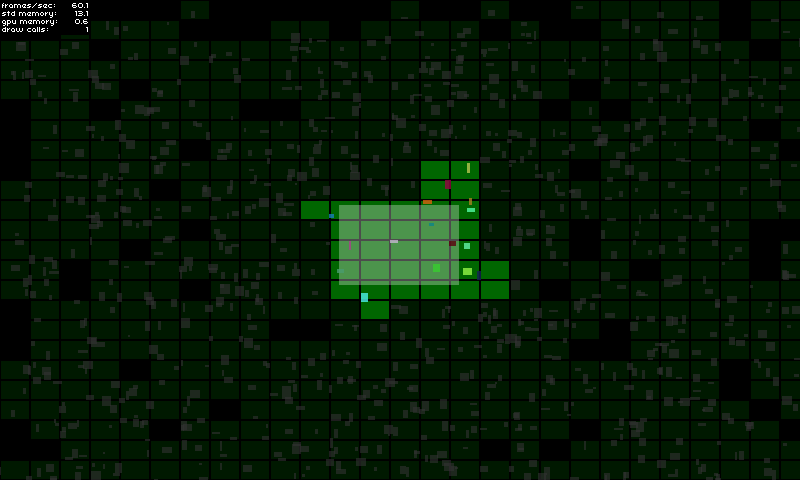
このスターリング拡張機能は、ゲームオブジェクトの2D空間的アクティブ化 /非アクティブ化を解決するアプローチです。たとえば、画面の外側にあるゲーム要素を表示 /隠すことを目的としていますが、それがアクティブまたは非アクティブと見なされている場合、基本的にゲームオブジェクトを使用してやりたいことは何でもできるようになります。
このライブラリは、次の場合に役立つ可能性があります。
実装の詳細については、デモページをご覧ください。
ここで試してみてください!
GameManagerで: private var _deactivator : SpatialDeactivator ;
private var _activeAreaAABB : Rectangle = new Rectangle ( 0 , 0 , 120 , 80 ) ;
public function MyGameManager()
{
// Create the spatial deactivator
_deactivator = new SpatialDeactivator(_activeAreaAABB.width * 0.25, _activeAreaAABB.height * 0.25);
Starling.current.juggler.add(_deactivator);
}
// Called at each frame...
public function update () : void
{
// Update active area when needed
_activeAreaAABB.x = ...; // Your complex stuff here
_activeAreaAABB.y = ...; // Your complex stuff here
_activeAreaAABB.width = ...; // Your complex stuff here
_activeAreaAABB.height = ...; // Your complex stuff here
// IMPORTANT TIP: Update only if AABB has changed!
_deactivator.updateActiveArea(_activeAreaAABB);
}
public function get deactivator() : SpatialDeactivator
{
return _deactivator;
}GameObjectで: private var _spatialElement : SpatialElement ;
public function MyGameObject(gameManager : MyGameManager)
{
// Setup game object core components
_mySprite = ...;
_myPhysicalBody = ...;
// IMPORTANT: Make sure that the object starts inactive!
// The deactivator will take care of activating it right away if needed.
onSpatialElementActivityChanged(false);
// Create spatial element
_spatialElement = new SpatialElement(gameManager.deactivator);
_spatialElement.activityChangedCallback = onSpatialElementActivityChanged;
// Initial position update
updatePosition();
}
// Called during frame update...
public function updatePosition() : void
{
// Update game object position & size
x = ...; // Your complex stuff here
y = ...; // Your complex stuff here
width = ...; // Your complex stuff here
height = ...; // Your complex stuff here
// IMPORTANT TIP: Update only if AABB has changed!
_spatialElement.updateAABB(x, y, width, height);
}
private function onSpatialElementActivityChanged( active : Boolean ) : void
{
// Activate / deactivate your object as you want.
_mySprite.visible = active;
_myPhysicalBody.enable = active;
...
}重要なメモ:
デバッグモードは、適切な構成を選択したかどうかを確認するのに役立ちます(以下の重要な側面を参照)。
あなたはそれをこのように有効にすることができます:
 _deactivator = new SpatialDeactivator( 32 , 32 , true ) ;

if ( _deactivator . debugSprite)
addChild ( _deactivator . debugSprite) ; リポジトリをクローンまたはダウンロードして、 src/chフォルダーをsrcディレクトリにコピー/貼り付けたり、 src/フォルダーをクラスパスに追加します。
このツールを効率的にするための重要なポイントの1つは、あなたのニーズに最適な正しいチャンクサイズを見つけることです。
デバッグモードを有効にすることで、自分にとって最適なものをテストして確認できます(セクションを参照)。
私は、アクティブな面積サイズと比較して、 0.25の比率を個人的に使用しています。
new SpatialDeactivator( _activeAreaAABB . width * 0.25 , _activeAreaAABB . height * 0.25 ) ;アクティブな領域がカメラビューに対応する場合、マージンを使用することは、今後のゲームオブジェクトのアクティブ化を予測するのに役立ちます。
 private var _margin : Number = 20 ;
private var _activeAreaAABB : Rectangle = new Rectangle ( 0 , 0 , 120 + _margin , 80 + _margin ) ;
...
_activeAreaAABB . x = x - _margin * 0.5 ;
_activeAreaAABB . y = y - _margin * 0.5 ;
deactivator . updateActiveArea( _activeAreaAABB ) ;空間要素のサイズは、ゲームオブジェクトの全体のサイズをカバーして、ゲームオブジェクトが最近早すぎたりアクティブになりすぎたりしないようにする必要があります。必要に応じて、空間要素のサイズは、ゲームオブジェクトの境界よりも少し大きくなる可能性があります。
_spatialElement . updateAABB( x - margin * 0.5 , y - margin * 0.5 , width + margin, height + margin) ;






