Starling Spatial Deactivator
vator v0.3

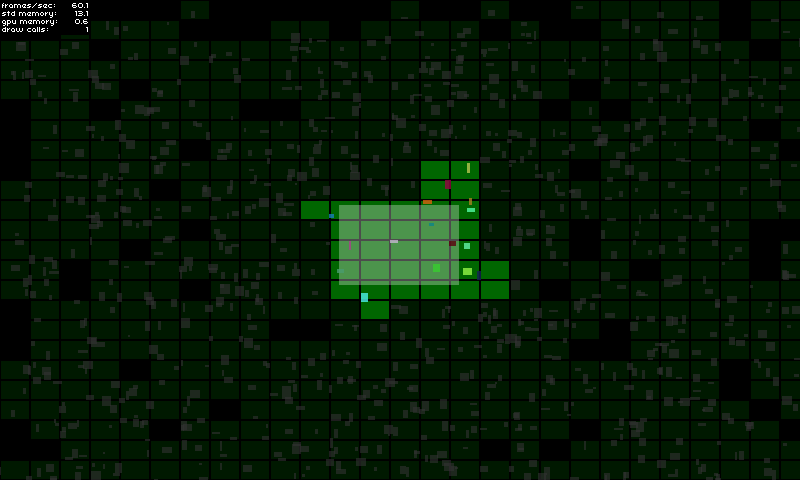
ส่วนขยายของสตาร์ลิ่งนี้เป็นวิธีการแก้ปัญหาการเปิดใช้งานเชิงพื้นที่ 2D / การปิดการใช้งานของวัตถุเกม มันหมายถึงการดูแลองค์ประกอบการแสดง / ซ่อนองค์ประกอบของเกมที่อยู่นอกหน้าจอตัวอย่างเช่น แต่ไม่เพียง แต่ ... คุณจะสามารถทำสิ่งที่คุณต้องการได้โดยทั่วไปกับวัตถุเกมเมื่อถือว่าเป็นงานที่ใช้งานอยู่หรือไม่ได้ใช้งาน
ห้องสมุดนี้อาจเป็นประโยชน์สำหรับคุณถ้า:
สำหรับรายละเอียดเพิ่มเติมเกี่ยวกับการใช้งานโปรดดูที่หน้าสาธิต
ลองที่นี่!
GameManager ของคุณ: private var _deactivator : SpatialDeactivator ;
private var _activeAreaAABB : Rectangle = new Rectangle ( 0 , 0 , 120 , 80 ) ;
public function MyGameManager()
{
// Create the spatial deactivator
_deactivator = new SpatialDeactivator(_activeAreaAABB.width * 0.25, _activeAreaAABB.height * 0.25);
Starling.current.juggler.add(_deactivator);
}
// Called at each frame...
public function update () : void
{
// Update active area when needed
_activeAreaAABB.x = ...; // Your complex stuff here
_activeAreaAABB.y = ...; // Your complex stuff here
_activeAreaAABB.width = ...; // Your complex stuff here
_activeAreaAABB.height = ...; // Your complex stuff here
// IMPORTANT TIP: Update only if AABB has changed!
_deactivator.updateActiveArea(_activeAreaAABB);
}
public function get deactivator() : SpatialDeactivator
{
return _deactivator;
}GameObject ของคุณ: private var _spatialElement : SpatialElement ;
public function MyGameObject(gameManager : MyGameManager)
{
// Setup game object core components
_mySprite = ...;
_myPhysicalBody = ...;
// IMPORTANT: Make sure that the object starts inactive!
// The deactivator will take care of activating it right away if needed.
onSpatialElementActivityChanged(false);
// Create spatial element
_spatialElement = new SpatialElement(gameManager.deactivator);
_spatialElement.activityChangedCallback = onSpatialElementActivityChanged;
// Initial position update
updatePosition();
}
// Called during frame update...
public function updatePosition() : void
{
// Update game object position & size
x = ...; // Your complex stuff here
y = ...; // Your complex stuff here
width = ...; // Your complex stuff here
height = ...; // Your complex stuff here
// IMPORTANT TIP: Update only if AABB has changed!
_spatialElement.updateAABB(x, y, width, height);
}
private function onSpatialElementActivityChanged( active : Boolean ) : void
{
// Activate / deactivate your object as you want.
_mySprite.visible = active;
_myPhysicalBody.enable = active;
...
}หมายเหตุสำคัญ:
โหมดการดีบักจะช่วยให้คุณดูว่าคุณเลือกการกำหนดค่าที่ถูกต้องหรือไม่ (ดูแง่มุมที่สำคัญด้านล่าง)
คุณสามารถเปิดใช้งานได้ง่ายๆ:
 _deactivator = new SpatialDeactivator( 32 , 32 , true ) ;

if ( _deactivator . debugSprite)
addChild ( _deactivator . debugSprite) ; เพียงแค่โคลนหรือดาวน์โหลดที่เก็บและคัดลอก/วางโฟลเดอร์ src/ch ลงในไดเรกทอรี src ของคุณหรือเพิ่ม src/ โฟลเดอร์ลงในเส้นทางคลาสของคุณ
จุดสำคัญอย่างหนึ่งที่จะทำให้เครื่องมือนี้มีประสิทธิภาพสำหรับคุณคือการค้นหาขนาดก้อนที่ถูกต้องเพื่อให้เหมาะกับความต้องการของคุณมากที่สุด
คุณสามารถทดสอบและดูว่าอะไรดีที่สุดสำหรับคุณโดยเปิดใช้งานโหมดการดีบัก (ดูส่วน)
ฉันใช้อัตราส่วน 0.25 เมื่อเทียบกับขนาดพื้นที่ที่ใช้งานอยู่
new SpatialDeactivator( _activeAreaAABB . width * 0.25 , _activeAreaAABB . height * 0.25 ) ;หากพื้นที่ที่ใช้งานของคุณสอดคล้องกับมุมมองกล้องการใช้มาร์จิ้นอาจเป็นประโยชน์ในการคาดการณ์การเปิดใช้งานวัตถุเกมที่กำลังจะมาถึง
 private var _margin : Number = 20 ;
private var _activeAreaAABB : Rectangle = new Rectangle ( 0 , 0 , 120 + _margin , 80 + _margin ) ;
...
_activeAreaAABB . x = x - _margin * 0.5 ;
_activeAreaAABB . y = y - _margin * 0.5 ;
deactivator . updateActiveArea( _activeAreaAABB ) ;ขนาดขององค์ประกอบเชิงพื้นที่ควรครอบคลุมขนาดทั้งหมดของวัตถุเกมของคุณเพื่อให้แน่ใจว่าวัตถุเกมไม่ได้ทำงานเร็วเกินไปหรือใช้งานเมื่อเร็ว ๆ นี้ หากจำเป็นขนาดขององค์ประกอบเชิงพื้นที่ของคุณอาจใหญ่กว่าวัตถุเกมของคุณได้เช่นกัน:
_spatialElement . updateAABB( x - margin * 0.5 , y - margin * 0.5 , width + margin, height + margin) ;






