Starling Spatial Deactivator
vator v0.3

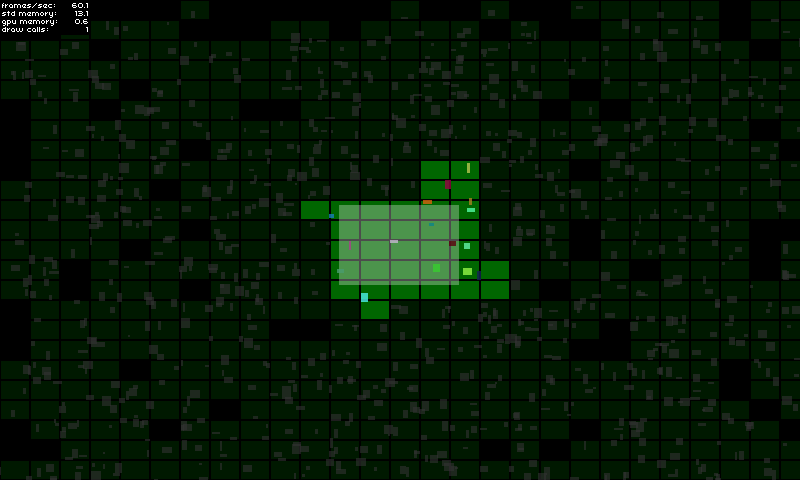
Esta extensión de Starling es un enfoque para resolver la activación espacial 2D / desactivación de objetos de juego. Está destinado a ocuparse de mostrar / ocultar elementos del juego que están fuera de la pantalla, por ejemplo, pero no solo ... podrá básicamente hacer lo que quiera con un objeto de juego cuando se considera activo o inactivo.
Esta biblioteca podría ser útil para usted si:
Para obtener más detalles sobre la implementación, eche un vistazo a la página de demostración.
¡Pruébalo aquí!
GameManager : private var _deactivator : SpatialDeactivator ;
private var _activeAreaAABB : Rectangle = new Rectangle ( 0 , 0 , 120 , 80 ) ;
public function MyGameManager()
{
// Create the spatial deactivator
_deactivator = new SpatialDeactivator(_activeAreaAABB.width * 0.25, _activeAreaAABB.height * 0.25);
Starling.current.juggler.add(_deactivator);
}
// Called at each frame...
public function update () : void
{
// Update active area when needed
_activeAreaAABB.x = ...; // Your complex stuff here
_activeAreaAABB.y = ...; // Your complex stuff here
_activeAreaAABB.width = ...; // Your complex stuff here
_activeAreaAABB.height = ...; // Your complex stuff here
// IMPORTANT TIP: Update only if AABB has changed!
_deactivator.updateActiveArea(_activeAreaAABB);
}
public function get deactivator() : SpatialDeactivator
{
return _deactivator;
}GameObject : private var _spatialElement : SpatialElement ;
public function MyGameObject(gameManager : MyGameManager)
{
// Setup game object core components
_mySprite = ...;
_myPhysicalBody = ...;
// IMPORTANT: Make sure that the object starts inactive!
// The deactivator will take care of activating it right away if needed.
onSpatialElementActivityChanged(false);
// Create spatial element
_spatialElement = new SpatialElement(gameManager.deactivator);
_spatialElement.activityChangedCallback = onSpatialElementActivityChanged;
// Initial position update
updatePosition();
}
// Called during frame update...
public function updatePosition() : void
{
// Update game object position & size
x = ...; // Your complex stuff here
y = ...; // Your complex stuff here
width = ...; // Your complex stuff here
height = ...; // Your complex stuff here
// IMPORTANT TIP: Update only if AABB has changed!
_spatialElement.updateAABB(x, y, width, height);
}
private function onSpatialElementActivityChanged( active : Boolean ) : void
{
// Activate / deactivate your object as you want.
_mySprite.visible = active;
_myPhysicalBody.enable = active;
...
}Notas importantes:
El modo de depuración lo ayudará a ver si ha elegido la configuración correcta (consulte los aspectos importantes a continuación).
Puede habilitarlo simplemente así:
 _deactivator = new SpatialDeactivator( 32 , 32 , true ) ;

if ( _deactivator . debugSprite)
addChild ( _deactivator . debugSprite) ; Simplemente clone o descargue el repositorio y copie/pegue la carpeta src/ch en su directorio src o agregue la carpeta src/ a su ruta de clase.
Un punto importante para que esta herramienta sea eficiente para usted es encontrar el tamaño correcto de la fragmentación para que mejor se ajuste a sus necesidades.
Puede probar y ver qué es lo mejor para usted habilitando el modo de depuración (ver sección).
Yo personalmente uso una relación de 0.25 en comparación con el tamaño del área activa.
new SpatialDeactivator( _activeAreaAABB . width * 0.25 , _activeAreaAABB . height * 0.25 ) ;Si su área activa corresponde a la vista de la cámara, usar margen podría ser útil para anticipar la activación de los próximos objetos del juego.
 private var _margin : Number = 20 ;
private var _activeAreaAABB : Rectangle = new Rectangle ( 0 , 0 , 120 + _margin , 80 + _margin ) ;
...
_activeAreaAABB . x = x - _margin * 0.5 ;
_activeAreaAABB . y = y - _margin * 0.5 ;
deactivator . updateActiveArea( _activeAreaAABB ) ;El tamaño de un elemento espacial debe cubrir todo el tamaño de su objeto de juego para asegurarse de que el objeto del juego no se inactivo demasiado temprano o activo últimamente. Si es necesario, el tamaño de sus elementos espaciales también puede ser un poco más grande que sus límites de objetos de juego:
_spatialElement . updateAABB( x - margin * 0.5 , y - margin * 0.5 , width + margin, height + margin) ;






