Starling Spatial Deactivator
vator v0.3

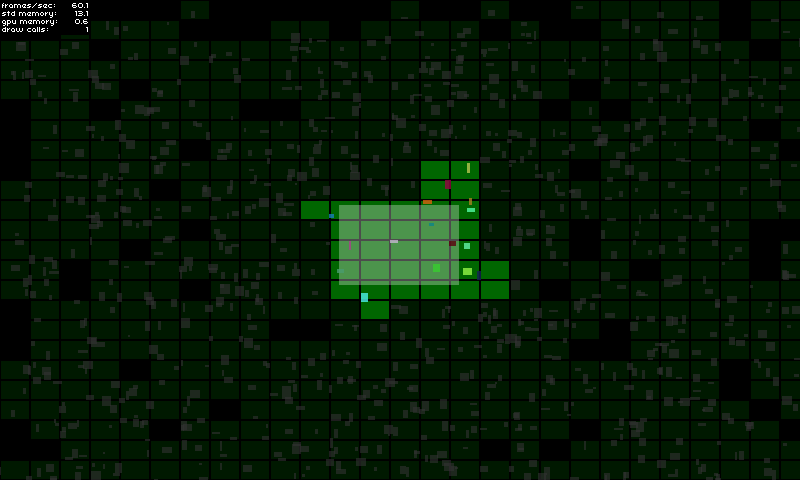
이 스타 링 확장은 게임 객체의 2D 공간 활성화 / 비활성화를 해결하기위한 접근법입니다. 예를 들어 화면 외부에있는 게임 요소를 보여 주거나 숨기는 것을 관리하기위한 것입니다. 예를 들어 ... 활성 또는 비활성으로 간주 될 때 게임 객체로 원하는 모든 것을 기본적으로 수행 할 수 있습니다.
이 라이브러리는 다음과 같은 경우 유용 할 수 있습니다.
구현에 대한 자세한 내용은 데모 페이지를 참조하십시오.
여기서 시도해보십시오!
GameManager 에서 : private var _deactivator : SpatialDeactivator ;
private var _activeAreaAABB : Rectangle = new Rectangle ( 0 , 0 , 120 , 80 ) ;
public function MyGameManager()
{
// Create the spatial deactivator
_deactivator = new SpatialDeactivator(_activeAreaAABB.width * 0.25, _activeAreaAABB.height * 0.25);
Starling.current.juggler.add(_deactivator);
}
// Called at each frame...
public function update () : void
{
// Update active area when needed
_activeAreaAABB.x = ...; // Your complex stuff here
_activeAreaAABB.y = ...; // Your complex stuff here
_activeAreaAABB.width = ...; // Your complex stuff here
_activeAreaAABB.height = ...; // Your complex stuff here
// IMPORTANT TIP: Update only if AABB has changed!
_deactivator.updateActiveArea(_activeAreaAABB);
}
public function get deactivator() : SpatialDeactivator
{
return _deactivator;
}GameObject 에서 : private var _spatialElement : SpatialElement ;
public function MyGameObject(gameManager : MyGameManager)
{
// Setup game object core components
_mySprite = ...;
_myPhysicalBody = ...;
// IMPORTANT: Make sure that the object starts inactive!
// The deactivator will take care of activating it right away if needed.
onSpatialElementActivityChanged(false);
// Create spatial element
_spatialElement = new SpatialElement(gameManager.deactivator);
_spatialElement.activityChangedCallback = onSpatialElementActivityChanged;
// Initial position update
updatePosition();
}
// Called during frame update...
public function updatePosition() : void
{
// Update game object position & size
x = ...; // Your complex stuff here
y = ...; // Your complex stuff here
width = ...; // Your complex stuff here
height = ...; // Your complex stuff here
// IMPORTANT TIP: Update only if AABB has changed!
_spatialElement.updateAABB(x, y, width, height);
}
private function onSpatialElementActivityChanged( active : Boolean ) : void
{
// Activate / deactivate your object as you want.
_mySprite.visible = active;
_myPhysicalBody.enable = active;
...
}중요한 메모 :
디버그 모드는 올바른 구성을 선택했는지 확인하는 데 도움이됩니다 (아래의 중요한 측면 참조).
당신은 단순히 다음과 같이 활성화 할 수 있습니다.
 _deactivator = new SpatialDeactivator( 32 , 32 , true ) ;

if ( _deactivator . debugSprite)
addChild ( _deactivator . debugSprite) ; 저장소를 복제하거나 다운로드하고 src/ch 폴더를 src 디렉토리에 복사/붙여 넣거나 src/ 폴더를 클래스 경로에 추가하십시오.
이 도구를 효율적으로 만들기위한 중요한 요점 중 하나는 귀하의 요구에 가장 적합한 올바른 청크 크기를 찾는 것입니다.
디버그 모드를 활성화하여 테스트하고 가장 좋은 것이 무엇인지 확인할 수 있습니다 (섹션 참조).
나는 개인적으로 활성 영역 크기에 비해 0.25 의 비율을 사용합니다.
new SpatialDeactivator( _activeAreaAABB . width * 0.25 , _activeAreaAABB . height * 0.25 ) ;활성 영역이 카메라보기에 해당하는 경우 마진을 사용하면 다가오는 게임 객체의 활성화를 예상하는 데 유용 할 수 있습니다.
 private var _margin : Number = 20 ;
private var _activeAreaAABB : Rectangle = new Rectangle ( 0 , 0 , 120 + _margin , 80 + _margin ) ;
...
_activeAreaAABB . x = x - _margin * 0.5 ;
_activeAreaAABB . y = y - _margin * 0.5 ;
deactivator . updateActiveArea( _activeAreaAABB ) ;공간 요소의 크기는 게임 객체의 전체 크기를 덮어 게임 객체가 너무 일찍 또는 활성화되지 않도록해야합니다. 필요한 경우 공간 요소의 크기는 게임 객체 범위보다 약간 클 수 있습니다.
_spatialElement . updateAABB( x - margin * 0.5 , y - margin * 0.5 , width + margin, height + margin) ;






