chad
v7.0

搜索Google Dorks等乍得。基於Ivan-Sincek/Nagooglesearch。
在Kali Linux V2024.2(64位)上測試。
出於教育目的而設計。我希望它會有所幫助!
未來計劃:
linkedin-user的牆。 pip3 install --upgrade playwright
playwright install chromium確保每次升級劇作家依賴性以重新安裝鉻時;否則,您可能會使用乍得提取器中的無頭瀏覽器會遇到錯誤。
pip3 install --upgrade google-chadgit clone https://github.com/ivan-sincek/chad && cd chad
python3 -m pip install --upgrade build
python3 -m build
python3 -m pip install dist/google_chad-7.0-py3-none-any.whlchad -q ' intitle:"index of /" intext:"parent directory" ' 你說metagoofil嗎?
mkdir downloads

chad -q " ext:pdf OR ext:docx OR ext:xlsx OR ext:pptx " -s * .example.com -tr 200 -dir downloads
Chad的文件下載功能基於Python請求依賴性。
Chad Extractor是基於Scrapy的Web軌道和劇作家的Chromium無頭瀏覽器的功能強大的工具,旨在有效刮擦Web內容。與Python請求依賴關係不同,該請求無法呈現JavaScript編碼的HTML,並且很容易被反機器人解決方案阻止。
首先,乍得提取器旨在從乍得結果文件中提取和驗證數據。但是,它也可以使用-pt選項來從明文文件中提取和驗證數據。
如果使用-pt選項,則將像服務器響應一樣對待明文文件,並將應用提取邏輯,然後進行驗證。如果您想通過使用-res report.json -pt -o retest.json重新測試以前的乍得提取器的報告,例如,這也很有用。
準備Google Dorks作為Social_Media_Dorks.txt文件:
 intext:"t.me/"
intext:"discord.com/invite/" OR intext:"discord.gg/invite/"
intext:"youtube.com/c/" OR intext:"youtube.com/channel/"
intext:"twitter.com/" OR intext:"x.com/"
intext:"facebook.com/"
intext:"instagram.com/"
intext:"tiktok.com/"
intext:"linkedin.com/in/" OR intext:"linkedin.com/company/"
準備模板作為social_media_template.json文件:
{
   "telegram" :{
      "extract" : " t \ .me \ /(?:(?!(?:share)(?:(?: \ /| \ ?| \\ | " | \ <)*$|(?: \ /| \ ?| \\ | \" | \ <)[ \ s \ S]))[ \ w \ d \ . \ _ \ - \ + \ @]+)(?<! \ .) " ,
      "extract_prepend" : " https:// " ,
      "validate" : " <meta property= " og:title " content= " Telegram: Contact .+? " > "
   },
   "discord" :{
      "extract" : " discord \ .(?:com|gg) \ /invite \ /[ \ w \ d \ . \ _ \ - \ + \ @]+(?<! \ .) " ,
      "extract_prepend" : " https:// " ,
      "validate" : " Invite Invalid " ,
      "validate_browser" : true ,
      "validate_browser_wait" : 6
   },
   "youtube" :{
      "extract" : " youtube \ .com \ /(?:c|channel) \ /[ \ w \ d \ . \ _ \ - \ + \ @]+(?<! \ .) " ,
      "extract_prepend" : " https://www. " ,
      "validate" : " <iframe.+?src= "\ /error \ ?src=404.+? " > " ,
      "validate_cookies" :{
         "SOCS" : " CAESEwgDEgk2OTk3ODk2MzcaAmVuIAEaBgiAn5S6Bg "
      }
   },
   "twitter" :{
      "extract" : " (?<=(?<!pic \ .)twitter|(?<!pic \ .)x) \ .com \ /(?:(?!(?:[ \ w]{2} \ /)*(?:explore|hashtag|home|i|intent|library|media|personalization|privacy|search|share|tos|widgets \ .js)(?:(?: \ /| \ ?| \\ | " | \ <)*$|(?: \ /| \ ?| \\ | \" | \ <)[ \ s \ S]))[ \ w \ d \ . \ _ \ - \ + \ @]+)(?<! \ .) " ,
      "extract_prepend" : " https://x " ,
      "validate" : " This account doesn.?t exist " ,
      "validate_browser" : true ,
      "validate_cookies" :{
         "night_mode" : " 2 "
      }
   },
   "facebook" :{
      "extract" : " facebook \ .com \ /(?:(?!(?:about|dialog|gaming|groups|public|sharer|share \ .php|terms \ .php)(?:(?: \ /| \ ?| \\ | " | \ <)*$|(?: \ /| \ ?| \\ | \" | \ <)[ \ s \ S]))[ \ w \ d \ . \ _ \ - \ + \ @]+)(?<! \ .) " ,
      "extract_prepend" : " https://www. " ,
      "validate" : " This (?:content|page) isn't available " ,
      "validate_browser" : true
   },
   "instagram" :{
      "extract" : " instagram \ .com \ /(?:(?!(?:about|accounts|ar|explore|p)(?:(?: \ /| \ ?| \\ | " | \ <)*$|(?: \ /| \ ?| \\ | \" | \ <)[ \ s \ S]))[ \ w \ d \ . \ _ \ - \ + \ @]+)(?<! \ .) " ,
      "extract_prepend" : " https://www. " ,
      "extract_append" : " / " ,
      "validate" : " Sorry, this page isn't available \ . " ,
      "validate_browser" : true
   },
   "tiktok" :{
      "extract" : " (?<!vt \ .)tiktok \ .com \ / \ @[ \ w \ d \ . \ _ \ - \ + \ @]+(?<! \ .) " ,
      "extract_prepend" : " https://www. " ,
      "validate" : " Couldn't find this account "
   },
   "linkedin-company" :{
      "extract" : " linkedin \ .com \ /company \ /[ \ w \ d \ . \ _ \ - \ + \ @ \ &]+(?<! \ .) " ,
      "extract_prepend" : " https://www. " ,
      "validate" : " Page not found " ,
      "validate_cookies" :{
         "bcookie" : " v=2 " ,
         "lang" : " v=2&lang=en-us "
      }
   },
   "linkedin-user" :{
      "extract" : " linkedin \ .com \ /in \ /[ \ w \ d \ . \ _ \ - \ + \ @ \ &]+(?<! \ .) " ,
      "extract_prepend" : " https://www. " ,
      "validate" : " An exact match for .+ could not be found \ . "
   }
}確保您的正則表達式僅返回一個捕獲組,例如[1, 2, 3, 4] ;而不是傾向,例如[(1, 2), (3, 4)] 。
確保正確逃脫模板文件中的正則表達式特定符號,例如,確保逃脫點.作為\. ,然後向前斜線/ as \/ ,等等。
所有正則表達式搜索都是不敏感的。
從CHAD結果文件中獲取的Web內容將與模板文件中的所有正則表達式(由extract屬性定義)匹配,以查找盡可能多的相關數據。
要提取無驗證的數據,只需根據需要從模板文件中省略validate屬性。
| 範圍 | 姓名 | 類型 | 必需的 | 描述 |
|---|---|---|---|---|
| 萃取 | 提煉 | str | 是的 | 正則表達查詢。 |
| 萃取 | extract_prepend | str | 不 | 字符串以準備所有提取的數據。 |
| 萃取 | extract_append | str | 不 | 字符串以附加到提取的數據。 |
| 驗證 | 證實 | str | 不 | 正則表達查詢。 |
| 驗證 | validate_browser | 布爾 | 不 | 是否使用無頭瀏覽器。 |
| 驗證 | validate_browser_wait | 漂浮 | 不 | 等待幾秒鐘的時間,然後從無頭瀏覽器的頁面獲取內容。 |
| 驗證 | Validate_headers | dict [str,str] | 不 | HTTP請求標頭的鍵值格式。 Cookie標題被忽略。 |
| 驗證 | validate_cookies | dict [str,str] | 不 | HTTP請求cookie以鍵值格式。 |
表1-模板屬性
chad -q social_media_dorks.txt -s * .example.com -tr 200 -pr 100 -o results.json

chad-extractor -t social_media_template.json -res results.json -o report.json準備域 /子域作為sites.txt文件,就像您在site: Google中的選項:
 *.example.com
*.example.com -www
跑步:
mkdir chad_results

IFS= $' n ' ; count=0 ; for site in $( cat sites.txt ) ; do count= $(( count + 1 )) ; echo " # ${count} | ${site} " ; chad -q social_media_dorks.txt -s " ${site} " -tr 200 -pr 100 -o " chad_results/results_ ${count} .json " ; done

chad-extractor -t social_media_template.json -res chad_results -o report.json -v手動驗證results[summary][validated]很容易接管:
{
   "started_at" : " 2023-12-23 03:30:10 " ,
   "ended_at" : " 2023-12-23 04:20:00 " ,
   "summary" :{
      "validated" :[
         " https://t.me/does_not_exist " // might be vulnerable to takeover
      ],
      "extracted" :[
         " https://discord.com/invite/exists " ,
         " https://t.me/does_not_exist " ,
         " https://t.me/exists "
      ]
   },
   "failed" :{
      "validation" :[],
      "extraction" :[]
   },
   "full" :[
      {
         "url" : " https://example.com/about " ,
         "results" :{
            "telegram" :[
               " https://t.me/does_not_exist " ,
               " https://t.me/exists "
            ],
            "discord" :[
               " https://discord.com/invite/exists "
            ]
         }
      }
   ]
}Google的冷卻期限從幾個小時到整天不等。
為避免使用CHAD達到Google的費率限制,請增加Google查詢和/或頁面之間的最低和最大睡眠;或使用免費或付費代理。但是,自由代理通常會被阻止和不穩定。
要下載免費代理列表,請運行:
curl -s ' https://proxylist.geonode.com/api/proxy-list?limit=50&page=1&sort_by=lastChecked&sort_type=desc ' -H ' Referer: https://proxylist.geonode.com/ ' | jq -r ' .data[] | "(.protocols[])://(.ip):(.port)" ' > proxies.txt如果您使用的是代理,則可能需要增加請求超時,因為響應將需要更長的時間才能到達。
此外,為避免在使用Chad提取器時在Instagram等平台上達到率限制,請考慮減少每個域的並發請求的數量,並增加睡眠和等待時間。
 Chad v7.0 ( github.com/ivan-sincek/chad )

Usage:   chad -q queries     [-s site         ] [-x proxies    ] [-o out         ]
Example: chad -q queries.txt [-s *.example.com] [-x proxies.txt] [-o results.json]

DESCRIPTION
    Search Google Dorks like Chad
QUERIES
    File containing Google Dorks or a single query to use
    -q, --queries = queries.txt | intext:password | "ext:tar OR ext:zip" | etc.
SITE
    Domain[s] to search
    -s, --site = example.com | sub.example.com | *.example.com | "*.example.com -www" | etc.
TIME
    Get results not older than the specified time in months
    -t, --time =  6 | 12 | 24 | etc.
TOTAL RESULTS
    Total number of unique results
    Default: 100
    -tr, --total-results = 200 | etc.
PAGE RESULTS
    Number of results per page - capped at 100 by Google
    Default: randint(70, 100)
    -pr, --page-results = 50 | etc.
MINIMUM QUERIES
    Minimum sleep time in seconds between Google queries
    Default: 75
    -min-q, --minimum-queries = 120 | etc.
MAXIMUM QUERIES
    Maximum sleep time between Google queries
    Default: minimum + 50
    -max-q, --maximum-queries = 180 | etc.
MINIMUM PAGES
    Minimum sleep time between Google pages
    Default: 15
    -min-p, --minimum-pages = 30 | etc.
MAXIMUM PAGES
    Maximum sleep time between Google pages
    Default: minimum + 10
    -max-p, --maximum-pages = 60 | etc.
USER AGENTS
    User agents to use
    Default: random-all
    -a, --user-agents = user_agents.txt | random(-all) | curl/3.30.1 | etc.
PROXIES
    File containing web proxies or a single web proxy to use
    -x, --proxies = proxies.txt | http://127.0.0.1:8080 | etc.
DIRECTORY
    Downloads directory
    All downloaded files will be saved in this directory
    -dir, --directory = downloads | etc.
THREADS
    Number of files to download in parallel
    Default: 5
    -th, --threads = 20 | etc.
OUT
    Output file
    -o, --out = results.json | etc.
NO SLEEP ON START
    Disable the safety feature to prevent triggering rate limits by accident
    -nsos, --no-sleep-on-start
DEBUG
    Enable debug output
    -dbg, --debug
 Chad Extractor v7.0 ( github.com/ivan-sincek/chad )

Usage:   chad-extractor -t template      -res results      -o out         [-s sleep] [-rs random-sleep]
Example: chad-extractor -t template.json -res chad_results -o report.json [-s 1.5  ] [-rs             ]

DESCRIPTION
    Extract and validate data from Chad results or plaintext files
TEMPLATE
    File containing extraction and validation details
    -t, --template = template.json | etc.
RESULTS
    Directory containing Chad results or plaintext files, or a single file
    If a directory is specified, files ending with '.report.json' will be ignored
    -res, --results = chad_results | results.json | urls.txt | etc.
PLAINTEXT
    Treat all the results as plaintext files / server responses
    -pt, --plaintext
EXCLUDES
    File containing regular expressions or a single regular expression to exclude content from the page
    Applies only for extraction
    -e, --excludes = regexes.txt | "<div id="seo">.+?</div>" | etc.
PLAYWRIGHT
    Use Playwright's headless browser
    Applies only for extraction
    -p, --playwright
PLAYWRIGHT WAIT
    Wait time in seconds before fetching the page content
    Applies only for extraction
    -pw, --playwright-wait = 0.5 | 2 | 4 | etc.
CONCURRENT REQUESTS
    Number of concurrent requests
    Default: 15
    -cr, --concurrent-requests = 30 | 45 | etc.
CONCURRENT REQUESTS PER DOMAIN
    Number of concurrent requests per domain
    Default: 5
    -crd, --concurrent-requests-domain = 10 | 15 | etc.
SLEEP
    Sleep time in seconds between two consecutive requests to the same domain
    -s, --sleep = 1.5 | 3 | etc.
RANDOM SLEEP
    Randomize the sleep time between requests to vary between '0.5 * sleep' and '1.5 * sleep'
    -rs, --random-sleep
AUTO THROTTLE
    Auto throttle concurrent requests based on the load and latency
    Sleep time is still respected
    -at, --auto-throttle = 0.5 | 10 | 15 | 45 | etc.
RETRIES
    Number of retries per URL
    Default: 2
    -r, --retries = 0 | 4 | etc.
REQUEST TIMEOUT
    Request timeout in seconds
    Default: 60
    -rt, --request-timeout = 30 | 90 | etc.
USER AGENTS
    User agents to use
    Default: random-all
    -a, --user-agents = user_agents.txt | random(-all) | curl/3.30.1 | etc.
PROXY
    Web proxy to use
    -x, --proxy = http://127.0.0.1:8080 | etc.
OUT
    Output file
    -o, --out = report.json | etc.
VERBOSE
    Create additional supporting output files that end with '.report.json'
    -v, --verbose
DEBUG
    Enable debug output
    -dbg, --debug
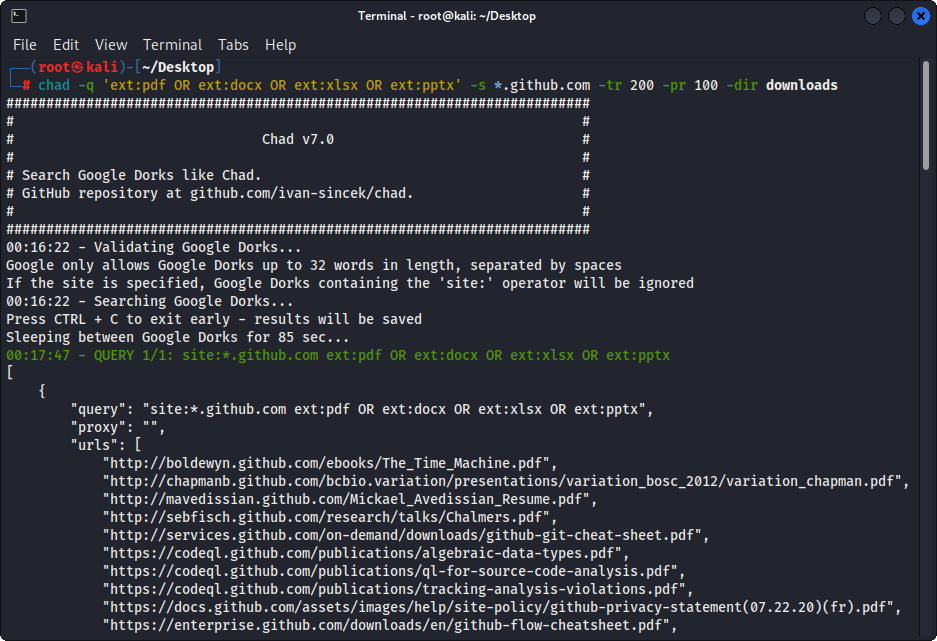
圖1-(乍得)文件下載 - 單個Google Dork
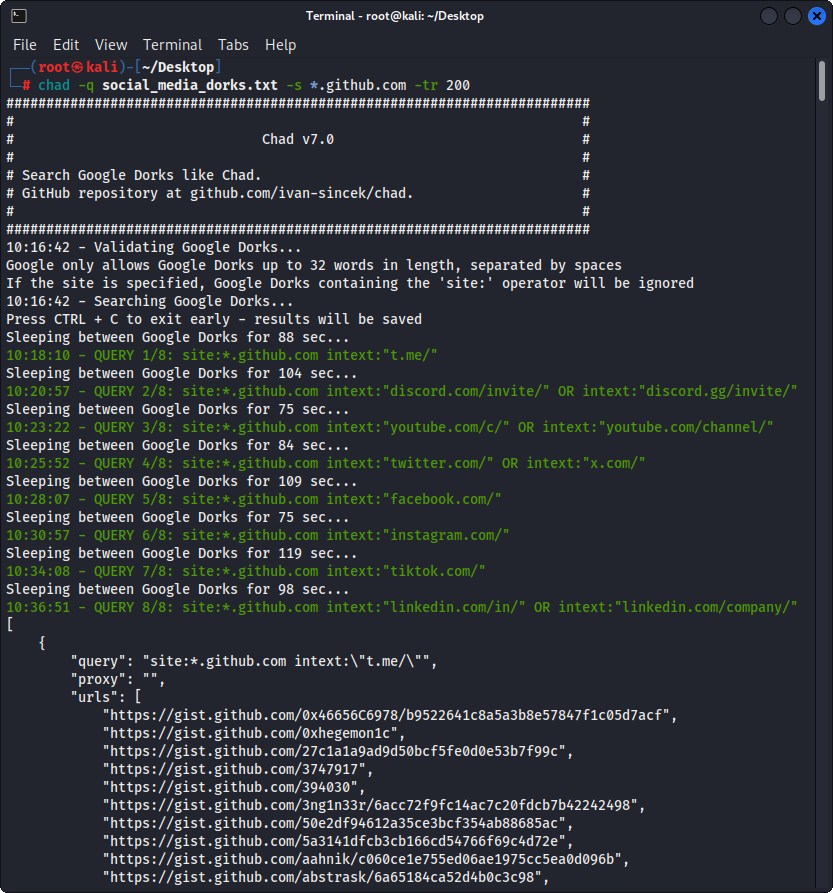
圖2-(乍得)破裂的鏈接劫持 - 多個Google Dorks
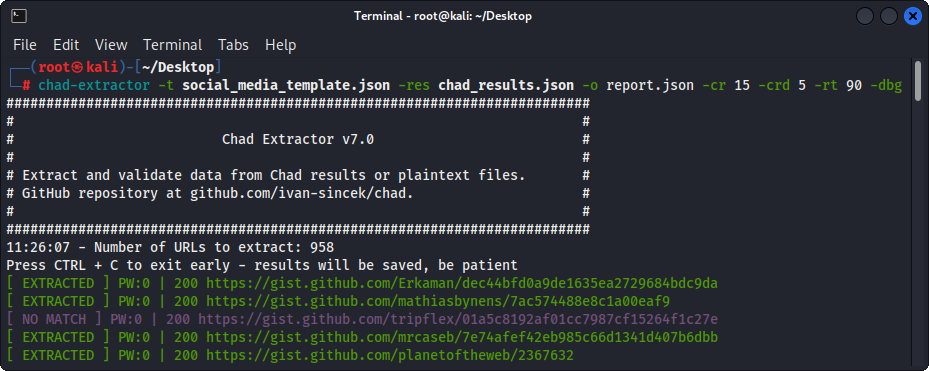
圖3-(乍得提取器)提取
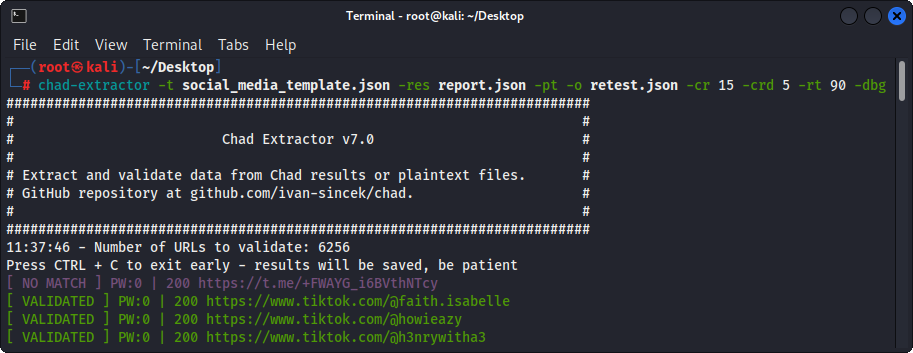
圖4-(乍得提取器)驗證





