chad
v7.0

チャドのようなGoogle Dorksを検索します。 Ivan-Sincek/Nagooglesearchに基づいています。
Kali Linux V2024.2(64ビット)でテストしました。
教育目的で作られています。私はそれが役立つことを願っています!
将来の計画:
linkedin-userの壁。 pip3 install --upgrade playwright
playwright install chromium劇作家の依存関係をアップグレードするたびに、クロムを再インストールすることを確認してください。それ以外の場合は、Chad Extractorのヘッドレスブラウザを使用してエラーが発生する場合があります。
pip3 install --upgrade google-chadgit clone https://github.com/ivan-sincek/chad && cd chad
python3 -m pip install --upgrade build
python3 -m build
python3 -m pip install dist/google_chad-7.0-py3-none-any.whlchad -q ' intitle:"index of /" intext:"parent directory" ' メタゴフィルと言った?!
mkdir downloads

chad -q " ext:pdf OR ext:docx OR ext:xlsx OR ext:pptx " -s * .example.com -tr 200 -dir downloads
Chadのファイルダウンロード機能は、Pythonリクエストの依存関係に基づいています。
Chad Extractorは、ScrapyのWeb CrawlerとPlaywrightのChromium Headlessブラウザーに基づいた強力なツールであり、Webコンテンツを効率的に削減するように設計されています。 Pythonとは異なり、JavaScriptエンコードされたHTMLをレンダリングできず、アンチボットソリューションによって簡単にブロックされる依存関係が要求されます。
主に、CHAD抽出器は、CHAD結果ファイルからデータを抽出および検証するように設計されています。ただし、 -ptオプションを使用して、プレーンテキストファイルからデータを抽出および検証するためにも使用できます。
-ptオプションを使用すると、プレーンテキストファイルがサーバーの応答のように扱われ、抽出ロジックが適用され、その後検証が行われます。これは、以前のChad Extractorのレポート-res report.json -pt -o retest.json再テストする場合にも役立ちます。
Google Dorksをsocial_media_dorks.txtファイルとして準備します:
 intext:"t.me/"
intext:"discord.com/invite/" OR intext:"discord.gg/invite/"
intext:"youtube.com/c/" OR intext:"youtube.com/channel/"
intext:"twitter.com/" OR intext:"x.com/"
intext:"facebook.com/"
intext:"instagram.com/"
intext:"tiktok.com/"
intext:"linkedin.com/in/" OR intext:"linkedin.com/company/"
social_media_template.jsonファイルとしてテンプレートを準備します。
{
   "telegram" :{
      "extract" : " t \ .me \ /(?:(?!(?:share)(?:(?: \ /| \ ?| \\ | " | \ <)*$|(?: \ /| \ ?| \\ | \" | \ <)[ \ s \ S]))[ \ w \ d \ . \ _ \ - \ + \ @]+)(?<! \ .) " ,
      "extract_prepend" : " https:// " ,
      "validate" : " <meta property= " og:title " content= " Telegram: Contact .+? " > "
   },
   "discord" :{
      "extract" : " discord \ .(?:com|gg) \ /invite \ /[ \ w \ d \ . \ _ \ - \ + \ @]+(?<! \ .) " ,
      "extract_prepend" : " https:// " ,
      "validate" : " Invite Invalid " ,
      "validate_browser" : true ,
      "validate_browser_wait" : 6
   },
   "youtube" :{
      "extract" : " youtube \ .com \ /(?:c|channel) \ /[ \ w \ d \ . \ _ \ - \ + \ @]+(?<! \ .) " ,
      "extract_prepend" : " https://www. " ,
      "validate" : " <iframe.+?src= "\ /error \ ?src=404.+? " > " ,
      "validate_cookies" :{
         "SOCS" : " CAESEwgDEgk2OTk3ODk2MzcaAmVuIAEaBgiAn5S6Bg "
      }
   },
   "twitter" :{
      "extract" : " (?<=(?<!pic \ .)twitter|(?<!pic \ .)x) \ .com \ /(?:(?!(?:[ \ w]{2} \ /)*(?:explore|hashtag|home|i|intent|library|media|personalization|privacy|search|share|tos|widgets \ .js)(?:(?: \ /| \ ?| \\ | " | \ <)*$|(?: \ /| \ ?| \\ | \" | \ <)[ \ s \ S]))[ \ w \ d \ . \ _ \ - \ + \ @]+)(?<! \ .) " ,
      "extract_prepend" : " https://x " ,
      "validate" : " This account doesn.?t exist " ,
      "validate_browser" : true ,
      "validate_cookies" :{
         "night_mode" : " 2 "
      }
   },
   "facebook" :{
      "extract" : " facebook \ .com \ /(?:(?!(?:about|dialog|gaming|groups|public|sharer|share \ .php|terms \ .php)(?:(?: \ /| \ ?| \\ | " | \ <)*$|(?: \ /| \ ?| \\ | \" | \ <)[ \ s \ S]))[ \ w \ d \ . \ _ \ - \ + \ @]+)(?<! \ .) " ,
      "extract_prepend" : " https://www. " ,
      "validate" : " This (?:content|page) isn't available " ,
      "validate_browser" : true
   },
   "instagram" :{
      "extract" : " instagram \ .com \ /(?:(?!(?:about|accounts|ar|explore|p)(?:(?: \ /| \ ?| \\ | " | \ <)*$|(?: \ /| \ ?| \\ | \" | \ <)[ \ s \ S]))[ \ w \ d \ . \ _ \ - \ + \ @]+)(?<! \ .) " ,
      "extract_prepend" : " https://www. " ,
      "extract_append" : " / " ,
      "validate" : " Sorry, this page isn't available \ . " ,
      "validate_browser" : true
   },
   "tiktok" :{
      "extract" : " (?<!vt \ .)tiktok \ .com \ / \ @[ \ w \ d \ . \ _ \ - \ + \ @]+(?<! \ .) " ,
      "extract_prepend" : " https://www. " ,
      "validate" : " Couldn't find this account "
   },
   "linkedin-company" :{
      "extract" : " linkedin \ .com \ /company \ /[ \ w \ d \ . \ _ \ - \ + \ @ \ &]+(?<! \ .) " ,
      "extract_prepend" : " https://www. " ,
      "validate" : " Page not found " ,
      "validate_cookies" :{
         "bcookie" : " v=2 " ,
         "lang" : " v=2&lang=en-us "
      }
   },
   "linkedin-user" :{
      "extract" : " linkedin \ .com \ /in \ /[ \ w \ d \ . \ _ \ - \ + \ @ \ &]+(?<! \ .) " ,
      "extract_prepend" : " https://www. " ,
      "validate" : " An exact match for .+ could not be found \ . "
   }
}
正規表現は、1つのキャプチャグループのみを返すことを確認してください。たとえば、 [1, 2, 3, 4] 。 eg、 [(1, 2), (3, 4)]ではなく。
テンプレートファイルの正規表現固有のシンボルを適切に逃がすようにしてください。たとえば、ドットを逃がしてください.として\. 、およびフォワードスラッシュ/ \/など
すべての正規表現検索は、ケース非感受性です。
CHAD結果のURLから取得されたWebコンテンツファイルは、テンプレートファイルのすべての正規表現( extract属性で定義)と一致して、できるだけ多くの関連データを見つけます。
検証なしでデータを抽出するには、必要に応じてテンプレートファイルからvalidate属性を省略します。
| 範囲 | 名前 | タイプ | 必須 | 説明 |
|---|---|---|---|---|
| 抽出 | 抽出する | str | はい | 正規表現クエリ。 |
| 抽出 | extract_prendy | str | いいえ | 抽出されたすべてのデータにプリプンする文字列。 |
| 抽出 | extract_append | str | いいえ | 抽出されたデータに追加する文字列。 |
| 検証 | 検証します | str | いいえ | 正規表現クエリ。 |
| 検証 | VALIDATE_BROWSER | ブール | いいえ | ヘッドレスブラウザを使用するかどうか。 |
| 検証 | validate_browser_wait | フロート | いいえ | ヘッドレスブラウザのページからコンテンツを取得する前の数秒で待つ時間。 |
| 検証 | validate_headers | dict [str、str] | いいえ | httpはキー値形式のヘッダーを要求します。 Cookieヘッダーは無視されます。 |
| 検証 | validate_cookies | dict [str、str] | いいえ | HTTPは、キー価値形式のCookieを要求します。 |
表1-テンプレート属性
chad -q social_media_dorks.txt -s * .example.com -tr 200 -pr 100 -o results.json

chad-extractor -t social_media_template.json -res results.json -o report.jsonドメイン /サブドメインをsites.txtファイルとして準備します。 site: Googleのオプション:
 *.example.com
*.example.com -www
走る:
mkdir chad_results

IFS= $' n ' ; count=0 ; for site in $( cat sites.txt ) ; do count= $(( count + 1 )) ; echo " # ${count} | ${site} " ; chad -q social_media_dorks.txt -s " ${site} " -tr 200 -pr 100 -o " chad_results/results_ ${count} .json " ; done

chad-extractor -t social_media_template.json -res chad_results -o report.json -v壊れたソーシャルメディアURLがresults[summary][validated]が買収に対して脆弱であるかどうかを手動で確認します。
{
   "started_at" : " 2023-12-23 03:30:10 " ,
   "ended_at" : " 2023-12-23 04:20:00 " ,
   "summary" :{
      "validated" :[
         " https://t.me/does_not_exist " // might be vulnerable to takeover
      ],
      "extracted" :[
         " https://discord.com/invite/exists " ,
         " https://t.me/does_not_exist " ,
         " https://t.me/exists "
      ]
   },
   "failed" :{
      "validation" :[],
      "extraction" :[]
   },
   "full" :[
      {
         "url" : " https://example.com/about " ,
         "results" :{
            "telegram" :[
               " https://t.me/does_not_exist " ,
               " https://t.me/exists "
            ],
            "discord" :[
               " https://discord.com/invite/exists "
            ]
         }
      }
   ]
}Googleの冷却期間は、数時間から1日までの範囲です。
ChadでGoogleのレート制限を打つことを避けるために、Googleのクエリやページ間の最小および最大睡眠を増やします。または、無料または有料のプロキシを使用します。ただし、無料のプロキシはしばしばブロックされ、不安定です。
無料のプロキシのリストをダウンロードするには、実行してください。
curl -s ' https://proxylist.geonode.com/api/proxy-list?limit=50&page=1&sort_by=lastChecked&sort_type=desc ' -H ' Referer: https://proxylist.geonode.com/ ' | jq -r ' .data[] | "(.protocols[])://(.ip):(.port)" ' > proxies.txtプロキシを使用している場合は、応答が到着するのに長い時間が必要になるため、リクエストタイムアウトを増やすことをお勧めします。
さらに、Chad抽出器を使用しながらInstagramのようなプラットフォームの速度制限を打つことを避けるために、ドメインごとの同時リクエストの数を減らし、睡眠と待ち時間を増やすことを検討してください。
 Chad v7.0 ( github.com/ivan-sincek/chad )

Usage:   chad -q queries     [-s site         ] [-x proxies    ] [-o out         ]
Example: chad -q queries.txt [-s *.example.com] [-x proxies.txt] [-o results.json]

DESCRIPTION
    Search Google Dorks like Chad
QUERIES
    File containing Google Dorks or a single query to use
    -q, --queries = queries.txt | intext:password | "ext:tar OR ext:zip" | etc.
SITE
    Domain[s] to search
    -s, --site = example.com | sub.example.com | *.example.com | "*.example.com -www" | etc.
TIME
    Get results not older than the specified time in months
    -t, --time =  6 | 12 | 24 | etc.
TOTAL RESULTS
    Total number of unique results
    Default: 100
    -tr, --total-results = 200 | etc.
PAGE RESULTS
    Number of results per page - capped at 100 by Google
    Default: randint(70, 100)
    -pr, --page-results = 50 | etc.
MINIMUM QUERIES
    Minimum sleep time in seconds between Google queries
    Default: 75
    -min-q, --minimum-queries = 120 | etc.
MAXIMUM QUERIES
    Maximum sleep time between Google queries
    Default: minimum + 50
    -max-q, --maximum-queries = 180 | etc.
MINIMUM PAGES
    Minimum sleep time between Google pages
    Default: 15
    -min-p, --minimum-pages = 30 | etc.
MAXIMUM PAGES
    Maximum sleep time between Google pages
    Default: minimum + 10
    -max-p, --maximum-pages = 60 | etc.
USER AGENTS
    User agents to use
    Default: random-all
    -a, --user-agents = user_agents.txt | random(-all) | curl/3.30.1 | etc.
PROXIES
    File containing web proxies or a single web proxy to use
    -x, --proxies = proxies.txt | http://127.0.0.1:8080 | etc.
DIRECTORY
    Downloads directory
    All downloaded files will be saved in this directory
    -dir, --directory = downloads | etc.
THREADS
    Number of files to download in parallel
    Default: 5
    -th, --threads = 20 | etc.
OUT
    Output file
    -o, --out = results.json | etc.
NO SLEEP ON START
    Disable the safety feature to prevent triggering rate limits by accident
    -nsos, --no-sleep-on-start
DEBUG
    Enable debug output
    -dbg, --debug
 Chad Extractor v7.0 ( github.com/ivan-sincek/chad )

Usage:   chad-extractor -t template      -res results      -o out         [-s sleep] [-rs random-sleep]
Example: chad-extractor -t template.json -res chad_results -o report.json [-s 1.5  ] [-rs             ]

DESCRIPTION
    Extract and validate data from Chad results or plaintext files
TEMPLATE
    File containing extraction and validation details
    -t, --template = template.json | etc.
RESULTS
    Directory containing Chad results or plaintext files, or a single file
    If a directory is specified, files ending with '.report.json' will be ignored
    -res, --results = chad_results | results.json | urls.txt | etc.
PLAINTEXT
    Treat all the results as plaintext files / server responses
    -pt, --plaintext
EXCLUDES
    File containing regular expressions or a single regular expression to exclude content from the page
    Applies only for extraction
    -e, --excludes = regexes.txt | "<div id="seo">.+?</div>" | etc.
PLAYWRIGHT
    Use Playwright's headless browser
    Applies only for extraction
    -p, --playwright
PLAYWRIGHT WAIT
    Wait time in seconds before fetching the page content
    Applies only for extraction
    -pw, --playwright-wait = 0.5 | 2 | 4 | etc.
CONCURRENT REQUESTS
    Number of concurrent requests
    Default: 15
    -cr, --concurrent-requests = 30 | 45 | etc.
CONCURRENT REQUESTS PER DOMAIN
    Number of concurrent requests per domain
    Default: 5
    -crd, --concurrent-requests-domain = 10 | 15 | etc.
SLEEP
    Sleep time in seconds between two consecutive requests to the same domain
    -s, --sleep = 1.5 | 3 | etc.
RANDOM SLEEP
    Randomize the sleep time between requests to vary between '0.5 * sleep' and '1.5 * sleep'
    -rs, --random-sleep
AUTO THROTTLE
    Auto throttle concurrent requests based on the load and latency
    Sleep time is still respected
    -at, --auto-throttle = 0.5 | 10 | 15 | 45 | etc.
RETRIES
    Number of retries per URL
    Default: 2
    -r, --retries = 0 | 4 | etc.
REQUEST TIMEOUT
    Request timeout in seconds
    Default: 60
    -rt, --request-timeout = 30 | 90 | etc.
USER AGENTS
    User agents to use
    Default: random-all
    -a, --user-agents = user_agents.txt | random(-all) | curl/3.30.1 | etc.
PROXY
    Web proxy to use
    -x, --proxy = http://127.0.0.1:8080 | etc.
OUT
    Output file
    -o, --out = report.json | etc.
VERBOSE
    Create additional supporting output files that end with '.report.json'
    -v, --verbose
DEBUG
    Enable debug output
    -dbg, --debug
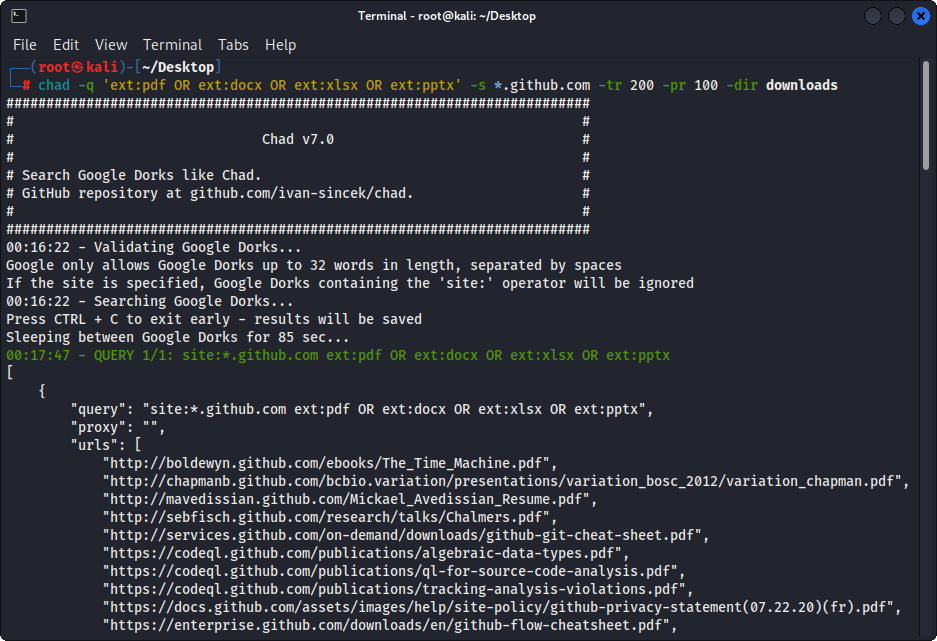
図1-(チャド)ファイルのダウンロード - 単一のGoogleDork
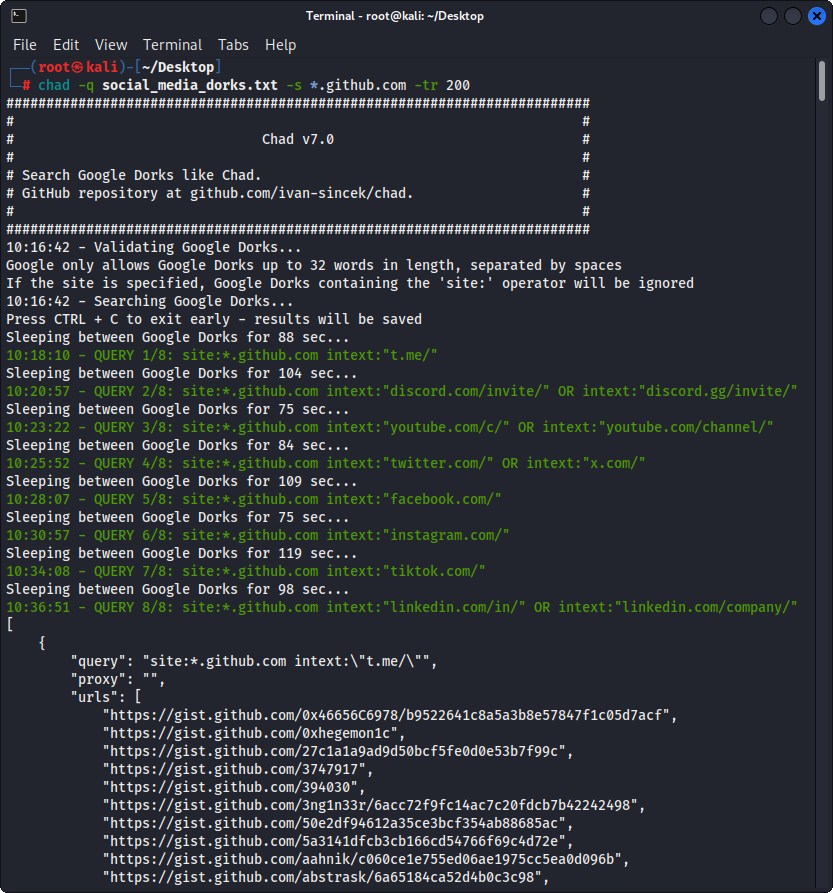
図2-(チャド)壊れたリンクハイジャック - 複数のGoogle Dorks
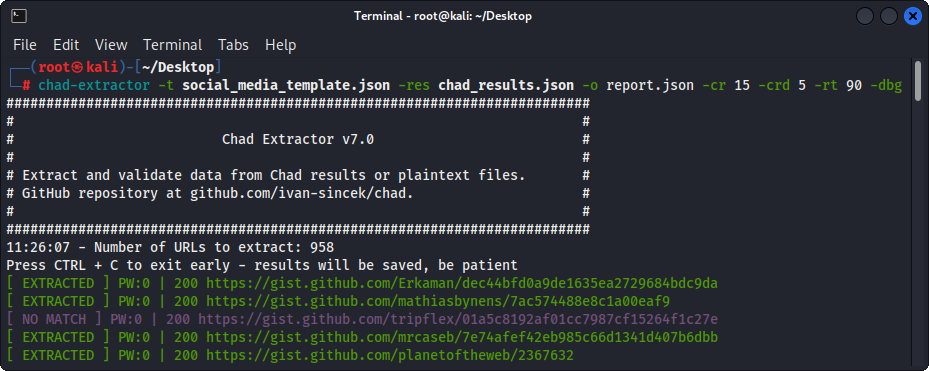
図3-(チャド抽出器)抽出
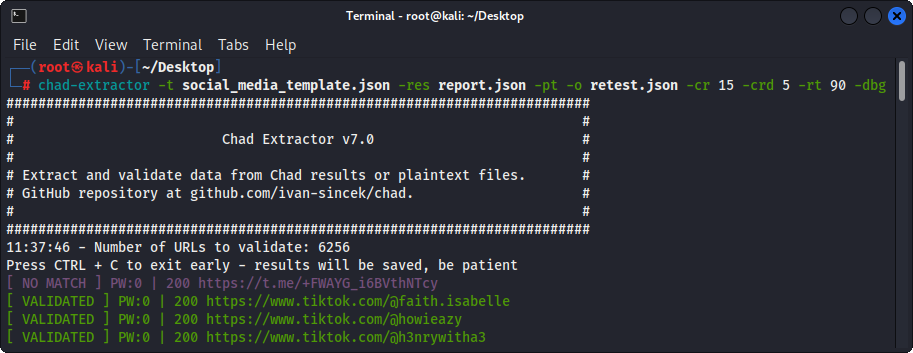
図4-(Chad Extractor)検証





