chad
v7.0

ค้นหา Google Dorks เช่น Chad ขึ้นอยู่กับ Ivan-Sincek/Nagooglesearch
ทดสอบเกี่ยวกับ Kali Linux V2024.2 (64 บิต)
ทำเพื่อวัตถุประสงค์ทางการศึกษา ฉันหวังว่ามันจะช่วยได้!
แผนการในอนาคต:
linkedin-user pip3 install --upgrade playwright
playwright install chromiumตรวจสอบให้แน่ใจว่าทุกครั้งที่คุณอัปเกรดการพึ่งพานักเขียนบทละครของคุณเพื่อติดตั้งโครเมียมใหม่ มิฉะนั้นคุณอาจได้รับข้อผิดพลาดโดยใช้เบราว์เซอร์แบบไม่มีหัวใน Chad Extractor
pip3 install --upgrade google-chadgit clone https://github.com/ivan-sincek/chad && cd chad
python3 -m pip install --upgrade build
python3 -m build
python3 -m pip install dist/google_chad-7.0-py3-none-any.whlchad -q ' intitle:"index of /" intext:"parent directory" ' คุณพูดว่า Metagoofil!
mkdir downloads

chad -q " ext:pdf OR ext:docx OR ext:xlsx OR ext:pptx " -s * .example.com -tr 200 -dir downloads
คุณสมบัติการดาวน์โหลดไฟล์ของ Chad ขึ้นอยู่กับการพึ่งพาคำขอ Python
Chad Extractor เป็นเครื่องมือที่ทรงพลังบนพื้นฐานของ Web Crawler และเบราว์เซอร์ Chromium Headless ของ Playwright ซึ่งออกแบบมาเพื่อขูดเนื้อหาเว็บอย่างมีประสิทธิภาพ ซึ่งแตกต่างจากการพึ่งพาคำขอ Python ซึ่งไม่สามารถแสดงผล HTML ที่เข้ารหัส JavaScript และถูกบล็อกได้อย่างง่ายดายโดยโซลูชันต่อต้านบอท
โดยพื้นฐานแล้ว Chad Extractor ได้รับการออกแบบมาเพื่อแยกและตรวจสอบข้อมูลจากไฟล์ผลลัพธ์ของ Chad อย่างไรก็ตามมันยังสามารถใช้ในการแยกและตรวจสอบข้อมูลจากไฟล์ plaintext โดยใช้ตัวเลือก -pt
หากใช้ตัวเลือก -pt ไฟล์ข้อความธรรมดาจะได้รับการปฏิบัติเช่นการตอบสนองของเซิร์ฟเวอร์และตรรกะการสกัดจะถูกนำไปใช้ตามด้วยการตรวจสอบ สิ่งนี้ยังมีประโยชน์หากคุณต้องการทดสอบรายงานของ Chad Extractor ก่อนหน้าเช่นโดยใช้ -res report.json -pt -o retest.json
เตรียม Google Dorks เป็นไฟล์ social_media_dorks.txt:
 intext:"t.me/"
intext:"discord.com/invite/" OR intext:"discord.gg/invite/"
intext:"youtube.com/c/" OR intext:"youtube.com/channel/"
intext:"twitter.com/" OR intext:"x.com/"
intext:"facebook.com/"
intext:"instagram.com/"
intext:"tiktok.com/"
intext:"linkedin.com/in/" OR intext:"linkedin.com/company/"
เตรียมเทมเพลตเป็นไฟล์ Social_media_template.json:
{
   "telegram" :{
      "extract" : " t \ .me \ /(?:(?!(?:share)(?:(?: \ /| \ ?| \\ | " | \ <)*$|(?: \ /| \ ?| \\ | \" | \ <)[ \ s \ S]))[ \ w \ d \ . \ _ \ - \ + \ @]+)(?<! \ .) " ,
      "extract_prepend" : " https:// " ,
      "validate" : " <meta property= " og:title " content= " Telegram: Contact .+? " > "
   },
   "discord" :{
      "extract" : " discord \ .(?:com|gg) \ /invite \ /[ \ w \ d \ . \ _ \ - \ + \ @]+(?<! \ .) " ,
      "extract_prepend" : " https:// " ,
      "validate" : " Invite Invalid " ,
      "validate_browser" : true ,
      "validate_browser_wait" : 6
   },
   "youtube" :{
      "extract" : " youtube \ .com \ /(?:c|channel) \ /[ \ w \ d \ . \ _ \ - \ + \ @]+(?<! \ .) " ,
      "extract_prepend" : " https://www. " ,
      "validate" : " <iframe.+?src= "\ /error \ ?src=404.+? " > " ,
      "validate_cookies" :{
         "SOCS" : " CAESEwgDEgk2OTk3ODk2MzcaAmVuIAEaBgiAn5S6Bg "
      }
   },
   "twitter" :{
      "extract" : " (?<=(?<!pic \ .)twitter|(?<!pic \ .)x) \ .com \ /(?:(?!(?:[ \ w]{2} \ /)*(?:explore|hashtag|home|i|intent|library|media|personalization|privacy|search|share|tos|widgets \ .js)(?:(?: \ /| \ ?| \\ | " | \ <)*$|(?: \ /| \ ?| \\ | \" | \ <)[ \ s \ S]))[ \ w \ d \ . \ _ \ - \ + \ @]+)(?<! \ .) " ,
      "extract_prepend" : " https://x " ,
      "validate" : " This account doesn.?t exist " ,
      "validate_browser" : true ,
      "validate_cookies" :{
         "night_mode" : " 2 "
      }
   },
   "facebook" :{
      "extract" : " facebook \ .com \ /(?:(?!(?:about|dialog|gaming|groups|public|sharer|share \ .php|terms \ .php)(?:(?: \ /| \ ?| \\ | " | \ <)*$|(?: \ /| \ ?| \\ | \" | \ <)[ \ s \ S]))[ \ w \ d \ . \ _ \ - \ + \ @]+)(?<! \ .) " ,
      "extract_prepend" : " https://www. " ,
      "validate" : " This (?:content|page) isn't available " ,
      "validate_browser" : true
   },
   "instagram" :{
      "extract" : " instagram \ .com \ /(?:(?!(?:about|accounts|ar|explore|p)(?:(?: \ /| \ ?| \\ | " | \ <)*$|(?: \ /| \ ?| \\ | \" | \ <)[ \ s \ S]))[ \ w \ d \ . \ _ \ - \ + \ @]+)(?<! \ .) " ,
      "extract_prepend" : " https://www. " ,
      "extract_append" : " / " ,
      "validate" : " Sorry, this page isn't available \ . " ,
      "validate_browser" : true
   },
   "tiktok" :{
      "extract" : " (?<!vt \ .)tiktok \ .com \ / \ @[ \ w \ d \ . \ _ \ - \ + \ @]+(?<! \ .) " ,
      "extract_prepend" : " https://www. " ,
      "validate" : " Couldn't find this account "
   },
   "linkedin-company" :{
      "extract" : " linkedin \ .com \ /company \ /[ \ w \ d \ . \ _ \ - \ + \ @ \ &]+(?<! \ .) " ,
      "extract_prepend" : " https://www. " ,
      "validate" : " Page not found " ,
      "validate_cookies" :{
         "bcookie" : " v=2 " ,
         "lang" : " v=2&lang=en-us "
      }
   },
   "linkedin-user" :{
      "extract" : " linkedin \ .com \ /in \ /[ \ w \ d \ . \ _ \ - \ + \ @ \ &]+(?<! \ .) " ,
      "extract_prepend" : " https://www. " ,
      "validate" : " An exact match for .+ could not be found \ . "
   }
}
ตรวจสอบให้แน่ใจว่าการแสดงออกปกติของคุณส่งคืนกลุ่มที่จับได้เพียงครั้งเดียวเช่น [1, 2, 3, 4] ; และไม่ใช่ Touple, EG, [(1, 2), (3, 4)]
ตรวจสอบให้แน่ใจว่าได้หลบหนีสัญลักษณ์เฉพาะนิพจน์ทั่วไปในไฟล์เทมเพลตของคุณเช่นตรวจสอบให้แน่ใจว่าได้หลบหนี . เช่น \. และส่งต่อ Slash / As \/ ฯลฯ
การค้นหานิพจน์ทั่วไปทั้งหมดเป็นตัวพิมพ์ใหญ่
เนื้อหาเว็บที่ดึงมาจาก URL ในไฟล์ผลลัพธ์ของชาดจะถูกจับคู่กับนิพจน์ทั่วไปทั้งหมด (กำหนดโดยแอตทริบิวต์ extract ) ในไฟล์เทมเพลตเพื่อค้นหาข้อมูลที่เกี่ยวข้องมากที่สุด
ในการแยกข้อมูลโดยไม่มีการตรวจสอบเพียงแค่ละเว้นแอตทริบิวต์ validate จากไฟล์เทมเพลตตามความจำเป็น
| ขอบเขต | ชื่อ | พิมพ์ | ที่จำเป็น | คำอธิบาย |
|---|---|---|---|---|
| การสกัด | สารสกัด | str | ใช่ | แบบสอบถามการแสดงออกปกติ |
| การสกัด | extract_pract | str | เลขที่ | สตริงเพื่อเติมเต็มให้กับข้อมูลที่แยกทั้งหมด |
| การสกัด | extract_append | str | เลขที่ | สตริงเพื่อผนวกข้อมูลที่แยกออกมา |
| การตรวจสอบความถูกต้อง | ตรวจสอบความถูกต้อง | str | เลขที่ | แบบสอบถามการแสดงออกปกติ |
| การตรวจสอบความถูกต้อง | Validate_browser | บูล | เลขที่ | ไม่ว่าจะใช้เบราว์เซอร์ที่ไม่มีหัวหรือไม่ |
| การตรวจสอบความถูกต้อง | validate_browser_wait | ลอย | เลขที่ | รอเวลาในไม่กี่วินาทีก่อนที่จะดึงเนื้อหาจากหน้าเบราว์เซอร์แบบไม่มีหัว |
| การตรวจสอบความถูกต้อง | Validate_headers | dict [str, str] | เลขที่ | ส่วนหัวคำขอ HTTP ในรูปแบบคีย์-ค่า ส่วนหัว Cookie จะถูกละเว้น |
| การตรวจสอบความถูกต้อง | Validate_cookies | dict [str, str] | เลขที่ | HTTP ขอคุกกี้ในรูปแบบคีย์-ค่า |
ตารางที่ 1 - แอตทริบิวต์เทมเพลต
chad -q social_media_dorks.txt -s * .example.com -tr 200 -pr 100 -o results.json

chad-extractor -t social_media_template.json -res results.json -o report.json เตรียมโดเมน / โดเมนย่อยเป็นไฟล์ sites.txt เช่นเดียวกับที่คุณจะใช้กับ site: ตัวเลือกใน Google:
 *.example.com
*.example.com -www
วิ่ง:
mkdir chad_results

IFS= $' n ' ; count=0 ; for site in $( cat sites.txt ) ; do count= $(( count + 1 )) ; echo " # ${count} | ${site} " ; chad -q social_media_dorks.txt -s " ${site} " -tr 200 -pr 100 -o " chad_results/results_ ${count} .json " ; done

chad-extractor -t social_media_template.json -res chad_results -o report.json -v ตรวจสอบด้วยตนเองว่า URL โซเชียลมีเดียที่แตกหักใน results[summary][validated] มีความเสี่ยงที่จะครอบครองหรือไม่:
{
   "started_at" : " 2023-12-23 03:30:10 " ,
   "ended_at" : " 2023-12-23 04:20:00 " ,
   "summary" :{
      "validated" :[
         " https://t.me/does_not_exist " // might be vulnerable to takeover
      ],
      "extracted" :[
         " https://discord.com/invite/exists " ,
         " https://t.me/does_not_exist " ,
         " https://t.me/exists "
      ]
   },
   "failed" :{
      "validation" :[],
      "extraction" :[]
   },
   "full" :[
      {
         "url" : " https://example.com/about " ,
         "results" :{
            "telegram" :[
               " https://t.me/does_not_exist " ,
               " https://t.me/exists "
            ],
            "discord" :[
               " https://discord.com/invite/exists "
            ]
         }
      }
   ]
}ช่วงเวลาการระบายความร้อนของ Google อาจมีตั้งแต่สองสามชั่วโมงจนถึงทั้งวัน
เพื่อหลีกเลี่ยงการกดปุ่มขีด จำกัด อัตราของ Google ด้วย Chad ให้เพิ่มการนอนหลับขั้นต่ำและสูงสุดระหว่าง Google Queries และ/หรือหน้า หรือใช้พร็อกซีฟรีหรือชำระเงิน อย่างไรก็ตามพร็อกซีฟรีมักถูกบล็อกและไม่เสถียร
ในการดาวน์โหลดรายการพร็อกซีฟรี Run:
curl -s ' https://proxylist.geonode.com/api/proxy-list?limit=50&page=1&sort_by=lastChecked&sort_type=desc ' -H ' Referer: https://proxylist.geonode.com/ ' | jq -r ' .data[] | "(.protocols[])://(.ip):(.port)" ' > proxies.txtหากคุณใช้พร็อกซีคุณอาจต้องการเพิ่มการหมดเวลาการร้องขอเนื่องจากการตอบกลับจะต้องใช้เวลานานขึ้นในการมาถึง
นอกจากนี้เพื่อหลีกเลี่ยงการ จำกัด อัตราการกดปุ่มบนแพลตฟอร์มเช่น Instagram ในขณะที่ใช้ Chad Extractor ให้พิจารณาลดจำนวนคำขอพร้อมกันต่อโดเมนและเพิ่มการนอนหลับและเวลารอ
 Chad v7.0 ( github.com/ivan-sincek/chad )

Usage:   chad -q queries     [-s site         ] [-x proxies    ] [-o out         ]
Example: chad -q queries.txt [-s *.example.com] [-x proxies.txt] [-o results.json]

DESCRIPTION
    Search Google Dorks like Chad
QUERIES
    File containing Google Dorks or a single query to use
    -q, --queries = queries.txt | intext:password | "ext:tar OR ext:zip" | etc.
SITE
    Domain[s] to search
    -s, --site = example.com | sub.example.com | *.example.com | "*.example.com -www" | etc.
TIME
    Get results not older than the specified time in months
    -t, --time =  6 | 12 | 24 | etc.
TOTAL RESULTS
    Total number of unique results
    Default: 100
    -tr, --total-results = 200 | etc.
PAGE RESULTS
    Number of results per page - capped at 100 by Google
    Default: randint(70, 100)
    -pr, --page-results = 50 | etc.
MINIMUM QUERIES
    Minimum sleep time in seconds between Google queries
    Default: 75
    -min-q, --minimum-queries = 120 | etc.
MAXIMUM QUERIES
    Maximum sleep time between Google queries
    Default: minimum + 50
    -max-q, --maximum-queries = 180 | etc.
MINIMUM PAGES
    Minimum sleep time between Google pages
    Default: 15
    -min-p, --minimum-pages = 30 | etc.
MAXIMUM PAGES
    Maximum sleep time between Google pages
    Default: minimum + 10
    -max-p, --maximum-pages = 60 | etc.
USER AGENTS
    User agents to use
    Default: random-all
    -a, --user-agents = user_agents.txt | random(-all) | curl/3.30.1 | etc.
PROXIES
    File containing web proxies or a single web proxy to use
    -x, --proxies = proxies.txt | http://127.0.0.1:8080 | etc.
DIRECTORY
    Downloads directory
    All downloaded files will be saved in this directory
    -dir, --directory = downloads | etc.
THREADS
    Number of files to download in parallel
    Default: 5
    -th, --threads = 20 | etc.
OUT
    Output file
    -o, --out = results.json | etc.
NO SLEEP ON START
    Disable the safety feature to prevent triggering rate limits by accident
    -nsos, --no-sleep-on-start
DEBUG
    Enable debug output
    -dbg, --debug
 Chad Extractor v7.0 ( github.com/ivan-sincek/chad )

Usage:   chad-extractor -t template      -res results      -o out         [-s sleep] [-rs random-sleep]
Example: chad-extractor -t template.json -res chad_results -o report.json [-s 1.5  ] [-rs             ]

DESCRIPTION
    Extract and validate data from Chad results or plaintext files
TEMPLATE
    File containing extraction and validation details
    -t, --template = template.json | etc.
RESULTS
    Directory containing Chad results or plaintext files, or a single file
    If a directory is specified, files ending with '.report.json' will be ignored
    -res, --results = chad_results | results.json | urls.txt | etc.
PLAINTEXT
    Treat all the results as plaintext files / server responses
    -pt, --plaintext
EXCLUDES
    File containing regular expressions or a single regular expression to exclude content from the page
    Applies only for extraction
    -e, --excludes = regexes.txt | "<div id="seo">.+?</div>" | etc.
PLAYWRIGHT
    Use Playwright's headless browser
    Applies only for extraction
    -p, --playwright
PLAYWRIGHT WAIT
    Wait time in seconds before fetching the page content
    Applies only for extraction
    -pw, --playwright-wait = 0.5 | 2 | 4 | etc.
CONCURRENT REQUESTS
    Number of concurrent requests
    Default: 15
    -cr, --concurrent-requests = 30 | 45 | etc.
CONCURRENT REQUESTS PER DOMAIN
    Number of concurrent requests per domain
    Default: 5
    -crd, --concurrent-requests-domain = 10 | 15 | etc.
SLEEP
    Sleep time in seconds between two consecutive requests to the same domain
    -s, --sleep = 1.5 | 3 | etc.
RANDOM SLEEP
    Randomize the sleep time between requests to vary between '0.5 * sleep' and '1.5 * sleep'
    -rs, --random-sleep
AUTO THROTTLE
    Auto throttle concurrent requests based on the load and latency
    Sleep time is still respected
    -at, --auto-throttle = 0.5 | 10 | 15 | 45 | etc.
RETRIES
    Number of retries per URL
    Default: 2
    -r, --retries = 0 | 4 | etc.
REQUEST TIMEOUT
    Request timeout in seconds
    Default: 60
    -rt, --request-timeout = 30 | 90 | etc.
USER AGENTS
    User agents to use
    Default: random-all
    -a, --user-agents = user_agents.txt | random(-all) | curl/3.30.1 | etc.
PROXY
    Web proxy to use
    -x, --proxy = http://127.0.0.1:8080 | etc.
OUT
    Output file
    -o, --out = report.json | etc.
VERBOSE
    Create additional supporting output files that end with '.report.json'
    -v, --verbose
DEBUG
    Enable debug output
    -dbg, --debug
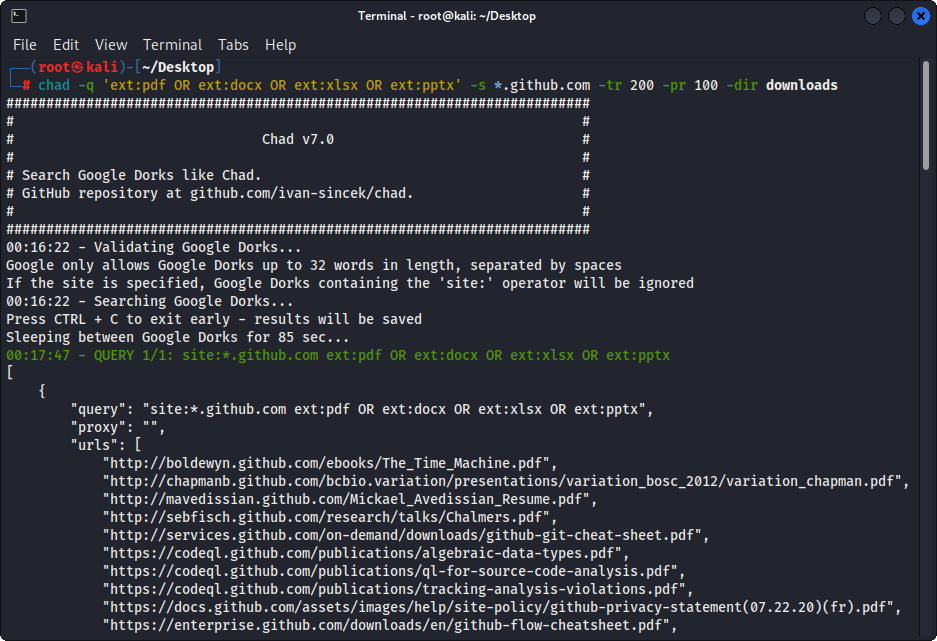
รูปที่ 1 - (ชาด) ดาวน์โหลดไฟล์ - Google Dork เดี่ยว
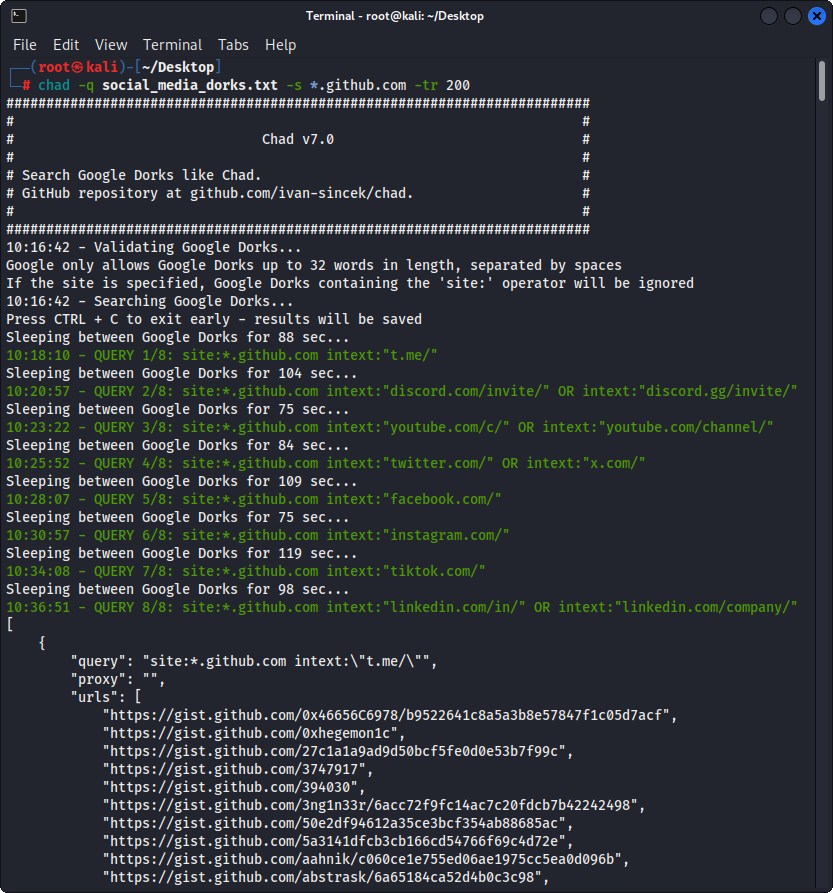
รูปที่ 2 - (ชาด) การจี้ลิงค์หัก - Google Dorks หลายตัว
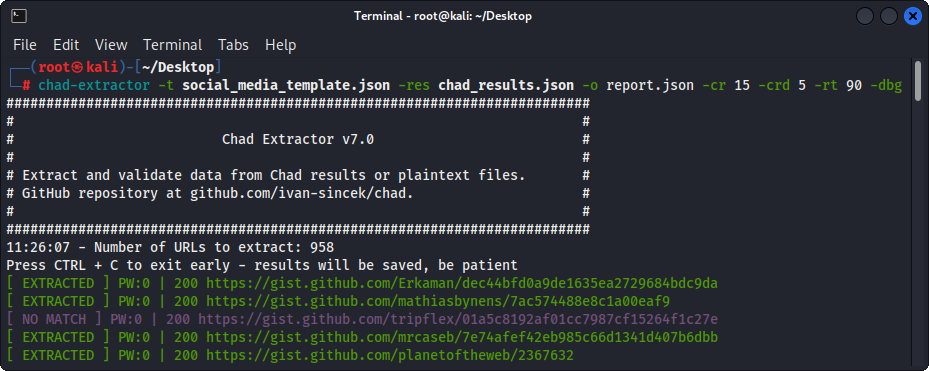
รูปที่ 3 - (Chad Extractor) การสกัด
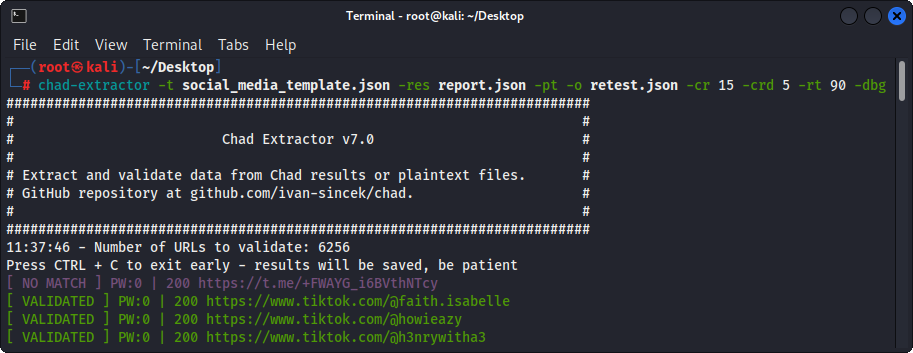
รูปที่ 4 - (Chad Extractor) การตรวจสอบความถูกต้อง





