chad
v7.0

Chad와 같은 Google Dorks를 검색하십시오. Ivan-Sincek/Nagooglesearch를 기반으로합니다.
Kali Linux V2024.2 (64 비트)에서 테스트.
교육 목적을 위해 만들어졌습니다. 도움이되기를 바랍니다!
향후 계획 :
linkedin-user 의 벽. pip3 install --upgrade playwright
playwright install chromium크롬을 다시 설치하기 위해 극작가 의존성을 업그레이드 할 때마다; 그렇지 않으면 Chad Extractor의 헤드리스 브라우저를 사용하여 오류가 발생할 수 있습니다.
pip3 install --upgrade google-chadgit clone https://github.com/ivan-sincek/chad && cd chad
python3 -m pip install --upgrade build
python3 -m build
python3 -m pip install dist/google_chad-7.0-py3-none-any.whlchad -q ' intitle:"index of /" intext:"parent directory" ' Metagoofil이라고 했습니까?!
mkdir downloads

chad -q " ext:pdf OR ext:docx OR ext:xlsx OR ext:pptx " -s * .example.com -tr 200 -dir downloads
Chad의 파일 다운로드 기능은 Python 요청 종속성을 기반으로합니다.
Chad Extractor는 웹 컨텐츠를 효율적으로 긁어 내도록 설계된 Crapy의 웹 크롤러 및 극작가의 Chromium 헤드리스 브라우저를 기반으로하는 강력한 도구입니다. Python 요청 의존성과 달리 JavaScript를 인코딩 할 수없는 HTML을 렌더링 할 수 없으며 반대 솔루션에 의해 쉽게 차단됩니다.
주로 Chad Extractor는 Chad 결과 파일의 데이터를 추출하고 검증하도록 설계되었습니다. 그러나 -pt 옵션을 사용하여 일반 텍스트 파일에서 데이터를 추출하고 검증하는 데 사용될 수도 있습니다.
-pt 옵션을 사용하는 경우 일반 텍스트 파일은 서버 응답처럼 취급되고 추출 로직이 적용된 다음 유효성 검사가 적용됩니다. 이것은 -res report.json -pt -o retest.json 사용하여 이전 Chad Extractor의 보고서를 다시 테스트하려는 경우에도 유용합니다.
Google Dorks를 Social_Media_dorks.txt 파일로 준비하십시오.
 intext:"t.me/"
intext:"discord.com/invite/" OR intext:"discord.gg/invite/"
intext:"youtube.com/c/" OR intext:"youtube.com/channel/"
intext:"twitter.com/" OR intext:"x.com/"
intext:"facebook.com/"
intext:"instagram.com/"
intext:"tiktok.com/"
intext:"linkedin.com/in/" OR intext:"linkedin.com/company/"
social_media_template.json 파일로 템플릿을 준비하십시오.
{
   "telegram" :{
      "extract" : " t \ .me \ /(?:(?!(?:share)(?:(?: \ /| \ ?| \\ | " | \ <)*$|(?: \ /| \ ?| \\ | \" | \ <)[ \ s \ S]))[ \ w \ d \ . \ _ \ - \ + \ @]+)(?<! \ .) " ,
      "extract_prepend" : " https:// " ,
      "validate" : " <meta property= " og:title " content= " Telegram: Contact .+? " > "
   },
   "discord" :{
      "extract" : " discord \ .(?:com|gg) \ /invite \ /[ \ w \ d \ . \ _ \ - \ + \ @]+(?<! \ .) " ,
      "extract_prepend" : " https:// " ,
      "validate" : " Invite Invalid " ,
      "validate_browser" : true ,
      "validate_browser_wait" : 6
   },
   "youtube" :{
      "extract" : " youtube \ .com \ /(?:c|channel) \ /[ \ w \ d \ . \ _ \ - \ + \ @]+(?<! \ .) " ,
      "extract_prepend" : " https://www. " ,
      "validate" : " <iframe.+?src= "\ /error \ ?src=404.+? " > " ,
      "validate_cookies" :{
         "SOCS" : " CAESEwgDEgk2OTk3ODk2MzcaAmVuIAEaBgiAn5S6Bg "
      }
   },
   "twitter" :{
      "extract" : " (?<=(?<!pic \ .)twitter|(?<!pic \ .)x) \ .com \ /(?:(?!(?:[ \ w]{2} \ /)*(?:explore|hashtag|home|i|intent|library|media|personalization|privacy|search|share|tos|widgets \ .js)(?:(?: \ /| \ ?| \\ | " | \ <)*$|(?: \ /| \ ?| \\ | \" | \ <)[ \ s \ S]))[ \ w \ d \ . \ _ \ - \ + \ @]+)(?<! \ .) " ,
      "extract_prepend" : " https://x " ,
      "validate" : " This account doesn.?t exist " ,
      "validate_browser" : true ,
      "validate_cookies" :{
         "night_mode" : " 2 "
      }
   },
   "facebook" :{
      "extract" : " facebook \ .com \ /(?:(?!(?:about|dialog|gaming|groups|public|sharer|share \ .php|terms \ .php)(?:(?: \ /| \ ?| \\ | " | \ <)*$|(?: \ /| \ ?| \\ | \" | \ <)[ \ s \ S]))[ \ w \ d \ . \ _ \ - \ + \ @]+)(?<! \ .) " ,
      "extract_prepend" : " https://www. " ,
      "validate" : " This (?:content|page) isn't available " ,
      "validate_browser" : true
   },
   "instagram" :{
      "extract" : " instagram \ .com \ /(?:(?!(?:about|accounts|ar|explore|p)(?:(?: \ /| \ ?| \\ | " | \ <)*$|(?: \ /| \ ?| \\ | \" | \ <)[ \ s \ S]))[ \ w \ d \ . \ _ \ - \ + \ @]+)(?<! \ .) " ,
      "extract_prepend" : " https://www. " ,
      "extract_append" : " / " ,
      "validate" : " Sorry, this page isn't available \ . " ,
      "validate_browser" : true
   },
   "tiktok" :{
      "extract" : " (?<!vt \ .)tiktok \ .com \ / \ @[ \ w \ d \ . \ _ \ - \ + \ @]+(?<! \ .) " ,
      "extract_prepend" : " https://www. " ,
      "validate" : " Couldn't find this account "
   },
   "linkedin-company" :{
      "extract" : " linkedin \ .com \ /company \ /[ \ w \ d \ . \ _ \ - \ + \ @ \ &]+(?<! \ .) " ,
      "extract_prepend" : " https://www. " ,
      "validate" : " Page not found " ,
      "validate_cookies" :{
         "bcookie" : " v=2 " ,
         "lang" : " v=2&lang=en-us "
      }
   },
   "linkedin-user" :{
      "extract" : " linkedin \ .com \ /in \ /[ \ w \ d \ . \ _ \ - \ + \ @ \ &]+(?<! \ .) " ,
      "extract_prepend" : " https://www. " ,
      "validate" : " An exact match for .+ could not be found \ . "
   }
}
정규 표현이 하나의 캡처 그룹 (예 : [1, 2, 3, 4] 만 반환해야합니다. 그리고 touple, 예를 들어, [(1, 2), (3, 4)] .
템플릿 파일에서 정규 표현식 특정 기호를 올바르게 탈출해야합니다. 예를 들어 도트를 탈출하십시오 . 처럼 \. , 전방 슬래시 / as \/ 등
모든 정규 표현식 검색은 사례에 민감합니다.
CHAD 결과 파일의 URL에서 가져온 웹 컨텐츠는 템플릿 파일의 모든 정규식 ( extract 속성에 의해 정의)과 일치하여 가능한 한 많은 관련 데이터를 찾습니다.
유효성 검사없이 데이터를 추출하려면 필요에 따라 템플릿 파일에서 validate 속성을 생략하십시오.
| 범위 | 이름 | 유형 | 필수의 | 설명 |
|---|---|---|---|---|
| 추출 | 발췌 | str | 예 | 정규 표현 쿼리. |
| 추출 | extrac_prepend | str | 아니요 | 추출 된 모든 데이터에 전제하는 문자열. |
| 추출 | Extract_Append | str | 아니요 | 추출 된 데이터에 추가되는 문자열. |
| 확인 | 검증 | str | 아니요 | 정규 표현 쿼리. |
| 확인 | validate_browser | 부 | 아니요 | 헤드리스 브라우저 사용 여부. |
| 확인 | validate_browser_wait | 뜨다 | 아니요 | 헤드리스 브라우저 페이지에서 콘텐츠를 가져 오기 전에 몇 초 만에 대기 시간. |
| 확인 | validate_headers | dict [str, str] | 아니요 | HTTP 요청 헤더는 키 값 형식의 헤더입니다. Cookie 헤더는 무시됩니다. |
| 확인 | validate_cookies | dict [str, str] | 아니요 | HTTP는 키 값 형식의 쿠키를 요청합니다. |
표 1- 템플릿 속성
chad -q social_media_dorks.txt -s * .example.com -tr 200 -pr 100 -o results.json

chad-extractor -t social_media_template.json -res results.json -o report.json Domains / subdomains를 sites.txt 파일로 준비하십시오. Google의 site: 옵션과 함께 사용하는 것과 동일한 방식 :
 *.example.com
*.example.com -www
달리다:
mkdir chad_results

IFS= $' n ' ; count=0 ; for site in $( cat sites.txt ) ; do count= $(( count + 1 )) ; echo " # ${count} | ${site} " ; chad -q social_media_dorks.txt -s " ${site} " -tr 200 -pr 100 -o " chad_results/results_ ${count} .json " ; done

chad-extractor -t social_media_template.json -res chad_results -o report.json -v results[summary][validated] 의 깨진 소셜 미디어 URL이 인수에 취약한 지 수동으로 확인하십시오.
{
   "started_at" : " 2023-12-23 03:30:10 " ,
   "ended_at" : " 2023-12-23 04:20:00 " ,
   "summary" :{
      "validated" :[
         " https://t.me/does_not_exist " // might be vulnerable to takeover
      ],
      "extracted" :[
         " https://discord.com/invite/exists " ,
         " https://t.me/does_not_exist " ,
         " https://t.me/exists "
      ]
   },
   "failed" :{
      "validation" :[],
      "extraction" :[]
   },
   "full" :[
      {
         "url" : " https://example.com/about " ,
         "results" :{
            "telegram" :[
               " https://t.me/does_not_exist " ,
               " https://t.me/exists "
            ],
            "discord" :[
               " https://discord.com/invite/exists "
            ]
         }
      }
   ]
}Google의 냉각 기간은 몇 시간에서 하루 종일 다양합니다.
Chad로 Google의 요금 제한을 치르지 않으려면 Google 쿼리 및/또는 페이지 간의 최소 및 최대 수면을 증가시킵니다. 또는 무료 또는 유료 프록시를 사용하십시오. 그러나 자유 프록시는 종종 차단되고 불안정합니다.
무료 프록시 목록을 다운로드하려면 실행하십시오.
curl -s ' https://proxylist.geonode.com/api/proxy-list?limit=50&page=1&sort_by=lastChecked&sort_type=desc ' -H ' Referer: https://proxylist.geonode.com/ ' | jq -r ' .data[] | "(.protocols[])://(.ip):(.port)" ' > proxies.txt프록시를 사용하는 경우 응답이 더 긴 시간이 필요하므로 요청 시간 초과를 늘릴 수 있습니다.
또한 Chad Extractor를 사용하는 동안 Instagram과 같은 플랫폼의 속도 제한을 피하려면 도메인 당 동시 요청 수를 줄이고 수면 및 대기 시간을 늘리는 것을 고려하십시오.
 Chad v7.0 ( github.com/ivan-sincek/chad )

Usage:   chad -q queries     [-s site         ] [-x proxies    ] [-o out         ]
Example: chad -q queries.txt [-s *.example.com] [-x proxies.txt] [-o results.json]

DESCRIPTION
    Search Google Dorks like Chad
QUERIES
    File containing Google Dorks or a single query to use
    -q, --queries = queries.txt | intext:password | "ext:tar OR ext:zip" | etc.
SITE
    Domain[s] to search
    -s, --site = example.com | sub.example.com | *.example.com | "*.example.com -www" | etc.
TIME
    Get results not older than the specified time in months
    -t, --time =  6 | 12 | 24 | etc.
TOTAL RESULTS
    Total number of unique results
    Default: 100
    -tr, --total-results = 200 | etc.
PAGE RESULTS
    Number of results per page - capped at 100 by Google
    Default: randint(70, 100)
    -pr, --page-results = 50 | etc.
MINIMUM QUERIES
    Minimum sleep time in seconds between Google queries
    Default: 75
    -min-q, --minimum-queries = 120 | etc.
MAXIMUM QUERIES
    Maximum sleep time between Google queries
    Default: minimum + 50
    -max-q, --maximum-queries = 180 | etc.
MINIMUM PAGES
    Minimum sleep time between Google pages
    Default: 15
    -min-p, --minimum-pages = 30 | etc.
MAXIMUM PAGES
    Maximum sleep time between Google pages
    Default: minimum + 10
    -max-p, --maximum-pages = 60 | etc.
USER AGENTS
    User agents to use
    Default: random-all
    -a, --user-agents = user_agents.txt | random(-all) | curl/3.30.1 | etc.
PROXIES
    File containing web proxies or a single web proxy to use
    -x, --proxies = proxies.txt | http://127.0.0.1:8080 | etc.
DIRECTORY
    Downloads directory
    All downloaded files will be saved in this directory
    -dir, --directory = downloads | etc.
THREADS
    Number of files to download in parallel
    Default: 5
    -th, --threads = 20 | etc.
OUT
    Output file
    -o, --out = results.json | etc.
NO SLEEP ON START
    Disable the safety feature to prevent triggering rate limits by accident
    -nsos, --no-sleep-on-start
DEBUG
    Enable debug output
    -dbg, --debug
 Chad Extractor v7.0 ( github.com/ivan-sincek/chad )

Usage:   chad-extractor -t template      -res results      -o out         [-s sleep] [-rs random-sleep]
Example: chad-extractor -t template.json -res chad_results -o report.json [-s 1.5  ] [-rs             ]

DESCRIPTION
    Extract and validate data from Chad results or plaintext files
TEMPLATE
    File containing extraction and validation details
    -t, --template = template.json | etc.
RESULTS
    Directory containing Chad results or plaintext files, or a single file
    If a directory is specified, files ending with '.report.json' will be ignored
    -res, --results = chad_results | results.json | urls.txt | etc.
PLAINTEXT
    Treat all the results as plaintext files / server responses
    -pt, --plaintext
EXCLUDES
    File containing regular expressions or a single regular expression to exclude content from the page
    Applies only for extraction
    -e, --excludes = regexes.txt | "<div id="seo">.+?</div>" | etc.
PLAYWRIGHT
    Use Playwright's headless browser
    Applies only for extraction
    -p, --playwright
PLAYWRIGHT WAIT
    Wait time in seconds before fetching the page content
    Applies only for extraction
    -pw, --playwright-wait = 0.5 | 2 | 4 | etc.
CONCURRENT REQUESTS
    Number of concurrent requests
    Default: 15
    -cr, --concurrent-requests = 30 | 45 | etc.
CONCURRENT REQUESTS PER DOMAIN
    Number of concurrent requests per domain
    Default: 5
    -crd, --concurrent-requests-domain = 10 | 15 | etc.
SLEEP
    Sleep time in seconds between two consecutive requests to the same domain
    -s, --sleep = 1.5 | 3 | etc.
RANDOM SLEEP
    Randomize the sleep time between requests to vary between '0.5 * sleep' and '1.5 * sleep'
    -rs, --random-sleep
AUTO THROTTLE
    Auto throttle concurrent requests based on the load and latency
    Sleep time is still respected
    -at, --auto-throttle = 0.5 | 10 | 15 | 45 | etc.
RETRIES
    Number of retries per URL
    Default: 2
    -r, --retries = 0 | 4 | etc.
REQUEST TIMEOUT
    Request timeout in seconds
    Default: 60
    -rt, --request-timeout = 30 | 90 | etc.
USER AGENTS
    User agents to use
    Default: random-all
    -a, --user-agents = user_agents.txt | random(-all) | curl/3.30.1 | etc.
PROXY
    Web proxy to use
    -x, --proxy = http://127.0.0.1:8080 | etc.
OUT
    Output file
    -o, --out = report.json | etc.
VERBOSE
    Create additional supporting output files that end with '.report.json'
    -v, --verbose
DEBUG
    Enable debug output
    -dbg, --debug
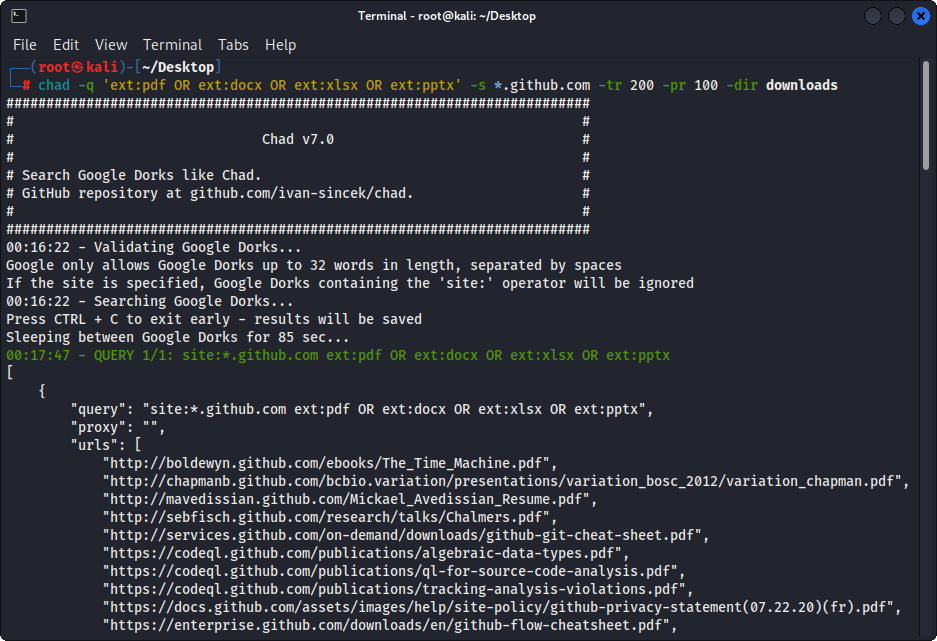
그림 1- (Chad) 파일 다운로드 - 단일 Google Dork
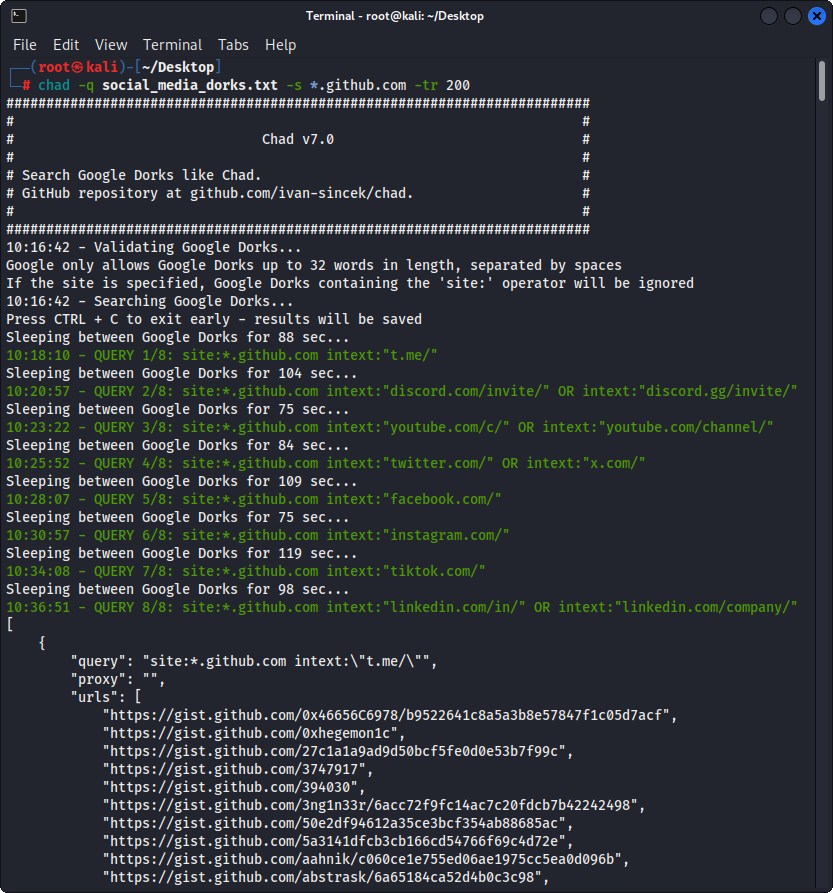
그림 2- (Chad) Broken Link 납치 - 다중 Google Dorks
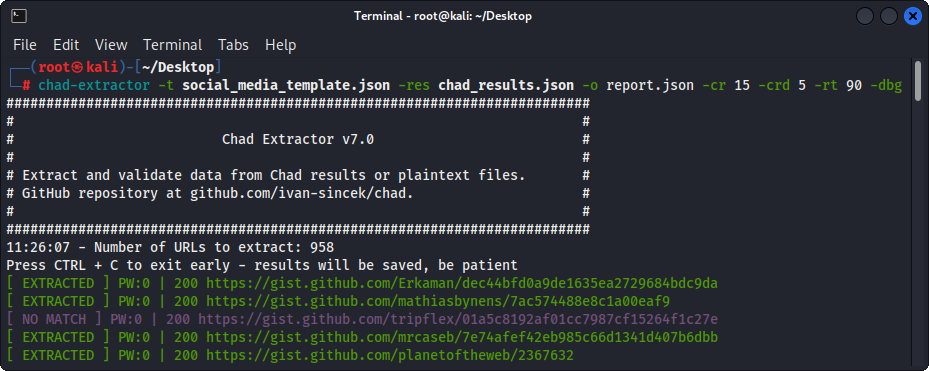
그림 3- (차드 추출기) 추출
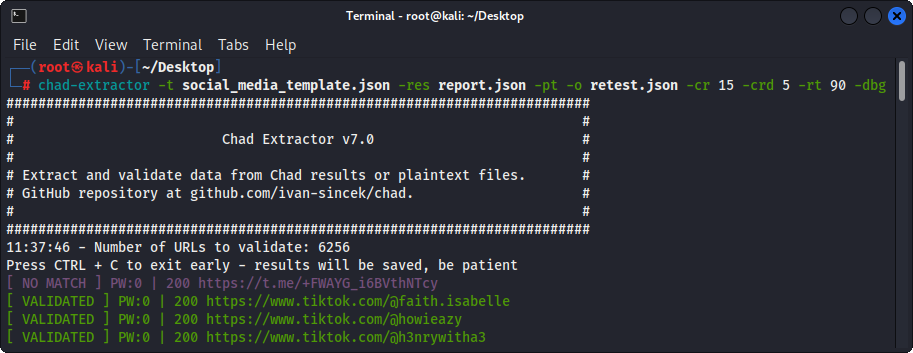
그림 4- (Chad Extractor) 검증





