text2speech
1.0.0

?在ICASSP 2023接受
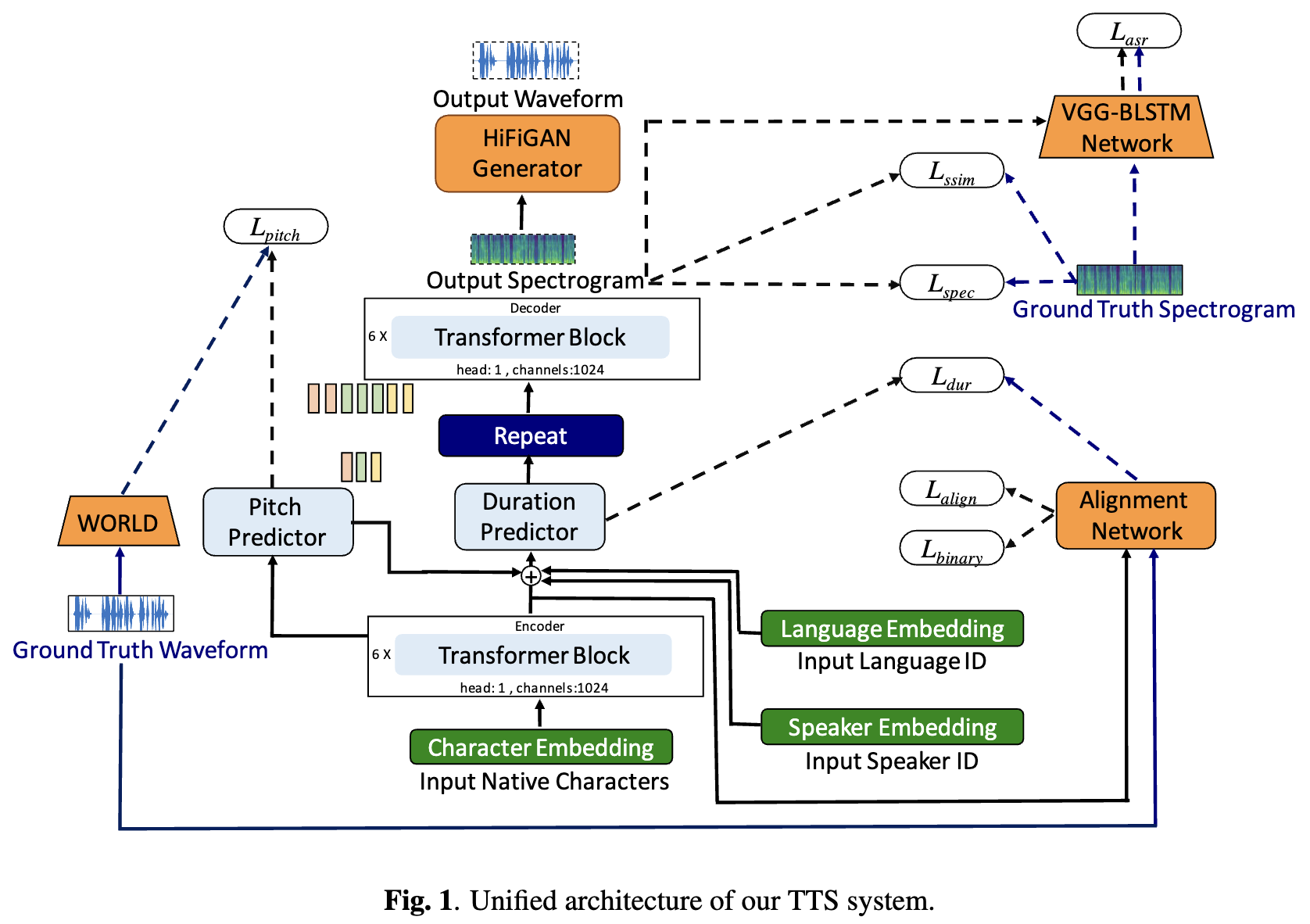
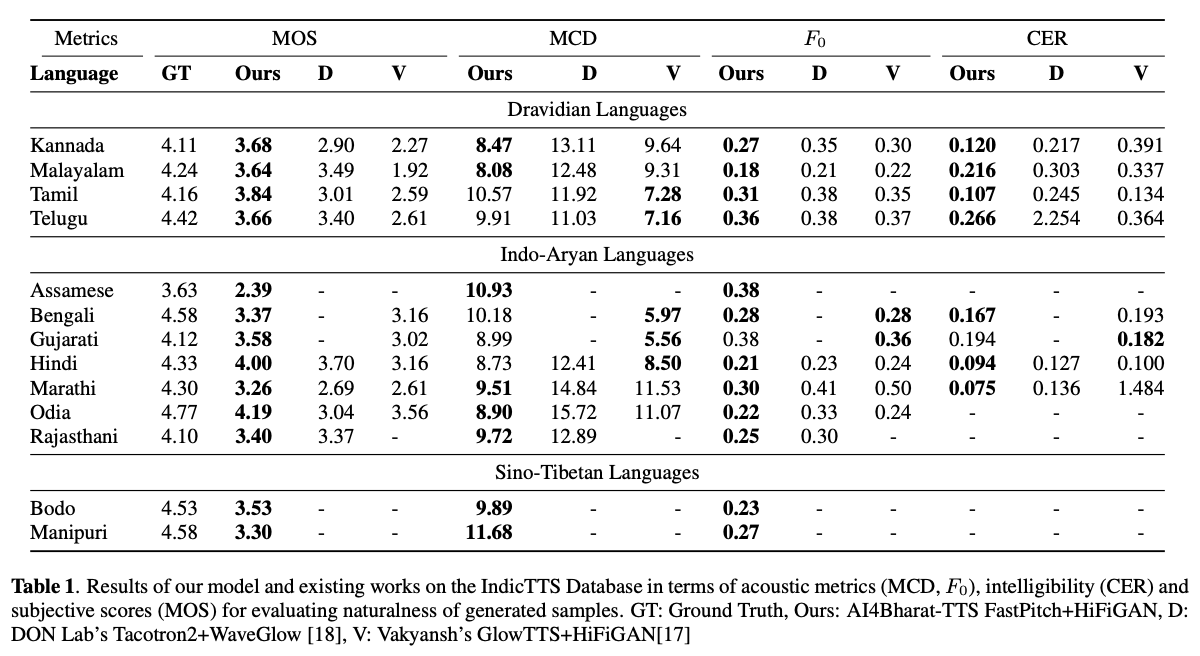
基于深度学习的文本到语音(TTS)系统,随着模型架构,培训方法和跨扬声器和语言的概括的进步,正在迅速发展。但是,这些进步尚未经过彻底研究印度语言言语综合。鉴于印度语言的数量和多样性,资源可用性相对较低,并且在未经测试的神经TT中,这种调查在计算上是昂贵的。在本文中,我们评估了德拉维语和印度雅利安语言的声学模型,声码器,补充损失功能,培训时间表以及说话者和语言多样性的选择。基于此,我们通过FastPitch和Hifi-GAN V1确定了单语模型,并对男性和女性扬声器进行了培训,以表现最好。通过此设置,我们培训和评估13种语言的TTS模型,并找到我们的模型,以通过平均意见分数衡量的所有语言中的现有模型显着改进。我们在Bhashini平台上开放所有型号。
TL; DR:我们开源13种印度语言的SOTA SOTA文本到语音模型: Assamese,Bengali,Bodo,Gujarati,Gujarati,Hindi,Kannada,Kannada,Malayalam,Manipuri,Manipuri,Marathi,Marathi,Odia,Rajasthani,Rajasthani,Temil和Telugu 。
作者: Gokul Karthik Kumar*,Praveen SV*,Pratyush Kumar,Mitesh M. Khapra,Karthik Nandakumar
[arxiv预印度] [音频样本] [尝试实时] [视频]
 # 1. Create environment
sudo apt-get install libsndfile1-dev
conda create -n tts-env
conda activate tts-env

# 2. Setup PyTorch
pip3 install -U torch torchvision torchaudio --extra-index-url https://download.pytorch.org/whl/cu113

# 3. Setup Trainer
git clone https://github.com/gokulkarthik/Trainer

cd Trainer
pip3 install -e .[all]
cd ..
[or]
cp Trainer/trainer/logging/wandb_logger.py to the local Trainer installation # fixed wandb logger
cp Trainer/trainer/trainer.py to the local Trainer installation # fixed model.module.test_log and added code to log epoch
add `gpus = [str(gpu) for gpu in gpus]` in line 53 of trainer/distribute.py

# 4. Setup TTS
git clone https://github.com/gokulkarthik/TTS

cd TTS
pip3 install -e .[all]
cd ..
[or]
cp TTS/TTS/bin/synthesize.py to the local TTS installation # added multiple output support for TTS.bin.synthesis

# 5. Install other requirements
> pip3 install -r requirements.txt
sh run.sh训练和测试可以在此链接上下载经过训练的模型权重和配置文件。
 python3 -m TTS.bin.synthesize --text <TEXT>
    --model_path <LANG>/fastpitch/best_model.pth
    --config_path <LANG>/config.json
    --vocoder_path <LANG>/hifigan/best_model.pth
    --vocoder_config_path <LANG>/hifigan/config.json
    --out_path <OUT_PATH>
代码参考:https://github.com/coqui-ai/tts







