text2speech
1.0.0

? ICASSP 2023で受け入れられました
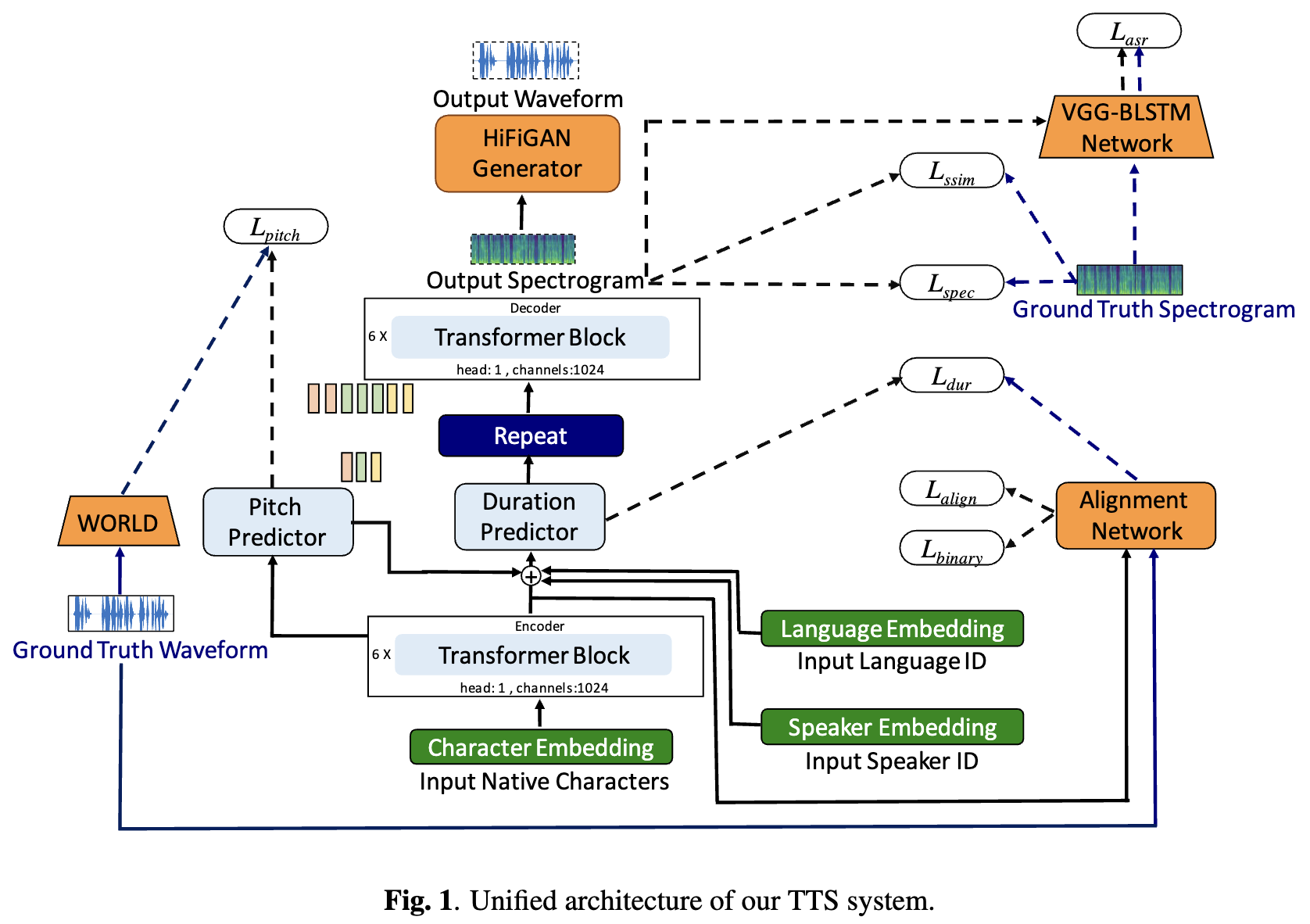
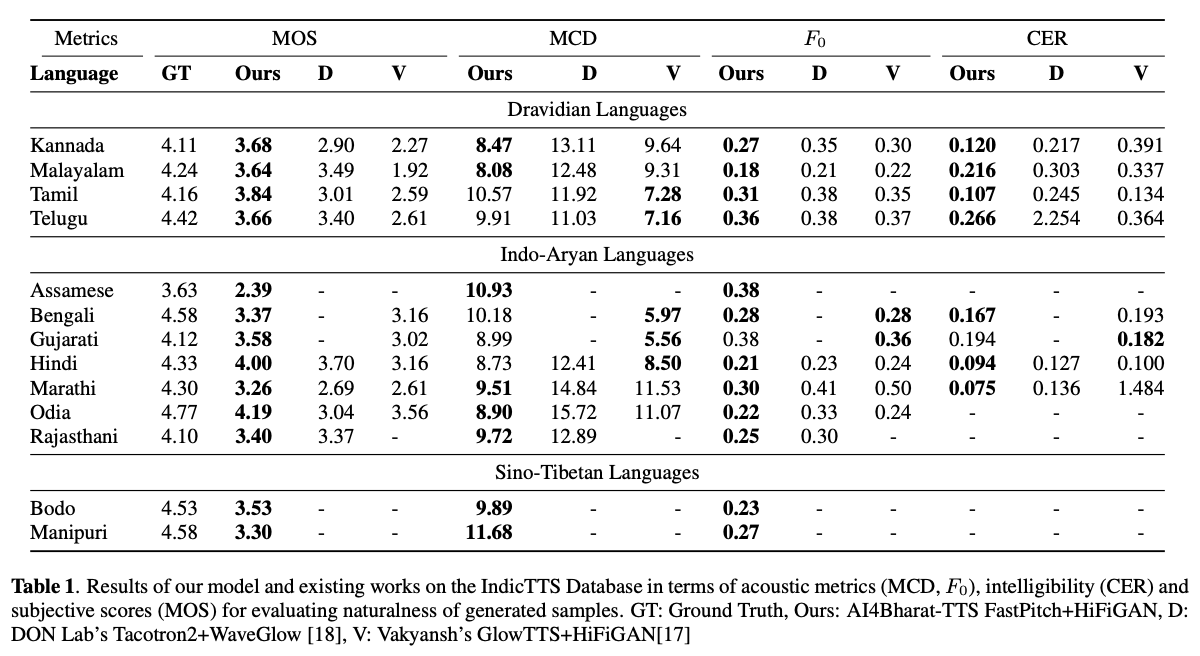
ディープラーニングベースのテキスト対スピーチ(TTS)システムは、モデルアーキテクチャ、トレーニング方法論、およびスピーカーや言語間の一般化の進歩とともに急速に進化しています。ただし、これらの進歩は、インド語の言語統合のために徹底的に調査されていません。このような調査は、インドの言語の数と多様性、比較的低いリソースの可用性、およびテストされていない神経TTの多様な進歩セットを考えると、計算的に高価です。このホワイトペーパーでは、ドラヴィディアンとインドアリアンの言語の音響モデル、ボコーダー、補足損失機能、トレーニングスケジュール、スピーカーと言語の多様性の選択を評価します。これに基づいて、FastPitchとHifi-Gan V1を使用して単一言語モデルを特定し、男性と女性のスピーカーを共同で訓練して最高のパフォーマンスを発揮します。このセットアップにより、13の言語のTTSモデルをトレーニングおよび評価し、平均意見スコアで測定されたすべての言語の既存のモデルを大幅に改善するモデルを見つけます。 Bhashiniプラットフォーム上のすべてのモデルをオープンソースします。
TL; DR: 13のインド言語用のSOTAテキストからスピーチモデルのオープンソース:アッサム、ベンガル語、ボドー、グジャラート語、ヒンディー語、カンナダ、マラヤーラム語、マニプリ、マラティ、オディア、ラジャスタニ、タミル語、テルグ語。
著者: Gokul Karthik Kumar*、Praveen SV*、Pratyush Kumar、Mitesh M. Khapra、Karthik Nandakumar
[arxiv preprint] [オーディオサンプル] [ライブで試してください] [ビデオ]
 # 1. Create environment
sudo apt-get install libsndfile1-dev
conda create -n tts-env
conda activate tts-env

# 2. Setup PyTorch
pip3 install -U torch torchvision torchaudio --extra-index-url https://download.pytorch.org/whl/cu113

# 3. Setup Trainer
git clone https://github.com/gokulkarthik/Trainer

cd Trainer
pip3 install -e .[all]
cd ..
[or]
cp Trainer/trainer/logging/wandb_logger.py to the local Trainer installation # fixed wandb logger
cp Trainer/trainer/trainer.py to the local Trainer installation # fixed model.module.test_log and added code to log epoch
add `gpus = [str(gpu) for gpu in gpus]` in line 53 of trainer/distribute.py

# 4. Setup TTS
git clone https://github.com/gokulkarthik/TTS

cd TTS
pip3 install -e .[all]
cd ..
[or]
cp TTS/TTS/bin/synthesize.py to the local TTS installation # added multiple output support for TTS.bin.synthesis

# 5. Install other requirements
> pip3 install -r requirements.txt
sh run.sh実行してトレーニングとテストトレーニングされたモデルの重量と構成ファイルは、このリンクでダウンロードできます。
 python3 -m TTS.bin.synthesize --text <TEXT>
    --model_path <LANG>/fastpitch/best_model.pth
    --config_path <LANG>/config.json
    --vocoder_path <LANG>/hifigan/best_model.pth
    --vocoder_config_path <LANG>/hifigan/config.json
    --out_path <OUT_PATH>
コードリファレンス:https://github.com/coqui-ai/tts







