openshift install power
v1.12.1

该项目包含一个BASH脚本,可帮助您在IBM®云(PowerVS)上的IBM®PowerSystems™虚拟服务器上部署OpenShift Container Platform 4.x。 OCP4-UPI-PowerVS上的TerraForm代码用于部署过程。
确保您的PowerVS实例已准备好部署OpenShift群集。请检查此链接以获取更多详细信息
这是快速演示。
脚本仅支持64位操作系统。
该脚本需要bash Shell和Package Manager预先配置。
需要Catalina(10.15)及以上。
该脚本使用Homebrew Package Manager安装所需的软件包。
需要RHEL8/CENTOS8及以上或Ubuntu 16.04及以上。
该脚本根据分布使用默认软件包管理器( yum/dnf/apt )。
该脚本可以在Gitbash,Linux和Cygwin终端的Windows子系统上运行。
如果使用Cygwin,请确保安装curl和解unzip软件包。您将需要再次运行Cygwin设置。
注意: PowerShell不受支持。
$ mkdir ocp-install-dir && cd ocp-install-dir
 $ curl -sL https://raw.githubusercontent.com/ocp-power-automation/openshift-install-power/main/openshift-install-powervs -o ./openshift-install-powervs
$ chmod +x ./openshift-install-powervs
 $ ./openshift-install-powervs

Automation for deploying OpenShift 4.X on PowerVS

Usage:
  openshift-install-powervs [command] [<args> [<value>]]

Available commands:
  setup           Install all the required packages/binaries in current directory
  variables       Interactive way to populate the variables file
  create          Create an OpenShift cluster
  destroy         Destroy an OpenShift cluster
  output          Display the cluster information. Runs terraform output [NAME]
  access-info     Display the access information of installed OpenShift cluster
  help            Display this information

Where <args>:
  -var               Terraform variable to be passed to the create/destroy command
  -var-file          Terraform variable file name in current directory. (By default using var.tfvars)
  -flavor            Cluster compute template to use eg: small, medium, large
  -force-destroy     Not ask for confirmation during destroy command
  -ignore-os-checks  Ignore operating system related checks
  -ignore-warnings   Warning messages will not be displayed. Should be specified first, before any other args.
  -verbose           Enable verbose for terraform console messages
  -all-images        List all the images available during variables prompt
  -trace             Enable tracing of all executed commands
  -version, -v       Display the script version

Environment Variables:
  IBMCLOUD_API_KEY    IBM Cloud API key
  RELEASE_VER         OpenShift release version (Default: 4.15)
  ARTIFACTS_VERSION   Tag or Branch name of ocp4-upi-powervs repository (Default: main)
  RHEL_SUBS_PASSWORD  RHEL subscription password if not provided in variables
  NO_OF_RETRY         Number of retries/attempts to run repeatable actions such as create (Default: 5)

Submit issues at: https://github.com/ocp-power-automation/openshift-install-power/issues
使用容器图像
要使用quay.io/powercloud存储库中的图像,请运行以下命令。
docker run -it -e IBMCLOUD_API_KEY="<key>" -v $(pwd):/data quay.io/powercloud/openshift-install-powervs:<valid-tag> create
或者
podman run -it -e IBMCLOUD_API_KEY="<key>" -v $(pwd):/data quay.io/powercloud/openshift-install-powervs:<valid-tag> create
标签提供有关发布版本,OCP版本或支持的体系结构的信息。
如果您需要构建OpenShift-install-Powervs图像,请查看以下“使用容器”链接
该脚本假设Powervs OpenShift的先决条件已经到位。
如果您错过了,这是前提条件的链接
对于运行脚本,您需要以下内容:
导出IBM Cloud API密钥和RHEL订阅密码。
 $ set +o history
$ export IBMCLOUD_API_KEY='<your API key>'
$ export RHEL_SUBS_PASSWORD='<your RHEL subscription password>'
$ set -o history
运行create命令。
$ ./openshift-install-powervs create
脚本将设置所需的工具并以交互式模式运行,以提示输入。
一旦上述命令成功完成,它将打印群集访问信息。
 Login to bastion: 'ssh -i automation/data/id_rsa [email protected]' and start using the 'oc' command.
To access the cluster on local system when using 'oc' run: 'export KUBECONFIG=/root/ocp-install-dir/automation/kubeconfig'
Access the OpenShift web-console here: https://console-openshift-console.apps.test-ocp-6f2c.ibm.com
Login to the console with user: "kubeadmin", and password: "MHvmI-z5nY8-CBFKF-hmCDJ"
Add the line on local system 'hosts' file:
145.48.43.53 api.test-ocp-6f2c.ibm.com console-openshift-console.apps.test-ocp-6f2c.ibm.com integrated-oauth-server-openshift-authentication.apps.test-ocp-6f2c.ibm.com oauth-openshift.apps.test-ocp-6f2c.ibm.com prometheus-k8s-openshift-monitoring.apps.test-ocp-6f2c.ibm.com grafana-openshift-monitoring.apps.test-ocp-6f2c.ibm.com example.apps.test-ocp-6f2c.ibm.com
在运行脚本之前,您可以根据需要选择覆盖某些环境变量。
默认情况下,已安装OpenShift版本4.15。
如果要安装4.14,请导出变量RELEASE_VER 。
$ export RELEASE_VER="4.14"
您可以通过在安装目录中拥有所需的输入文件来避免交互模式
所需的输入文件
Terraform vars文件(文件名: var.tfvars )
ssh键文件(文件名: id_rsa & id_rsa.pub )
示例var.tfvars文件
 ibmcloud_region = "syd"
ibmcloud_zone = "syd04"
service_instance_id = "123456abc-xzz-2223434343"
rhel_image_name = "rhel-83"
rhcos_image_name = "rhcos-415"
network_name = "ocp-net"
openshift_install_tarball = "https://mirror.openshift.com/pub/openshift-v4/ppc64le/clients/ocp/stable-4.15/openshift-install-linux.tar.gz"
openshift_client_tarball = "https://mirror.openshift.com/pub/openshift-v4/ppc64le/clients/ocp/stable-4.15/openshift-client-linux.tar.gz"
cluster_id_prefix = "test-ocp"
cluster_domain = "xip.io"
storage_type = "nfs"
volume_size = "300"
bastion = {memory = "16", processors = "1", "count" = 1}
bootstrap = {memory = "32", processors = "0.5", "count" = 1}
master = {memory = "32", processors = "0.5", "count" = 3}
worker = {memory = "32", processors = "0.5", "count" = 2}
rhel_subscription_username = "[email protected]"
rhel_subscription_password = "mysubscriptionPassword"
您还可以使用选项-var-file <filename>将自定义Terraform变量文件传递给脚本。您还可以使用选项-var "key=value"传递一个变量。如果给出相同的变量多次一次,则优先级将是从左侧(低)到右(高)。
查看以下学习路径,用于部署和使用OpenShift powervs
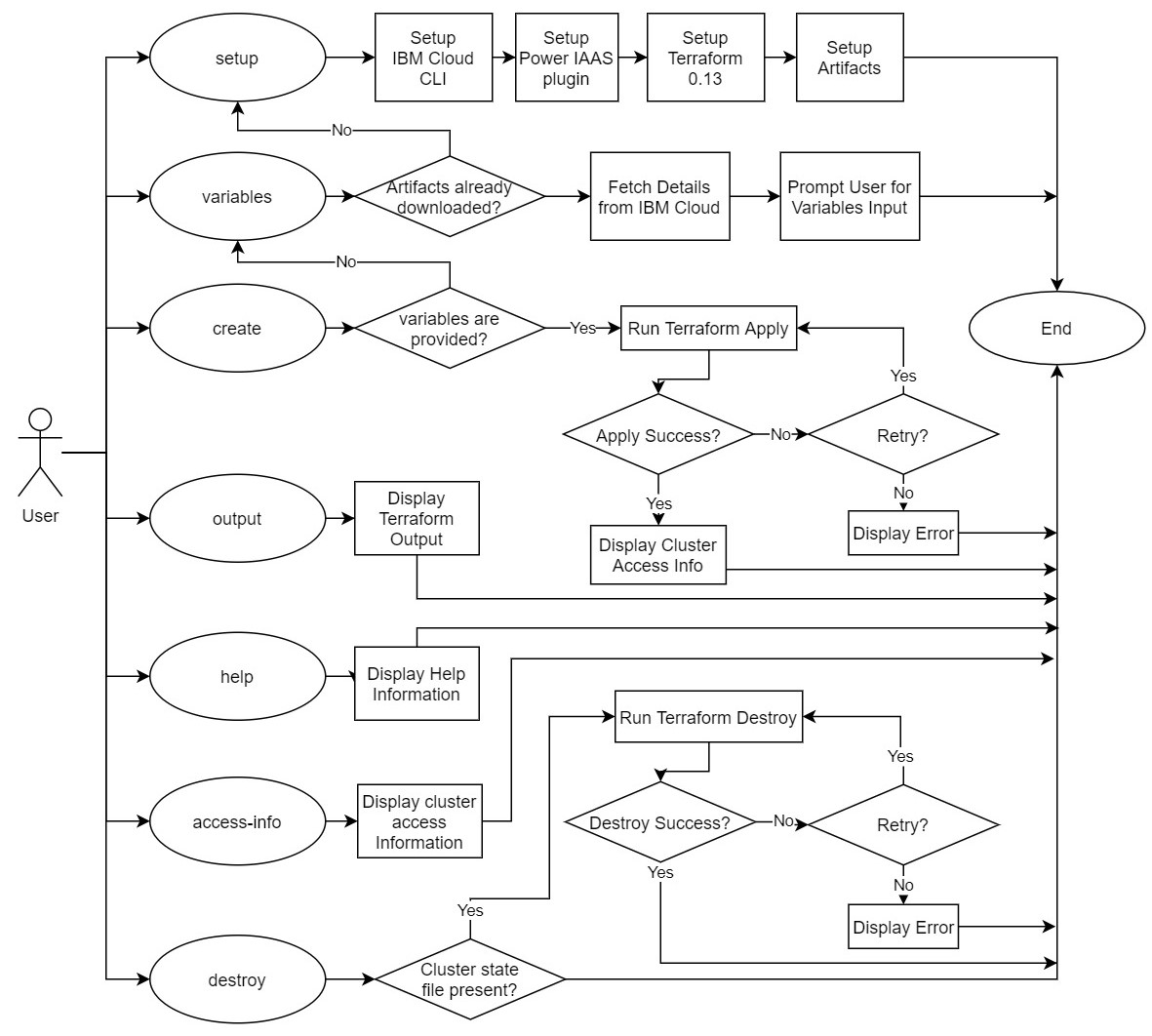
脚本支持以下核心命令。
下面是一个简单的流程图,解释了每个命令的流程。
请参阅贡献文档以获取更多详细信息。 PR是最欢迎的!





