openshift install power
v1.12.1

이 프로젝트에는 IBM ® Power Systems ™ 가상 서버에 IBM Cloud (POWERVS)에 OpenShift Container Platform 4.X를 배포하는 데 도움이되는 Bash 스크립트가 포함되어 있습니다. OCP4-UPI-PowerVS의 Terraform 코드는 배포 프로세스에 사용됩니다.
OpenShift 클러스터 배포를 위해 PowerVS 인스턴스가 준비되었는지 확인하십시오. 자세한 내용은이 링크를 확인하십시오
다음은 빠른 데모입니다.
스크립트는 64 비트 운영 체제 만 지원됩니다.
스크립트에는 bash Shell과 패키지 관리자가 사전 구성된 패키지 관리자가 필요합니다.
카탈리나 (10.15) 이상이 필요합니다.
이 스크립트는 Homebrew 패키지 관리자를 사용하여 필요한 패키지를 설치합니다.
RHEL8/CENTOS8 이상 또는 우분투 16.04 이상이 필요합니다.
스크립트는 배포에 따라 기본 패키지 관리자 ( yum/dnf/apt )를 사용합니다.
스크립트는 Gitbash, Linux 용 Windows 서브 시스템 및 Cygwin 터미널에서 실행될 수 있습니다.
Cygwin을 사용하는 경우 curl 및 unzip 패키지가 설치되어 있는지 확인하십시오. Cygwin 설정을 다시 실행해야합니다.
참고 : PowerShell은 지원되지 않습니다 .
$ mkdir ocp-install-dir && cd ocp-install-dir
 $ curl -sL https://raw.githubusercontent.com/ocp-power-automation/openshift-install-power/main/openshift-install-powervs -o ./openshift-install-powervs
$ chmod +x ./openshift-install-powervs
 $ ./openshift-install-powervs

Automation for deploying OpenShift 4.X on PowerVS

Usage:
  openshift-install-powervs [command] [<args> [<value>]]

Available commands:
  setup           Install all the required packages/binaries in current directory
  variables       Interactive way to populate the variables file
  create          Create an OpenShift cluster
  destroy         Destroy an OpenShift cluster
  output          Display the cluster information. Runs terraform output [NAME]
  access-info     Display the access information of installed OpenShift cluster
  help            Display this information

Where <args>:
  -var               Terraform variable to be passed to the create/destroy command
  -var-file          Terraform variable file name in current directory. (By default using var.tfvars)
  -flavor            Cluster compute template to use eg: small, medium, large
  -force-destroy     Not ask for confirmation during destroy command
  -ignore-os-checks  Ignore operating system related checks
  -ignore-warnings   Warning messages will not be displayed. Should be specified first, before any other args.
  -verbose           Enable verbose for terraform console messages
  -all-images        List all the images available during variables prompt
  -trace             Enable tracing of all executed commands
  -version, -v       Display the script version

Environment Variables:
  IBMCLOUD_API_KEY    IBM Cloud API key
  RELEASE_VER         OpenShift release version (Default: 4.15)
  ARTIFACTS_VERSION   Tag or Branch name of ocp4-upi-powervs repository (Default: main)
  RHEL_SUBS_PASSWORD  RHEL subscription password if not provided in variables
  NO_OF_RETRY         Number of retries/attempts to run repeatable actions such as create (Default: 5)

Submit issues at: https://github.com/ocp-power-automation/openshift-install-power/issues
컨테이너 이미지 사용
quay.io/powercloud 저장소에있는 이미지를 사용하려면 다음 명령을 실행하십시오.
docker run -it -e IBMCLOUD_API_KEY="<key>" -v $(pwd):/data quay.io/powercloud/openshift-install-powervs:<valid-tag> create
또는
podman run -it -e IBMCLOUD_API_KEY="<key>" -v $(pwd):/data quay.io/powercloud/openshift-install-powervs:<valid-tag> create
태그는 릴리스 버전, OCP 버전 또는 지원되는 아키텍처에 대한 정보를 제공합니다.
OpenShift Install-PowerVS 이미지를 작성 해야하는 경우 다음 "컨테이너 사용"링크를 확인하십시오.
이 스크립트는 OpenShift에 대한 PowerVS 전제 조건이 이미 설치되어 있다고 가정합니다.
당신이 놓친 경우, 여기에 전제 조건에 대한 링크가 있습니다.
스크립트를 실행하려면 다음이 필요합니다.
IBM Cloud API 키 및 RHEL 구독 비밀번호를 내보내십시오.
 $ set +o history
$ export IBMCLOUD_API_KEY='<your API key>'
$ export RHEL_SUBS_PASSWORD='<your RHEL subscription password>'
$ set -o history
create 명령을 실행하십시오.
$ ./openshift-install-powervs create
스크립트는 필요한 도구를 설정하고 입력을위한 대화식 모드로 실행됩니다.
위의 명령이 성공적으로 완료되면 클러스터 액세스 정보가 인쇄됩니다.
 Login to bastion: 'ssh -i automation/data/id_rsa [email protected]' and start using the 'oc' command.
To access the cluster on local system when using 'oc' run: 'export KUBECONFIG=/root/ocp-install-dir/automation/kubeconfig'
Access the OpenShift web-console here: https://console-openshift-console.apps.test-ocp-6f2c.ibm.com
Login to the console with user: "kubeadmin", and password: "MHvmI-z5nY8-CBFKF-hmCDJ"
Add the line on local system 'hosts' file:
145.48.43.53 api.test-ocp-6f2c.ibm.com console-openshift-console.apps.test-ocp-6f2c.ibm.com integrated-oauth-server-openshift-authentication.apps.test-ocp-6f2c.ibm.com oauth-openshift.apps.test-ocp-6f2c.ibm.com prometheus-k8s-openshift-monitoring.apps.test-ocp-6f2c.ibm.com grafana-openshift-monitoring.apps.test-ocp-6f2c.ibm.com example.apps.test-ocp-6f2c.ibm.com
스크립트를 실행하기 전에 요구 사항에 따라 일부 환경 변수를 무시하도록 선택할 수 있습니다.
기본적으로 OpenShift 버전 4.15가 설치됩니다.
4.14를 설치하려면 variable RELEASE_VER 내보내십시오.
$ export RELEASE_VER="4.14"
설치 디렉토리에 필요한 입력 파일을 사용하여 대화식 모드를 피할 수 있습니다.
필요한 입력 파일
Terraform vars 파일 (filename : var.tfvars )
ssh 키 파일 (filename : id_rsa & id_rsa.pub )
예 var.tfvars 파일
 ibmcloud_region = "syd"
ibmcloud_zone = "syd04"
service_instance_id = "123456abc-xzz-2223434343"
rhel_image_name = "rhel-83"
rhcos_image_name = "rhcos-415"
network_name = "ocp-net"
openshift_install_tarball = "https://mirror.openshift.com/pub/openshift-v4/ppc64le/clients/ocp/stable-4.15/openshift-install-linux.tar.gz"
openshift_client_tarball = "https://mirror.openshift.com/pub/openshift-v4/ppc64le/clients/ocp/stable-4.15/openshift-client-linux.tar.gz"
cluster_id_prefix = "test-ocp"
cluster_domain = "xip.io"
storage_type = "nfs"
volume_size = "300"
bastion = {memory = "16", processors = "1", "count" = 1}
bootstrap = {memory = "32", processors = "0.5", "count" = 1}
master = {memory = "32", processors = "0.5", "count" = 3}
worker = {memory = "32", processors = "0.5", "count" = 2}
rhel_subscription_username = "[email protected]"
rhel_subscription_password = "mysubscriptionPassword"
옵션 -var-file <filename> 스크립트로 사용하여 사용자 정의 Terraform 변수 파일을 전달할 수도 있습니다. 옵션 -var "key=value" 사용하여 단일 변수를 전달할 수도 있습니다. 동일한 변수에 두 번 이상 주어지면 우선 순위는 왼쪽 (낮음)에서 오른쪽 (높음)입니다.
PowerV에서 OpenShift를 배포하고 사용하기위한 다음 학습 경로를 확인하십시오.
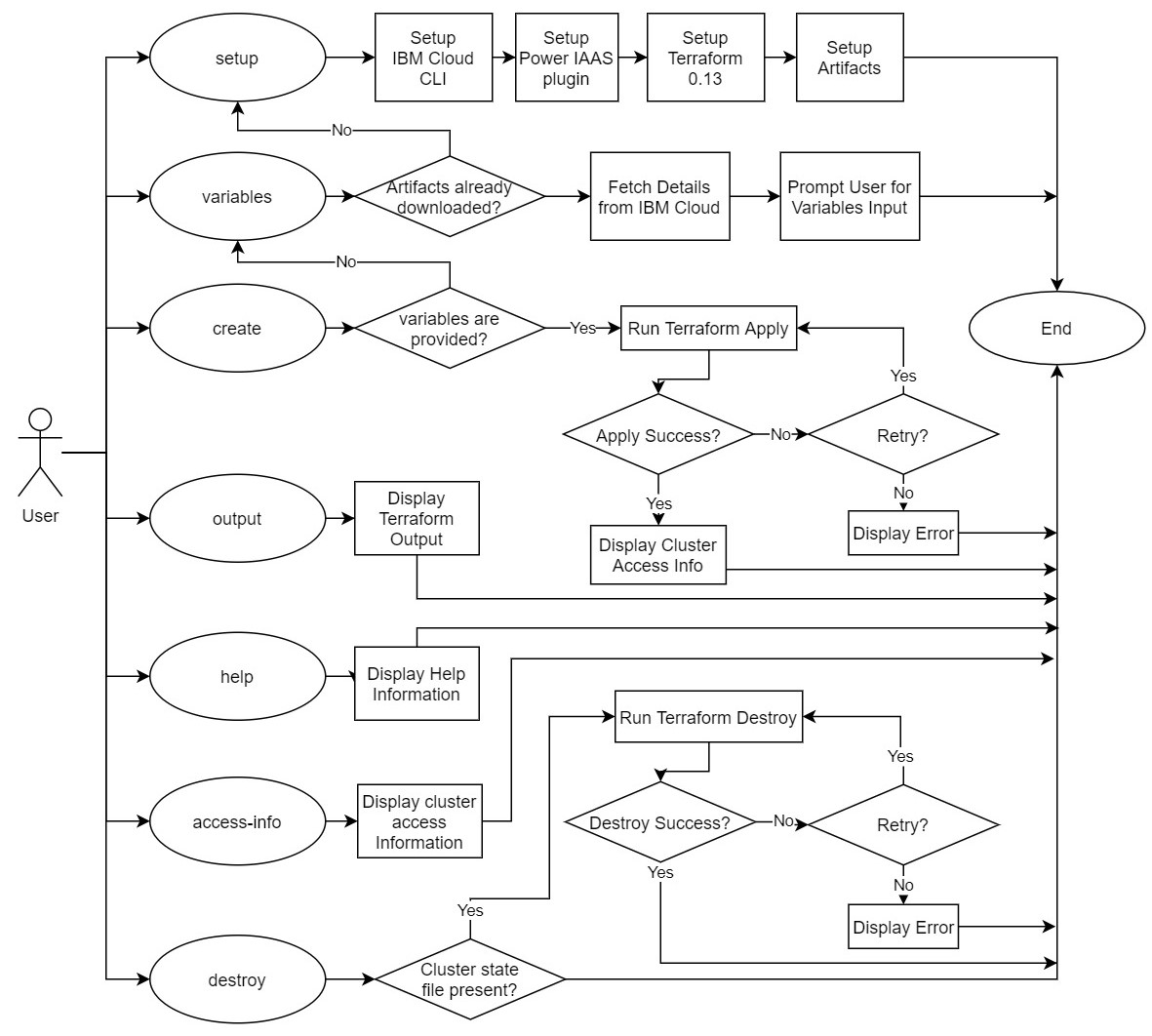
다음 핵심 명령은 스크립트에서 지원됩니다.
아래는 각 명령의 흐름을 설명하는 간단한 흐름도입니다.
자세한 내용은 기고 문서를 참조하십시오. PR은 가장 환영합니다 !!





