openshift install power
v1.12.1

このプロジェクトには、IBM®PowerSystems™Virtual ServerにIBM Cloud(PowerVS)にOpenShiftコンテナプラットフォーム4.xを展開するのに役立つBASHスクリプトが含まれています。 ocp4-upi-powervsのTerraformコードは、展開プロセスに使用されます。
OpenShiftクラスターを展開するために、PowerVsインスタンスが準備されていることを確認してください。詳細については、このリンクを確認してください
これがクイックデモです。
スクリプトによってサポートされているのは64ビットオペレーティングシステムのみです。
スクリプトには、 bash ShellとPackage Managerが事前に構成されている必要があります。
カタリナ(10.15)以上が必要です。
このスクリプトは、HomeBrewパッケージマネージャーを使用して、必要なパッケージをインストールします。
rhel8/centos8以上またはubuntu 16.04以上が必要です。
スクリプトは、配布に基づいてデフォルトのパッケージマネージャー( yum/dnf/apt )を使用します。
スクリプトは、Linux端子用のGitBash、Windowsサブシステム、およびCygwin端子で実行できます。
Cygwinを使用する場合は、 curlとunzipパッケージがインストールされていることを確認してください。 Cygwinセットアップを再度実行する必要があります。
注: PowerShellはサポートされていません。
$ mkdir ocp-install-dir && cd ocp-install-dir
 $ curl -sL https://raw.githubusercontent.com/ocp-power-automation/openshift-install-power/main/openshift-install-powervs -o ./openshift-install-powervs
$ chmod +x ./openshift-install-powervs
 $ ./openshift-install-powervs

Automation for deploying OpenShift 4.X on PowerVS

Usage:
  openshift-install-powervs [command] [<args> [<value>]]

Available commands:
  setup           Install all the required packages/binaries in current directory
  variables       Interactive way to populate the variables file
  create          Create an OpenShift cluster
  destroy         Destroy an OpenShift cluster
  output          Display the cluster information. Runs terraform output [NAME]
  access-info     Display the access information of installed OpenShift cluster
  help            Display this information

Where <args>:
  -var               Terraform variable to be passed to the create/destroy command
  -var-file          Terraform variable file name in current directory. (By default using var.tfvars)
  -flavor            Cluster compute template to use eg: small, medium, large
  -force-destroy     Not ask for confirmation during destroy command
  -ignore-os-checks  Ignore operating system related checks
  -ignore-warnings   Warning messages will not be displayed. Should be specified first, before any other args.
  -verbose           Enable verbose for terraform console messages
  -all-images        List all the images available during variables prompt
  -trace             Enable tracing of all executed commands
  -version, -v       Display the script version

Environment Variables:
  IBMCLOUD_API_KEY    IBM Cloud API key
  RELEASE_VER         OpenShift release version (Default: 4.15)
  ARTIFACTS_VERSION   Tag or Branch name of ocp4-upi-powervs repository (Default: main)
  RHEL_SUBS_PASSWORD  RHEL subscription password if not provided in variables
  NO_OF_RETRY         Number of retries/attempts to run repeatable actions such as create (Default: 5)

Submit issues at: https://github.com/ocp-power-automation/openshift-install-power/issues
コンテナ画像を使用します
quay.io/powercloudリポジトリに存在する画像を使用するには、次のコマンドを実行します。
docker run -it -e IBMCLOUD_API_KEY="<key>" -v $(pwd):/data quay.io/powercloud/openshift-install-powervs:<valid-tag> create
または
podman run -it -e IBMCLOUD_API_KEY="<key>" -v $(pwd):/data quay.io/powercloud/openshift-install-powervs:<valid-tag> create
タグは、リリースバージョン、OCPバージョン、またはサポートされているアーキテクチャに関する情報を提供します。
OpenShift-Install-Powervs画像を作成する必要がある場合は、次の「コンテナ付きの使用」リンクをご覧ください
スクリプトは、OpenShiftのPowerVsの前提条件がすでに導入されていると仮定しています。
あなたが見逃した場合に備えて、ここに前提条件へのリンクがあります
スクリプトを実行するには、次のことが必要です。
IBM Cloud APIキーとRHELサブスクリプションパスワードをエクスポートします。
 $ set +o history
$ export IBMCLOUD_API_KEY='<your API key>'
$ export RHEL_SUBS_PASSWORD='<your RHEL subscription password>'
$ set -o history
createコマンドを実行します。
$ ./openshift-install-powervs create
スクリプトは、必要なツールをセットアップし、インタラクティブモードで実行され、入力を促します。
上記のコマンドが正常に完了すると、クラスターアクセス情報が印刷されます。
 Login to bastion: 'ssh -i automation/data/id_rsa [email protected]' and start using the 'oc' command.
To access the cluster on local system when using 'oc' run: 'export KUBECONFIG=/root/ocp-install-dir/automation/kubeconfig'
Access the OpenShift web-console here: https://console-openshift-console.apps.test-ocp-6f2c.ibm.com
Login to the console with user: "kubeadmin", and password: "MHvmI-z5nY8-CBFKF-hmCDJ"
Add the line on local system 'hosts' file:
145.48.43.53 api.test-ocp-6f2c.ibm.com console-openshift-console.apps.test-ocp-6f2c.ibm.com integrated-oauth-server-openshift-authentication.apps.test-ocp-6f2c.ibm.com oauth-openshift.apps.test-ocp-6f2c.ibm.com prometheus-k8s-openshift-monitoring.apps.test-ocp-6f2c.ibm.com grafana-openshift-monitoring.apps.test-ocp-6f2c.ibm.com example.apps.test-ocp-6f2c.ibm.com
スクリプトを実行する前に、要件に従っていくつかの環境変数をオーバーライドすることを選択できます。
デフォルトでは、OpenShiftバージョン4.15がインストールされています。
4.14をインストールする場合は、変数RELEASE_VERをエクスポートします。
$ export RELEASE_VER="4.14"
インストールディレクトリで必要な入力ファイルを使用できるようにすることで、インタラクティブモードを回避できます
必要な入力ファイル
Terraform varsファイル(ファイル名: var.tfvars )
sshキーファイル(filename: id_rsa & id_rsa.pub )
例var.tfvarsファイル
 ibmcloud_region = "syd"
ibmcloud_zone = "syd04"
service_instance_id = "123456abc-xzz-2223434343"
rhel_image_name = "rhel-83"
rhcos_image_name = "rhcos-415"
network_name = "ocp-net"
openshift_install_tarball = "https://mirror.openshift.com/pub/openshift-v4/ppc64le/clients/ocp/stable-4.15/openshift-install-linux.tar.gz"
openshift_client_tarball = "https://mirror.openshift.com/pub/openshift-v4/ppc64le/clients/ocp/stable-4.15/openshift-client-linux.tar.gz"
cluster_id_prefix = "test-ocp"
cluster_domain = "xip.io"
storage_type = "nfs"
volume_size = "300"
bastion = {memory = "16", processors = "1", "count" = 1}
bootstrap = {memory = "32", processors = "0.5", "count" = 1}
master = {memory = "32", processors = "0.5", "count" = 3}
worker = {memory = "32", processors = "0.5", "count" = 2}
rhel_subscription_username = "[email protected]"
rhel_subscription_password = "mysubscriptionPassword"
また、Option -var-file <filename>を使用してカスタムTerraform変数ファイルをスクリプトに渡すこともできます。また、Option -var "key=value"を使用して、単一の変数を渡すこともできます。同じ変数が1回以上与えられている場合、優先順位は左(低)から右(高)になります。
PowerVSでOpenShiftを展開および使用するための次の学習パスをチェックしてください
次のコアコマンドは、スクリプトによってサポートされています。
以下は、各コマンドのフローを説明する単純なフローチャートです。
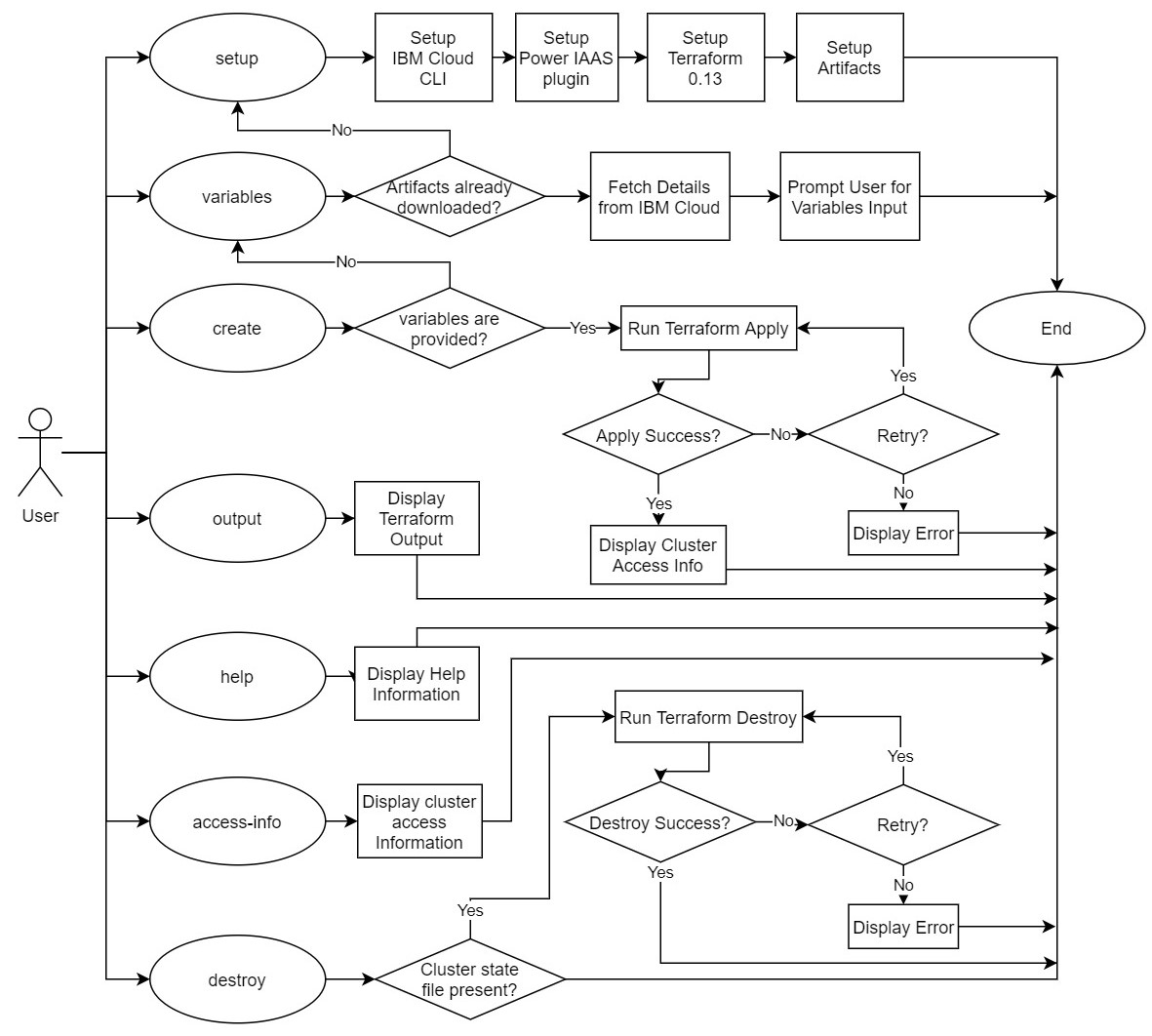
詳細については、貢献しているドキュメントをご覧ください。 PRは大歓迎です!!





