webarena
v0.2.0

网站•纸•排行榜
重要的
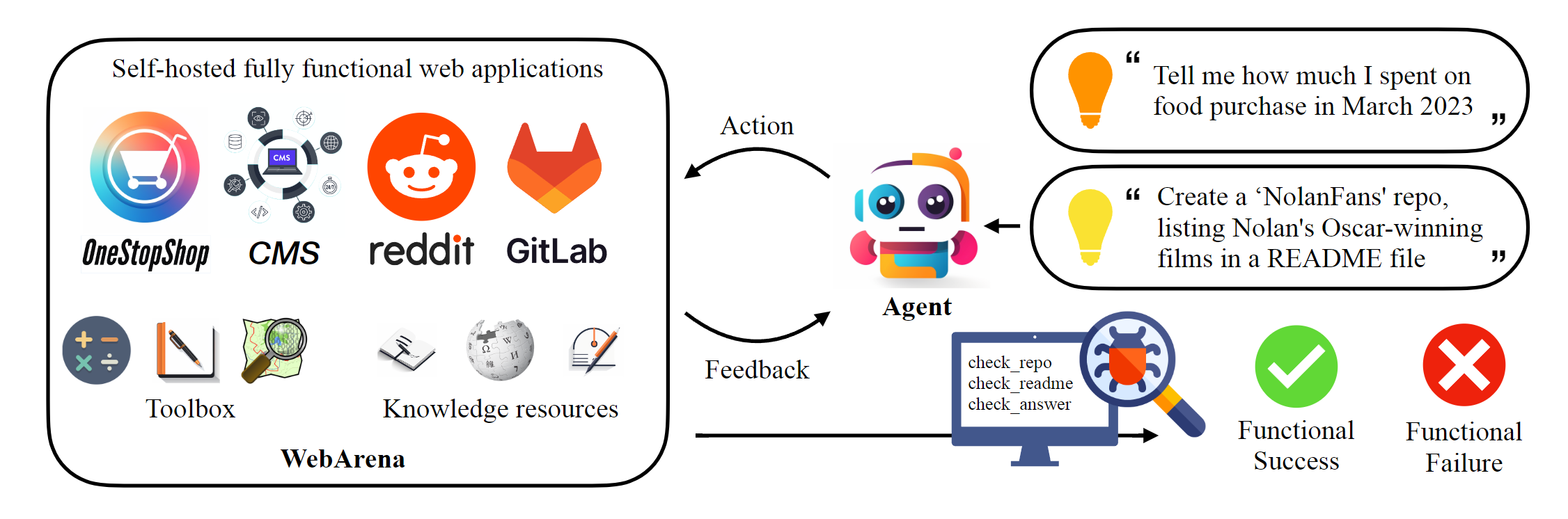
该存储库托管Webarena的规范实现,以重现本文报告的结果。 AgentLab通过browsergym引入了几个关键特征,引入了几个关键特征,该网络导航基础架构得到了显着增强,(1)支持使用浏览器的平行实验,(2)在统一的框架中集成流行的Web导航基准(例如,VisualWebarena),在统一的框架中,(3)统一的排行榜报告,以及(4)(4)(4)(4)(4)改善环境的处理案例。我们强烈建议将此框架用于您的实验。
 # Python 3.10+
conda create -n webarena python=3.10 ; conda activate webarena
pip install -r requirements.txt
playwright install
pip install -e .

# optional, dev only
pip install -e " .[dev] "
mypy --install-types --non-interactive browser_env agents evaluation_harness
pip install pre-commit
pre-commit install查看此脚本,以便快速演练如何设置浏览器环境并使用我们托管的演示站点进行交互。该脚本仅出于教育目的,要执行可重复的实验,请查看下一节。简而言之,使用Webarena与使用OpenAi体育馆非常相似。以下代码段显示了如何与环境互动。
 from browser_env import ScriptBrowserEnv , create_id_based_action
# init the environment
env = ScriptBrowserEnv (
    headless = False ,
    observation_type = "accessibility_tree" ,
    current_viewport_only = True ,
    viewport_size = { "width" : 1280 , "height" : 720 },
)
# prepare the environment for a configuration defined in a json file
config_file = "config_files/0.json"
obs , info = env . reset ( options = { "config_file" : config_file })
# get the text observation (e.g., html, accessibility tree) through obs["text"]

# create a random action
id = random . randint ( 0 , 1000 )
action = create_id_based_action ( f"click [id]" )

# take the action
obs , _ , terminated , _ , info = env . step ( action )重要的
为了确保正确的评估,请在第1步和步骤2之后设置您自己的Webarena网站。演示网站仅用于浏览目的,以帮助您更好地了解内容。评估812个示例后,按照说明将环境重置为初始状态。
设置独立环境。请查看此页面以获取详细信息。
为每个网站配置URL。
 export SHOPPING= " <your_shopping_site_domain>:7770 "
export SHOPPING_ADMIN= " <your_e_commerce_cms_domain>:7780/admin "
export REDDIT= " <your_reddit_domain>:9999 "
export GITLAB= " <your_gitlab_domain>:8023 "
export MAP= " <your_map_domain>:3000 "
export WIKIPEDIA= " <your_wikipedia_domain>:8888/wikipedia_en_all_maxi_2022-05/A/User:The_other_Kiwix_guy/Landing "
export HOMEPAGE= " <your_homepage_domain>:4399 " # this is a placeholder
鼓励您更新GitHub工作流程中的环境变量,以确保单位测试的正确性
python scripts/generate_test_data.py您将看到config_files文件夹中生成的*.json文件。每个文件包含一个测试示例的配置。
 mkdir -p ./.auth
python browser_env/auto_login.py
导出OPENAI_API_KEY=your_key ,有效的OpenAI API键以sk-开头
启动评估
python run.py
  --instruction_path agent/prompts/jsons/p_cot_id_actree_2s.json  # this is the reasoning agent prompt we used in the paper
  --test_start_idx 0
  --test_end_idx 1
  --model gpt-3.5-turbo
--result_dir < your_result_dir >该脚本将使用GPT-3.5推理代理运行第一个示例。该轨迹将保存在<your_result_dir>/0.html中
 prompt = {
  "intro" : < The overall guideline which includes the task description , available action , hint and others > ,
  "examples" : [
    (
      example_1_observation ,
      example_1_response
    ),
    (
      example_2_observation ,
      example_2_response
    ),
    ...
  ],
  "template" : < How to organize different information such as observation , previous action , instruction , url > ,
  "meta_data" : {
    "observation" : < Which observation space the agent uses > ,
    "action_type" : < Which action space the agent uses > ,
    "keywords" : < The keywords used in the template , the program will later enumerate all keywords in the template to see if all of them are correctly replaced with the content > ,
    "prompt_constructor" : < Which prompt construtor is in used , the prompt constructor will construct the input feed to an LLM and extract the action from the generation , more details below > ,
    "action_splitter" : < Inside which splitter can we extract the action , used by the prompt constructor >
    }
}construct :将输入提要构造到LLM_extract_action :从LLM给定生成,如何提取与动作相对应的短语如果您使用我们的环境或数据,请引用我们的论文:
 @article{zhou2023webarena,
  title={WebArena: A Realistic Web Environment for Building Autonomous Agents},
  author={Zhou, Shuyan and Xu, Frank F and Zhu, Hao and Zhou, Xuhui and Lo, Robert and Sridhar, Abishek and Cheng, Xianyi and Bisk, Yonatan and Fried, Daniel and Alon, Uri and others},
  journal={arXiv preprint arXiv:2307.13854},
  year={2023}
}





