webarena
v0.2.0

웹 사이트 • 종이 • 리더 보드
중요한
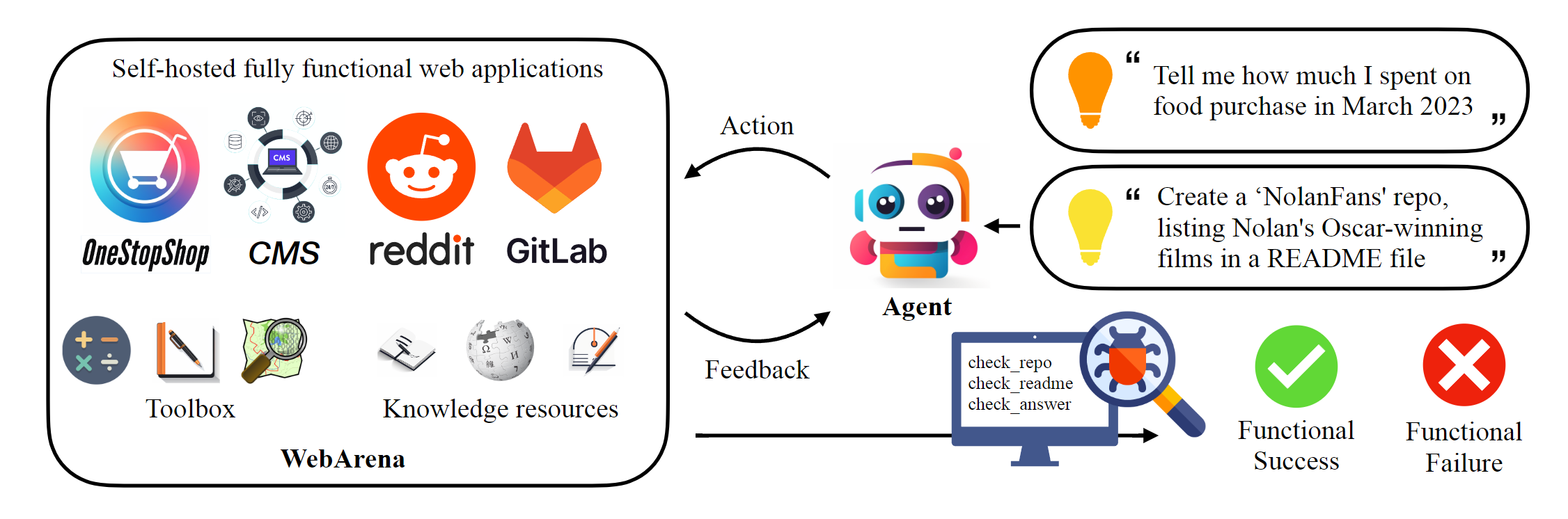
이 저장소는 종이에보고 된 결과를 재현하기 위해 Webarena의 표준 구현을 호스팅합니다. 웹 내비게이션 인프라는 AgentLab에 의해 크게 향상되었으며 (1) (1) Browsergym을 사용한 병렬 실험 지원, (2) 통합 된 프레임 워크 내에서 인기있는 웹 탐색 벤치 마크 (예 : visualWebarena)의 통합 및 (3) 통합 리더 보드 보고서 및 (4) 환경 가장자리 사례 개선 된 개선 된 처리. 실험 에이 프레임 워크를 사용하는 것이 좋습니다.
 # Python 3.10+
conda create -n webarena python=3.10 ; conda activate webarena
pip install -r requirements.txt
playwright install
pip install -e .

# optional, dev only
pip install -e " .[dev] "
mypy --install-types --non-interactive browser_env agents evaluation_harness
pip install pre-commit
pre-commit install이 스크립트에서 브라우저 환경을 설정하는 방법에 대한 빠른 연습을 확인하고 호스팅 한 데모 사이트를 사용하여 상호 작용하십시오. 이 스크립트는 교육 목적으로 만 재현 가능한 실험을 수행하기 위해 다음 섹션을 확인하십시오. 간단히 말해서 Webarena를 사용하는 것은 OpenAi 체육관 사용과 매우 유사합니다. 다음 코드 스 니펫은 환경과 상호 작용하는 방법을 보여줍니다.
 from browser_env import ScriptBrowserEnv , create_id_based_action
# init the environment
env = ScriptBrowserEnv (
    headless = False ,
    observation_type = "accessibility_tree" ,
    current_viewport_only = True ,
    viewport_size = { "width" : 1280 , "height" : 720 },
)
# prepare the environment for a configuration defined in a json file
config_file = "config_files/0.json"
obs , info = env . reset ( options = { "config_file" : config_file })
# get the text observation (e.g., html, accessibility tree) through obs["text"]

# create a random action
id = random . randint ( 0 , 1000 )
action = create_id_based_action ( f"click [id]" )

# take the action
obs , _ , terminated , _ , info = env . step ( action )중요한
올바른 평가를 보장하려면 1 단계와 2 단계에 따라 자신의 WebArena 웹 사이트를 설정하십시오. 데모 사이트는 콘텐츠를 더 잘 이해하는 데 도움이되는 브라우징 목적입니다. 812 예제를 평가 한 후 여기에서 지침에 따라 환경을 초기 상태로 재설정하십시오.
독립형 환경을 설정하십시오. 자세한 내용은이 페이지를 확인하십시오.
각 웹 사이트의 URL을 구성하십시오.
 export SHOPPING= " <your_shopping_site_domain>:7770 "
export SHOPPING_ADMIN= " <your_e_commerce_cms_domain>:7780/admin "
export REDDIT= " <your_reddit_domain>:9999 "
export GITLAB= " <your_gitlab_domain>:8023 "
export MAP= " <your_map_domain>:3000 "
export WIKIPEDIA= " <your_wikipedia_domain>:8888/wikipedia_en_all_maxi_2022-05/A/User:The_other_Kiwix_guy/Landing "
export HOMEPAGE= " <your_homepage_domain>:4399 " # this is a placeholder
단위 테스트의 정확성을 보장하기 위해 Github 워크 플로에서 환경 변수를 업데이트하는 것이 좋습니다.
python scripts/generate_test_data.py config_files 폴더에서 생성 된 *.json 파일이 표시됩니다. 각 파일에는 하나의 테스트 예제 구성이 포함되어 있습니다.
 mkdir -p ./.auth
python browser_env/auto_login.py
Export OPENAI_API_KEY=your_key , 유효한 OpenAI API 키는 sk- 로 시작합니다.
평가를 시작하십시오
python run.py
  --instruction_path agent/prompts/jsons/p_cot_id_actree_2s.json  # this is the reasoning agent prompt we used in the paper
  --test_start_idx 0
  --test_end_idx 1
  --model gpt-3.5-turbo
  --result_dir < your_result_dir >
이 스크립트는 GPT-3.5 추론 에이전트와 함께 첫 번째 예제를 실행합니다. 궤적은 <your_result_dir>/0.html 로 저장됩니다
 prompt = {
  "intro" : < The overall guideline which includes the task description , available action , hint and others > ,
  "examples" : [
    (
      example_1_observation ,
      example_1_response
    ),
    (
      example_2_observation ,
      example_2_response
    ),
    ...
  ],
  "template" : < How to organize different information such as observation , previous action , instruction , url > ,
  "meta_data" : {
    "observation" : < Which observation space the agent uses > ,
    "action_type" : < Which action space the agent uses > ,
    "keywords" : < The keywords used in the template , the program will later enumerate all keywords in the template to see if all of them are correctly replaced with the content > ,
    "prompt_constructor" : < Which prompt construtor is in used , the prompt constructor will construct the input feed to an LLM and extract the action from the generation , more details below > ,
    "action_splitter" : < Inside which splitter can we extract the action , used by the prompt constructor >
    }
}construct : 입력 피드를 LLM으로 구성하십시오_extract_action : LLM의 생성이 주어지면 동작에 해당하는 문구를 추출하는 방법 환경이나 데이터를 사용하는 경우 논문을 인용하십시오.
 @article{zhou2023webarena,
  title={WebArena: A Realistic Web Environment for Building Autonomous Agents},
  author={Zhou, Shuyan and Xu, Frank F and Zhu, Hao and Zhou, Xuhui and Lo, Robert and Sridhar, Abishek and Cheng, Xianyi and Bisk, Yonatan and Fried, Daniel and Alon, Uri and others},
  journal={arXiv preprint arXiv:2307.13854},
  year={2023}
}





