webarena
v0.2.0

Situs web • Kertas • Papan peringkat
Penting
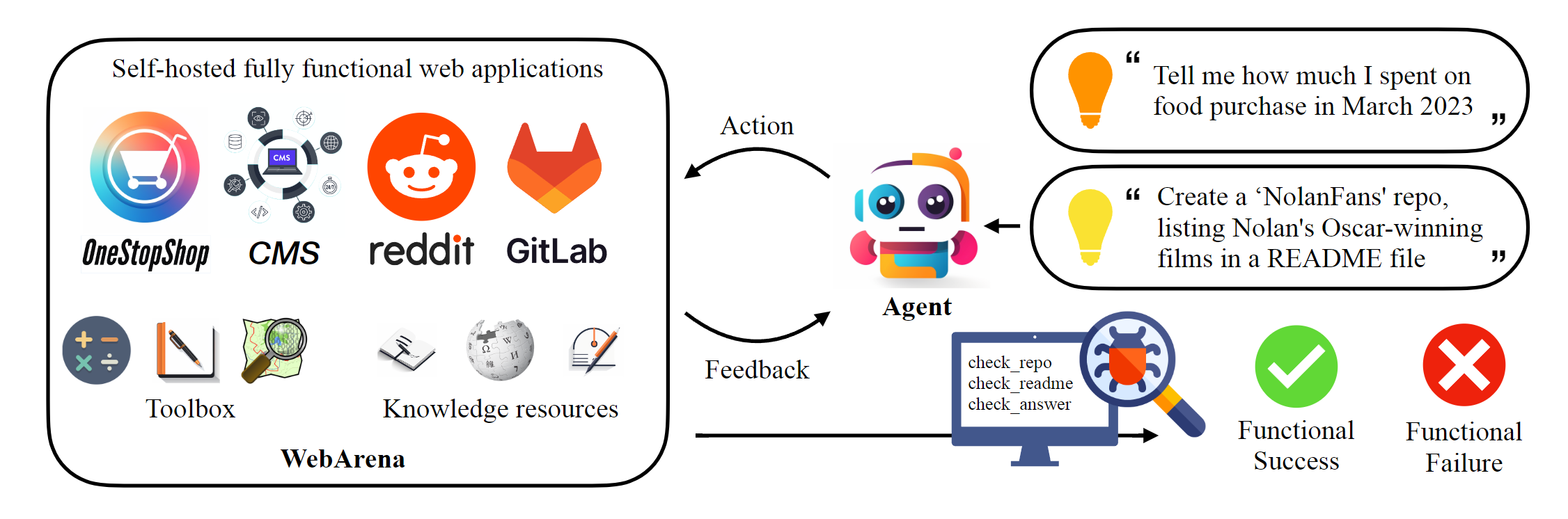
Repositori ini menampung implementasi kanonik Webarena untuk mereproduksi hasil yang dilaporkan dalam makalah ini. Infrastruktur Navigasi Web telah ditingkatkan secara signifikan oleh AgentLab, memperkenalkan beberapa fitur utama: (1) dukungan untuk percobaan paralel menggunakan Browsergym, (2) integrasi tolok ukur navigasi web populer (misalnya, Visualwebarena) dalam kerangka kerja yang disatukan, (3) pelaporan papan peringkat yang disatukan. Kami sangat menyarankan untuk menggunakan kerangka kerja ini untuk eksperimen Anda.
 # Python 3.10+
conda create -n webarena python=3.10 ; conda activate webarena
pip install -r requirements.txt
playwright install
pip install -e .

# optional, dev only
pip install -e " .[dev] "
mypy --install-types --non-interactive browser_env agents evaluation_harness
pip install pre-commit
pre-commit installLihatlah skrip ini untuk penelusuran cepat tentang cara mengatur lingkungan browser dan berinteraksi dengannya menggunakan situs demo yang kami host. Skrip ini hanya untuk tujuan pendidikan, untuk melakukan eksperimen yang dapat direproduksi , silakan periksa bagian berikutnya. Dalam nutshell, menggunakan webarena sangat mirip dengan menggunakan gym openai. Cuplikan kode berikut menunjukkan cara berinteraksi dengan lingkungan.
 from browser_env import ScriptBrowserEnv , create_id_based_action
# init the environment
env = ScriptBrowserEnv (
    headless = False ,
    observation_type = "accessibility_tree" ,
    current_viewport_only = True ,
    viewport_size = { "width" : 1280 , "height" : 720 },
)
# prepare the environment for a configuration defined in a json file
config_file = "config_files/0.json"
obs , info = env . reset ( options = { "config_file" : config_file })
# get the text observation (e.g., html, accessibility tree) through obs["text"]

# create a random action
id = random . randint ( 0 , 1000 )
action = create_id_based_action ( f"click [id]" )

# take the action
obs , _ , terminated , _ , info = env . step ( action )Penting
Untuk memastikan evaluasi yang benar, silakan siapkan situs web WebArena Anda sendiri setelah Langkah 1 dan Langkah 2. Situs demo hanya untuk tujuan menjelajah untuk membantu Anda lebih memahami konten. Setelah mengevaluasi 812 contoh, setel ulang lingkungan ke keadaan awal mengikuti instruksi di sini.
Siapkan lingkungan mandiri. Silakan periksa halaman ini untuk detailnya.
Konfigurasi URL untuk setiap situs web.
 export SHOPPING= " <your_shopping_site_domain>:7770 "
export SHOPPING_ADMIN= " <your_e_commerce_cms_domain>:7780/admin "
export REDDIT= " <your_reddit_domain>:9999 "
export GITLAB= " <your_gitlab_domain>:8023 "
export MAP= " <your_map_domain>:3000 "
export WIKIPEDIA= " <your_wikipedia_domain>:8888/wikipedia_en_all_maxi_2022-05/A/User:The_other_Kiwix_guy/Landing "
export HOMEPAGE= " <your_homepage_domain>:4399 " # this is a placeholder
Anda didorong untuk memperbarui variabel lingkungan dalam alur kerja GitHub untuk memastikan kebenaran unit tes
python scripts/generate_test_data.py Anda akan melihat file *.json yang dihasilkan di folder config_files. Setiap file berisi konfigurasi untuk satu contoh tes.
 mkdir -p ./.auth
python browser_env/auto_login.py
Ekspor OPENAI_API_KEY=your_key , kunci API openai yang valid dimulai dengan sk-
Luncurkan evaluasi
python run.py
  --instruction_path agent/prompts/jsons/p_cot_id_actree_2s.json  # this is the reasoning agent prompt we used in the paper
  --test_start_idx 0
  --test_end_idx 1
  --model gpt-3.5-turbo
  --result_dir < your_result_dir >
Skrip ini akan menjalankan contoh pertama dengan agen penalaran GPT-3.5. Lintasan akan disimpan di <your_result_dir>/0.html
 prompt = {
  "intro" : < The overall guideline which includes the task description , available action , hint and others > ,
  "examples" : [
    (
      example_1_observation ,
      example_1_response
    ),
    (
      example_2_observation ,
      example_2_response
    ),
    ...
  ],
  "template" : < How to organize different information such as observation , previous action , instruction , url > ,
  "meta_data" : {
    "observation" : < Which observation space the agent uses > ,
    "action_type" : < Which action space the agent uses > ,
    "keywords" : < The keywords used in the template , the program will later enumerate all keywords in the template to see if all of them are correctly replaced with the content > ,
    "prompt_constructor" : < Which prompt construtor is in used , the prompt constructor will construct the input feed to an LLM and extract the action from the generation , more details below > ,
    "action_splitter" : < Inside which splitter can we extract the action , used by the prompt constructor >
    }
}construct : Bangun umpan input ke LLM_extract_action : Diberikan generasi dari llm, cara mengekstrak frasa yang sesuai dengan tindakan Jika Anda menggunakan lingkungan atau data kami, silakan kutip kertas kami:
 @article{zhou2023webarena,
  title={WebArena: A Realistic Web Environment for Building Autonomous Agents},
  author={Zhou, Shuyan and Xu, Frank F and Zhu, Hao and Zhou, Xuhui and Lo, Robert and Sridhar, Abishek and Cheng, Xianyi and Bisk, Yonatan and Fried, Daniel and Alon, Uri and others},
  journal={arXiv preprint arXiv:2307.13854},
  year={2023}
}





