webarena
v0.2.0

Site • Papel • Robôs -líder
Importante
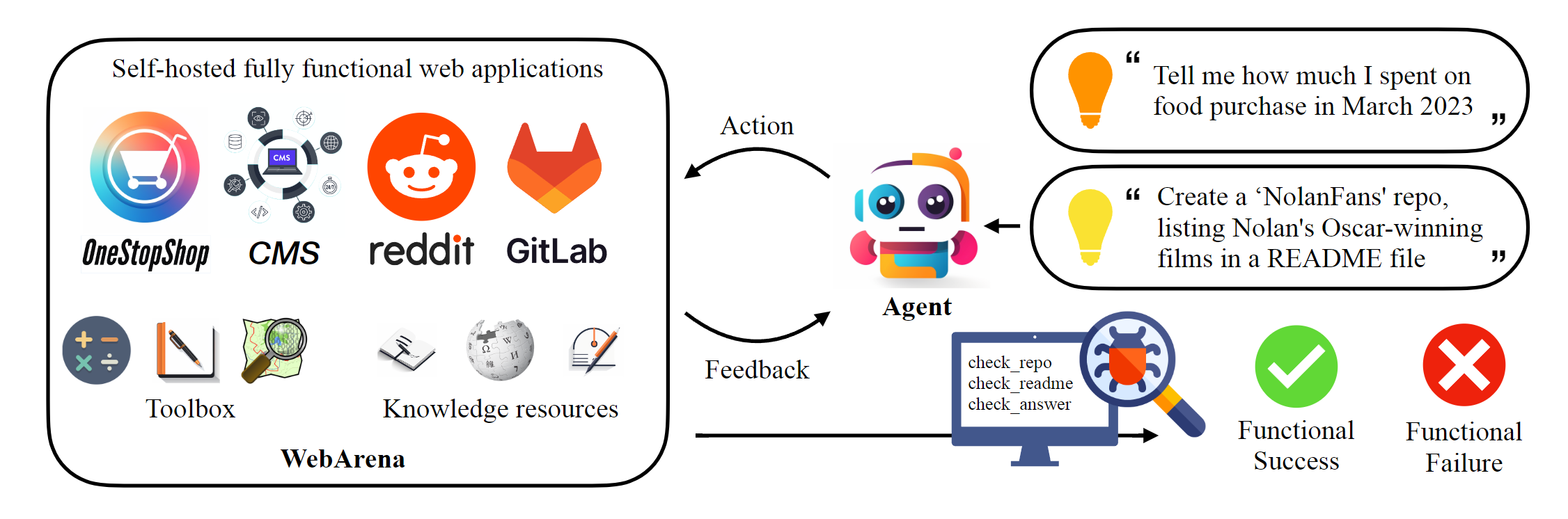
Este repositório hospeda a implementação canônica de Webarena para reproduzir os resultados relatados no artigo. A infraestrutura de navegação na Web foi significativamente aprimorada pelo AgentLab, introduzindo vários recursos -chave: (1) suporte para experimentos paralelos usando a BrowergyMM, (2) integração de benchmarks populares de navegação na Web (por exemplo, VisualWeBarena) em uma estrutura unificada. Recomendamos fortemente o uso dessa estrutura para seus experimentos.
 # Python 3.10+
conda create -n webarena python=3.10 ; conda activate webarena
pip install -r requirements.txt
playwright install
pip install -e .

# optional, dev only
pip install -e " .[dev] "
mypy --install-types --non-interactive browser_env agents evaluation_harness
pip install pre-commit
pre-commit installConfira este script para obter uma rápida explicação sobre como configurar o ambiente do navegador e interaja com ele usando os sites de demonstração que hospedamos. Este script é apenas para fins educacionais, para realizar experimentos reproduzíveis , confira a próxima seção. Na casca, o uso de webarena é muito semelhante ao uso da academia Openai. O snippet de código a seguir mostra como interagir com o ambiente.
 from browser_env import ScriptBrowserEnv , create_id_based_action
# init the environment
env = ScriptBrowserEnv (
    headless = False ,
    observation_type = "accessibility_tree" ,
    current_viewport_only = True ,
    viewport_size = { "width" : 1280 , "height" : 720 },
)
# prepare the environment for a configuration defined in a json file
config_file = "config_files/0.json"
obs , info = env . reset ( options = { "config_file" : config_file })
# get the text observation (e.g., html, accessibility tree) through obs["text"]

# create a random action
id = random . randint ( 0 , 1000 )
action = create_id_based_action ( f"click [id]" )

# take the action
obs , _ , terminated , _ , info = env . step ( action )Importante
Para garantir a avaliação correta, configure seus próprios sites de Webarena após a etapa 1 e 2. Os sites de demonstração têm apenas para a navegação para ajudá -lo a entender melhor o conteúdo. Depois de avaliar os 812 exemplos, redefine o ambiente para o estado inicial seguindo as instruções aqui.
Configure o ambiente independente. Confira esta página para obter detalhes.
Configure os URLs para cada site.
 export SHOPPING= " <your_shopping_site_domain>:7770 "
export SHOPPING_ADMIN= " <your_e_commerce_cms_domain>:7780/admin "
export REDDIT= " <your_reddit_domain>:9999 "
export GITLAB= " <your_gitlab_domain>:8023 "
export MAP= " <your_map_domain>:3000 "
export WIKIPEDIA= " <your_wikipedia_domain>:8888/wikipedia_en_all_maxi_2022-05/A/User:The_other_Kiwix_guy/Landing "
export HOMEPAGE= " <your_homepage_domain>:4399 " # this is a placeholder
Você é incentivado a atualizar as variáveis do ambiente no fluxo de trabalho do GitHub para garantir a correção dos testes de unidade
python scripts/generate_test_data.py Você verá os arquivos *.json gerados na pasta Config_files. Cada arquivo contém a configuração para um exemplo de teste.
 mkdir -p ./.auth
python browser_env/auto_login.py
exportar OPENAI_API_KEY=your_key , uma chave de API do OpenAI válida começa com sk-
Inicie a avaliação
python run.py
  --instruction_path agent/prompts/jsons/p_cot_id_actree_2s.json  # this is the reasoning agent prompt we used in the paper
  --test_start_idx 0
  --test_end_idx 1
  --model gpt-3.5-turbo
  --result_dir < your_result_dir >
Este script executará o primeiro exemplo com o agente de raciocínio GPT-3.5. A trajetória será salva em <your_result_dir>/0.html
 prompt = {
  "intro" : < The overall guideline which includes the task description , available action , hint and others > ,
  "examples" : [
    (
      example_1_observation ,
      example_1_response
    ),
    (
      example_2_observation ,
      example_2_response
    ),
    ...
  ],
  "template" : < How to organize different information such as observation , previous action , instruction , url > ,
  "meta_data" : {
    "observation" : < Which observation space the agent uses > ,
    "action_type" : < Which action space the agent uses > ,
    "keywords" : < The keywords used in the template , the program will later enumerate all keywords in the template to see if all of them are correctly replaced with the content > ,
    "prompt_constructor" : < Which prompt construtor is in used , the prompt constructor will construct the input feed to an LLM and extract the action from the generation , more details below > ,
    "action_splitter" : < Inside which splitter can we extract the action , used by the prompt constructor >
    }
}construct : Construa o feed de entrada para um LLM_extract_action : dada a geração de um LLM, como extrair a frase que corresponde à ação Se você usar nosso ambiente ou dados, cite nosso artigo:
 @article{zhou2023webarena,
  title={WebArena: A Realistic Web Environment for Building Autonomous Agents},
  author={Zhou, Shuyan and Xu, Frank F and Zhu, Hao and Zhou, Xuhui and Lo, Robert and Sridhar, Abishek and Cheng, Xianyi and Bisk, Yonatan and Fried, Daniel and Alon, Uri and others},
  journal={arXiv preprint arXiv:2307.13854},
  year={2023}
}





