webarena
v0.2.0

ウェブサイト•紙•リーダーボード
重要
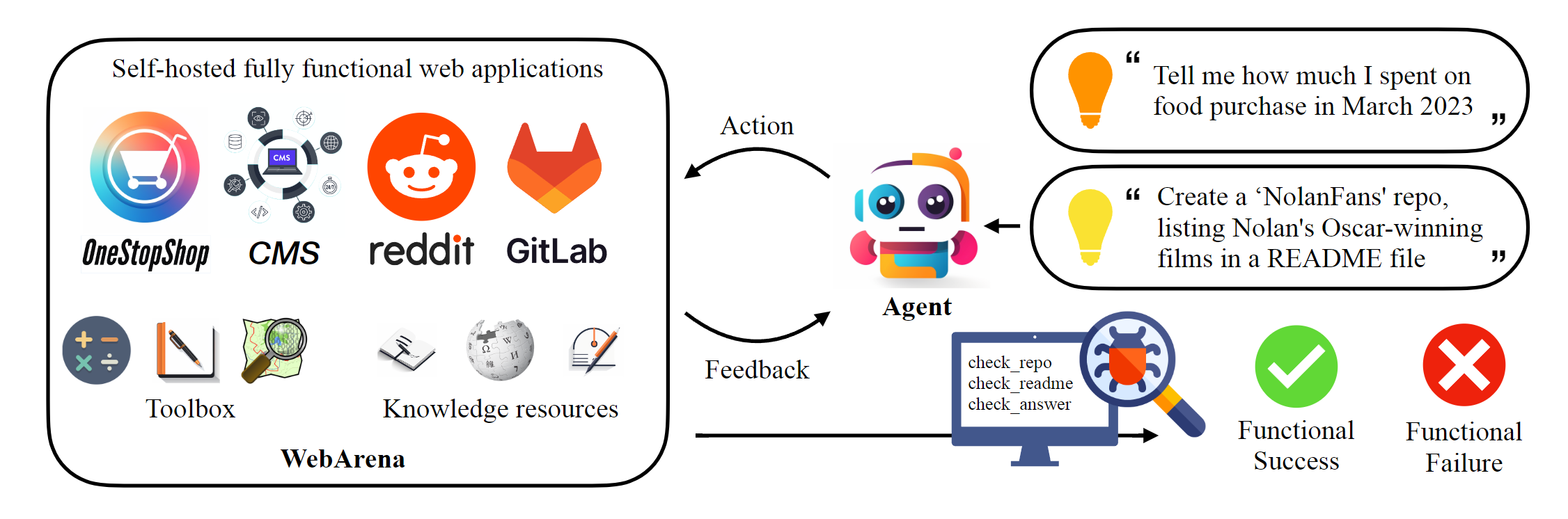
このリポジトリは、Webarenaの標準的な実装をホストして、論文で報告された結果を再現しています。 Webナビゲーションインフラストラクチャは、AgentLabによって大幅に強化されており、いくつかの重要な機能を導入しています。(1)Browsergymを使用した並列実験のサポート、(2)統一されたフレームワーク内の一般的なWebナビゲーションベンチマーク(VisualWebarenaなど)の統合、(3)統一されたリーダーボードレポートの(4)環境ケースの改善。このフレームワークを実験に使用することを強くお勧めします。
 # Python 3.10+
conda create -n webarena python=3.10 ; conda activate webarena
pip install -r requirements.txt
playwright install
pip install -e .

# optional, dev only
pip install -e " .[dev] "
mypy --install-types --non-interactive browser_env agents evaluation_harness
pip install pre-commit
pre-commit installこのスクリプトをチェックして、ブラウザ環境をセットアップし、ホストしたデモサイトを使用して対話する方法についてのクイックウォークスルーをご覧ください。このスクリプトは、教育の目的でのみ、再現可能な実験を行うために、次のセクションをご覧ください。一言で言えば、Webarenaを使用することはOpenaiジムの使用に非常に似ています。次のコードスニペットは、環境と対話する方法を示しています。
 from browser_env import ScriptBrowserEnv , create_id_based_action
# init the environment
env = ScriptBrowserEnv (
    headless = False ,
    observation_type = "accessibility_tree" ,
    current_viewport_only = True ,
    viewport_size = { "width" : 1280 , "height" : 720 },
)
# prepare the environment for a configuration defined in a json file
config_file = "config_files/0.json"
obs , info = env . reset ( options = { "config_file" : config_file })
# get the text observation (e.g., html, accessibility tree) through obs["text"]

# create a random action
id = random . randint ( 0 , 1000 )
action = create_id_based_action ( f"click [id]" )

# take the action
obs , _ , terminated , _ , info = env . step ( action )重要
正しい評価を確実にするために、ステップ1とステップ2に続いて独自のWebArena Webサイトをセットアップしてください。デモサイトは、コンテンツをよりよく理解するのに役立つ閲覧目的のみです。 812の例を評価した後、ここの指示に従って環境を初期状態にリセットします。
スタンドアロン環境をセットアップします。詳細については、このページをご覧ください。
各WebサイトのURLを構成します。
 export SHOPPING= " <your_shopping_site_domain>:7770 "
export SHOPPING_ADMIN= " <your_e_commerce_cms_domain>:7780/admin "
export REDDIT= " <your_reddit_domain>:9999 "
export GITLAB= " <your_gitlab_domain>:8023 "
export MAP= " <your_map_domain>:3000 "
export WIKIPEDIA= " <your_wikipedia_domain>:8888/wikipedia_en_all_maxi_2022-05/A/User:The_other_Kiwix_guy/Landing "
export HOMEPAGE= " <your_homepage_domain>:4399 " # this is a placeholder
GitHubワークフローの環境変数を更新して、ユニットテストの正しさを確保することをお勧めします
python scripts/generate_test_data.py config_filesフォルダーで生成された*.jsonファイルが表示されます。各ファイルには、1つのテスト例の構成が含まれています。
 mkdir -p ./.auth
python browser_env/auto_login.py
OPENAI_API_KEY=your_key 、有効なOpenai APIキーはsk-で始まります -
評価を開始します
python run.py
  --instruction_path agent/prompts/jsons/p_cot_id_actree_2s.json  # this is the reasoning agent prompt we used in the paper
  --test_start_idx 0
  --test_end_idx 1
  --model gpt-3.5-turbo
--result_dir < your_result_dir >このスクリプトは、GPT-3.5推論エージェントで最初の例を実行します。軌跡は<your_result_dir>/0.htmlに保存されます
 prompt = {
  "intro" : < The overall guideline which includes the task description , available action , hint and others > ,
  "examples" : [
    (
      example_1_observation ,
      example_1_response
    ),
    (
      example_2_observation ,
      example_2_response
    ),
    ...
  ],
  "template" : < How to organize different information such as observation , previous action , instruction , url > ,
  "meta_data" : {
    "observation" : < Which observation space the agent uses > ,
    "action_type" : < Which action space the agent uses > ,
    "keywords" : < The keywords used in the template , the program will later enumerate all keywords in the template to see if all of them are correctly replaced with the content > ,
    "prompt_constructor" : < Which prompt construtor is in used , the prompt constructor will construct the input feed to an LLM and extract the action from the generation , more details below > ,
    "action_splitter" : < Inside which splitter can we extract the action , used by the prompt constructor >
    }
}construct :入力フィードをLLMに構築します_extract_action :LLMからの世代を考えると、アクションに対応するフレーズを抽出する方法環境またはデータを使用する場合は、私たちの論文を引用してください。
 @article{zhou2023webarena,
  title={WebArena: A Realistic Web Environment for Building Autonomous Agents},
  author={Zhou, Shuyan and Xu, Frank F and Zhu, Hao and Zhou, Xuhui and Lo, Robert and Sridhar, Abishek and Cheng, Xianyi and Bisk, Yonatan and Fried, Daniel and Alon, Uri and others},
  journal={arXiv preprint arXiv:2307.13854},
  year={2023}
}





