webarena
v0.2.0

Site Web • Papier • Cabilations
Important
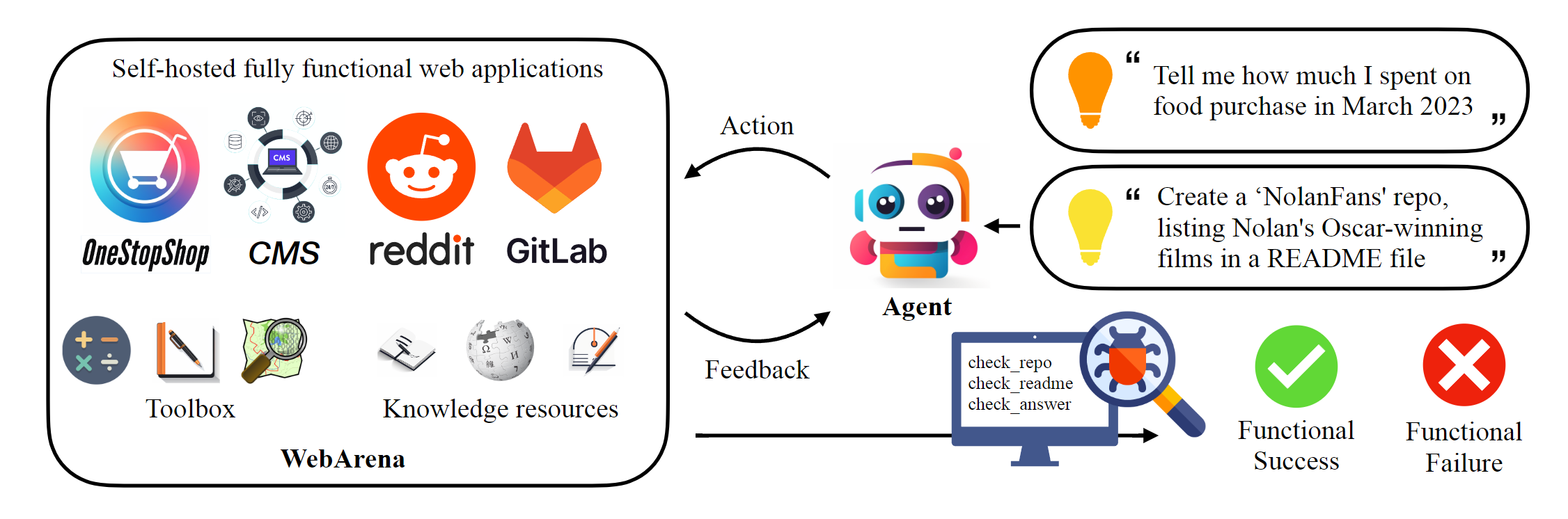
Ce référentiel héberge l'implémentation canonique de webarena pour reproduire les résultats rapportés dans l'article. L'infrastructure de navigation Web a été considérablement améliorée par AgentLab, introduisant plusieurs caractéristiques clés: (1) Prise en charge des expériences parallèles utilisant Browsergym, (2) l'intégration des repères de navigation Web populaires (par exemple, Visualwebarena) dans un cadre unifié, (3) le reportage unifié des classements unifiés et (4) le traitement amélioré des cas de pointe. Nous recommandons fortement d'utiliser ce cadre pour vos expériences.
 # Python 3.10+
conda create -n webarena python=3.10 ; conda activate webarena
pip install -r requirements.txt
playwright install
pip install -e .

# optional, dev only
pip install -e " .[dev] "
mypy --install-types --non-interactive browser_env agents evaluation_harness
pip install pre-commit
pre-commit installConsultez ce script pour une procédure à pas rapide sur la façon de configurer l'environnement du navigateur et interagissez avec lui en utilisant les sites de démonstration que nous avons hébergés. Ce script est uniquement à des fins d'éducation, pour effectuer des expériences reproductibles , veuillez consulter la section suivante. En un mot, l'utilisation de la webarena est très similaire à l'utilisation de l'Openai Gym. L'extrait de code suivant montre comment interagir avec l'environnement.
 from browser_env import ScriptBrowserEnv , create_id_based_action
# init the environment
env = ScriptBrowserEnv (
    headless = False ,
    observation_type = "accessibility_tree" ,
    current_viewport_only = True ,
    viewport_size = { "width" : 1280 , "height" : 720 },
)
# prepare the environment for a configuration defined in a json file
config_file = "config_files/0.json"
obs , info = env . reset ( options = { "config_file" : config_file })
# get the text observation (e.g., html, accessibility tree) through obs["text"]

# create a random action
id = random . randint ( 0 , 1000 )
action = create_id_based_action ( f"click [id]" )

# take the action
obs , _ , terminated , _ , info = env . step ( action )Important
Pour assurer la bonne évaluation, veuillez configurer vos propres sites Web WebArena après les étapes 1 et 2. Les sites de démonstration sont uniquement à des fins de navigation pour vous aider à mieux comprendre le contenu. Après avoir évalué les 812 exemples, réinitialisez l'environnement à l'état initial suivant les instructions ici.
Configurez l'environnement autonome. Veuillez consulter cette page pour plus de détails.
Configurez les URL pour chaque site Web.
 export SHOPPING= " <your_shopping_site_domain>:7770 "
export SHOPPING_ADMIN= " <your_e_commerce_cms_domain>:7780/admin "
export REDDIT= " <your_reddit_domain>:9999 "
export GITLAB= " <your_gitlab_domain>:8023 "
export MAP= " <your_map_domain>:3000 "
export WIKIPEDIA= " <your_wikipedia_domain>:8888/wikipedia_en_all_maxi_2022-05/A/User:The_other_Kiwix_guy/Landing "
export HOMEPAGE= " <your_homepage_domain>:4399 " # this is a placeholder
Vous êtes encouragé à mettre à jour les variables environnementales dans GitHub Workflow pour assurer l'exactitude des tests unitaires
python scripts/generate_test_data.py Vous verrez les fichiers *.json générés dans le dossier config_files. Chaque fichier contient la configuration d'un exemple de test.
 mkdir -p ./.auth
python browser_env/auto_login.py
exporter OPENAI_API_KEY=your_key , une touche API OpenAI valide commence par sk-
Lancez l'évaluation
python run.py
  --instruction_path agent/prompts/jsons/p_cot_id_actree_2s.json  # this is the reasoning agent prompt we used in the paper
  --test_start_idx 0
  --test_end_idx 1
  --model gpt-3.5-turbo
  --result_dir < your_result_dir >
Ce script exécutera le premier exemple avec l'agent de raisonnement GPT-3.5. La trajectoire sera enregistrée dans <your_result_dir>/0.html
 prompt = {
  "intro" : < The overall guideline which includes the task description , available action , hint and others > ,
  "examples" : [
    (
      example_1_observation ,
      example_1_response
    ),
    (
      example_2_observation ,
      example_2_response
    ),
    ...
  ],
  "template" : < How to organize different information such as observation , previous action , instruction , url > ,
  "meta_data" : {
    "observation" : < Which observation space the agent uses > ,
    "action_type" : < Which action space the agent uses > ,
    "keywords" : < The keywords used in the template , the program will later enumerate all keywords in the template to see if all of them are correctly replaced with the content > ,
    "prompt_constructor" : < Which prompt construtor is in used , the prompt constructor will construct the input feed to an LLM and extract the action from the generation , more details below > ,
    "action_splitter" : < Inside which splitter can we extract the action , used by the prompt constructor >
    }
}construct : construire le flux d'entrée sur un LLM_extract_action : étant donné la génération d'un LLM, comment extraire la phrase qui correspond à l'action Si vous utilisez notre environnement ou nos données, veuillez citer notre article:
 @article{zhou2023webarena,
  title={WebArena: A Realistic Web Environment for Building Autonomous Agents},
  author={Zhou, Shuyan and Xu, Frank F and Zhu, Hao and Zhou, Xuhui and Lo, Robert and Sridhar, Abishek and Cheng, Xianyi and Bisk, Yonatan and Fried, Daniel and Alon, Uri and others},
  journal={arXiv preprint arXiv:2307.13854},
  year={2023}
}





