webarena
v0.2.0

الموقع • ورقة • لوحة المتصدرين
مهم
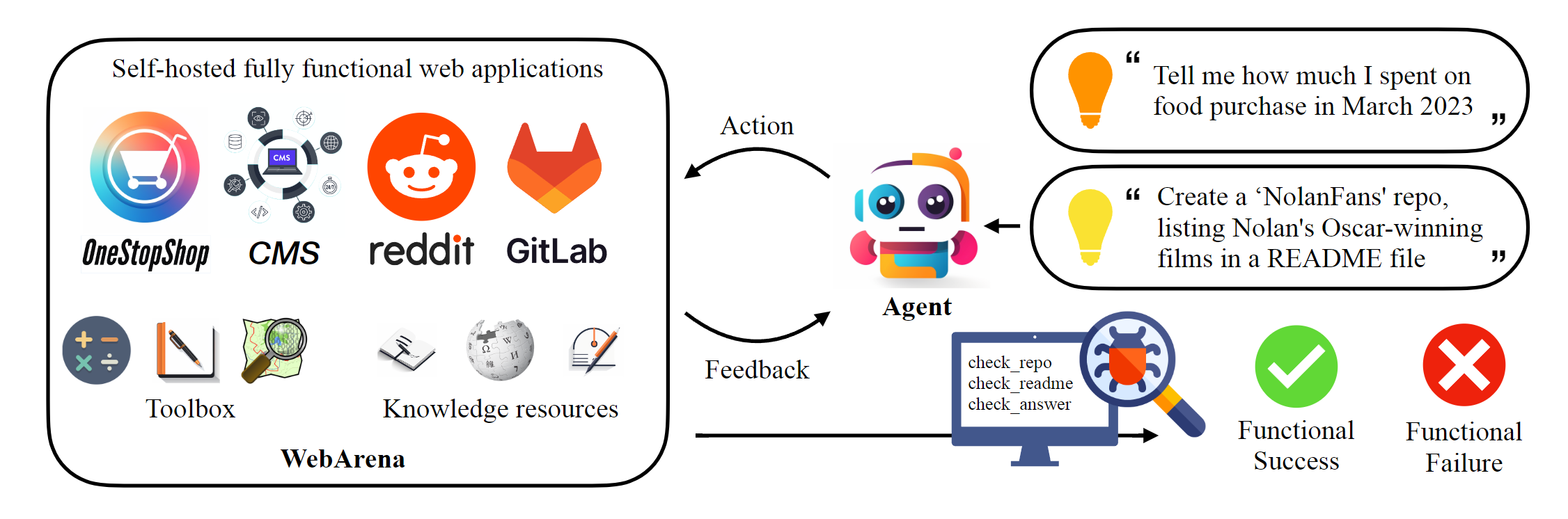
يستضيف هذا المستودع التنفيذ الكنسي لـ Webarena لإعادة إنتاج النتائج المذكورة في الورقة. تم تعزيز البنية التحتية لملاحة الويب بشكل كبير من قبل AgentLab ، حيث قدمت العديد من الميزات الرئيسية: (1) دعم التجارب المتوازية باستخدام المتصفح ، (2) تكامل معايير التنقل على الويب الشعبية (على سبيل المثال ، VisualWebarena) ضمن إطار موحد ، (3) الإبلاغ عن اللوحة الموحدة ، و (4) تحسن في حافة الحافة البيئية. نوصي بشدة باستخدام هذا الإطار لتجاربك.
 # Python 3.10+
conda create -n webarena python=3.10 ; conda activate webarena
pip install -r requirements.txt
playwright install
pip install -e .

# optional, dev only
pip install -e " .[dev] "
mypy --install-types --non-interactive browser_env agents evaluation_harness
pip install pre-commit
pre-commit installتحقق من هذا البرنامج النصي للحصول على تجول سريع حول كيفية إعداد بيئة المتصفح والتفاعل معه باستخدام المواقع التجريبية التي استضفناها. هذا البرنامج النصي هو فقط لغرض التعليم ، لإجراء تجارب قابلة للتكرار ، يرجى مراجعة القسم التالي. باختصار ، يشبه استخدام Webarena استخدام Openai Gym. يوضح مقتطف الكود التالي كيفية التفاعل مع البيئة.
 from browser_env import ScriptBrowserEnv , create_id_based_action
# init the environment
env = ScriptBrowserEnv (
    headless = False ,
    observation_type = "accessibility_tree" ,
    current_viewport_only = True ,
    viewport_size = { "width" : 1280 , "height" : 720 },
)
# prepare the environment for a configuration defined in a json file
config_file = "config_files/0.json"
obs , info = env . reset ( options = { "config_file" : config_file })
# get the text observation (e.g., html, accessibility tree) through obs["text"]

# create a random action
id = random . randint ( 0 , 1000 )
action = create_id_based_action ( f"click [id]" )

# take the action
obs , _ , terminated , _ , info = env . step ( action )مهم
لضمان التقييم الصحيح ، يرجى إعداد مواقع الويب الخاصة بك على الويب بعد الخطوة 1 والخطوة 2. المواقع التجريبية هي فقط لغرض التصفح لمساعدتك على فهم المحتوى بشكل أفضل. بعد تقييم الأمثلة 812 ، أعد تعيين البيئة إلى الحالة الأولية باتباع التعليمات هنا.
إعداد البيئة المستقلة. يرجى التحقق من هذه الصفحة للحصول على التفاصيل.
تكوين عناوين URL لكل موقع ويب.
 export SHOPPING= " <your_shopping_site_domain>:7770 "
export SHOPPING_ADMIN= " <your_e_commerce_cms_domain>:7780/admin "
export REDDIT= " <your_reddit_domain>:9999 "
export GITLAB= " <your_gitlab_domain>:8023 "
export MAP= " <your_map_domain>:3000 "
export WIKIPEDIA= " <your_wikipedia_domain>:8888/wikipedia_en_all_maxi_2022-05/A/User:The_other_Kiwix_guy/Landing "
export HOMEPAGE= " <your_homepage_domain>:4399 " # this is a placeholder
نشجعك على تحديث متغيرات البيئة في سير عمل GitHub لضمان صحة اختبارات الوحدة
python scripts/generate_test_data.py سترى ملفات *.json التي تم إنشاؤها في مجلد Config_Files. يحتوي كل ملف على التكوين لمثال اختبار واحد.
 mkdir -p ./.auth
python browser_env/auto_login.py
Export OPENAI_API_KEY=your_key ، يبدأ مفتاح API Openai صالح بـ sk-
إطلاق التقييم
python run.py
  --instruction_path agent/prompts/jsons/p_cot_id_actree_2s.json  # this is the reasoning agent prompt we used in the paper
  --test_start_idx 0
  --test_end_idx 1
  --model gpt-3.5-turbo
  --result_dir < your_result_dir >
سيقوم هذا البرنامج النصي بتشغيل المثال الأول باستخدام وكيل التفكير GPT-3.5. سيتم حفظ المسار في <your_result_dir>/0.html
 prompt = {
  "intro" : < The overall guideline which includes the task description , available action , hint and others > ,
  "examples" : [
    (
      example_1_observation ,
      example_1_response
    ),
    (
      example_2_observation ,
      example_2_response
    ),
    ...
  ],
  "template" : < How to organize different information such as observation , previous action , instruction , url > ,
  "meta_data" : {
    "observation" : < Which observation space the agent uses > ,
    "action_type" : < Which action space the agent uses > ,
    "keywords" : < The keywords used in the template , the program will later enumerate all keywords in the template to see if all of them are correctly replaced with the content > ,
    "prompt_constructor" : < Which prompt construtor is in used , the prompt constructor will construct the input feed to an LLM and extract the action from the generation , more details below > ,
    "action_splitter" : < Inside which splitter can we extract the action , used by the prompt constructor >
    }
}construct : بناء تغذية الإدخال إلى LLM_extract_action : بالنظر إلى الجيل من LLM ، كيفية استخراج العبارة التي تتوافق مع الإجراء إذا كنت تستخدم بيئتنا أو بياناتنا ، فيرجى الاستشهاد بالورقة:
 @article{zhou2023webarena,
  title={WebArena: A Realistic Web Environment for Building Autonomous Agents},
  author={Zhou, Shuyan and Xu, Frank F and Zhu, Hao and Zhou, Xuhui and Lo, Robert and Sridhar, Abishek and Cheng, Xianyi and Bisk, Yonatan and Fried, Daniel and Alon, Uri and others},
  journal={arXiv preprint arXiv:2307.13854},
  year={2023}
}





