vue document editor
v2.3.2 (Vue3)


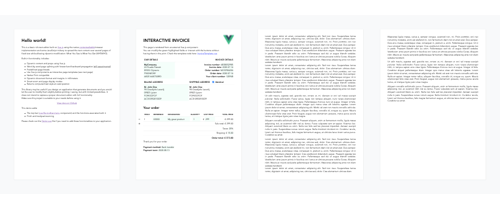
Vue-Document-Editor เป็นตัวแก้ไขข้อความที่หลากหลายที่สร้างขึ้นบน Vue.js โดยใช้การใช้เบราว์เซอร์ ที่เป็นที่ชื่นชอบของ เบราว์เซอร์และกลอุบาย JavaScript บางส่วนเพื่อกระจายเนื้อหาผ่านหน้ากระดาษขนาดใหญ่ ส่วนใหญ่ได้รับการออกแบบมาเพื่ออนุญาตให้มี การปรับเปลี่ยนเป้าหมาย ไปยังเอกสารที่จัดรูปแบบล่วงหน้าโดยใช้ HTML หรือ เทมเพลตแบบโต้ตอบ
npm install vue-document-editor
npm install vue-document-editor@1
dist < template >
< div style = " font-family : Avenir, sans-serif " >
< vue-document-editor v-model:content = " content " /> <!-- Vue 3 syntax -->
<!-- <vue-document-editor :content.sync="content" /> --> <!-- Vue 2 syntax -->
</ div >
</ template >
< script >
import VueDocumentEditor from ' vue-document-editor '
export default {
components : { VueDocumentEditor },
data () {
return {
content : [ " <h1>Hello!</h1>Fill this page with text and new pages will be created as it overflows. " ]
}
}
}
</ script > < html >
< head >
< script src =" https://cdn.jsdelivr.net/npm/vue@3/dist/vue.global.prod.js " > </ script >
< script src =" https://cdn.jsdelivr.net/npm/vue-document-editor@2/dist/VueDocumentEditor.umd.min.js " > </ script >
< link href =" https://cdn.jsdelivr.net/npm/vue-document-editor@2/dist/VueDocumentEditor.css " rel =" stylesheet " >
</ head >
< body >
< div id =" app " >
< div style =" font-family: Avenir, sans-serif " >
< vue-document-editor v-model:content =" content " />
</ div >
</ div >
< script >
const app = Vue . createApp ( {
components : { VueDocumentEditor } ,
data ( ) {
return {
content : [ "<h1>Hello!</h1>Fill this page with text and new pages will be created as it overflows." ]
}
}
} ) . mount ( '#app' ) ;
</ script >
</ body >
</ html > < html >
< head >
< script src =" https://cdn.jsdelivr.net/npm/vue@2/dist/vue.js " > </ script >
< script src =" https://cdn.jsdelivr.net/npm/vue-document-editor@1/dist/VueDocumentEditor.umd.min.js " > </ script >
< link href =" https://cdn.jsdelivr.net/npm/vue-document-editor@1/dist/VueDocumentEditor.css " rel =" stylesheet " >
</ head >
< body >
< div id =" app " >
< div style =" font-family: Avenir, sans-serif " >
< vue-document-editor :content.sync =" content " />
</ div >
</ div >
< script >
var app = new Vue ( {
el : '#app' ,
components : { VueDocumentEditor } ,
data ( ) {
return {
content : [ "<h1>Hello!</h1>Fill this page with text and new pages will be created as it overflows." ]
}
}
} )
</ script >
</ body >
</ html > ดูไฟล์ demo.vue และไฟล์ InvoIcetemplate.ce.vue ที่สอดคล้องกับการสาธิตสด
สำหรับรายการอุปกรณ์ประกอบฉากข้อมูลและตัวแปรสไตล์: อ่าน API
content และจัดเก็บไว้ในสแต็กจากนั้นกู้คืนพวกเขา Demo.Vue ใช้สิ่งนี้ นอกจากนี้แม่แบบอินเทอร์แอคทีฟของคุณจำเป็นต้องมีการจัดการการเลิกทำ/ทำซ้ำที่กำหนดเองหากฟิลด์แก้ไขได้ของพวกเขาไม่ได้ซิงค์กับ contentcontenteditable="false" และ onclick="..." ที่มีรหัส JavaScript ของคุณเอง npm run serve Compiles ให้บริการและการสาธิตการรีไลโหลดร้อนเพื่อการพัฒนาnpm run build Compiles และ minifies ไฟล์การผลิตและการสาธิต ลิขสิทธิ์ (c) 2020 Romain Lamothe, ใบอนุญาต MIT






