vue document editor
v2.3.2 (Vue3)


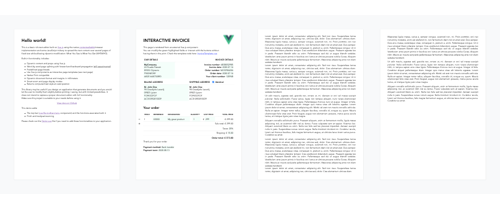
O Vue-Document-Editor é um editor de texto rico construído no topo do vue.js, usando a implementação do navegador contentável nativo e alguns truques JavaScript para espalhar o conteúdo sobre as páginas do tamanho de papel. Ele é projetado principalmente para permitir modificações direcionadas para documentos pré-formatados usando modelos HTML ou interativos .
npm install vue-document-editor
npm install vue-document-editor@1
dist < template >
< div style = " font-family : Avenir, sans-serif " >
< vue-document-editor v-model:content = " content " /> <!-- Vue 3 syntax -->
<!-- <vue-document-editor :content.sync="content" /> --> <!-- Vue 2 syntax -->
</ div >
</ template >
< script >
import VueDocumentEditor from ' vue-document-editor '
export default {
components : { VueDocumentEditor },
data () {
return {
content : [ " <h1>Hello!</h1>Fill this page with text and new pages will be created as it overflows. " ]
}
}
}
</ script > < html >
< head >
< script src =" https://cdn.jsdelivr.net/npm/vue@3/dist/vue.global.prod.js " > </ script >
< script src =" https://cdn.jsdelivr.net/npm/vue-document-editor@2/dist/VueDocumentEditor.umd.min.js " > </ script >
< link href =" https://cdn.jsdelivr.net/npm/vue-document-editor@2/dist/VueDocumentEditor.css " rel =" stylesheet " >
</ head >
< body >
< div id =" app " >
< div style =" font-family: Avenir, sans-serif " >
< vue-document-editor v-model:content =" content " />
</ div >
</ div >
< script >
const app = Vue . createApp ( {
components : { VueDocumentEditor } ,
data ( ) {
return {
content : [ "<h1>Hello!</h1>Fill this page with text and new pages will be created as it overflows." ]
}
}
} ) . mount ( '#app' ) ;
</ script >
</ body >
</ html > < html >
< head >
< script src =" https://cdn.jsdelivr.net/npm/vue@2/dist/vue.js " > </ script >
< script src =" https://cdn.jsdelivr.net/npm/vue-document-editor@1/dist/VueDocumentEditor.umd.min.js " > </ script >
< link href =" https://cdn.jsdelivr.net/npm/vue-document-editor@1/dist/VueDocumentEditor.css " rel =" stylesheet " >
</ head >
< body >
< div id =" app " >
< div style =" font-family: Avenir, sans-serif " >
< vue-document-editor :content.sync =" content " />
</ div >
</ div >
< script >
var app = new Vue ( {
el : '#app' ,
components : { VueDocumentEditor } ,
data ( ) {
return {
content : [ "<h1>Hello!</h1>Fill this page with text and new pages will be created as it overflows." ]
}
}
} )
</ script >
</ body >
</ html > Consulte o arquivo Demo.Vue e o arquivo Invoicetemplate.ce.vue correspondente à demonstração ao vivo.
Para a lista de adereços, variáveis de dados e estilo: leia a API .
content e armazenando -as em uma pilha e depois restaurando -as. Demo.vue implementa isso. Além disso, seus modelos interativos precisam ter um gerenciamento de desfazer/refazer personalizado se seus campos editáveis não forem sincronizados com o content .contenteditable="false" e onclick="..." contendo seu próprio código JavaScript. npm run serve COMPILES, SERVES E DEMO RELOADES HOT RELOADS PARA DESENVOLVIRnpm run build Compile e minifica arquivos de produção e demonstração Copyright (C) 2020 Romain Lamothe, MIT Licença






