vue document editor
v2.3.2 (Vue3)


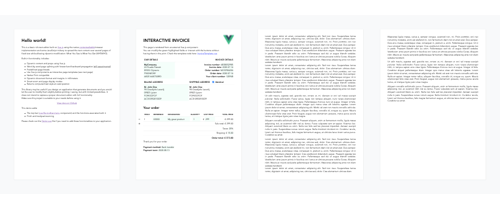
Vue-Document-Editor는 Vue.js 위에 구축 된 풍부한 텍스트 편집기로, Native Contentedable Browser 구현과 일부 JavaScript Trickery를 사용하여 종이 크기의 페이지에 컨텐츠를 전파합니다. 주로 HTML 또는 대화식 템플릿을 사용하여 사전 형식화 된 문서에 대한 대상 수정을 허용하도록 설계되었습니다.
npm install vue-document-editor
npm install vue-document-editor@1
dist 폴더에서 자산을 가져 오십시오. < template >
< div style = " font-family : Avenir, sans-serif " >
< vue-document-editor v-model:content = " content " /> <!-- Vue 3 syntax -->
<!-- <vue-document-editor :content.sync="content" /> --> <!-- Vue 2 syntax -->
</ div >
</ template >
< script >
import VueDocumentEditor from ' vue-document-editor '
export default {
components : { VueDocumentEditor },
data () {
return {
content : [ " <h1>Hello!</h1>Fill this page with text and new pages will be created as it overflows. " ]
}
}
}
</ script > < html >
< head >
< script src =" https://cdn.jsdelivr.net/npm/vue@3/dist/vue.global.prod.js " > </ script >
< script src =" https://cdn.jsdelivr.net/npm/vue-document-editor@2/dist/VueDocumentEditor.umd.min.js " > </ script >
< link href =" https://cdn.jsdelivr.net/npm/vue-document-editor@2/dist/VueDocumentEditor.css " rel =" stylesheet " >
</ head >
< body >
< div id =" app " >
< div style =" font-family: Avenir, sans-serif " >
< vue-document-editor v-model:content =" content " />
</ div >
</ div >
< script >
const app = Vue . createApp ( {
components : { VueDocumentEditor } ,
data ( ) {
return {
content : [ "<h1>Hello!</h1>Fill this page with text and new pages will be created as it overflows." ]
}
}
} ) . mount ( '#app' ) ;
</ script >
</ body >
</ html > < html >
< head >
< script src =" https://cdn.jsdelivr.net/npm/vue@2/dist/vue.js " > </ script >
< script src =" https://cdn.jsdelivr.net/npm/vue-document-editor@1/dist/VueDocumentEditor.umd.min.js " > </ script >
< link href =" https://cdn.jsdelivr.net/npm/vue-document-editor@1/dist/VueDocumentEditor.css " rel =" stylesheet " >
</ head >
< body >
< div id =" app " >
< div style =" font-family: Avenir, sans-serif " >
< vue-document-editor :content.sync =" content " />
</ div >
</ div >
< script >
var app = new Vue ( {
el : '#app' ,
components : { VueDocumentEditor } ,
data ( ) {
return {
content : [ "<h1>Hello!</h1>Fill this page with text and new pages will be created as it overflows." ]
}
}
} )
</ script >
</ body >
</ html > 라이브 데모에 해당하는 Demo.Vue 파일 및 invoicetemplate.ce.vue 파일을 참조하십시오.
소품 목록, 데이터 및 스타일 변수 : API를 읽으십시오 .
content 업데이트를보고 스택에 저장 한 다음 복원하여 직접 구현해야합니다. Demo.Vue는 이것을 구현합니다. 또한 대화식 템플릿에는 편집 가능한 필드가 content 와 동기화되지 않으면 사용자 정의 실행 취소/레디 관리가 필요합니다.contenteditable="false" 및 onclick="..." 자신의 JavaScript 코드를 포함하는 HTML 요소를 사용하여 상호 작용을 수행 할 수 있습니다. npm run serve Comp, Serves 및 Hot Reloads Demo Demo Demonpm run build 컴파일 및 제작 파일 및 데모를 최소화합니다. 저작권 (C) 2020 Romain Lamothe, MIT 라이센스






