vue document editor
v2.3.2 (Vue3)


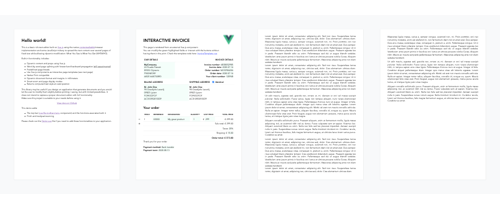
Vue-Document-Enditor هو محرر نص غني تم تصميمه على رأس Vue.js ، باستخدام تطبيق المتصفح القابل للاسترداد الأصلي وبعض خداع JavaScript لنشر المحتوى على الصفحات الورقية. تم تصميمه بشكل أساسي للسماح للتعديلات المستهدفة بالوثائق التي تم تنظيمها مسبقًا باستخدام HTML أو قوالب تفاعلية .
npm install vue-document-editor
npm install vue-document-editor@1
dist < template >
< div style = " font-family : Avenir, sans-serif " >
< vue-document-editor v-model:content = " content " /> <!-- Vue 3 syntax -->
<!-- <vue-document-editor :content.sync="content" /> --> <!-- Vue 2 syntax -->
</ div >
</ template >
< script >
import VueDocumentEditor from ' vue-document-editor '
export default {
components : { VueDocumentEditor },
data () {
return {
content : [ " <h1>Hello!</h1>Fill this page with text and new pages will be created as it overflows. " ]
}
}
}
</ script > < html >
< head >
< script src =" https://cdn.jsdelivr.net/npm/vue@3/dist/vue.global.prod.js " > </ script >
< script src =" https://cdn.jsdelivr.net/npm/vue-document-editor@2/dist/VueDocumentEditor.umd.min.js " > </ script >
< link href =" https://cdn.jsdelivr.net/npm/vue-document-editor@2/dist/VueDocumentEditor.css " rel =" stylesheet " >
</ head >
< body >
< div id =" app " >
< div style =" font-family: Avenir, sans-serif " >
< vue-document-editor v-model:content =" content " />
</ div >
</ div >
< script >
const app = Vue . createApp ( {
components : { VueDocumentEditor } ,
data ( ) {
return {
content : [ "<h1>Hello!</h1>Fill this page with text and new pages will be created as it overflows." ]
}
}
} ) . mount ( '#app' ) ;
</ script >
</ body >
</ html > < html >
< head >
< script src =" https://cdn.jsdelivr.net/npm/vue@2/dist/vue.js " > </ script >
< script src =" https://cdn.jsdelivr.net/npm/vue-document-editor@1/dist/VueDocumentEditor.umd.min.js " > </ script >
< link href =" https://cdn.jsdelivr.net/npm/vue-document-editor@1/dist/VueDocumentEditor.css " rel =" stylesheet " >
</ head >
< body >
< div id =" app " >
< div style =" font-family: Avenir, sans-serif " >
< vue-document-editor :content.sync =" content " />
</ div >
</ div >
< script >
var app = new Vue ( {
el : '#app' ,
components : { VueDocumentEditor } ,
data ( ) {
return {
content : [ "<h1>Hello!</h1>Fill this page with text and new pages will be created as it overflows." ]
}
}
} )
</ script >
</ body >
</ html > راجع ملف Demo.vue وملف InvoIcEtemplate.ce.vue المقابل للعرض المباشر.
لقائمة الدعائم والبيانات ومتغيرات التصميم: اقرأ واجهة برمجة التطبيقات .
content وتخزينها في مكدس ، ثم استعادتها. Demo.vue تنفذ هذا. كما تحتاج القوالب التفاعلية إلى إدارة التراجع/الاحتجاز المخصص إذا لم تتم مزامنة حقولها القابلة للتحرير مع content .contenteditable="false" و onclick="..." التي تحتوي على رمز JavaScript الخاص بك. npm run serve تجمع وخدمات وتوضيح للأحمال الساخنة للتنميةnpm run build تجمع ملفات الإنتاج والتوضيح المصغرة حقوق الطبع والنشر (ج) 2020 رومان لاموث ، ترخيص معهد ماساتشوستس للتكنولوجيا






