holmes extractor
Holmes 4.0.0

저자 : Richard Paul Hudson, 폭발 AI
Managermanager.nlpOntologySupervisedTopicTrainingBasis ( Manager.get_supervised_topic_training_basis() )에서 반환SupervisedTopicModelTrainer ( SupervisedTopicTrainingBasis.train() )에서 반환SupervisedTopicClassifier ( SupervisedTopicModelTrainer.classifier() 및 Manager.deserialize_supervised_topic_classifier() )에서 반환Manager.match() 에서 반환Manager.topic_match_documents_against() 에서 반환되었습니다.Holmes는 영어 및 독일어 텍스트에서 정보 추출과 관련된 여러 사용 사례를 지원하는 Spacy (v3.1 ~ v3.3)에서 실행되는 Python 3 라이브러리 (v3.6 ~ v3.10)입니다. 모든 사용 사례에서 정보 추출은 각 문장의 구성 요소 부분에 의해 표현 된 의미 론적 관계를 분석하는 것을 기반으로합니다.
챗봇 유스 케이스에서 시스템은 하나 이상의 검색 문구를 사용하여 구성됩니다. 그런 다음 Holmes는 검색 된 문서 내에서 이러한 검색 문구의 의미에 해당하는 구조를 찾습니다.이 경우 최종 사용자가 입력 한 텍스트 또는 음성의 개별 스 니펫에 해당합니다. 일치 내에서, 검색어에서 고유 한 의미 (즉 문법 기능을 충족시키는 것이 아니라)는 문서의 하나 이상의 단어에 해당합니다. 검색어가 일치했다는 사실과 검색어 추출물이 챗봇을 구동하는 데 사용될 수 있습니다.
구조 추출 사용 사례는 챗봇 사용 사례와 정확히 동일한 구조적 일치 기술을 사용하지만 챗봇 사용 사례에서 분석 된 스 니펫보다 일반적으로 더 긴 기존 문서 또는 문서와 관련하여 검색이 발생하며, 목표는 구조화 된 정보를 추출하고 저장하는 것입니다. 예를 들어, 한 회사가 두 번째 회사를 인수 할 계획이라고 말하는 모든 장소를 찾기 위해 일련의 비즈니스 기사를 검색 할 수 있습니다. 그런 다음 관련 회사의 신원은 데이터베이스에 저장 될 수 있습니다.
유스 케이스와 일치하는 주제는 쿼리 문서의 역할을 수행하는 다른 문서의 의미와 관련된 문서 나 문서에서 또는 사용자가 임시로 입력 한 쿼리 문구 의 구절을 찾는 것을 목표로합니다. Holmes는 쿼리 문서 또는 쿼리 문서에서 여러 개의 작은 문구를 추출하고 각 문구에 대해 검색되는 문서와 일치하며 결과를 문서 내에서 가장 관련성있는 구절을 찾습니다. 쿼리 문서에 자체 의미가있는 모든 단어가 검색 된 문서의 특정 단어 나 단어와 일치해야한다는 엄격한 요구 사항은 없기 때문에 구조 추출 사용 사례에서보다 더 많은 일치가 발견되지만 일치에는 후속 처리에 사용할 수있는 구조화 된 정보가 포함되어 있지 않습니다. 주제 일치하는 유스 케이스는 웹 사이트에서 6 개의 Charles Dickens 소설 (영어)과 약 350 개의 전통 스토리 (독일어) 내에서 검색 할 수 있습니다.
감독 된 문서 분류 사용 사례는 교육 데이터를 사용하여 하나 이상의 분류 레이블을 새로운 문서에 기준으로 새로운 문서에 할당하는 분류기를 학습합니다. 그것은 주제 일치 사용 사례의 쿼리 문서에서 문구를 추출하는 것과 같은 방식으로 훈련 문서에서 추출한 문구와 일치하는 새로운 문서를 분류합니다. 이 기술은 N-Grams를 사용하는 Bag-of-Words 기반 분류 알고리즘에서 영감을 얻지 만, 구성 요소 단어가 언어 표면 표현에서 이웃이되는 것보다 의미 적으로 관련된 N- 그램을 도출하는 것을 목표로합니다.
4 가지 사용 사례 모두에서 개별 단어는 여러 가지 전략을 사용하여 일치합니다. 개별적으로 일치하는 단어를 포함하는 두 문법 구조가 논리적으로 일치하고 일치하는지 여부를 해결하기 위해 Holmes는 Spacy 라이브러리에서 제공 한 구문 구문 분석 정보를 시맨틱 구조로 변환하여 텍스트를 술어 논리를 사용하여 텍스트를 비교할 수 있도록합니다. Holmes의 사용자는 챗봇 및 구조적 추출 사용 사례에 대한 효과적인 검색 문구를 작성하는 데 중요한 팁이 있지만 탑승하는 방법에 대한 복잡성을 이해할 필요는 없습니다.
Holmes는 비교적 적은 튜닝, 조정 또는 훈련으로 상자에서 다소 사용될 수있는 일반 솔루션을 제공하고 광범위한 사용 사례에 빠르게 적용 할 수 있습니다. 그 핵심에는 각 언어의 구문 표현이 의미 론적 관계를 표현하는 방법을 설명하는 논리적이고 프로그래밍 된 규칙 기반 시스템이 있습니다. 감독 된 문서 분류 사용 사례는 신경망을 통합하지만 Holmes 빌드 자체가 머신 학습을 사용하여 사전 훈련을 받았지만 본질적으로 규칙 기반의 Holmes 특성은 챗봇, 구조적 추출 및 주제 일치하는 사용 사례가 교육없이 상자를 사용할 수 없다는 것을 의미하며, 상대적으로 훈련이 거의 필요하지 않다는 것을 의미합니다. 실제 문제.
Holmes는 길고 복잡한 역사를 가지고 있으며 이제 여러 회사의 영업권과 개방성 덕분에 MIT 라이센스에 따라 게시 할 수 있습니다. Richard Hudson은 뮌헨 근처에있는 대규모 국제 소프트웨어 컨설팅 인 MSG Systems에서 일하면서 최대 3.0.0까지 버전을 썼습니다. 2021 년 후반, 나는 고용주를 바꾸고 이제는 Spacy와 Prodigy의 제작자 인 폭발을 위해 일하고 있습니다. Holmes Library의 요소는 2000 년대 초에 제가 쓴 미국 특허에 의해 다루어지면서 Astrazeneca가 인수 한 Definiens라는 신생 기업에서 일했습니다. Astrazeneca와 MSG 시스템의 친절한 허가로, 나는 이제 폭발시 Holmes를 유지하고 있으며 허용 라이센스로 처음으로 제공 할 수 있습니다. 이제 누구나 특허에 대해 걱정하지 않고 MIT 라이센스의 조건에 따라 Holmes를 사용할 수 있습니다.
이 라이브러리는 원래 MSG 시스템에서 개발되었지만 현재 폭발 AI에서 유지되고 있습니다. 새로운 문제 나 토론을 폭발 저장소에 지시하십시오.
컴퓨터에 아직 Python 3과 PIP가없는 경우 Holmes를 설치하기 전에 설치해야합니다.
다음 명령을 사용하여 Holmes를 설치하십시오.
Linux :
pip3 install holmes-extractor
Windows :
pip install holmes-extractor
이전 Holmes 버전에서 업그레이드하려면 다음 명령을 발행 한 다음 명령을 재발행하여 Spacy 및 Coreferee 모델을 다운로드하여 올바른 버전을 보장합니다.
Linux :
pip3 install --upgrade holmes-extractor
Windows :
pip install --upgrade holmes-extractor
예제 및 테스트를 사용하려면 사용을 사용하여 소스 코드를 복제하십시오.
git clone https://github.com/explosion/holmes-extractor
소스 코드 변경을 실험하려면 변경된 holmes_extractor 모듈 코드가있는 디렉토리의 상위 디렉토리에서 Python ( python3 (Linux) 또는 python (Windows))을 시작하여 설치된 코드를 무시할 수 있습니다. Holmes를 Git에서 확인한 경우 holmes-extractor 디렉토리가됩니다.
홈즈를 다시 제거하려면 파일 시스템에서 설치된 파일을 직접 삭제하여이를 달성합니다. holmes_extractor 의 상위 디렉토리 이외 의 디렉토리에서 시작된 Python 명령 프롬프트에서 다음을 발행하여 찾을 수 있습니다.
 import holmes_extractor
print(holmes_extractor.__file__)
Holmes를 기반으로하는 Spacy 및 Coreferee 라이브러리에는 Holmes를 사용하기 전에 별도로 다운로드 해야하는 언어 별 모델이 필요합니다.
Linux/English :
 python3 -m spacy download en_core_web_trf
python3 -m spacy download en_core_web_lg
python3 -m coreferee install en
리눅스/독일어 :
 pip3 install spacy-lookups-data # (from spaCy 3.3 onwards)
python3 -m spacy download de_core_news_lg
python3 -m coreferee install de
Windows/English :
 python -m spacy download en_core_web_trf
python -m spacy download en_core_web_lg
python -m coreferee install en
Windows/German :
 pip install spacy-lookups-data # (from spaCy 3.3 onwards)
python -m spacy download de_core_news_lg
python -m coreferee install de
그리고 회귀 테스트를 실행할 계획이라면 :
Linux :
python3 -m spacy download en_core_web_sm
Windows :
python -m spacy download en_core_web_sm
관리자 외관 클래스를 인스턴스화 할 때 홈즈가 사용할 수있는 스파이 모델을 지정합니다. en_core_web_trf 및 de_core_web_lg 는 각각 영어와 독일어에 대한 최상의 결과를 산출하는 것으로 밝혀진 모델입니다. en_core_web_trf en_core_web_trf 고유 한 단어 벡터가 없지만 Holmes는 기반 매칭을 임베딩하기위한 단어 벡터가 필요하기 때문에 en_core_web_lg 모델은 기본 모델로 관리자 클래스에 지정 될 때마다 벡터 소스로로드됩니다.
en_core_web_trf 모델은 다른 모델보다 충분히 더 많은 리소스가 필요합니다. 리소스가 부족한 Siutation에서는 en_core_web_lg 대신 기본 모델로 사용하는 것이 합리적인 타협 일 수 있습니다.
홈즈를 비 파이썬 환경에 통합하는 가장 좋은 방법은 편안한 HTTP 서비스로 래핑하고 마이크로 서비스로 배포하는 것입니다. 예를 들어 여기를 참조하십시오.
Holmes는 복잡하고 지능적인 분석을 수행하기 때문에 기존의 검색 프레임 워크보다 더 많은 하드웨어 리소스가 필요하다는 것은 불가피합니다. 문서로드 (구조 추출 및 주제 일치)와 관련된 사용 사례는 크고 대규모 Corpora (예 : 특정 조직에 속하는 모든 문서, 특정 주제에 대한 모든 특허, 특정 저자의 모든 책)에 가장 적용 할 수 있습니다. 비용의 이유로 Holmes는 인터넷 전체의 내용을 분석하는 적절한 도구가 아닙니다!
즉, 홈즈는 수직 및 수평으로 확장 가능합니다. 충분한 하드웨어를 사용하면 여러 시스템에서 Holmes를 실행하여 각 문서에 대해 다른 문서 세트를 처리하고 결과를 차별하여 본질적으로 무제한의 문서에 적용 할 수 있습니다. 이 전략은 이미 단일 시스템의 여러 코어들 사이에 일치하는 것을 배포하는 데 이미 사용되었습니다. 관리자 클래스는 여러 작업자 프로세스를 시작하고 등록 된 문서를 배포합니다.
Holmes는 메모리에로드 된 문서를 보유하고 있으며 크고 대규모 Corpora와는 사용되지 않았습니다. Holmes는 단일 문장을 처리 할 때 다양한 페이지의 메모리를 다루어야 할 수 있기 때문에 운영 체제가 메모리 페이지를 보조 스토리지로 바꿔야하는 경우 모든 저하와 일치하는 문서 로딩, 구조 추출 및 주제의 성능. 즉, 각 기계에 충분한 RAM을 공급하여 모든로드 된 문서를 보유하는 것이 중요하다는 것을 의미합니다.
다른 모델의 상대 리소스 요구 사항에 대한 위의 의견에 유의하십시오.
Holmes의 작동 방식에 대한 빠른 기본 아이디어를 얻는 가장 쉬운 사용 사례는 챗봇 사용 사례입니다.
여기서 하나 이상의 검색 문구가 사전에 홈즈에 정의되며 검색 된 문서는 최종 사용자가 대화식으로 입력 한 짧은 문장 또는 단락입니다. 실제 설정에서 추출 된 정보는 최종 사용자와의 상호 작용 흐름을 결정하는 데 사용됩니다. 테스트 및 데모 목적으로, 일치하는 결과를 대화식으로 표시하는 콘솔이 있습니다. Python 명령 줄 ( python3 (Linux) 또는 python (Windows)을 입력하여 운영 체제 프롬프트에서 시작된 Python Command Line (운영 체제 프롬프트)에서 또는 Jupyter 노트북 내에서 쉽게 시작할 수 있습니다.
다음 코드 스 니펫은 Python 명령 줄, Jupyter 노트북 또는 IDE에 라인을 입력 할 수 있습니다. 그것은 당신이 고양이를 쫓는 큰 개에 대한 문장에 관심이 있다는 사실을 등록하고 시연 챗봇 콘솔을 시작합니다.
영어:
 import holmes_extractor as holmes
holmes_manager = holmes.Manager(model='en_core_web_lg', number_of_workers=1)
holmes_manager.register_search_phrase('A big dog chases a cat')
holmes_manager.start_chatbot_mode_console()
독일 사람:
 import holmes_extractor as holmes
holmes_manager = holmes.Manager(model='de_core_news_lg', number_of_workers=1)
holmes_manager.register_search_phrase('Ein großer Hund jagt eine Katze')
holmes_manager.start_chatbot_mode_console()
이제 검색 문자에 해당하는 문장을 입력하면 콘솔이 일치합니다.
영어:
 Ready for input

A big dog chased a cat


Matched search phrase with text 'A big dog chases a cat':
'big'->'big' (Matches BIG directly); 'A big dog'->'dog' (Matches DOG directly); 'chased'->'chase' (Matches CHASE directly); 'a cat'->'cat' (Matches CAT directly)
독일 사람:
 Ready for input

Ein großer Hund jagte eine Katze


Matched search phrase 'Ein großer Hund jagt eine Katze':
'großer'->'groß' (Matches GROSS directly); 'Ein großer Hund'->'hund' (Matches HUND directly); 'jagte'->'jagen' (Matches JAGEN directly); 'eine Katze'->'katze' (Matches KATZE directly)
이것은 간단한 일치 알고리즘으로 쉽게 달성 될 수 있으므로 홈즈가 실제로 파악하고 일치하는 것이 여전히 반환된다는 것을 확신시키기 위해 몇 가지 복잡한 문장을 입력하십시오.
영어:
 The big dog would not stop chasing the cat
The big dog who was tired chased the cat
The cat was chased by the big dog
The cat always used to be chased by the big dog
The big dog was going to chase the cat
The big dog decided to chase the cat
The cat was afraid of being chased by the big dog
I saw a cat-chasing big dog
The cat the big dog chased was scared
The big dog chasing the cat was a problem
There was a big dog that was chasing a cat
The cat chase by the big dog
There was a big dog and it was chasing a cat.
I saw a big dog. My cat was afraid of being chased by the dog.
There was a big dog. His name was Fido. He was chasing my cat.
A dog appeared. It was chasing a cat. It was very big.
The cat sneaked back into our lounge because a big dog had been chasing her.
Our big dog was excited because he had been chasing a cat.
독일 사람:
 Der große Hund hat die Katze ständig gejagt
Der große Hund, der müde war, jagte die Katze
Die Katze wurde vom großen Hund gejagt
Die Katze wurde immer wieder durch den großen Hund gejagt
Der große Hund wollte die Katze jagen
Der große Hund entschied sich, die Katze zu jagen
Die Katze, die der große Hund gejagt hatte, hatte Angst
Dass der große Hund die Katze jagte, war ein Problem
Es gab einen großen Hund, der eine Katze jagte
Die Katzenjagd durch den großen Hund
Es gab einmal einen großen Hund, und er jagte eine Katze
Es gab einen großen Hund. Er hieß Fido. Er jagte meine Katze
Es erschien ein Hund. Er jagte eine Katze. Er war sehr groß.
Die Katze schlich sich in unser Wohnzimmer zurück, weil ein großer Hund sie draußen gejagt hatte
Unser großer Hund war aufgeregt, weil er eine Katze gejagt hatte
시연은 같은 단어를 포함하지만 같은 아이디어를 표현하지 않고 일치 하지 않는다는 것을 관찰하는 다른 문장을 시도하지 않고는 완전하지 않습니다.
영어:
 The dog chased a big cat
The big dog and the cat chased about
The big dog chased a mouse but the cat was tired
The big dog always used to be chased by the cat
The big dog the cat chased was scared
Our big dog was upset because he had been chased by a cat.
The dog chase of the big cat
독일 사람:
 Der Hund jagte eine große Katze
Die Katze jagte den großen Hund
Der große Hund und die Katze jagten
Der große Hund jagte eine Maus aber die Katze war müde
Der große Hund wurde ständig von der Katze gejagt
Der große Hund entschloss sich, von der Katze gejagt zu werden
Die Hundejagd durch den große Katze
위의 예에서, Holmes는 동일한 의미를 공유하는 다양한 문장 수준 구조와 일치했지만, 일치하는 문서의 세 단어의 기본 형태는 항상 검색 문구의 세 단어와 동일했습니다. Holmes는 개별 단어 수준에서 일치시키기위한 몇 가지 추가 전략을 제공합니다. Holmes의 다른 문장 구조와 일치하는 능력과 함께, 이들은 검색어를 문서 문장과 일치시킬 수 있으며, 두 사람이 단어를 공유하고 문법적으로 완전히 다른 경우에도 그 의미를 공유하는 문서 문장과 일치 할 수 있습니다.
이러한 추가 단어 매치 전략 중 하나는 이름이 일치합니다. 특별 단어는 사람이나 장소와 같은 전체 클래스의 이름과 일치하는 검색 문구에 포함될 수 있습니다. exit 입력하여 콘솔을 종료 한 다음 두 번째 검색 문구를 등록하고 콘솔을 다시 시작하십시오.
영어:
 holmes_manager.register_search_phrase('An ENTITYPERSON goes into town')
holmes_manager.start_chatbot_mode_console()
독일 사람:
 holmes_manager.register_search_phrase('Ein ENTITYPER geht in die Stadt')
holmes_manager.start_chatbot_mode_console()
당신은 이제 도시로가는 사람들에 대한 관심을 등록했으며 콘솔에 적절한 문장을 입력 할 수 있습니다.
영어:
 Ready for input

I met Richard Hudson and John Doe last week. They didn't want to go into town.


Matched search phrase with text 'An ENTITYPERSON goes into town'; negated; uncertain; involves coreference:
'Richard Hudson'->'ENTITYPERSON' (Has an entity label matching ENTITYPERSON); 'go'->'go' (Matches GO directly); 'into'->'into' (Matches INTO directly); 'town'->'town' (Matches TOWN directly)

Matched search phrase with text 'An ENTITYPERSON goes into town'; negated; uncertain; involves coreference:
'John Doe'->'ENTITYPERSON' (Has an entity label matching ENTITYPERSON); 'go'->'go' (Matches GO directly); 'into'->'into' (Matches INTO directly); 'town'->'town' (Matches TOWN directly)
독일 사람:
 Ready for input

Letzte Woche sah ich Richard Hudson und Max Mustermann. Sie wollten nicht mehr in die Stadt gehen.


Matched search phrase with text 'Ein ENTITYPER geht in die Stadt'; negated; uncertain; involves coreference:
'Richard Hudson'->'ENTITYPER' (Has an entity label matching ENTITYPER); 'gehen'->'gehen' (Matches GEHEN directly); 'in'->'in' (Matches IN directly); 'die Stadt'->'stadt' (Matches STADT directly)

Matched search phrase with text 'Ein ENTITYPER geht in die Stadt'; negated; uncertain; involves coreference:
'Max Mustermann'->'ENTITYPER' (Has an entity label matching ENTITYPER); 'gehen'->'gehen' (Matches GEHEN directly); 'in'->'in' (Matches IN directly); 'die Stadt'->'stadt' (Matches STADT directly)
두 언어 각각 에서이 마지막 예제는 Holmes의 몇 가지 추가 기능을 보여줍니다.
더 많은 예는 섹션 5를 참조하십시오.
다음 전략은 전략 당 하나의 파이썬 모듈로 구현됩니다. 표준 라이브러리는 관리자 클래스를 통한 맞춤형 전략 추가를 지원하지 않지만 Python 프로그래밍 기술을 가진 사람은 누구나 코드를 변경하여이를 활성화하기가 비교적 쉽습니다.
word_match.type=='direct' )검색어 단어와 문서 단어 사이의 직접 일치하는 것은 항상 활성화됩니다. 이 전략은 주로 영어 구매 와 어린이 와 일치하는 줄기 형태의 단어와 어린이 , 어린이 , 독일 스테이 겐 , 친절하고 친절하게 일치합니다. 그러나 파서가 단어에 대한 잘못된 줄기 형태를 전달할 때 직접 일치하는 작동 가능성을 높이기 위해서는 검색어 및 문서 단어의 원시 텍스트 형식도 직접 일치하는 동안 고려됩니다.
word_match.type=='derivation' ) 파생 기반 매칭은 일반적으로 다른 단어 수업, 예를 들어 영어 평가 및 평가 , 독일 Jagen 및 Jagd 에 속하는 독특하지만 관련된 단어를 포함합니다. 기본적으로 활성화되지만 Manager 클래스를 인스턴스화 할 때 설정된 analyze_derivational_morphology 매개 변수를 사용하여 꺼질 수 있습니다.
word_match.type=='entity' )명명 된 엔티티 매칭
엔터티가 마을로 간다 (영어)
Die Stadt (독일)의 Ein Entityper Geht .
지원되는 명명 된 엔티티 식별자는 각 언어에 대한 스파크 모델에 의해 제공되는 명명 된 엔티티 정보 (이전 버전의 스파크 문서에서 복사 된 설명)에 직접적으로 의존합니다.
영어:
| 식별자 | 의미 |
|---|---|
| EntityNoun | 명사 문구. |
| EntityPerson | 허구를 포함한 사람들. |
| EntityNorp | 국적 또는 종교 또는 정치 그룹. |
| EntityFac | 건물, 공항, 고속도로, 교량 등 |
| Entityorg | 회사, 대행사, 기관 등 |
| Entitygpe | 국가, 도시, 주. |
| EntityLoc | 비 GPE 위치, 산맥, 물 몸체. |
| 엔터티 제품 | 물체, 차량, 식품 등 (서비스가 아님) |
| EntityEvent | 허리케인, 전투, 전쟁, 스포츠 이벤트 등이라는 이름. |
| EntityWork_of_art | 책, 노래 등의 제목 |
| 엔티티 로우 | 법으로 명명 된 문서. |
| EntityLanguage | 이름이 지정된 언어. |
| EntityDate | 절대 또는 상대 날짜 또는 기간. |
| 엔티티 타임 | 하루보다 작은 시간. |
| 엔터티 퍼센트 | "%"를 포함한 백분율. |
| EntityMoney | 단위를 포함한 금전적 값. |
| 엔터티 Quantity | 무게 또는 거리의 측정. |
| 엔터티 라디 컬 | "첫 번째", "두 번째"등 |
| EntityCardinal | 다른 유형에 속하지 않는 숫자. |
독일 사람:
| 식별자 | 의미 |
|---|---|
| EntityNoun | 명사 문구. |
| 엔티티 퍼 | 지명 된 사람 또는 가족. |
| EntityLoc | 정치적 또는 지리적으로 정의 된 위치 (도시, 지방, 국가, 국제 지역, 물, 산)의 이름. |
| Entityorg | 기업, 정부 또는 기타 조직 단체로 지명되었습니다. |
| EntityMisc | 기타 단체, 예를 들어 행사, 국적, 제품 또는 예술 작품. |
우리는 진정한 이름의 이름이 식별자에 ENTITYNOUN 추가했습니다. 명사 문구와 일치하므로 일반 대명사와 비슷한 방식으로 동작합니다. 차이점은 ENTITYNOUN 문서 내의 특정 명사 문구와 일치 하고이 특정 명사 문구가 추출되어 추가 처리를 위해 사용할 수 있다는 것입니다. ENTITYNOUN 주제 일치 사용 사례 내에서 지원되지 않습니다.
word_match.type=='ontology' )Ontology를 사용하면 사용자가 문서를 검색 문구와 일치시킬 때 고려되는 단어 간의 관계를 정의 할 수 있습니다. 세 가지 관련 관계 유형은 hyponyms (무언가의 하위 유형), 동의어 (무언가가 무언가와 동일 함) 및 지명 된 개인 (무언가의 특정 사례)입니다. 세 가지 관계 유형은 그림 1에서 예시됩니다.
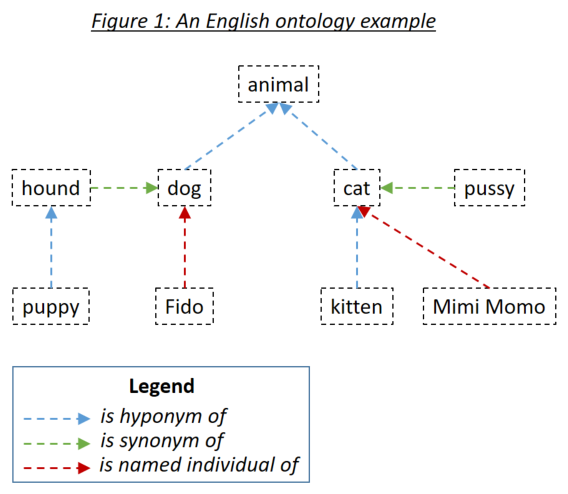
온톨로지는 RDF/XML을 사용하여 올빼미 온톨로지 표준 직렬화 된 홈즈에 정의됩니다. 이러한 온톨로지는 다양한 도구로 생성 될 수 있습니다. Holmes 예제 및 테스트의 경우, 무료 도구 단백질이 사용되었습니다. 자신의 온톨로지를 정의하고 예제 및 테스트와 함께 배송되는 온톨로지를 탐색하기 위해 Protege를 사용하는 것이 좋습니다. Protege에서 온톨로지를 저장할 때 RDF/XML을 형식으로 선택하십시오. Protege는 홈즈가 기본값으로 이해하는 hyponym, 동의어 및 명명 된 개인 관계에 대한 표준 레이블을 할당하지만 이는 무시할 수 있습니다.
온톨로지 항목은 국제화 된 리소스 식별자 (IRI) (예 : http://www.semanticweb.org/hudsonr/ontologies/2019/0/animals#dog )를 사용하여 정의됩니다. 홈즈는 최종 조각 만 사용하여 일치하는 데만 사용되며, 이로 인해 동종 (동일한 형식이지만 다중 의미를 가진 단어)은 온톨로지 트리의 여러 지점에서 정의 될 수 있습니다.
온톨로지 기반 매칭은 특정 주제 영역 및 사용 사례를 위해 구축 된 작은 온톨로지가 사용될 때 홈즈와 최상의 결과를 제공합니다. 예를 들어, 건물 보험 사용 사례에 대한 챗봇을 구현하는 경우 해당 특정 도메인 내에서 이용 약관을 캡처하는 작은 온톨로지를 만들어야합니다. 반면에 WordNet과 같은 전체 언어 내의 모든 도메인에 대해 구축 된 대형 온톨로지를 사용하는 것이 권장되지 않습니다. 좁은 주제 영역에만 적용되는 많은 동의어와 관계가 많은 부정확 한 일치로 이어지는 경향이 있기 때문입니다. 일반적인 사용 사례의 경우, 임베딩 기반 매칭은 더 나은 결과를 얻는 경향이 있습니다.
온톨로지의 각 단어는 소자, 동의어 및 지명 된 개인, 그 단어의 hyponyms, 동의어 및 지명 된 개인 등으로 구성된 하위 트리를 향한 것으로 간주 될 수 있습니다. 챗봇 및 구조 추출 사용 사례에 적합한 표준 방식으로 온톨로지가 설정되면 Holmes 검색 문구의 단어는 문서 단어가 검색어 단어의 하위 트리 내에있는 경우 문서의 단어와 일치합니다. 그림 1의 온톨로지는 홈즈에게 정의되었으며, 직접 일치 전략 외에도 각 단어 자체와 일치하는 다음 조합이 일치합니다.
Eat Up 및 Aufessen 과 같은 독일어 동사와 같은 영어 문구 동사는 온톨로지 내에서 단일 항목으로 정의되어야합니다. Holmes가 텍스트를 분석하고 그러한 동사를 가로 질러 오면 주 동사와 입자는 단일 논리 단어로 혼합되어 온톨로지를 통해 일치 할 수 있습니다. 이것은 텍스트 내에서 먹는 것이 온톨로지 내에서 먹는 부분 의 하위 트리와 일치하지만 온톨로지 내에서 먹는 하위 트리는 아닙니다.
파생 기반 매칭이 활성화되면 잠재적 온톨로지 기반 매치의 양쪽에서 고려됩니다. 예를 들어, 변경 과 수정이 온톨로지에서 동의어로 정의되면 변경 및 수정 사항 도 서로 일치합니다.
문서의 논리적 서신을 검색 문구와 일치시키는 것보다 관련 문장을 찾는 것이 더 중요한 상황에서 온톨로지를 정의 할 때 대칭 일치를 지정하는 것이 합리적 일 수 있습니다. 주제 일치 사용 사례에는 대칭 일치가 권장되지만 챗봇 또는 구조 추출 사용 사례에 적합하지는 않습니다. 이는 hypernym (Reverse Hyponym) 관계와 일치시 최면 및 동의어 관계뿐만 아니라 문서와 검색 문구 사이의 대칭 관계를 초래한다는 것을 의미합니다. 대칭 온톨로지를 통해 일치 할 때 적용되는 중요한 규칙은 성냥 경로에 하이퍼 랜드와 hyponyn 관계를 모두 포함하지 않을 수 있다는 것입니다. 즉, 당신은 스스로 돌아갈 수 없습니다. 위의 온톨로지는 대칭으로 정의되었으며 다음 조합은 다음과 같습니다.
감독 된 문서 분류 사용 사례에서 두 가지 별도의 온톨로지를 사용할 수 있습니다.
구조적 일치 온톨로지는 교육 문서와 테스트 문서의 내용을 분석하는 데 사용됩니다. 온톨로지에서 발견되는 문서의 각 단어는 가장 일반적인 하이퍼 랜드 조상으로 대체됩니다. 온톨로지가 목적을 위해 특별히 구축 된 경우, 온톨로지가 감독 된 문서 분류를 위해 구조적 일치와 만 작동 할 가능성이 있음을 인식하는 것이 중요합니다. 그러한 온톨로지는 분류 할 문서의 주요 클래스를 나타내는 다수의 별도의 나무로 구성되어야합니다. 위에 표시된 온톨로지의 예에서, 온톨로지의 모든 단어는 동물 로 대체 될 것이다. WordNet 스타일 온톨로지의 극단적 인 경우, 모든 명사는 결국 사물 로 대체 될 것이며, 이는 분명히 바람직한 결과가 아닙니다!
분류 온톨로지는 분류 라벨 간의 관계를 포착하는 데 사용됩니다. 문서에는 특정 분류가 있음을 의미합니다. 또한 분류가 속한 하위 트리에 대한 분류가 있음을 의미합니다. 분류 온톨로지에서 동의어는 값을 추가하지 않고 신경망의 복잡성을 추가하기 때문에 동의어를 드물게 사용해야합니다. 그리고 대칭 일치를 사용하기 위해 분류 온톨로지를 설정하는 것이 기술적으로 가능하지만, 그렇게 할 이유는 없습니다. 분류 문서의 레이블로 직접 정의되지 않은 분류 온톨로지 내의 레이블은 분류기를 훈련 할 때 고려할 경우 SupervisedTopicTrainingBasis.register_additional_classification_label() 메소드를 사용하여 특별히 등록해야합니다.
word_match.type=='embedding' )Spacy는 단어 임베딩을 제공합니다 : 각 단어가 발생하는 경향이있는 컨텍스트를 포착하는 단어의 기계 학습 수치 벡터 표현을 제공합니다. 비슷한 의미를 가진 두 단어는 서로 가까이있는 단어 임베딩으로 나타나는 경향이 있으며, 스파크는 0.0 (유사성 없음)과 1.0 (동일한 단어)으로 표시된 두 단어의 임베딩 사이의 코사인 유사성을 측정 할 수 있습니다. 개와 고양이는 비슷한 맥락에서 나타나는 경향이 있기 때문에 0.80의 유사성이 있습니다. 개와 말은 공통점이 적고 0.62의 유사성을 갖는다; 개와 철분 의 유사성은 0.25입니다. 임베딩 기반 매칭은 명사, 형용사 및 부사에 대해서만 활성화됩니다. 결과는 다른 단어 클래스와 불만족스러운 것으로 밝혀 졌기 때문입니다.
두 단어가 비슷한 임베딩을 가지고 있다는 사실은 온톨로지 기반 매칭이 사용될 때와 둘 사이의 동일한 종류의 논리적 관계를 암시하지 않는다는 것을 이해하는 것이 중요합니다. 예를 들어, 개와 고양이가 비슷한 임베딩을 가지고 있다는 사실은 개가 고양이의 종류이거나 고양이가 개 유형이라는 것을 의미하지 않습니다. 그럼에도 불구하고 임베딩 기반 매칭이 적절한 선택은 기능적 사용 사례에 따라 다릅니다.
챗봇, 구조 추출 및 감독 된 문서 분류 사용 사례의 경우 Holmes는 overall_similarity_threshold 매개 변수를 사용하여 Manager 클래스에 전 세계적으로 정의 된 Word-empedding 기반 유사성을 사용합니다. 개별 해당 단어 쌍 간의 유사성의 기하학적 평균 이이 임계 값보다 큽니다. 이 기술의 직관은 예를 들어 6 개의 어휘 단어가있는 검색 문서 가이 단어 중 5 개가 정확히 일치하고 하나의 단지 임베딩을 통해 일치하는 문서 구조와 일치하는 경우,이 여섯 번째 단어와 일치하는 데 필요한 유사성은 정확히 일치하고 다른 단어 중 2 개가 포함되는 경우보다 적습니다.
검색 문서를 문서와 일치시키는 것은 검색어의 루트 (syntactic head)의 단어와 일치하는 문서에서 단어를 찾는 것으로 시작됩니다. 그런 다음 홈즈는 문서 구조가 검색어 구조와 일치하는지 여부를 확인하기 위해이 일치하는 문서 단어 각각의 구조를 조사합니다. 검색 문구 루트 단어와 일치하는 문서 단어는 일반적으로 인덱스를 사용하여 발견됩니다. 그러나 검색어 루트 단어와 일치하는 문서 단어를 찾을 때 임베딩을 고려해야하는 경우, 유효한 단어 클래스가있는 모든 문서의 모든 단어는 해당 검색 문구 루트 단어와 유사성을 비교해야합니다. 이것은 챗봇 사용 사례를 제외한 모든 사용 사례를 본질적으로 사용할 수없는 매우 눈에 띄는 성능을 제공합니다.
검색어 루트 단어의 임베딩 기반 매칭으로 인한 불필요한 성능 히트를 피하기 위해, 관리자 클래스를 인스턴스화 할 때 설정된 embedding_based_matching_on_root_words 매개 변수를 사용하여 일반적으로 임베딩 기반 매칭과 별도로 제어됩니다. 대부분의 사용 사례에 대해이 설정을 끄는 (값 False )를 끄는 것이 좋습니다.
overall_similarity_threshold _similarity_threshold 나 embedding_based_matching_on_root_words 매개 변수는 주제 일치 사용 사례에 영향을 미치지 않습니다. 여기서 단어 수준 임베딩 유사성 임계 값은 word_embedding_match_threshold 및 initial_question_word_embedding_match_threshold 매개 변수 topic_match_documents_against 사용하여 설정됩니다.
word_match.type=='entity_embedding' ) 명명 된 엔티티-엠 베딩 기반 매치는 특정 엔티티 레이블이있는 검색 된 문서 단어와 검색어 또는 쿼리 문서 단어 사이를 얻습니다.이 엔티티 레이블의 기본 의미와 충분히 유사한 검색어 라벨의 단어는 개인 엔티티 레이블의 기본 의미에 포함됩니다. 명명 된-엔티티-엠 베딩 기반 매칭은 embedding_based_matching_on_root_words 설정에 관계없이 루트 단어에서 결코 활성화되지 않습니다.
word_match.type=='question' )주제 일치 중에만 초기 질문 마칭은 활성화됩니다. 쿼리 문구의 초기 질문 단어는 질문에 대한 잠재적 답변을 나타내는 검색 된 문서의 엔티티와 일치합니다. 예를 들어 , Peter가 아침 식사를했을 때 쿼리 문구를 비교할 때 Peter가 오전 8시에 아침 식사를했을 때, 오전 8시에 시간적 부사 문구와 일치 할 때 의 질문이 있습니다.
Manager 클래스에서 topic_match_documents_against 함수를 호출 할 때 initial_question_word_behaviour 매개 변수를 사용하여 초기 Question-Word 매칭이 켜지고 꺼집니다. It is only likely to be useful when topic matching is being performed in an interactive setting where the user enters short query phrases, as opposed to when it is being used to find documents on a similar topic to an pre-existing query document: initial question words are only processed at the beginning of the first sentence of the query phrase or query document.
Linguistically speaking, if a query phrase consists of a complex question with several elements dependent on the main verb, a finding in a searched document is only an 'answer' if contains matches to all these elements. Because recall is typically more important than precision when performing topic matching with interactive query phrases, however, Holmes will match an initial question word to a searched-document phrase wherever they correspond semantically (eg wherever when corresponds to a temporal adverbial phrase) and each depend on verbs that themselves match at the word level. One possible strategy to filter out 'incomplete answers' would be to calculate the maximum possible score for a query phrase and reject topic matches that score below a threshold scaled to this maximum.
Before Holmes analyses a searched document or query document, coreference resolution is performed using the Coreferee library running on top of spaCy. This means that situations are recognised where pronouns and nouns that are located near one another within a text refer to the same entities. The information from one mention can then be applied to the analysis of further mentions:
I saw a big dog . It was chasing a cat.
I saw a big dog . The dog was chasing a cat.
Coreferee also detects situations where a noun refers back to a named entity:
We discussed AstraZeneca . The company had given us permission to publish this library under the MIT license.
If this example were to match the search phrase A company gives permission to publish something , the coreference information that the company under discussion is AstraZeneca is clearly relevant and worth extracting in addition to the word(s) directly matched to the search phrase. Such information is captured in the word_match.extracted_word field.
The concept of search phrases has already been introduced and is relevant to the chatbot use case, the structural extraction use case and to preselection within the supervised document classification use case.
It is crucial to understand that the tips and limitations set out in Section 4 do not apply in any way to query phrases in topic matching. If you are using Holmes for topic matching only, you can completely ignore this section!
Structural matching between search phrases and documents is not symmetric: there are many situations in which sentence X as a search phrase would match sentence Y within a document but where the converse would not be true. Although Holmes does its best to understand any search phrases, the results are better when the user writing them follows certain patterns and tendencies, and getting to grips with these patterns and tendencies is the key to using the relevant features of Holmes successfully.
Holmes distinguishes between: lexical words like dog , chase and cat (English) or Hund , jagen and Katze (German) in the initial example above; and grammatical words like a (English) or ein and eine (German) in the initial example above. Only lexical words match words in documents, but grammatical words still play a crucial role within a search phrase: they enable Holmes to understand it.
Dog chase cat (English)
Hund jagen Katze (German)
contain the same lexical words as the search phrases in the initial example above, but as they are not grammatical sentences Holmes is liable to misunderstand them if they are used as search phrases. This is a major difference between Holmes search phrases and the search phrases you use instinctively with standard search engines like Google, and it can take some getting used to.
A search phrase need not contain a verb:
ENTITYPERSON (English)
A big dog (English)
Interest in fishing (English)
ENTITYPER (German)
Ein großer Hund (German)
Interesse am Angeln (German)
are all perfectly valid and potentially useful search phrases.
Where a verb is present, however, Holmes delivers the best results when the verb is in the present active , as chases and jagt are in the initial example above. This gives Holmes the best chance of understanding the relationship correctly and of matching the widest range of document structures that share the target meaning.
Sometimes you may only wish to extract the object of a verb. For example, you might want to find sentences that are discussing a cat being chased regardless of who is doing the chasing. In order to avoid a search phrase containing a passive expression like
A cat is chased (English)
Eine Katze wird gejagt (German)
you can use a generic pronoun . This is a word that Holmes treats like a grammatical word in that it is not matched to documents; its sole purpose is to help the user form a grammatically optimal search phrase in the present active. Recognised generic pronouns are English something , somebody and someone and German jemand (and inflected forms of jemand ) and etwas : Holmes treats them all as equivalent. Using generic pronouns, the passive search phrases above could be re-expressed as
Somebody chases a cat (English)
Jemand jagt eine Katze (German).
Experience shows that different prepositions are often used with the same meaning in equivalent phrases and that this can prevent search phrases from matching where one would intuitively expect it. For example, the search phrases
Somebody is at the market (English)
Jemand ist auf dem Marktplatz (German)
would fail to match the document phrases
Richard was in the market (English)
Richard war am Marktplatz (German)
The best way of solving this problem is to define the prepositions in question as synonyms in an ontology.
The following types of structures are prohibited in search phrases and result in Python user-defined errors:
A dog chases a cat. A cat chases a dog (English)
Ein Hund jagt eine Katze. Eine Katze jagt einen Hund (German)
Each clause must be separated out into its own search phrase and registered individually.
A dog does not chase a cat. (영어)
Ein Hund jagt keine Katze. (독일 사람)
Negative expressions are recognised as such in documents and the generated matches marked as negative; allowing search phrases themselves to be negative would overcomplicate the library without offering any benefits.
A dog and a lion chase a cat. (영어)
Ein Hund und ein Löwe jagen eine Katze. (독일 사람)
Wherever conjunction occurs in documents, Holmes distributes the information among multiple matches as explained above. In the unlikely event that there should be a requirement to capture conjunction explicitly when matching, this could be achieved by using the Manager.match() function and looking for situations where the document token objects are shared by multiple match objects.
The (English)
Der (German)
A search phrase cannot be processed if it does not contain any words that can be matched to documents.
A dog chases a cat and he chases a mouse (English)
Ein Hund jagt eine Katze und er jagt eine Maus (German)
Pronouns that corefer with nouns elsewhere in the search phrase are not permitted as this would overcomplicate the library without offering any benefits.
The following types of structures are strongly discouraged in search phrases:
Dog chase cat (English)
Hund jagen Katze (German)
Although these will sometimes work, the results will be better if search phrases are expressed grammatically.
A cat is chased by a dog (English)
A dog will have chased a cat (English)
Eine Katze wird durch einen Hund gejagt (German)
Ein Hund wird eine Katze gejagt haben (German)
Although these will sometimes work, the results will be better if verbs in search phrases are expressed in the present active.
Who chases the cat? (영어)
Wer jagt die Katze? (독일 사람)
Although questions are supported as query phrases in the topic matching use case, they are not appropriate as search phrases. Questions should be re-phrased as statements, in this case
Something chases the cat (English)
Etwas jagt die Katze (German).
Informationsextraktion (German)
Ein Stadtmittetreffen (German)
The internal structure of German compound words is analysed within searched documents as well as within query phrases in the topic matching use case, but not within search phrases. In search phrases, compound words should be reexpressed as genitive constructions even in cases where this does not strictly capture their meaning:
Extraktion der Information (German)
Ein Treffen der Stadtmitte (German)
The following types of structures should be used with caution in search phrases:
A fierce dog chases a scared cat on the way to the theatre (English)
Ein kämpferischer Hund jagt eine verängstigte Katze auf dem Weg ins Theater (German)
Holmes can handle any level of complexity within search phrases, but the more complex a structure, the less likely it becomes that a document sentence will match it. If it is really necessary to match such complex relationships with search phrases rather than with topic matching, they are typically better extracted by splitting the search phrase up, eg
A fierce dog (English)
A scared cat (English)
A dog chases a cat (English)
Something chases something on the way to the theatre (English)
Ein kämpferischer Hund (German)
Eine verängstigte Katze (German)
Ein Hund jagt eine Katze (German)
Etwas jagt etwas auf dem Weg ins Theater (German)
Correlations between the resulting matches can then be established by matching via the Manager.match() function and looking for situations where the document token objects are shared across multiple match objects.
One possible exception to this piece of advice is when embedding-based matching is active. Because whether or not each word in a search phrase matches then depends on whether or not other words in the same search phrase have been matched, large, complex search phrases can sometimes yield results that a combination of smaller, simpler search phrases would not.
The chasing of a cat (English)
Die Jagd einer Katze (German)
These will often work, but it is generally better practice to use verbal search phrases like
Something chases a cat (English)
Etwas jagt eine Katze (German)
and to allow the corresponding nominal phrases to be matched via derivation-based matching.
The chatbot use case has already been introduced: a predefined set of search phrases is used to extract information from phrases entered interactively by an end user, which in this use case act as the documents.
The Holmes source code ships with two examples demonstrating the chatbot use case, one for each language, with predefined ontologies. Having cloned the source code and installed the Holmes library, navigate to the /examples directory and type the following (Linux):
영어:
python3 example_chatbot_EN_insurance.py
독일 사람:
python3 example_chatbot_DE_insurance.py
or click on the files in Windows Explorer (Windows).
Holmes matches syntactically distinct structures that are semantically equivalent, ie that share the same meaning. In a real chatbot use case, users will typically enter equivalent information with phrases that are semantically distinct as well, ie that have different meanings. Because the effort involved in registering a search phrase is barely greater than the time it takes to type it in, it makes sense to register a large number of search phrases for each relationship you are trying to extract: essentially all ways people have been observed to express the information you are interested in or all ways you can imagine somebody might express the information you are interested in . To assist this, search phrases can be registered with labels that do not need to be unique: a label can then be used to express the relationship an entire group of search phrases is designed to extract. Note that when many search phrases have been defined to extract the same relationship, a single user entry is likely to be sometimes matched by multiple search phrases. This must be handled appropriately by the calling application.
One obvious weakness of Holmes in the chatbot setting is its sensitivity to correct spelling and, to a lesser extent, to correct grammar. Strategies for mitigating this weakness include:
The structural extraction use case uses structural matching in the same way as the chatbot use case, and many of the same comments and tips apply to it. The principal differences are that pre-existing and often lengthy documents are scanned rather than text snippets entered ad-hoc by the user, and that the returned match objects are not used to drive a dialog flow; they are examined solely to extract and store structured information.
Code for performing structural extraction would typically perform the following tasks:
Manager.register_search_phrase() several times to define a number of search phrases specifying the information to be extracted.Manager.parse_and_register_document() several times to load a number of documents within which to search.Manager.match() to perform the matching.The topic matching use case matches a query document , or alternatively a query phrase entered ad-hoc by the user, against a set of documents pre-loaded into memory. The aim is to find the passages in the documents whose topic most closely corresponds to the topic of the query document; the output is a ordered list of passages scored according to topic similarity. Additionally, if a query phrase contains an initial question word, the output will contain potential answers to the question.
Topic matching queries may contain generic pronouns and named-entity identifiers just like search phrases, although the ENTITYNOUN token is not supported. However, an important difference from search phrases is that the topic matching use case places no restrictions on the grammatical structures permissible within the query document.
In addition to the Holmes demonstration website, the Holmes source code ships with three examples demonstrating the topic matching use case with an English literature corpus, a German literature corpus and a German legal corpus respectively. Users are encouraged to run these to get a feel for how they work.
Topic matching uses a variety of strategies to find text passages that are relevant to the query. These include resource-hungry procedures like investigating semantic relationships and comparing embeddings. Because applying these across the board would prevent topic matching from scaling, Holmes only attempts them for specific areas of the text that less resource-intensive strategies have already marked as looking promising. This and the other interior workings of topic matching are explained here.
In the supervised document classification use case, a classifier is trained with a number of documents that are each pre-labelled with a classification. The trained classifier then assigns one or more labels to new documents according to what each new document is about. As explained here, ontologies can be used both to enrichen the comparison of the content of the various documents and to capture implication relationships between classification labels.
A classifier makes use of a neural network (a multilayer perceptron) whose topology can either be determined automatically by Holmes or specified explicitly by the user. With a large number of training documents, the automatically determined topology can easily exhaust the memory available on a typical machine; if there is no opportunity to scale up the memory, this problem can be remedied by specifying a smaller number of hidden layers or a smaller number of nodes in one or more of the layers.
A trained document classification model retains no references to its training data. This is an advantage from a data protection viewpoint, although it cannot presently be guaranteed that models will not contain individual personal or company names.
A typical problem with the execution of many document classification use cases is that a new classification label is added when the system is already live but that there are initially no examples of this new classification with which to train a new model. The best course of action in such a situation is to define search phrases which preselect the more obvious documents with the new classification using structural matching. Those documents that are not preselected as having the new classification label are then passed to the existing, previously trained classifier in the normal way. When enough documents exemplifying the new classification have accumulated in the system, the model can be retrained and the preselection search phrases removed.
Holmes ships with an example script demonstrating supervised document classification for English with the BBC Documents dataset. The script downloads the documents (for this operation and for this operation alone, you will need to be online) and places them in a working directory. When training is complete, the script saves the model to the working directory. If the model file is found in the working directory on subsequent invocations of the script, the training phase is skipped and the script goes straight to the testing phase. This means that if it is wished to repeat the training phase, either the model has to be deleted from the working directory or a new working directory has to be specified to the script.
Having cloned the source code and installed the Holmes library, navigate to the /examples directory. Specify a working directory at the top of the example_supervised_topic_model_EN.py file, then type python3 example_supervised_topic_model_EN (Linux) or click on the script in Windows Explorer (Windows).
It is important to realise that Holmes learns to classify documents according to the words or semantic relationships they contain, taking any structural matching ontology into account in the process. For many classification tasks, this is exactly what is required; but there are tasks (eg author attribution according to the frequency of grammatical constructions typical for each author) where it is not. For the right task, Holmes achieves impressive results. For the BBC Documents benchmark processed by the example script, Holmes performs slightly better than benchmarks available online (see eg here) although the difference is probably too slight to be significant, especially given that the different training/test splits were used in each case: Holmes has been observed to learn models that predict the correct result between 96.9% and 98.7% of the time. The range is explained by the fact that the behaviour of the neural network is not fully deterministic.
The interior workings of supervised document classification are explained here.
Manager holmes_extractor.Manager(self, model, *, overall_similarity_threshold=1.0,
embedding_based_matching_on_root_words=False, ontology=None,
analyze_derivational_morphology=True, perform_coreference_resolution=None,
number_of_workers=None, verbose=False)
The facade class for the Holmes library.
Parameters:
model -- the name of the spaCy model, e.g. *en_core_web_trf*
overall_similarity_threshold -- the overall similarity threshold for embedding-based
matching. Defaults to *1.0*, which deactivates embedding-based matching. Note that this
parameter is not relevant for topic matching, where the thresholds for embedding-based
matching are set on the call to *topic_match_documents_against*.
embedding_based_matching_on_root_words -- determines whether or not embedding-based
matching should be attempted on search-phrase root tokens, which has a considerable
performance hit. Defaults to *False*. Note that this parameter is not relevant for topic
matching.
ontology -- an *Ontology* object. Defaults to *None* (no ontology).
analyze_derivational_morphology -- *True* if matching should be attempted between different
words from the same word family. Defaults to *True*.
perform_coreference_resolution -- *True* if coreference resolution should be taken into account
when matching. Defaults to *True*.
use_reverse_dependency_matching -- *True* if appropriate dependencies in documents can be
matched to dependencies in search phrases where the two dependencies point in opposite
directions. Defaults to *True*.
number_of_workers -- the number of worker processes to use, or *None* if the number of worker
processes should depend on the number of available cores. Defaults to *None*
verbose -- a boolean value specifying whether multiprocessing messages should be outputted to
the console. Defaults to *False*
 Manager.register_serialized_document(self, serialized_document:bytes, label:str="") -> None

Parameters:

document -- a preparsed Holmes document.
label -- a label for the document which must be unique. Defaults to the empty string,
    which is intended for use cases involving single documents (typically user entries).
 Manager.register_serialized_documents(self, document_dictionary:dict[str, bytes]) -> None

Note that this function is the most efficient way of loading documents.

Parameters:

document_dictionary -- a dictionary from labels to serialized documents.
 Manager.parse_and_register_document(self, document_text:str, label:str='') -> None

Parameters:

document_text -- the raw document text.
label -- a label for the document which must be unique. Defaults to the empty string,
    which is intended for use cases involving single documents (typically user entries).
Manager.remove_document(self, label:str) -> None
 Manager.remove_all_documents(self, labels_starting:str=None) -> None

Parameters:

labels_starting -- a string starting the labels of documents to be removed,
    or 'None' if all documents are to be removed.
 Manager.list_document_labels(self) -> List[str]

Returns a list of the labels of the currently registered documents.
 Manager.serialize_document(self, label:str) -> Optional[bytes]

Returns a serialized representation of a Holmes document that can be
  persisted to a file. If 'label' is not the label of a registered document,
  'None' is returned instead.

Parameters:

label -- the label of the document to be serialized.
 Manager.get_document(self, label:str='') -> Optional[Doc]

Returns a Holmes document. If *label* is not the label of a registered document, *None*
  is returned instead.

Parameters:

label -- the label of the document to be serialized.
 Manager.debug_document(self, label:str='') -> None

Outputs a debug representation for a loaded document.

Parameters:

label -- the label of the document to be serialized.
 Manager.register_search_phrase(self, search_phrase_text:str, label:str=None) -> SearchPhrase

Registers and returns a new search phrase.

Parameters:

search_phrase_text -- the raw search phrase text.
label -- a label for the search phrase, which need not be unique.
  If label==None, the assigned label defaults to the raw search phrase text.
Manager.remove_all_search_phrases_with_label(self, label:str) -> None
Manager.remove_all_search_phrases(self) -> None
Manager.list_search_phrase_labels(self) -> List[str]
 Manager.match(self, search_phrase_text:str=None, document_text:str=None) -> List[Dict]

Matches search phrases to documents and returns the result as match dictionaries.

Parameters:

search_phrase_text -- a text from which to generate a search phrase, or 'None' if the
    preloaded search phrases should be used for matching.
document_text -- a text from which to generate a document, or 'None' if the preloaded
    documents should be used for matching.
 topic_match_documents_against(self, text_to_match:str, *,
    use_frequency_factor:bool=True,
    maximum_activation_distance:int=75,
    word_embedding_match_threshold:float=0.8,
    initial_question_word_embedding_match_threshold:float=0.7,
    relation_score:int=300,
    reverse_only_relation_score:int=200,
    single_word_score:int=50,
    single_word_any_tag_score:int=20,
    initial_question_word_answer_score:int=600,
    initial_question_word_behaviour:str='process',
    different_match_cutoff_score:int=15,
    overlapping_relation_multiplier:float=1.5,
    embedding_penalty:float=0.6,
    ontology_penalty:float=0.9,
    relation_matching_frequency_threshold:float=0.25,
    embedding_matching_frequency_threshold:float=0.5,
    sideways_match_extent:int=100,
    only_one_result_per_document:bool=False,
    number_of_results:int=10,
    document_label_filter:str=None,
    tied_result_quotient:float=0.9) -> List[Dict]:

Returns a list of dictionaries representing the results of a topic match between an entered text
and the loaded documents.

Properties:

text_to_match -- the text to match against the loaded documents.
use_frequency_factor -- *True* if scores should be multiplied by a factor between 0 and 1
  expressing how rare the words matching each phraselet are in the corpus. Note that,
  even if this parameter is set to *False*, the factors are still calculated as they are
  required for determining which relation and embedding matches should be attempted.
maximum_activation_distance -- the number of words it takes for a previous phraselet
  activation to reduce to zero when the library is reading through a document.
word_embedding_match_threshold -- the cosine similarity above which two words match where
  the search phrase word does not govern an interrogative pronoun.
initial_question_word_embedding_match_threshold -- the cosine similarity above which two
  words match where the search phrase word governs an interrogative pronoun.
relation_score -- the activation score added when a normal two-word relation is matched.
reverse_only_relation_score -- the activation score added when a two-word relation
  is matched using a search phrase that can only be reverse-matched.
single_word_score -- the activation score added when a single noun is matched.
single_word_any_tag_score -- the activation score added when a single word is matched
  that is not a noun.
initial_question_word_answer_score -- the activation score added when a question word is
  matched to an potential answer phrase.
initial_question_word_behaviour -- 'process' if a question word in the sentence
  constituent at the beginning of *text_to_match* is to be matched to document phrases
  that answer it and to matching question words; 'exclusive' if only topic matches that
  answer questions are to be permitted; 'ignore' if question words are to be ignored.
different_match_cutoff_score -- the activation threshold under which topic matches are
  separated from one another. Note that the default value will probably be too low if
  *use_frequency_factor* is set to *False*.
overlapping_relation_multiplier -- the value by which the activation score is multiplied
  when two relations were matched and the matches involved a common document word.
embedding_penalty -- a value between 0 and 1 with which scores are multiplied when the
  match involved an embedding. The result is additionally multiplied by the overall
  similarity measure of the match.
ontology_penalty -- a value between 0 and 1 with which scores are multiplied for each
  word match within a match that involved the ontology. For each such word match,
  the score is multiplied by the value (abs(depth) + 1) times, so that the penalty is
  higher for hyponyms and hypernyms than for synonyms and increases with the
  depth distance.
relation_matching_frequency_threshold -- the frequency threshold above which single
  word matches are used as the basis for attempting relation matches.
embedding_matching_frequency_threshold -- the frequency threshold above which single
  word matches are used as the basis for attempting relation matches with
  embedding-based matching on the second word.
sideways_match_extent -- the maximum number of words that may be incorporated into a
  topic match either side of the word where the activation peaked.
only_one_result_per_document -- if 'True', prevents multiple results from being returned
  for the same document.
number_of_results -- the number of topic match objects to return.
document_label_filter -- optionally, a string with which document labels must start to
  be considered for inclusion in the results.
tied_result_quotient -- the quotient between a result and following results above which
  the results are interpreted as tied.
 Manager.get_supervised_topic_training_basis(self, *, classification_ontology:Ontology=None,
  overlap_memory_size:int=10, oneshot:bool=True, match_all_words:bool=False,
  verbose:bool=True) -> SupervisedTopicTrainingBasis:

Returns an object that is used to train and generate a model for the
supervised document classification use case.

Parameters:

classification_ontology -- an Ontology object incorporating relationships between
    classification labels, or 'None' if no such ontology is to be used.
overlap_memory_size -- how many non-word phraselet matches to the left should be
    checked for words in common with a current match.
oneshot -- whether the same word or relationship matched multiple times within a
    single document should be counted once only (value 'True') or multiple times
    (value 'False')
match_all_words -- whether all single words should be taken into account
          (value 'True') or only single words with noun tags (value 'False')
verbose -- if 'True', information about training progress is outputted to the console.
 Manager.deserialize_supervised_topic_classifier(self,
  serialized_model:bytes, verbose:bool=False) -> SupervisedTopicClassifier:

Returns a classifier for the supervised document classification use case
that will use a supplied pre-trained model.

Parameters:

serialized_model -- the pre-trained model as returned from `SupervisedTopicClassifier.serialize_model()`.
verbose -- if 'True', information about matching is outputted to the console.
 Manager.start_chatbot_mode_console(self)

Starts a chatbot mode console enabling the matching of pre-registered
  search phrases to documents (chatbot entries) entered ad-hoc by the
  user.
 Manager.start_structural_search_mode_console(self)

Starts a structural extraction mode console enabling the matching of pre-registered
  documents to search phrases entered ad-hoc by the user.
 Manager.start_topic_matching_search_mode_console(self,
  only_one_result_per_document:bool=False, word_embedding_match_threshold:float=0.8,
  initial_question_word_embedding_match_threshold:float=0.7):

Starts a topic matching search mode console enabling the matching of pre-registered
  documents to query phrases entered ad-hoc by the user.

Parameters:

only_one_result_per_document -- if 'True', prevents multiple topic match
  results from being returned for the same document.
word_embedding_match_threshold -- the cosine similarity above which two words match where the
  search phrase word does not govern an interrogative pronoun.
initial_question_word_embedding_match_threshold -- the cosine similarity above which two
  words match where the search phrase word governs an interrogative pronoun.
 Manager.close(self) -> None

Terminates the worker processes.
manager.nlp manager.nlp is the underlying spaCy Language object on which both Coreferee and Holmes have been registered as custom pipeline components. The most efficient way of parsing documents for use with Holmes is to call manager.nlp.pipe() . This yields an iterable of documents that can then be loaded into Holmes via manager.register_serialized_documents() .
The pipe() method has an argument n_process that specifies the number of processors to use. With _lg , _md and _sm spaCy models, there are some situations where it can make sense to specify a value other than 1 (the default). Note however that with transformer spaCy models ( _trf ) values other than 1 are not supported.
Ontology holmes_extractor.Ontology(self, ontology_path,
owl_class_type='http://www.w3.org/2002/07/owl#Class',
owl_individual_type='http://www.w3.org/2002/07/owl#NamedIndividual',
owl_type_link='http://www.w3.org/1999/02/22-rdf-syntax-ns#type',
owl_synonym_type='http://www.w3.org/2002/07/owl#equivalentClass',
owl_hyponym_type='http://www.w3.org/2000/01/rdf-schema#subClassOf',
symmetric_matching=False)
Loads information from an existing ontology and manages ontology
matching.
The ontology must follow the W3C OWL 2 standard. Search phrase words are
matched to hyponyms, synonyms and instances from within documents being
searched.
This class is designed for small ontologies that have been constructed
by hand for specific use cases. Where the aim is to model a large number
of semantic relationships, word embeddings are likely to offer
better results.
Holmes is not designed to support changes to a loaded ontology via direct
calls to the methods of this class. It is also not permitted to share a single instance
of this class between multiple Manager instances: instead, a separate Ontology instance
pointing to the same path should be created for each Manager.
Matching is case-insensitive.
Parameters:
ontology_path -- the path from where the ontology is to be loaded,
or a list of several such paths. See https://github.com/RDFLib/rdflib/.
owl_class_type -- optionally overrides the OWL 2 URL for types.
owl_individual_type -- optionally overrides the OWL 2 URL for individuals.
owl_type_link -- optionally overrides the RDF URL for types.
owl_synonym_type -- optionally overrides the OWL 2 URL for synonyms.
owl_hyponym_type -- optionally overrides the RDF URL for hyponyms.
symmetric_matching -- if 'True', means hypernym relationships are also taken into account.
SupervisedTopicTrainingBasis (returned from Manager.get_supervised_topic_training_basis() )Holder object for training documents and their classifications from which one or more SupervisedTopicModelTrainer objects can be derived. This class is NOT threadsafe.
 SupervisedTopicTrainingBasis.parse_and_register_training_document(self, text:str, classification:str,
  label:Optional[str]=None) -> None

Parses and registers a document to use for training.

Parameters:

text -- the document text
classification -- the classification label
label -- a label with which to identify the document in verbose training output,
  or 'None' if a random label should be assigned.
 SupervisedTopicTrainingBasis.register_training_document(self, doc:Doc, classification:str,
  label:Optional[str]=None) -> None

Registers a pre-parsed document to use for training.

Parameters:

doc -- the document
classification -- the classification label
label -- a label with which to identify the document in verbose training output,
  or 'None' if a random label should be assigned.
 SupervisedTopicTrainingBasis.register_additional_classification_label(self, label:str) -> None

Register an additional classification label which no training document possesses explicitly
  but that should be assigned to documents whose explicit labels are related to the
  additional classification label via the classification ontology.
 SupervisedTopicTrainingBasis.prepare(self) -> None

Matches the phraselets derived from the training documents against the training
  documents to generate frequencies that also include combined labels, and examines the
  explicit classification labels, the additional classification labels and the
  classification ontology to derive classification implications.

  Once this method has been called, the instance no longer accepts new training documents
  or additional classification labels.
 SupervisedTopicTrainingBasis.train(
        self,
        *,
        minimum_occurrences: int = 4,
        cv_threshold: float = 1.0,
        learning_rate: float = 0.001,
        batch_size: int = 5,
        max_epochs: int = 200,
        convergence_threshold: float = 0.0001,
        hidden_layer_sizes: Optional[List[int]] = None,
        shuffle: bool = True,
        normalize: bool = True
    ) -> SupervisedTopicModelTrainer:

Trains a model based on the prepared state.

Parameters:

minimum_occurrences -- the minimum number of times a word or relationship has to
  occur in the context of the same classification for the phraselet
  to be accepted into the final model.
cv_threshold -- the minimum coefficient of variation with which a word or relationship has
  to occur across the explicit classification labels for the phraselet to be
  accepted into the final model.
learning_rate -- the learning rate for the Adam optimizer.
batch_size -- the number of documents in each training batch.
max_epochs -- the maximum number of training epochs.
convergence_threshold -- the threshold below which loss measurements after consecutive
  epochs are regarded as equivalent. Training stops before 'max_epochs' is reached
  if equivalent results are achieved after four consecutive epochs.
hidden_layer_sizes -- a list containing the number of neurons in each hidden layer, or
  'None' if the topology should be determined automatically.
shuffle -- 'True' if documents should be shuffled during batching.
normalize -- 'True' if normalization should be applied to the loss function.
SupervisedTopicModelTrainer (returned from SupervisedTopicTrainingBasis.train() ) Worker object used to train and generate models. This object could be removed from the public interface ( SupervisedTopicTrainingBasis.train() could return a SupervisedTopicClassifier directly) but has been retained to facilitate testability.
This class is NOT threadsafe.
 SupervisedTopicModelTrainer.classifier(self)

Returns a supervised topic classifier which contains no explicit references to the training data and that
can be serialized.
SupervisedTopicClassifier (returned from SupervisedTopicModelTrainer.classifier() and Manager.deserialize_supervised_topic_classifier() ))
 SupervisedTopicClassifier.def parse_and_classify(self, text: str) -> Optional[OrderedDict]:

Returns a dictionary from classification labels to probabilities
  ordered starting with the most probable, or *None* if the text did
  not contain any words recognised by the model.

Parameters:

text -- the text to parse and classify.
 SupervisedTopicClassifier.classify(self, doc: Doc) -> Optional[OrderedDict]:

Returns a dictionary from classification labels to probabilities
  ordered starting with the most probable, or *None* if the text did
  not contain any words recognised by the model.


Parameters:

doc -- the pre-parsed document to classify.
 SupervisedTopicClassifier.serialize_model(self) -> str

Returns a serialized model that can be reloaded using
  *Manager.deserialize_supervised_topic_classifier()*
Manager.match() A text-only representation of a match between a search phrase and a
document. The indexes refer to tokens.
Properties:
search_phrase_label -- the label of the search phrase.
search_phrase_text -- the text of the search phrase.
document -- the label of the document.
index_within_document -- the index of the match within the document.
sentences_within_document -- the raw text of the sentences within the document that matched.
negated -- 'True' if this match is negated.
uncertain -- 'True' if this match is uncertain.
involves_coreference -- 'True' if this match was found using coreference resolution.
overall_similarity_measure -- the overall similarity of the match, or
'1.0' if embedding-based matching was not involved in the match.
word_matches -- an array of dictionaries with the properties:
search_phrase_token_index -- the index of the token that matched from the search phrase.
search_phrase_word -- the string that matched from the search phrase.
document_token_index -- the index of the token that matched within the document.
first_document_token_index -- the index of the first token that matched within the document.
Identical to 'document_token_index' except where the match involves a multiword phrase.
last_document_token_index -- the index of the last token that matched within the document
(NOT one more than that index). Identical to 'document_token_index' except where the match
involves a multiword phrase.
structurally_matched_document_token_index -- the index of the token within the document that
structurally matched the search phrase token. Is either the same as 'document_token_index' or
is linked to 'document_token_index' within a coreference chain.
document_subword_index -- the index of the token subword that matched within the document, or
'None' if matching was not with a subword but with an entire token.
document_subword_containing_token_index -- the index of the document token that contained the
subword that matched, which may be different from 'document_token_index' in situations where a
word containing multiple subwords is split by hyphenation and a subword whose sense
contributes to a word is not overtly realised within that word.
document_word -- the string that matched from the document.
document_phrase -- the phrase headed by the word that matched from the document.
match_type -- 'direct', 'derivation', 'entity', 'embedding', 'ontology', 'entity_embedding'
or 'question'.
negated -- 'True' if this word match is negated.
uncertain -- 'True' if this word match is uncertain.
similarity_measure -- for types 'embedding' and 'entity_embedding', the similarity between the
two tokens, otherwise '1.0'.
involves_coreference -- 'True' if the word was matched using coreference resolution.
extracted_word -- within the coreference chain, the most specific term that corresponded to
the document_word.
depth -- the number of hyponym relationships linking 'search_phrase_word' and
'extracted_word', or '0' if ontology-based matching is not active. Can be negative
if symmetric matching is active.
explanation -- creates a human-readable explanation of the word match from the perspective of the
document word (e.g. to be used as a tooltip over it).
Manager.topic_match_documents_against() A text-only representation of a topic match between a search text and a document.
Properties:
document_label -- the label of the document.
text -- the document text that was matched.
text_to_match -- the search text.
rank -- a string representation of the scoring rank which can have the form e.g. '2=' in case of a tie.
index_within_document -- the index of the document token where the activation peaked.
subword_index -- the index of the subword within the document token where the activation peaked, or
'None' if the activation did not peak at a specific subword.
start_index -- the index of the first document token in the topic match.
end_index -- the index of the last document token in the topic match (NOT one more than that index).
sentences_start_index -- the token start index within the document of the sentence that contains
'start_index'
sentences_end_index -- the token end index within the document of the sentence that contains
'end_index' (NOT one more than that index).
sentences_character_start_index_in_document -- the character index of the first character of 'text'
within the document.
sentences_character_end_index_in_document -- one more than the character index of the last
character of 'text' within the document.
score -- the score
word_infos -- an array of arrays with the semantics:
[0] -- 'relative_start_index' -- the index of the first character in the word relative to
'sentences_character_start_index_in_document'.
[1] -- 'relative_end_index' -- one more than the index of the last character in the word
relative to 'sentences_character_start_index_in_document'.
[2] -- 'type' -- 'single' for a single-word match, 'relation' if within a relation match
involving two words, 'overlapping_relation' if within a relation match involving three
or more words.
[3] -- 'is_highest_activation' -- 'True' if this was the word at which the highest activation
score reported in 'score' was achieved, otherwise 'False'.
[4] -- 'explanation' -- a human-readable explanation of the word match from the perspective of
the document word (e.g. to be used as a tooltip over it).
answers -- an array of arrays with the semantics:
[0] -- the index of the first character of a potential answer to an initial question word.
[1] -- one more than the index of the last character of a potential answer to an initial question
word.
Earlier versions of Holmes could only be published under a restrictive license because of patent issues. As explained in the introduction, this is no longer the case thanks to the generosity of AstraZeneca: versions from 4.0.0 onwards are licensed under the MIT license.
The word-level matching and the high-level operation of structural matching between search-phrase and document subgraphs both work more or less as one would expect. What is perhaps more in need of further comment is the semantic analysis code subsumed in the parsing.py script as well as in the language_specific_rules.py script for each language.
SemanticAnalyzer is an abstract class that is subclassed for each language: at present by EnglishSemanticAnalyzer and GermanSemanticAnalyzer . These classes contain most of the semantic analysis code. SemanticMatchingHelper is a second abstract class, again with an concrete implementation for each language, that contains semantic analysis code that is required at matching time. Moving this out to a separate class family was necessary because, on operating systems that spawn processes rather than forking processes (eg Windows), SemanticMatchingHelper instances have to be serialized when the worker processes are created: this would not be possible for SemanticAnalyzer instances because not all spaCy models are serializable, and would also unnecessarily consume large amounts of memory.
At present, all functionality that is common to the two languages is realised in the two abstract parent classes. Especially because English and German are closely related languages, it is probable that functionality will need to be moved from the abstract parent classes to specific implementing children classes if and when new semantic analyzers are added for new languages.
The HolmesDictionary class is defined as a spaCy extension attribute that is accessed using the syntax token._.holmes . The most important information in the dictionary is a list of SemanticDependency objects. These are derived from the dependency relationships in the spaCy output ( token.dep_ ) but go through a considerable amount of processing to make them 'less syntactic' and 'more semantic'. To give but a few examples:
Some new semantic dependency labels that do not occur in spaCy outputs as values of token.dep_ are added for Holmes semantic dependencies. It is important to understand that Holmes semantic dependencies are used exclusively for matching and are therefore neither intended nor required to form a coherent set of linguistic theoretical entities or relationships; whatever works best for matching is assigned on an ad-hoc basis.
For each language, the match_implication_dict dictionary maps search-phrase semantic dependencies to matching document semantic dependencies and is responsible for the asymmetry of matching between search phrases and documents.
Topic matching involves the following steps:
SemanticMatchingHelper.topic_matching_phraselet_stop_lemmas ), which are consistently ignored throughout the whole process.SemanticMatchingHelper.phraselet_templates .SemanticMatchingHelper.topic_matching_reverse_only_parent_lemmas ) or when the frequency factor for the parent word is below the threshold for relation matching ( relation_matching_frequency_threshold , default: 0.25). These measures are necessary because matching on eg a parent preposition would lead to a large number of potential matches that would take a lot of resources to investigate: it is better to start investigation from the less frequent word within a given relation.relation_matching_frequency_threshold , default: 0.25).embedding_matching_frequency_threshold , default: 0.5), matching at all of those words where the relation template has not already been matched is retried using embeddings at the other word within the relation. A pair of words is then regarded as matching when their mutual cosine similarity is above initial_question_word_embedding_match_threshold (default: 0.7) in situations where the document word has an initial question word in its phrase or word_embedding_match_threshold (default: 0.8) in all other situations.use_frequency_factor is set to True (the default), each score is scaled by the frequency factor of its phraselet, meaning that words that occur less frequently in the corpus give rise to higher scores.maximum_activation_distance ; default: 75) of its value is subtracted from it as each new word is read.single_word_score ; default: 50), a non-noun single-word phraselet or a noun phraselet that matched a subword ( single_word_any_tag_score ; default: 20), a relation phraselet produced by a reverse-only template ( reverse_only_relation_score ; default: 200), any other (normally matched) relation phraselet ( relation_score ; default: 300), or a relation phraselet involving an initial question word ( initial_question_word_answer_score ; default: 600).embedding_penalty ; default: 0.6).ontology_penalty ; default: 0.9) once more often than the difference in depth between the two ontology entries, ie once for a synonym, twice for a child, three times for a grandchild and so on.overlapping_relation_multiplier ; default: 1.5).sideways_match_extent ; default: 100 words) within which the activation score is higher than the different_match_cutoff_score (default: 15) are regarded as belonging to a contiguous passage around the peak that is then returned as a TopicMatch object. (Note that this default will almost certainly turn out to be too low if use_frequency_factor is set to False .) A word whose activation equals the threshold exactly is included at the beginning of the area as long as the next word where activation increases has a score above the threshold. If the topic match peak is below the threshold, the topic match will only consist of the peak word.initial_question_word_behaviour is set to process (the default) or to exclusive , where a document word has matched an initial question word from the query phrase, the subtree of the matched document word is identified as a potential answer to the question and added to the dictionary to be returned. If initial_question_word_behaviour is set to exclusive , any topic matches that do not contain answers to initial question words are discarded.only_one_result_per_document = True prevents more than one result from being returned from the same document; only the result from each document with the highest score will then be returned.tied_result_quotient (default: 0.9) are labelled as tied. The supervised document classification use case relies on the same phraselets as the topic matching use case, although reverse-only templates are ignored and a different set of stop words is used ( SemanticMatchingHelper.supervised_document_classification_phraselet_stop_lemmas ). Classifiers are built and trained as follows:
oneshot ; whether single-word phraselets are generated for all words with their own meaning or only for those such words whose part-of-speech tags match the single-word phraselet template specification (essentially: noun phraselets) depends on the value of match_all_words . Wherever two phraselet matches overlap, a combined match is recorded. Combined matches are treated in the same way as other phraselet matches in further processing. This means that effectively the algorithm picks up one-word, two-word and three-word semantic combinations. See here for a discussion of the performance of this step.minimum_occurrences ; default: 4) or where the coefficient of variation (the standard deviation divided by the arithmetic mean) of the occurrences across the categories is below a threshold ( cv_threshold ; default: 1.0).oneshot==True vs. oneshot==False respectively). The outputs are the category labels, including any additional labels determined via a classification ontology. By default, the multilayer perceptron has three hidden layers where the first hidden layer has the same number of neurons as the input layer and the second and third layers have sizes in between the input and the output layer with an equally sized step between each size; the user is however free to specify any other topology.Holmes code is formatted with black.
The complexity of what Holmes does makes development impossible without a robust set of over 1400 regression tests. These can be executed individually with unittest or all at once by running the pytest utility from the Holmes source code root directory. (Note that the Python 3 command on Linux is pytest-3 .)
The pytest variant will only work on machines with sufficient memory resources. To reduce this problem, the tests are distributed across three subdirectories, so that pytest can be run three times, once from each subdirectory:
New languages can be added to Holmes by subclassing the SemanticAnalyzer and SemanticMatchingHelper classes as explained here.
The sets of matching semantic dependencies captured in the _matching_dep_dict dictionary for each language have been obtained on the basis of a mixture of linguistic-theoretical expectations and trial and error. The results would probably be improved if the _matching_dep_dict dictionaries could be derived using machine learning instead; as yet this has not been attempted because of the lack of appropriate training data.
An attempt should be made to remove personal data from supervised document classification models to make them more compliant with data protection laws.
In cases where embedding-based matching is not active, the second step of the supervised document classification procedure repeats a considerable amount of processing from the first step. Retaining the relevant information from the first step of the procedure would greatly improve training performance. This has not been attempted up to now because a large number of tests would be required to prove that such performance improvements did not have any inadvertent impacts on functionality.
The topic matching and supervised document classification use cases are both configured with a number of hyperparameters that are presently set to best-guess values derived on a purely theoretical basis. Results could be further improved by testing the use cases with a variety of hyperparameters to learn the optimal values.
The initial open-source version.
pobjp linking parents of prepositions directly with their children.MultiprocessingManager object as its facade.Manager and MultiprocessingManager classes into a single Manager class, with a redesigned public interface, that uses worker threads for everything except supervised document classification.




