WELA
v1.0.0 alpha release


Analizador de registros de eventos de Windows) tiene como objetivo ser el Swiss Army Shife para los registros de eventos de Windows. Actualmente, la mayor funcionalidad de Wella es crear una línea de tiempo de inicio de sesión fácil de analizar para ayudar a los forenses rápidos y la respuesta a los incidentes. El generador de línea de tiempo de inicio de WELA consolodará solo la información útil en múltiples entradas de registro de inicio de sesión (4624, 4634, 4647, 4672, 4776) en eventos individuales, realizan una reducción de datos al ignorar alrededor del 90% del ruido y convertirá cualquier datos difíciles de leer (al igual que los códigos de estado HEX) en un formato readable humano.
Probado en Windows PowerShell 5.1 pero puede funcionar con versiones anteriores. Desafortunadamente, no funcionará con PowerShell Core, ya que no hay funcionalidad incorporada para leer registros de eventos de Windows.
** Notas: ** El último cumplimiento de la regla de Sigma en Wella es julio de 2021. Si desea utilizar las últimas reglas de Sigma para la detección EVTX, use Hayabusa. **
Por el momento, utilice un Windows PowerShell 5.1. Necesitará acceso al administrador local para el análisis en vivo.
    Analysis Source (Specify one):
        - LiveAnalysis : Creates a timeline based on the live host ' s log
        -LogFile <path-to-logfile> : Creates a timelime from an offline .evtx file
        -LogDirectory <path-to-logfiles> (Warning: not fully implemented.) : Analyze offline .evtx files
        -RemoteLiveAnalysis : Creates a timeline based on the remote host ' s log

    Analysis Type (Specify one):
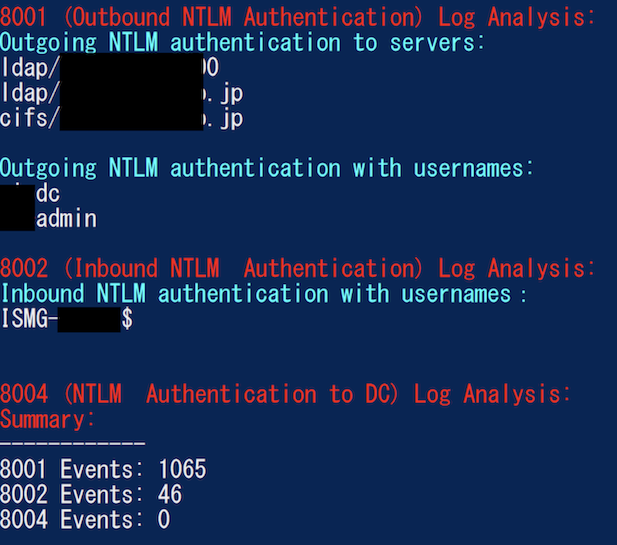
        - AnalyzeNTLM_UsageBasic : Returns basic NTLM usage based on the NTLM Operational log
        - AnalyzeNTLM_UsageDetailed : Returns detailed NTLM usage based on the NTLM Operational log
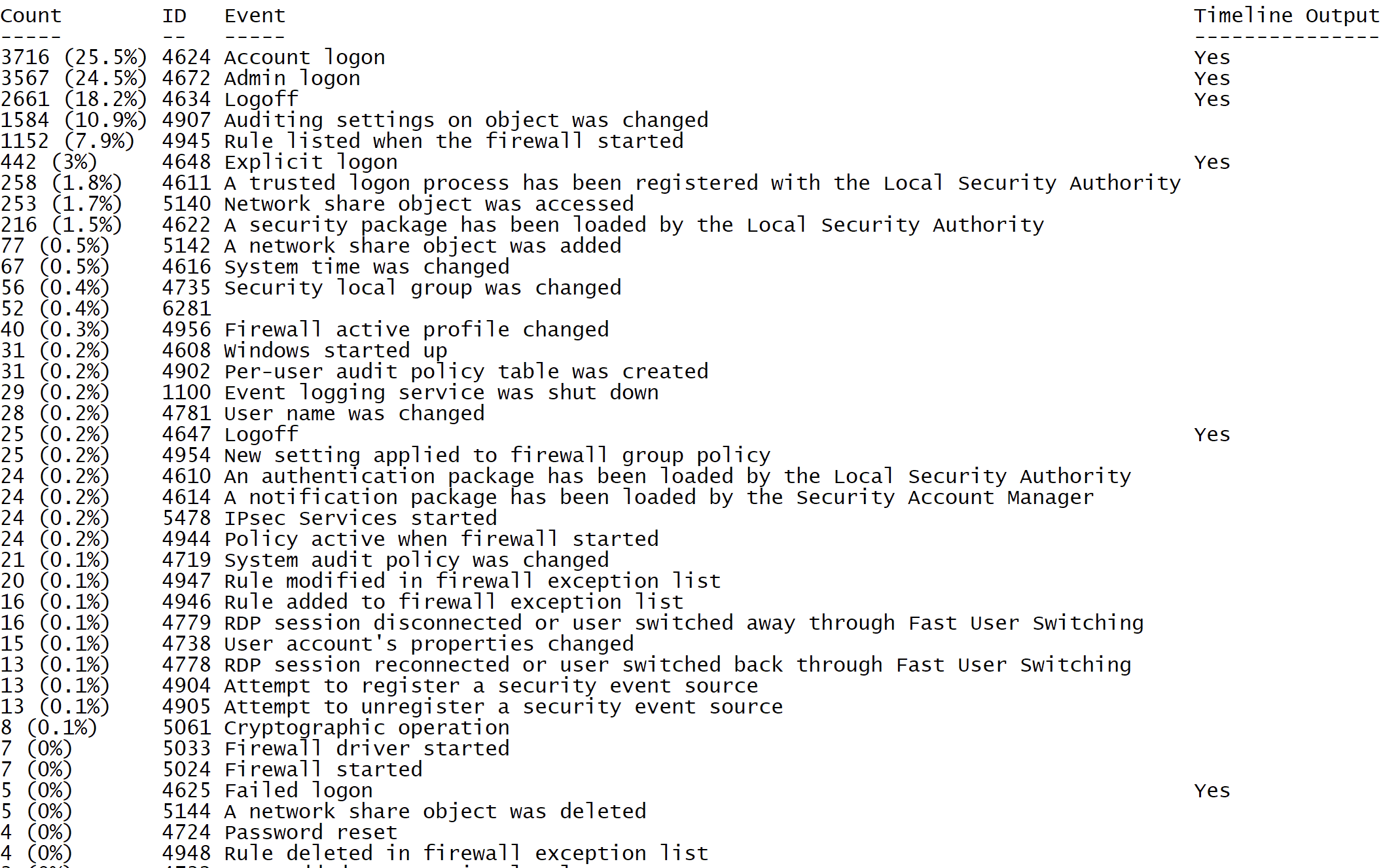
        - SecurityEventID_Statistics : Output event ID statistics
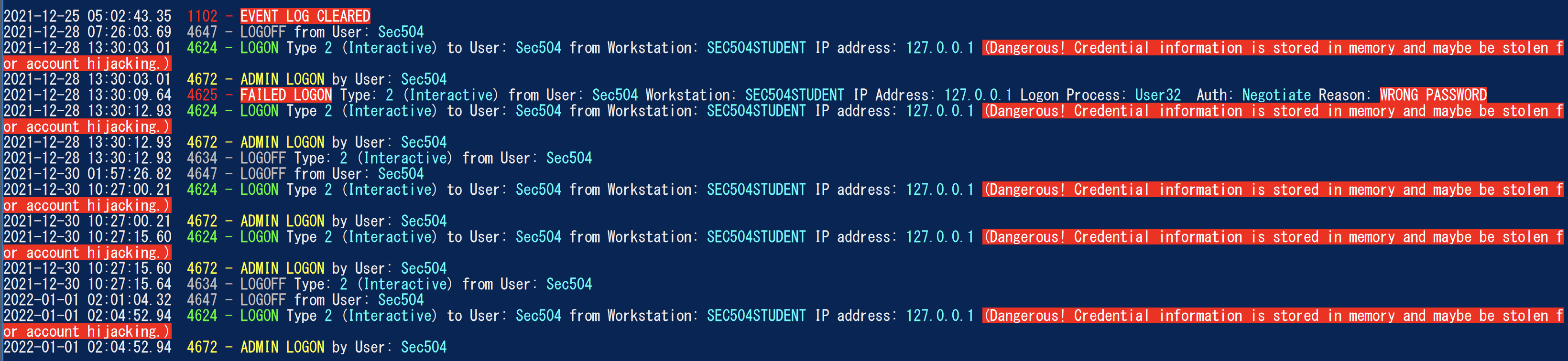
        - EasyToReadSecurityLogonTimeline : Output essy to read event ID statics
        - SecurityLogonTimeline : Output a condensed timeline of user logons based on the Security log
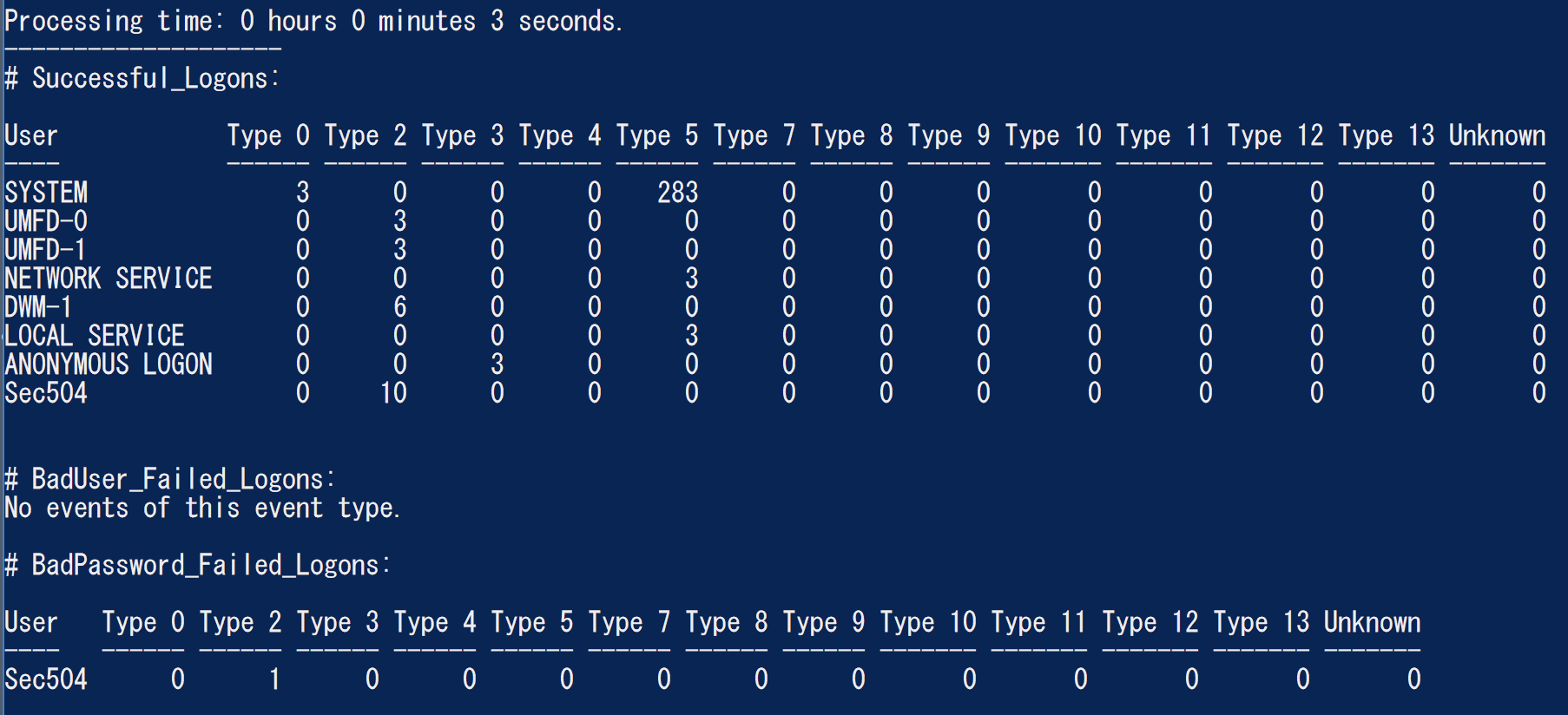
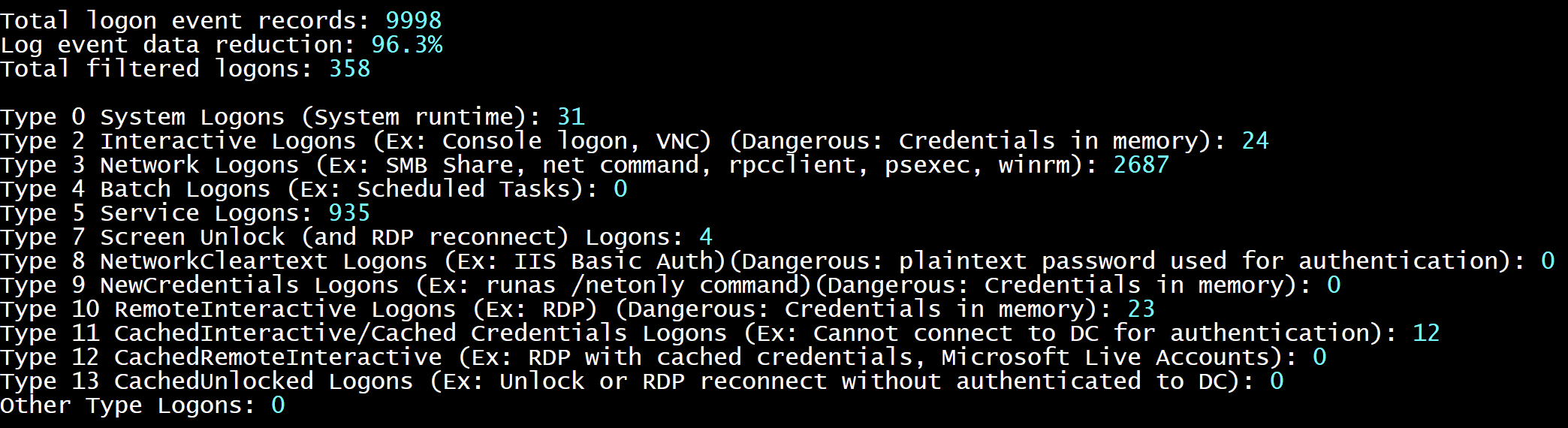
        - SecurityAuthenticationSummary : Output a summary of authentication events for each logon type based on the Security log

    Analysis Options:
        - StartTimeline " <YYYY-MM-DD HH:MM:SS> " : Specify the start of the timeline
        - EndTimeline " <YYYY-MM-DD HH:MM:SS> " : Specify the end of the timeline

    - LogonTimeline Analysis Options:
        - IsDC : Specify if the logs are from a DC

    Output Types ( Default : Standard Output):
        - SaveOutput < outputfile - path > : Output results to a text file
        - OutputCSV : Outputs to CSV
        - OutputGUI : Outputs to the Out-GridView GUI

    General Output Options:
        - USDateFormat : Output the dates in MM - DD - YYYY format ( Default : YYYY - MM - DD)
        - EuropeDateFormat : Output the dates in DD - MM - YYYY format ( Default : YYYY - MM - DD)
        - UTC : Output in UTC time ( default is the local timezone)
        - Japanese : Output in Japanese

    - LogonTimeline Output Options:
        - HideTimezone : Hides the timezone
        - ShowLogonID : Show logon IDs

    Other:
        - ShowContributors : Show the contributors
- QuietLogo : Do not display the WELA logo. / WELA.ps1 - LogFile .Security.evtx - SecurityEventID_Statistics.WELA.ps1 - LogFile .Security.evtx - SecurityLogonTimeline - OutputGUI - UTC.WELA.ps1 - LogFile .DC1 - NTLM - Operational.evtx - AnalyzeNTLM_UsageBasic.WELA.ps1 - LiveAnalysis - SecurityAuthenticationSummary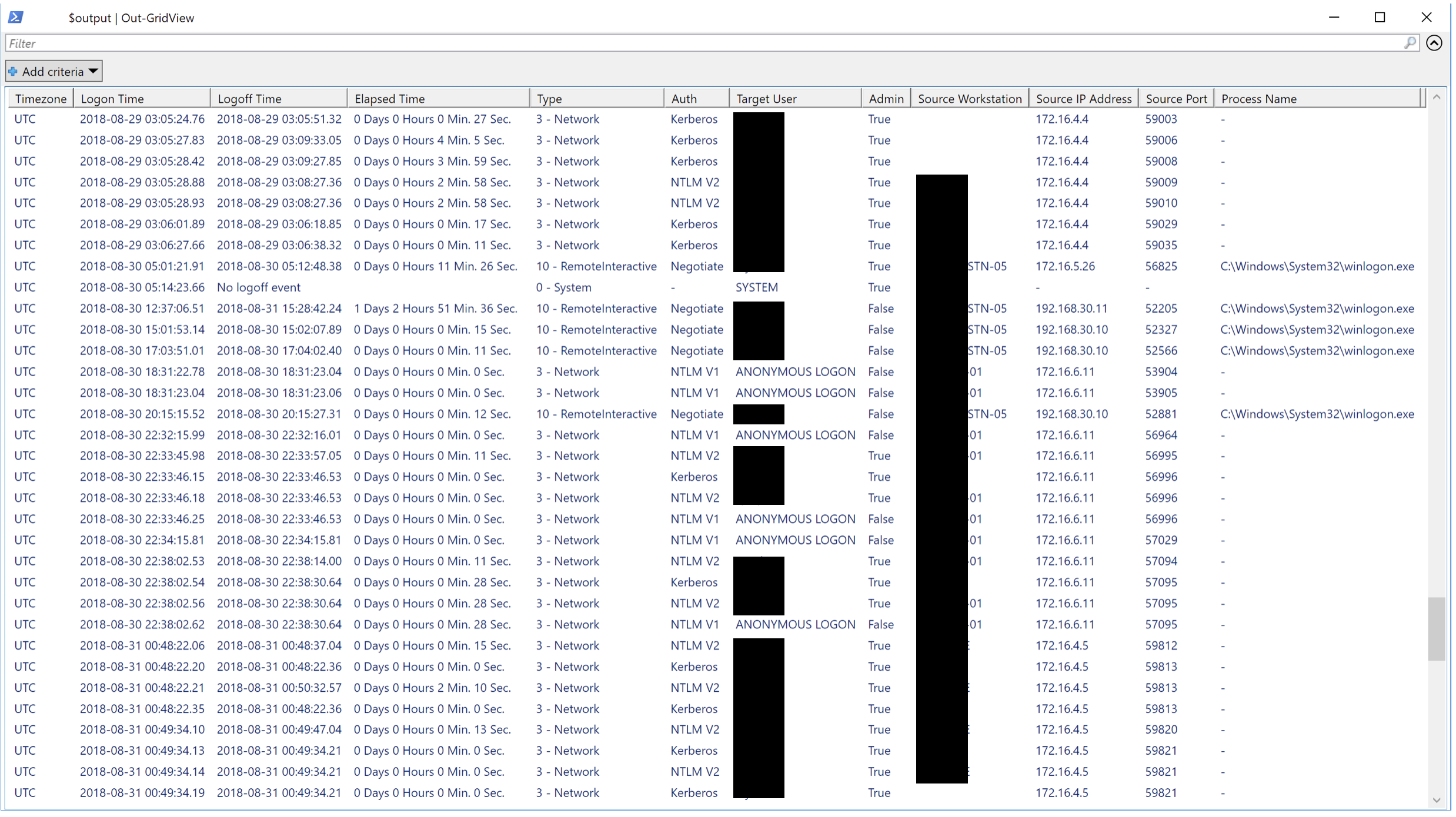
Nos encantaría cualquier forma de contribución. Las solicitudes de extracción son las mejores, pero las solicitudes de funciones, notificándonos de errores, etc., también son muy bienvenidas.





