One Click VITS Training
1.0.0

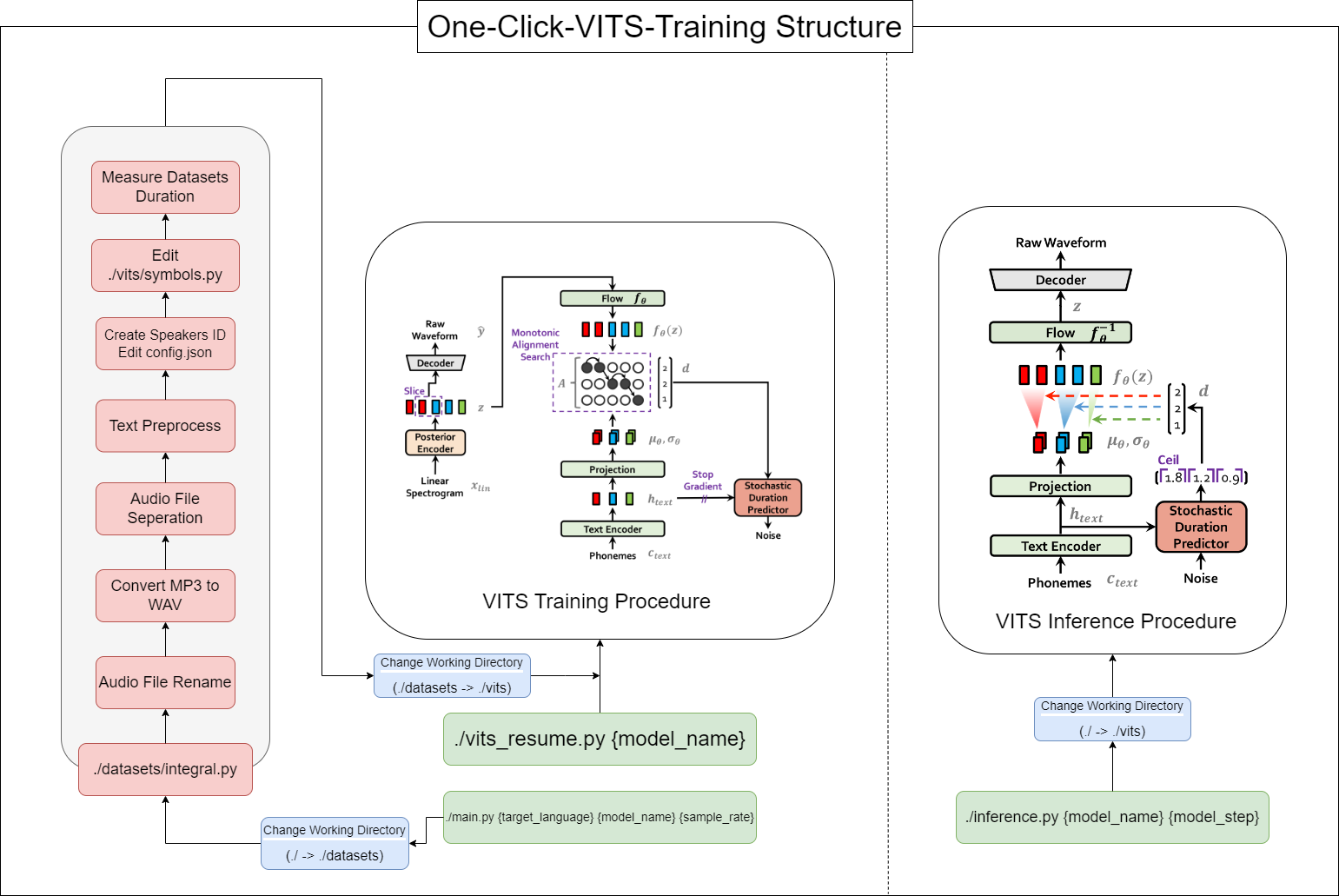
This tool allows you to complete the entire process of VITS (Data Preprocessing + Whisper ASR + Text Preprocessing + Modification config.json + Training, Inference) with ONE-CLICK!
16GB RAM.12GB of VRAM.Pytorch install command:
pip install torch==1.13.1+cu117 torchvision==0.14.1+cu117 torchaudio==0.13.1 --extra-index-url https://download.pytorch.org/whl/cu117CUDA 11.7 Install:
https://developer.nvidia.com/cuda-11-7-0-download-archive
Zlib DLL Install:
https://docs.nvidia.com/deeplearning/cudnn/install-guide/index.html#install-zlib-windows
Install pyopenjtalk Manually:
pip install -U pyopenjtalk --no-build-isolation
conda create -n one-click-vits python=3.8conda activate one-click-vitsgit clone https://github.com/ORI-Muchim/One-Click-VITS-Training.gitcd One-Click-VITS-Trainingpip install -r requirements.txtPlace the audio files as follows.
.mp3 or .wav files are okay.
One-Click-VITS-Training
├────datasets
│       ├───speaker0
│       │   ├────1.mp3
│       │   └────1.wav
│       └───speaker1
│       │    ├───1.mp3
│       │    └───1.wav
│       ├integral.py
│       └integral_low.py
│
├────vits
├────inference.py
├────main_low.py
├────main_resume.py
├────main.py
├────Readme.md
└────requirements.txt
This is just an example, and it's okay to add more speakers.
To start this tool, use the following command, replacing {language}, {model_name}, and {sample_rate} with your respective values({language: ko, ja, en, zh} / {sample_rate: 22050 / 44100}):
python main.py {language} {model_name} {sample_rate}For those with low specifications(VRAM < 12GB), please use this code:
python main_low.py {language} {model_name} {sample_rate}If the data configuration is complete and you want to resume training, enter this code:
python main_resume.py {model_name}After the model has been trained, you can generate predictions by using the following command, replacing {model_name} and {model_step} with your respective values:
python inference.py {model_name} {model_step}Or check ./vits/inference.ipynb.
If you want to change the example text used in the reference, modify ./vits/inferencems.py text part.
In the repository of CjangCjengh/vits, I made some modifications to the Korean text cleaning method. The other cleaning process is the same by posting it to the CjangCjengh repository, but the cleaner file was modified using the tenebo/g2pk2 library as Korean pronounced.
For more information, please refer to the following repositories:







