bitmapfontcreator
1.0 Initial Release

Bitmapfontcreator is a simple program for creating pixel fonts, built with the Love2D game framework.
.exe..app.love bitmapfontcreator_linux.loveOn startup, Bitmapfontcreator will create a new font.
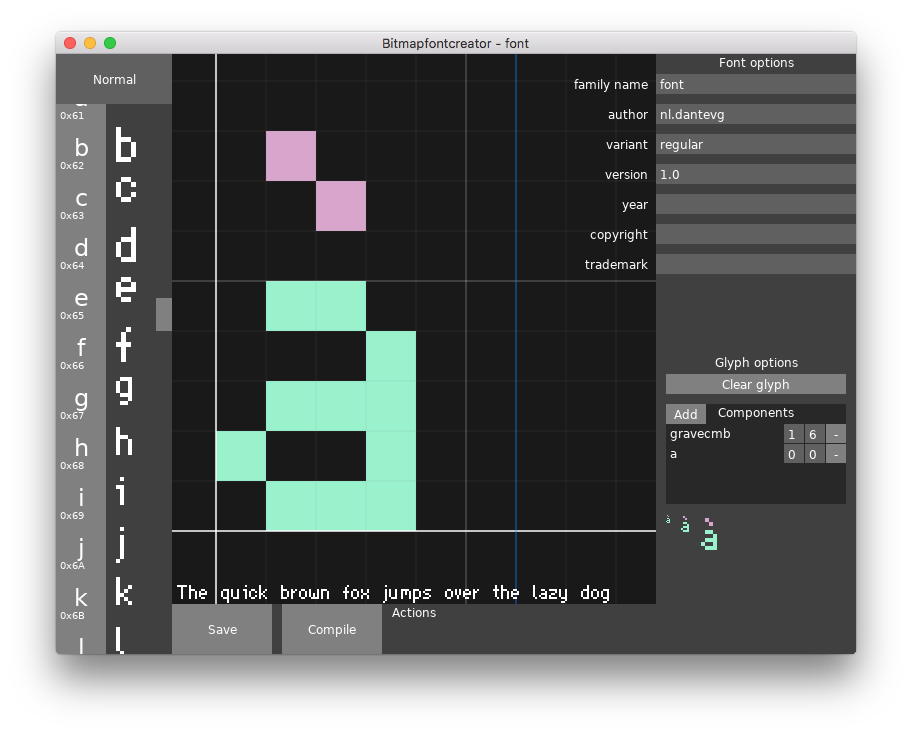
You can change the font metadata on the top right, under 'Font options'. Don't forget to press enter to confirm, though, since otherwise it won't save the changes.
At the bottom right, under 'Glyph options', three previews are present, with scaling x1, x2 and x4. To add a subcomponent, click the 'add'-button, and click on the glyph you want to add. You can then change the x and y-offset, or remove it.
At the left side is the character picker, above that is the button to switch between the two sets of characters:
Mouse actions in the drawing canvas:
| Button | Action |
|---|---|
| left click | add pixel |
| right click | remove pixel |
| middle click or ctrl+click |
move canvas |
| scroll | zoom |
Bitmapfontcreator will save the font in ufo-format, in the save directory.
For compiling, Bitmapfontcreator will need fontmake, which will generate a TrueType-font in the save directory.
Save directory:
| Platfom | Path |
|---|---|
| Windows | %appdata%bitmapfontcreator |
| MacOS | ~/Library/Application Support/bitmapfontcreator/ |
| Linux | ~/.local/share/love/bitmapfontcreator |
To load a font, navigate to the save directory and drag the .ufo directory
onto the Bitmapfontcreator window.
If it doesn't create a font file, there probably was an error while compiling.
To see logs and error messages on windows, run the exe from the command line
as bitmapfontcreator.exe --console.
For MacOS and Linux, running Bitmapfontcreator from the command line
should be enough.
See LICENSE.
This project uses the following libraries:








