resume intelligence
1.0.0

使用自然查詢恢復搜索。使用OpenAi RAG API和OpenSource VLM模型進行演示應用程序進行恢復比較分析。
這將幫助人才合作夥伴和工程經理從簡歷中獲取特定信息。
簡歷智能的目的是支持一組簡歷上的自然語言查詢。它可用於對簡歷進行比較分析。讓我們說,我們有4或5個簡歷的潛在軟件工程師一些查詢,應該讓您開火
在此實驗中,您需要簡歷。
我沒有從Internet搜索數據,而是使用Chagpt API生成簡歷。
我使用OpenAI功能調用和結構化響應輸出來獲取JSON輸出。
擁有JSON後,您可以將其轉換為PDF簡歷文檔。
OPENAI_KEY=<substitute your key>
   # Install python packages locally.
   pip install -r requirements.txt
python ui_gen_resume.py可以在本地Windows機器/筆記本電腦上運行此示例。它沒有關於GPU的特殊要求,您需要從UI應用程序中選擇2個簡歷,請在提示框中輸入查詢。
並點擊提交。
用戶需要在文件夾根中存在的.env文件中的OpenAI鍵中鍵。
.env文件示例
   OPENAI_KEY= <openai key>
   vector_store_resume=resume_compare
   MODEL=gpt-4o-2024-11-20
   # individual file is put into vector store if value is FALSE
   CONCAT_PDF=False
   # instruction for assistant is chosen based on this. Possible values ( individual_pdf|concat_pdf)
   INSTRUCTION_ID=individual_pdf
   # Path where generated pdf resumes are stored.
   RESUME_PATH=.\resumes
python ui_resume_compare_multi.py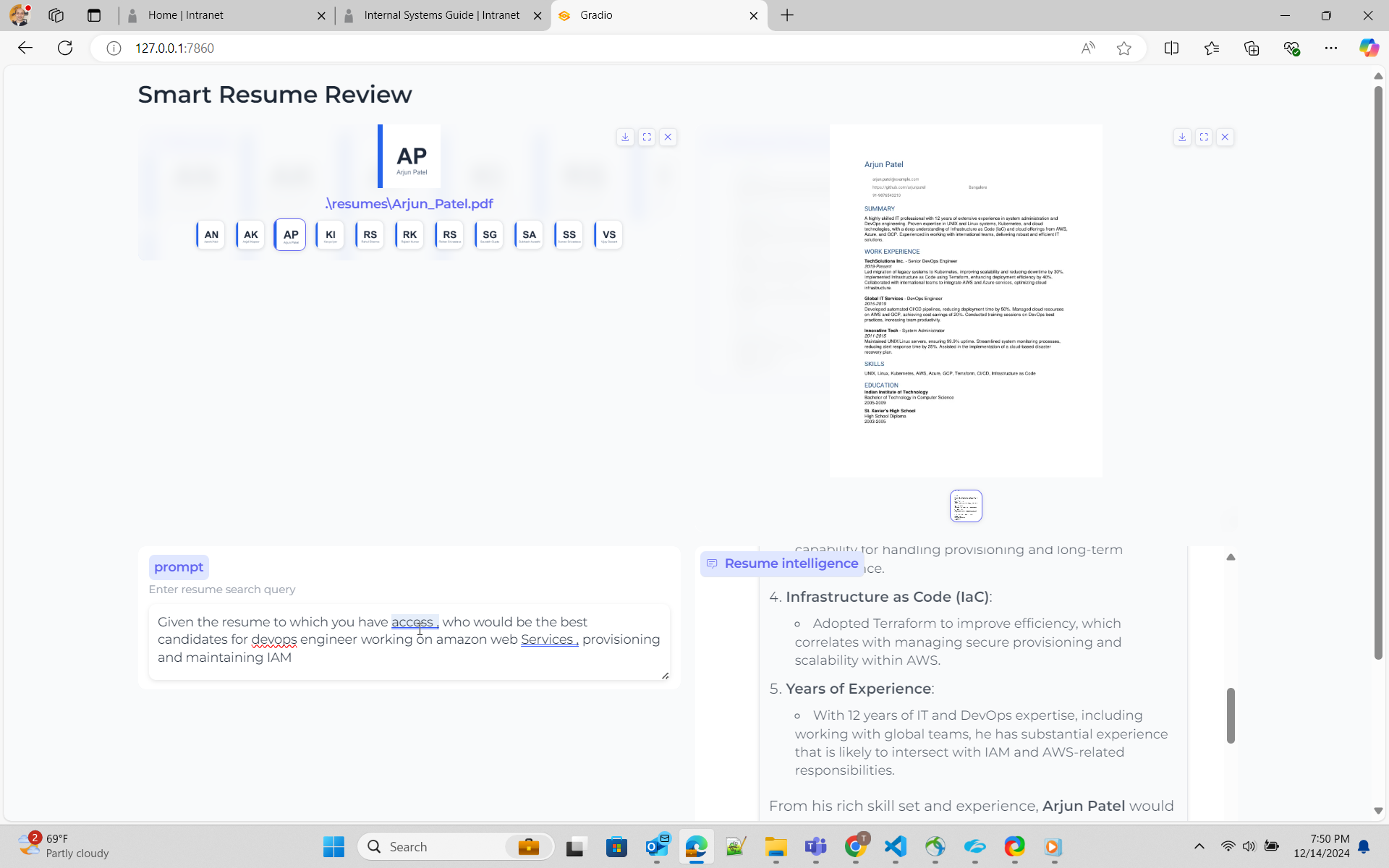
在這裡我使用抹布的方法
RAG-借助Openai Openai擁有助理API,它可以選擇存儲文檔的向量表示並蒐索相同的內容。請參閱此處以獲取有關如何使用文件搜索API的文檔文件搜索,我推薦了西蒙·威爾遜(Simon Wilson)的出色博客,他製作了示例代碼
抹布 - 使用Opensource colpali,這是使用VLM的方法。我計劃使用內部使用colpali的Byaldi參考筆記本,該筆記本與PDF使用Byaldi byaldi我尚未實施示例代碼聊天。
這是一種簡單的方法。我使用OpenAI API來創建矢量存儲,並將所有PDF文檔添加到矢量存儲中。張貼創建助手並將矢量商店附加到助手
OpenAI文件搜索似乎在較早的實驗中無法正常工作,該查詢正在觸及多個文檔。初始解決方案似乎是將文件加成並在矢量存儲中上傳。但是,這是關於如何提出指示來建模的不正確理解
為了改善響應,它概述意味著必須調整,指令或系統提示,以便您獲得正確的結果。這是我的,我正在懇求模型進行正確的搜索。
 You are dilligent assistant specializing in analyzing resume for technology industry . Your goal is to find the a individual resume closely matched per the requirement from user
1. ** location of resume ** - Vector store has resume of individual candidates . Name of the vector store is resume_compare .
2  ** format of resume ** - Vector store has resume of individual candidates in pdf format. Name of the pdf would be firstname followed by underscore last name . E.g Rajesh_Kumar.pdf
3  ** vector store** - Vector store resume_compare belongs to the user/owner, whose is calling the api
4  ** role descriptions** - For job role description such as engineering manager , devops engineer , software engineer , use your knowledge based gained from pre-training.
5  ** Resume Search Strategy** - Search across ALL documents in vector store .Consider partial matches across multiple documents .Use multiple search queries for different aspects (skills, experience, etc.)
6  ** Search Depth ** - Perform multiple searches with varied keywords. Use both exact and semantic matching.
7  ** Result Aggregation ** - Combine result from multiple searches . Cross-reference finding across documents.
8  ** key qualitifications ** - For finding key qualifications or experiences for role/work , use your knowledge base and pre-training.
9  ** resume search** - For Candidates's resume and their capability ,skills , experience for a role/work , you must use file_search tool and attached vector store. Resume will always be present in vector store.
10  ** resume presence** - Resume will always present in vector store attached to assistant . Do not prompt to ask user on resume.
11  ** Dillgence ** - Please search dilligently . you seem to miss the fact that resume files are present in vectore store resume_compare.
12  ** Technical Skills** -  In the resume take a deep look at work experience section .Focus on relevant programming languages, frameworks, tools, and certifications (e.g., Python, Java, AWS, Docker). Highlight these clearly.
13.  ** Job Match** - Compare the resume with provided job descriptions. Focus on matching key technologies ,business and opetational knowledge and job experience, and note areas where the candidate doesn’t meet the requirements.
14.  ** Projects & Experience** - Prioritize large-scale projects or leadership roles in tech teams. Identify open-source contributions or significant technical achievements.





