resume intelligence
1.0.0

自然クエリを使用して検索を再開します。 OpenAI RAG APIとOpenSource VLMモデルを使用して、比較分析を再開するデモアプリケーション。
これは、タレントパートナーとエンジニアリングマネージャーが履歴書から特定の情報を取得するのに役立ちます。
履歴書インテリジェンスの目的は、一連の履歴書で自然言語クエリをサポートすることです。履歴書の比較分析を行うために使用できます。たとえば、将来のソフトウェアエンジニアの4つまたは5つの履歴書があると、クエリの一部があります。
この実験では、履歴書が必要です。
インターネットからデータを検索する代わりに、Chagpt APIを使用して履歴書を生成しました。
JSON出力を取得するために、OpenAI機能コールと構造化された応答出力を使用しました。
JSONを取得したら、PDF Resumeドキュメントに変換できます。
OPENAI_KEY=<substitute your key>
   # Install python packages locally.
   pip install -r requirements.txt
python ui_gen_resume.pyこの例は、ローカルWindowsマシン/ラップトップで実行できます。 GPUに関しては特別な要件がありません。UIアプリケーションから2つの履歴書を選択する必要があります。プロンプトボックスのクエリを入力します。
そして、送信をヒットします。
ユーザーは、フォルダーのルートに存在する.ENVファイルでOpenAIキーインでキーする必要があります。
.ENVファイルの例
   OPENAI_KEY= <openai key>
   vector_store_resume=resume_compare
   MODEL=gpt-4o-2024-11-20
   # individual file is put into vector store if value is FALSE
   CONCAT_PDF=False
   # instruction for assistant is chosen based on this. Possible values ( individual_pdf|concat_pdf)
   INSTRUCTION_ID=individual_pdf
   # Path where generated pdf resumes are stored.
   RESUME_PATH=.\resumes
python ui_resume_compare_multi.py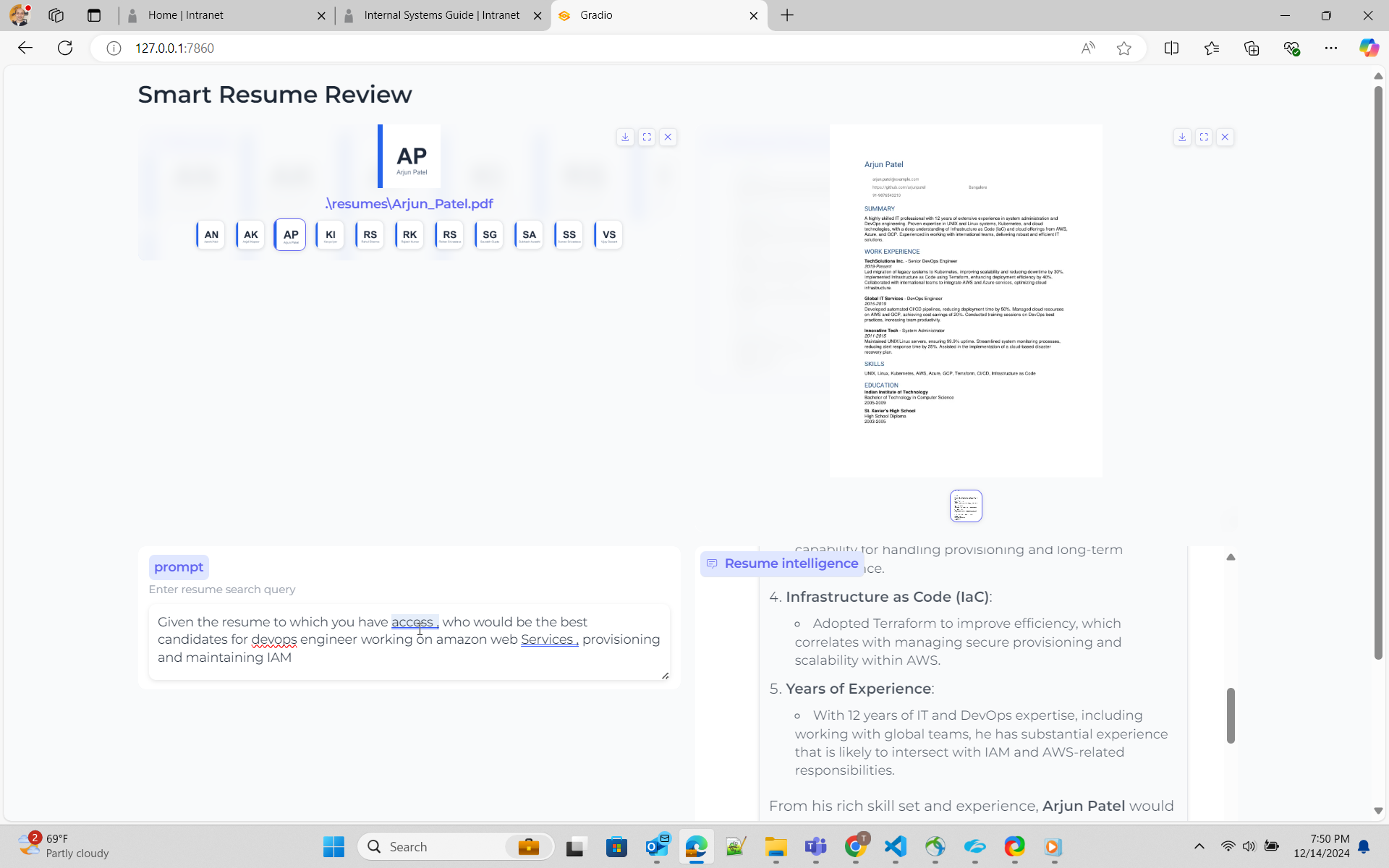
ここでは、RAGアプローチを使用します
Rag -Openai OpenaiにはアシスタントAPIがあります。これには、ドキュメントのベクトル表現を保存し、同じものに対して検索するオプションがあります。ファイル検索APIの使用方法に関するドキュメントファイル検索については、こちらを参照してください。サイモンウィルソンの優れたブログと彼がサンプルコードを作成したGistを参照しました
Rag -OpenSource Colpaliを使用すると、これはVLMを使用するアプローチです。 Colpaliを内部的に使用するByaldiを使用する予定です。ノートブックは、これを実装していないByaldiを使用してPDFとのサンプルコードチャットがあります。
これは簡単なアプローチです。OpenaiAPIを使用してVectorストアを作成し、すべてのPDFドキュメントをVectorストアに追加します。アシスタントを作成し、ベクトルストアをアシスタントに添付する投稿
OpenAIファイルの検索は、複数のドキュメントに触れているクエリについては、以前の実験ではうまく機能していないようです。最初のソリューションは、ファイルを連結し、ベクトルストアにアップロードするようです。しかし、これはモデル化する手順を提示する方法についての誤った理解でした
応答を改善するために、それは、正しい結果が得られるように、指示またはシステムのプロンプトを調整する必要があることを保証することを意味します。これが私のものであり、私はモデルに正しい検索を行うように懇願しています。
 You are dilligent assistant specializing in analyzing resume for technology industry . Your goal is to find the a individual resume closely matched per the requirement from user
1. ** location of resume ** - Vector store has resume of individual candidates . Name of the vector store is resume_compare .
2  ** format of resume ** - Vector store has resume of individual candidates in pdf format. Name of the pdf would be firstname followed by underscore last name . E.g Rajesh_Kumar.pdf
3  ** vector store** - Vector store resume_compare belongs to the user/owner, whose is calling the api
4  ** role descriptions** - For job role description such as engineering manager , devops engineer , software engineer , use your knowledge based gained from pre-training.
5  ** Resume Search Strategy** - Search across ALL documents in vector store .Consider partial matches across multiple documents .Use multiple search queries for different aspects (skills, experience, etc.)
6  ** Search Depth ** - Perform multiple searches with varied keywords. Use both exact and semantic matching.
7  ** Result Aggregation ** - Combine result from multiple searches . Cross-reference finding across documents.
8  ** key qualitifications ** - For finding key qualifications or experiences for role/work , use your knowledge base and pre-training.
9  ** resume search** - For Candidates's resume and their capability ,skills , experience for a role/work , you must use file_search tool and attached vector store. Resume will always be present in vector store.
10  ** resume presence** - Resume will always present in vector store attached to assistant . Do not prompt to ask user on resume.
11  ** Dillgence ** - Please search dilligently . you seem to miss the fact that resume files are present in vectore store resume_compare.
12  ** Technical Skills** -  In the resume take a deep look at work experience section .Focus on relevant programming languages, frameworks, tools, and certifications (e.g., Python, Java, AWS, Docker). Highlight these clearly.
13.  ** Job Match** - Compare the resume with provided job descriptions. Focus on matching key technologies ,business and opetational knowledge and job experience, and note areas where the candidate doesn’t meet the requirements.
14.  ** Projects & Experience** - Prioritize large-scale projects or leadership roles in tech teams. Identify open-source contributions or significant technical achievements.





